Scope creep is flagged before you approve
Task Machine now flags work an agent added that the approved plan never asked for. A new Scope creep tab on the review shows each addition with a short name, why it was not asked for, and the exact text, so you can keep it or send it back before you approve.
The requirement check answers whether everything asked for was done. It could not tell you that an agent also added a Slack notification nobody requested, and reviewers only found extras by reading the whole change. We built this so the extras are listed for you.
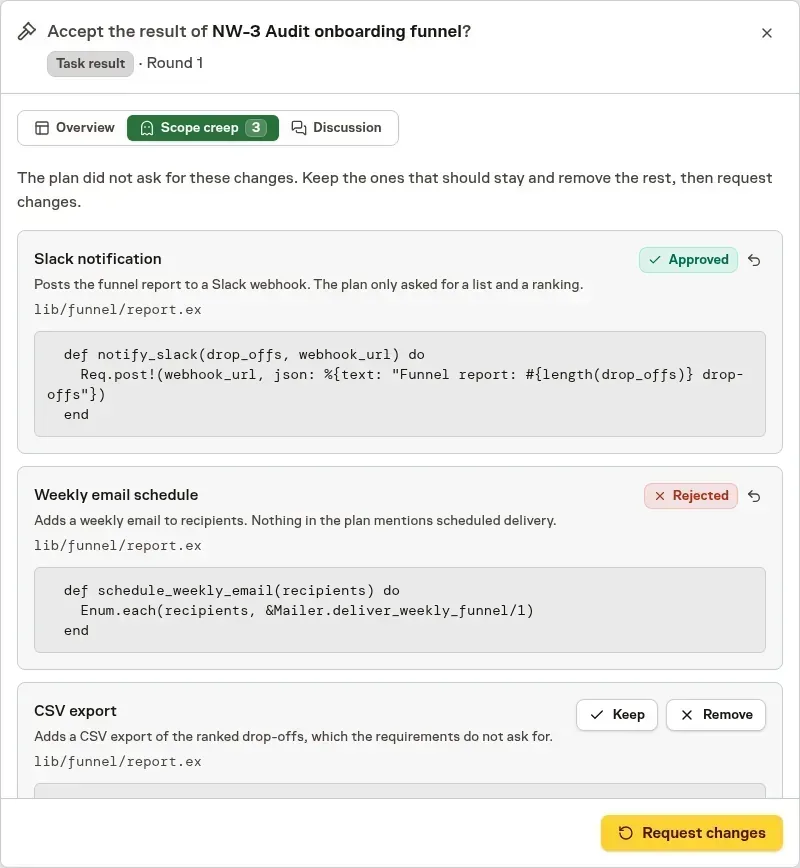
Decide each addition, then send the removals back together
Choose Keep or Remove for each item, and Undo to decide again. Request changes sends every item you marked Remove to the agent in one round, naming the exact lines. A change you keep is not raised again on later submissions.
Approving past an open item is a deliberate choice
If you approve while items are undecided, Task Machine asks you to confirm first and then keeps them as submitted. The Inbox decision shows the same list and the same confirmation, so the choice looks the same wherever you review.
Scope creep is checked on the files, diffs, and documents the agent submitted, and only for tasks with explicit requirements. See Reviews for how results appear.