Comment on the exact lines of an agent's plan
New Feature
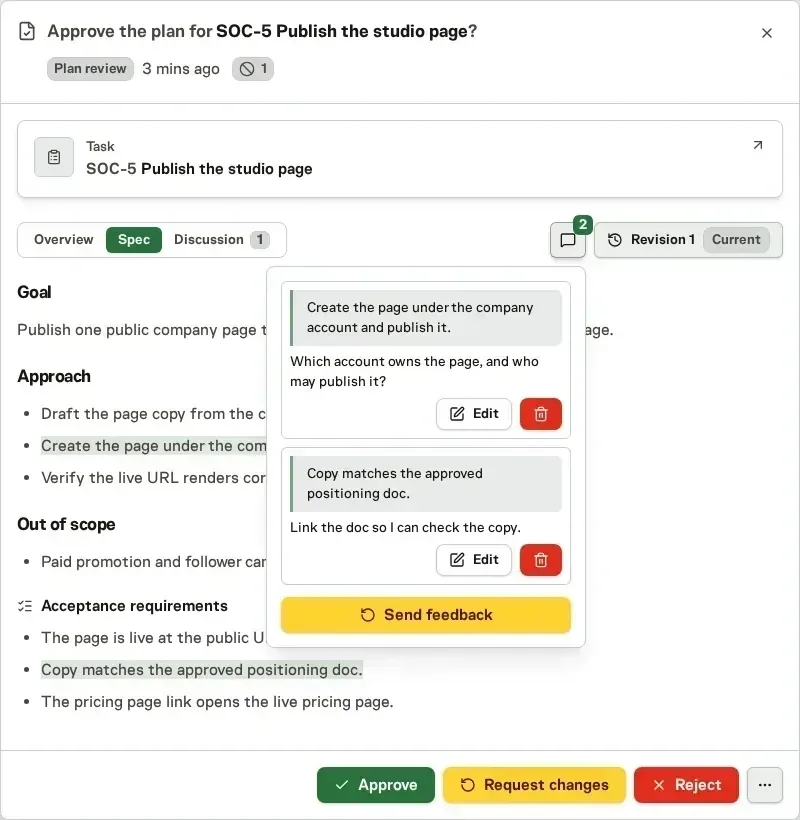
When you review an agent's plan, you can now select any passage in the Work Spec and comment on it. Each comment keeps the text it points at, and Send feedback turns all of them into one change request for the planner. We built it because a plan review had room for one reply, so feedback on several parts of a plan meant describing where each part was.
Comment where the problem is
Select text in the latest revision and a small box opens beside it. Write the comment and choose Add comment. Commented text stays marked in the plan, so you can click it to change or delete its comment. The comment icon next to the Diff and Text choice collects every comment, with an Edit and a Delete for each.
Read Task specs and reviews for the full plan review flow.