Tasks
Task specs
On this page
Give the Task a clear result to achieve before choosing how much execution to inspect. Planning, implementation, and review have different jobs. A successful Run tells you that an attempt finished, while the Task still needs to meet its acceptance criteria.
Review boundaries
The Task brief states your intent. A Work Spec describes how the Agent plans to carry it out and records acceptance criteria and an estimate of total implementation, required checks, review and rework time. The approach accounts for priority, the delivery target and any optional time budget while preserving required checks, safety and review. Assignment review can first check whether the work has a suitable owner. Planner, implementer, and reviewer can be different members.
An explicit planning-approval requirement sends the spec to a Human. High-sensitivity work also requires human review. Other plans may proceed without a separate review or go to an Agent reviewer, depending on risk, the resolved autonomy settings, and the assigned reviewer. Broader autonomy does not mean every plan bypasses human judgment.
Check the plan before review
The workspace-funded check for planning and clarity looks for unresolved questions, undecided approaches, unfinished research, scope changes, unclear wording, vague verification, acceptance requirements that cannot be checked independently, and an approach that disregards priority and delivery or an estimate that omits required work. Priority can narrow the scope, but does not make the same work take less time. Research findings belong in Context reviewed, leaving the approach focused on the work to carry out. The check also reads the planner's assumptions, so an open question cannot pass as an assumption.
Before the funded check, Task Machine compares the estimate with completed similar work by the same planning Agent in your workspace. With at least five usable Tasks, an estimate below half or above twice their median working time returns to the planner. Planning, Discussion and Recheck time are excluded from that comparison.
The planner can revise the estimate or resubmit with an Estimate override reason. The reason and historical reference stay with the plan for review. Missing history never rejects an estimate, and estimate feedback does not use a failed planning-check attempt. An override does not change your time budget or bypass the other checks.
Each failed check returns revision guidance to the planner, and a plan that fails is never stored or sent to you for approval. For missing research, the guidance tells the planner to do that research and submit again, and to ask you only when the research needs access or knowledge it cannot get. When the plan still depends on a decision only a person can make, such as an open question or an undecided approach, the guidance tells the planner to ask you in the Task's spec thread instead of rewording the plan.
After a third failed check in the same planning Run, asking is the only way forward, and the planner cannot submit another plan in that Run. Planning never stops silently. A planning Run ends with a stored plan, a question or other decision waiting for you, or a finished or cancelled Task. When a Run cannot end that way, its step stops and a Task needs recovery item in your Inbox explains why.
Passing the check leaves the existing review rules in place.
When the check is unavailable, the complete plan is stored and follows those review rules. The planner receives the full checklist to check its own plan and submit a replacement if needed. These instructions are for the Agent and do not appear in your Inbox or Task review. Unavailability does not mean the plan passed or require human approval, so normal routing may still approve it automatically.
Plans too large for one complete evaluation take this same path without an AI call or charge. The plan text is preserved. Checks that do run follow the workspace's managed-AI privacy controls and use workspace usage.
Choose a visual direction
When a plan depends on a new layout or visual direction, the planner can attach labeled image mockups to the Task's spec discussion before asking for your choice. Reusing an established template does not need a mockup.
Open the images from the question in your Inbox, then answer with your choice or the changes you need. The planner refines the mockups in the same conversation, and the complete Work Spec references the selected image.
Mockups guide the plan. Implementation follows the ordinary plan-review rules, and the finished presentation still needs separate visual approval of the real result.
Approve or revise the Work Spec
The plan review is the same in Task detail and in your Inbox. It opens on Overview, which holds everything you need to decide: the agent assessment with the review level, the blast radius, novelty, sensitivity and reversibility levels and the planner's own assessment, then the goal, the work breakdown, the assumptions that need your confirmation and the acceptance requirements. Pull-request delivery, earlier review rounds and the model choices follow at the end. A plan written without a Goal section shows its complete text in place of the goal.

When the Task has a time budget, Overview compares the agent's estimate with the current work limit. An over-budget estimate shows how much extra time the work needs. The work limit also shows the entered budget and planning reserve, and its help explains that it covers implementation, required checks, review and rework after approval.
Editing the budget updates this comparison. Completed Inbox reviews keep the budget captured with that decision.
The planner treats the work limit as its planning ceiling and must report a realistic estimate for the complete work, even above that ceiling. Going over budget does not block approval or stop execution, and required checks stay in place.
Needs your confirmation lists decisions the planner made without anyone confirming them, each with the alternative it considered. Choose Change beside one to start a reply about it.
Spec shows the complete plan of the revision you pick, with the changes since the revision before it marked inline. Two small icons beside the revision picker switch between the plan with the marks and the plan without them. Hover an icon to see its name. The icons appear when the revision differs from the one before it, always start on the marks, and apply only to the review you have open.
Select text in the latest revision to comment on it. A small box opens beside the selection: write your comment and choose Add comment. Click outside the box to close it without adding anything. On a phone the box opens in the comment list instead. The comment icon beside the Diff and Text choice collects your comments, where you can change or delete each one. Commented text stays marked in the plan: click it to change or delete its comment.
Comments are made in the Text view, so selecting text or opening the comment list in the Diff view switches to Text first. The comment icon appears only on the latest revision.
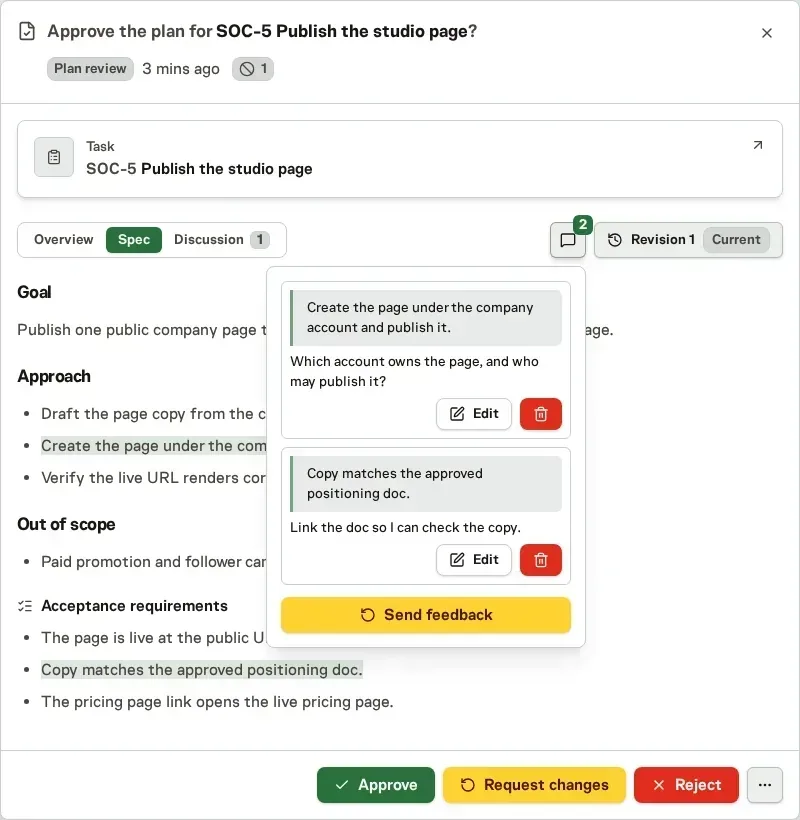
Choose Send feedback in that list to open every quote and comment as Markdown, each quote starting with >. Adapt the text, add files if you like, then choose Send and request changes. It reaches the planner in the Discussion thread like any other reply. Your comments stay in your browser while you review and are dropped once they are sent or the planner submits a new revision.
Discussion shows the Task's spec thread: the planner's questions, your answers and earlier change requests. A reply there requests changes, exactly like Request changes, which opens the same reply box. The planner then answers in the thread, asks one question, or submits a revised or unchanged plan.
Use the paperclip or drop files onto the reply box to add evidence. Include written feedback, then choose Send and request changes. Files stay with that feedback in the spec thread for the planner. If sending fails, your draft and files remain available to retry.
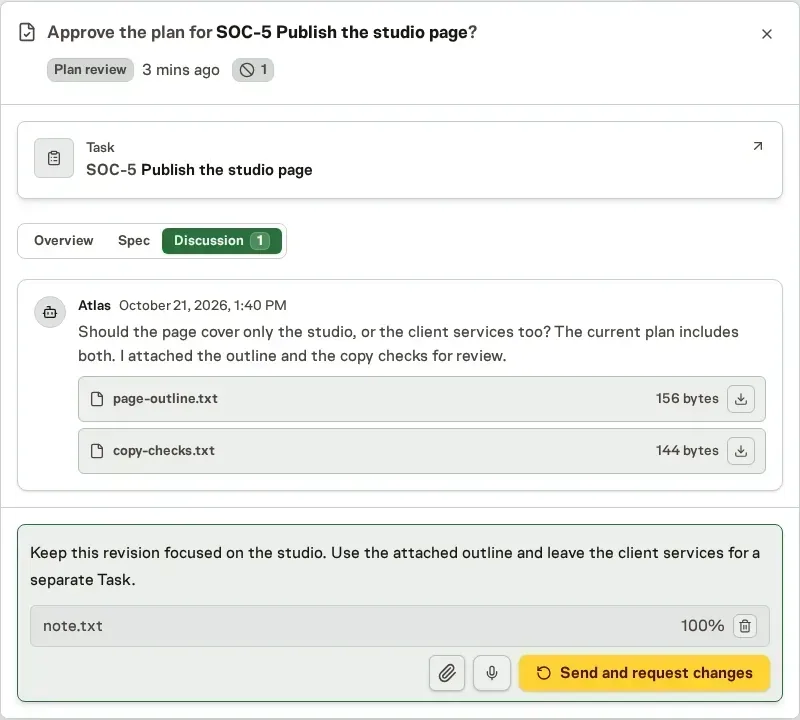
Approve, Request changes and Reject stay at the bottom of the Overview and Spec tabs. The Discussion tab hides them because its reply box is the only action there, so open another tab to approve or reject.
A spec waiting for approval or revision is a distinct state from a failed execution attempt. Repeatedly retrying work will not substitute for the required decision.
A repository-backed plan identified as changing source code requires pull-request delivery, even if the planner selected otherwise or the Project does not require it. A Task explicitly set to No repository required is the exception. A pending replacement leaves the previous approved delivery choice active until the replacement is approved.
A Work Spec can declare expected files, new Library documents by path, and existing Library documents by identity. The plan review shows each declaration separately and links readable existing documents to their current path. Task Machine checks only these declarations against the plan revision used for each Run, never inferring required outputs from the brief or free-form plan text.
Missing or unverifiable declared outputs get one corrective attempt and return to the implementer if still unresolved, without being recorded as a failed run. Confirmed missing outputs continue in another run, with the gap in its instructions instead of a posted comment. If that run leaves the same outputs missing under the same approved Work Spec, work pauses with one Inbox request for your decision.
Create pre-planned follow-ups
When the right result needs more than one Task, the planner can pre-plan the later work as follow-ups. An urgent fix can ship as this Task while the proper fix waits as a follow-up. Each follow-up is a draft with a title, a short brief and draft acceptance requirements, and it can depend on earlier follow-ups.
Follow-ups appear under Work breakdown, and nothing starts until you choose Create follow-up task, or Create all follow-ups for the whole chain. You can create them before or after approving the plan. A created follow-up is an ordinary Task blocked by this one, so automatic work on it waits for this Task and then plans from the draft.
Follow-ups you have not created stay out of Proposals and create no Inbox items. When a newer plan replaces this one, its follow-ups replace the ones you have not created.
Questions during planning always go to people. An agent cannot ask another agent, or a Team, in the Work Spec discussion, so every planning decision stays with you.
Keep specs aligned with changed requirements
When discussion changes what a task should deliver, its assigned agent can propose an updated spec. The Inbox review shows changed spec text and acceptance criteria, plus the files and Library documents being added or removed. Short text appears formatted, with removed words struck through and added words highlighted, while very long text pages through in plain form.
An estimate override reason and its historical reference appear with the proposed plan when available.
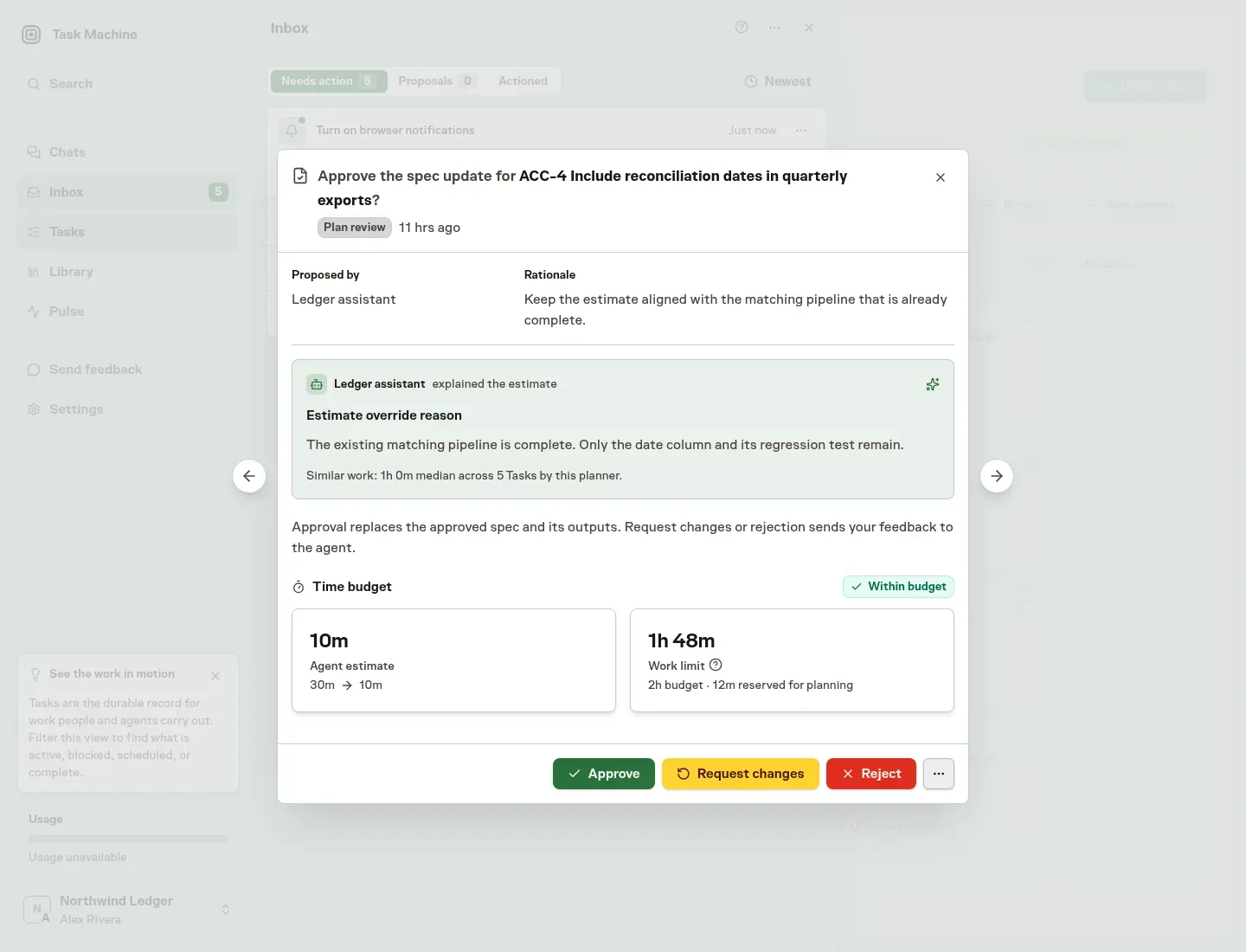
Approve the update to make it the task's approved spec immediately. Task Machine keeps the previous version as history, checks the new output declarations, and continues the work without another approval step.
Request changes to send the agent your feedback so it can revise the proposal. Reject to keep the approved spec unchanged and send the agent your reason so it can respond. Both choices require feedback, and this decision has no Dismiss action.
A newer proposal replaces the pending one. Completed or cancelled tasks cannot receive spec-update proposals.
If changed requirements conflict with a declared output, the agent proposes a spec update rather than recreating an obsolete file just to pass the output check. Discussion alone does not change the declarations.
While approval is pending, rejected or unavailable, the output remains unmet. A replacement governs later Runs and never rewrites the approved revision used to check an earlier Run.
Planning and review bracket the work
An agent-assigned task is not handed to an agent to "just start." Before the work is ready to run, Auto reads the task description and acceptance criteria, weighs the planning complexity against every applicable budget, and selects an available high-capability planning model. A straightforward, well-defined task can use an efficient planner.
Substantial ambiguity, coordination, sensitivity, or difficult verification can move the task to a stronger one.
Auto also looks at how similar work went. It finds finished Tasks like this one across Task Machine and checks how much steering each model needed: human comments, Inbox items, and extra or repeated Runs. It also considers duration and cost. Many very similar Tasks count for more than a model's reputation, and a model without enough history is neither favored nor penalized.
An Urgent Task or one with a close due date favors models that finish faster, and a Task with a budget gives cost more weight.
The planning turn begins by analyzing the task, its history, and the relevant workspace and repository context. When the outcome and execution direction are concrete, the planner writes a self-contained Work Spec with Goal, Investigation and implementation approach, How to verify, Constraints & non-goals, Context reviewed, and Deferrals sections.
The acceptance criteria are a separate checkable list rather than a repeated section in the spec. This gives a fresh agent enough direction to carry out the work without relying on the original conversation. When several reasonable approaches would materially change the result, scope, architecture, risk, or rollout, the planner does not invent the decision.
It asks one question in your Inbox with three distinct approaches, their trade-offs, its recommended default, and three editable suggested replies. The question goes into the Task's spec thread, where later questions, your answers and change requests also collect, so the whole conversation about the plan stays in one place. Planning waits for your answer and then resumes on that exact task. Details the agent can inspect or research itself never become unnecessary questions.
The planner aims to settle the plan within about two rounds of questions, each closing at least one decision. For an urgent Task, it can offer a quick fix as this Task with the proper fix pre-planned as follow-ups.
The planner assesses the Task's risk across four dimensions:
- Blast radius: who or what could be affected.
- Novelty: how unfamiliar the work is.
- Sensitivity: whether it involves sensitive information or consequences.
- Reversibility: how readily a mistake could be undone.
Each receives a score from 0 to 2 and a one or two sentence reason from the planner. Open the help icon on a dimension to read that reason above what Low, Moderate, and High mean for it. Plans written before this reason existed show only the meanings.
Together the scores determine a review level of Routine, Standard, Elevated, or Critical, which sets how much scrutiny the result needs.
Review the plan and its model choices
Once the Work Spec exists, Auto matches models separately to implementation, review, verification, and follow-up. It considers current model capabilities, pricing, and budgets on every decision, and weighs how each model did on finished Tasks with a similar Work Spec. This matching finishes before the plan proceeds.
A small share of decisions uses another suitable model, so Task Machine keeps finding out which models do best and new models get a chance to prove themselves. Run history shows the model that actually ran.
Whether the plan waits for a human in the inbox depends on its risk assessment and effective autonomy settings, including any explicit planning-approval setting. Highly sensitive plans always require human approval.
When a plan waits for approval, its Task and Inbox reviews show the same Models section at the end of Overview. The planning row is read-only because that turn has already happened. Every future stage starts on Auto, showing the model and reasoning Task Machine currently recommends.
Keep Auto for the quick approval path, or choose another model available on the same worker and then choose one of that model's supported reasoning levels. Nothing changes when you open a menu: Task Machine saves the fixed stage choices together with the approval.
After approval, the review keeps the effective choices visible in read-only selectors.
After implementation, Reviews explains how to judge the delivered result.