Observability
Budgets
On this page
Repeated work is where cost and effort accumulate. Budgets track recorded usage and can prevent new agent work from starting once an applicable limit is exhausted. They do not interrupt work already running or guarantee that its final usage stays below the limit.
Standard retries bound repeated attempts, while Workflow approvals and verifier checks keep the process under review.
A budget tracks usage within a scope
A budget attaches limits to a part of your work. Its scope identifies the usage measured against those limits. Task-based checks cover workspace, project, goal, task, agent, and workflow budgets. Team budgets track team usage but do not currently block new runs.
- Workspace tracks the whole operating context.
- Project tracks one project's work.
- Goal tracks work pursuing one goal.
- Task tracks a single piece of work.
- Agent tracks one agent's work.
- Workflow tracks a repeating process.
- Team tracks work by the team's members.
A budget can carry a monetary limit and currency, token limits for input, output, and cache-write usage, and a status. Its period can be daily, weekly, monthly, quarterly, yearly, or one-time.
Scopes overlap by design: a tight per-agent limit can sit inside a looser project budget, so you can control one part without restating the whole. Budgets are separate from billing. Setting a budget does not purchase usage or change your subscription.
You manage budgets from a dedicated screen in the workspace. The Budgets page separates Active and Archived budgets, showing each budget's scope, period, limit, and recorded spend.
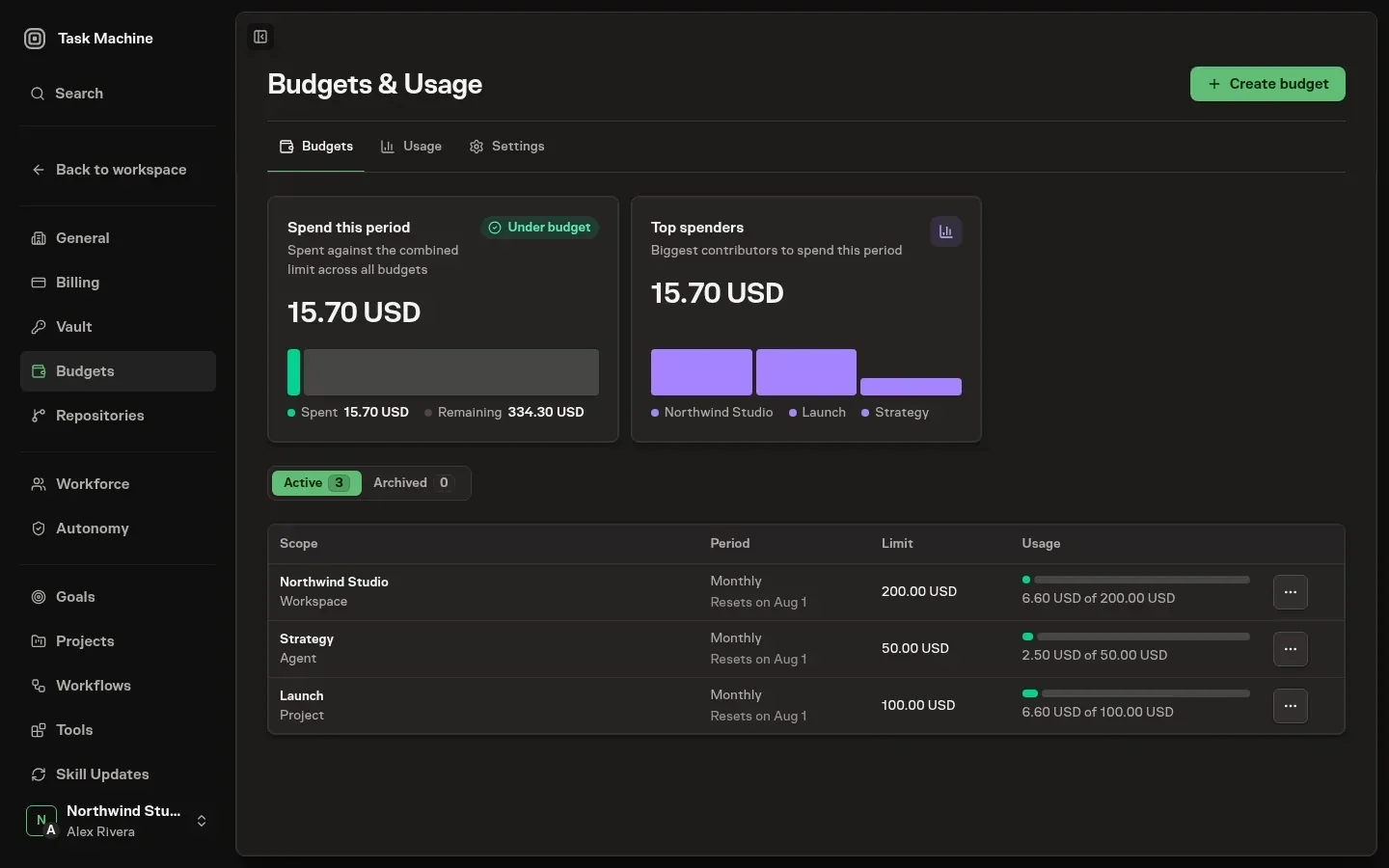
From there you create a budget by choosing a scope and setting its cost or token limits, edit a budget's limits and period, and archive a budget you no longer want tracked or restore one you do, all live across sessions. Creating, editing, and archiving require the budget-manage permission.
The page stays viewable to anyone with read access and hides the controls from members who only watch.
Exhausted budgets prevent new starts
Task Machine compares recorded usage with each budget's limits for the current period. Spend is normalized to a single base currency and then converted into the budget's own currency, so a budget set in euros and work paid for in dollars can be compared.
The Budgets page shows that spend next to each limit and marks budgets near or over their limits.
As usage approaches or reaches a limit, a notice lands in the inbox for members who can manage budgets, with one warning per threshold in each period rather than a stream. Before starting task-based agent work, Task Machine checks the active budgets covering its task, project, goal, agent, workflow, and workspace.
If recorded usage has reached an applicable cost or token limit, new work is refused. Work already running can continue and may take usage beyond that limit.
Agents can see a budget and ask for more
An agent can read its applicable budgets before attempting expensive work.
From its worker an agent sees the budgets that govern its work, each with how much of the limit is already spent and whether it is near or over, so a careful agent checks its remaining room before starting expensive work rather than discovering the ceiling by being stopped at it.
When an agent is about to exceed a limit it does not silently stall: it can request a budget increase, naming the budget, the higher limit it needs, and why. That request changes nothing on its own.
It lands in the inbox for the members who manage budgets, who raise the limit by approving it or decline by rejecting it with a reason.
The budget's scope determines which Agent may request an increase:
- Goal or Team: the request must come from its lead.
- Workspace, Project, Task, Agent, or Workflow: an Agent working in that scope may ask.
A Human budget manager decides whether to grant more room.
See where spend is going
Open the Budgets page's Usage tab to see where recorded cost and effort went. It shows spend, daily or weekly trends, token totals when recorded, and active time.
You can break down spend by agent, project, goal, task, worker, execution stage, or model. The stages separate planning, implementation, review, verification, rework, and follow-up while preserving other historical usage, and every attributed model stays separate so you can tell exactly what is driving the bill.
A period control narrows the window from this month down to a single day, or widens it out to all time.

Task, goal, project, and workflow detail pages show their own usage as one monetary total across local and Cloud agent runs. Task usage keeps its execution-stage breakdown, while Chat shows one Chat category. Neither card exposes providers, models, tokens, execution sources, or internal correction details.
When a budget covers the scope, the card also shows its status and next reset.
If you manage budgets, you can set a budget for that resource, or edit the one already covering it, right from the card: it opens the same budget form as the Budgets page, already scoped to what you are looking at.
Standard retries cap repeated attempts
Standard retries bound repeated Workflow attempts. The recovery depends on what happened:
- Worker failure or timeout: up to three retries, with increasing delays beginning at five seconds.
- Missing required document: one rework attempt with feedback before the Run fails.
- Verifier
FAIL: two rework attempts by default, followed by a pause for Human review if they are exhausted. - Verifier
UNCERTAIN: an immediate pause for Human review. - Verifier
PASS: the Run continues. - Constitution violation or malformed verifier response: the Run fails rather than following the ordinary
FAILretry path.
The builder does not expose general per-step attempt and delay controls.
Read the retry record before restarting
A workflow run records retries, verifier decisions, and the reason work failed or paused. Use that history to decide whether to correct the instructions, resolve a blocker, or retry.
Budgets and retries cover different boundaries. Applicable exhausted budgets prevent new starts based on recorded usage, while retry counts limit repeated attempts. Neither replaces the approvals and checks you choose for consequential work.
Money versus operating limits
A budget controls work against recorded cost or token usage. It does not fund the Workspace. Billing and usage explains the available allowance and charges. A Run that fails can still have consumed paid resources.
Team budgets support usage reporting and increase requests. The ordinary Task execution check applies Workspace, Project, Goal, Task, Agent, and Workflow budgets. Do not rely on a Team budget as an equivalent hard execution gate. Use an applicable enforced scope when new Agent work must pause at its recorded limit.
Choose a review boundary and leave room for reasonable recovery. Budget checks do not guarantee that every in-flight or externally billed operation stops at an exact monetary amount.