Tasks
Workflows
On this page
Use a Workflow for a repeatable process with explicit steps, decisions, and outputs. Adapt an installed Playbook, or build a process once you know how the work should flow. You do not need to build a Workflow before delegating your first Task.
Step types
Add steps in the builder
| Type | Use it to |
|---|---|
| Agent | Give an Agent a prompt and the documents, files, memories, or Tasks it should use as context. |
| Branch | Evaluate ordered, plain-language conditions and follow the first matching route. |
| Human approval | Pause for a permitted person's decision. Rejection follows the rejected route when configured, or fails the Run otherwise. |
| Document | Create named Library documents from their titles, paths, and instructions, with required outputs checked before continuing. |
Recognize other supported steps
Agent-authored definitions can also contain these executable types. They are not currently choices in the builder's step picker.
| Type | What it does |
|---|---|
| Ask human | Pause for information or direction from a person. |
| Connector call | Call a configured Connector action. |
| HTTP request | Make a configured HTTP request. |
A verifier is an optional check configured on a step, not another step type. Approval steps and verifier checks have different purposes: one asks for a decision, while the other evaluates the output against requirements.
Design the workflow
Arrange and configure steps
A workflow is a definition: a named graph of steps connected by edges, owned by a workspace and usually scoped to a project. You open the builder from the Workflows page, which lists the definitions in your workspace and links each one to its graph, or by searching for the workflow in the command center.
The builder renders the graph top to bottom. Each root becomes its own vertical chain, branch steps anchor in that chain before fanning out into horizontal route columns, and each route continues downward in its own local chain.
You create and edit steps in the shared step modal, insert new steps from the connector menus between cards, and reorder linear runs vertically. If a branch fans out wide enough to need more space, only the graph canvas scrolls horizontally.
The builder also gives you a quick read on the current draft before you scan the full graph. A compact overview shows the workflow's effective lifecycle and step count. Rich step cards surface the configuration that matters for each step. Each card shows its agent, autonomy ceiling, verifier, and approval recipient where applicable.
Prose fields still read as prose, branch routes stay as ordered route descriptions, and document outputs stay as structured file lists. Members who can read workflows but cannot manage them can still reach the page, but they see a no-permission state that asks them to get workflow management access before changing the draft.
The saved definition records the steps, their connections, and configuration rather than their screen positions.
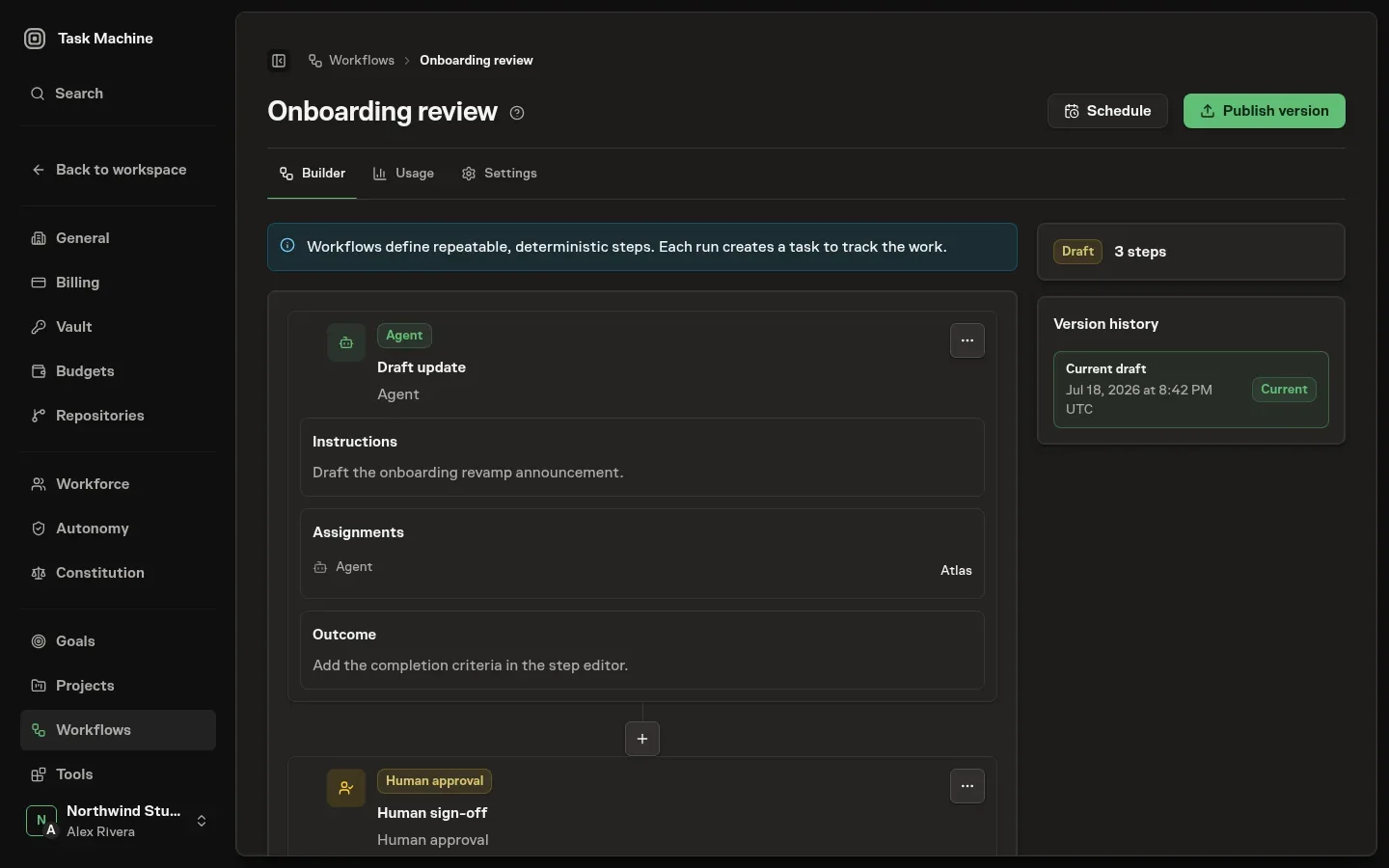
You assign the agent, optional autonomy ceilings for the work and verification, and an optional verifier as you configure a step, so the graph carries the choices that are specific to this process rather than leaving them to be decided later.
Branch conditions route by meaning, not by code
A branch step chooses its path by reading conditions written in plain language. Each route out of a branch carries a condition, a sentence describing when that route should be taken, and the conditions are ordered by a sort value.
When the branch is reached, an evaluator agent reads the conditions in that order and the first one that passes selects the route. The ordering is fixed, while the evaluator's judgment remains model-based. You write the conditions and order them. You do not write rules or expressions.
Choose the review boundary before publishing
Put a human approval before the consequential action it controls, such as publishing a document. A sign-off after publication cannot prevent that publication. For agent and document steps, write outcome requirements and choose a verifier when an automated check would help. Human decisions and verifier checks determine what passes, retries, pauses, or fails.
Standard retries bound transient failures
The builder does not expose general per-step attempt and backoff controls. Worker failures and timeouts allow three retries with exponential delays beginning at five seconds. Missing required documents get one rework attempt before the run fails.
An ordinary verifier FAIL sends the work back with feedback, allowing two rework attempts by default before pausing for human review. UNCERTAIN pauses for review immediately, and a flagged constitution violation fails the run immediately. A malformed verifier response also fails rather than following the ordinary FAIL retry path.
Node configuration supports a max_verifier_retries override, but that is separate from general retry-policy authoring. Budgets and retries explains these boundaries.
Validation checks the graph before you rely on it
Validate the draft before relying on its connections. The builder checks these rules:
- Exactly one start step.
- Connections stay inside the same Workflow.
- Outgoing routes have distinct ordering.
- Ordinary steps have at most one outgoing route.
- Branch conditions have real connections to their destinations. Naming a destination alone does not connect it.
- Human approval steps can have an approved route and an optional rejected route.
- Terminal steps need no outgoing connection.
- No cycles or loop-back connections.
Validation reports the problems and their affected steps or connections without changing the graph. Keep the definition as a draft while you correct them.
Publish the process
Publishing freezes a draft into an immutable active version
When a draft is ready, you use Publish version, and that is what turns a graph you are editing into one a run can follow.
Publishing first validates the source graph, then copies the whole definition, including its steps, edges, and branch conditions, into a new active version with its own identity and a published timestamp.
The current workflow stays editable as the draft you were already working in, and that draft records a link to the version it produced so the next publish chains to the one before it. Publishing makes a version runnable. It does not itself start a Run or add a schedule.
The sidebar keeps that history visible while you work. Version history shows the Current draft first, then lists immutable published versions newest first below it.
Open one of those published entries and the builder switches into a read-only historical view with Viewing version N at the top and Back to current to return to the editable draft.
This copy-on-save design is what makes a published version immutable: a run always executes against the exact version it started from, and editing the draft afterward never reaches back and changes a graph a run already followed. Changes always happen in the draft you publish next.
You keep refining that draft and publish again when the next version is ready. Each published version is a frozen snapshot, and the link chain is the history of how the process changed.
Scheduling stays on the same workflow identity, so future schedule firings keep resolving the latest published version even as you keep editing the draft. Only an active published version can be started. See workflow execution for how a run of one proceeds.
Workspace workflow playbooks use the same graph shape but sit outside the normal runnable list. When one appears in the command center, duplicating it creates a fresh draft with the playbook's steps, edges, and branch conditions copied in, so you can adapt the graph before publishing it.
An agent can propose a workflow
An agent authors workflows as well as runs them, but its profile can gate workflow creation behind your approval.
When it is gated, the agent proposes the definition instead of saving an ordinary draft: the graph is created in a held state with the agent's rationale attached, and it waits in your inbox and on the Proposed tab of the Workflows page, beside the active and archived definitions.
From there you open the proposal to preview the graph it drew: its steps and the order they run in. You can then approve it into the workspace or reject it with a reason. When the effective creation gate permits direct application, the proposal publishes a runnable version without waiting for human review.
Agents can also propose a complete revision to an existing workflow. While review is pending, its current draft and runnable version remain unchanged. Approval rechecks the submitted base and references before publishing the candidate version. The separate workflow-update approval gate can also permit direct publication.
From here, workflow execution describes how a run of a published workflow advances and what it records.
Execution and recovery
Once a workflow is authored in the builder and published, running it is what makes the process repeatable: a run is one execution of a published workflow version, the place where a designed graph turns into actual work with a result for every step.
This page describes how a run starts, how it advances step by step, and what it records, so the shape you drew becomes a loop you can actually start.
Every run belongs to a task
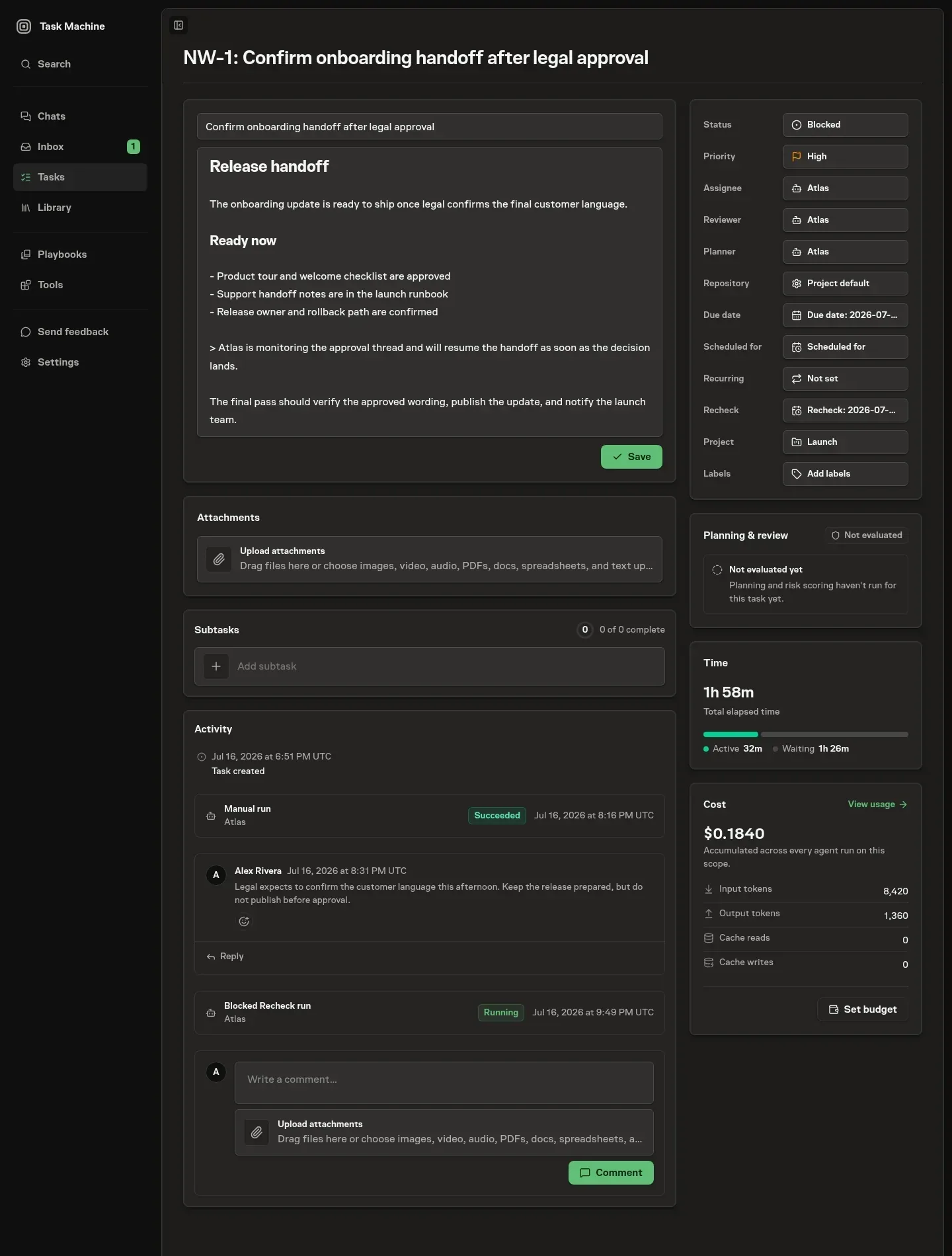
A run is always anchored to a task, so there is one visible record of what happened even when work runs itself. The task is the papertrail (see Tasks): its timeline is where a run's progress, questions, approvals, and final summary belong.
You start a run against an existing task, or start it from the Workflows page, where a manual start creates a backing task in the definition's project and runs beneath it.
A scheduled workflow has one stable root task in Tasks. Each scheduled firing creates a backing task linked under that root. The root stays on the Tasks list and board, while its Schedule runs tab opens the generated task details without adding repetitive cards to the board.
A generated scheduled task still keeps its own complete Activity, Runs, questions, approvals, artifacts, and execution history. Starting a workflow against a task that already exists does not change that task's origin. Either way a run is never orphaned from a place you can look.
A run also records its workspace, its project, the exact published workflow version it came from, who started it, and its status.
A run is queued, running, paused, succeeded, failed, cancelled, or timed out. Its current step shows where it is in the graph.
As the run advances it writes events onto the task timeline: the run starting, each step starting and finishing, a step waiting on agent work or a human, and the run reaching its result.
The command center can find workflow runs by name, status, ids, and failure details. Opening a run from search takes you to the backing task's Activity tab for current execution and steering context. Open Runs for the complete execution history.
If a run is not terminal and your role can run workflows, search also offers a cancel action that stops the run and any workflow-owned worker work.
A run advances step by step through the graph
Workflows use an acyclic graph with one start step. When a step finishes, the run follows its outgoing edge or the route selected by a branch or human approval. Conditional routes can rejoin. A step becomes ready when its selected incoming dependencies have succeeded. When nothing remains to schedule, the run succeeds.
If a step fails after its retry or decision path is exhausted, the run fails there and records why. Loop-back edges are not supported.
When a step hands work to a worker or pauses for a person, the run stops at that step and waits. When that work completes, Task Machine resumes the run from where it left off and carries it to the next wait or to the end.
Resuming is safe to repeat: a run that is already finished is left untouched, and a step still waiting on agent work or approval is left waiting.
Agent steps run in Cloud or on Local Workers
An agent step runs an agent against the prompt and context the step carries, using the same Cloud or Local execution path as a directly assigned task (see Tasks).
The run assigns the step's agent to the backing task, passes the step's explicit context references into the compiled prompt, starts the work when compatible execution capacity is available, and waits. Readable document references are injected into the job's knowledge context.
File, task, and memory references travel with the job as context hints for the agent. When the work succeeds the step captures its output and the documents the agent produced.
When it fails or times out, Task Machine retries that worker work with a bounded exponential backoff before failing the run, and when it is cancelled the run cancels at that step with the worker's reason. Branch and document steps run the same way, each with a prompt shaped to its job.
A branch asks its agent to evaluate the conditions. A document step asks its agent to create the configured Library documents and checks that every required document exists before moving on.
Branch steps route by evaluating their conditions
A branch step chooses its path at run time by checking its conditions in order. Each condition can name its own evaluator agent. When it does not, the branch step's agent evaluates it. The first condition that returns PASS selects its route and the later conditions are not run.
If every condition returns FAIL, the branch finishes without opening an outgoing route. The step result records the conditions checked, their verdicts, and the selected route. Evaluation order is fixed, but each condition is a model judgment and can produce a different verdict on another run.
Human decisions and verifiers control progression
For an Agent or Document step with a verifier, the verifier checks the output against the outcome requirements in the same Task working folder.
| Verifier result | What happens next |
|---|---|
PASS |
The step continues. |
FAIL |
Primary work retries with feedback within its configured bound, then escalates to a Human if it still fails. |
UNCERTAIN |
The Run escalates to a Human immediately. |
Escalation creates a Task question for the Workflow starter and pauses until they answer. A reported constitution violation fails the Run without corrective retries.
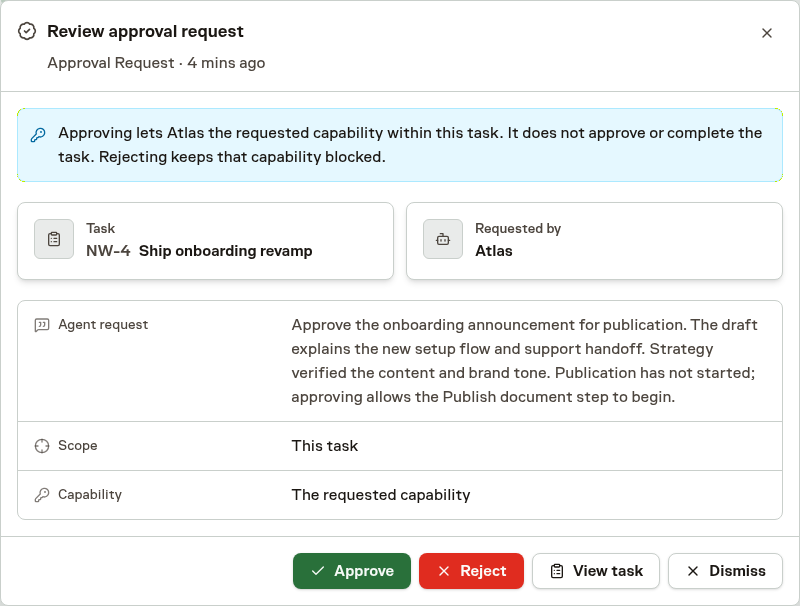
A human approval step pauses the run, opens an approval request routed to whoever the step's scope authorizes, such as a member, role, project editor, or required-permission holder. It holds until a permitted person decides.
Approval resumes the run down its approved route, and a rejection takes a separate rejected route when the step was wired with one, or fails the run when it was not.
An ask-human step pauses the same way to ask a plain question rather than a yes-or-no decision: it opens a question on the backing task, routes it to a chosen member or, by default, to whoever started the run, and resumes carrying the person's answer once they respond.
Both human pauses land in your Inbox and on the Task timeline and also notify by email.
A run records a result for every step it touches
Beneath a run, each step attempt is a step result: a record of which step ran, the attempt number, its status, the structured input and output, the decision a branch reached, and timing. When a step reaches outside itself, the step result links to the agent work, approval or question, and working folder involved.
Agent-step output also carries the agent-run reference, the knowledge context that was injected, and any documents linked back to that job, so the run can show what the agent produced without duplicating document state inside workflow logs.
A verifier check on a step records its own outcome against that step result, holding the PASS, FAIL, or UNCERTAIN verdict, the reasoning behind it, and the issues it found.
Read together, the step results are the spine the task timeline, the audit trail, command-center workflow search, and worker transcripts use to explain how a run reached its result.
Usage and cost stay on those worker transcript events and are summarized from them when a workflow run is displayed, rather than being copied into workflow timeline entries.
Watch a run from its task
The backing task's Activity tab shows current execution alongside steering history. Its Runs tab keeps the complete execution history. Opening a workflow run brings up the run view, where you can inspect its steps, decisions, and transcripts.
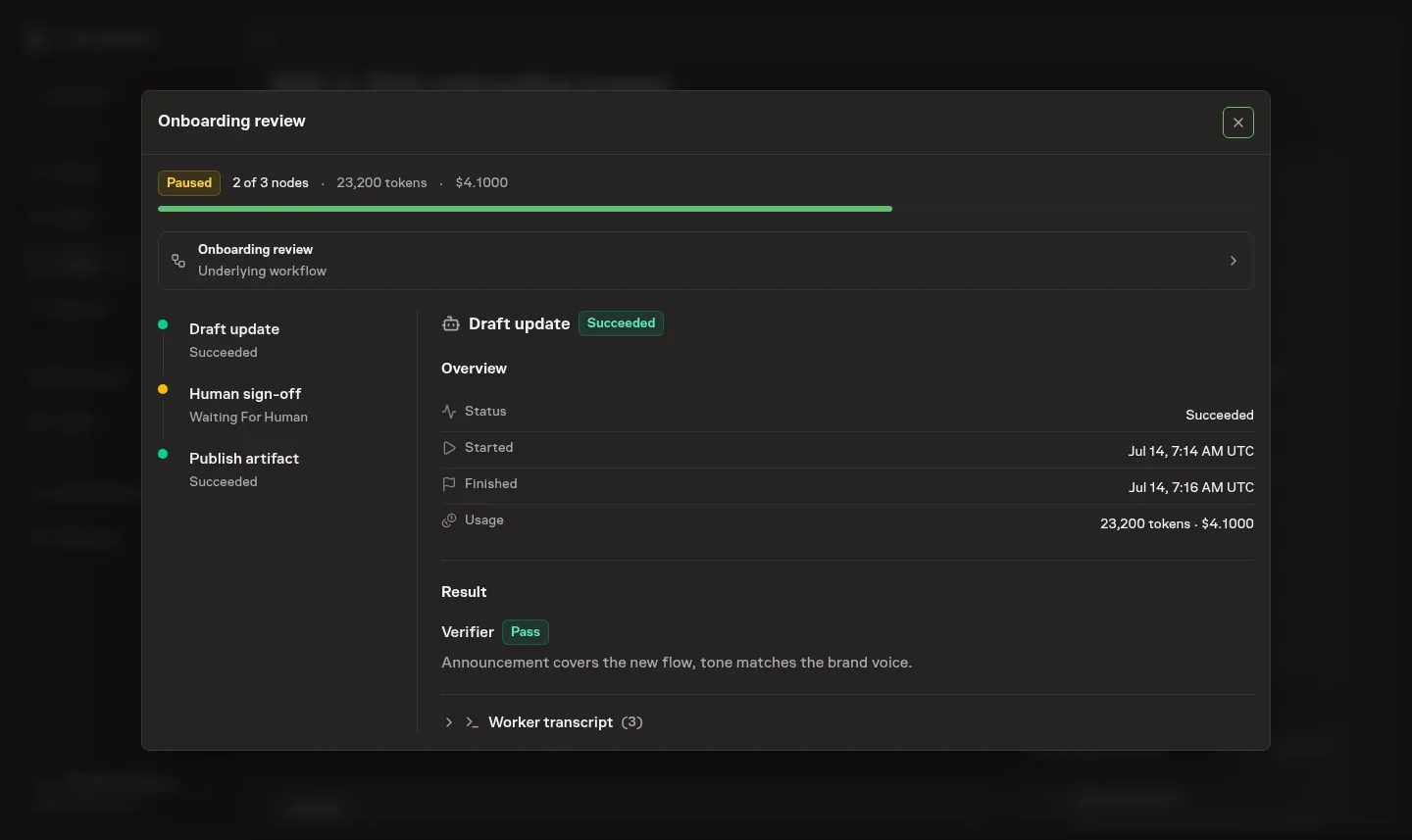
Read the Run view from its overview into the step that needs attention:
- Top summary: status, progress, tokens, and cost derived from the transcripts.
- Left stepper: steps in order, their statuses, and the current step. Select a step to inspect it.
- Right panel: the selected step's attempts, timing, working folder, verifier verdict, branch choice, documents, and transcript.
It uses the same expandable tool calls, reasoning, and output as Chat. The selected step's newest transcript page loads automatically, and earlier or later events remain available without loading every step's complete history.
Questions and approvals the step is waiting on surface here too, and when a request is routed to you, you can approve or reject it inline without leaving the task. Everything updates live as the run advances, so a run you are watching moves on its own.
Retry after correcting a failed attempt
Open a failed Workflow's details to inspect its failed step and earlier attempts. When your role permits it and Workspace access is operational, Retry can return a failed or timed-out Workflow to running with fresh attempts for steps whose latest attempts failed. Earlier attempts remain in the history.
Correct the cause first, such as missing access or unclear instructions. Retry does not undo external actions, erase earlier charges, or replace the published version the Run was following. This action is not a way to retry a succeeded or cancelled Run.
Stopping its schedule is a separate choice that prevents future occurrences while preserving Runs already created.
What execution does and does not cover today
Workflow runs support agent, branch, document, Connector call, HTTP request, ask-human, and human-approval steps, with verifier checks on configured steps. Conditional routes can rejoin, but loop-back edges remain unsupported. Worker failures and timeouts use bounded automatic retries. Missing required documents receive one rework attempt. Verifier corrective retries default to two.
Authored definitions can configure that limit, but the builder does not offer a separate retry-policy control. See budgets and retries for how these bounds fit the larger control story.
Resolve waiting questions and approvals in Inbox. For ready-made setups you install rather than draw, see Playbooks.
Repeat a proven process
Capture a handoff after it has produced useful work. State each step's inputs, output, and review boundary before adding another branch. Give each cycle room to finish within a deliberate budget. Use Schedules for timing and review a few real cycles before increasing volume.
Inspect the linked definition
Workflow shows the latest definition linked to the task without execution statuses. Branched paths remain grouped through labels and indentation. Task Machine renders at most the first 25 steps in one view and says when more exist, which keeps large definitions readable without implying the workflow itself was shortened.
A task with no linked workflow shows an empty state instead.