Tools
Connectors
On this page
Connectors let Agents use external services, such as a payment system, a project-management tool, or a search provider. Configure the connection, choose which Agents can use it, and approve its credential access separately.
Browse the Marketplace
Open Settings, then Connectors, and choose Marketplace. Search for the service or kind of work you need. Installed, Proposed, and Archived keep existing connections and waiting decisions separate from the catalog.
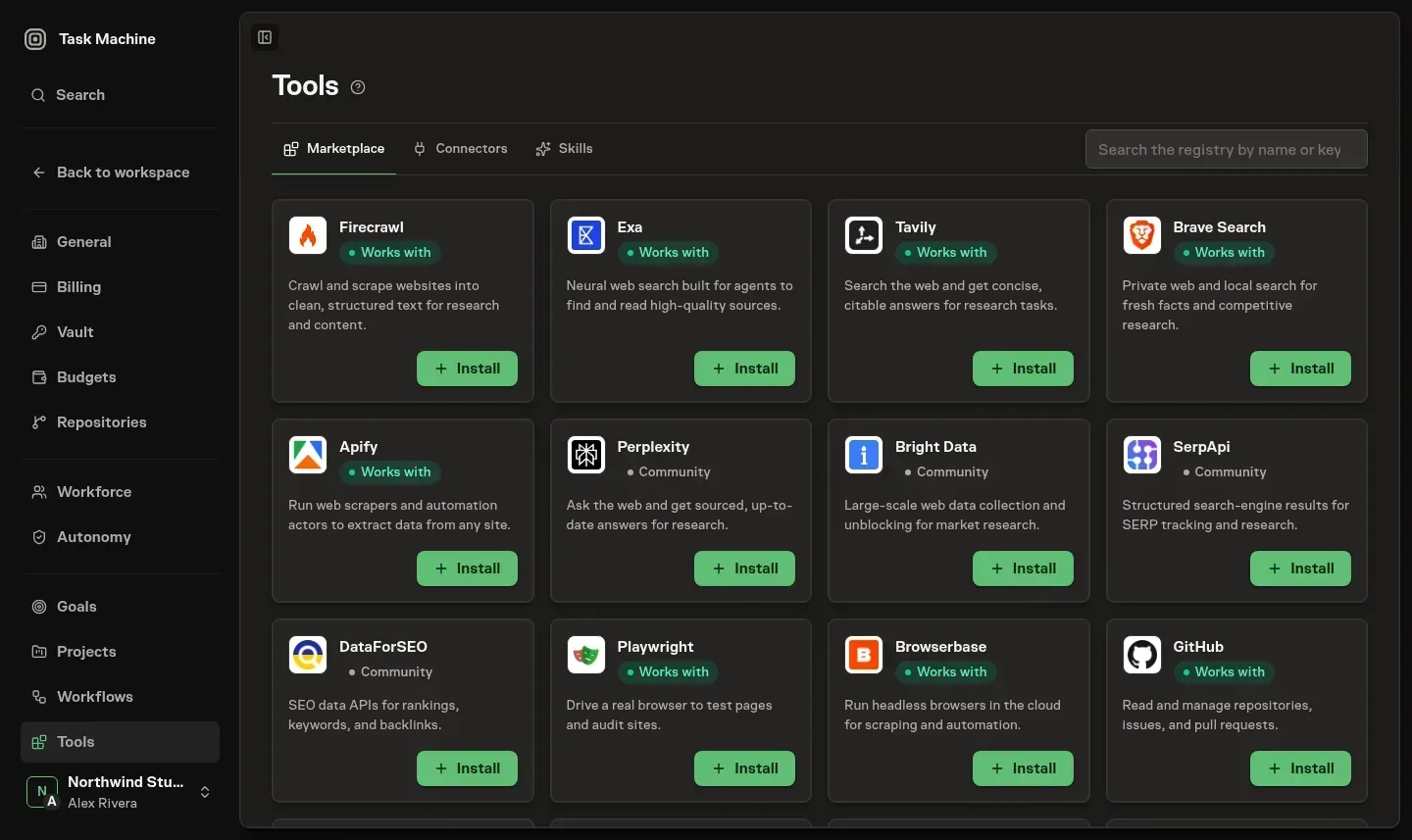
Search uses Task Machine's synchronized catalog rather than waiting for the external registry. For a nonblank search, Task Machine's authored Connectors appear before registry listings. Official provenance and exact service names then lead broader matches within each source group.
Review the publisher, version, website, and source when available. A verified badge identifies an official listing based on the catalog's ownership checks. It is not a security review of every action the service exposes. Community listings remain identified as such. Deprecated and unavailable entries do not appear in the Marketplace, but an existing connection remains available under Installed until you archive it.
Install a Connector
Review the details
Choose Install on a Marketplace card, or Add connector for a connection you are configuring yourself. Check the name and description before continuing.
You can keep several independently named connections to the same service. Installing another does not change an archived connection. Suggested names avoid an existing name with a numeric suffix. If you enter a duplicate yourself, setup asks you to choose another.
Reviewed hosted Connectors carry their exact endpoint into setup without a registry lookup and select account authorization first. Key, token, and public-endpoint alternatives remain available when the hosted service supports them. Other listings carry registry defaults into setup when available. Otherwise you supply the missing connection details.
Configure the connection
Setup includes Details, Connection, and Agents. Remote connections also have Verification before Agents. Choose the authentication method the service supports and provide the required account authorization or Vault binding.
Connections that run a command on a Worker use their configured environment entries there. Remote connections are verified from Task Machine itself, without needing a Cloud or Local Worker online.
Verify and apply
Verification checks the remote connection using the selected authentication and asks it for its available actions. The result applies to the exact draft you checked.
Changing those details, going back, or closing setup requires another check. A failed check must be resolved and retried before applying the connection. Nothing is saved merely because an earlier draft passed.
Choose the Agents
After saving, assign the Connector to one or more Agents or finish without assigning it. The saved connection stays in place while you make that choice.
Managing a Connector and assigning it are separate permissions. You can finish setup without assigning when your role permits management but not assignment. People without management access can browse the Marketplace without installation controls.
Choose authentication
Connect an account
Use Account authorization when the service offers its own consent screen. Connect account takes you through that flow. Task Machine keeps the long-lived login in Vault and uses short-lived access for verification and later work.
Use a key or token
For an API-key service, select the required request header and its Vault entry. Keep the header name, value prefix, and credential together.
Choose No prefix when the service expects the stored value unchanged, Bearer when its authorization header requires that scheme, or the service's documented custom prefix. A selected prefix is separated from the stored value by one space. It does not alter the Vault entry.
The Vault picker can create a write-only entry without closing setup and selects it immediately afterward. Connections that run on a Worker can instead map Vault entries to the environment variables their command expects.

Use a public endpoint
Choose no authentication only when the endpoint is intended to be public. Authentication choices are exclusive: an account login does not compete with a manually configured authorization header.
Credential values are resolved for the connection check and later authorized use. They do not appear in verification results.
Grant only the access the Agent needs
Assigning a payments Connector to a finance Agent does not give it to every other Agent. Each Agent receives its explicit assignments plus active Workspace-default Connectors. Task Machine does not install a web-search provider as a Workspace default.
Assignment does not silently grant Vault access. Required credential decisions appear in Inbox, where an authorized person can approve the applicable one-Run, timed, or ongoing access, or reject it.
If work reaches that connection before the decision, the original Run waits rather than repeatedly retrying. The same decision and its outcome remain visible in the blocked Chat or Task Activity. Chat keeps the composer visible but unavailable while access is missing.
Approval continues the preserved work. Rejection stops it and blocks affected Tasks until the assignment or access is changed. See Vault for the credential flow.
Review an Agent's proposal
An Agent can propose a missing Connector from Chat before attempting work that depends on it. Review its rationale, authorize the service when required, and choose its assignments so the original request can continue.
The Proposed list shows the service, connection type, address, and proposing Agent. Review opens the full proposal before you approve or reject it.
Check or reconnect an existing connection
For an active remote Connector, choose Check connection from its row menu. A temporary service or network problem can be retried without changing the saved connection.
An expired account login can produce a warning and a Log in again action. The same action is available in the corresponding Inbox recovery request or Edit connector flow. Successful authorization returns to the originating place and resumes the waiting work.
If the login expires after an Agent has already started work and its provider session can be preserved, Task Machine preserves that exact Run and its current work. After you log in again, the Agent continues its existing session without automatically repeating the rejected Connector action. When the earlier action might have changed remote data, the Agent checks durable state and asks for confirmation before an uncertain retry. If no resumable provider session is available, the Run fails rather than claiming it can continue safely.
Task Machine keeps one recovery request for each authorized Connector manager rather than repeatedly asking about the same expired login. A successful login clears those requests. Temporary provider, network, encryption, and save failures remain retryable errors rather than unnecessary login requests.
Check connection is not available for connections whose commands run later on Workers.
Keep repository access separate
The Marketplace includes official GitHub, GitLab, and Bitbucket provider Connectors for pull requests or merge requests, reviews, issues, and CI. GitHub uses Task Machine's reviewed hosted endpoint and starts with account authorization. GitLab and Bitbucket use their selected registry connection to supply setup defaults when available.
Repository SSH access handles Git transport, not those provider actions. Configure it separately in Coding Work.
Choose search providers deliberately
Providers such as Exa are optional Marketplace Connectors. Install and configure the provider you choose, then assign it where needed. Its processing terms remain separate from Task Machine's managed AI requirements. See Privacy and data.
Browser access is separate from Connectors. Task Machine supplies the browser for a Run when the Agent's settings permit it.
Finish the connections a Playbook needs
A Playbook can bring its Connectors and Agent assignments as part of the setup. After a proposed Playbook is approved, an Inbox follow-up for each Connector asks you to finish its connection before the work uses it.
Use Skills for reusable expertise rather than service access. See Members and roles when a management or assignment action is unavailable.