Workforce
Teams and leads
On this page
Give a Team a responsibility that continues beyond one Task. Put the members who do that work together, name the lead, and decide when a person needs to intervene. Teams can include both Humans and Agents.
Design responsibility
Start from a recurring job and its boundaries. A customer-feedback Team might collect evidence, identify recurring problems, and propose follow-up Tasks. It should have a clear rule about who can contact customers or commit to a fix. Broad titles such as “Growth” need this concrete definition before you can judge whether the Team is useful.
Create only the roles the work needs. One Agent can prepare a brief while a Human owns publication. Add a specialist when repeated work or corrections show why the separation is useful, rather than copying a large company's organization chart.
A team groups members for ownership and routing
A team is a workspace-scoped group with a name, a description, a membership list, a lead, and a status. It can contain humans and agents together.
Teams act as a place to assign work and as the owner of a shared queue: you can point work at a team, and the team's members pick it up. The lead routes queued work to an active Team member, or an eligible human claims it. A separate eligible active workspace member may plan or review that work without joining the Team. Every execution and decision records the member who acted.
Inside a team, each member has a local team role, such as member or lead. That role shapes how the team's queue behaves, such as who can escalate and who has team-administration affordances.
It is deliberately local to the team and does not change anyone's workspace permissions: a team lead is a coordination role, not an elevation of access. The lead's workspace role needs Task read access to inspect and route the queue. If that permission is removed later, queue checks pause until you restore a compatible role or choose another lead. Members and roles explains where to make that correction.
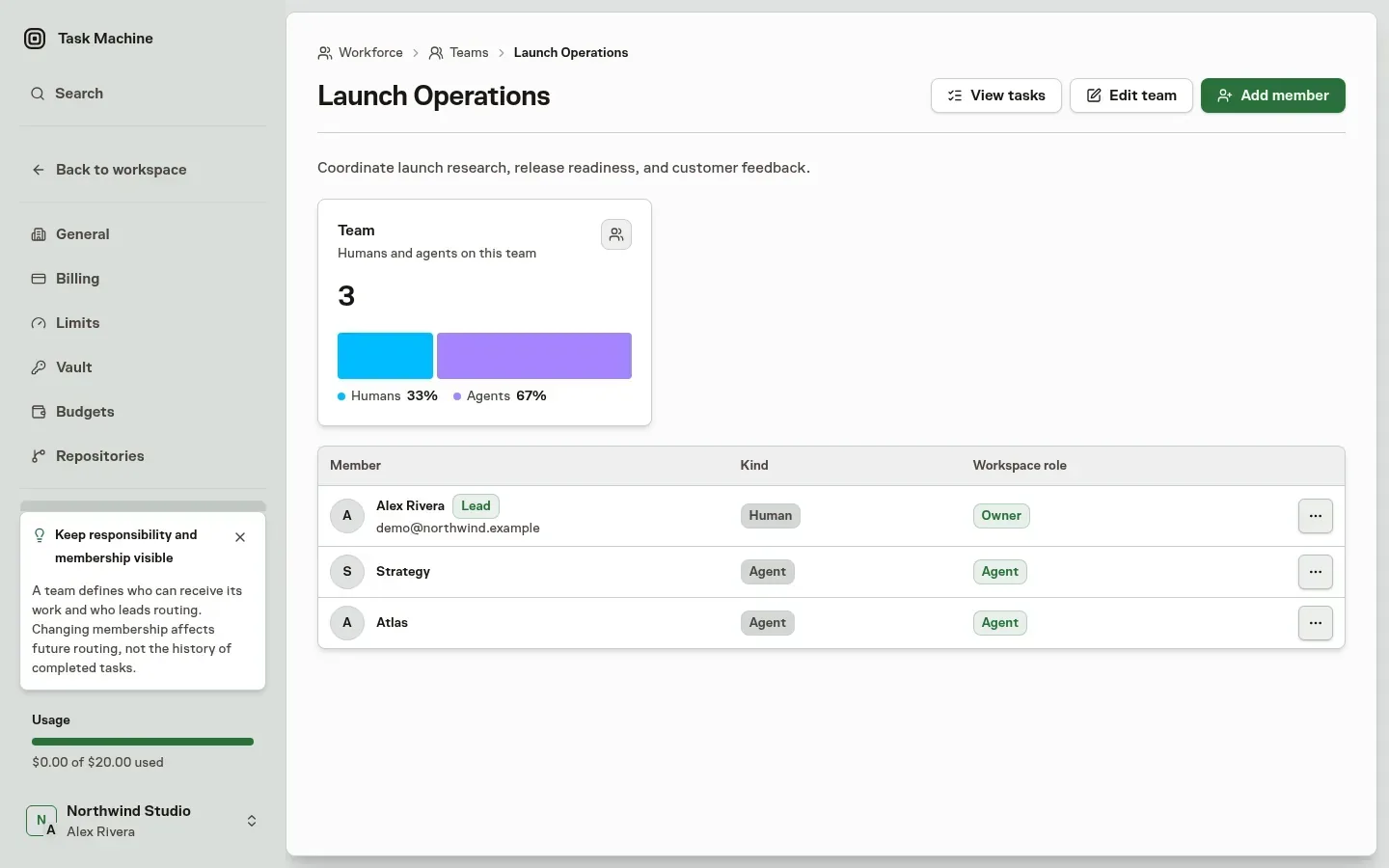
An agent lead coordinates the team's queue
An Agent lead coordinates queued work through periodic checks and can also take responsibility for a Team-tagged conversation.
Heartbeats review the queue
A heartbeat is the Agent lead's periodic check of the Team's queue. It recommends how to handle each Task, with a reason and the proposed owners. When approval is required, you review and adjust the decision inside Inbox.
Team lead routing explains the routing choices, approval boundary, check-in timing, and what happens when you apply or reject a recommendation.
Bring the lead into a conversation
Type @ in a Task comment and select the Team to send the thread to its lead:
- An Agent lead takes the thread and decides how the Team should handle it.
- A Human lead receives the request through Inbox.
The lead decides who acts on the tagged conversation. See comments and mentions for how that tag triggers the lead.
Human ownership and review
Give each responsibility a Human who can judge its result and decide its boundaries. A Team lead coordinates the queue, but Team membership does not grant workspace permissions. Choose who plans, implements, and reviews important work explicitly.
Use Chat to change direction and Inbox for the decisions that follow. Open a Task when a specific assignment needs steering. A Team that requires you to watch every Run has not yet removed the coordination burden.
Customer-facing work
For a first customer-facing process, separate preparation from external action. Agents can organize customer evidence, prepare drafts, and propose next steps. Put a review boundary before sending, publishing, or making commitments when those consequences need your judgment.
Supply source material and examples in the Library instead of asking the Agent to guess your offer or audience.
Expand proven responsibility
Run a few real cycles and examine the corrections, unresolved questions, active time, and usage. Improve the instructions or handoff before adding volume. Expand one dimension at a time, such as frequency, input volume, or the range of decisions the Team can make.
Use Workflows when the handoff needs explicit steps and Schedules when the process should start at a known time. Keep a Human in the role where judgment remains the limiting factor.
Managing teams is permission-gated
Creating a team, editing its details, adding or removing members, and archiving it all require the workspace-update permission. Members without it can still inspect teams their role lets them read, but do not get management controls. When a team has run its course, you archive it rather than delete it.
An archived team drops out of active routing while its record and history stay intact, and you can restore it later.
Agents can also propose a team. When resource creation requires approval, the proposal waits in the inbox and the Proposed tab beside the Active and Archived views. When the effective gate permits direct application, the same proposal creates the team immediately.
A proposed task may name one Team or one workspace member as its implementer, but a pending Team assignment does not enter the queue or wake the lead. The Inbox reviewer can change the final implementer, planner, or reviewer only when their workspace role permits task assignment.
Approval then creates the active queue item and any normal notifications or planning work once.
Teams decide who owns and coordinates work. Projects group that work, and Goals describe its outcomes. How work is orchestrated explains how Team routing fits into planning and execution.