Inbox
Working through decisions
On this page
Use Inbox to supervise delegated work without watching every Run. Questions, plan decisions, approvals, and recovery actions arrive with the context and controls needed to resolve them there. Use Chat for discussion and planning, and Tasks when you need to inspect or steer a specific piece of work.
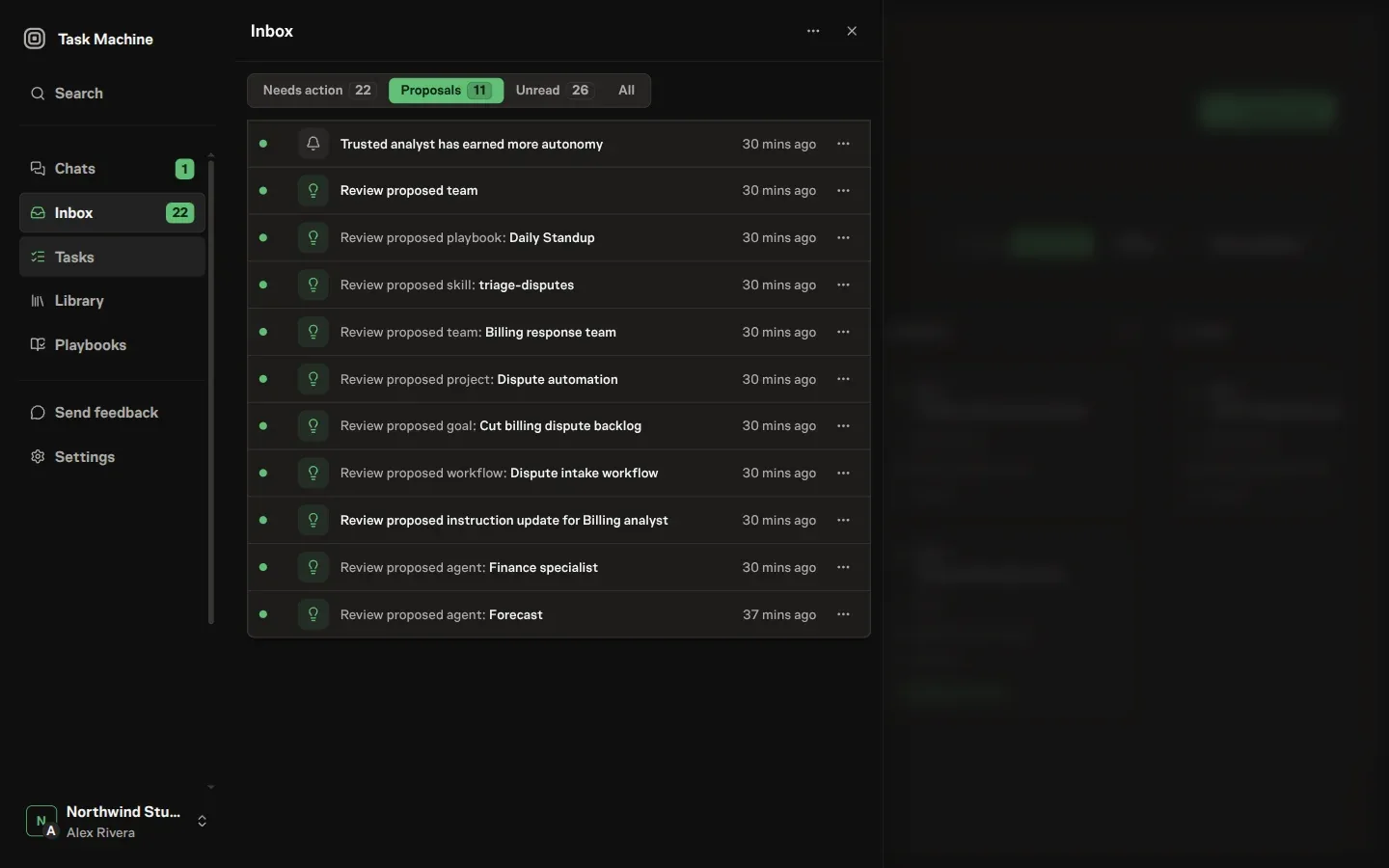
Everything that needs you arrives in one queue
The Inbox brings the Workspace's requests and updates together:
- Questions, comment mentions, and delegation decisions.
- Plans, proposals, and approvals before consequential work.
- Failed Runs and repository or credential recovery.
- Task updates and budget warnings.
A blocked status by itself does not create another item. The question, approval, mention, review, or recovery action that can move the work owns the attention instead. Start with items that need a decision. Informational updates share the feed but do not all require action.
Each item names its kind and carries a short title and body. Use the three views to separate pending attention from completed decisions:
- Needs action: every active item, including awareness updates you have read but not cleared.
- Proposals: active proposed records and autonomy changes.
- Actioned: explicit outcomes such as approvals, rejections, answers, resolving reactions, retries, and dismissals.
Reading changes an item's visual state, but leaves it in Needs action. System cleanup and superseded history do not appear in Actioned.
The Inbox badge adds the Needs action and Proposals counts, so proposals contribute to both parts of the total. Because the queue mixes sources, each view is ordered by recency rather than by domain: the most recent attention sits at the top, regardless of where it came from.
Completed and archived items are read-only history. Opening one from Actioned or an old notification preserves the exact title, context, and decision state that were visible immediately before the decision. Disclosures, copy controls, authorized previews, and optional links remain usable, while editable forms and controls that could change data are omitted.
The result and attribution remain visible, and no mutable task, pull request, proposal, or other source record is loaded to rebuild the historical view.
When several entries are about the same thing, the queue folds them together instead of stacking a separate row for each.
Related informational updates on one task or workflow collapse behind a single summary that names what they are about and counts how many arrived, so a burst of activity on one piece of work does not push everything else out of view.
A group that holds something you still have to decide opens on its own, and every item in it keeps its own actions, so a folded summary never hides a pending approval or buries the control that resolves it.
You expand or collapse any group yourself, and that choice sticks as the queue refreshes around you.
Move between open decisions
Open an item to read its complete decision in the modal. Use Previous inbox item and Next inbox item to move through neighboring items without closing it and returning to the list. A navigation control is disabled when there is no item in that direction.
After you successfully resolve an active item, the modal advances to the next eligible item in the queue. When the resolved item was at the end, the modal falls back to the last remaining decision. It closes only when the queue has no eligible items left.
Read the new item's context before acting. Navigation does not approve, reject, or dismiss it.
Recover after a Local usage limit
A Local Runtime's usage-limit item offers Retry now to people who manage the Workspace or its Agents. After restoring provider access or changing accounts in the agent tool, use it to clear Task Machine's waiting period and request recovery for eligible interrupted assignments.
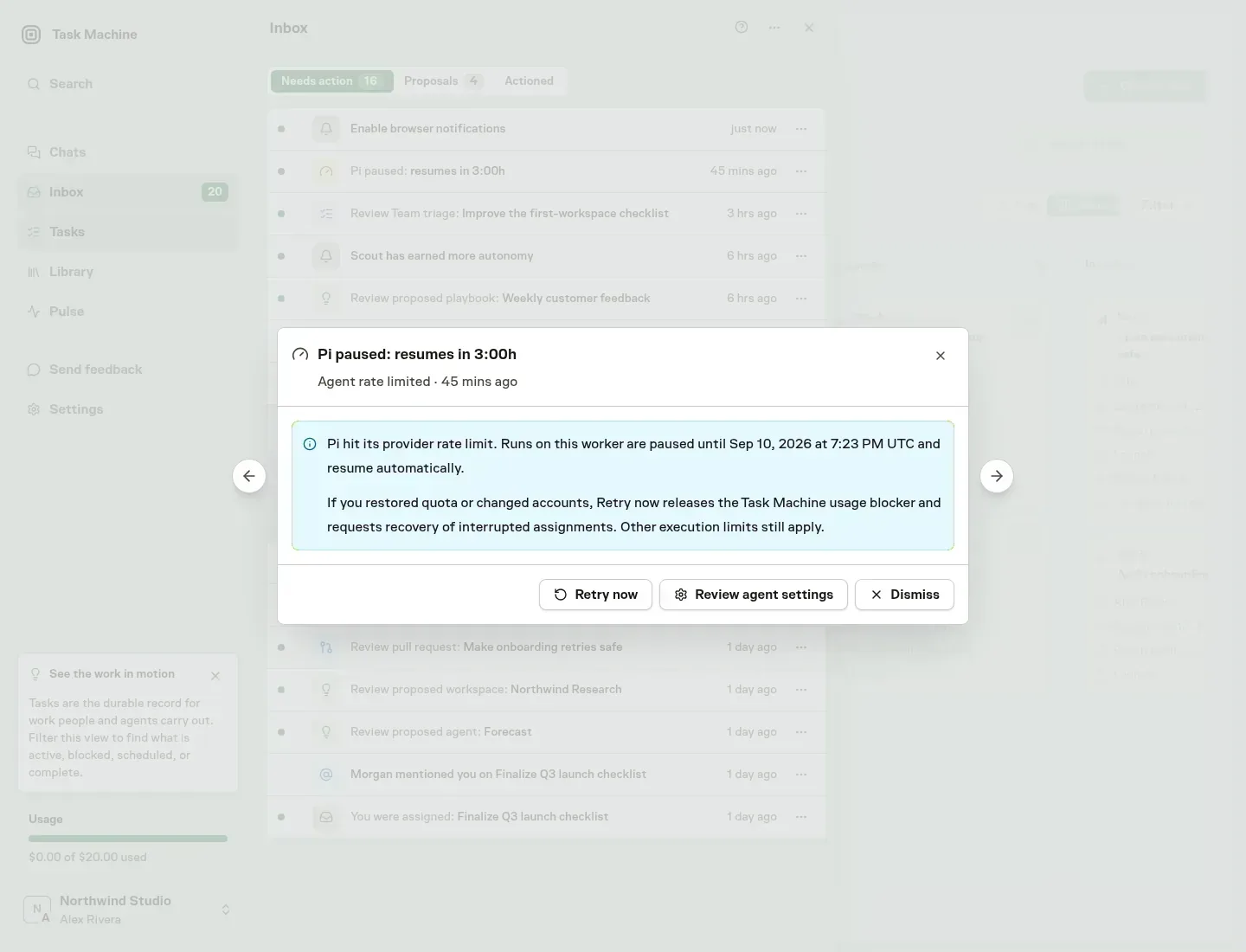
The item is marked retried once Task Machine accepts the request. Provider quota, manual computer pauses, disabled Runtimes, budgets, capacity, and Task approvals remain unchanged. A new provider limit can pause work again. Local execution explains the recovery boundaries.
Notifications return to the decision
When an Inbox item triggers an enabled email or browser notification, opening it returns to that exact item with its context and actions ready. The same link opens the Inbox from an in-app notification, so an alert never leaves you searching through the queue for the decision it announced.
Once a day at 8:00 in your timezone, Task Machine sends one morning digest per workspace covering what is waiting on your approval, what is blocked, what finished yesterday, and what is in progress. Each section previews up to five items while its badge and the email subject report the full total.
Owners and other members who manage tasks receive the workspace-wide overview, including budget spend in each currency. Everyone else sees Inbox items addressed to them and task activity they created, are assigned to, plan, review, or share through an active team queue.
If an inactive subscription has stopped work, every digest that already has relevant activity explains that work is paused. Members who manage workspace settings can open billing settings from the email. Everyone else is told to contact an owner or admin. The warning alone never causes an email to be sent.
The email links back to the Workspace Inbox and contains only what you may see. When nothing relevant happened and nothing needs you, Task Machine sends no digest.
You control the digest from notification settings, where it sits as a row in the notification table. Turn the daily email off there. The timezone that decides when "morning" is lives in account settings. New accounts have the digest on, with the timezone guessed from where you signed up. Change either at any time.
The Inbox updates live
The Inbox reflects the workspace as it changes, without a reload. When an agent asks a question, finishes a task, or hits a failure in Cloud or on a connected computer, the item appears.
When you or anyone else reads, completes, or archives an item in another session, already-open Inbox and dashboard views update to match. The active queue and counts update as requests arrive or resolve.
To inspect the work behind an item, see Tasks for the record they point into and Comments and attachments for how discussion on a task turns into attention here.
Read Proposals, Questions and approvals, and Setup and recovery for the decisions you will encounter.