Discuss
Chat
On this page
Use Chat to decide what to delegate, develop a plan, and ask an agent to create the resulting work or Library document. The app calls this surface Chats because each conversation keeps its own history, with one selected agent handling each turn.
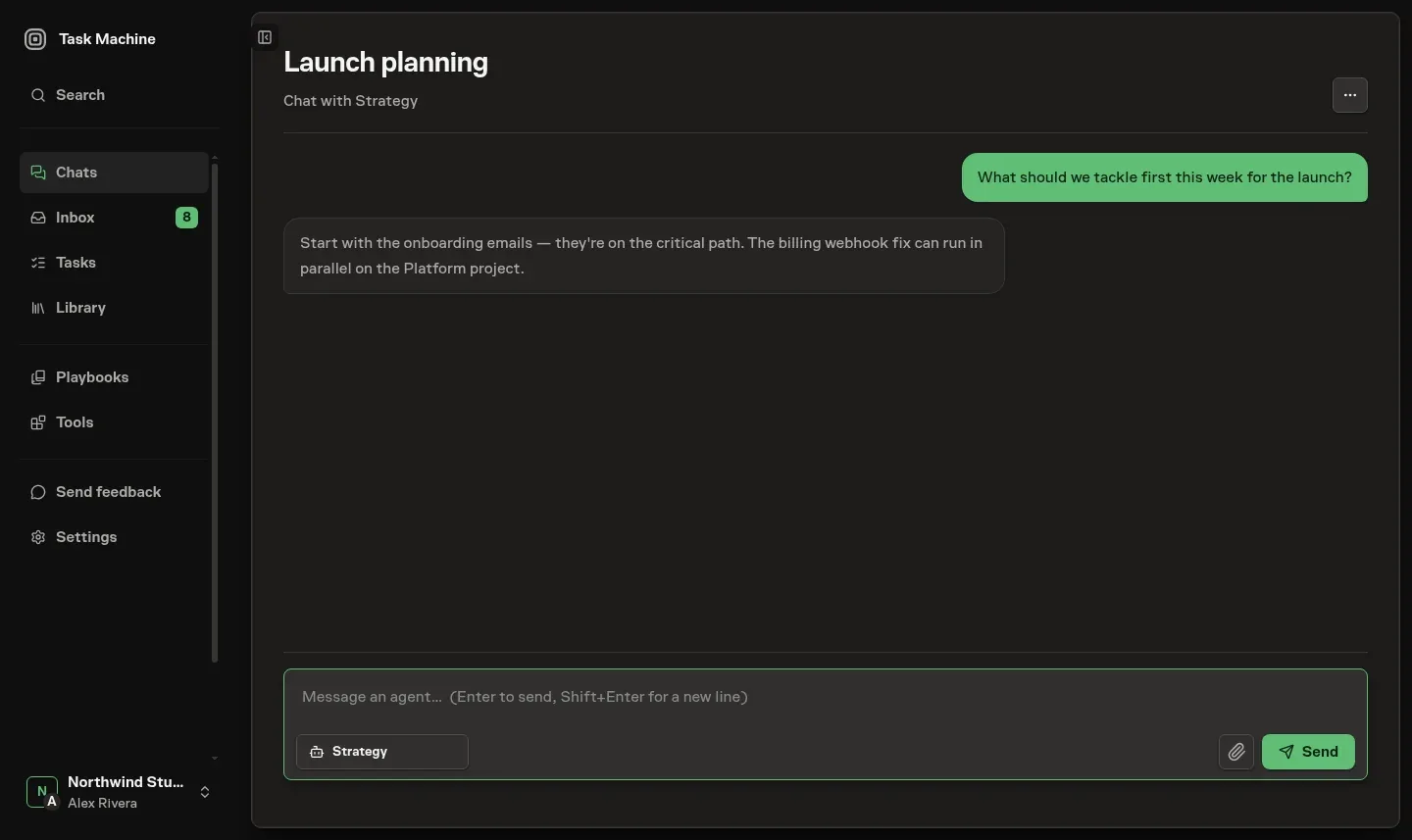
Choose the agent for the next turn
A Chat runs one agent turn at a time. A participant can select another active, chat-ready agent from the workspace in the composer before sending the next message. Changing agents does not require a new Chat.
Task Machine supplies prior conversation context to the incoming agent, including a summary and recent turns as the conversation grows. The agent also reads the workspace knowledge it is entitled to, so the conversation can continue with a different specialist while keeping its history.
Starting a chat keeps the choice small: write the message and pick the agent. A new or empty chat starts with that agent's configured model and reasoning.
An existing chat keeps its latest available model choice, falls back to the agent's current default when that choice is no longer available, and uses Auto only when neither provides a valid choice.
Auto chooses a concrete model and reasoning level for each message from that message and a bounded portion of the conversation so far. Compact model and reasoning controls remain beside the agent picker when you want to override the inherited choice for the next message, without making configuration a prerequisite for the first message.
The Chats drawer also offers starter presets for common conversations such as building an agent, discussing strategy, and planning a project. A preset fills the composer with questions about your goal, current process, constraints, and exceptions before the agent proposes anything. It never replaces a draft you have already started.
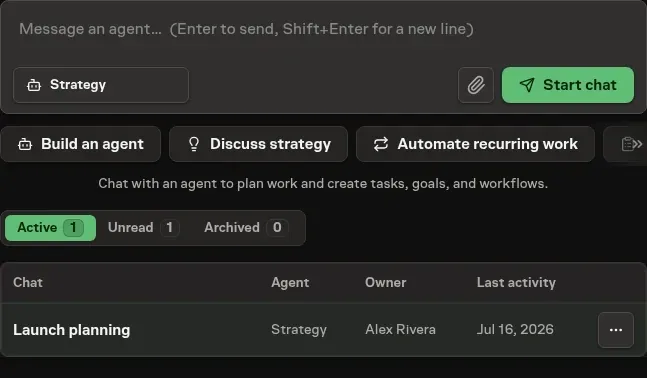
Follow the answer and inspect the work behind it
The conversation shows your messages, the agent's answers, and expandable evidence of the work behind them. When you send a prompt, Task Machine compiles it together with the agent's instructions and the knowledge it may read, then starts an agent Run for the agent selected for that turn.
The agent runs that work using the execution choice selected for the turn, whether that is Auto, a fixed Cloud model, or a model on a selected Local Worker. When you do not make a new choice, Chat keeps a still-available conversation selection, then the Agent profile default, before falling back to Auto. The transcript events it produces (your message, the agent's reply, and the internal prompt that framed the turn) are what the chat surface renders, in job order. Repeated thinking and consecutive tool activity stay collapsed until you need them.
Adjacent thoughts appear as one counted row that expands to each complete thought in order. Web activity names one or two public domains and otherwise counts the sites searched, fetched, or browsed, while Skills, Connectors, and Vault activity retain their own recognizable summaries.
Retry and resolve a paused turn
A chat runs one turn at a time. Only a single queued, running, or in-flight job may exist per chat, so a new prompt waits until the current turn finishes rather than racing it. Conversations take fair turns across the workspace when several are ready.
If the latest reply fails, times out, or you stop it, its original message shows Retry beneath it for a participant who can send. Task Machine keeps that message in place and starts one fresh linked attempt instead of posting it again.
When a turn creates a proposal, question, approval, or other Inbox decision, the same durable recipient-scoped item appears in the conversation for the person who can decide it. They can review and resolve it there without losing the thread.
If connector credential access blocks the turn, the composer stays visible but unavailable until that decision is approved or rejected. Local and Cloud conversations share one Chat capacity lane, separate from Task execution capacity. A Cloud Chat retains its conversation files between turns without creating a synthetic Task.
Keep inputs and replies in the conversation
Attachments remain available to later turns, and suggested responses remain editable shortcuts rather than automatic replies. Sharing and context explains persistence, retries, filename reuse, and when response choices disappear.
Browser use stays reviewable inside the conversation
After an Agent uses the browser, the Chat sidebar lists its named Browser use journeys. Select one to inspect that journey's captured frames and chronological action log. Only an active journey carries a Live badge.
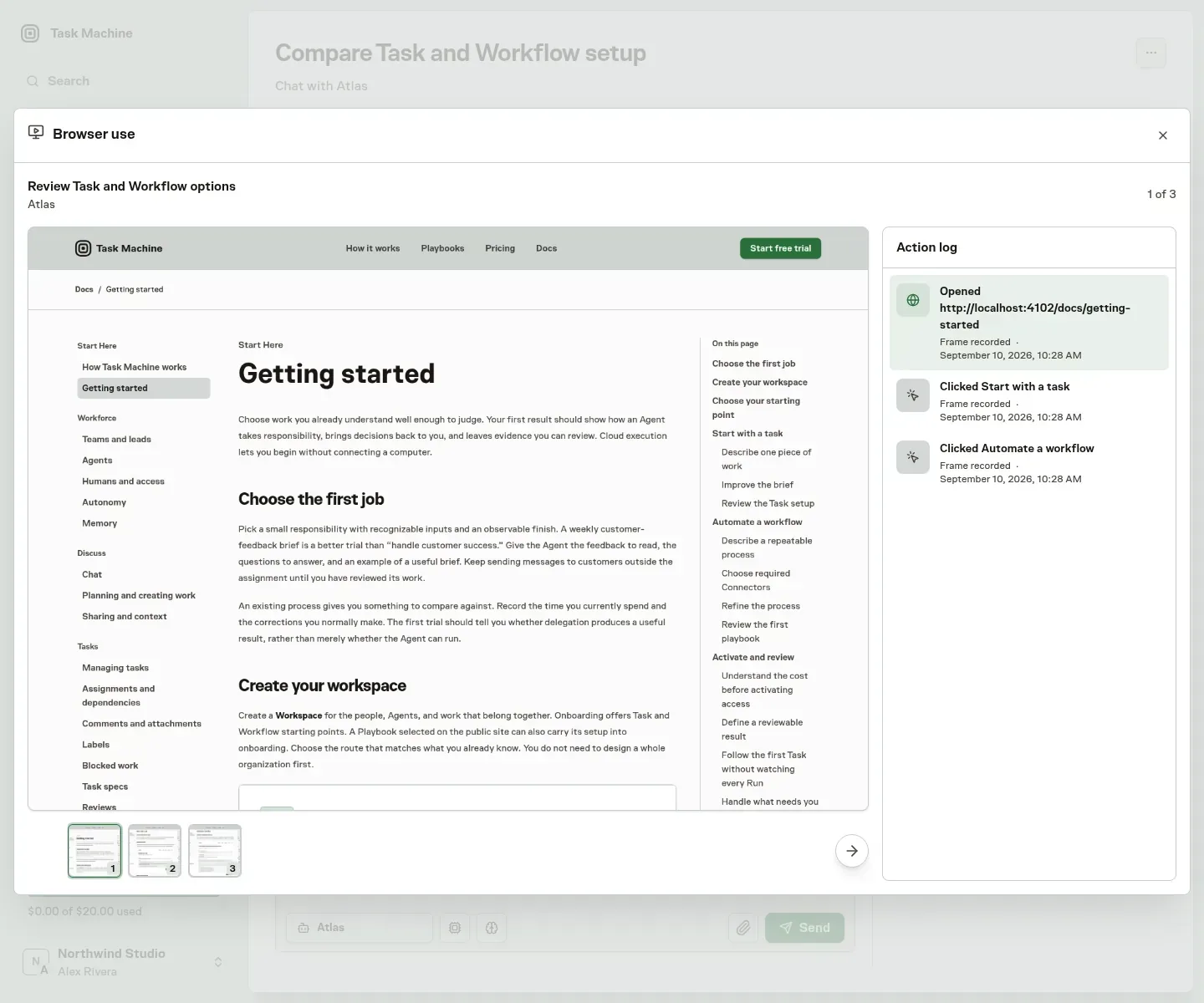
You can move through the evidence with:
- Previous and Next, or the Left and Right keys.
- A swipe across the viewer.
- A thumbnail or an action in the log.
The image and highlighted action stay synchronized. Missing images retain their action entries, so an incomplete capture does not erase the log.
Viewing this history requires Browser use access as well as access to the Chat. Frames are masked before storage, but can still contain other confidential page content. They follow the conversation's retention and are not public artifacts.
Browser use explains capture controls, masking, missing frames, and navigation in detail. See Privacy and data for the wider data boundary.
Continue with Planning and creating work or Sharing and context.