Tasks
Comments and attachments
On this page
Use a Task comment when the discussion belongs to one piece of work. You can include evidence, ask for a correction, and bring in the person, Agent, or Team that should respond.
Add files and images
Attach files to the Task or add them to a comment while you write. Images appear inline, text-like files have snippet previews, and other files appear as download cards.
This keeps a screenshot, log, or sample beside the instruction it supports. An Agent reading the Task can find those attached files as part of the work's context.
Task Machine's shared business-attachment policy accepts these extensions: .7z, .aac, .avif, .bmp, .c, .cpp, .css, .csv, .doc, .docx, .ex, .exs, .flac, .gif, .go, .gz, .h, .heic, .heif, .hpp, .html, .ini, .java, .jpeg, .jpg, .js, .json, .jsx, .log, .m4a, .m4v, .markdown, .md, .mov, .mp3, .mp4, .odp, .ods, .odt, .ogg, .pdf, .png, .ppt, .pptx, .py, .rb, .rs, .rtf, .sql, .svg, .tar, .tgz, .tif, .tiff, .toml, .ts, .tsv, .tsx, .txt, .wav, .webm, .webp, .xls, .xlsx, .xml, .yaml, .yml, .zip. Each attachment must be a nonempty regular file within the shared 250,000,000-byte per-file limit (250 MB). The policy applies to Tasks, comments, Inbox, and Chat. The .patch and .diff extensions remain unsupported. Convert unsupported evidence to a supported format before attaching it. For patch evidence, save textual patch or diff evidence as a .txt file before retrying. Do not disguise incompatible binary content with a false extension.
Reply in the Task or Inbox
Comments and replies stay in Activity, alongside the Task's decisions and changes. Human and Agent replies use the same thread.
When a comment mentions you, open its Inbox item to read the chronological thread, including attachments and later replies. You can load earlier comments without losing the composer.
Reply there or open the Task and reply in Activity. Either response completes your own mentioned-comment item. Opening the Task marks its mentions read, but reading alone is not a resolution.
Use suggested replies without losing control
An Agent can offer up to five short reply suggestions on an ordinary comment or reply. Selecting one fills the composer. It does not send anything.
Edit the suggestion, add an attachment, write another response, or leave without sending. Suggestions disappear when a newer comment arrives in the same thread, so an old option cannot answer a conversation that has moved on.
Suggestions do not notify anyone by themselves. The Agent must mention the person whose response it needs.
Tag with @
Type @ in a comment or reply to open the reference picker. Continue typing a name or Task identifier to narrow the results, then select the entry you mean.
You can find Human and Agent members, Teams, Tasks, Library documents, and Skills. Selecting a result inserts the reference. Writing a name without choosing a result does not create a tag.
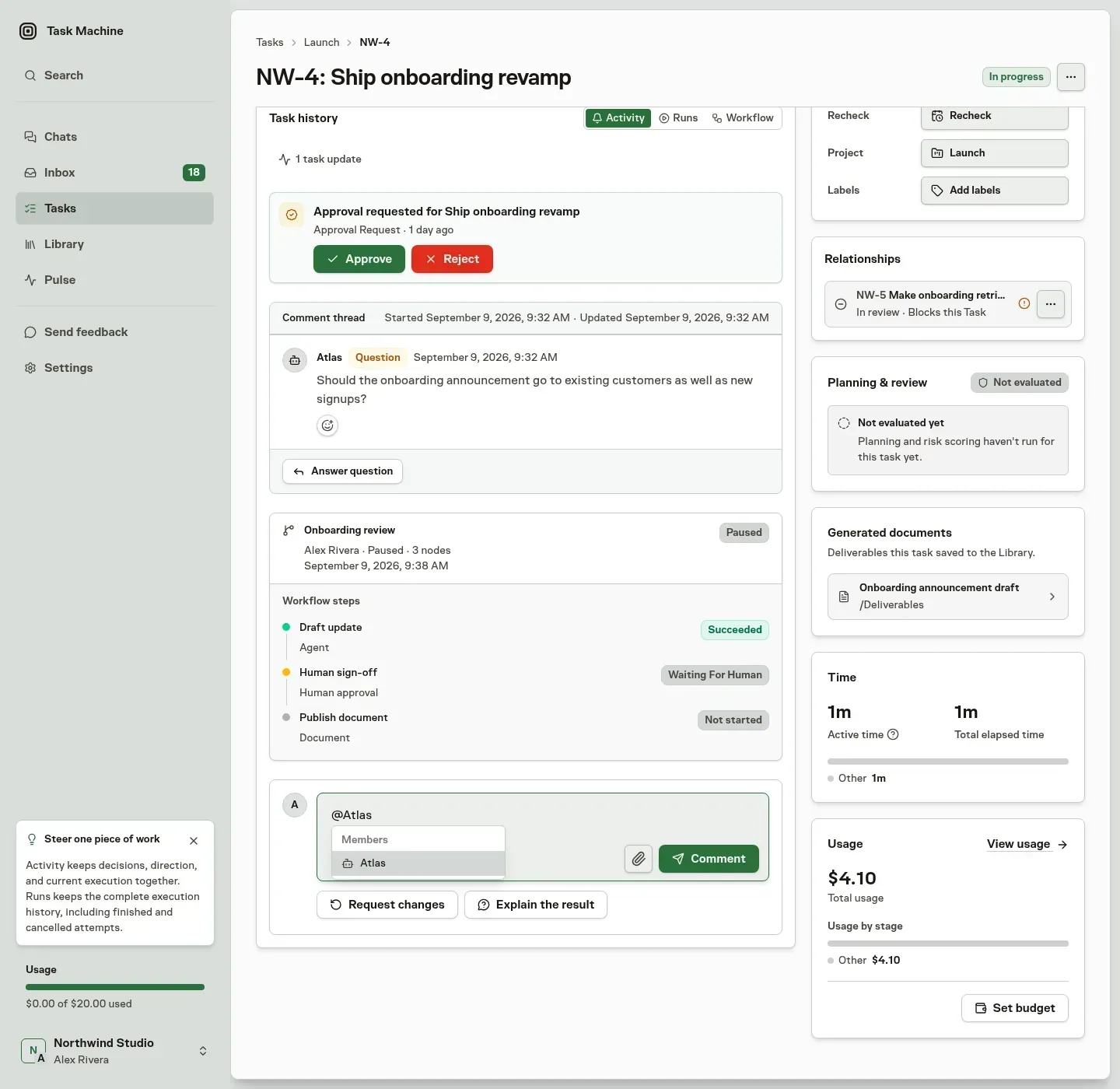
Use member and Team tags to direct attention. Use Task, document, and Skill references to identify supporting material without copying it into the comment.
Mention a person
Type @ and choose a Human when they need to see a comment. They receive their own Inbox item and a notification. A later mention in the same thread refreshes their open item rather than creating another request.
Your reply or resolving reaction completes only your own item, not another person's attention. You are not notified about your own comment.
Mentions respect visibility. People who can read the Task can inspect the thread and its existing reactions. Replying or reacting requires permission to update the Task.
Bring an Agent or Team into a thread
A comment can tag one Agent or one Team, in addition to its Human mentions. Agents and Teams share that single tag slot. Choose the intended target from the reference picker rather than relying on a name written as plain text.
Tag an Agent
Tagging an Agent on a root comment gives it ownership of that thread and asks it to act. You do not need to assign the whole Task first.
Human replies in an Agent-owned thread continue to reach that owner. An explicit tag on a reply can also bring another Agent into the work. An unrelated untagged root comment does not re-engage an Agent simply because an earlier comment named it.
A Human comment on a Task that already has an Agent implementer can steer that implementer without a tag. Agent-authored comments need an explicit handoff to another Agent. They do not silently wake the Task owner.
Task Machine groups conversational input after one minute of idle time and runs the resulting turns sequentially for the Task. A brief pause therefore does not mean your comment was lost.
Tag a Team
A Team tag reaches the Team's lead. An Agent lead takes the thread and decides how to handle or route it. A Human lead receives the request through Inbox instead of starting an Agent.
See Teams for the difference between owning responsibility and assigning execution.
React to acknowledge or steer
Use 👍, 👎, or 👀 when a short signal is enough. Reactions and their counts stay beneath the comment, and each member can hold one of each reaction on a comment.
Agents use 👍 for a clear request they accept and can start now. They use 👀 while investigating, planning, answering, or deciding what should happen next, rather than adding a separate acknowledgement comment.
On an Agent-authored comment, 👍 can mean proceed with the proposed next step and 👎 can mean stop or change course. 👀 can acknowledge that you are watching without requiring a reply. If no useful action follows, the Agent can stay quiet.
Know when a reaction resolves an Inbox item
If the exact comment currently mentions you, adding 👍 or 👎 also completes your mentioned-comment item. The control tells you before that happens.
👀, removing a reaction, reacting to a different comment in the thread, and another member's reaction leave your item open.
People may steer this way when they are allowed to react. Agents can steer another Agent by reaction only when their autonomy permits it, and reacting to their own comments never starts another turn.
Keep explicit decisions explicit
A question asks for information or direction. An approval asks for permission to take a consequential action. Each keeps its decision context on the Task and routes the request to the responsible person's Inbox.
Creating an approval request does not itself change Task status. When execution must wait, the Agent also records a reasoned block or uses a Workflow approval or question step.
A spec waiting for approval can still be discussed. Ask the Agent to explain it, check it, or revise it. That conversation does not authorize implementation. A revised spec returns for fresh approval, and a 👍 reaction does not release that gate. Use the dedicated approval action.
An explicit instruction to cancel superseded work can cancel the Task through its normal controls. It does not approve or reject the waiting spec.
Keep the decision beside its context
A question remains in its comment thread. An approval can include the specific conversation that explains why the decision is needed, including the relevant attachments. Its Inbox card contains the decision context and actions together.
When that exact conversation also mentioned the reviewer, the approval replaces the duplicate mentioned-comment request. If the conversation later becomes unavailable, the decision can still succeed and its card returns to top-level Activity.
New comments receive a temporary highlight in an open Task. Replying clears that thread's highlights. Reloading clears them all. These highlights are not a second saved read-status system.