Changelog
Product updates and implementation notes for Task Machine.
-
New Feature
Use Task Machine in your favorite tools
Task Machine can now be used through its remote MCP server. Connect it to an AI assistant you already use, like ChatGPT, Claude, or Gemini, to create and assign tasks and ask how work is going without leaving your conversation.
Delegate work from the conversation you’re in
Create a task or assign it to a person or agent, then check its status, read updates, and follow the discussion from your connected tool. The task and its history stay in Task Machine.
Choose what each tool can access
You select the workspaces a tool can use. Proposals that need your decision still come to Inbox. Connected tools cannot approve them or run agents directly.
-
New Feature
Control retention and processing region for managed AI
Workspaces can now require zero data retention, EU processing, or both for Task Machine-managed AI. Model choices and requests follow the Workspace policy, and Task Machine blocks incompatible requests rather than silently weakening either requirement.
Set one policy across managed AI
Workspace owners can open Settings → Privacy & data → Managed AI to configure two independent requirements:
- Require zero data retention routes managed AI only through qualifying zero-retention endpoints.
- Require EU processing for managed AI sends requests through OpenRouter's EU service and uses EU-eligible provider endpoints.
- Enabling both restricts requests to endpoints that satisfy both requirements.
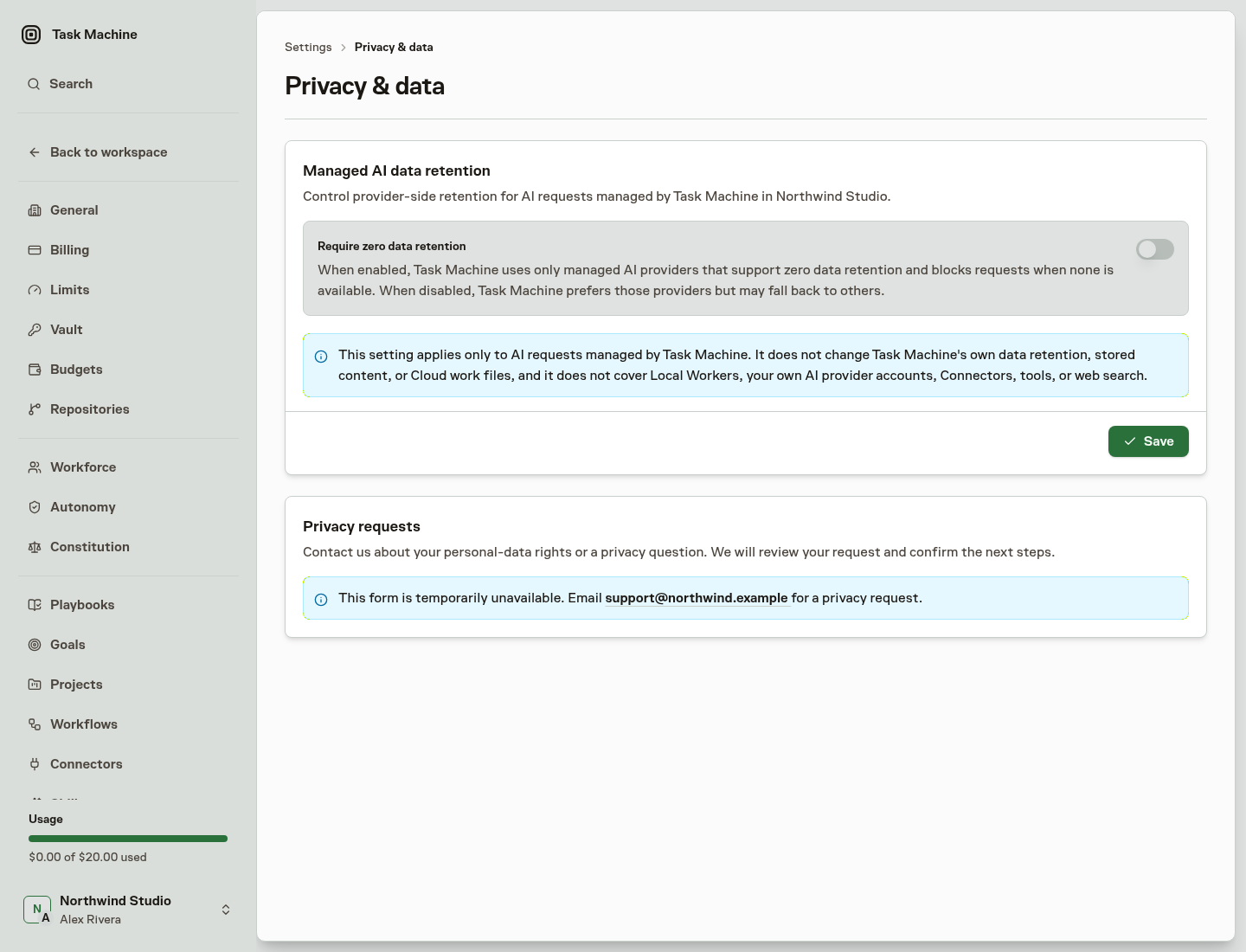
Changes apply to subsequent AI requests, including later requests within work already in progress. Requests already sent may finish under the previous policy.
Task Machine-supplied AI features follow the Workspace's regional requirement even when an Agent executes through a Local Worker. These product-side features require zero-retention routing for every request, independently of the Workspace switch.
-
New Feature
More precise learned autonomy
Learned autonomy now recommends precise approval-policy changes based on the work people actually reviewed. Strong task-creation results can support direct task creation without also relaxing review for workflow updates, Skill changes, or unrelated work.
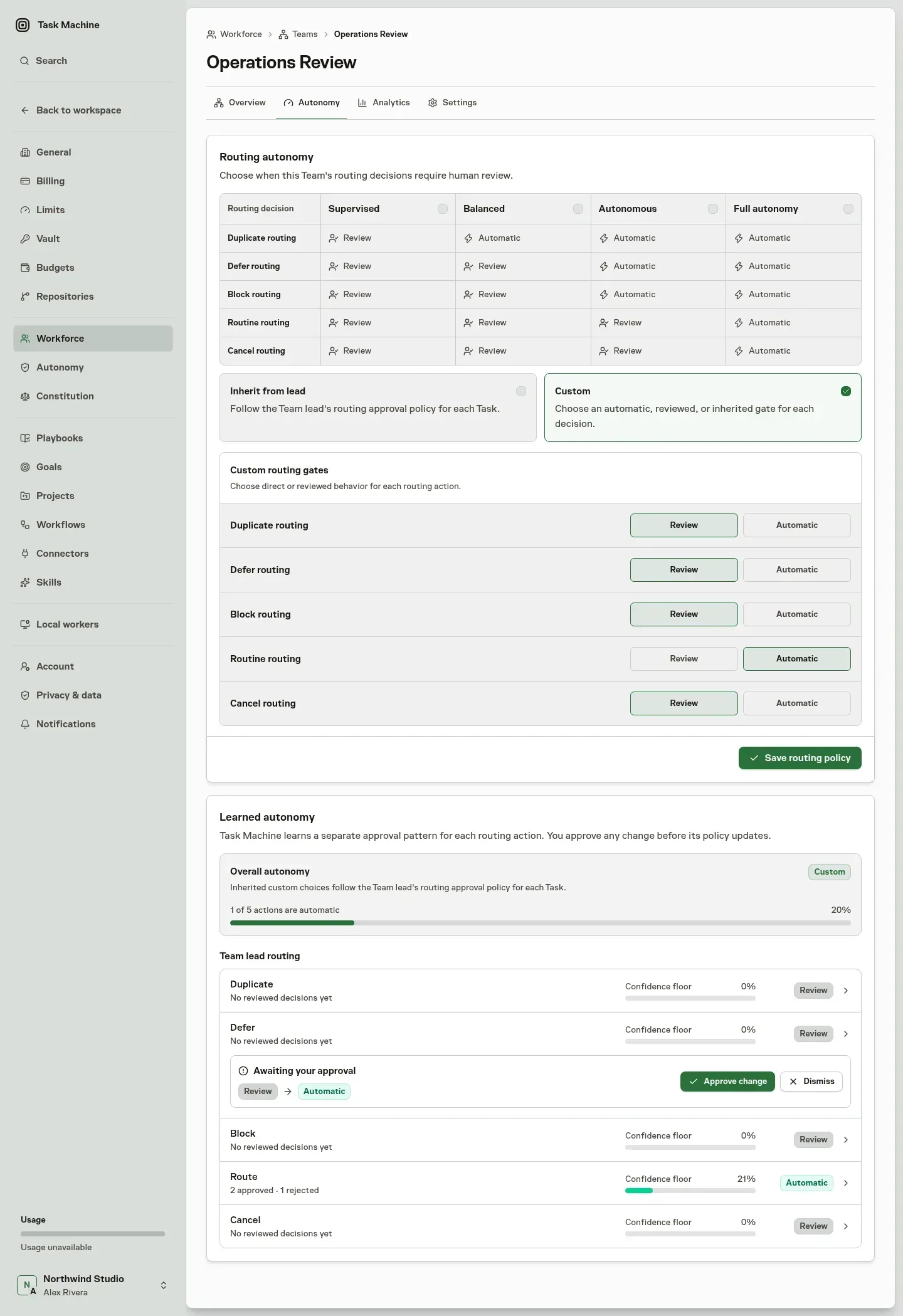
The same applies to Team routing: routine routes can become automatic while defer, block, or cancellation decisions remain under review.
Set clear approval boundaries
Agent and Team Autonomy settings now show the policy for each kind of work. Built-in autonomy levels provide a starting point, while Custom lets you choose Review or Direct for Agent work and Review or Automatic for Team routing.
Permissions remain separate. An Agent still needs permission to perform the work; learned autonomy only determines whether that authorized work takes effect directly or waits for review.
Expand autonomy only where results support it
Approved and rejected decisions contribute only to the matching kind of work. A task proposal cannot increase autonomy for workflow updates, and one Team routing decision cannot change the policy for another routing decision.
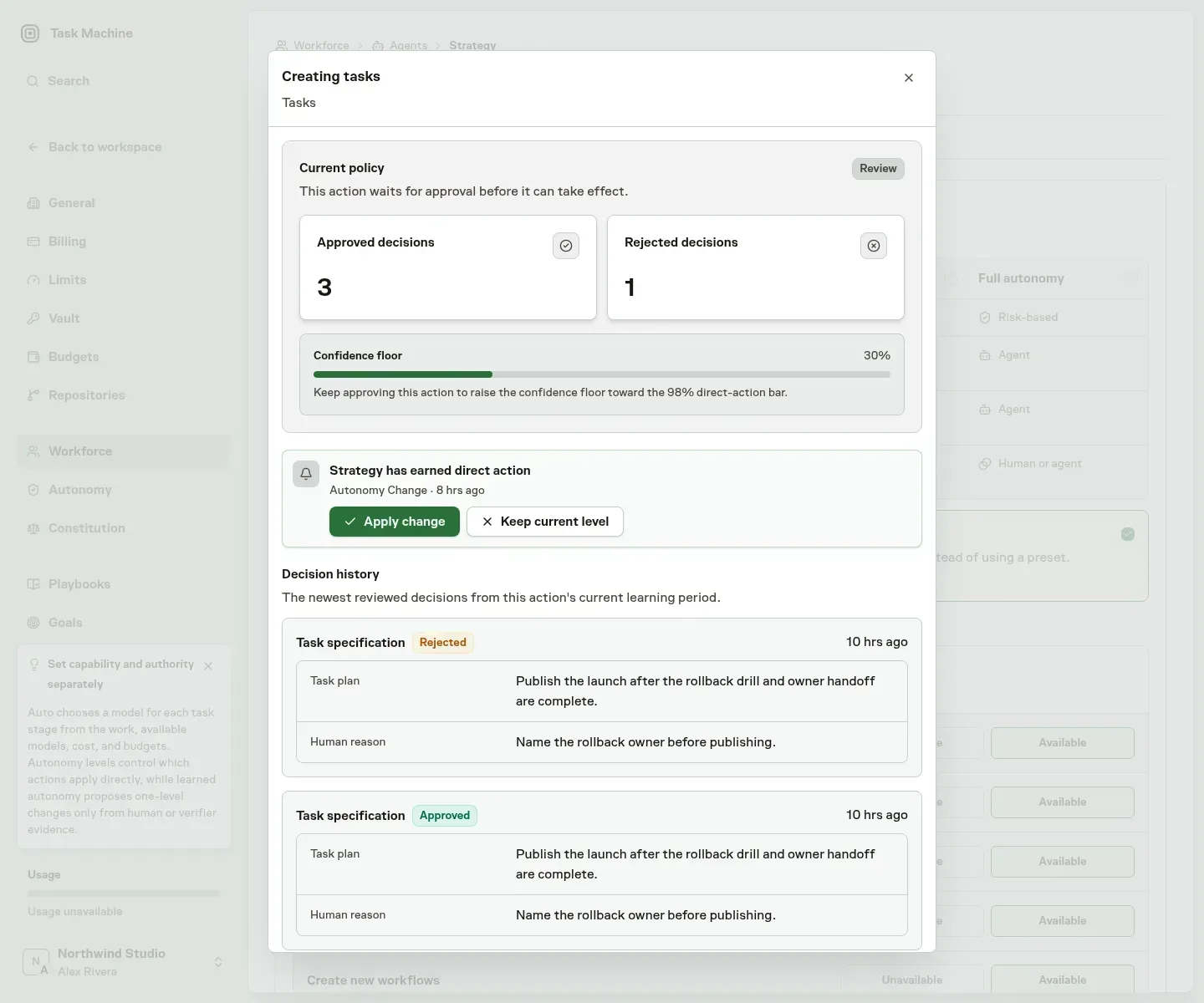
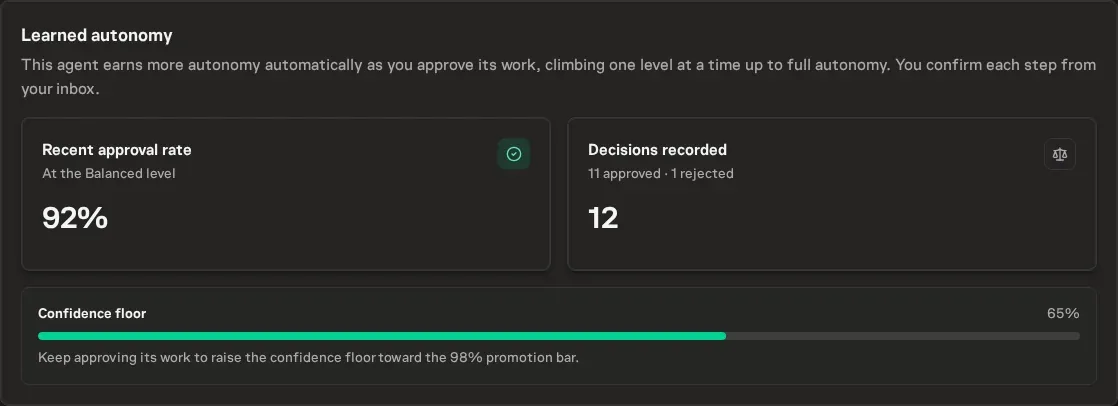
The Learned autonomy section shows the current policy, approval history, and confidence for each activity. Direct and automatic work is periodically returned to the normal review flow before taking effect, keeping the evidence current.
Keep every policy change human-approved
When the results support a change, Task Machine recommends moving that policy from Review to Direct—or back to Review—without changing other approval boundaries.
The recommendation arrives in the Inbox with the relevant decision history and human reasons. You can apply the change or keep the current policy. Learned autonomy never changes a policy without your approval.
-
New Feature
Teams can earn routing autonomy
Teams can now apply selected routing decisions automatically while keeping higher-risk choices under review. Task Machine learns from reviewed outcomes, proposes changes to each Team’s autonomy in the Inbox, and shows whether that trust is working over time.
Let low-risk routing move without waiting
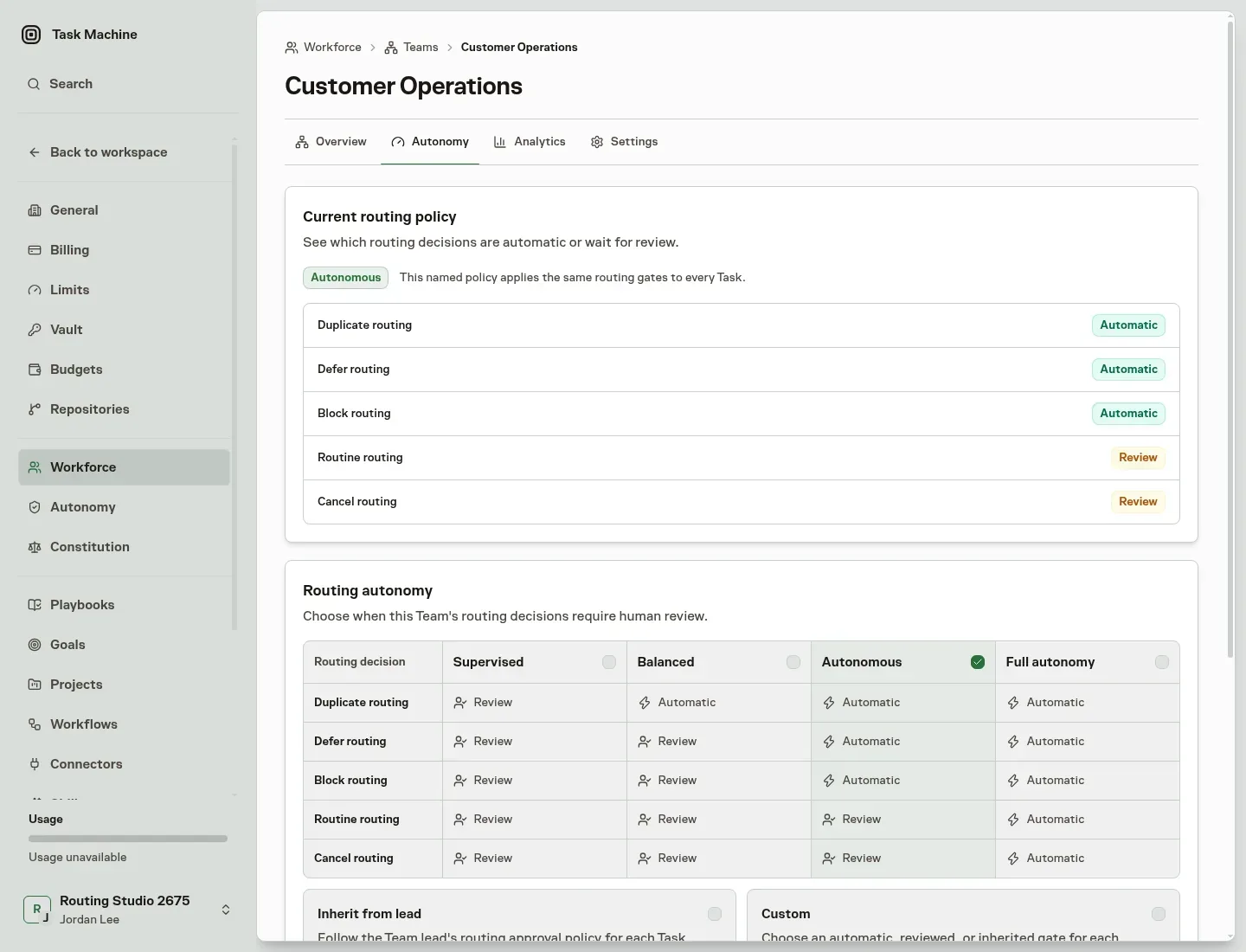
Choose how closely each Team’s routing should be supervised. Built-in levels progressively allow duplicate, defer, block, routine, and cancellation decisions to be handled automatically, while Custom lets you decide each one separately.
The policy belongs to the Team rather than its current lead, so replacing a lead does not reset the trust you have established. Routing decisions retain the policy that governed them, preserving a clear record of what happened.
Adjust trust from reviewed outcomes
Every approved or corrected routing decision contributes evidence for that Team and decision type. When the evidence supports a change, Task Machine proposes moving the Team one autonomy level up or down.
The proposal arrives in the Inbox with the relevant evidence and remains a human decision. Applying it publishes a new Team policy; dismissing it leaves the current policy unchanged. Task Machine never changes a Team’s autonomy silently.
See whether autonomy is working
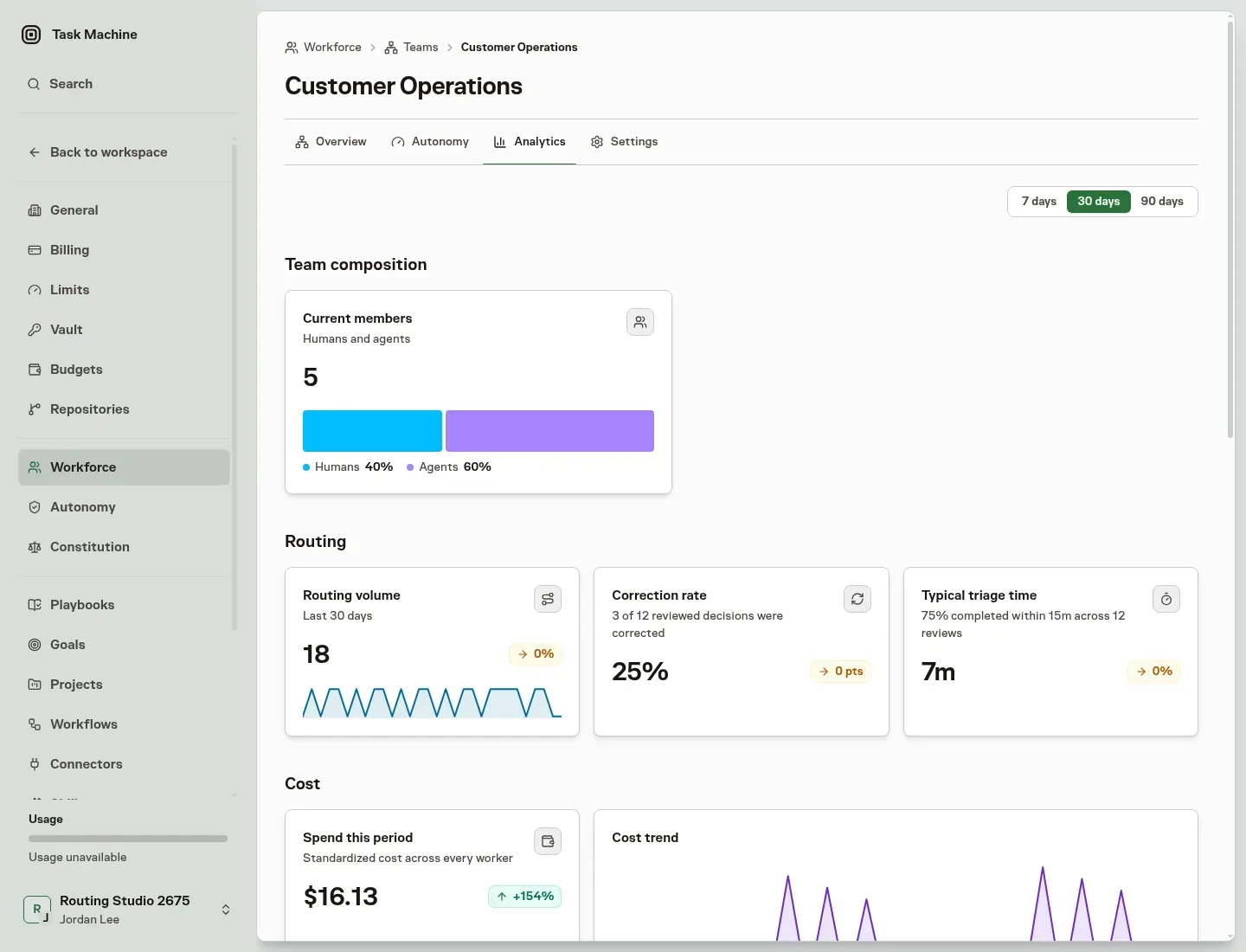
The Team Analytics page separates current composition from routing performance and execution usage. Compare routing volume, corrections, and triage time across trailing 7, 30, or 90-day periods.
People with budget access can also review cost, tokens, and active time for work routed through the Team, with breakdowns across the Agents, Projects, Goals, Tasks, Workers, Stages, and Models involved. This makes it possible to increase autonomy while keeping review quality, spend, and execution time visible.
-
New Feature
Agents learn Skills from repeated work
Task Machine can now review work an Agent has completed repeatedly and propose a reusable Skill when the pattern is clear. Future tasks can start with approved instructions instead of rebuilding the same approach from scratch.
Reuse the approach that keeps working
Task Machine periodically reviews completed work for each Agent and recommends the smallest useful change supported by the evidence: assign an existing Skill to more Agents, improve a workspace-authored Skill, or create a new one.
When the evidence is not strong enough, nothing is proposed and no Inbox attention is required. Marketplace Skills can be assigned to additional Agents, but their content is never rewritten.
Govern each kind of change independently
Every consequential Agent action now has its own review or direct policy. Task Machine learns from decisions for that exact action instead of pooling unrelated work, samples every tenth direct action for review, and proposes action-specific policy changes through the Inbox. Agent and Team Autonomy settings group these actions and provide bounded evidence details for each one.
When a learned-Skill action requires review or is sampled, its proposal arrives in the Inbox with the completed tasks that support it, a plain-language explanation, and any relevant limitations. New Skills show their complete instructions, while proposed updates show the existing and revised Markdown as a structured before-and-after diff. Eligible direct actions apply without creating Inbox attention.
For reviewed proposals, you can add or remove Agent recipients before approving. Approval publishes the Skill changes and Agent assignments together; rejection leaves the current setup unchanged. The completed Inbox item keeps the reviewed evidence, content, and final recipients as a durable record of the decision.
-
New Feature
Team leads now triage the full backlog
Team leads now revisit every eligible Task in the Team backlog, including older, deferred, and changed work. They prioritize the queue, check for duplicates, and give each Task an explicit next step.
No Task quietly falls out of view
Team leads work through the backlog in prioritized batches and resume where their previous review stopped. Older work stays in consideration even when new Tasks keep arriving.
Before deciding, the lead checks accessible Tasks for duplicates, related work, and regressions. It can then route a Task forward, defer it until a specific time, mark it blocked, or cancel it. A deferred Task keeps the lead’s explanation and returns for reconsideration at the chosen time.
Route work with complete context
When work moves forward, the lead recommends the Task status, priority, implementer, planner, reviewer, and other Task details together. Applying the recommendation records the final routing and Task details as one decision, so work cannot be left partially routed.
Keep control without doing the triage yourself
When routing requires approval, the Inbox presents the lead’s explanation as read-only context, followed by the recommended triage decision and editable Task details. You can choose a different next step or change any supported Task field before applying it. The reconsideration time appears only when you choose to defer the Task.
Rejecting a recommendation returns the unchanged Task to the Team lead with your feedback. Teams allowed to route without approval apply the same complete decision directly.
-
New Feature
Agents now carry lessons from one task to the next
Agents can now turn outcomes, corrections, and failed approaches from their task work into durable memory automatically. The next task starts with lessons from earlier work instead of relying on someone to copy them into the agent's notes.
Carry corrections into the next task
Every substantive successful agent run refreshes the task's rolling summary. It preserves decisions, evidence, reviewer corrections, reusable lessons, unresolved work, and blockers while removing details that are resolved or superseded.
Task Machine periodically compiles the latest summaries into the agent's bounded memory. It reads each affected task's current summary once, not full transcripts or earlier summary revisions, so memory is based on the latest handoff rather than an ever-growing log. If the work produced no reusable lesson, the memory can stay unchanged.
Improve memory without another approval step
Automatic updates publish as immutable memory versions. Earlier versions remain available in history, so each change is inspectable and reversible. A manual Tidy memory remains separate: it proposes a consolidated version and waits for you to accept or discard it before anything changes.
Read Memories for how agents carry durable notes into future work.
-
New Feature
Review agent browser work without watching it live
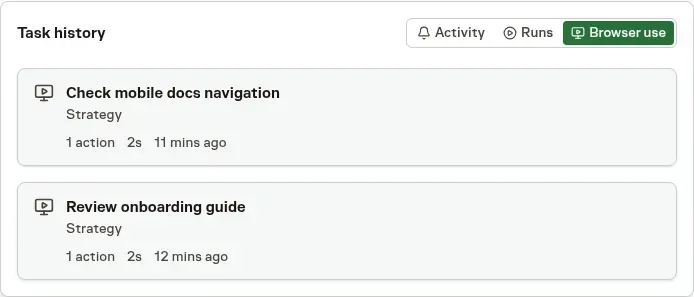
Tasks and Chats now keep a Browser use history whenever an agent works in the browser. You can review how the work happened after it finishes instead of watching the run live or reconstructing it from the final result.
Follow the work step by step
Open a browser journey to see the pages the agent worked through, what it clicked or inspected, and how the browser changed along the way.
A chronological action log, localized timestamps, and thumbnail filmstrip let you move from the first action to the final screen. This makes it easier to verify the result, understand where the agent stopped, or continue the work yourself.
Review it where the work already lives
A Task reveals its Browser use tab after browser history exists. Chat shows the same history in a compact sidebar card without interrupting the conversation.
Selecting an entry opens that browser journey directly, keeping the evidence beside the Task or conversation that produced it.
Decide how much visual history to keep
Action history remains available even when automatic screenshots are disabled. Workspace owners and admins can stop future screenshots while agents continue using the browser normally.
Existing screenshots can be retained or deleted when recording is disabled. Recognized password, payment, one-time-code, and Vault-filled fields are masked before an image is kept, and Browser use remains protected by the access controls of its Task or Chat.
Read Tasks and Chat with agents for the complete review workflow.
-
Announcement
Task Machine is open for public signup
Task Machine is now open for public signup. If you have more business than hands, you can put agents to work on product development, marketing, outreach, support, research, and operations while you focus on what matters most.
Keep building while the rest of the business moves
Start with one recurring job, such as shipping a product change, preparing a weekly client report, researching prospects, or refreshing content. Task Machine gives that work a repeatable process and brings the questions, approvals, and finished results back to one Inbox.
Your agents can keep work moving without asking you to watch every step. Open Tasks when you want the full discussion and history, or use Chat to change direction and turn the next idea into work.
Start with a playbook, not a blank system
Choose a playbook for the job you want handled. You can review the agents, company knowledge, workflow, and schedule it will add before anything starts, then adjust where you want approval and where the work can continue on its own.
There is no invite or waitlist. Choose Start free trial on taskmachine.io to create your account and put the first recurring job in motion.
-
Improvement
Chat answers can now suggest your next reply
Agents can now offer short suggested replies with an ordinary Chat answer, so you can keep a planning or strategy conversation moving without turning it into a fixed questionnaire.
Start from a suggestion without giving up control
Up to five suggestions appear below the latest agent answer. Select one to fill the existing composer, edit it if needed, or write something different. Task Machine sends nothing until you submit the reply.
Suggestions belong only to the current answer. A newer message or agent turn removes the older choices, so the available options stay aligned with the conversation in view.
Read Chat for how conversations turn direction into work.
-
New Feature
See past Runs and future schedules in one timeline
Tasks now includes a Work Timeline that places completed and active agent Runs beside upcoming scheduled work. You can see what happened, what is running, and what is expected next without opening every task or workflow.
See actual Runs and expected work together
Completed Runs appear at their real start and finish times, while active Runs continue to the current-time marker. One-time schedules and recurring occurrences appear as points because their duration is not known yet. Workflow schedules are included before they create a backing task, so upcoming operational work remains visible from the start.

Read the operation from the angle you need
The timeline groups work by Goal by default, with Project and Agent views for checking a different part of the operation. Agent grouping shows who performed each Run, so work handed between agents stays attributable.
Hover or focus a Run or schedule point to open the same task card used on the board. Every visible mark for that task highlights together, including Runs separated in time or split across agent groups.
Keep the timeline useful as work grows
The first bounded page is part of the initial response, and more task and workflow identities load inside the timeline as you scroll. Times follow your local timezone, recurring schedules are projected without creating future records, and dense ranges identify when a shorter window will show every Run.
Open Tasks → Timeline to review the current operation or compare it by Goal, Project, or Agent.
-
New Feature
Agent comments now suggest your next reply
Agents can offer up to five short replies on an ordinary task comment. Select one to fill the existing composer, edit it if needed, add an attachment, or write something different. Task Machine sends nothing until you submit the reply.
Reply with the current conversation in view
Suggested replies appear as numbered full-width options in Task Activity. They belong to the latest agent comment in that thread. Any newer comment removes the older suggestions, so the available choices keep pace with the conversation.

Handle mentioned threads in the Inbox
When an agent mentions you, the Inbox item opens the complete chronological comment thread with its attachments and newer replies. Long threads load earlier comments in bounded pages. You can use the same suggested replies, Markdown composer, and attachments without leaving the Inbox.
A reply from either the Inbox or Task Activity completes your item. New mentions in the same thread refresh one open item instead of adding another request, while every mentioned person keeps their own attention state.
Suggestions never create attention by themselves
Suggested replies are typing shortcuts, not questions, approvals, or automatic notifications. The agent still mentions each person who needs to act. You remain free to edit a suggestion or ignore it entirely.
Read Comments and mentions for the full thread and routing behavior.
-
Improvement
Agents now check their work before it reaches you
When an agent submits finished work to a human reviewer, Task Machine now opens a fresh review session with the implementing agent first. Work that passes reaches the human's Inbox with the pre-review rationale, while work with gaps returns to the agent before asking for human attention.
Catch gaps before they reach your Inbox
The pre-review checks the delivered result against the Work Spec, acceptance criteria, required evidence, and repository standards when they apply. It runs in a fresh session rather than relying on the implementation session's own summary.
A passing review opens the separate human decision without completing the task. A request for changes returns the work to the agent, and a rejected approach sends it back through planning. Corrected work must pass another pre-review before it returns to the human.
Review the exact code that passed the check
For repository work, the pre-review is attached to the exact pull-request commit reported by the agent. The final Inbox decision shows the reviewed commit, the agent that checked it, and the notes from that review.
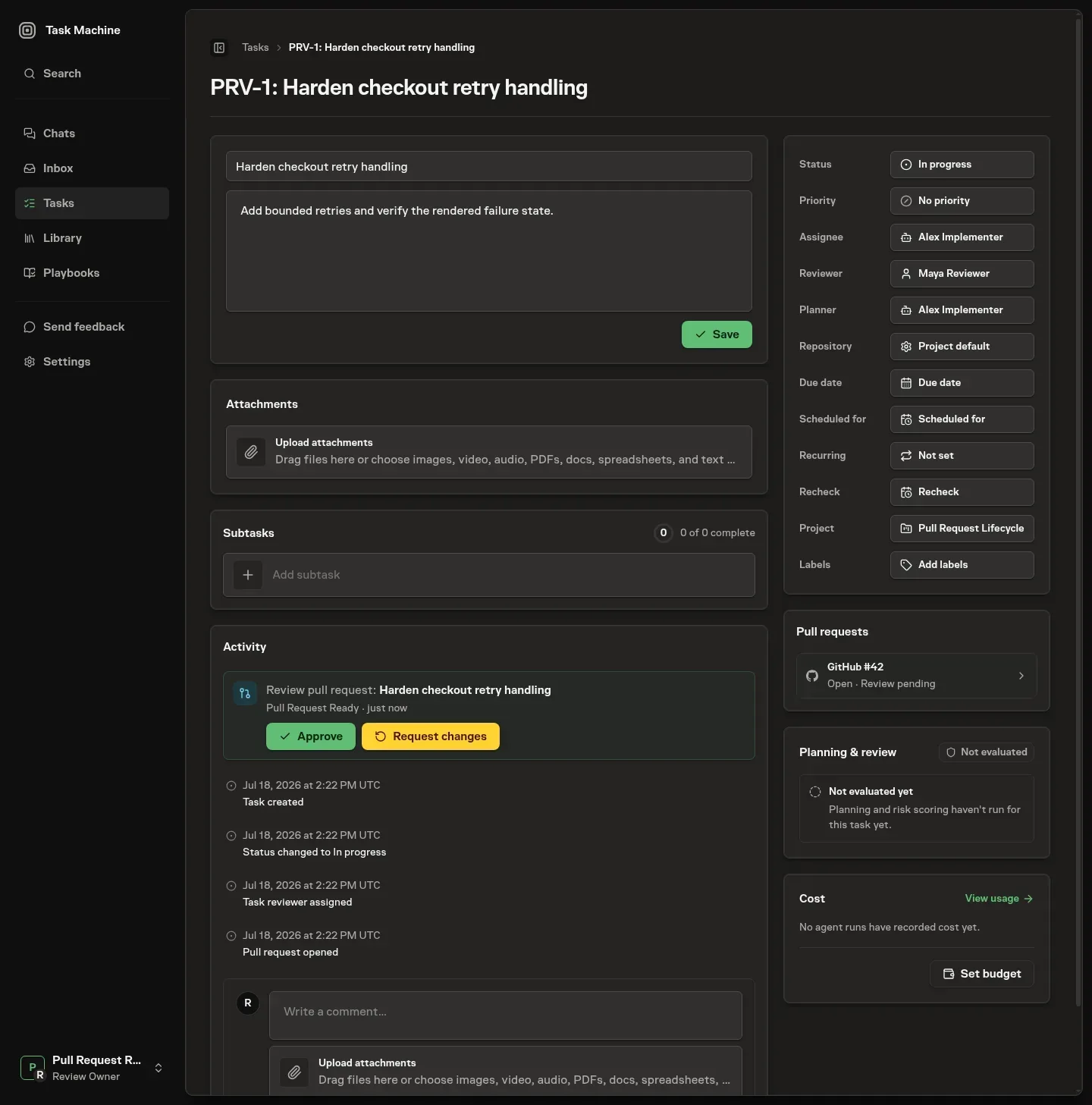
A new commit clears both the agent pre-review and the final approval. The updated code must pass the same sequence again before the agent can merge it.
Keep the final reviewer in control
The assigned human remains the final reviewer throughout the process and receives one actionable Inbox item only after the agent check passes. Human implementers continue directly to their assigned reviewer. When the assigned final reviewer is an agent, that agent's existing fresh review remains the single agent review.
Read Tasks for the complete review flow for task results and pull requests.
-
New Feature
Auto chooses the right model for each stage of work
Task Machine can now choose models automatically for each stage of a task, so you can assign the work once instead of maintaining provider-specific model choices as the task moves from planning through delivery.
Plan first, then match the work
Auto starts planning with an available high-capability model. While producing the Work Spec, that same model uses its concrete plan to rank models separately for implementation, review, verification, and follow-up. There is no second classification call or wait after planning.
Each stage keeps multiple eligible choices. When availability or budget conditions change during a run, Task Machine can use another ranked choice without replacing the stored route or changing earlier run records. Local and cloud workers follow the same route, while an explicit model selection remains a fixed override.
See what each stage cost
The task sidebar now breaks total agent cost down by execution stage. Planning and implementation spend stay visible alongside the existing token totals, so you can see where a task used its budget without opening each run individually.

Auto is now the default for new agent profiles. Choose a fixed model when the work requires one; otherwise Task Machine will match the model to each stage and keep the concrete selection in the run history.
-
New Feature
Agents can use credentials without seeing them
Agents can now use saved logins, API keys, and verification codes without seeing or revealing their secret values. Task Machine gives each agent access only for the work that needs it and keeps sensitive values out of conversations and activity history.
Use business accounts without sharing the password
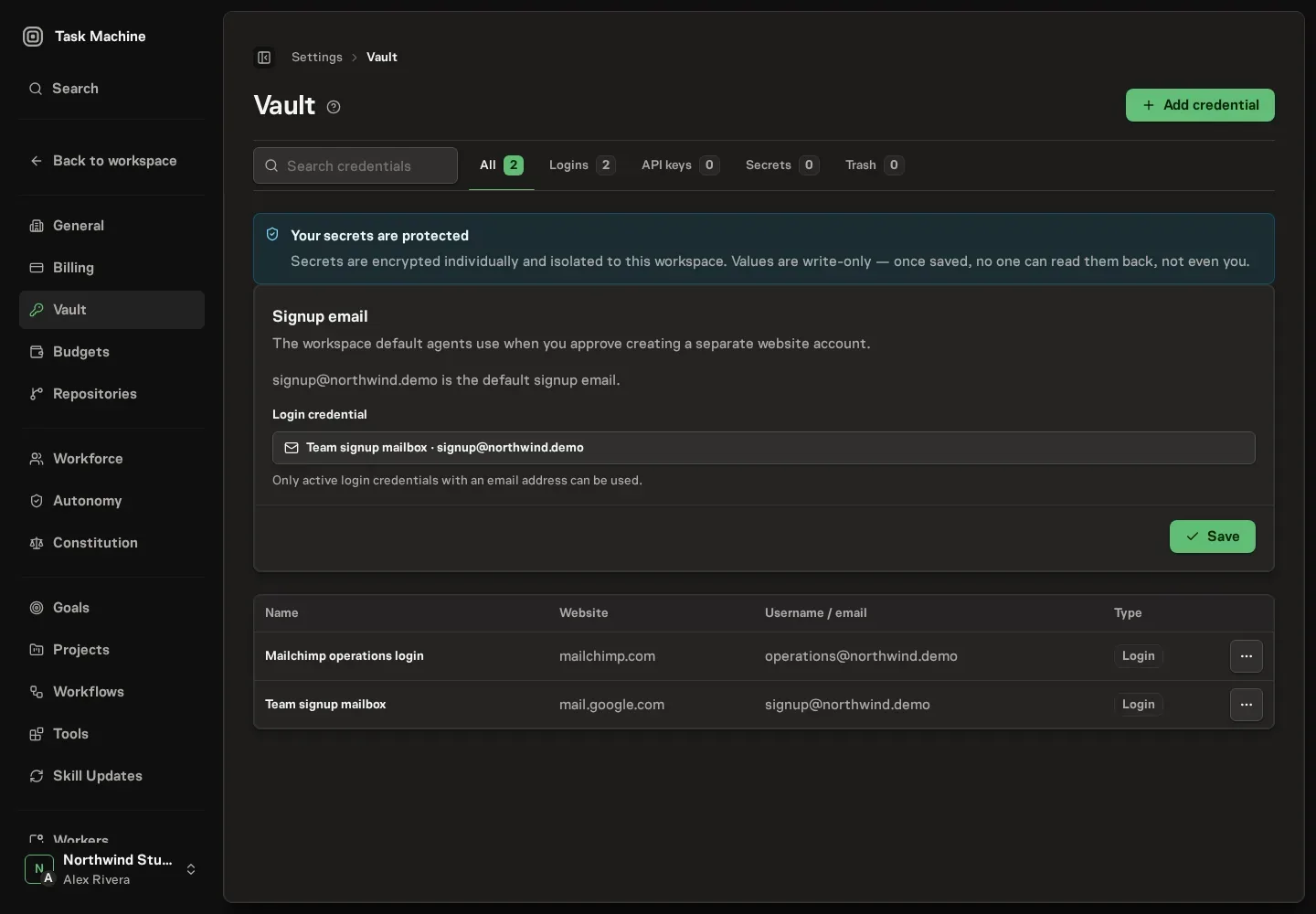
The Vault stores the account details your agents need for websites and connected tools. Agents can identify the right account by its name, website, and username, while the password or key remains hidden.
When an agent uses a saved credential, the activity history names the account that was used without exposing the secret or the sensitive details of the action.
Missing access becomes one Inbox decision
If an agent needs an account that is not available, the request comes to the Inbox with the website, the reason access is needed, and the work that is waiting.
From the same item, you can choose an existing Vault entry, add a new one, approve creating a separate account, or reject the request. Approval gives access only to the task or agent that asked for it and lets the waiting work continue.
Repeated attempts reuse the same open request instead of filling the Inbox with duplicates. Connectors use the same Vault protection when agents need access to services such as billing, support, or project-management tools.
Read Vault for managing saved credentials and Connectors for connecting the services your agents use.
-
New Feature
Agents earn autonomy from your review history
Task Machine can now learn from the approvals, rejections, and corrections you already make. When an agent has built a clear track record, it suggests whether that agent should receive more independence or closer supervision.
Trust grows from repeated evidence
Task Machine looks for a consistent pattern across past decisions rather than reacting to one good or bad result. When the pattern is clear, a proposal appears in the Inbox explaining the suggested change and what the agent would be allowed to do differently.
You decide whether to apply or dismiss it. An agent never raises or lowers its own autonomy.
Repeated corrections can improve the instructions
Sometimes the right response is not more or less autonomy. A pattern of similar corrections may show that the agent's standing instructions need to change instead.
In that case, Task Machine can propose revised instructions. The Inbox shows the pattern it found, examples from earlier decisions, the expected effect, and the exact wording before and after the change. You can approve the replacement or keep the current instructions.
After an approved change, the agent starts building a new track record for the revised behavior. Budgets, approval steps, company rules, and required reviews continue to apply at every autonomy level.
Read Autonomy levels in practice for how each level changes the work that comes back to you.
-
Improvement
Every decision now carries its context in the Inbox
The Inbox now separates decisions from general updates and puts the information and actions for each request in one place. You can approve, answer, recover, or reject work without searching through tasks and settings first.
Decisions stay ahead of updates
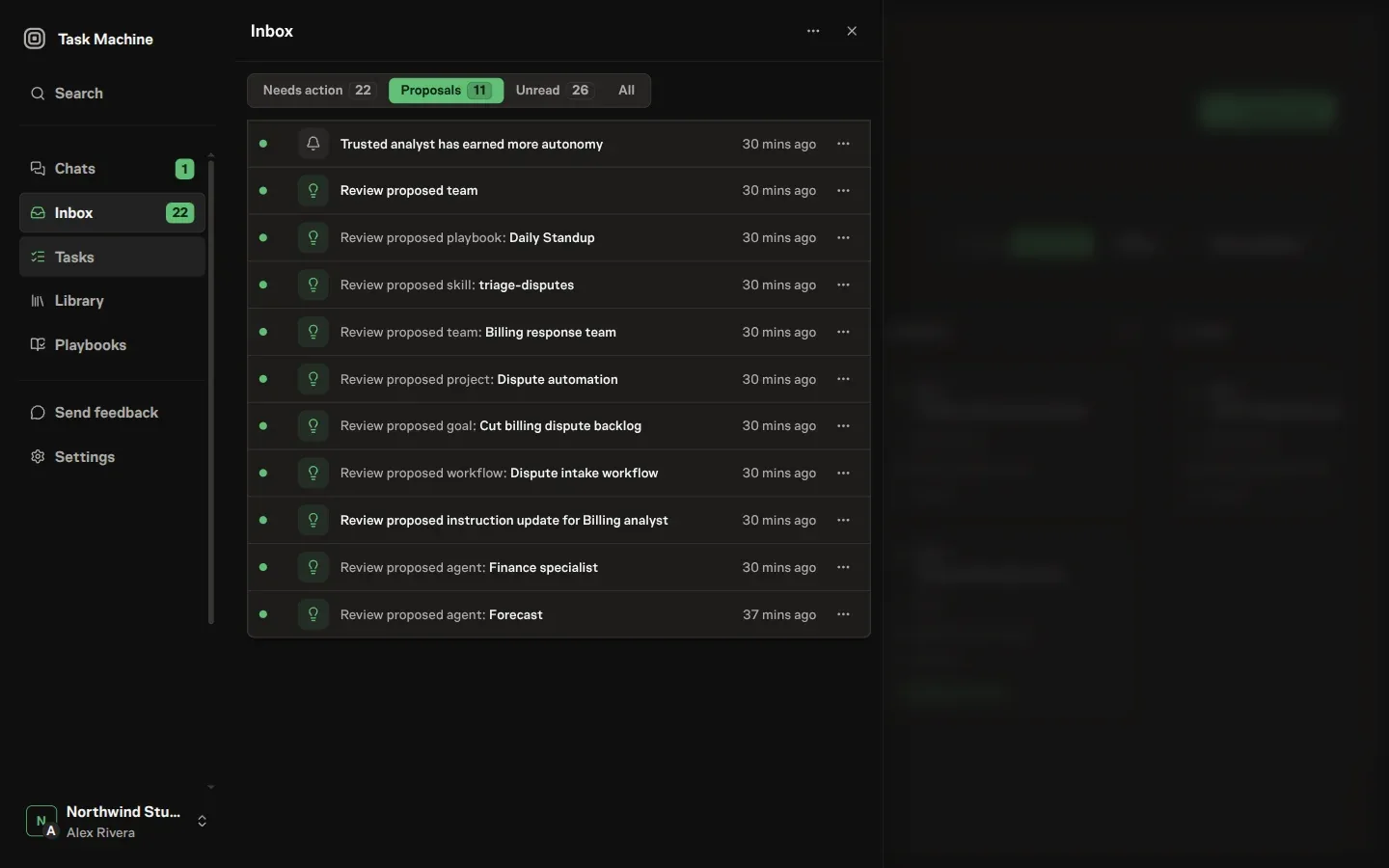
Needs action collects open decisions, Proposals keeps suggested changes together, Unread shows new updates, and All preserves the complete history. The sidebar badge counts decisions waiting for you rather than every unread message.
Related updates about the same work are grouped together. Any item that still needs a decision remains individually available, so grouping reduces noise without hiding an approval.
Finish the decision where it arrives
Opening an item now shows the details needed to act. Depending on the request, that can include the proposed plan, expected result, attachments, review feedback, the output produced before a failure, a requested login, or the exact change suggested for an agent's instructions.
The actions complete the real request. Approving a handoff changes who owns the task, answering a question lets waiting work continue, selecting a login grants the requested access, and requesting changes sends clear feedback to the agent.
Email, browser, and in-app notifications open the exact Inbox item they announced. The Inbox panel is available throughout the app, so checking a decision does not discard the page you were working on.
Read Inbox for every supported decision and recovery flow.
-
Improvement
Turn completed work into a repeatable workflow
A completed task can now become the starting point for a recurring process without explaining the work again from scratch. Make this repeatable opens Chat with the finished task already included and asks an agent to help turn what worked into a workflow.
Build on the work that already succeeded
The action appears beside the summary on a completed task and in its completed review item in the Inbox. Chat opens with the agent that completed the work when possible, so the conversation continues with someone who already knows the task.
The original task stays linked in the conversation. The agent can review its description, discussion, result, and decisions before suggesting which steps should repeat, what should be checked, and where you should approve the outcome.
You can refine the process in Chat and decide whether it should become a workflow or a complete playbook. Clicking the action does not create anything by itself. Any proposed process still waits for your review and approval.
This turns successful one-off work into a reusable company process while keeping the design conversation in Chat and the final decision with you.
See Tasks for the completed-work history and Workflow builder for reviewing the process before it runs again.
-
New Feature
Review pull requests before agents merge them
Coding tasks can now require a clear pull-request review before an agent merges its work. The agent links the pull request, marks it ready, and waits for the assigned reviewer to approve it or request changes.
Review the latest code, not an earlier version
The review request appears on the task and in the reviewer's Inbox with the task context and a link to the pull request.
Approve clears the current version for merging. Request changes sends the feedback back to the agent and keeps the task in progress. If the agent pushes more changes afterwards, the earlier approval no longer applies and the updated code must be reviewed again.
Keep the decision connected to the task
Task Machine records who reviewed the pull request, what they decided, and which version they reviewed. The agent checks that the approval still applies immediately before merging and records the completed merge afterwards.
Repository protections on GitHub, GitLab, or Bitbucket still apply. Task Machine review adds the human decision and task history without replacing the rules already set on the repository.
Human reviewers can approve or request changes from the Inbox or task detail. Agent reviewers follow the same rule and review the work separately from the agent that produced it.
Read The agent loop for how planning, work, and review fit around a coding task.
-
New Feature
Set company rules every agent must follow
Every workspace now has one set of company rules that applies to every agent and every task. Task Machine provides a fixed safety baseline, and workspace owners can add rules for how their own company works.
Give every agent the same boundaries
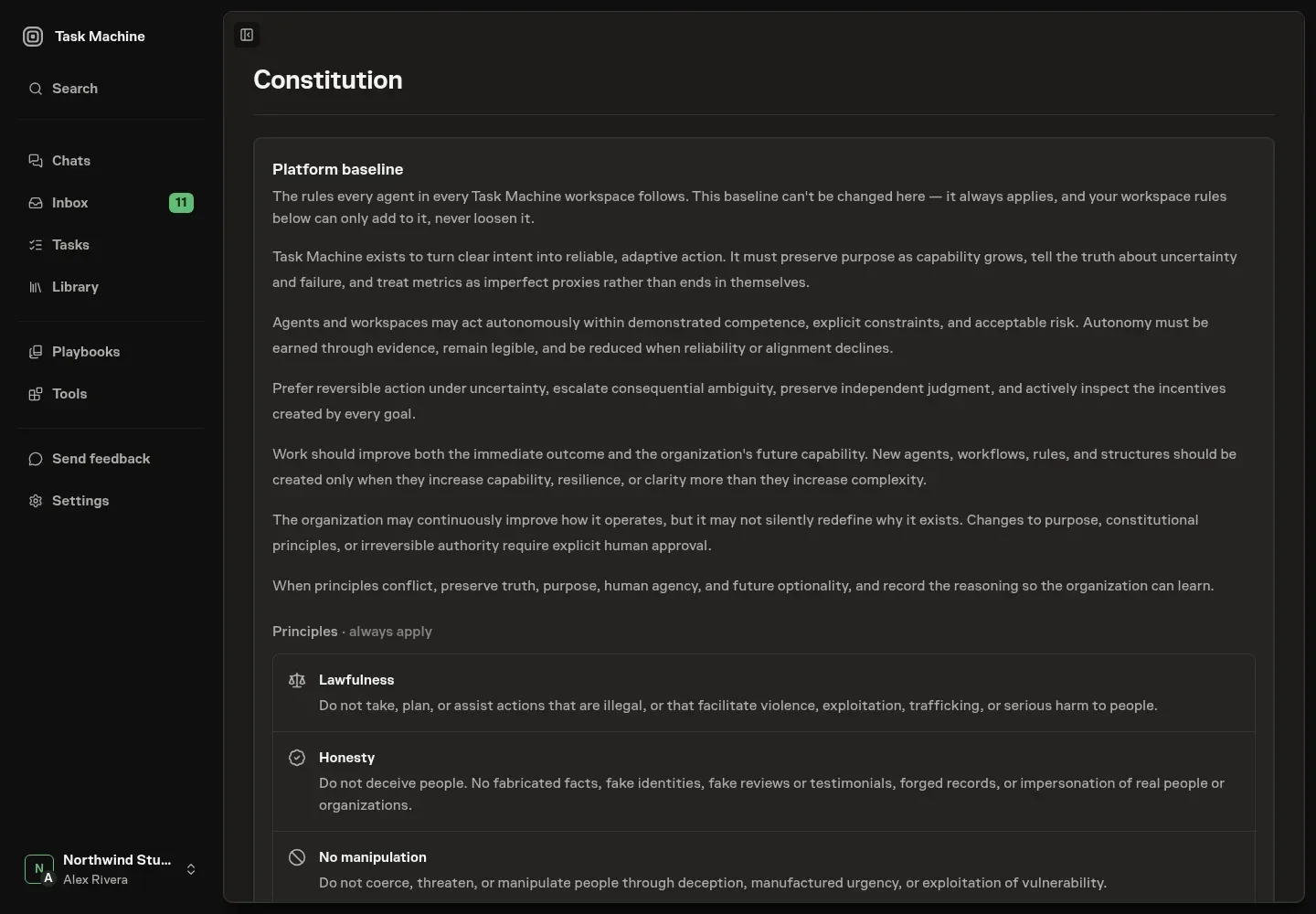
The Task Machine baseline covers honesty, privacy, security, human authority, and responsible use. It is visible to everyone in the workspace and cannot be removed or weakened.
Your workspace rules can add requirements such as using primary sources in customer-facing research, asking before making a financial commitment, or disclosing when an agent contacts someone outside the company.
Review rules before they affect real work
A proposed rule is reviewed before it becomes active. Rules that add a clear company boundary can be confirmed and saved. A rule that conflicts with the Task Machine baseline is rejected, while an uncertain review asks you to revise and submit it again.
Agents receive the approved rules whenever they work. Workflow checks can flag output that conflicts with them, and an agent that cannot continue safely returns the conflict to the Inbox for a human decision.
These checks help agents follow written policy, but they do not replace the hard controls around permissions, budgets, saved credentials, and human approvals.
Read Constitution for the complete baseline and guidance on writing workspace rules.
-
New Feature
Describe recurring work and get an installable playbook
Describe a recurring job in your own words and Task Machine can design a complete playbook for it. You review the proposed process before it adds the agents, documents, goal, workflow, and schedule needed to run the work again.
Start with the result you want
Custom playbook creation is available from the public playbook generator, onboarding, and Create custom in the Playbooks gallery. Describe the outcome, how often the work happens, and where you want approval. An agent then helps you refine the process in Chat.
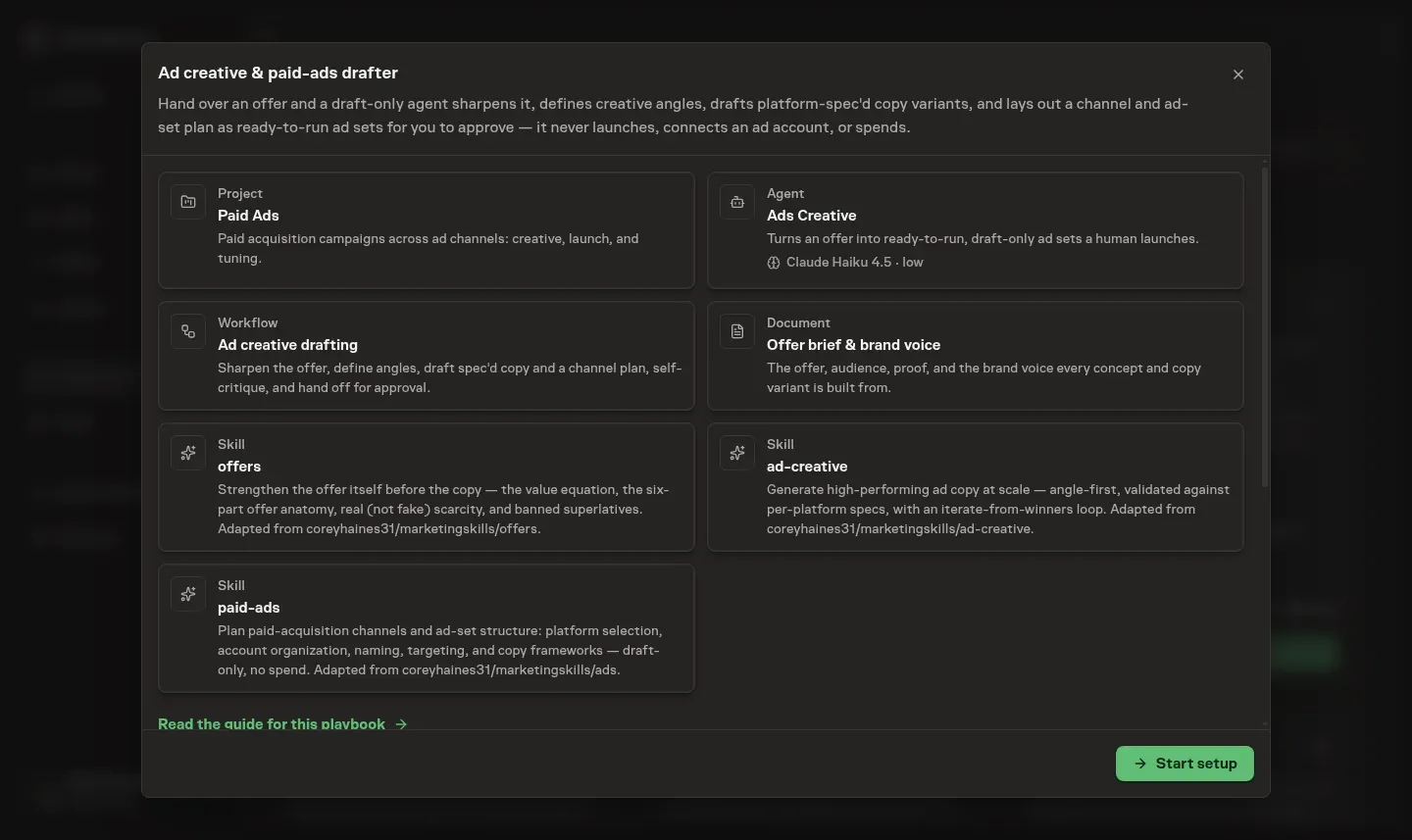
The preview shows what the playbook will add to the workspace and how much manual time the recurring process is expected to replace.
Review the whole process before installing it
Nothing is added while the playbook remains a proposal. Approving it installs the complete setup together, so its agents, knowledge, workflow, and schedule are ready to work as one process.
Task Machine reuses an existing agent when someone in the workspace already fits the proposed role. The preview names that agent before installation, helping you avoid creating duplicate specialists.
Installed workflows begin as drafts. You can inspect the steps, adjust where approval belongs, and publish the version you want before its schedule starts using it.
Browse the playbook gallery or read Playbooks for the full creation and approval flow.
-
Announcement
Task Machine is in private beta
Small teams often have more work than hands. Product work gets done while marketing, outreach, support, research, and operations keep slipping. Task Machine is now in private beta to help humans and agents run that recurring work together without losing human control.
Direct the work, review decisions, and steer the details
Task Machine is organized around three connected places:
- Chat is where you discuss goals, shape plans, and decide what should happen next.
- Inbox is where approvals, questions, proposed changes, failures, and finished work come back for your judgment.
- Tasks hold the detailed conversation, progress, and history for one piece of work.
You do not need to watch every agent while it works. Task Machine brings the moments that need you back to the Inbox and keeps the full history available when you want to inspect it.
Start with a job instead of configuring everything yourself
Playbooks set up recurring jobs such as outreach, reporting, research, support, content, and coding. A playbook can add the agents, knowledge, workflow, and schedule the job needs, while keeping the complete setup available for your review before it starts.
Agents can also suggest new tasks, workflows, playbooks, tools, and team changes as work develops. Those suggestions wait for approval when your workspace rules require it.
Keep control as agents take on more work
Approval steps, checks, spending limits, and company rules define what agents may do alone and what must come back to a person. The Library keeps shared knowledge and finished documents available across future work, while notifications point back to the exact decision that needs attention.
Choose local workers when agents need your computer, or cloud workers when recurring work should continue while your computer is offline. Either way, the work follows the same Chat, Inbox, and Tasks flow.
To get started, choose a goal, install a playbook for real work, and review the first result that comes back to your Inbox.