Workforce
Autonomy
On this page
Autonomy in Task Machine sets how much an agent may do without approval. Choose it for the responsibility you are delegating, then revisit it when the work, inputs, or consequences change.
New agents normally inherit their autonomy settings, with Balanced as the workspace default. As human approvals and rejections accumulate, Task Machine can propose changing whether a particular action needs approval. You decide whether to apply it.
Learned autonomy
Your reviews can help an Agent earn broader responsibility, or show when it needs closer supervision. Learned autonomy uses the approvals and rejections you already make to recommend a change. You see the evidence and decide whether to apply it.
The Create, Update, Restore, Assign, and Other tabs group the actions by what they do. Number badges count the changes awaiting your approval in each group. The overall summary above the tabs covers all actions, including those in other tabs.
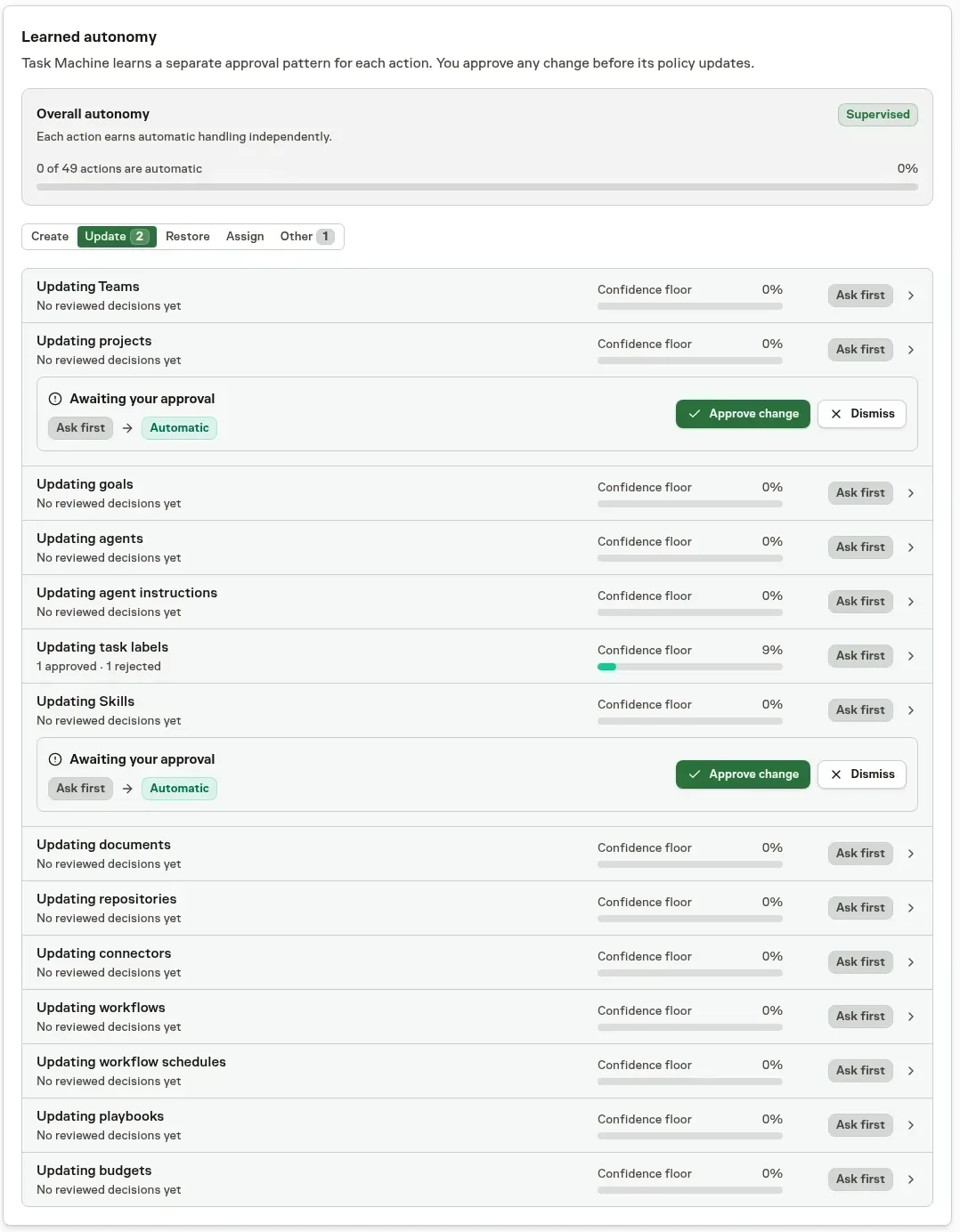
This example uses demonstration data, not results from a customer's Agent. Select an action to inspect its review record before approving or dismissing a recommendation. Team routing keeps its smaller action list together without a category tab bar.
Review a proposed action change
Task Machine records consequential Human decisions on an Agent's work, including proposal decisions, Task specs, and sensitive-action requests. An approval counts as positive evidence only when the recommendation is accepted unchanged. A material edit or rejection counts as a correction. It evaluates each governed action separately, rather than treating evidence from different actions as equivalent.
With enough consistent evidence, it can propose changing the review policy for that action. A short lucky streak is not enough for broader autonomy, and a few early corrections do not automatically tighten review.
The proposal arrives in your Inbox with:
- The decision record behind the recommendation.
- The proposed Ask first / Automatic policy for that action.
- The consequences of accepting it.
- Actions to apply or dismiss the proposal.
The action's policy does not change without your decision.
Improve instructions when the record is mixed
Sometimes a mature record is mixed enough to earn neither promotion nor demotion. Task Machine can compare representative approvals and rejections with the Agent's current instructions. It may conclude that no instruction change is justified.
When it finds a recurring instruction-level cause, it proposes a replacement. The Inbox shows the diagnosis, cited decisions, expected effect, and exact before-and-after text.
Approving the change starts a fresh measurement window so the revised behavior earns its own record.
Choose an autonomy setting
Permissions decide what an Agent is allowed to access and do. Autonomy adds decision boundaries: an allowed action may proceed directly, need approval, or be unavailable at the selected level. Raising autonomy never grants missing permissions.
| Setting | What the Agent can do | What you review |
|---|---|---|
| Supervised | Work on its assigned Tasks. It cannot assign or delegate work, create Agents or Workflows, start Workflows, or open additional Chats. | Every Task spec waits for a Human. Completed work also has a Human reviewer. |
| Balanced | Propose assignments, delegation, new Agents and Workflows, Workflow starts, and additional Chats. These consequential actions need approval before taking effect. Reaction-triggered automation is off. | Routine and Standard specs can skip separate plan review. Higher-risk specs and completion reviews opened by the effective reviewer policy go to a Human. |
| Autonomous | Assign and delegate work, start Workflows, open additional Chats, and steer other Agents with reactions directly. Creating or revising Agents and Workflows, assigning Connectors, and other changes that retain an approval gate still need approval. | Routine and Standard specs can skip separate plan review. Default-owned Routine completion has no separate review, while an explicitly assigned active reviewer still receives it. Other completion reviews may use a Human or Agent. |
| Full autonomy | Perform the permitted actions above without an autonomy approval, including creating Agents and Workflows. | Task spec and completion review follow the same routing as Autonomous. Full autonomy does not remove mandatory safeguards, explicit reviewers, or explicit Workflow approvals. |
| Inherit | Use the next concrete configuration in the Agent, Team, Project, Goal, then Workspace order. | Follow the review rules of that configuration. Inherit is not an extra level of freedom. |
| Custom | Use the action and approval settings you select individually, rather than a preset. | Follow the explicit planning and reviewer settings, while mandatory safeguards remain in place. |
Highly sensitive specs still require Human approval at every level. An explicit planning-approval setting also keeps Routine and Standard specs behind review.
Task Machine takes the whole autonomy configuration from the first scope that does not say Inherit: Agent, Team, Project, Goal, then Workspace. It does not combine individual settings from several scopes. A concrete Agent setting therefore takes precedence over Team, Project, and Goal settings. The Workspace always supplies a concrete fallback.
Configure governed actions
The shared autonomy editor shows four preset columns and Custom as the fifth column. Custom uses the same table, with controls in its cells rather than a separate form. Workspace settings always choose a concrete policy. Agent, Team, Project, and Goal editors can choose Inherit instead of copying another scope's settings.
Restore rows use Ask first / Automatic for Agents, Budgets, Connectors, Goals, Projects, repositories, schedules, Skills, Tasks, Teams, and Workflows. Supervised and Balanced ask first. Autonomous permits automatic Task restoration but asks first for the other kinds. Full autonomy selects Automatic. Custom lets you choose independently for each kind without changing other governed actions. A restore still requires the kind's propose and read permissions.
Authenticated Task origins use the current Task's effective policy. Non-Task origins use Agent and Workspace policy. A caller cannot nominate another Task or send origin fields to gain authority. MCP always requires human review, and all modes retain sampled reviews. Restore decisions contain the target, rationale, current state, and resolution actions in Inbox.
Repository metadata updates have their own Ask first / Automatic action, independent from creating repositories. Supervised, Balanced, and Autonomous ask first, while Full autonomy selects Automatic. Custom can choose this action independently. Automatic retains permission checks, sampled reviews, and stale-observation safeguards. MCP always requires human review. The action changes only name, clone URL, or nullable default branch, never access, credentials, SSH setup, global defaults, or lifecycle. Repository revision decisions keep the comparison and resolution actions in Inbox, and stale cleanup supplies no human approval or rejection evidence.
Budget creation, updates, and restoration each have an independent Ask first / Automatic policy. Existing increase requests use the budget-update policy. Supervised, Balanced, and Autonomous ask first, while Full autonomy permits Automatic. Custom chooses independently, and learned evidence belongs only to the action you reviewed.
There is no fixed Human gate for Agent budget proposals. Permissions, sampled reviews, accepted-base checks, and scope validity still apply. MCP submissions always require a Human decision. Raising or clearing a cap changes an operating limit, not your subscription or purchased usage. Budget reviews keep the limits and resolution actions together.
External actions use the same editor and segmented choices, not a separate checkbox form. Connector and credential grants can be automatic when the selected policy permits them, and Ask first routes the grant for review. Automatic never bypasses authentication, Connector verification, or missing permissions.
Start unfamiliar work with closer review
For a new Agent, Playbook, or kind of work, choose Supervised deliberately. Keep an explicit approval step before sending or publishing. Use the first cycles to learn how the Agent interprets your instructions and which questions it should have asked.
Review that work in your Inbox before widening its authority. A new audience or responsibility does not automatically lower autonomy, so check the effective setting when the work changes.
Choose a level by the responsibility you are delegating, not by how quiet you want the Inbox to be. Questions, failures, and budget alerts can still need your attention at any level.
Choose default planners and reviewers
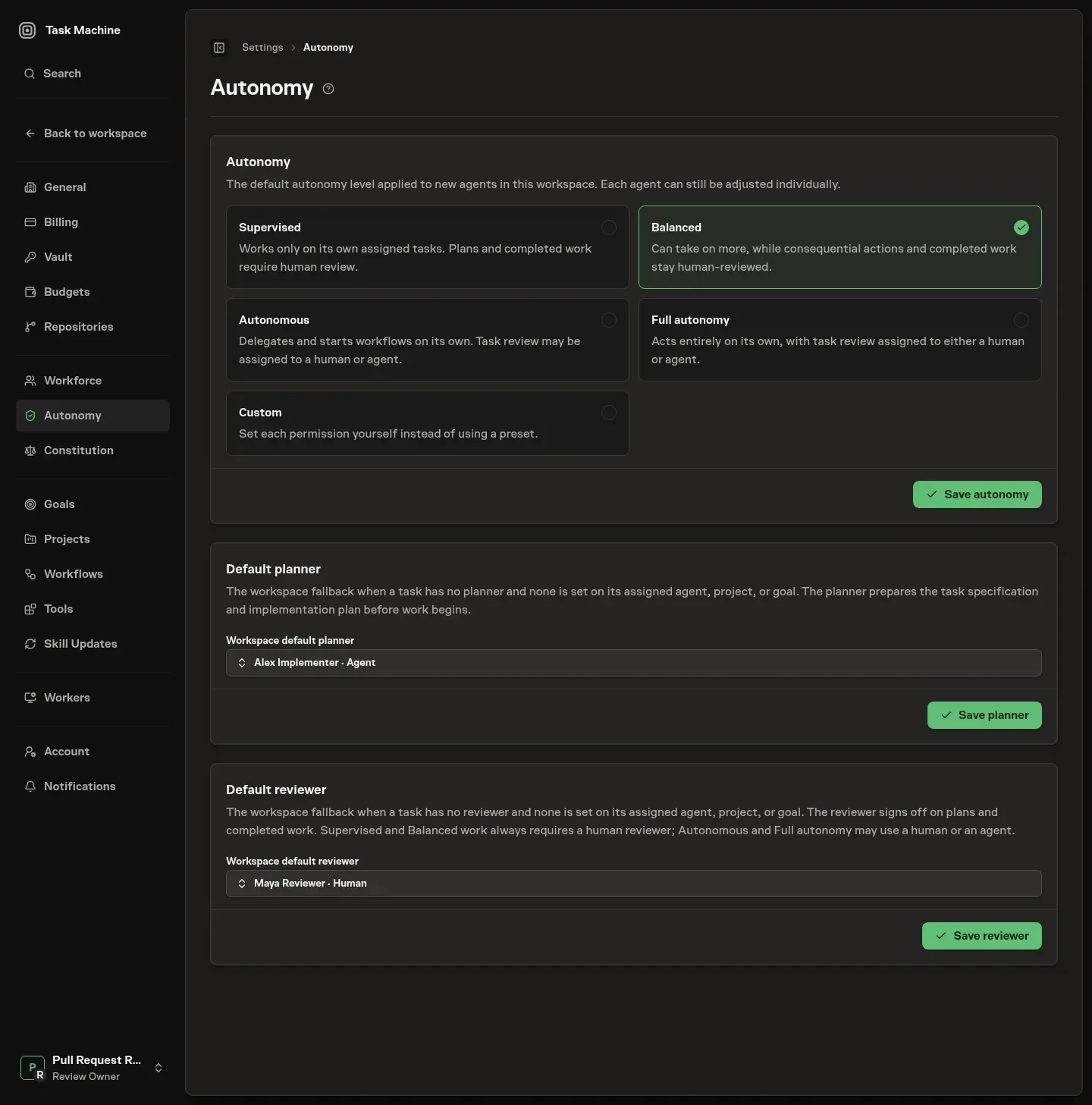
The Autonomy settings page also lets you choose workspace fallback planners and reviewers. A task first keeps its explicit roles, then resolves defaults independently from its assigned agent, project, goal, and workspace. When no default is configured, the implementer plans the work. The reviewer handles plans when review is required and signs off completion when the effective policy opens review.
An explicitly assigned active reviewer always takes precedence for completion. Under default ownership, Routine work has no separate completion review, Standard and Elevated work use the stored reviewer, and Critical work falls back to an active Human lead or the Human task creator.
Budgets and checks hold at every level
Raising autonomy never removes the hard boundaries. Budget checks block further runs when recorded usage has exhausted an applicable limit, including at Full autonomy. They do not guarantee that an already-running operation stops exactly at the threshold.
Verifier steps in workflows keep checking output against your criteria regardless of who approves it, and task runs still keep their execution history on the task. Repository work that requires pull-request delivery also keeps revision-bound review before merge at every level.
Autonomy changes which plans need separate review and who may perform required reviews, but it does not change what is measured, capped, and recorded.
Put autonomy into practice
Change authority for an outreach responsibility
Start an outreach playbook at Supervised and keep an explicit approval step before any sending you configure. The agent researches prospects and drafts messages for the Inbox. Save reusable corrections in its instructions and shared documents, then check whether later drafts follow them. Some playbooks stop at approved drafts and leave delivery to a human.
Changing autonomy does not add a delivery step.
When representative drafts pass review, consider Balanced while keeping the send approval. Later, you might choose Autonomous and explicitly configure different approval routes for established and unfamiliar audiences. Changing the preset alone does not create those routes.
Keep the budget and the verifier criteria in place, and evaluate the new responsibility separately when the audience changes.
Lower authority when the work changes
More rejected drafts, unresolved verifier findings, or surprising actions are reasons to revisit the boundary. Use the run history and approval record to identify what changed. A new audience, new format, or stale source document may need corrected guidance as well as closer review.
Lowering an agent's explicit autonomy changes that agent's setting wherever it applies, without changing other agents. To use project or goal settings instead, leave the agent on Inherit. Account for the extra review work while the responsibility is being corrected, and test the revised process before widening authority again.
Deciding when to trust agent output explains how to judge that record without treating a few successful runs as evidence for every kind of work.
Choose decision boundaries
Separate routine checking from consequential decisions
A client-report workflow may need to gather updates, reconcile dates, draft a summary, and check source links. Requiring your approval between every step can leave you doing the coordination you meant to delegate. Removing all review can let an invented commitment reach the client.
Keep a human gate before delivery. Use the steps before it to prepare a report you can judge, including unresolved questions and sources. Keep pricing changes, unusual promises, and other decisions outside the agreed brief with the person accountable for them.
Put each kind of interruption in the right place
Inside a workflow, an approval step pauses work for a human decision. Place it before the consequential action, such as sending an approved report. A question step pauses for information or direction the work needs, such as whether a changed deadline has been agreed with the client.
A verifier is configured on a step by assigning a verifier agent and writing outcome requirements. It assesses that step's output before completion. Criteria might require every completed-work claim to cite a source and every missing update to be marked. The verifier can catch mistakes, but it can also be wrong or uncertain.
Its assessment supports the human decision.
Research, drafting, formatting, and assembly can proceed between these gates, subject to the work's permissions, autonomy settings, and budgets. A written instruction to ask first does not replace a configured approval step.
Make the Inbox request sufficient to decide
The Inbox collects approvals, questions, proposals, reviewable results, and relevant awareness updates. Resolve the decision there and dismiss informational items once you have what you need. Reading an item is different from resolving it.
When shaping a workflow, specify what its approval request must contain. For the report example, include the draft, the reporting period, sources for material claims, unresolved gaps, and what happens if you approve. A request that says only “approve report” leaves you doing the research again.
Use Tasks for optional investigation or later detailed steering. The normal approval should not depend on leaving the Inbox to reconstruct why you were asked.
Use review effort to locate the next change
Look across several cycles rather than judging one busy morning. Distinguish requests that found a real problem from approvals you passed unchanged, questions caused by missing inputs, and awareness updates you could clear quickly.
If the same question returns, make the answer part of the brief or source guidance. If two approvals check the same draft with no new consequence between them, consider consolidating them. If a draft passes unchanged but its delivery still carries risk, keep the delivery approval. A clean record does not make every gate redundant.
Change one boundary at a time. An autonomy preset controls agent actions and review routing, while a workflow approval is an explicit step. Raising the preset does not remove that step. Conversely, removing a step does not establish that the agent has permission to perform the next action.