Administration
Workspace and account
On this page
A workspace keeps one operation's work, people, agents, and shared context together. Use the workspace created during setup, and create another only when work needs a separate membership and access boundary.
A workspace is one operating context
A workspace is the boundary around one company, client, or operating context, and it is the unit Task Machine uses for both navigation and access.
Your Tasks, Teams, Projects, Goals, Agents, Library, and Workflows stay within that Workspace. Your membership and role determine what you can read or change.
Switching workspaces changes the context you are viewing, rather than combining records from different clients or operations.
Name the workspace, then choose whether to begin with a Task or a Workflow. You can also skip that choice and finish setup later. Add the process, constraints, and desired outcome through the journey you choose.
Task Machine derives a stable slug from the workspace name. The slug is part of every workspace URL, which is how the app always knows which context to load. The slug stays put so links you have already shared keep working.
You can belong to more than one workspace
A single account can be a member of several workspaces at once. You can use one sign-in for several companies or clients while keeping their work separate. Your active memberships determine which workspaces you can open, unless your account is permanently blocked.
Your account holds personal preferences, while each membership grants access inside one workspace. Members and roles explains those memberships and their permissions.
A permanent account block prevents access even when your memberships remain active. Changing memberships or resolving billing does not lift it. Contact Task Machine support if you believe the block is a mistake.
Agents can propose a separate workspace
An agent may recognize that upcoming work needs a genuinely separate operating and authorization boundary. It can propose a sibling workspace from its current workspace, but it cannot create or own that workspace itself.
The proposal arrives in the Inbox of people who can update the current workspace, with the proposed name, rationale, and ownership consequence in the review.
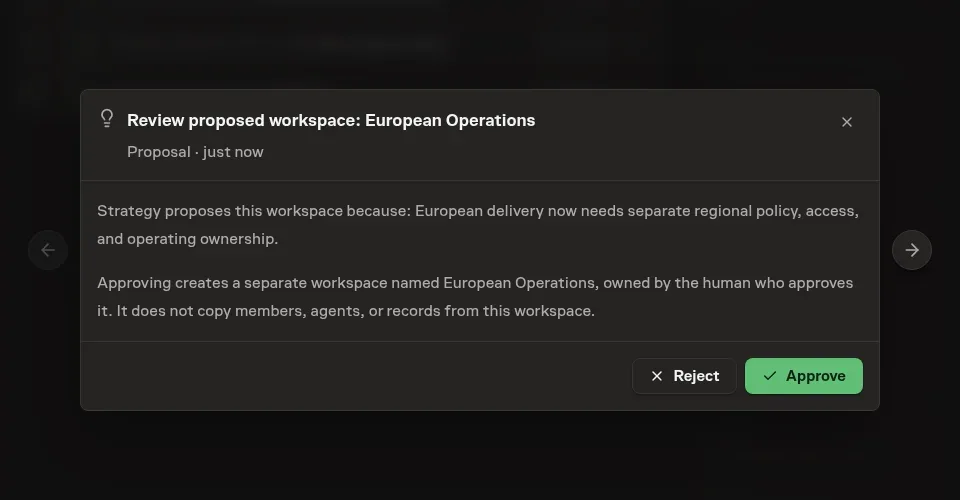
Approving creates a separate workspace owned by the human approver. It does not copy the proposing agent, other members, or records from the source workspace. Rejecting the proposal or having the agent retract it creates nothing. This keeps workspace boundaries and human ownership explicit while still letting agents recommend the right structure.
Workspace settings are gated by permission
Changing the workspace itself, including its logo and workspace-level configuration, requires the workspace-update permission, which the owner role always carries. Whoever creates a workspace becomes its owner and holds that permission from the start.
Members without it simply do not see workspace management actions, and a page that needs management access shows a no-permission state rather than dangling controls that would fail.
For accounts that are not permanently blocked, Task Machine enforces your role's permissions when you perform an action. Members and roles covers how those permissions are assigned, and the permissions reference lists every key.
Choose whether external work credits Task Machine
Task Machine attribution starts on for every workspace. Agents add a small credit to external work they create: “Sent with Task Machine” for email and direct messages, “Created with Task Machine” for public posts, comments, and published artifacts, and source-specific credits for commits and pull requests.
Internal Task Machine activity and private working drafts do not receive the credit.
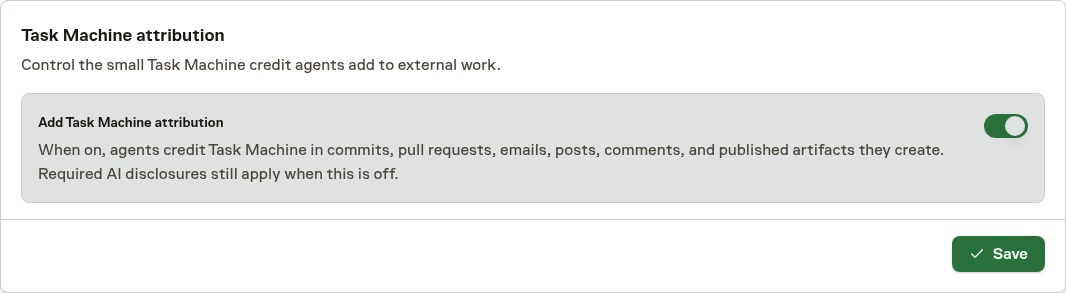
A member with workspace management access can turn this product attribution off or back on under General, in Task Machine attribution. The choice applies to work started after the change. It does not rewrite an existing message, artifact, commit, or pull request. This optional credit is separate from legally required AI disclosures.
Turning it off never permits an agent to hide that someone is interacting with AI or to omit another disclosure required for the context.
Archive a workspace you no longer use
An owner can archive a workspace from the Danger zone in workspace settings after every other active human member has been removed or suspended. Archiving takes the workspace out of navigation and prevents it from being opened, while preserving its tasks, history, and configuration. Agent members and retained workspace records do not block the action.
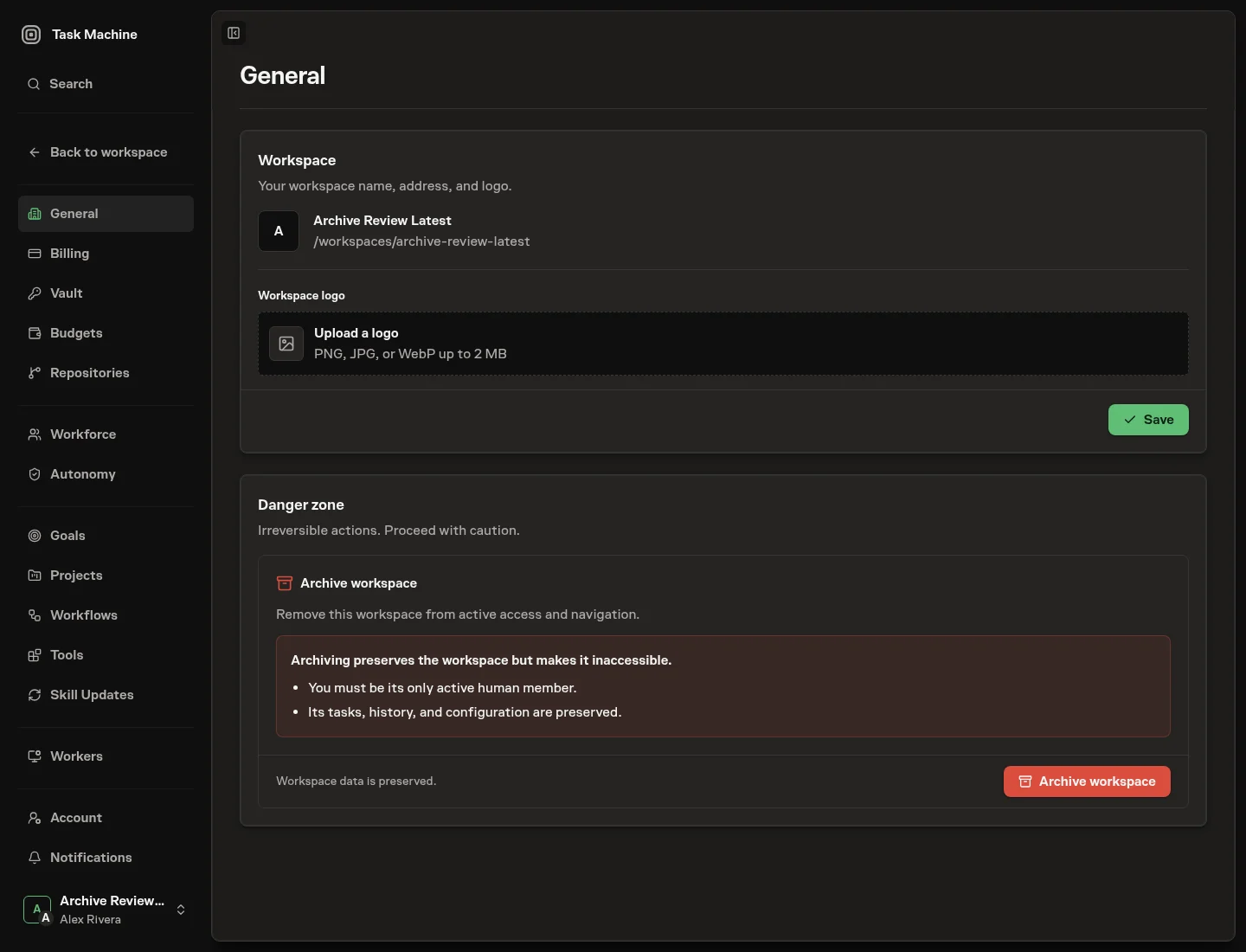
This safeguard prevents one owner from unilaterally removing a workspace that other people still use. If the archive action is unavailable, resolve the remaining active human memberships first in members and roles, then return to workspace settings.
The workspace stays live as others work
A workspace is a shared, multi-session space, so what you see updates as other people and agents act. When someone changes a workspace's identity, adds or suspends a member, accepts an invitation, moves a task, or a machine comes online, the pages you already have open update through live subscriptions without a manual refresh.
This matters most once agents are running: the workspace reflects their work as it happens, and you stay oriented without reloading.
Keep using Chat, Inbox, and Tasks for daily work. When another person needs access, Members and roles explains invitations and permissions.
Account and notification settings
Use account settings for your identity and preferences. Notification settings let you choose which events send email or browser notifications. Enabling browser notifications also requires permission in that browser. The daily digest is email-only. Reading a notification does not resolve its Inbox decision.
Privacy and data
Use Privacy and data to review managed AI retention requirements, understand the limits of those controls, and send an account privacy request. Archiving a Workspace preserves its history. It is not a deletion request.