Make Work Repeatable
Workflow execution
How a workflow run executes under a task — step by step, with verifier gates and human approvals.
Once a workflow is authored in the builder and published, running it is what makes the process repeatable: a run is one execution of a published workflow version, the place where a designed graph turns into actual work with a result for every step. This page describes how a run starts, how it advances step by step, and what it records, so the shape you drew becomes a loop you can actually start.
Every run belongs to a task
A run is always anchored to a task, so there is one visible record of what happened even when work runs itself. The task is the papertrail (see Tasks): its timeline is where a run's progress, questions, approvals, and final summary belong. You start a run against an existing task, or — the common path — start it from the Workflows page, where starting a workflow creates a backing task in the definition's project and runs beneath it. Either way a run is never orphaned from a place you can look. A run also records its workspace, its project, the exact published workflow version it came from, who started it, and its status.
A run moves through a fixed set of states — queued, running, paused, succeeded, failed, cancelled, or timed out — and points at the step it is currently on, so its position in the graph is always legible. As the run advances it writes events onto the task timeline: the run starting, each step starting and finishing, a step waiting on agent work or a human, and the run reaching its result.
The command center can find workflow runs by name, status, ids, and failure details. Opening a run from search takes you to the backing task's activity trail rather than to a separate run page, because that is where the run timeline and related task context live. If a run is not terminal and your role can run workflows, search also offers a cancel action that stops the run and any workflow-owned worker work.
Schedule a workflow to run on its own
A workflow does not have to wait for you to start it. Scheduling belongs to a specific workflow, so you reach it from that workflow — its row menu on the Workflows page or the Schedule action in the builder header — and choose whether it runs once at a future time or repeats on a recurring cadence. Task Machine then starts the run when that time comes due, each firing creating its own run and its own backing task, exactly as if you had started it by hand. Scheduling lives with the workflow itself rather than on a task that starts it: because a workflow already produces tasks as it runs, scheduling the workflow directly is the honest model, and it mirrors how a task carries its own one-time or recurring schedule.
You describe the cadence in plain language rather than cron syntax — "every weekday at 8" — and Task Machine resolves it, previews the next runs in your timezone so you can confirm them, and keeps the raw expression editable behind an advanced disclosure when you want precise control. A one-time schedule fires its run at the chosen moment and is then finished. A recurring schedule keeps creating the next run on its cadence until you cancel it. Cancelling a schedule stops future runs and leaves any runs it already created untouched, so ending a cadence never disturbs work already in flight.
A schedule follows the workflow's current published version rather than the one that was live when you set it up: publish a new version and the next firing runs that version, with no schedule to recreate. Each firing creates the backing task in the workflow's project and runs beneath it like any other run, so a scheduled run is as legible and steerable as one you started yourself.
A run advances step by step through the graph
A run executes deterministically from the graph's single start step. When a step finishes, the run reads the published graph to find what comes next — for a plain step that is its one outgoing edge, for a branch it is whichever routes the branch selected, and for a human approval it is the approved or rejected route its decision picked — and starts the steps that are now ready. A step is ready only once every step that feeds into it has succeeded, so the run never gets ahead of its own dependencies. When nothing remains to schedule, the run succeeds. If any step fails, the run fails at that step and records why. The current graph is linear and acyclic by design: there are no loop-back edges and no merge-many-into-one fan-in, which keeps advancement deterministic.
When a step hands work to a worker or pauses for a person, the run stops at that step and waits. When that work completes, Task Machine resumes the run from where it left off and carries it to the next wait or to the end. Resuming is safe to repeat: a run that is already finished is left untouched, and a step still waiting on agent work or approval is left waiting.
Agent steps run on connected machines
An agent step runs an agent against the prompt and context the step carries, using the same connected-machine path a directly assigned task takes (see Tasks). The run assigns the step's agent to the backing task, passes the step's explicit context references into the compiled prompt, sends the work to an available worker, and waits. Readable document references are injected into the job's knowledge context. File, task, and memory references travel with the job as context hints for the agent. When the work succeeds the step captures its output and the documents the agent produced. When it fails or times out, Task Machine retries that worker work with a bounded exponential backoff before failing the run, and when it is cancelled the run cancels at that step with the worker's reason. Branch and document steps run the same way, each with a prompt shaped to its job. A branch asks its agent to evaluate the conditions. A document step asks its agent to create the configured Library documents and checks that every required document exists before moving on.
Branch steps route by evaluating their conditions
A branch step chooses its path at run time by checking its conditions in order. Each condition can name its own evaluator agent. When it does not, the branch step's agent evaluates it. The first condition that returns PASS selects its route and the later conditions are not run. If every condition returns FAIL, the branch finishes without opening an outgoing route. The decision — which conditions were checked, how each came out, and which edge and target step were selected — is recorded on the step result, and the run follows exactly the route the branch chose. Routing stays deterministic even though the conditions are natural language: you wrote and ordered them in the builder, and the run records the verdict it reached on each.
Human pauses and verifier gates gate a running step
The checkpoints a workflow carries all execute inside the run. When an agent or document step names a verifier, the run asks that verifier to check the step's output against the step's outcome requirements in the same task working folder and return PASS, FAIL, or UNCERTAIN. A pass lets the run continue. A fail stops the run at that step. An uncertain result creates a task question for the workflow starter, pauses the run, and resumes once the human answer is recorded. A human approval step pauses the run, opens an approval request routed to whoever the step's scope authorizes — a member, a role, a project's editors, or anyone holding a required permission — and holds until a permitted person decides. Approval resumes the run down its approved route, and a rejection takes a separate rejected route when the step was wired with one, or fails the run when it was not. An ask-human step pauses the same way to ask a plain question rather than a yes-or-no decision: it opens a question on the backing task, routes it to a chosen member or, by default, to whoever started the run, and resumes carrying the person's answer once they respond. Both human pauses land in your inbox and on the task timeline and also notify by email. Approvals and verifier gates covers the checkpoints in full.
A run records a result for every step it touches
Beneath a run, each step attempt is a step result: a record of which step ran, the attempt number, its status, the structured input and output, the decision a branch reached, and timing. When a step reaches outside itself, the step result holds the link — to the agent work that ran, to the approval request or question that paused it, to the folder it used on disk. Agent-step output also carries the agent-run reference, the knowledge context that was injected, and any documents linked back to that job, so the run can show what the agent produced without duplicating document state inside workflow logs. A verifier check on a step records its own outcome against that step result, holding the PASS, FAIL, or UNCERTAIN verdict, the reasoning behind it, and the issues it found. Read together, the step results are the spine the task timeline, the audit trail, command-center workflow search, and worker transcripts hang off — one verifiable record of how a run reached its result. Usage and cost stay on those worker transcript events and are summarized from them when a workflow run is displayed, rather than being copied into workflow timeline entries.
Watch a run from the task timeline
A run is something you watch, not just something that happens. On the task it runs beneath, the run appears as a single entry in the activity timeline — one card for the whole run rather than a scroll of individual step events — and opening it brings up the run view, the one place that gathers everything a run recorded.
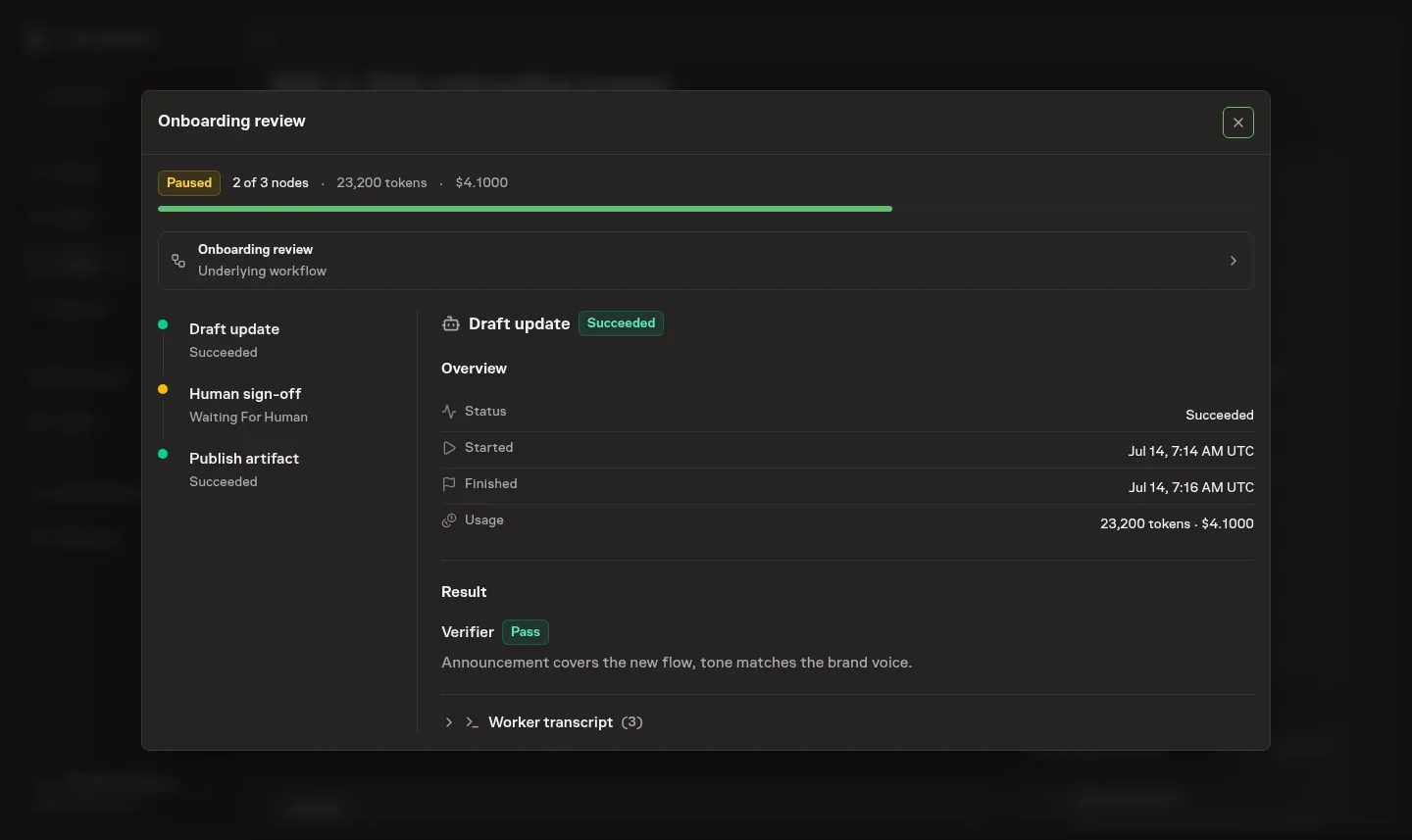
The view is laid out the way a run reads. A summary across the top shows the run's status, how far it has progressed through the graph, and the token and cost total — derived from the run's transcripts at the moment you look, never stored on the run itself. A stepper down the left walks the steps in order, each with its status and the current step marked, so you can see at a glance where the run is and click any step to inspect it. The panel on the right is the selected step's full record: its status and attempts, when it started and finished, the working directory it ran in, the verifier's verdict and reasoning, the route a branch chose, the documents it produced, and its worker transcript — the same tool calls, reasoning, and output you see in chat, folded away until you want it. The selected step's newest transcript page loads automatically, and earlier or later events remain available without loading every step's complete history. Questions and approvals the step is waiting on surface here too, and when a request is routed to you, you can approve or reject it inline without leaving the task. Everything updates live as the run advances, so a run you are watching moves on its own.
What execution does and does not cover today
Workflow runs cover the agent, branch, document, verifier, ask-human, and human-approval step types end to end, but they are honest about their current edges. The graph is linear and acyclic — loop-back and many-into-one merge steps are out of scope, so a process that needs to repeat a section is not yet expressible. Worker failures and timeouts retry automatically with a standard bound before the run fails, and a missing document gets one bounded rework attempt. Verifier outcomes do not retry automatically. The richer retry policies you define in the builder are saved with a published version, but a run does not yet read their attempt counts and backoff. Treat that part of the retry policy as the design Task Machine is growing into, and see budgets and retries for where that bounding fits the larger control story.
For the human and verifier checkpoints a run pauses on, see approvals and verifier gates. For ready-made workflows you install rather than draw, see playbooks.