Inbox
Proposals
On this page
A proposal asks whether a suggested change should become part of your Workspace. Read its scope and rationale, inspect the candidate, and decide in Inbox. Different proposals create work, add capabilities, or revise something you already use.
Change a proposal before approving
The proposer's note comes first, followed by the records the proposal touches. Everything the proposal would set sits in one card marked Proposed. Change any value there before choosing Approve, such as a name, description, instructions, lead, model, autonomy, timing, or amount. Approval applies your values. Anything you leave alone is approved as proposed.
A change to an existing value shows as a word diff. Insertions are highlighted and deletions are struck through, and you edit the proposed text in place. Use the icons labelled Diff and Text to switch each comparison between marked changes and the proposed text alone. Your choice stays in this browser view and does not change what approval applies.
Formatted text stays formatted until you click it to edit. Changes you cannot adjust in Inbox, such as autonomy rules, follow as Also changes rows with their current and proposed values.
Tasks
A Task proposal opens the complete editor in its decision modal. Adjust the brief, acceptance criteria, scope, assignments, timing, and labels before approving, according to your permissions.
Choosing an assignee while reviewing does not start work. Approval saves the final proposal and applies the ordinary assignment, planning, and execution behavior. If you can approve but cannot change assignments, the existing assignment choices remain unchanged.
Inbox history keeps the reviewed proposal and outcome rather than replacing them with the Task's later contents.
Follow-up Tasks pre-planned in a Work Spec are not listed here. You create them from that plan's review, as Task specs describes.
An Agent can also ask to cancel its own Task when the work is already done elsewhere. Decide whether a Task is still needed describes that decision.
Agents and Teams
Review a proposed Agent's role and configuration before adding it to the workforce. For a Team, check the responsibility and routing arrangement rather than treating the Team as another executing Agent.
An update to an existing Agent names the same Agent and shows the changed values, including instruction differences and Skill additions or removals. Approval updates that Agent. It does not create another one. Rejection leaves the accepted configuration unchanged.
Projects, Goals, and labels
Review how a proposed Project or Goal fits the work you intend to delegate. These proposals establish organization and context, not proof that the resulting work is complete.
A Project-label proposal shows its Project, name, color, description, proposer, and rationale. Check the intended meaning before activating another label that people will use to classify Tasks.
Chats
A proposed child Chat shows its opening message, target Agent, and the proposer's rationale. Read the actual question or direction before approving another conversation.
Human access
A Human access proposal asks you to invite a collaborator or change an existing Human's Workspace role. Review the recipient or Human, the Agent's rationale and the complete permission table. Role changes align Current and Proposed access on the same rows.
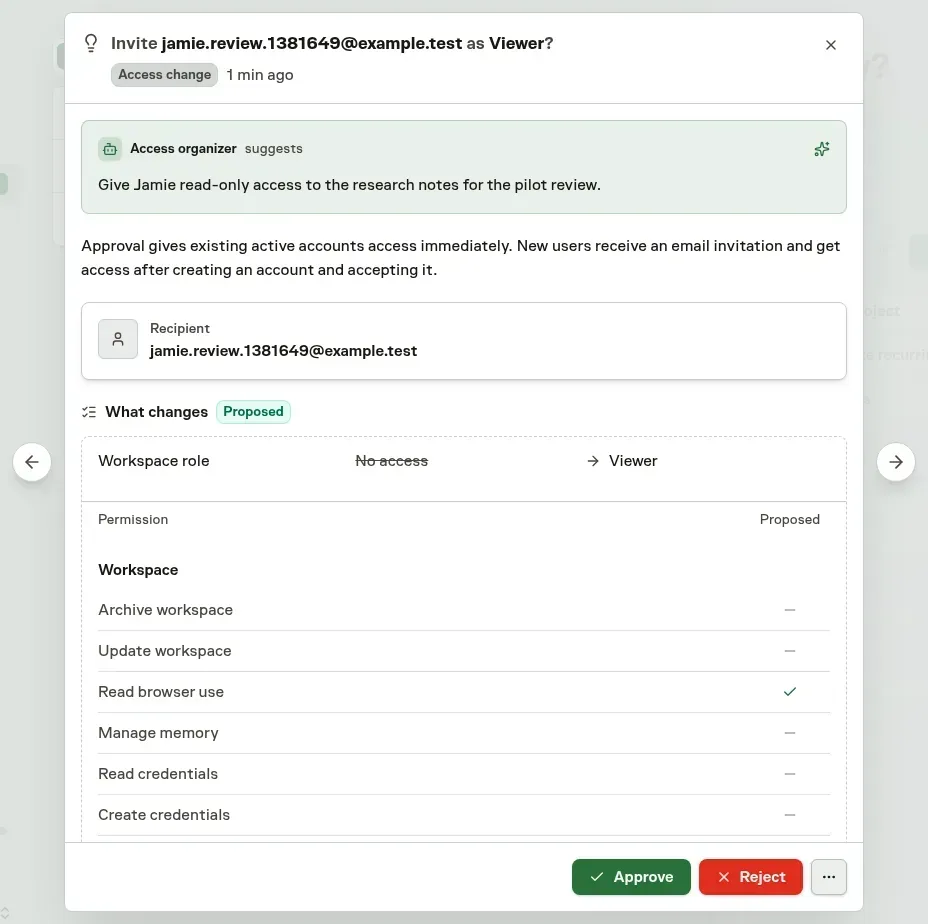
Approve or reject inside Inbox or the inline Chat review. Every request needs Human approval, even at Full autonomy. Invitation review uses your current invitation authority, while role changes use role-assignment authority. Only the current Owner can approve Owner-equivalent access.
Pending requests change no access and send no email. Approving an invitation gives an existing active account access immediately, with one Workspace access notice for the recipient. Someone without an account receives an invitation email and gains access after creating an account and accepting. Role-change approval changes only the Human's Workspace role. Rejection preserves current access.
If the inspected role or assignment changes, Task Machine skips the stale request and closes every review copy without attributing a Human verdict. Loading failures keep the request available for retry. These proposals do not edit accounts, remove or suspend people, and remote MCP cannot submit them. See Humans and access.
Personal notifications
A notification-preference proposal asks to change your own email or browser alerts, how often your notification emails arrive together, or both. When you ask an Agent in Chat to change your email summary, it first asks which frequency you want and then proposes your answer. Review the Agent's rationale and the Current and Proposed values for each changed preference. Alert changes apply only in the named Workspace. The email summary applies across all your Workspaces.
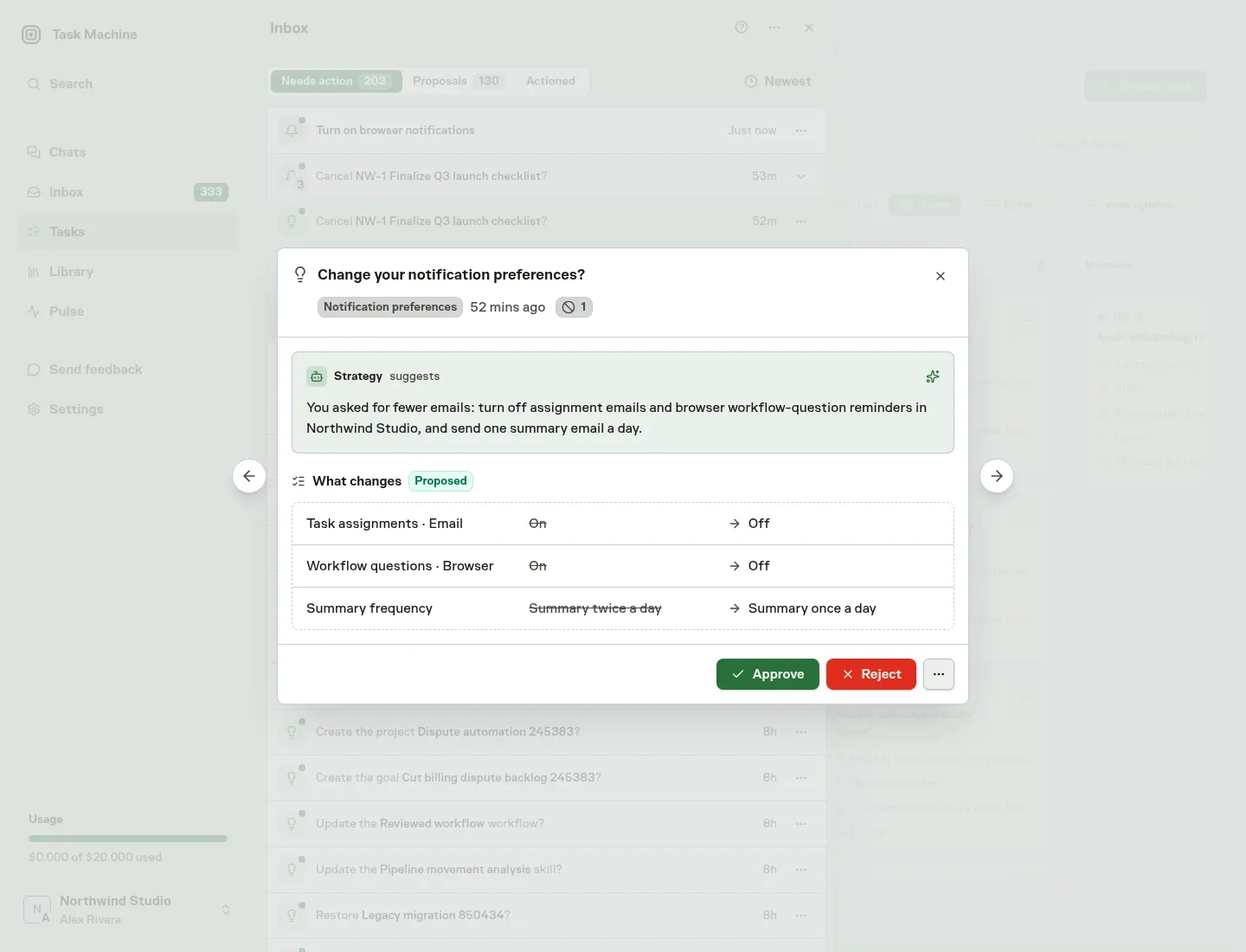
Only you can approve or reject this request inside Inbox or the inline Chat review, even at Full autonomy. Approval changes only the preferences shown. Rejection keeps your current settings. Browser notifications still require permission and setup in each browser.
If the inspected settings change or the request loses its valid owner, Task Machine skips the stale review without recording your approval or rejection. Loading failures remain available for retry, and completed decisions keep the reviewed comparison. Remote MCP cannot inspect or submit these proposals. See Workspace and account.
Skills and Connectors
A Skill proposal adds reusable expertise. Review its instructions and purpose separately from the service access an Agent may need. Marketplace Skill updates have their own review flow according to the Workspace's update policy. See Skills.
A Connector proposal shows the connection and its intended use. Approve and configure opens its prefilled setup in the same flow so you can finish authentication and verification. Rejecting it records your reason without making that connection available.
Workflows and Playbooks
Inspect a proposed Workflow's graph, assignments, decisions, and outputs before approving a process that can run repeatedly. A revision includes the accepted and candidate graphs so you can compare the whole change.
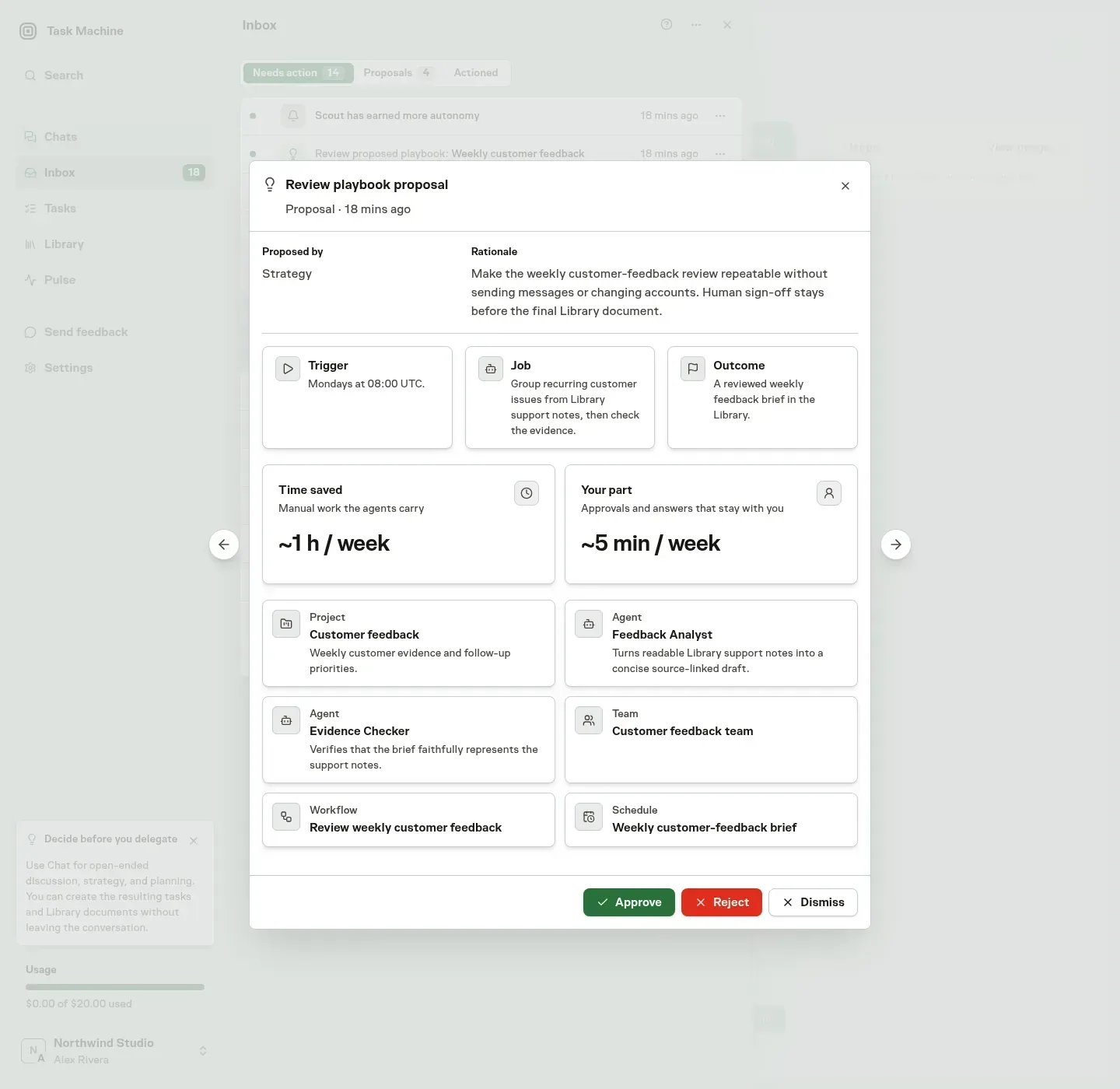
A Playbook groups its coordinated setup under one installation decision. After approval, finish the connection and timing requests it raises in Inbox before expecting the work to run. See Playbooks and Setup and recovery.
Changes to existing configuration
Agents can propose revisions to Agents, Connectors, Teams, Projects, Goals, Workflows, repositories, and installed Playbooks. Compare the accepted setup with the candidate, including changes to access or responsibility.
Ordinary Agent, Team, Project and Goal updates follow their configured and Human-approved learned update policies, including sampled review. A pending candidate leaves the accepted setup unchanged. An automatically applied update creates no Human verdict or Inbox request. Changes to autonomy policy remain Human-reviewed, and Team-member removal does not gain automatic execution. MCP updates always need Human review.
A Playbook update groups its component comparisons under one Human decision rather than asking you to approve the same coordinated change several times. Workflow creation and Workflow updates have separate approval gates.
Approval rechecks that the reviewed base and referenced resources are still valid. A stale proposal does not overwrite newer accepted configuration. Rejection or retraction leaves the accepted setup untouched.
Repository metadata
A repository revision shows the proposer, rationale, and changed name, clone URL, or default branch together in Inbox. Compare its before-and-after values, then approve or reject there using your current Project-management authority. An unset branch means the provider's default. Pending review leaves accepted metadata unchanged, and approving metadata does not provision access to a changed clone target or change credentials, SSH setup, global defaults, or repository lifecycle.
The review is bound to the repository observation made when it was proposed. If the repository changes or becomes unavailable, Task Machine closes the stale request as skipped without attributing an approval or rejection to you. Completed decisions retain the reviewed comparison. Repository updates have their own Ask first / Automatic policy, separate from creating repositories.
Budgets
A Budget proposal puts operating limits where you can decide on them. Review its scope, period, currency-bearing spend cap, subscription-usage treatment, proposer, and rationale together. A revision shows the accepted and proposed values, including a cleared cap or changed currency. Pending review leaves the accepted Budget unchanged.
Approve or reject with your current budget-management authority in Inbox or the inline Chat review. The Agent's configured and learned budget policy decides whether a change needs review, including an increase request. MCP submissions always wait for a Human budget manager.
Changed limits, unavailable scopes, or lost proposer authority make an older request unnecessary. Task Machine closes it as skipped and dismisses an open review without recording a Human verdict. Completed decisions retain the comparison you reviewed. See Budgets for the distinction between operating limits and funding.
Restoring archived records
An Agent can propose restoring an archived Budget, Project, Goal, Agent, Team, Workflow, Workflow Trigger, Connector, Skill, repository, or Task. The decision shows the target, proposer, rationale, current archival state, and approval consequence together in Inbox. Approval removes archival while preserving existing configuration and history. Rejection leaves the target unchanged. An unpublished Workflow returns to draft. An unpublished Connector returns to Setup required, not ready to use. Restoration does not publish, verify, or start them.
Use Approve or Reject in that decision, without opening another surface. Your current management permission for the target kind determines which actions are available. If someone restores the target elsewhere or it is removed, Task Machine automatically closes the unnecessary request as skipped and dismisses its open decision. This system cleanup is never attributed to you as an approval or rejection. Completed human decisions retain their reviewed context and attribution.
Each restore kind has an Ask first / Automatic setting in governed actions. The presets ask first except Full autonomy, and Autonomous also permits automatic Task restoration. Custom chooses per kind. Authenticated Task origins use the current Task's effective policy. Non-Task origins use Agent and Workspace policy. MCP always requires human review, and all modes retain sampled reviews. Raising autonomy never grants missing access.
Browse a proposal backlog
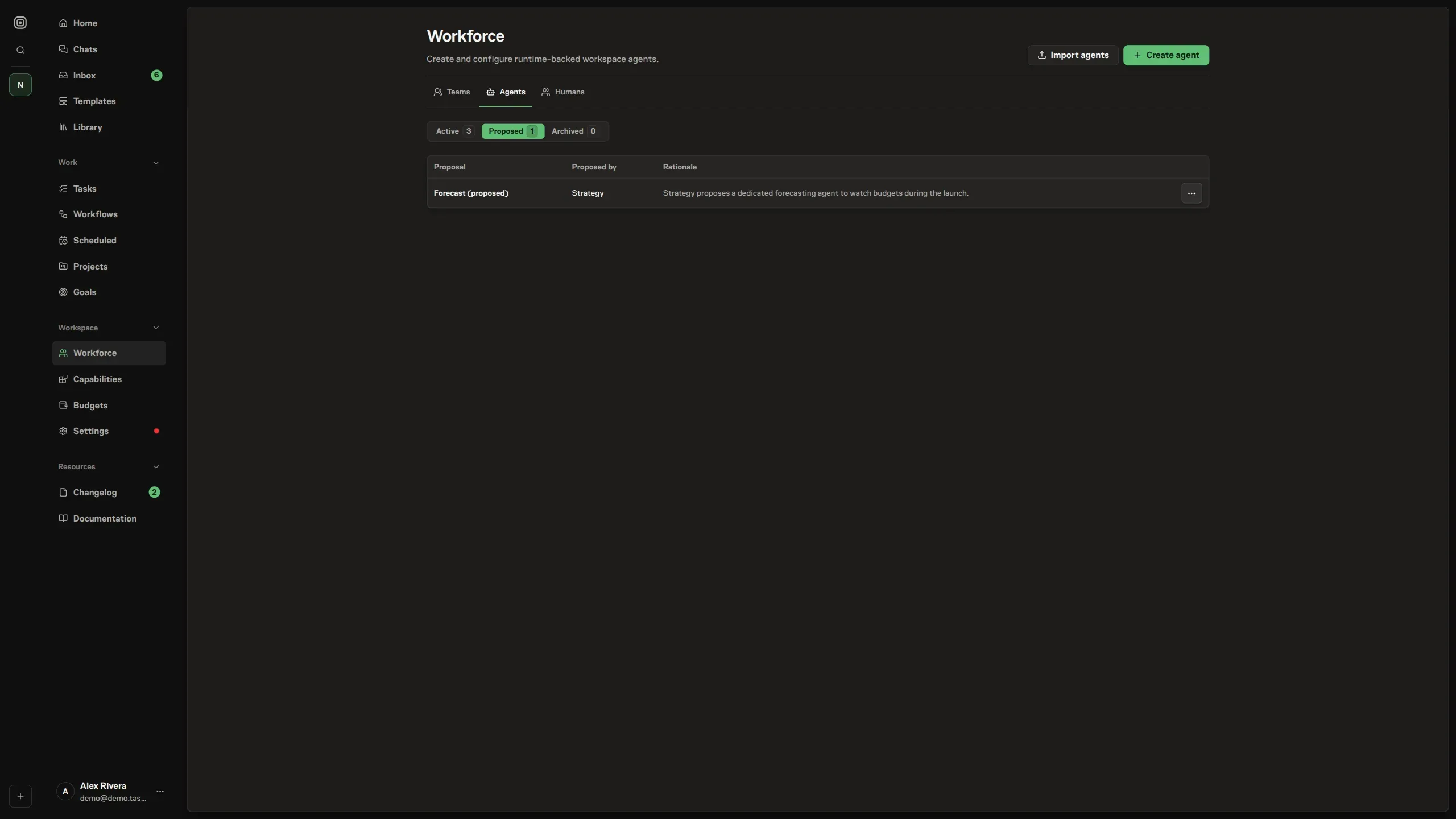
The relevant feature's Proposed tab lets you browse pending suggestions of that kind. It appears once there is something to review. Your access determines which proposals and actions are available. Inbox remains the place to work through the decisions routed to you without switching surfaces.
For questions, Work Spec approval, completion review, and access decisions, continue with Questions and approvals.