Administration
Billing
On this page
Choose Workspace access and the usage you want to fund before running managed work. Keep that funding separate from the operating budgets that guide how your workforce spends it.
Workspace access and trials
Choose Founding offer, Monthly, or Yearly
Start by comparing the base-access payment, the included usage amount, and whether a trial applies. New Monthly subscriptions bill base access and usage monthly, while new Yearly subscriptions bill both yearly. The Founding offer is a paid lifetime base-access purchase, not a free trial or prepaid lifetime Cloud usage.
The Founding offer sells lifetime Workspace base access in three rounds. Required monthly usage starts at $20 or €20, in addition to the one-time base payment.
| Round | One-time base access | Minimum initial charge, including first-month usage |
|---|---|---|
| First 10 successful purchases | $279 or €279 | $299 or €299 |
| Next 30 | $479 or €479 | $499 or €499 |
| Final 60 | $679 or €679 | $699 or €699 |
These amounts exclude tax. Monthly usage remains a separate recurring charge.
A completed paid purchase moves the offer forward. Opening Checkout does not reserve a place, and simultaneous purchases may exceed a round's target. Checkout keeps the quoted immutable price until it expires.
If the active round changed before Checkout opened, Task Machine shows the updated price and asks you to confirm it instead of substituting it silently.
The Founding offer starts no trial. Its one-time payment grants base access for the purchasing workspace while Task Machine continues to operate the applicable service, subject to the Terms. The access is non-transferable and does not promise perpetual operation or every future feature.
Canceling the separate monthly usage subscription does not revoke this base access, although new Cloud work still needs funded usage.
Monthly billing starts at $99 or €99 per month, excluding tax. That total combines the $79 or €79 Workspace subscription with at least $20 or €20 of included usage. You can choose more included usage in $10 or €10 monthly steps when your agents need it.
Yearly billing combines $859 or €859 for Workspace with included usage from $240 or €240 per year, both charged yearly. The minimum annual charge is $1,099 or €1,099, excluding tax. The full year's usage is available after payment and expires at the paid year's end, without monthly resets or rollover. Choose more usage in $10 or €10 yearly steps.
Stripe hosts Checkout and collects your payment details. Task Machine does not receive your complete card details. Your workspace uses either USD or EUR for all access and usage charges, and that currency stays fixed once billing begins. Any VAT or sales tax is calculated in Checkout and shown before you confirm payment.
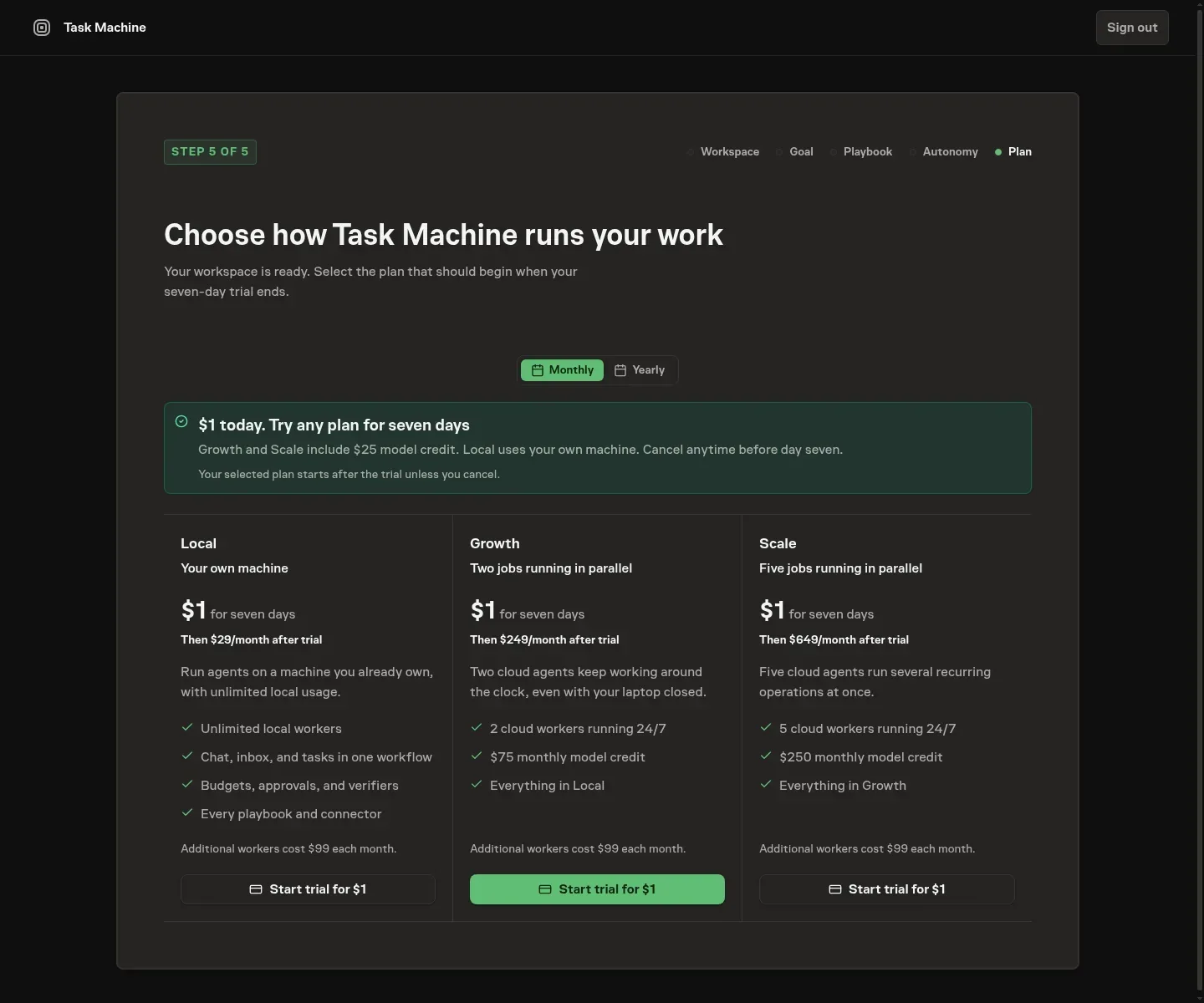
Activate an existing workspace from Billing
If your workspace setup is complete but access has not been activated, Billing & usage lets a workspace billing manager choose access and open Checkout without repeating onboarding. Your existing workspace setup stays unchanged. If you cannot manage billing, ask a workspace billing manager to activate it.
Checkout returns you to Billing whether you finish or cancel. Once a completed Checkout is recorded, Billing waits for confirmation rather than asking you to purchase again. Access becomes available after Task Machine verifies the subscription or purchase. If an existing subscription needs payment recovery, use Manage billing instead.
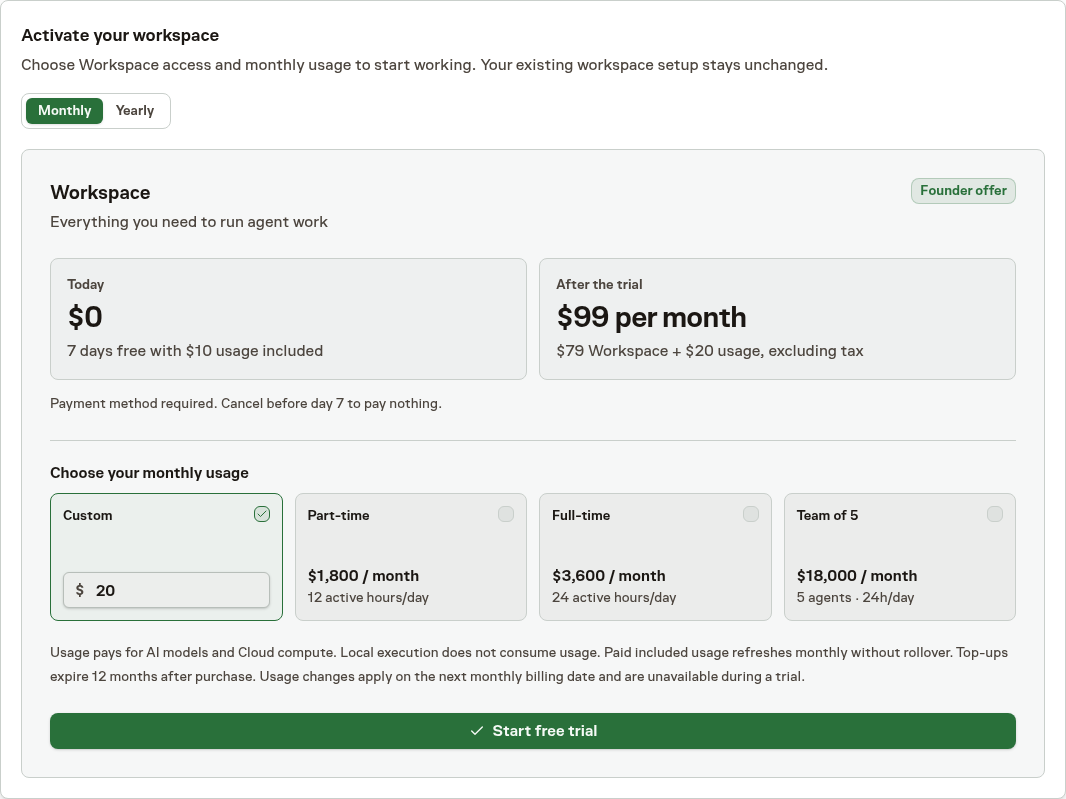
Reactivate after a subscription ends
When your subscription has ended without an outstanding payment or billing review, Billing shows a warning above the access choices. A workspace billing manager can choose Monthly, Yearly, or an available Founding offer and complete Checkout again. Reactivation keeps your workspace's currency and starts with a paid charge, not another free trial.
Your workspace and existing work stay unchanged.
If a payment failed or access is under review, use Manage billing instead of purchasing again. Access stays locked until the subscription or purchase is confirmed.
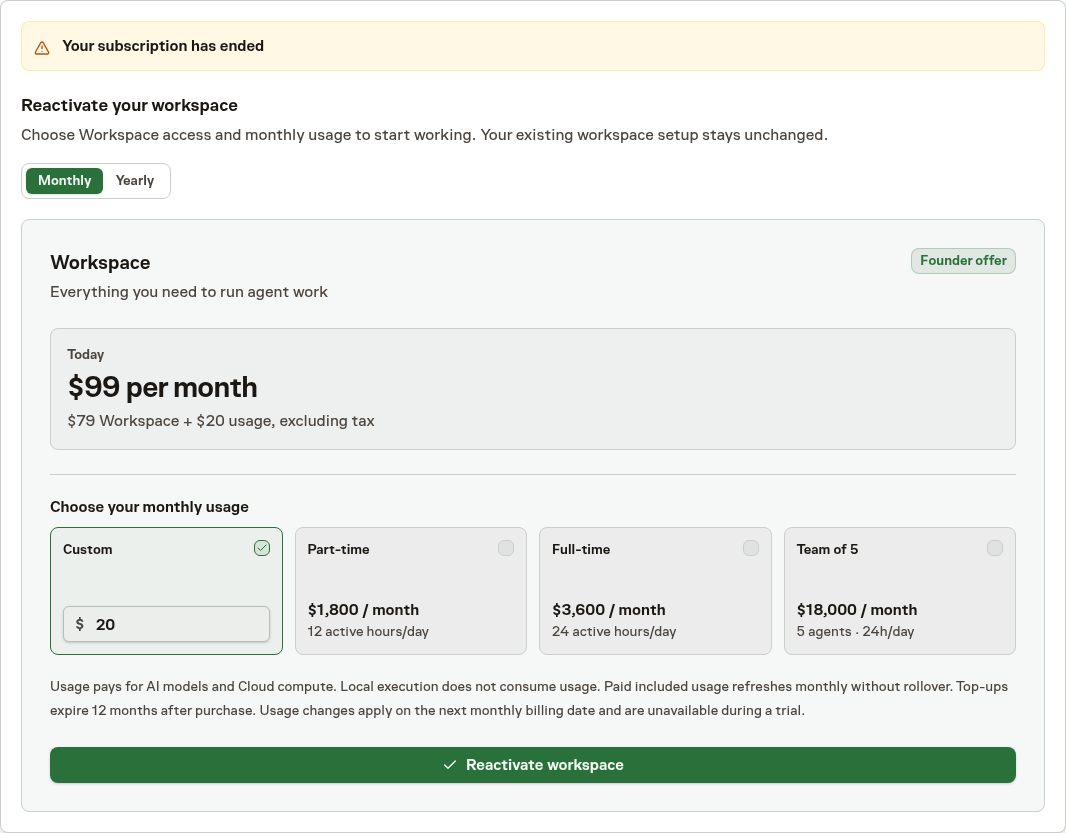
Recurring subscriptions start with a seven-day trial
An eligible new workspace that chooses Monthly or Yearly begins with a seven-day trial including up to $10 or €10 of Cloud usage. The trial is free in the US, Canada, all EU countries, the UK, Switzerland, Norway, Iceland, Liechtenstein, Australia, New Zealand, Singapore, Taiwan, Japan, and South Korea. Elsewhere, including when country cannot be resolved, the trial costs $1 or €1 upfront, excluding VAT or tax. Country is resolved on the server, not chosen through language, currency, or a browser country selector. A payment method is required in every region. Paying the trial fee does not add recurring usage or change the trial restrictions.
You choose the included usage you want on a slider before starting the trial, and Task Machine shows roughly how many active Cloud hours it buys. The hours are a planning estimate, not a quota. A summary beside the slider shows what is charged today and what recurs after the trial. If you continue after seven days, Stripe charges the monthly base and monthly usage, or the yearly base and the full selected yearly usage. Cancel before the trial end shown in Task Machine to prevent that charge.
Trial usage expires when the paid subscription begins. You cannot top it up or change the next recurring amount during the trial. If the trial allowance runs out, new Cloud work waits and Task Machine models on local computers can become unavailable, while Local execution with your own subscriptions remains available.
If trial usage is running low or has run out, its Inbox item can offer End trial and continue. Review the displayed immediate conversion charge before choosing it. This starts paid service early rather than buying a trial top-up.
You can instead leave the trial on its original schedule and wait for its next funding boundary.
Trial and subscription reminders
Task Machine reminds the current workspace owner 24 hours before a trial converts to paid service or a subscription scheduled not to renew ends. Ordinary automatic renewals do not trigger these reminders. A canceled trial receives an ending notice, not a claim that payment will be taken.
The reminder appears in Inbox. You can independently control its email and browser notifications under Trial and subscription reminders in Notification settings. Browser delivery also requires browser permission. Turning off either channel does not remove the Inbox notice, and dismissing the notice does not change your subscription.
When available, the reminder includes lifetime Task Analytics: tasks completed, average cost per task in USD, and average active task duration. These are arithmetic averages using the same recorded-cost and recorded-duration task populations as Analytics, not only completed tasks. Duration is active work, not an estimate of time saved.
Missing results or invoice estimates do not prevent the billing reminder.
If a reminder is delayed, Task Machine only delivers it while the trial or scheduled subscription end is still ahead. Review or change your subscription in Billing before that boundary.
Budget for usage rather than agent headcount
Usage is a monetary allowance, not a fixed number of agents or guaranteed hours of work. The model, the work it performs, its active runtime, and its retained files affect consumption. A short research job and a long coding job need not cost the same, even when assigned to the same Agent.
The calculator on public Pricing and workspace Billing estimates usage for Automatic routing or a selected Cloud model and the active hours you expect per day. It uses recent work when sufficient history exists and otherwise uses a planning baseline. It does not change billing or promise a fixed price for a Task.
The calculator sits on the Usage estimator tab of Billing & usage. Below it, Model prices lists every Cloud model your Workspace can use with its price per million tokens for input, output, cached input, and cache writes, in your Workspace currency. Your usage is charged at these prices: the tokens a model uses, multiplied by its price.
The list follows your Workspace's EU processing and ZDR settings, because a model's price can differ between regions and retention settings. A model that cannot be offered under those settings is not listed, and prices already charged do not change when a price or a setting does.
Treat usage shortcuts and comparisons with a hire as planning aids, not a promise that an agent can replace a particular person's responsibilities or deliver the same output. Start with a small representative job and inspect its actual usage before expanding.
Understand the charges
Cloud Runs consume AI and compute
Task Machine supplies the Cloud execution environment and model access, so you do not need separate Cloud-compute or model-provider accounts for that work. AI, execution, and storage draw from the same workspace usage allowance. Execution depends on provisioned memory and time. Storage uses a separate size-and-time rate. They are not the same unit price.
Task Machine's own AI features also use workspace usage. The Usage tab lists each charge under the feature that made it.
Task Machine covers Guided Setup during onboarding and never deducts those setup costs from your usage. Other billable AI used during onboarding is charged once the workspace has usage, so an onboarding you never finish costs nothing.
Compute for each Cloud Run includes a fixed 60-second startup period, active runtime after execution begins, and a fixed 60-second shutdown period. The fixed periods apply even when a Run fails before its agent starts. A Run that never starts agent execution has no active runtime, but that does not make it free.
A Task can have several Runs for planning, implementation, verification, corrections, or later checks. A retry is more work and can consume further usage. Budgets and retries explains the controls and their limits.
Task Machine features use usage on local computers too
Task Machine runs its own AI features on its servers wherever your agents run. Agents on your own computers with your own subscriptions therefore still use a small amount of workspace usage for the features in this table. Most of these checks are cheap, often costing a few cents or less each.
| Feature | When it runs |
|---|---|
| Smart grep and smart compaction | When an agent searches with tama grep, or tamacode compacts old tool output in a long session. |
| Tool-call check | Before every tool call in agent Runs and tama code, except its own tama commands, Task Machine checks it against the constitution and the categories that need a person's decision. Workspaces that require EU processing skip the check. |
| Writing check | When an agent posts a message such as a comment, question, approval request, review, summary, or Run report, Task Machine checks that the text is clear before it is published. |
| Next-step check | When a Run report schedules a timed follow-up step, Task Machine checks that the step does not wait on a person. |
| Run progress check | Every five minutes during a running Task, Task Machine checks whether the agent is making progress or drifting from the requested outcome. |
| Outcome check | When an agent submits finished work for review with evidence, Task Machine checks the evidence against the Task's intended outcome. |
| Work Spec check | When an agent submits the plan for a Task. |
| Duplicate check | When someone creates a Task. |
| Task classification | After a Task is created, to identify its Task type and source-code intent before a Run starts. Recovery fills missing evaluations without repeating completed classifications. EU-only workspaces use Unclassified without a call or charge. |
| Coaching | When you ask for coaching on a Goal or Project. |
| Chat titles | When a Chat needs a title. |
| Agent memory and skills | When Task Machine consolidates agent memory, learns reusable skills, or reviews an agent's reliability. |
| Constitution review | When you save a change to your workspace's Constitution. |
| Playbooks | When you generate or customize a Playbook. |
| Model routing | When Automatic routing picks a model for work. |
| Browser goals | When an agent works through a browser goal. |
Checks that have no provider for EU processing do not run in workspaces that require it, and use no usage there.
Retained Cloud files continue to consume usage
Cloud execution environments are temporary, but Task, Chat and Team files can remain available for later Runs. File storage is charged in complete 24-hour periods paid in advance, starting when storage becomes ready. The first period is not prorated or automatically refunded if execution never starts or the files are deleted before it ends.
Started work normally keeps its Cloud files for seven days after qualifying activity. Persisted Task changes, comments, attachments, decisions, Chat turns and responses, and completed Runs can extend that ordinary inactivity deadline. Passive views and storage measurements do not. Marking a Task Done or Cancelled, or archiving it, schedules earlier deletion after 24 hours. Reopening or restoring it before that deadline cancels the earlier deletion.
The Task or Chat storage card shows the current allocation, capacity, and deletion date. On a Chat, the card appears once deletion is seven days away or less. Authorized Workspace managers can add one, seven, or fourteen days to the current effective ordinary deadline or request immediate deletion when no active Cloud work still owns the files. A near-expiry Inbox item offers the same controls for both Tasks and Chats. A Chat's item goes only to managers who can open that Chat.
Cloud heartbeats use the same AI, execution and storage charges as other Cloud work. Their Team files have a seven-day retention deadline from storage readiness, and automatic check-ins do not extend it. A workspace manager who can read the Team can add days or request deletion from its Inbox warning. Files in use by waiting or running Cloud work cannot be deleted.
Loss of paid access gives existing active-Task files a seven-day return window funded by Task Machine. Security, blocking, explicit deletion, and other mandatory cleanup can require earlier deletion.
If startup recovery is exhausted before any Run starts with newly created files, deletion waits until the Cloud provider confirms those files are detached from the temporary environment. Files previously used by a started Run keep their normal retention. Charging stops when deletion begins, without rewriting a period already charged.
Deleting retained Cloud files does not delete the Task, Chat or Team, its discussion and execution records, or artifacts persisted separately. Save important deliverables in their intended destination rather than treating a temporary execution folder as permanent document storage.
Fund managed usage
Included usage follows its paid cadence
Monthly included usage refreshes after each paid monthly invoice and does not roll over. Yearly usage is granted in full after the yearly payment and expires at the paid year's end. Lifetime access retains monthly usage. Existing subscriptions with a yearly base and monthly usage keep their actual monthly usage cadence, which Billing displays separately. Task Machine uses included usage before purchased top-up usage.
An eligible seven-day trial includes at most $10 or €10 of Cloud usage. Trial usage expires when paid access starts and cannot be topped up. The regional trial fee does not increase this allowance. See Workspace pricing and access for cancellation and conversion terms.
Workspace Billing shows the exact subscription and included-usage renewal dates. New aligned subscriptions have one date. An existing yearly-base subscription with monthly usage shows separate yearly base and monthly usage dates. Task Machine never raises usage automatically.
Change included usage now or at renewal
Choose the new amount on the slider in Change included usage, which marks your current amount and the recommended amount. A decrease always starts at the next included-usage renewal shown in Billing. For a strict increase on an active paid subscription, choose Apply now or At next renewal. Renewal timing changes no allowance or charge today.
Apply now first loads a server-calculated quote. The quoted pre-tax payment and the matching included usage are the same whole-cent share of the increase for the exact time left in your current paid usage period. The review shows that amount, the usage it adds, when it expires, the renewal date, and when the quote expires. Stripe calculates and displays tax separately. At renewal, the full new monthly or yearly amount becomes your recurring selection.
The hosted payment must be at least $0.50 or €0.50, the quote lasts 30 minutes, and immediate application is unavailable during the final hour before renewal. If the amount or billing boundary changes, Task Machine shows a new quote for confirmation. Opening, canceling, abandoning, failing, or letting Checkout expire leaves both your current amount and any pending renewal choice unchanged. Only verified payment applies the increase and adds usage. A later refund, reversal, or chargeback removes the matching grant and can leave a deficit if you already consumed it.
An Inbox usage warning opens this same editor. A renewal recommendation keeps its recommended amount and timing choices directly in the Inbox detail, and Custom amount opens the editor when you want a different recurring amount. Neither path makes the recommendation payment authority. An immediate Inbox action stays open until paid fulfillment finishes. Unsuccessful payment leaves it available so you can retry or choose another timing.
Purchased top-up usage lasts 12 months. Available usage is consumed in order of expiry. Monthly usage usually expires first, but a top-up approaching its expiry can be used before it. A complimentary grant, when one has been issued, also has its own expiry and is identified separately in Billing.
Top-ups include a payment processing fee
A workspace with a healthy paid recurring usage subscription can buy additional usage manually. An active lifetime base-access grant alone does not enable top-ups. The minimum is $50 or €50 of usage, increasing in $10 or €10 steps.
For example, buying $50 of usage costs $55.56 before tax: $50 is added to your usage balance and $5.56 is the Payment processing fee. The equivalent EUR purchase adds €50 of usage for €55.56 before tax.
Review the usage amount, fee, and taxes before purchasing. The fee is part of what you pay, not extra usage you can spend.
Applicable VAT or sales tax is shown separately before payment. Task Machine never tops up automatically. An immediate included-usage increase changes the recurring selection and grants only the prorated amount shown for the current period. This is separate from a top-up.
Running out of usage pauses new managed work
When usage runs out, Task Machine sends an Inbox notice to the people who manage the workspace, whatever used it up. That includes Cloud Runs, Task Machine models on your own computers, and the AI features listed above. Billing then shows negative available usage until new funding clears it.
- New Cloud work waits for more usage.
- AI features that are not part of running work, such as coaching, chat titles, and agent memory, pause.
- Running work can finish when possible, without a guarantee. A running agent can lose access to Task Machine models or be unable to post comments, questions, or approval requests, although its Run report is still accepted.
- Local work on your own subscriptions keeps starting, and its agents can also be unable to post.
Adding usage lifts these limits.
A model-provider credit rejection can still fail a Run.
Funding enables future work rather than resuming a failed process automatically.
Use the available Inbox or Billing controls to add usage, change the next allowance, or inspect a billing problem. Those controls depend on your permissions and subscription state. Trial users cannot top up. Budgets provide narrower controls for specific work but have their own enforcement boundaries.
New funding first clears an outstanding deficit
Completed work can settle after the available allowance has run out. Billing can therefore show negative available usage. A later grant or top-up first clears that deficit, and only the remainder becomes available for new work.
For example, adding $50 of usage when the workspace has a $7 deficit leaves $43 available after clearing it. The top-up's payment processing fee and tax are separate from this calculation. A payment reversal can also create a deficit when the corresponding usage has already been consumed.
Purchased or complimentary usage can become unavailable while the required access is inactive. Reactivation can make unexpired usage available again, but it does not restart the expiry clock.
Local costs stay with your providers
Local execution requires operational Workspace access. Model usage from your own subscriptions does not consume Task Machine usage: those subscriptions or API charges, your hardware, and connected services remain your responsibility. Choosing a Task Machine model on a local computer, or in tama code on your own computer, is the exception. That model usage draws from your workspace's included usage like Cloud model usage, without Cloud compute charges. Local work also uses a small amount of included usage for Task Machine's own AI features, such as agent memory, smart grep (tama grep), and smart compaction of long sessions. Usage from tama code sessions appears in Billing as background work because no Task or Chat owns it. Installing a Connector does not include that service's subscription or unlimited use, whether its Agent runs locally or in Cloud.
The Usage card on a Task or Chat can combine reported Local-provider usage, customer-rated Cloud usage, and AI features used for that work. That work-level total is not necessarily the amount deducted from your Task Machine allowance. A Task can mix Local and Cloud Runs. Workspace Billing is the place to inspect the allowance and its changes.
Investigate a charge
Distinguish a failed result from a billing error
An unsuccessful attempt can still consume AI, execution, and storage usage. Retrying does not erase its previous charge. A verified billing error or Task Machine defect can have a correction path, but ordinary disappointing model output or a third-party failure is not automatically refundable.
Subscription, Founding-offer, additional-usage, and defect-correction refunds have different conditions. Read the refund policy for those terms and your mandatory rights. A subscription refund is not an unconditional money-back guarantee, and usage is not cash you can withdraw.
Inspect what was charged
The Subscription tab of Billing & usage shows usage remaining and Balance History for recurring grants, top-ups, and adjustments. Its Usage tab groups rated consumption by Task, Chat, or AI feature. Restricted or unattributable work can appear as Background work, without revealing content you cannot access.
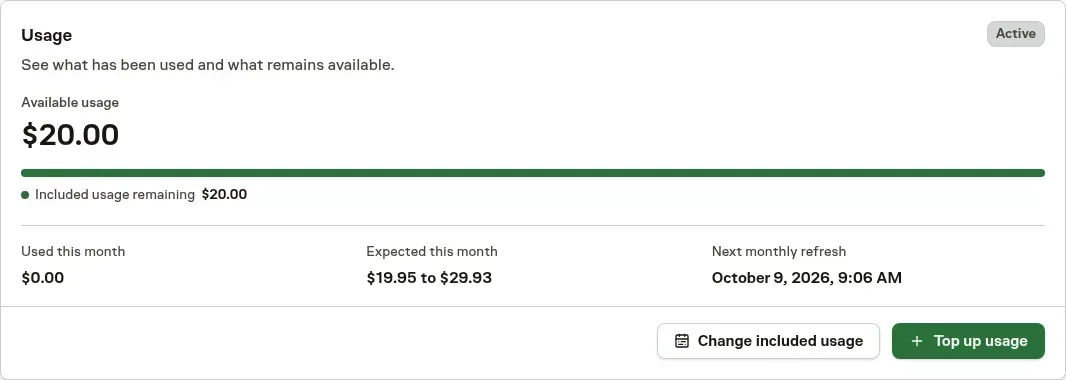
The Usage card keeps the current allowance, next refresh, and available funding actions together. The example below shows an existing $20 monthly included-usage grant before any consumption, not a payment receipt or an estimate of completed work.
Workspace currencies are fixed when billing begins. Billing belongs to one workspace, so another workspace's subscription or top-up cannot fund this one. Use Workspace pricing and access for the access contract and Budgets and retries to control the work that consumes it.