Inbox
Questions and approvals
On this page
A question asks for information or direction. An approval asks for authority to take a described action. Read what is needed and what your decision permits before resolving the item.
Answer a question
Open the item to read the relevant conversation and answer there. A planning question can offer approaches, trade-offs, a recommendation, and editable suggested replies. Adapt a suggestion when it does not express your decision accurately.
A Task question includes the recent discussion and its attached evidence. Select an image to preview it, or choose Load earlier replies to read older context inside the question. For a new visual direction, that evidence can include the planner's image mockups.
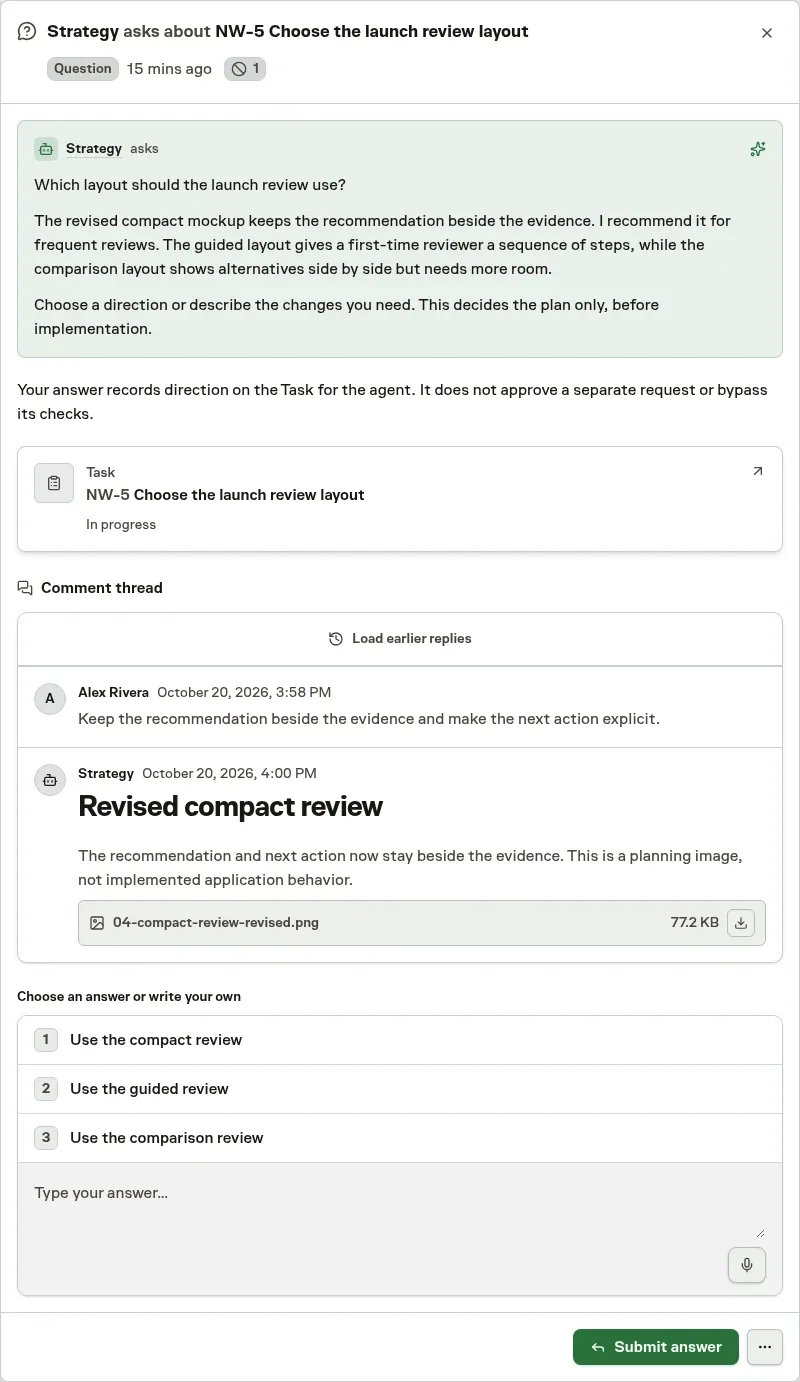
Your answer belongs to the Task or Workflow that asked. Links to its wider history remain available for investigation, but answering does not require leaving Inbox.
See what another agent already decided
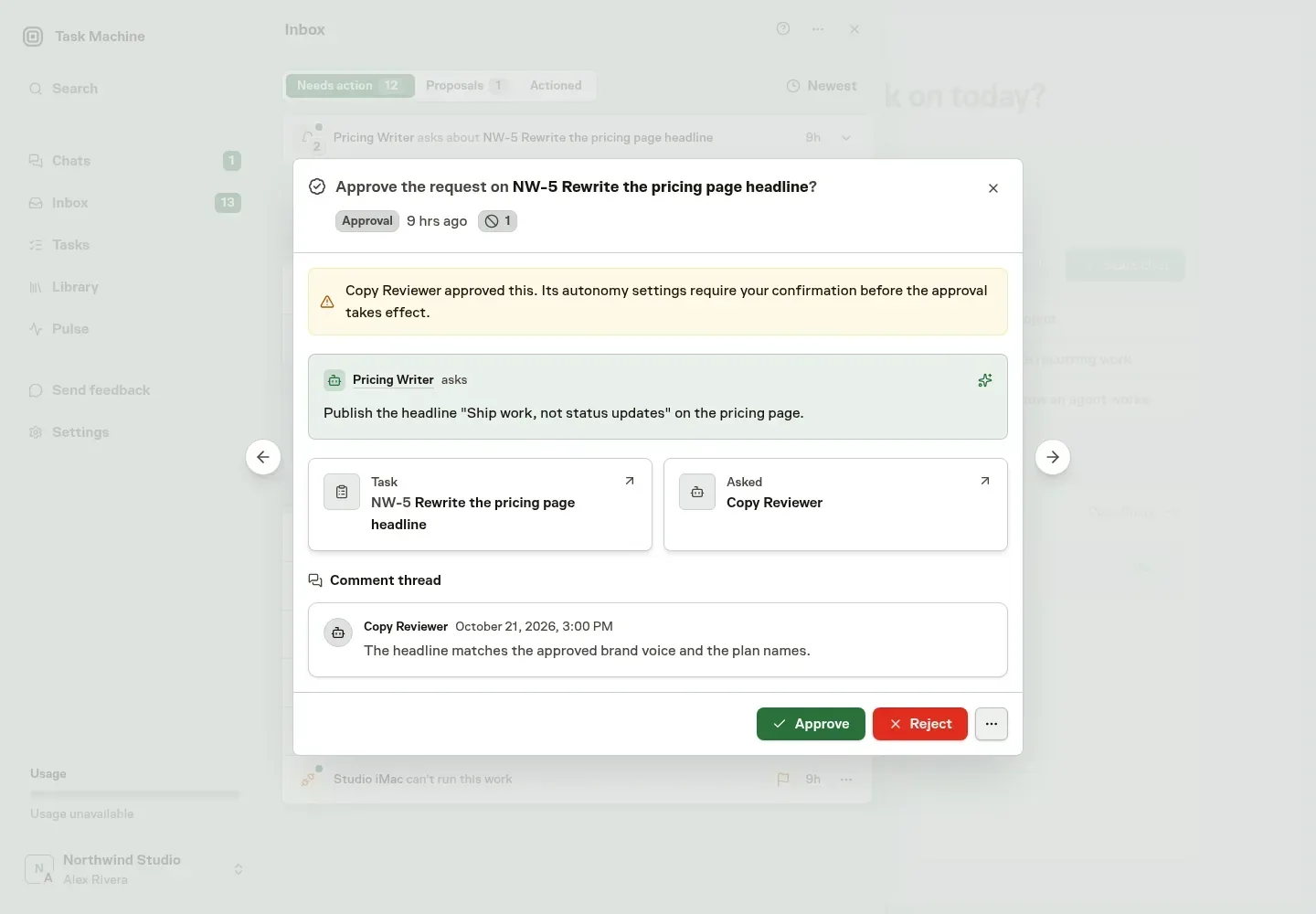
Some questions and approvals first went to another agent. When one reaches you, the Inbox item looks like any other question or approval. An Asked card names the agent that was asked and the Team that routed the request, the agent's reason is in the comment thread, and one sentence says why you are deciding: the agent escalated, its run ended, it did not respond within a day, someone took the request over, or its autonomy settings call for your confirmation.
You answer, approve, or reject exactly as you would any other item. When the asked agent had approved, your decision also counts as the record of that agent's judgment, so spot checks and learned autonomy measure it.
Approve a plan or review a result
A Work Spec approval concerns the proposed approach, acceptance criteria, risk, and model choices before implementation. The review opens on Overview, with Spec for the complete plan, its earlier revisions and comments on the latest one, and Discussion for the conversation with the planner. Follow-up Tasks the planner pre-planned are created from Overview. Read Task specs before approving work whose consequences you do not understand.

A completion review concerns the delivered result. Approve it, request changes, or reject the approach from the item, with feedback that explains the next step. See Reviews.
A pull-request review is tied to an exact commit. Its context includes the Agent's fresh pre-review, rationale, reviewed revision, reported changes, and CI state. An available Merge risk assessment adds evidence for the same revision inside the item and does not replace your decision. The item says why you are asked when an agent could not decide on its own, and policy may approve a low-risk pull request without asking you.
Approve or Request changes remains in Inbox. The source link is available for further inspection. Owners and admins can override the assigned reviewer, with their identity and feedback retained. Completed reviews keep their recorded evidence even after the pull request changes.
Decide assignments and Workflow approvals
A Team triage review contains the lead's recommended decision, rationale, and Task details. You can change the decision and role assignments, then choose Apply decision or Reject decision. See Team lead routing.
A delegation or assignment decision changes who owns the work, not merely who receives a notice. Check the proposed recipient and reason before approving. You can pick a different Agent, Human, or Team as the implementer, and approval assigns the one you chose. Some assignment reviews can instead propose creating and assigning a suitable Agent. You can rename that Agent and adjust its role before approving.
A Workflow approval authorizes the step it describes. Approval follows its approved route. Rejection follows a configured rejected route or fails the Run when no such route exists. A Workflow question supplies missing input instead of approving that action.
A Workflow verifier review appears when automatic checks still fail or remain uncertain after the configured retries. The verdict and its reason come first, followed by cards for the step and its Task, then any corrections, review criteria, and evidence the verifier recorded. When it recorded none of these, open the step to check its output before you decide. Approve accepts the current output, Request changes reruns the step with your feedback, and Reject ends the Workflow as failed.
Choose Discuss this failure when you want the acting Agent to propose ways forward before making that decision. Add a specific question or leave the optional field blank to request solutions to the verifier failure. The discussion appears in the Task conversation while the Workflow stays paused and the same review remains open. Dismiss clears the Inbox item without approving the output or advancing the Workflow.
Approve an Agent's held action
Before an Agent runs a tool call, other than Task Machine's own tama commands, Task Machine checks it. An action that needs a person's decision, such as a GitHub comment, spending outside Task Machine, a production change, or a destructive command, is held and one person is asked: the Task's reviewer or the next person in its request routing, the Chat's owner, or the workspace owner. The item shows the exact action, why it needs a decision, and the Task or Chat it belongs to. Values that look like secrets, such as tokens, passwords and private keys, are shown as [redacted secret]. Approving still runs the action exactly as the Agent wrote it. The Agent's Run pauses and continues where it stopped once you decide.
Approve with Once to let exactly that action run one time. For this Task, For this Chat, and Always also let the same Agent take actions of the same kind without asking you again. When Task Machine can tell what an action works on, such as the repository a push or comment goes to, your approval covers only that same target, and never a force push or branch deletion you did not approve. For other actions, a later check that is unsure whether your approval covers them still asks. Always requires permission to manage Agents, and you can revoke these approvals from the decision in the Agent's learned-autonomy history on its Autonomy tab. Reject stops the action and gives the Agent your optional message, so it can take another approach or ask you how to continue.
Task Machine also spot-checks calls an agent may run automatically, using that action's current interval. The system adjusts the interval as the action's record changes. Approve a held spot check once or reject it.
Later automatic calls can continue while spot checks wait. When three spot checks of the same kind are waiting, later calls ask first until you resolve one.
When Task Machine judges that an action could permanently destroy something large, such as deleting a home folder, dropping a production database, or force-pushing over a default branch, or sees that it reads Task Machine's own settings or changes protected files, such as Git hooks, it always holds the action. Listing or reading Git hooks is not held. This applies even when the Agent may run that kind automatically or an earlier approval covers similar actions. You can only approve it once, after confirming, or reject it.
The check judges what the exact action would do now. Reading billing code or preparing an unsent draft does not itself spend money or send a message. A local script that performs either still needs the corresponding authority.
Task relevance, unfamiliarity and uncertainty are not separate reasons to hold an action. Concrete constitutional violations, such as fabricating evidence or crossing an explicit authority boundary, still stop it.
Task Machine retries a failed check automatically first. When it still could not check an action, choose Retry check or Reject. Task Machine never offers to approve an action it could not check. Held actions cannot be dismissed, because the Agent waits for your decision.
Decide whether a Task is still needed
An Agent that finds its Task's work already done elsewhere or no longer needed can ask to cancel it, citing the evidence it found, such as a commit or a merged pull request. The Inbox item shows the Task, the Agent's reason, and what each choice does.
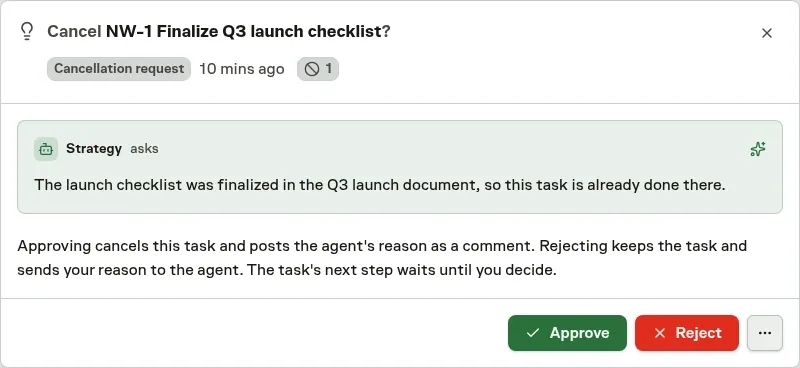
Approve cancels the Task and posts the Agent's reason as its comment. Reject keeps the Task, and the optional reason you add is posted as your comment so the Agent reads it when it resumes. Dismiss keeps the Task without judging the request and asks the Agent to reassess. The request closes by itself when the Task is reassigned, changes status, or is archived first.
Whether an Agent must ask depends on its autonomy setting.
Review access and spending
A credential-access approval grants the requested use of an existing Vault entry. Check the Agent, work context, and duration before choosing Approve once, Approve for a period, or Approve indefinitely. A missing credential is a different request: it needs an entry selected or created, or an account signup approved. See Vault.
Budget and usage requests concern funding or spending limits. Review the scope and amount before approving. You can change the requested limit, and the increase shown follows your amount. They do not grant missing service permissions or guarantee that a running job will finish within the new allowance. Billing actions depend on your role and subscription state.
A learned-autonomy suggestion asks you to change future decision boundaries. Review the supporting work and proposed change, or keep the current level. See Autonomy.
Decide whether two names are one person
An agent that meets one person under different names, such as a GitHub name and a Slack name, can ask whether to connect them to a member. The Inbox item names the service, the account, the member and the agent that suggested it. It says what the agent based the suggestion on and how many notes approval would move, and it goes to that member and to anyone who can manage members.
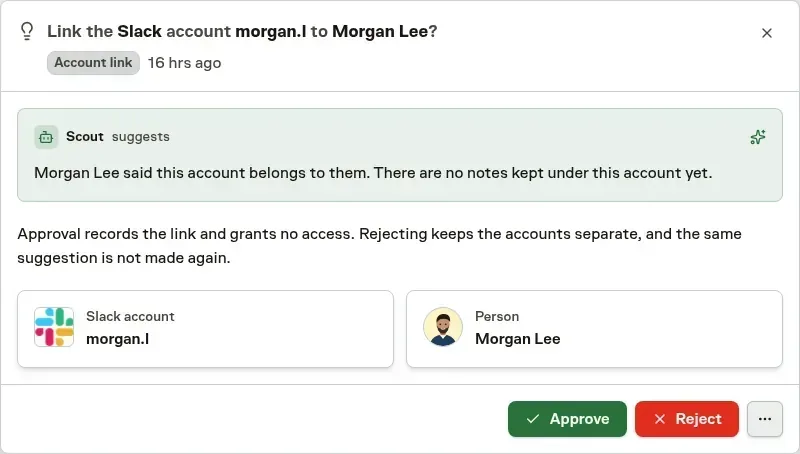
Approve connects the name to the member immediately. Notes already kept under that name follow automatically into the member's Memories. Reject keeps them separate, and the same pair is not suggested again. Connecting a name changes what the agent knows about someone and grants no access.
Agents ask first by default. Under Full autonomy, or after you approve a learned autonomy change, an agent's suggestion can apply at once, and a sample of them still comes to you for review. Every connected name is listed under Linked accounts on the member's Profile, where the member or anyone who can manage members can undo it.
Reply to a mention
A mentioned Task comment opens its chronological thread on the latest three replies, with attachments, reactions, suggested replies, and the ordinary reply composer. Select Load earlier replies to read further back. Your reply also appears in Task Activity and completes your Inbox item. Replying from Task Activity completes that same item.
When a written reply is unnecessary, adding 👍 or 👎 to the exact mentioned comment can resolve the item. The reaction control explains that effect before you add it. 👀, removing a reaction, or reacting elsewhere leaves the request open.
New mentions in an open thread refresh its existing item. After that item is completed or archived, a later request can ask for your attention again.
Retry failed work deliberately
A recoverable Agent Run failure shows its reason and offers Retry run when current Task state permits a fresh attempt. Correct the cause before retrying.
The item remains open if that attempt cannot be created. It resolves only after a fresh or already-active attempt exists. Dismissing a failure does not start replacement work.
Understand dismissal
Most active items can be Dismissed, including awareness updates. Held Agent actions, exhausted usage and Team routing reviews require an explicit outcome instead. Dismissal is a recorded outcome, not approval, rejection, cancellation, or a mark-as-read action.
Dismissing a Task work request can add a brief reassessment comment and resume its assigned Agent when that Agent can continue. A request from a comment thread keeps that reassessment in the same conversation when possible. If no Agent can run, dismissal still succeeds without adding that comment.
Mentions behave differently: dismissal clears only your item, without posting to the Task or resuming the Agent. Reply or a resolving reaction continues that conversation. Awareness updates and failed-Run recovery items also never start work when dismissed.
Handling or dismissing an item removes it from your active queue. Reading alone does not. Continue with Setup and recovery when the request concerns missing access or blocked execution.