How to Automate Applicant Screening and Interview Prep
A practical guide to agent-run applicant screening: evidence-based scoring, tiered ranking, interview question packs, and a fairness audit before you decide.

Founder, Task Machine
Applicant screening is the process of reading every CV that arrives for a role, scoring each candidate against the same job-relevant criteria, and ranking the pool so the strongest people reach an interview. Interview prep is the follow-on step: turning each candidate's gaps and open questions into a structured set of interview questions, so the conversation verifies what the CV could not.
Together they decide who joins the team, which makes them some of the highest-leverage hours a small company spends. Done loosely, they select for polished CVs over relevant evidence, and every inconsistency becomes a fairness problem that is hard to explain later.
Why screening on feel loses good candidates
Most small teams screen by reading a stack of CVs and sorting on feel. That approach fails in predictable ways. A strong first page inflates every later judgment, which is the halo effect at work. The candidate read on a fresh morning gets a different standard than the one read at the end of a long day. School names and unexplained gaps sway scores that should rest on demonstrated work.
The costs compound. Interviews run on improvised questions, so two candidates for the same role get evaluated on different things. Rejections go undocumented, so nobody can say later why a candidate did not proceed. And a cut pattern that consistently screens out one group for reasons unrelated to the job can sit unnoticed for months, because nobody is looking for it.
What the manual process looks like
Done properly by hand, screening a batch of applicants is a five-step ritual:
- Write down the role's must-have criteria, weights, and genuine disqualifiers before opening a single CV.
- Read each CV against those criteria, scoring each criterion separately and noting the evidence behind every score.
- Rank the pool into tiers and record a job-relevant reason for every candidate who does not proceed.
- For the candidates moving forward, write interview questions that target the gaps and concerns screening surfaced.
- Check the whole batch for consistency and fairness before inviting anyone.
Every step rewards discipline over speed, and every step is exactly what gets cut when a role attracts more applicants than expected. The batches that most need structured screening are the ones most likely to get the gut-feel version.
What an agent can automate
The scoring, ranking, and question-writing in that ritual are mechanical once the criteria exist, which makes the batch a good fit for a pair of agents running a fixed workflow:
- Build the requirements matrix. From your role scorecard, the screening agent builds weighted must-haves, bonus nice-to-haves, and genuine disqualifiers, and applies the same matrix to every candidate in the batch.
- Score on documented evidence. Each CV is scored criterion by criterion, with the evidence cited for every score, and the score recorded before any overall impression forms. Name, gender, age, photo, and school prestige are ignored. Unexplained gaps become interview questions, never silent penalties.
- Rank into tiers. Candidates land in Strong interview (80 and up), Phone screen (65 to 79), Hold (50 to 64), or Not proceeding (below 50), each with a documented reason. The batch closes with pool insights: common strengths, common gaps, and whether sourcing needs to widen.
- Prepare interview question packs. For the top candidates, the agent builds a competency-based pack: four to six role competencies, behavioral and situational questions aimed at each candidate's scorecard gaps, scoring anchors that describe what a 1, a 3, and a 5 look like for this role, and a debrief template for the panel.
- Audit the batch for fairness. A second agent, the fair-hiring reviewer, checks the ranking before any person sees it: every criterion that drove a score is job-relevant, the same standard was applied to every candidate, every rejection has a recorded reason, and the cut pattern passes an adverse-impact sanity check.
What stays with you is the judgment: the final call on every candidate, and the hire decision itself. The agents produce a draft to assist a person, never the decision.
The guardrails that make it safe
Hiring is the one recurring job where an unfair shortcut carries legal weight, so the guardrails here are the method, not an afterthought.
The first guardrail is adversarial review. The screener's ranking goes to the fair-hiring reviewer, whose job is to find the unfair or undocumented cut before it reaches you. Findings come back candidate by candidate, and the screener fixes every one before the batch moves on. The second is discipline on legal calls: neither agent states employment law from memory, because those rules vary by jurisdiction and shift over time. Where a decision turns on one, the reviewer flags it for research or counsel and stops.
The third is the approval step. Every batch ends in your inbox as a ranked memo with interview packs attached, waiting for your explicit approval. Nothing reaches a candidate before that. Even invites the agent drafts stay drafts until you send them. And because every score cites evidence and every rejection has a recorded reason, answering "why did this candidate not proceed" is a lookup, not a reconstruction.
Set it up in Task Machine
The Applicant screening & interview prep playbook provides a starting point for the method above. You need an active Task Machine workspace with Chat, workspace-management and Playbook-installation access (workspace owners have it). Email and calendar access is not required up front. Until you connect them, the agent drafts candidate invites and proposed interview slots for you to send.
1. Find the playbook
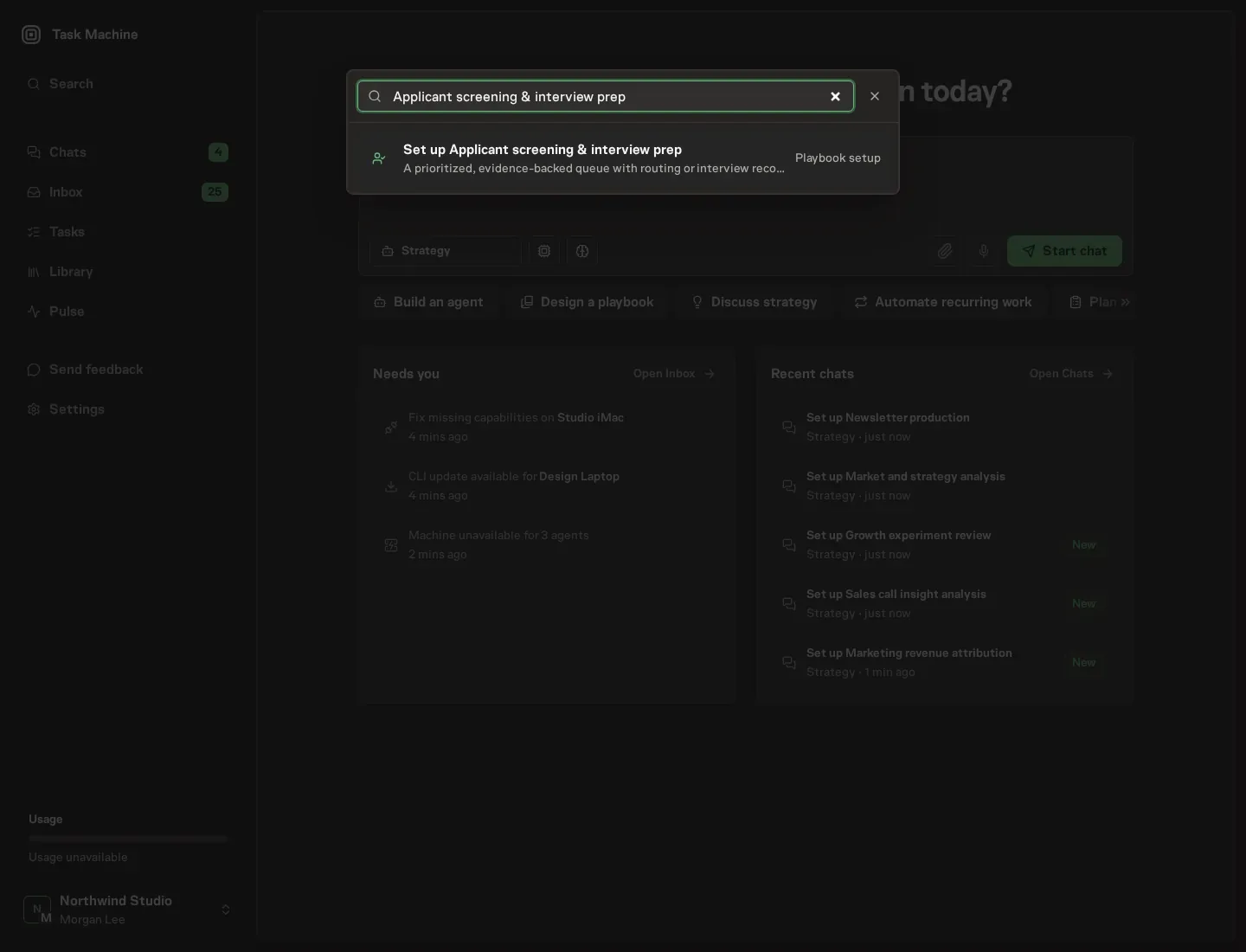
Open Search in your workspace and enter "Applicant screening & interview prep". The command center lists Set up Applicant screening & interview prep under Playbook setup.
2. Start the conversation
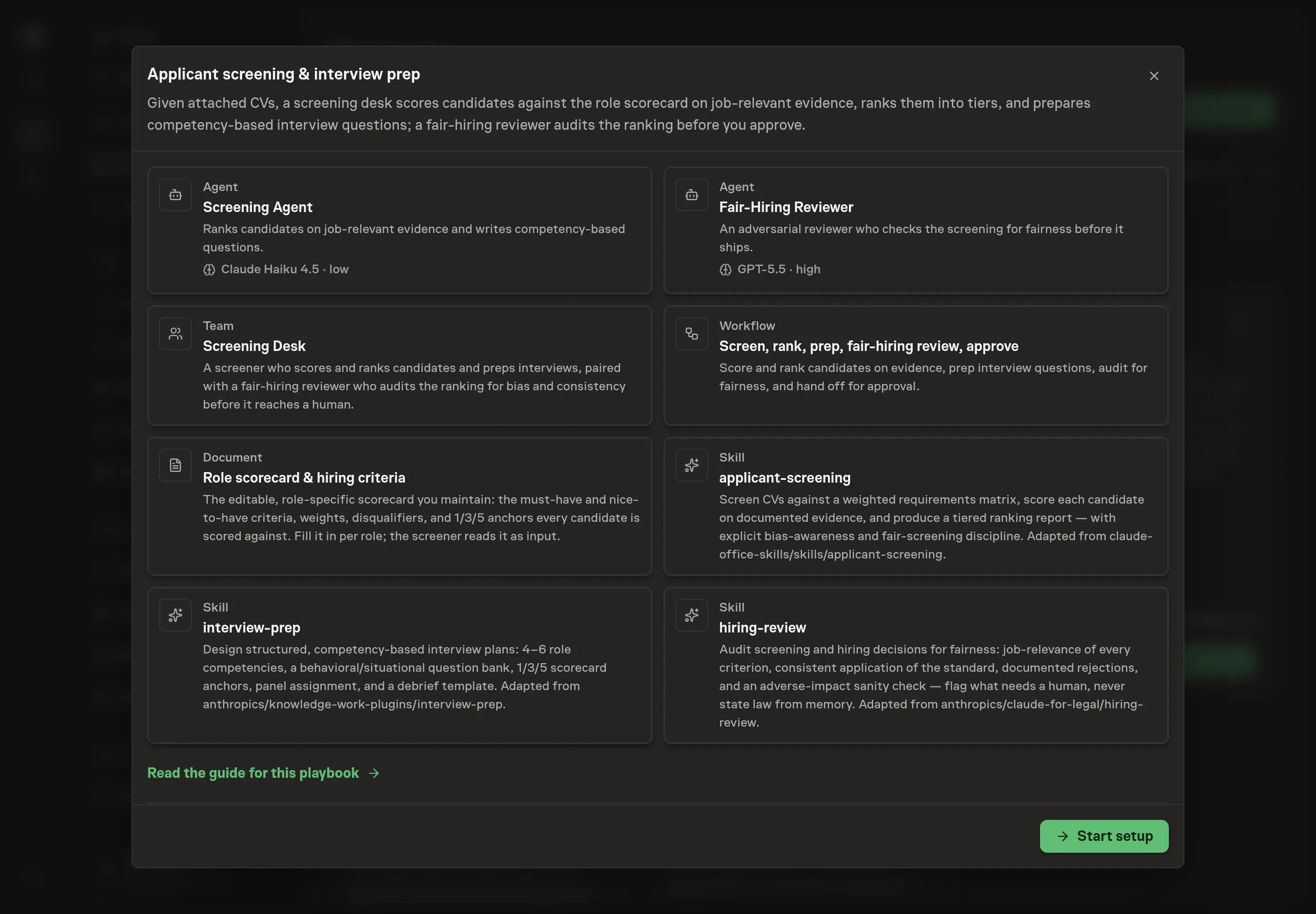
Choose Set up Applicant screening & interview prep. Task Machine opens a dedicated Chat with the Playbook card and an editable, unsent request. Read the intended job and outcome. Add your situation and send it when ready. Opening the draft does not install anything or start work. This walkthrough uses settings that require approval of the proposed Playbook.
3. Agree the working brief
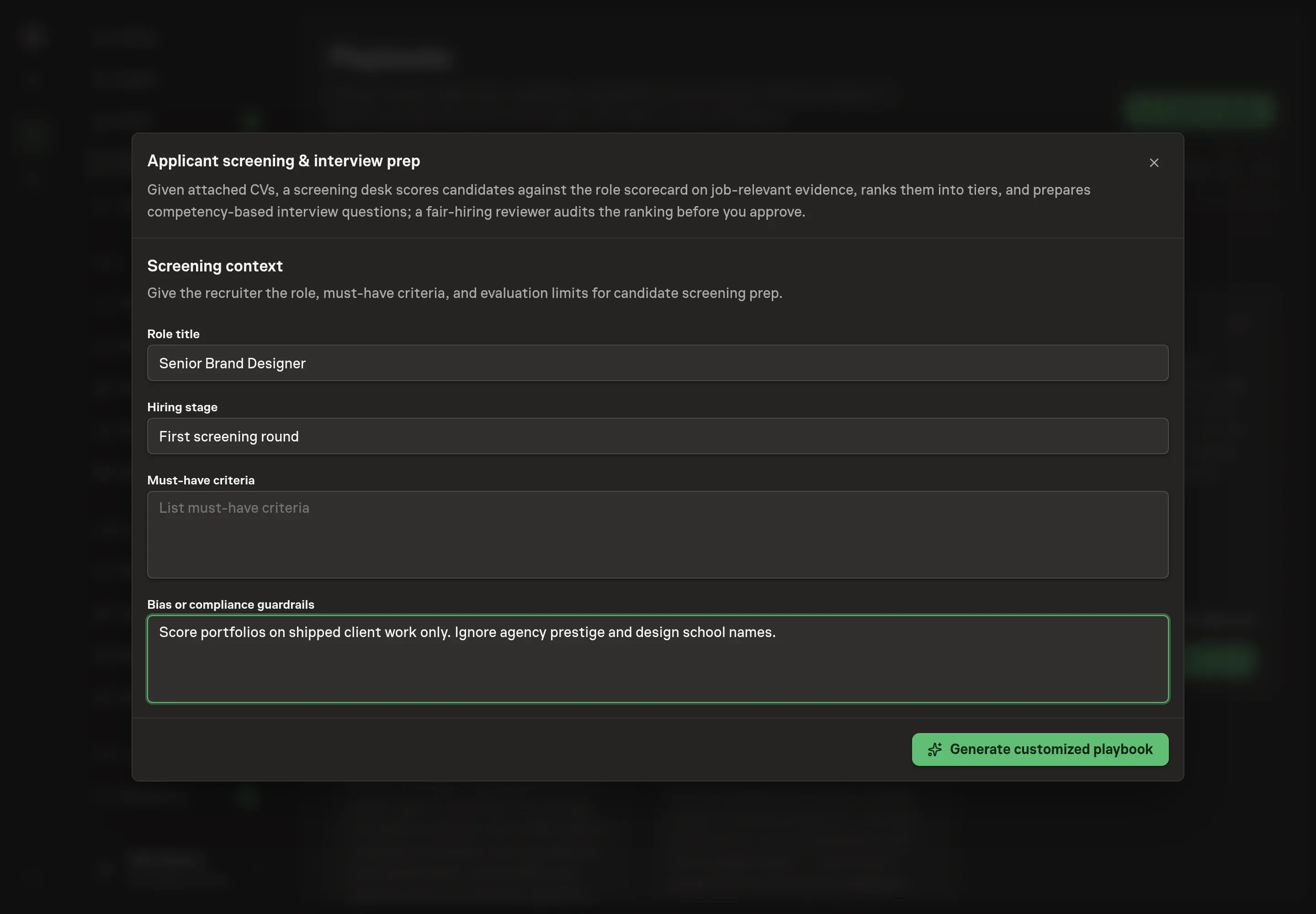
Use Chat to agree the inputs, expected output and limits before asking for a proposal. Discuss the screening context. Role title names the position every candidate is scored against. Hiring stage tells the desk where in the process the batch sits. Must-have criteria lists the non-negotiables that become the weighted requirements matrix. Bias or compliance guardrails sets the evaluation limits both agents enforce, such as what the screener must ignore and what the reviewer must flag.
4. Review the proposed Playbook
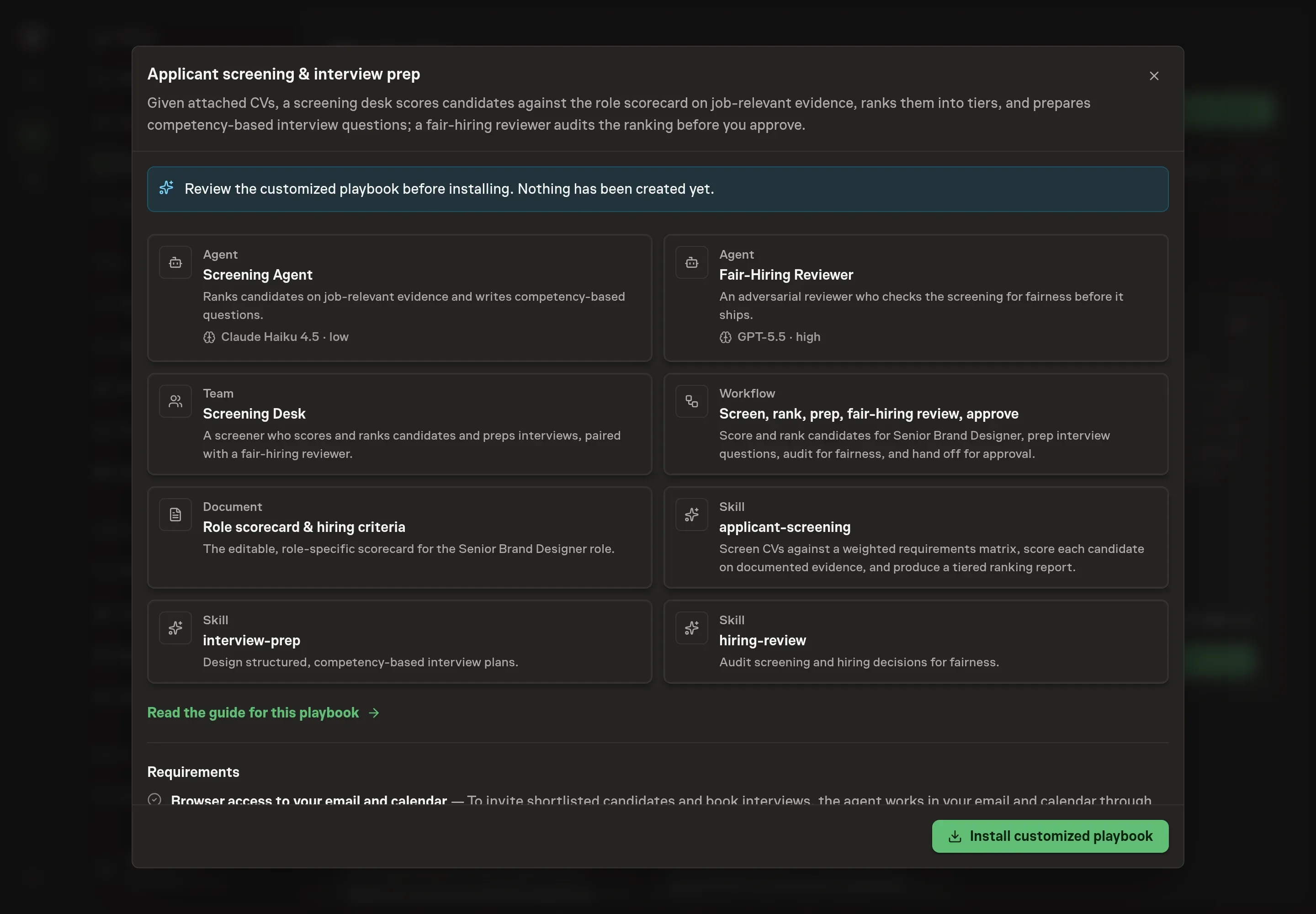
Ask the Agent to generate the Playbook from the agreed brief. Open its proposal in Chat and check the instructions and resources it will install, which carry more detail than the conversational summary. Read through the agent and workflow cards and confirm the role, criteria, and guardrails match what you agreed. Ask for a revised proposal if anything is missing or changes the job.
5. Approve and prepare the first work
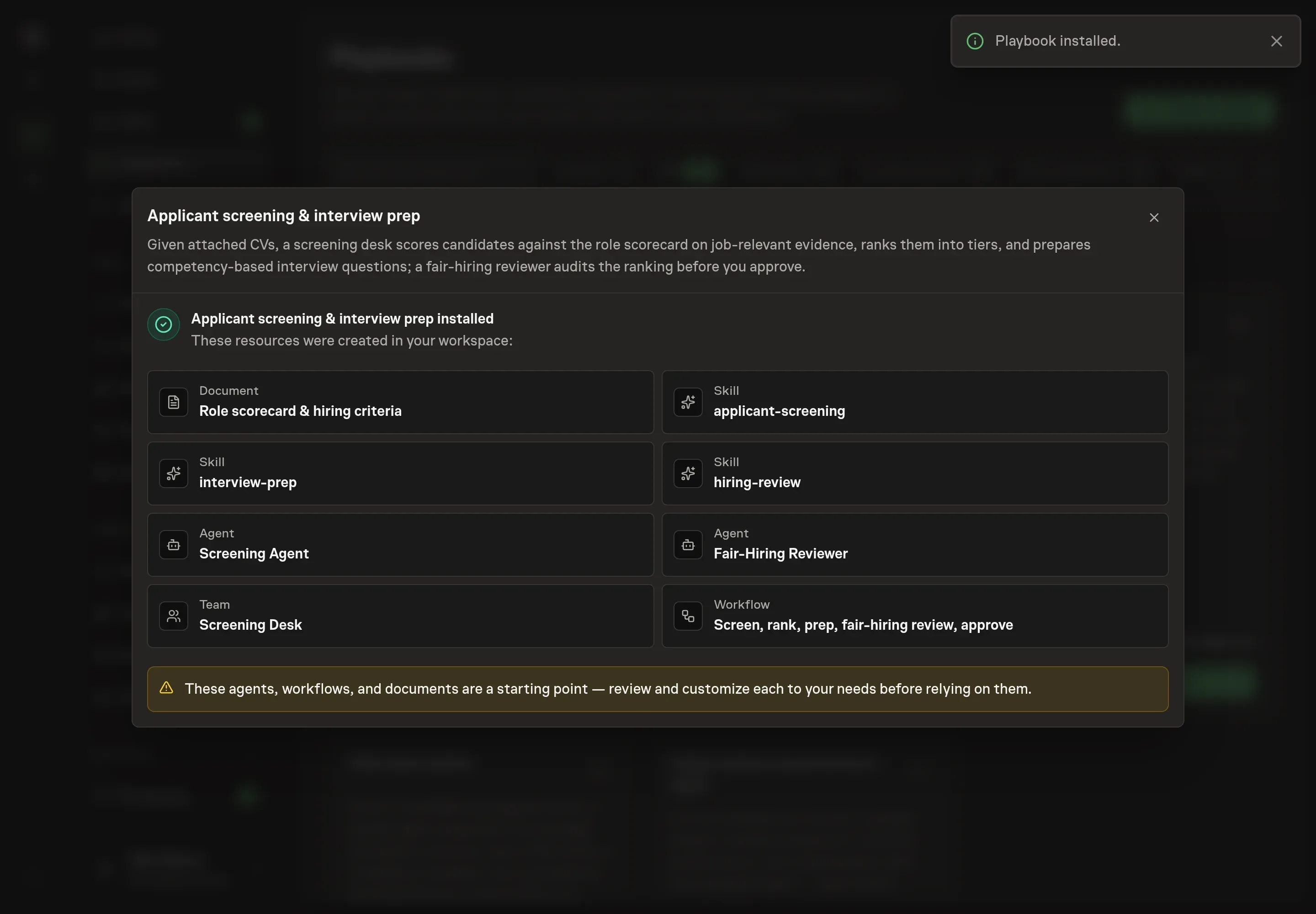
Choose Approve on the proposal in Chat when the configuration matches your brief. Task Machine installs that reviewed configuration. The approved item retains its review details. If your autonomy settings allow direct installation, this approval may not be required. Check the resulting configuration in that case too.
Complete any remaining secure service setup from the installation details in Chat. Inbox keeps those setup items available if you return later. Prepare the source documents and inputs before starting the first Task or Workflow. Installation does not authorize sending, publishing or changing an external service beyond the boundaries you agreed.
What good looks like
Three checks tell you whether the process works:
- Every score cites evidence. Each candidate's requirements-match table shows the evidence behind every criterion score. A score with no citation is a gut feeling in disguise, and the audit should catch it.
- Every rejection has a recorded, job-relevant reason. A "Pass" with no reason is a defect. When the reviewer returns a clean audit, you can answer for every candidate in the batch.
- Tier boundaries hold. Strong-interview candidates sit at 80 and above, phone screens between 65 and 79, and candidates below 50 do not proceed. When most of a pool lands under 50, the pool insight to act on is sourcing, not scoring.
Common questions
Does using an agent to screen CVs make bias worse? It depends entirely on the process, which is why the process here is fixed: job-relevant criteria only, scoring before impressions form, each criterion scored separately, and a second agent auditing every batch for consistency and adverse impact. Documented, consistent scoring is far easier to audit than a stack of gut reads.
Can the agent reject candidates on its own? No. The ranking is a draft. Every batch ends at an approval step, and the final call on every candidate is yours. Scoring is guidance for a human decision, not a replacement for one.
Does this give legal or compliance advice? No. The fair-hiring reviewer audits the process: job-relevance, consistency, documented rejections, and an adverse-impact sanity check. Where a decision turns on a jurisdiction-specific rule, it flags the question for research or counsel rather than stating employment law from memory.
What about candidates with career gaps or non-traditional backgrounds? Gaps become interview questions, never silent disqualifiers. Screening from a CV can also miss context from non-traditional paths, which is one more reason the final read on every candidate stays human.
Does it schedule the interviews too? It drafts the invites and proposed slots. Once you connect your email and calendar, the agent works in them through your browser and pauses for your approval before sending or scheduling anything. Until then, the drafts wait for you to send.