How to Automate Beta Customer Discovery
A practical guide to finding beta customers from public problem posts: keyword maps, qualification tiers, value-first replies, and approval on every send.

Founder, Task Machine
Beta customer discovery is the process of finding people who are publicly describing the problem your product solves, qualifying them against your ideal customer profile, and reaching out with something useful before the beta ever comes up. It targets the best kind of early customer: someone who wrote the problem down themselves, in public, in their own words.
For an early-stage product this is the highest-signal pipeline there is. Nobody has to be convinced the problem exists, because the person already said so. The only thing standing between you and that conversation is a search-and-qualify process that most founders run in stray half-hours, inconsistently, or not at all.
Why beta recruiting stalls
Without a discovery process, beta recruiting falls back on whoever you already know. That network runs out within a few weeks, and it skews feedback toward people who like you rather than people who have the problem.
Meanwhile the best prospects are perishable. A solution-seeking post gets answered by someone within a day, then scrolls out of sight. If nobody owns the job of watching for those posts, they pass unnoticed, and the shortcut most teams reach for instead (a templated DM blast) burns the exact communities where the buyers live. A recruiting channel torched by one promotional spree stays torched.
What the manual process looks like
Done by hand, beta customer discovery is a recurring ritual with five steps:
- Build a keyword map of the symptom language your buyers use: pain phrases, solution-seeking asks, competitor mentions, and broad category terms.
- Search X, Reddit, LinkedIn, Hacker News, and the niche communities your buyers post in, and capture each hit with the post, its link, the surface, and the phrase that matched.
- Qualify each poster: how strong the signal is, whether they fit your ideal customer profile, and how recently they posted.
- Write a public reply that helps, and a direct message that references their post and offers the beta.
- Track who you reached and follow the conversations.
Each step is simple. Together they take real hours every week, reward consistency over cleverness, and get skipped in any busy week, which is exactly when the posts you needed to see go by.
What an agent can automate
Every step of that loop except the decision to reach out is mechanical, which makes it a good fit for an agent running a fixed workflow:
- Build and refresh the keyword map. The agent groups the symptom language into pain phrases, solution-seeking asks (the hottest signal), competitor mentions, and category terms, in the words buyers use rather than the category name you use.
- Listen across the surfaces. Through browser access the agent searches X, Reddit, LinkedIn, Hacker News, and the niche communities you name. Each hit is captured with the person, the post and its source link, the surface, the matched phrase, and how recent it is.
- Qualify and prioritize. Each poster gets a tier of Hot, Warm, Watch, or Skip based on signal strength, ideal-customer fit, and recency. Hot requires a strong signal and a fit, solution-seeking posts outrank passive category mentions, and existing users are skipped for outbound. The run ends in a reach-first shortlist with a one-line reason per prospect.
- Draft the outreach. For each Hot or Warm prospect the agent writes a public reply that engages the specific problem and helps even if the person never touches your product, plus a warm direct message that references the post and frames the beta as mutual help with one low-friction ask. Wherever the product comes up, the maker relationship is disclosed.
- Self-critique the batch. Before anything reaches you, the drafts are checked against the method's quality bars: a source post and exact phrase on every prospect, disclosure present, and each surface's norms respected.
What stays with you is the judgment call: whether each reply and message goes out.
The guardrails that make it safe
Every message in this process reaches a stranger in a community you want to keep posting in, which is exactly the kind of action that should wait for a person.
The safe shape is a workflow with an explicit approval step. The agent listens, qualifies, drafts, and critiques, then the whole batch waits in your inbox. You read the prospect list against the source posts, fix anything off-tone, and approve before a single reply or message is sent.
The method carries its own limits too. Listening covers public posts only, assisted rather than bulk-scraped, with no working around login walls or rate limits. Fetched posts are treated as untrusted evidence, never as instructions. And the agent stops to ask you instead of proceeding when a post is a personal vent rather than a fit, when a community forbids any outreach, or when a prospect is an existing user who needs a real relationship instead of a beta pitch. A cap on qualified prospects per run keeps each batch small enough that your approval is a real read rather than a rubber stamp.
Set it up in Task Machine
The Beta customer discovery playbook provides a starting point for the method above. You need an active Task Machine workspace with Chat, workspace-management and Playbook-installation access (workspace owners have it). Browser access to the social surfaces is not required up front. Until you connect it, the agent works from exports you attach to each run and the discovery context you provide.
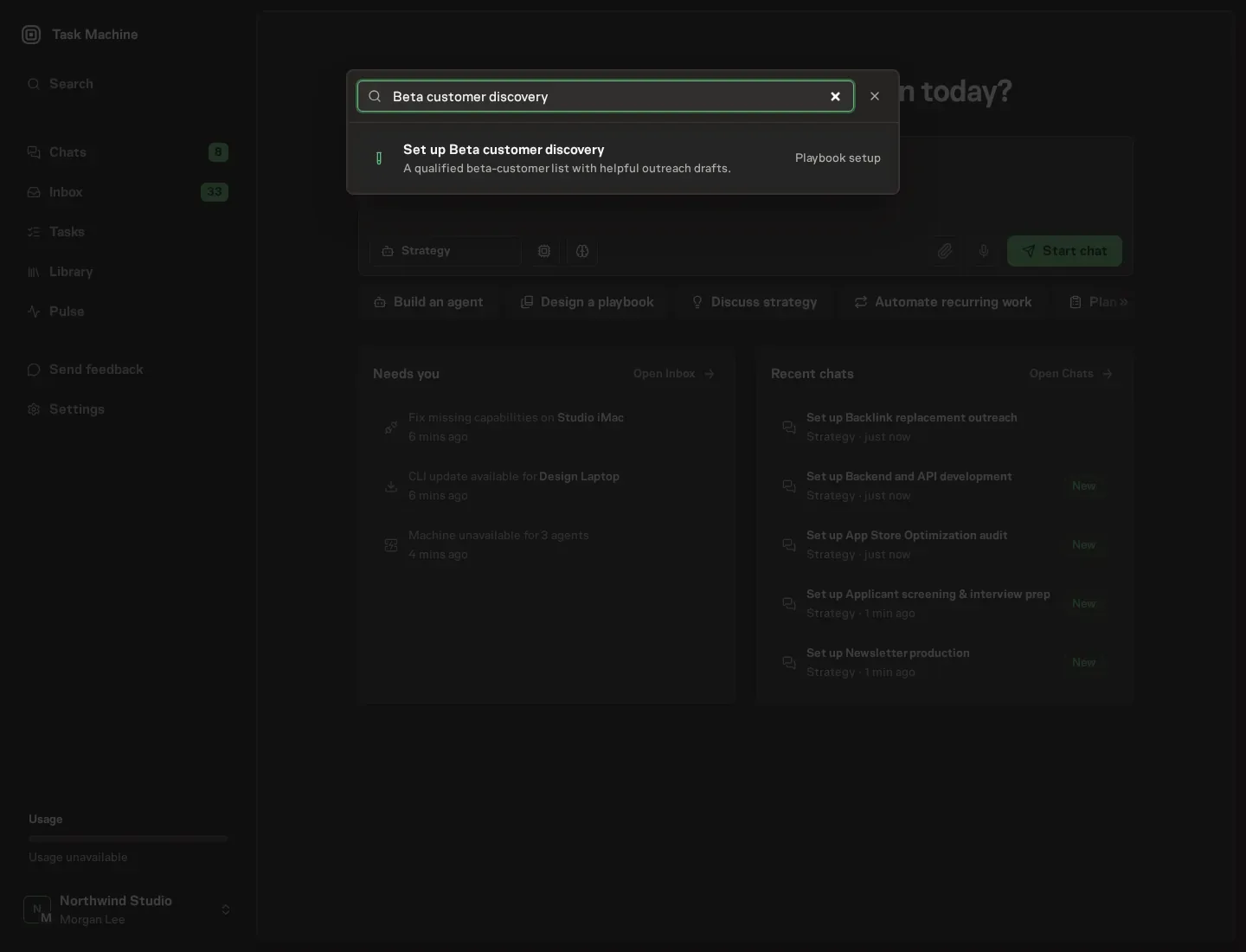
1. Find the playbook
Open Search in your workspace and enter "Beta customer discovery". The command center lists Set up Beta customer discovery under Playbook setup.
2. Start the conversation
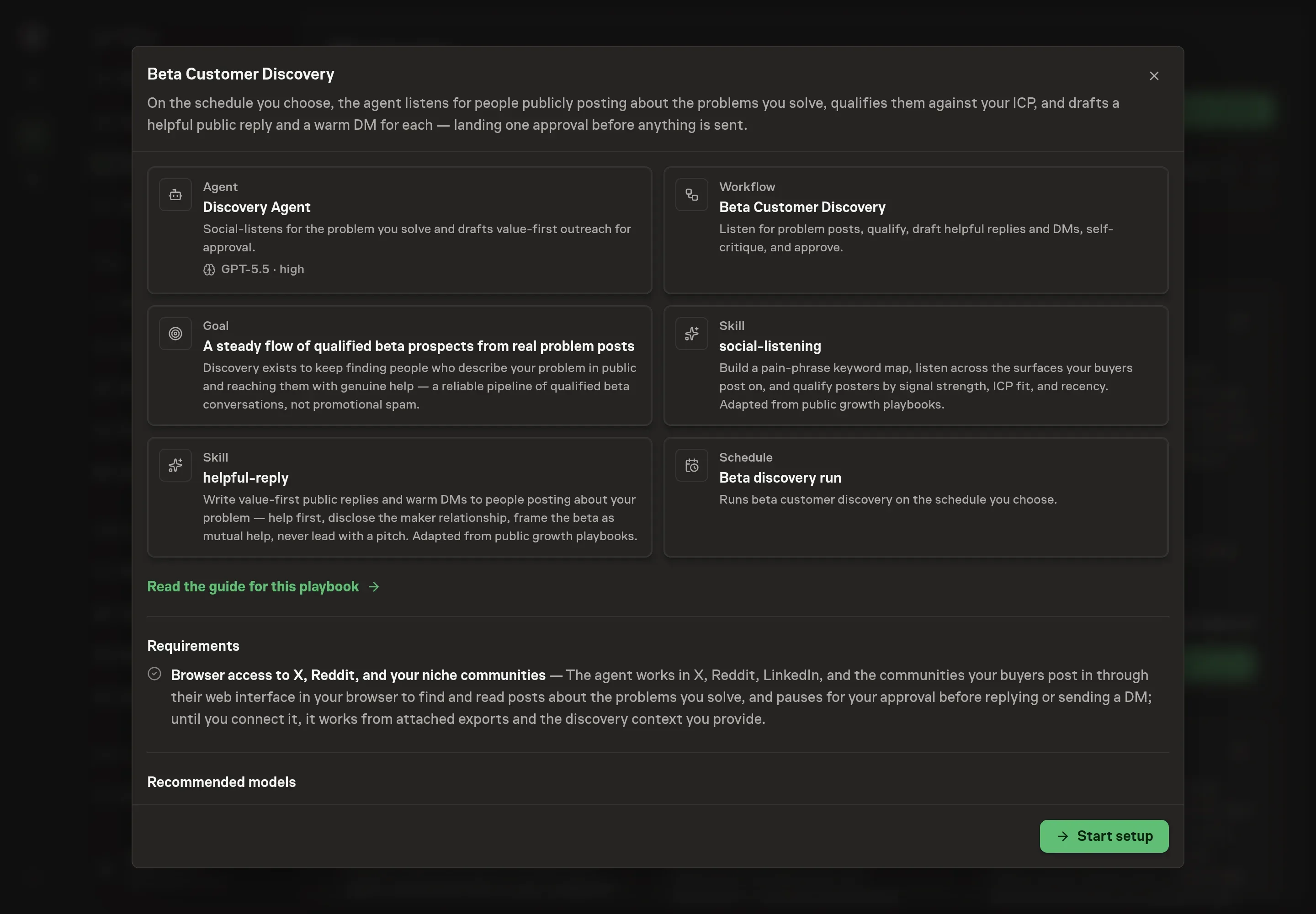
Choose Set up Beta customer discovery. Task Machine opens a dedicated Chat with the Playbook card and an editable, unsent request. Read the intended job and outcome. Add your situation and send it when ready. Opening the draft does not install anything or start work. This walkthrough uses settings that require approval of the proposed Playbook.
3. Agree the working brief
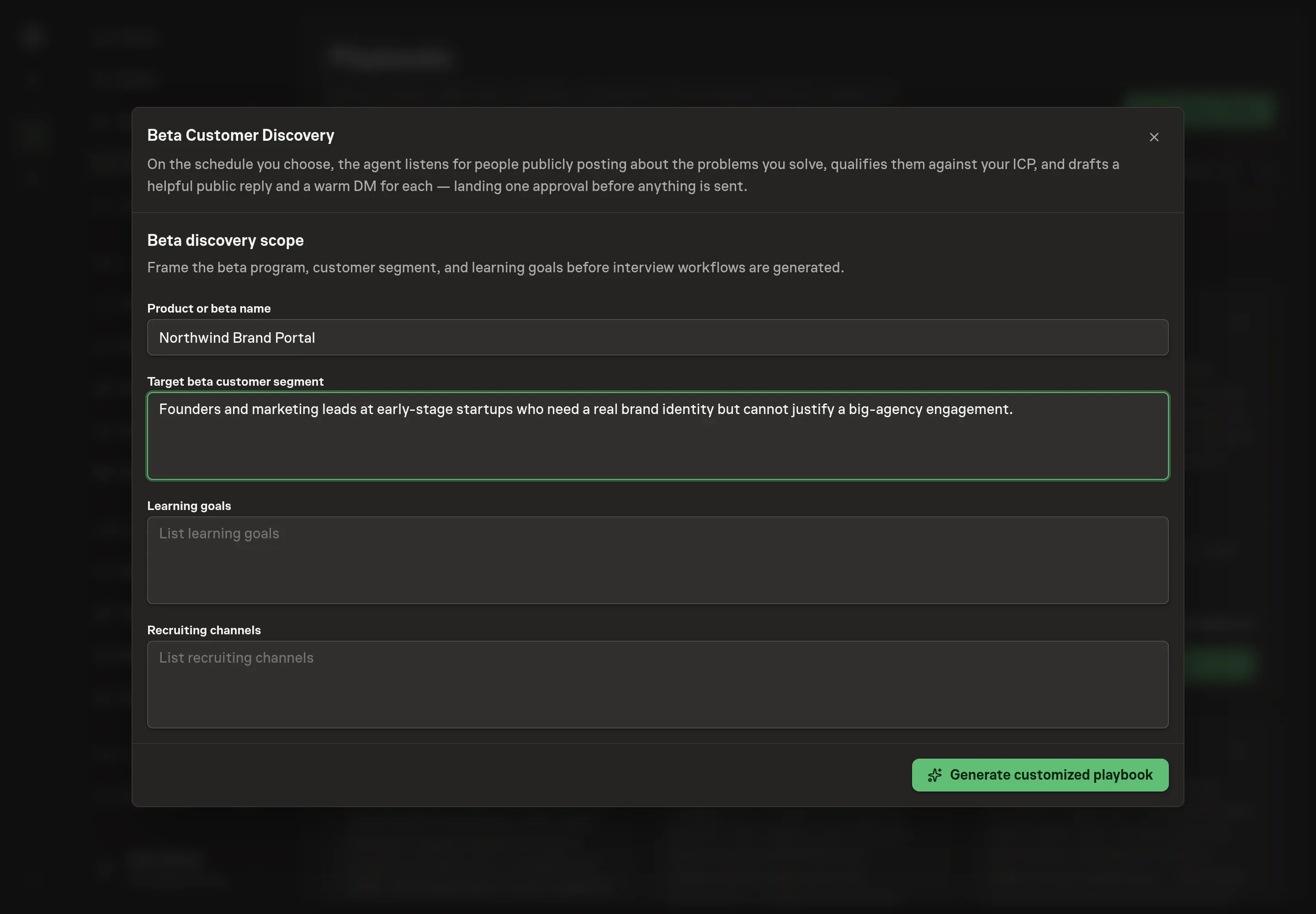
Use Chat to agree the inputs, expected output and limits before asking for a proposal. The Agent needs the details that shape every run. Product or beta name is what the agent discloses when the product comes up. Target beta customer segment describes who a qualified prospect looks like, and it drives the Hot, Warm, Watch, and Skip tiers. Learning goals name what the beta needs to teach you, so outreach lands with the people who can answer. Recruiting channels list the surfaces and communities the agent listens on.
4. Review the proposed Playbook
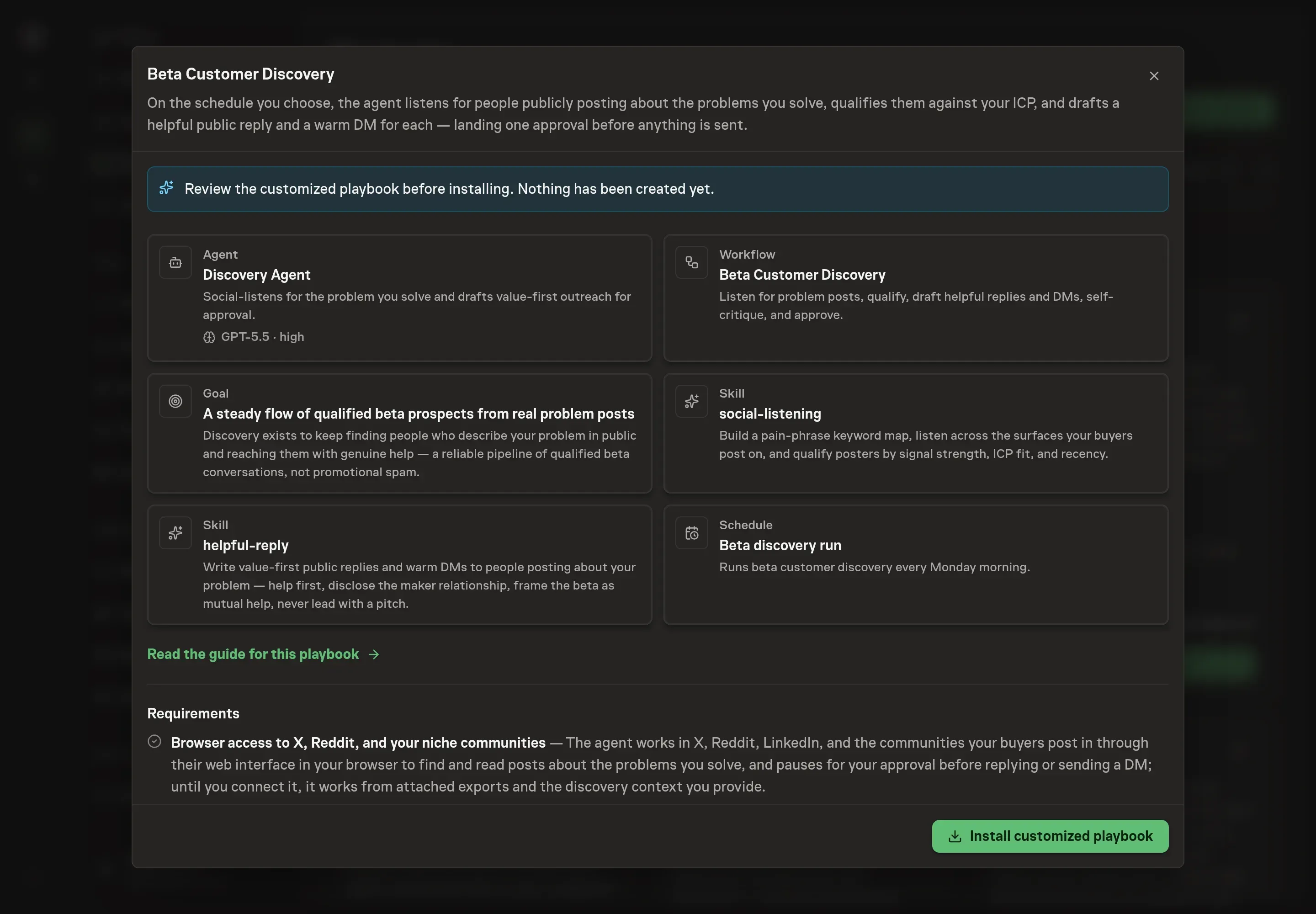
Ask the Agent to generate the Playbook from the agreed brief. Open its proposal in Chat and check the instructions and resources it will install, which carry more detail than the conversational summary. Read through the agent and workflow cards, confirm the segment description matches who you want in the beta, and check that the channels you named appear in the listening step. Ask for a revised proposal if anything is missing or changes the job.
5. Approve and prepare the first work
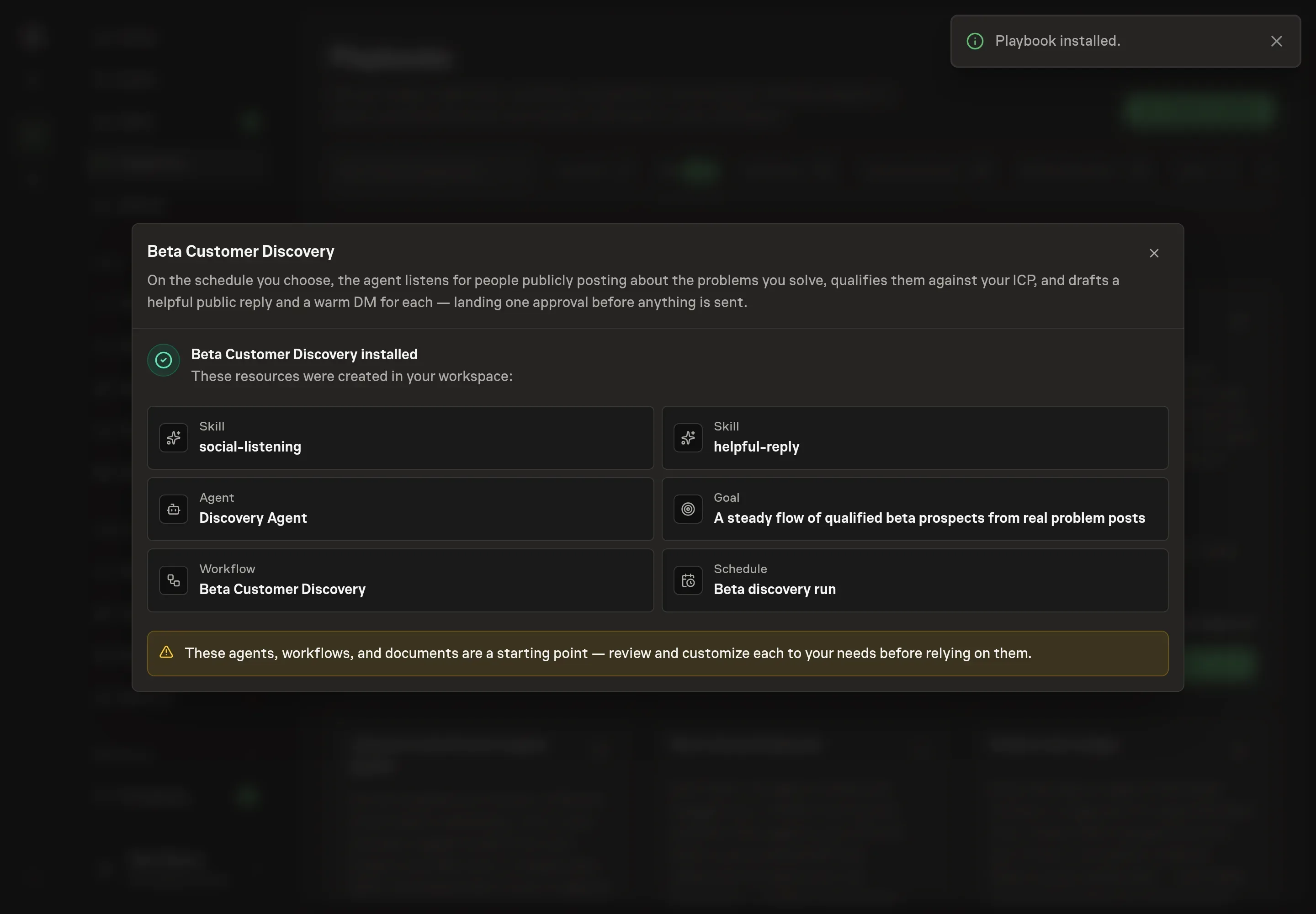
Choose Approve on the proposal in Chat when the configuration matches your brief. Task Machine installs that reviewed configuration. The approved item retains its review details. If your autonomy settings allow direct installation, this approval may not be required. Check the resulting configuration in that case too.
Complete any remaining secure service setup from the installation details in Chat. Inbox keeps those setup items available if you return later. Prepare the source documents and inputs before starting the first Task or Workflow. Installation does not authorize sending, publishing or changing an external service beyond the boundaries you agreed. Confirm each schedule's cadence and timezone, and resolve any pending schedule setup before it starts. A readback must wait for its agreed observation window and source data.
What good looks like
The method carries its own quality bars, and a healthy batch shows all of them:
- Every prospect traces to a real post. Each entry carries the source link and the exact phrase that matched. Prospects arriving without them mean listening has drifted into guessing.
- Hot means signal and fit, together. A batch where everything is Hot means qualification is not doing its job. Solution-seeking posts should sit at the top, and existing users should never appear in the outbound list.
- Replies that stand on their own. The test from the drafting method is whether the reply helps even if the person never uses the product. Drafts that read as a pitch with a compliment attached should not go out.
- Batches small enough to read. The per-run cap on qualified prospects (fifteen by default) keeps approval a real review of every draft.
Common questions
Isn't replying to strangers' problem posts just spam? It is when the reply leads with a pitch. This method inverts that: quote their words, help with the actual problem, and mention the product only where it directly fits, with the maker relationship disclosed. The gut check is whether the reply is useful even if the person never touches your product.
What about communities that ban self-promotion? The agent helps there without mentioning the product at all, and when a community forbids any outreach it stops and asks you instead of posting. Burning a niche community for one beta signup is a bad trade, and the guardrails treat it that way.
Does the agent post or message anyone on its own? No. Every run ends at an approval step. The qualified prospect list, the public replies, and the direct messages wait in your inbox, and nothing goes out until you approve the batch.
Can this run before browser access is connected? Yes. Until you connect the surfaces, the agent works from exports you attach to each run and the discovery context you provide. Connecting browser access removes the manual export step and lets the agent search the surfaces directly.
Why draft a direct message as well as a public reply? The public reply is the primary touch. It helps in public, where everyone else with the same problem can see it, and it earns the right to the follow-up. The message comes second, references the post, and makes one low-friction ask framed as mutual help: try the beta, and the feedback matters.