How to Automate Channel Sponsorship Sourcing
A practical guide to sourcing paid shoutouts and sponsorships with an agent: channel mapping, placement economics, drafted outreach, and spend approvals.

Founder, Task Machine
Channel sponsorship sourcing is the process of finding the communities, newsletters, podcasts, and accounts where your target customers already spend time, qualifying which of those channels sell placements worth paying for, and lining up shoutouts or sponsor slots with the people who run them.
A paid placement puts your product in front of an audience someone else spent years assembling, which makes it one of the fastest distribution moves a small team can buy. It is also one of the easiest to waste money on. The return depends entirely on picking audience fit over raw reach and holding a hard budget line, and that is exactly the work most teams skip when a deal lands in their inbox.
Why ad hoc sponsorships buy the wrong audience
When nobody owns sourcing, the placements you buy are the ones that pitched you, not the ones your customers read or listen to. Channels get compared on subscriber counts instead of on what a reachable reader costs, so a big off-target newsletter beats a small on-target one every time.
The money problems compound unnoticed. Without a unique tracking link per placement, you are left believing channel-reported numbers, which run optimistic. Without a named cap, spend creeps past what anyone agreed one deal at a time. And because each buy is a one-off scramble, there is no pipeline: when a placement works, there is nothing qualified behind it to run next.
What the manual process looks like
Done by hand, sponsorship sourcing is a research ritual with six steps:
- Gather context: who the customer is and what job they hire your product for, the offer you will promote, the budget cap, the target cost per placement, and any brand constraints.
- Map the four surfaces where that customer gathers: communities such as Slack and Discord servers, subreddits, and forums, then newsletters, podcasts, and the accounts they follow that run paid shoutouts.
- Qualify each channel on audience fit, engagement quality, whether they sell placements at all, whether a shoutout suits the product, and whether the likely rate is realistic. Drop channels that are big but off-target, and never pitch a community whose rules forbid promotion.
- Size each deal: placement type, likely cost, the audience that will see it, and a rough cost per thousand or per click so channels compare on a common axis. Shortlist so the worst-case total stays inside the cap.
- Write personalized outreach to each channel owner, tailored to the surface.
- Track every placement from first contact through booked, ran, and paid, and reconcile actual spend and results against the budget and your own analytics.
Each step rewards patience and consistency. Together they take hours of open-web research per cycle, which is why most teams do it once, buy two placements, and let the pipeline go cold.
What an agent can automate
Everything in that loop except the spend decision is research and assembly, which makes it a good fit for a pair of agents running a fixed workflow:
- Map the four surfaces. A sourcing agent researches communities, newsletters, podcasts, and accounts on the open web, inspects the channels themselves in the browser, and records fit, size, the booking path, and whether paid placement is allowed at all.
- Qualify instead of collect. Each channel gets scored on audience fit, engagement quality, availability, format fit, and price realism. Big-but-off-target channels get dropped, and communities whose rules forbid promotion never get pitched.
- Size every deal on one axis. The agent estimates placement type, reachable audience, and a rough cost per thousand or per click, so a $400 newsletter slot and a $900 podcast host-read compare on expected efficiency rather than raw reach. The shortlist is sized so its worst-case total stays inside the named cap.
- Draft per-surface outreach. Each message references the specific channel, leads with why the offer fits that audience, offers ready-to-use copy, and asks one low-effort next step. No message states a committed budget before approval, and every placement gets a unique tracking link planned up front.
- Keep the tracker current. One row per placement moves from mapped through qualified, shortlisted, approved, booked, ran, and paid, with actual spend and results reconciled against the cap and your analytics.
The one thing that stays with you is judgment over money: which placements get funded, and at what total.
The guardrails that make it safe
This process spends real money, so the guardrails are the point, not an afterthought.
The safe shape starts with a named external-costs budget that the agent operates strictly inside. Every approval request states the per-placement cost, the total worst-case spend, and the headroom remaining against that cap. A stop rule backs it: if the shortlist's worst case would exceed the cap, the agent cuts the shortlist before asking, and never requests approval to overspend.
Before anything reaches you, a second agent reviews the work. The spend reviewer independently checks that each shortlisted channel is a real fit and allows sponsorship, that no draft commits a budget early, that the economics are realistic, and that the recomputed worst-case spend stays inside the cap. It produces a short go or no-go memo, and anything that fails goes back to the sourcer with specifics.
Then the human gate. An explicit approval step sits before any placement is committed: nothing is booked and nothing is paid without your sign-off. Only after approval does the agent send the booking outreach with the ready-to-run kit, which carries the copy, the unique tracking link, and the disclosure note. Booked placements and committed spend land in the tracker, so the committed total always matches what you approved.
Set it up in Task Machine
The Channel sponsorship sourcing playbook provides a starting point for the method above. You need an active Task Machine workspace with Chat, workspace-management and Playbook-installation access (workspace owners have it). Web research and channel access are not required up front. Until you connect them, the agents work from channel lists, research, and exports you attach to each run.
1. Find the playbook
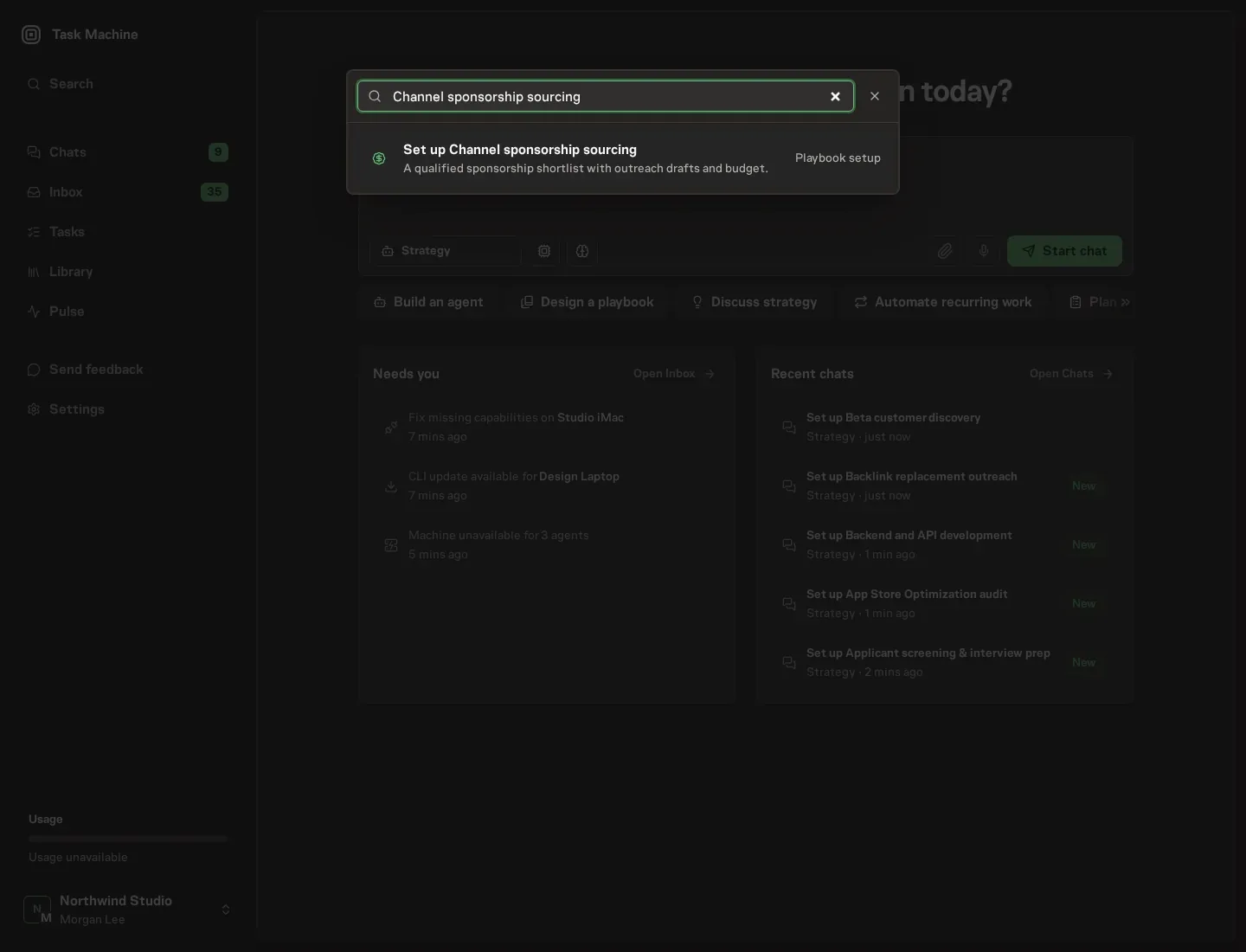
Open Search in your workspace and enter "Channel sponsorship sourcing". The command center lists Set up Channel sponsorship sourcing under Playbook setup.
2. Start the conversation
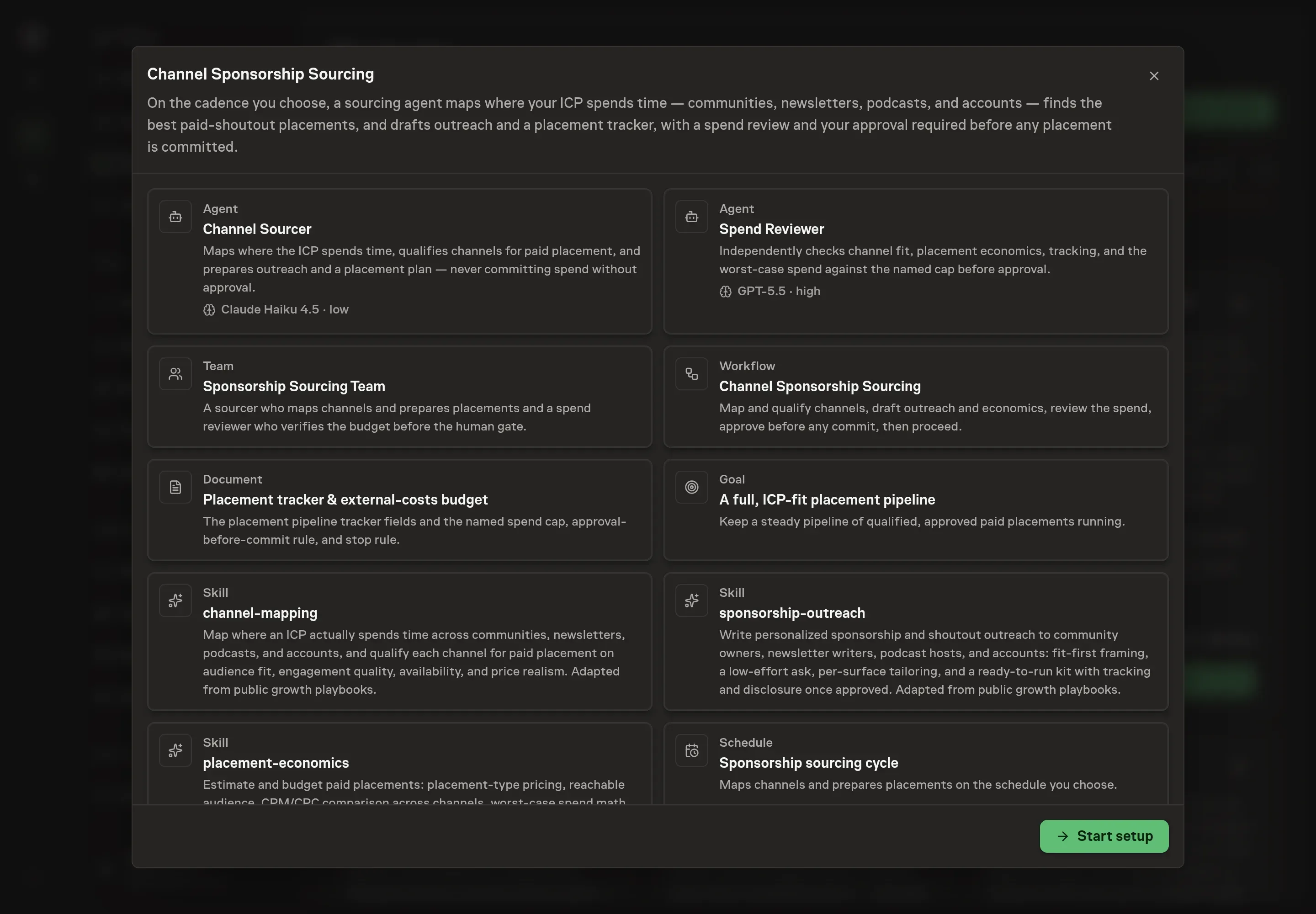
Choose Set up Channel sponsorship sourcing. Task Machine opens a dedicated Chat with the Playbook card and an editable, unsent request. Read the intended job and outcome. Add your situation and send it when ready. Opening the draft does not install anything or start work. This walkthrough uses settings that require approval of the proposed Playbook.
3. Agree the working brief
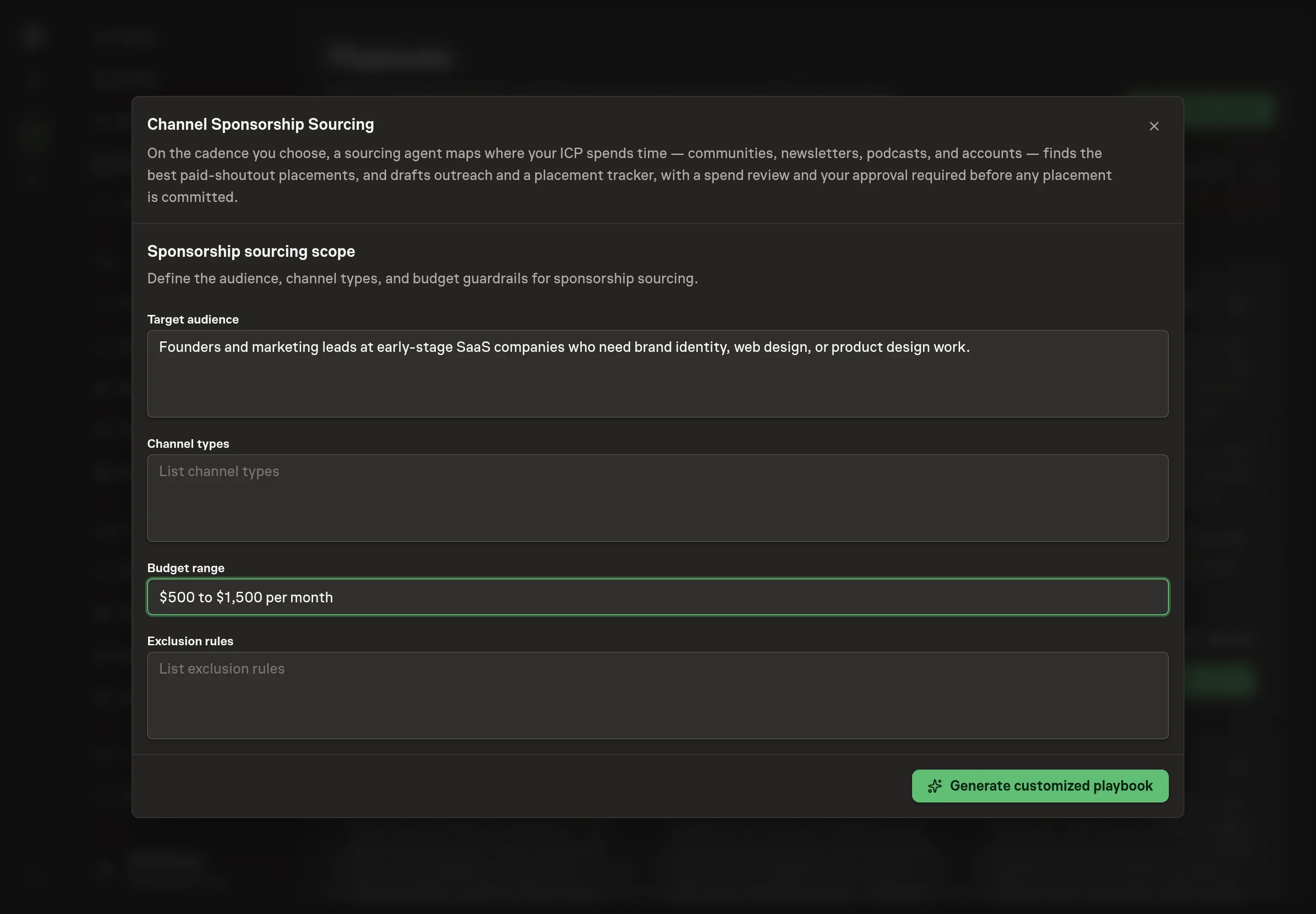
Use Chat to agree the inputs, expected output and limits before asking for a proposal. The Agent needs the details that shape every cycle. Target audience tells the agents who counts as a fit, so channels get qualified against your customer rather than raw size. Channel types narrows which of the four surfaces to map. Budget range becomes the named external-costs cap the shortlist's worst case must stay inside. Exclusion rules name the channels or categories the agents must skip entirely.
4. Review the proposed Playbook
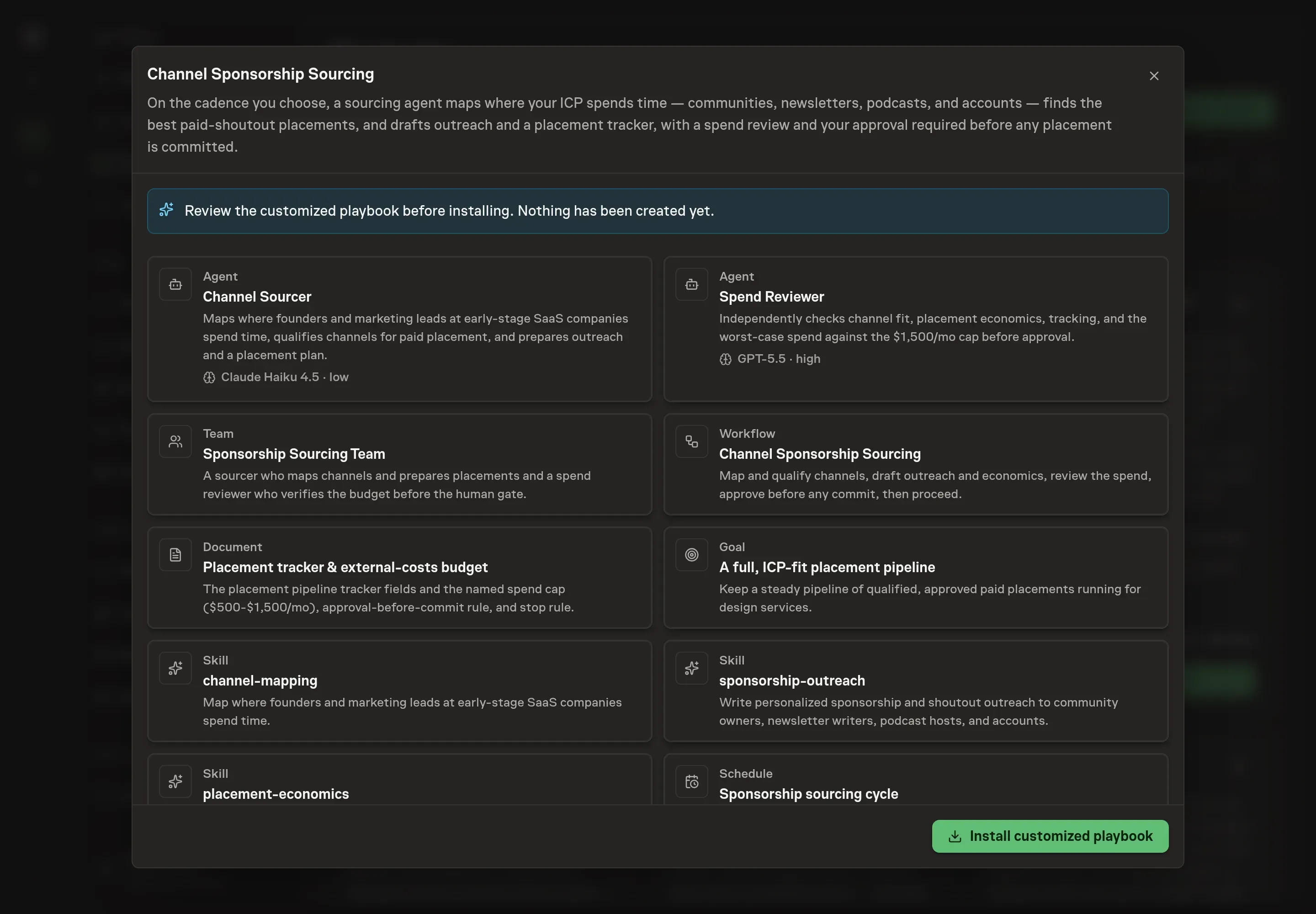
Ask the Agent to generate the Playbook from the agreed brief. Open its proposal in Chat and check the instructions and resources it will install, which carry more detail than the conversational summary. Read through the agent cards, confirm the audience and exclusions match what you wrote, and check that the budget cap in the tracker document is the one you gave. Ask for a revised proposal if anything is missing or changes the job.
5. Approve and prepare the first work
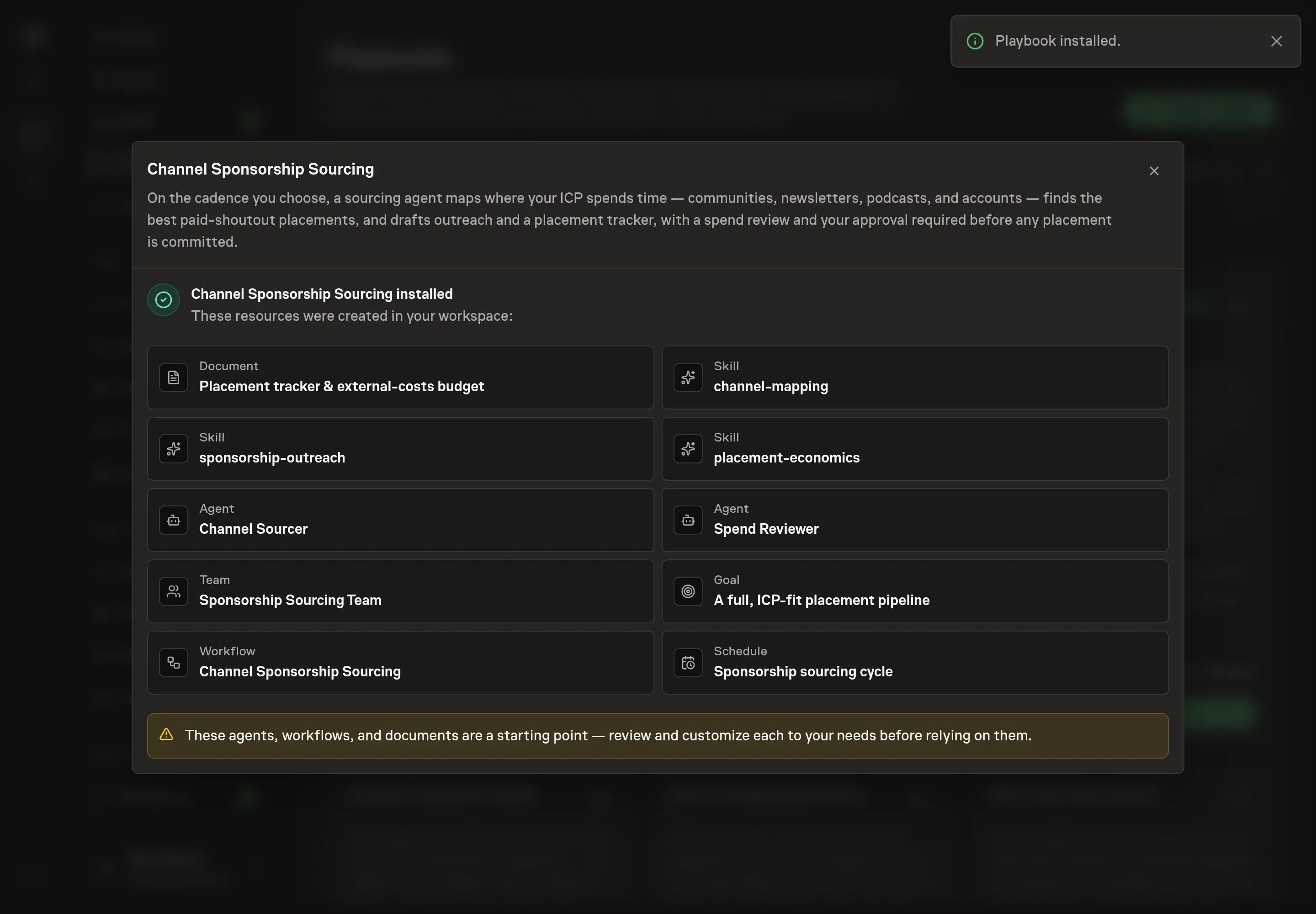
Choose Approve on the proposal in Chat when the configuration matches your brief. Task Machine installs that reviewed configuration. The approved item retains its review details. If your autonomy settings allow direct installation, this approval may not be required. Check the resulting configuration in that case too.
Complete any remaining secure service setup from the installation details in Chat. Inbox keeps those setup items available if you return later. Prepare the source documents and inputs before starting the first Task or Workflow. Installation does not authorize sending, publishing or changing an external service beyond the boundaries you agreed. Confirm each schedule's cadence and timezone, and resolve any pending schedule setup before it starts. A readback must wait for its agreed observation window and source data. Check the reviewed tracker or results document before the first cycle so evidence and human decisions have a durable home.
What good looks like
Three signals tell you whether the process works:
- Worst-case spend against the cap. Every approval request states the per-placement cost, the shortlist's worst-case total, and the headroom left. The committed total after a cycle matches what you approved, never more.
- Efficiency ranking, not reach ranking. The shortlist orders channels by estimated cost per thousand or per click, so a small on-target newsletter can beat a large off-target one on paper before any money moves.
- Results you can reconcile. Every placement runs with its own tracking link or promo code, and results get checked against your own analytics rather than channel-reported numbers, which run optimistic.
Common questions
Can the agent book or pay for a placement on its own? No. An approval step sits before the commit step in the workflow, so nothing is booked and nothing is paid without explicit human sign-off. Pre-approval outreach may confirm availability and fit, and nothing more.
Should the first outreach message name a budget? No. Early outreach proposes the placement type and timing and offers ready-to-use copy, but states a budget or asks for the rate card only after the spend gate approves the plan. That keeps negotiating room and keeps commitments behind the approval.
What happens if the shortlist would blow the budget? The stop rule applies: the agent cuts the shortlist until the worst-case total fits inside the cap, and never requests approval to overspend. The spend reviewer recomputes the math independently before the request reaches you.
Can this run before connecting Slack, Discord, or newsletter tools? Yes. Until those are connected, the agents work from channel lists, research, and exports you attach to each run. These channels have no usable programming interface for sponsorship outreach, so once connected, the agent works through their web interfaces in your browser and pauses for your approval before making any changes.
How do you know whether a placement paid off? Each placement carries a unique tracking link or promo code, and actual spend and results get recorded in the tracker and reconciled against the cap and your analytics. A placement without its own tracking is a guess, not a result.