How to Automate Competitor Tracking and Battlecard Updates
A practical guide to competitor tracking with an agent: scheduled sweeps, delta memos of what changed, a living battlecard, and approval on every update.

Founder, Task Machine
Competitor tracking is the practice of checking each rival's public surfaces (site, pricing page, changelog, blog, social accounts, and review profiles) on a regular cadence, working out what changed since the last check, and folding the material changes into a battlecard a rep can reference during a call. Done well, it turns a pricing change, a new tier, or a wave of bad reviews into a dated, sourced finding instead of a surprise in a live deal.
The work matters because competitive deals turn on current information. A battlecard that quotes last year's pricing gets fact-checked by a prospect once, and after that nobody trusts the card again. Without a standing process, competitor moves reach you the expensive way: through a deal you already lost.
Competitor tracking fails in two directions
Competitor tracking fails in two opposite directions. Miss a new tier, a removed feature, or a shift in review sentiment, and your positioning argues against a company that no longer exists. Re-report last month's pricing as news, and you train everyone to ignore the updates. Both failures come from the same cause: nobody keeps a dated record of what was already known, so every check starts from scratch.
There is also a competitor most tracking misses entirely. In B2B, roughly 40% of deals are lost to "no decision", which means the deal went to the spreadsheet, the manual process, or doing nothing. A watch that only covers named rivals ignores the alternative that wins the most.
The result of no process is a stale battlecard, and a stale battlecard is worse than none. Reps stop opening it, objection responses drift from reality, and the one asset meant to win competitive deals becomes a liability a prospect can disprove.
What the manual process looks like
Done by hand, a competitor watch is a recurring ritual with five steps:
- Open each competitor's homepage, pricing page, changelog, blog, and social accounts, plus their review profiles on G2, Capterra, TrustRadius, and Reddit.
- Compare what you see against what you knew from the last check, usually from memory or scattered notes.
- Decide which changes are material: a new or removed tier, a price or packaging change, a positioning pivot, a funding round, a swing in review sentiment. Cosmetic copy tweaks do not count.
- Update the battlecard rows those changes touch: the comparison table, the where-we-win proof points, the objection responses, the landmines.
- Write down what you found, dated and sourced, so the next check has something honest to compare against.
None of this is hard. It is tedious, it rewards consistency over cleverness, and it multiplies with every competitor you track. Skip a month and step 2 becomes guesswork, which is exactly how stale facts start getting reported as news.
What an agent can automate
Everything in that loop except the response decision is mechanical, which makes it a good fit for an agent running a fixed workflow:
- Sweep the same surfaces every run. The agent reads each tracked competitor's homepage and positioning, pricing page, changelog, blog and newsroom, and social snippets, grounded in live web search and fetch with a browser fallback for pages that render in JavaScript. It never invents pricing or features from memory.
- Mine reviews for themes. G2, Capterra, TrustRadius, and Reddit get read for recurring praise and complaint themes rather than one-off reviews. This is the highest-signal part of competitor research and the step people skip first when doing it by hand.
- Diff against memory. The agent keeps an append-only, dated log of every material move and compares each surface's current state to the most recent entry. Only what is new gets reported.
- Write a delta memo, not a re-dump. Each run leads with what matters this period, then covers each competitor: what changed with a dated source link, why it matters, and a concrete recommended response (or explicitly "monitor, no action"). A quiet competitor gets one line saying nothing material changed.
- Refresh the battlecard. The affected lines get updated in a sales-ready structure: an honest us/them/winner comparison table, where-we-win claims with proof, where-they-win with your counter, objection responses, landmines grounded in mined complaints, and win/loss patterns.
- Append to memory. Every material move lands in the log as a dated entry with its source URL. Past entries are never rewritten, because the history is what makes "this is new" trustworthy.
What stays with you is the judgment: which moves warrant a response, which win/loss patterns are real enough to carry forward, and whether a competitor move should change your positioning at all. Their shipped features reflect year-old thinking, so copying them blindly is the classic mistake the analysis exists to prevent.
The guardrails that make it safe
A competitor watch feeds your positioning and your sales conversations, so a wrong claim does real damage. The safe shape puts checks between the research and anything you act on.
The workflow ends in an explicit approval step. The delta memo, the refreshed battlecard, and the memory update all wait in your inbox, where you approve the update and steer which moves get a response. The agent researches and drafts. It does not publish or send anything.
Before the handoff, the agent runs a self-check against its own quality bar: every logged move has a dated source URL, the memo diffs against memory rather than re-reporting stale facts, reviews were mined rather than skimmed from marketing pages, and every competitor strength cited is accurate. Gaps get fixed before the update reaches you.
Two more limits hold at the research layer. If web tools are unavailable, the agent halts and says so instead of inventing a competitor's pricing, features, or funding. And it only reads public pages, falling back to a browser for JavaScript-heavy ones, without ever logging in on your behalf.
Set it up in Task Machine
The Competitor research & sales battlecards playbook provides a starting point for the method above. You need an active Task Machine workspace with Chat, workspace-management and Playbook-installation access (workspace owners have it). No external service needs to be authorized: the agent researches through web search and fetch, reads only public pages, and halts rather than guessing when a page cannot be reached.
1. Find the playbook
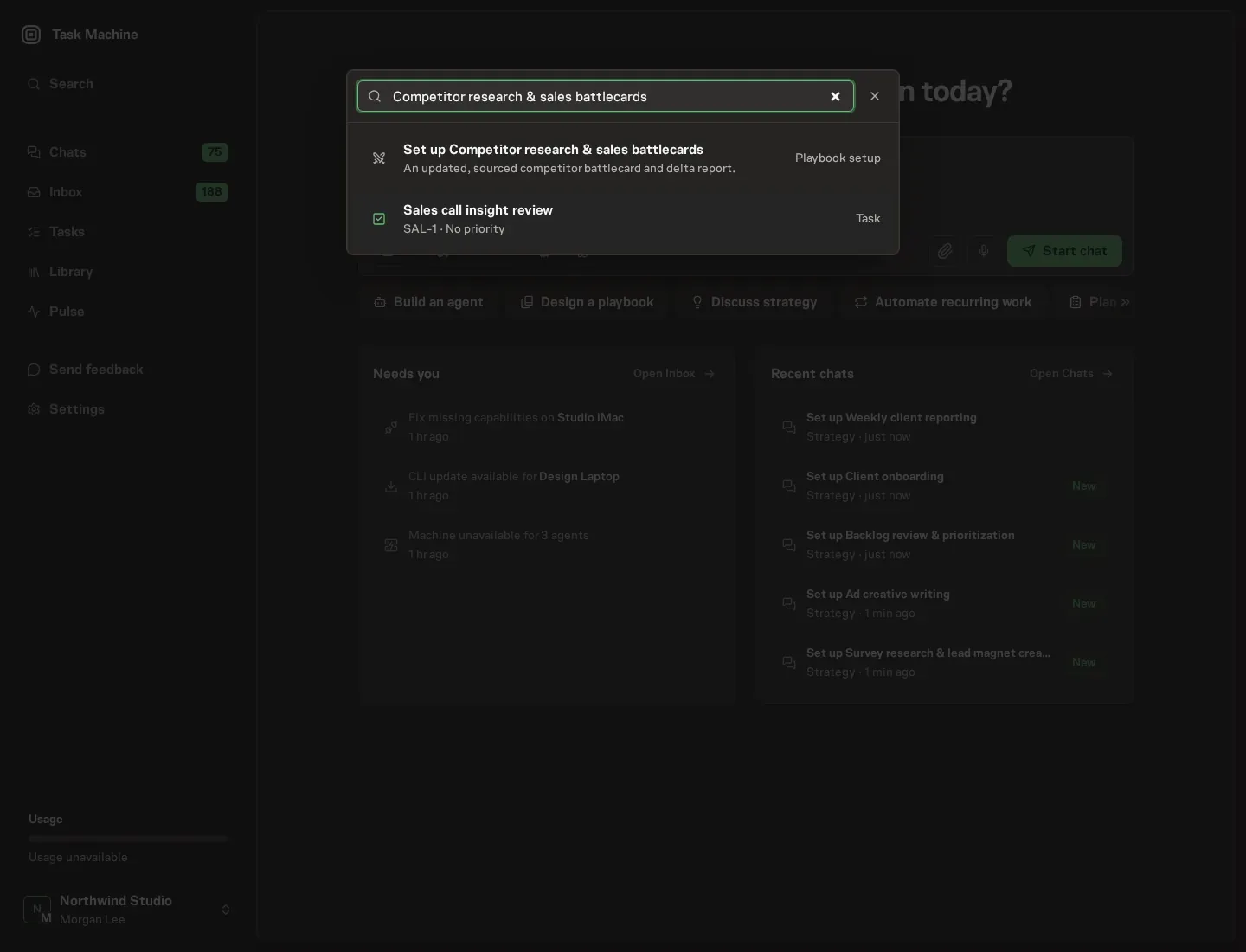
Open Search in your workspace and enter "Competitor research & sales battlecards". The command center lists Set up Competitor research & sales battlecards under Playbook setup.
2. Start the conversation
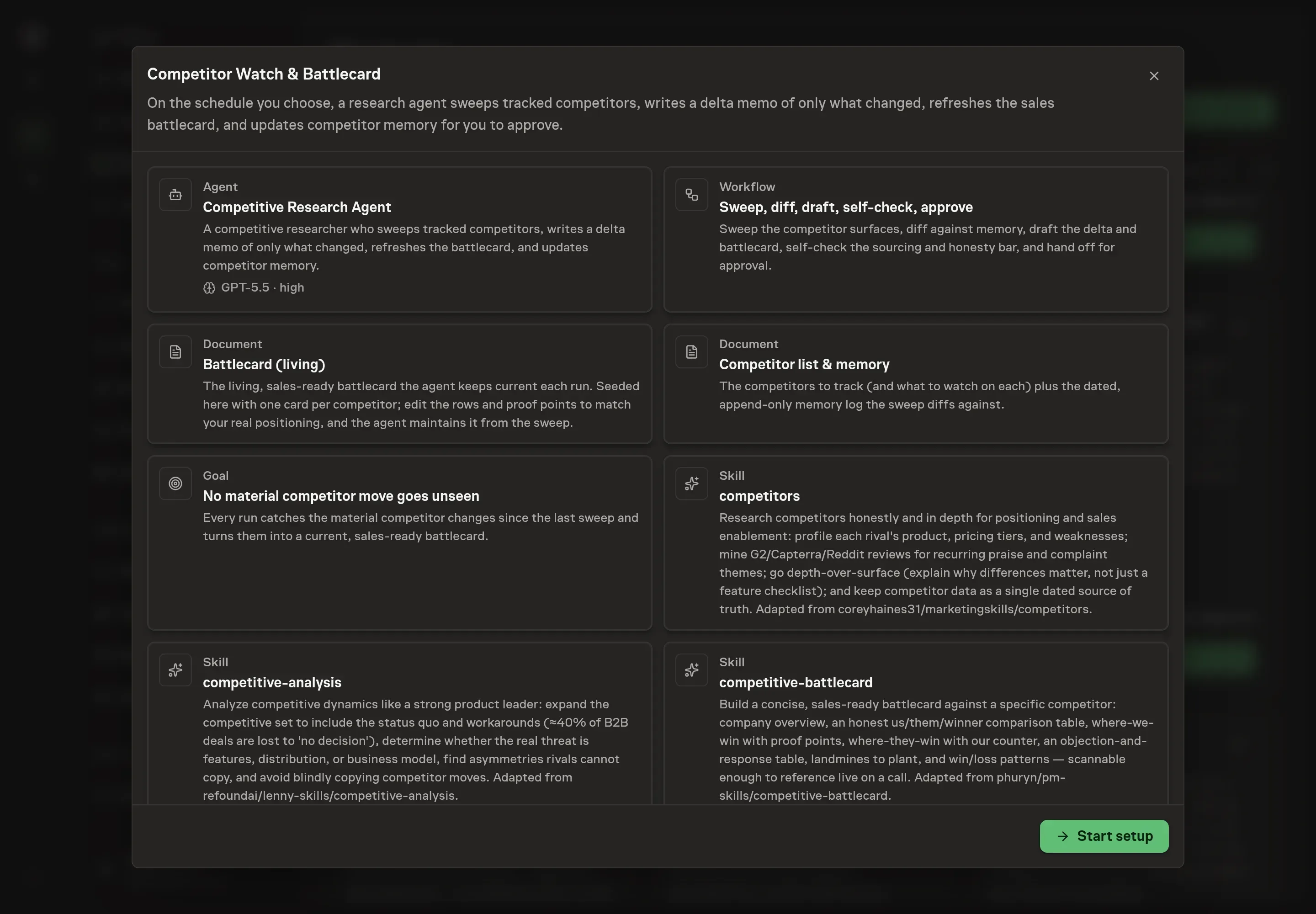
Choose Set up Competitor research & sales battlecards. Task Machine opens a dedicated Chat with the Playbook card and an editable, unsent request. Read the intended job and outcome. Add your situation and send it when ready. Opening the draft does not install anything or start work. This walkthrough uses settings that require approval of the proposed Playbook.
3. Agree the working brief
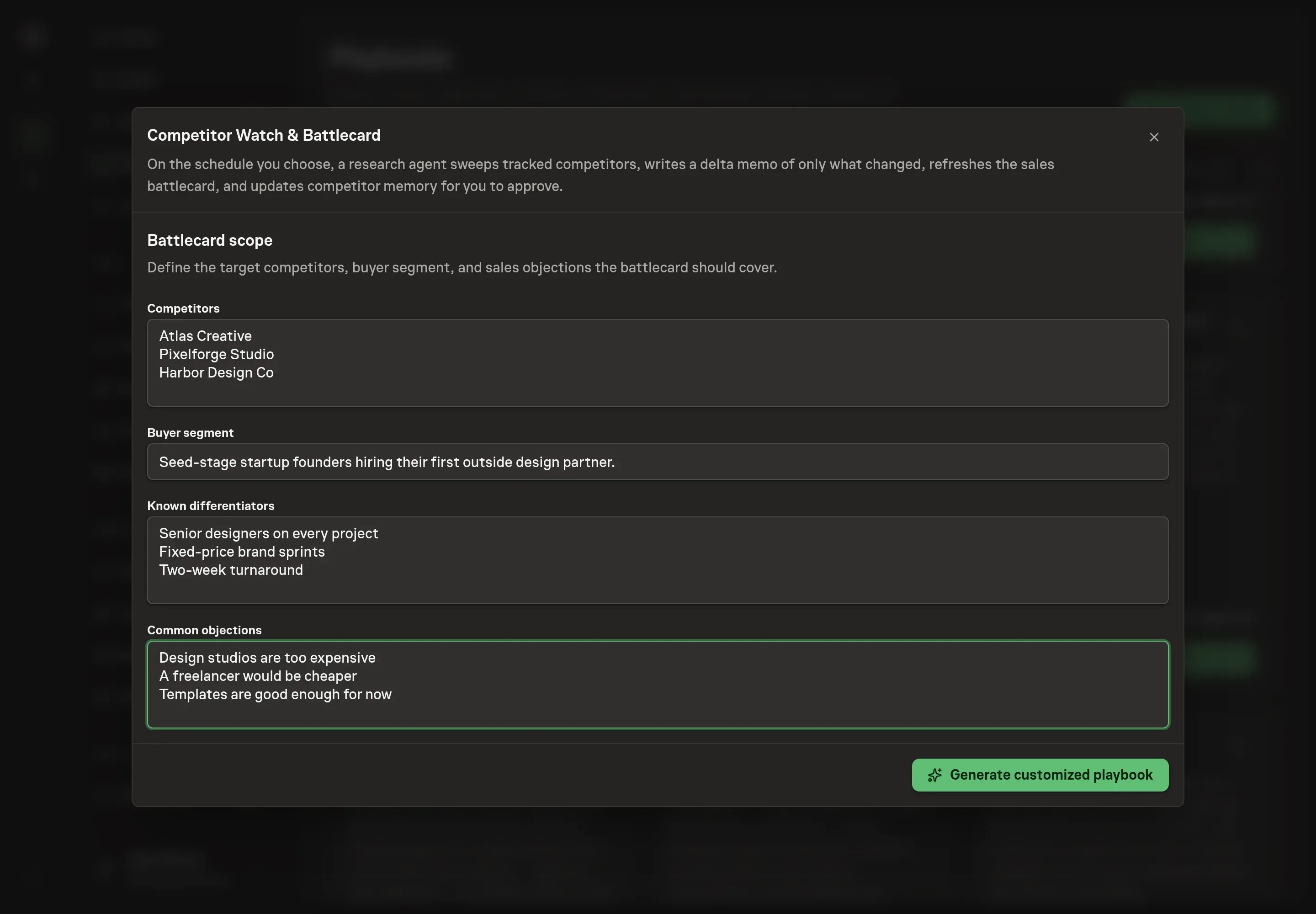
Use Chat to agree the inputs, expected output and limits before asking for a proposal. The Agent needs the scope the battlecard should cover. Competitors names the rivals to track, and each one becomes an entry in the competitor list the sweep reads every run. Buyer segment tells the agent who the battlecard argues to, which shapes every "so what" in the delta memo. Known differentiators seeds the where-we-win claims, and Common objections seeds the objection-and-response table, so the first battlecard starts from your real positioning instead of a blank template.
4. Review the proposed Playbook
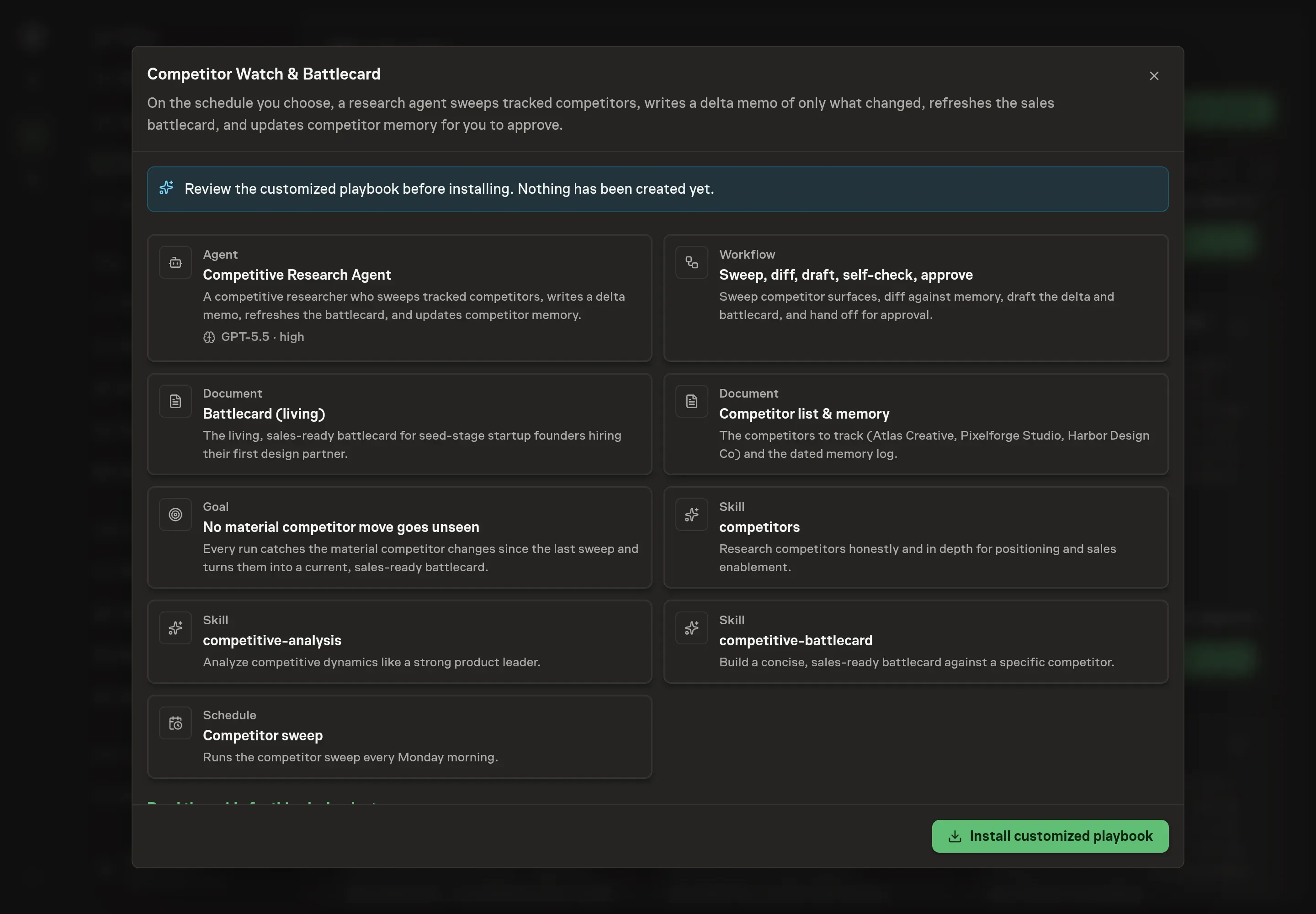
Ask the Agent to generate the Playbook from the agreed brief. Open its proposal in Chat and check the instructions and resources it will install, which carry more detail than the conversational summary. Read through the agent and workflow cards, and check that the competitor list, differentiators, and objections match what you agreed. Ask for a revised proposal if anything is missing or changes the job.
5. Approve and prepare the first work
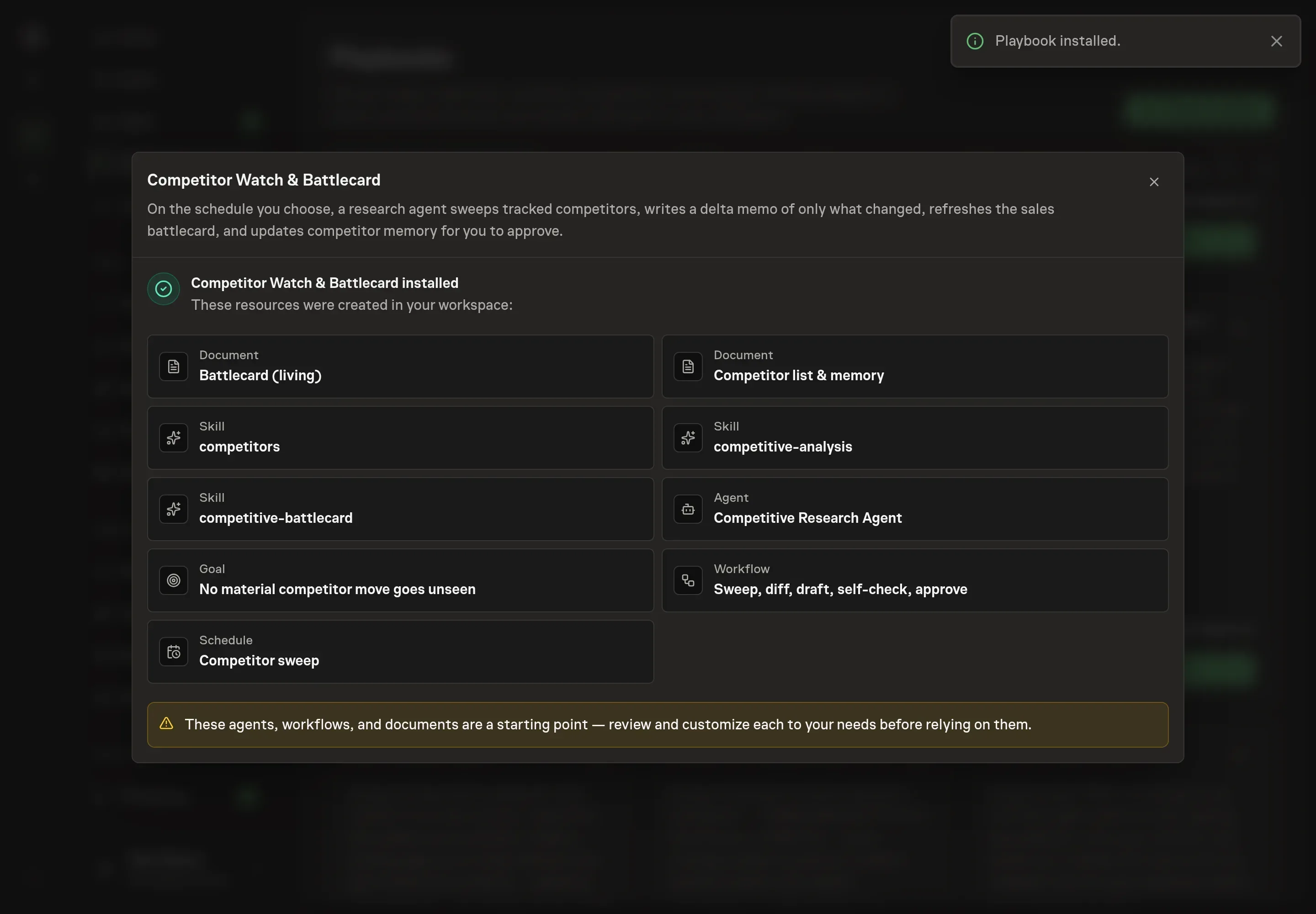
Choose Approve on the proposal in Chat when the configuration matches your brief. Task Machine installs that reviewed configuration. The approved item retains its review details. If your autonomy settings allow direct installation, this approval may not be required. Check the resulting configuration in that case too.
Complete any remaining secure service setup from the installation details in Chat. Inbox keeps those setup items available if you return later. Prepare the source documents and inputs before starting the first Task or Workflow. Installation does not authorize sending, publishing or changing an external service beyond the boundaries you agreed. Confirm each schedule's cadence and timezone, and resolve any pending schedule setup before it starts. A readback must wait for its agreed observation window and source data. Check the reviewed tracker or results document before the first cycle so evidence and human decisions have a durable home.
What good looks like
Three signals tell you whether the process works:
- Every finding survives a fact-check. Each logged move carries a dated source URL, and a rep or prospect who verifies a battlecard claim finds it accurate. One wrong claim discredits the whole card, so accuracy is the bar, not volume.
- The delta memo stays short. Quiet competitors get one line. A memo that pads itself by re-reporting known facts as news is the early warning that the diff discipline has broken.
- Competitive deals stop producing surprises. The goal the playbook installs is that no material competitor move goes unseen between runs, and over time the win/loss patterns section fills with patterns you have confirmed rather than guessed.
Common questions
What counts as a material competitor change? Anything that would change how a rep sells, how you position, or what a prospect believes: a new or removed tier, a price or packaging change, a removed feature, a positioning pivot, a funding round, or a swing in review sentiment. Cosmetic copy tweaks are not material unless they signal a pivot.
Should a battlecard admit where a competitor wins? Yes. A card that claims total victory is a card reps stop trusting, and readers who are comparing will verify every claim. Naming the competitor's genuine strengths, each with your counter, is what makes the rest of the card credible.
How often should the sweep run? The schedule is yours to set, and the playbook defaults to a weekly run. As a floor, verify pricing and check for major feature changes quarterly, refresh every profile fully once a year, and run an extra check whenever a customer mentions a competitor change.
What happens when a competitor's page will not load? Pages that render in JavaScript or block plain fetches get read through a browser fallback, still limited to public pages with no logging in. If web tools are unavailable entirely, the agent halts and says so rather than inventing pricing or features from memory.
Why track the status quo as a competitor? Because it wins more deals than any named rival. In B2B, roughly 40% of deals are lost to "no decision", meaning the spreadsheet or the manual process won. The competitor list treats that workaround as a tracked entry, so the battlecard argues against everything a prospect might choose.