How to Automate CRO Audits
A practical guide to automating CRO audits with an agent: a seven-dimension audit, ICE-ranked test hypotheses, and approval before any experiment runs.

Founder, Task Machine
A conversion rate optimization audit, or CRO audit, is a structured review of a page, funnel, or signup flow that finds where visitors drop off, explains why, and turns each finding into a testable hypothesis. Instead of a list of opinions about the design, the output is a ranked backlog of experiments, each tied to a metric that can prove it right or wrong.
It is worth doing because the traffic you already have is the cheapest growth there is. Every visitor who bounces off a vague headline or abandons a long signup form had already arrived at your page. An audit finds those leaks, and a disciplined test program fixes them without guessing.
Untested page changes ship on opinion
When nobody owns conversion, changes ship on opinion. Someone rewrites the headline because it feels stale, the pricing page gets a redesign because a competitor launched one, and nobody can say afterward whether any of it helped, because nothing was measured against a baseline.
Most experiments will not produce a defensible improvement. Untested changes hide those losses because nothing watches the baseline, while a documented losing test still rules out one belief about your visitors. The other failure mode is testing badly. A test stopped early because the results look significant inflates false positives, and an underpowered test on a low-traffic page can run for months without ever reaching a conclusion.
What the manual process looks like
Done by hand, a proper CRO program is a recurring ritual with seven steps:
- Frame the page: its type, the single primary conversion goal, and the traffic context, including what the source promised the visitor.
- Pull the evidence: funnel drop-off, event data, heatmaps, session recordings, and the results of past experiments.
- Walk the page against an audit checklist in impact order: value-proposition clarity, headline, CTA placement and copy, visual hierarchy, trust signals, objection handling, and friction points.
- Turn the material findings into falsifiable hypotheses, score each by impact, confidence, and ease, and rank the backlog.
- Pre-register the top test: one variable, fixed baseline and candidate windows, a minimum sample and duration, and primary, secondary, and guardrail metrics.
- Return on the fixed readback date, pull the measured result from its source, and check exposure, tracking quality, guardrails, and confounders.
- Decide whether to promote, keep testing, roll back, or call the result unproven, then preserve the evidence so the next audit can use it.
Each step is teachable. Together they take hours of focused work, and the discipline that makes the output trustworthy (ranking by impact, checking sample sizes, resisting the urge to peek) is exactly what gets dropped when the audit is squeezed between other work.
What an agent can automate
Most of that ritual is method rather than judgment, which makes it a good fit for an agent running a fixed workflow:
- Frame and gather. The agent identifies the page type, the primary conversion goal, and the traffic context, and reads any product-marketing context already in your workspace. With an analytics tool connected, it pulls real funnel drop-off, event, and experiment data. Without one, it audits from attached exports, screenshots, and the page itself.
- Run the audit. It works through the seven dimensions in impact order, from value-proposition clarity down to friction points. For signup and trial-activation flows it switches to a dedicated method: which required fields are truly required, whether value shows up before commitment, and where field-level drop-off concentrates.
- Build the backlog. Findings become falsifiable hypotheses in a fixed structure: because of this observation, we believe this change will cause this outcome for this audience, and we will know when this metric moves. Each gets an ICE score, (Impact + Confidence + Ease) / 3, and the backlog is ranked with the highest score first. The agent also drafts two to three copy alternatives for the headline and primary CTA, written as different bets rather than paraphrases.
- Verify and register the top test. Before proposing the leading hypothesis, the agent checks that the page's real traffic can reach the required sample in a sensible window. It drafts a row in the CRO experiment register with one changed variable, baseline and candidate windows, metrics, guardrails, sample, duration, source, and fixed readback date. It cannot mark the row approved.
- Read the result back. On schedule, a second workflow finds due experiments, pulls their registered measures, validates exposure and cohort comparability, names confounders, and prepares one recommendation: promote, keep testing, roll back, or unproven. It also drafts the exact, narrowly scoped patch that a supported result would add to Approved CRO Patterns.
What stays with you is the judgment: whether the copy alternatives fit your brand, which hypotheses deserve the traffic, whether anything runs at all, and what the evidence permits the system to learn.
The guardrails that make it safe
An audit is only advice, but an experiment touches a live page in front of real visitors. That boundary is where the human belongs.
The safe shape uses two explicit approval boundaries. The audit workflow waits with the audit, ranked hypotheses, pre-registered measurement plan, and copy alternatives. You approve which tests may proceed and confirm their readback dates. The agent still never queues an experiment or changes a live page itself.
The readback workflow waits again with the source-backed comparison, sample and duration checks, guardrails, confounders, recommendation, and exact pattern patch. You approve the decision and the precise knowledge update. Recording that decision does not authorize the agent to promote or roll back a live variant. That operational change remains a separate reviewed action.
Set it up in Task Machine
The Conversion rate optimization audit playbook provides a starting point for the method above. You need an active Task Machine workspace with Chat, workspace-management and Playbook-installation access (workspace owners have it).
1. Find the playbook
Open Search in your workspace and enter "Conversion rate optimization audit". The command center lists Set up Conversion rate optimization audit under Playbook setup.
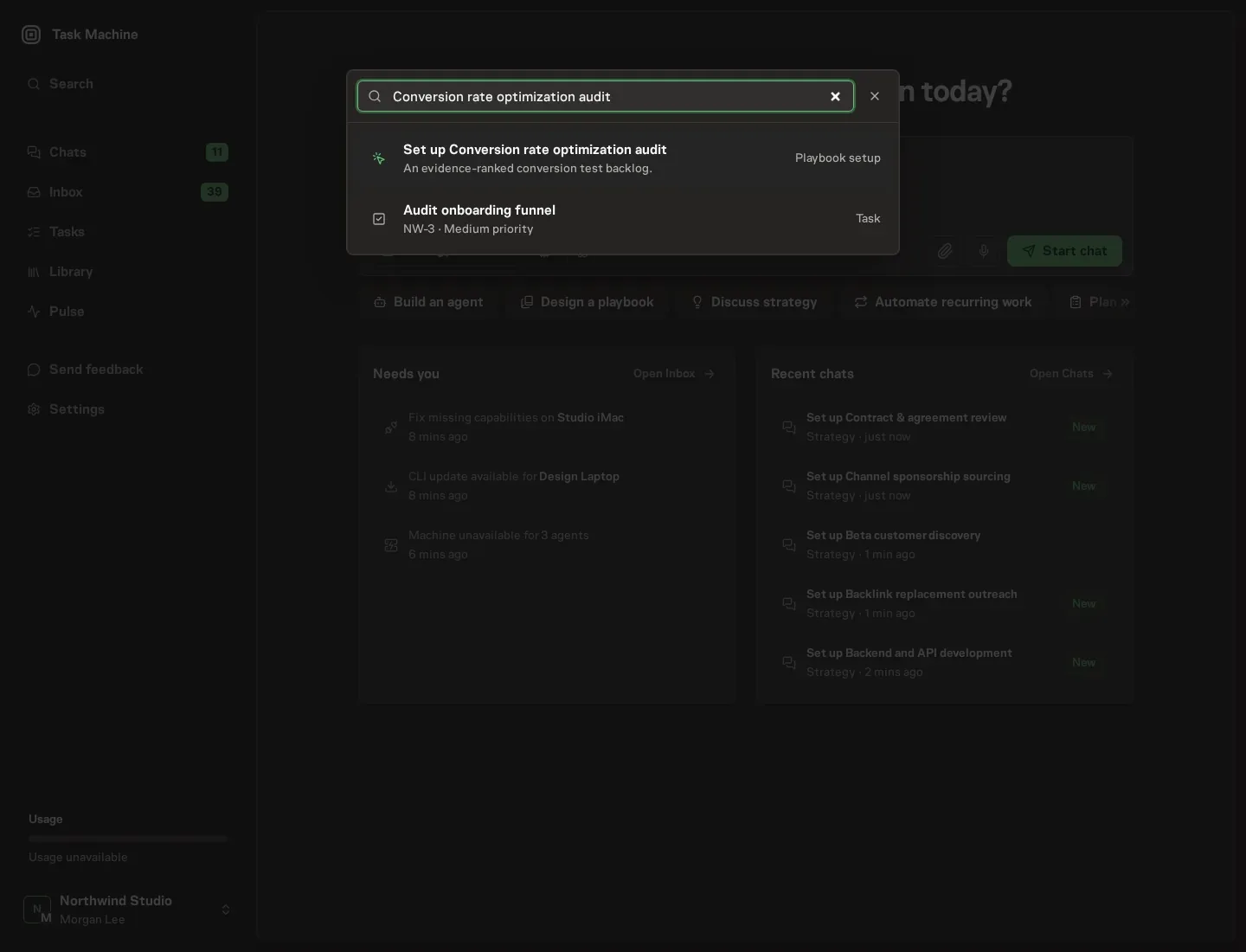
2. Start the conversation
Choose Set up Conversion rate optimization audit. Task Machine opens a dedicated Chat with the Playbook card and an editable, unsent request. Read the intended job and outcome. Add your situation and send it when ready. Opening the draft does not install anything or start work. This walkthrough uses settings that require approval of the proposed Playbook.
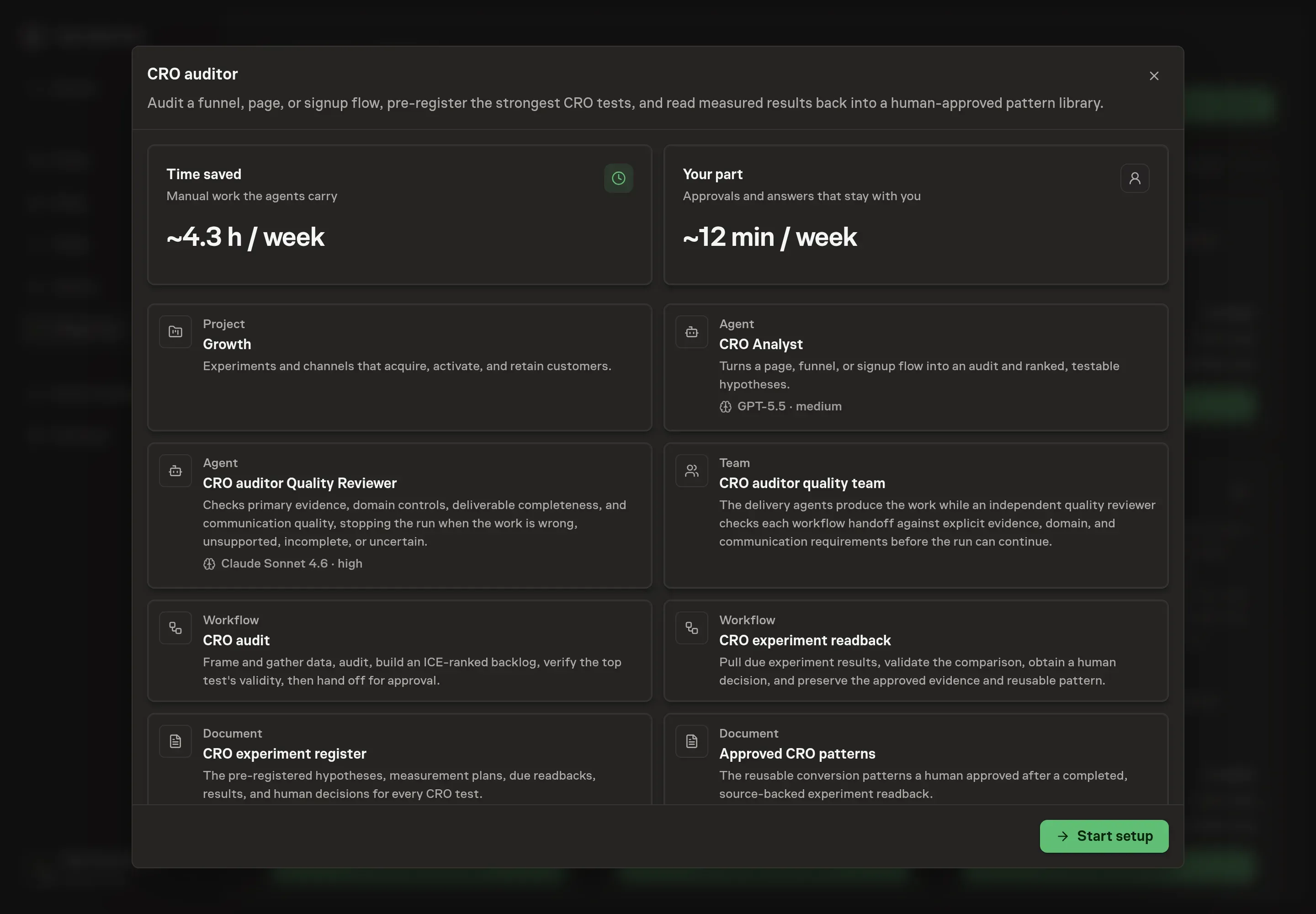
3. Agree the services
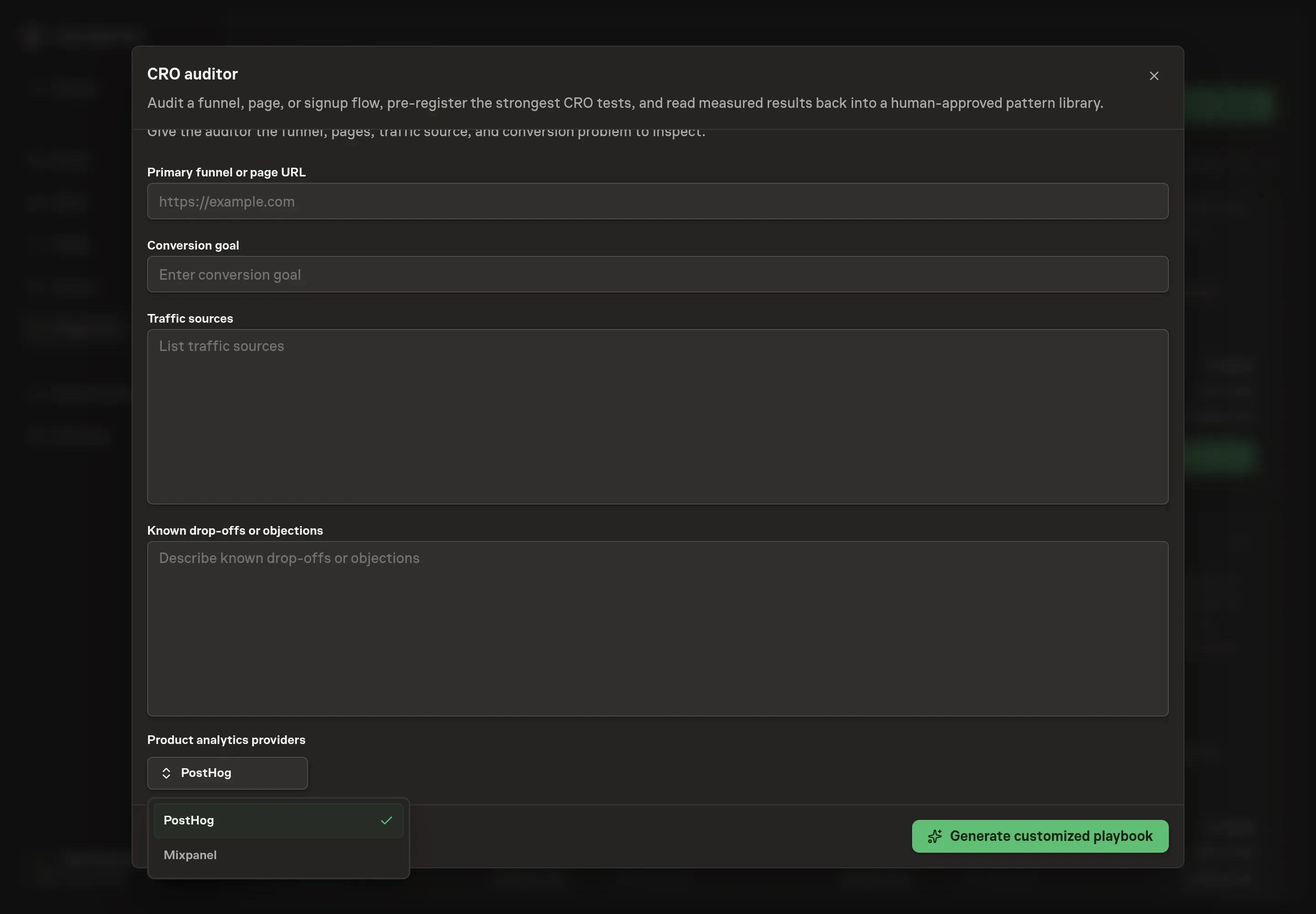
Tell the Agent which services you use. The catalog offers these starting choices:
- Product analytics providers: PostHog, Mixpanel. Optional.
Discuss any missing access or export-based alternative before generation. Check the exact proposal includes only the services you agreed. Enter credentials only through secure setup, never in Chat.
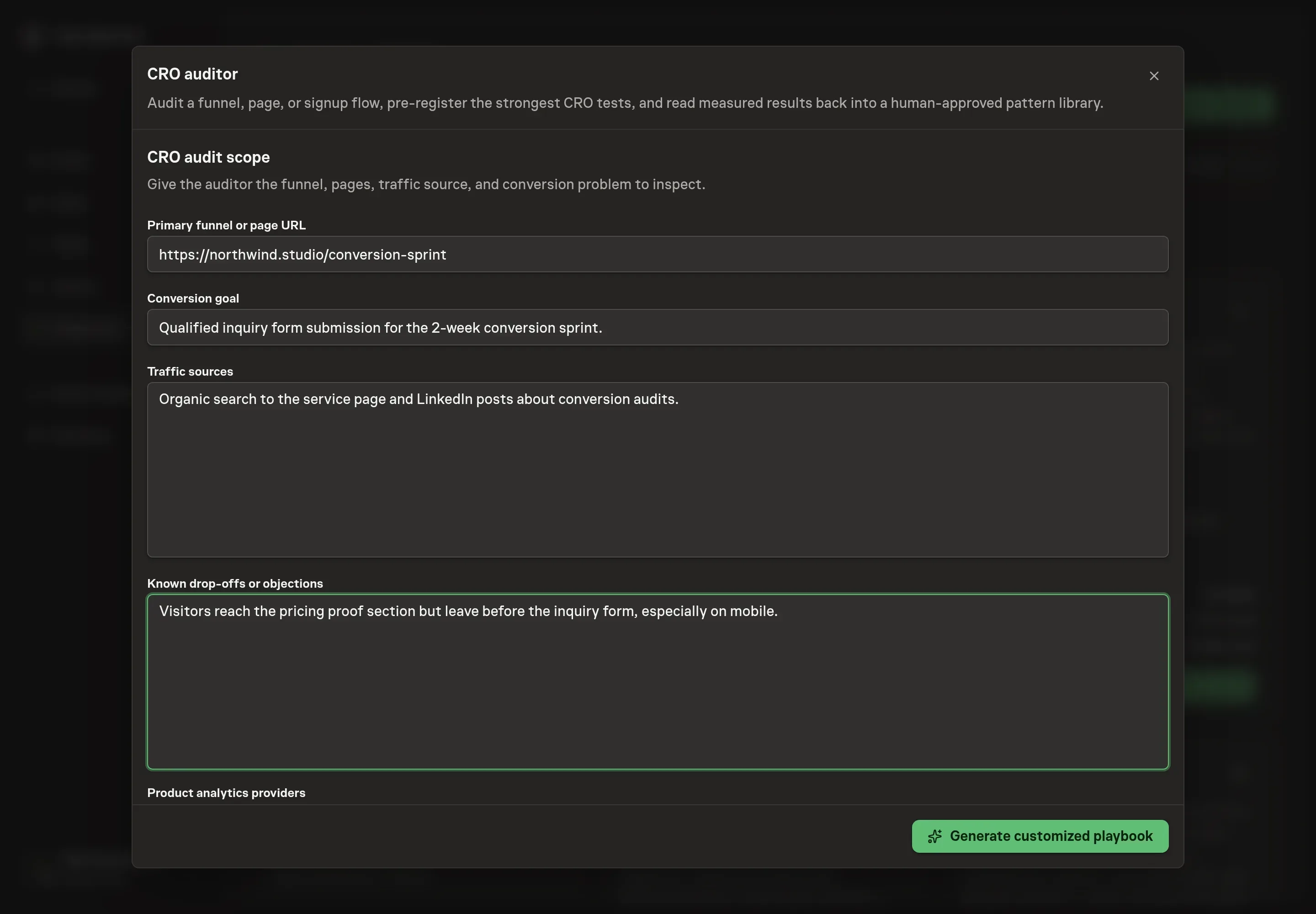
4. Agree the working brief
Use Chat to agree the inputs, expected output and limits before asking for a proposal. Four details shape the audit. The Primary funnel or page URL is where every audit starts. The Conversion goal names the single action the audit optimizes for, such as a trial signup or an inquiry form submission. Traffic sources tell the auditor what each visitor was promised before landing, so it can check message match. Known drop-offs or objections point it at the leaks you already suspect.
5. Review the proposed Playbook
Ask the Agent to generate the Playbook from the agreed brief. Open its proposal in Chat and check the instructions and resources it will install, which carry more detail than the conversational summary. Read the agent, both workflows, both experiment documents, goal, and schedule. Confirm the funnel and measurement plan match what you agreed, choose the readback cadence and timezone, and check that only the analytics tools you requested appear as connected services. Ask for a revised proposal if anything is missing or changes the job.
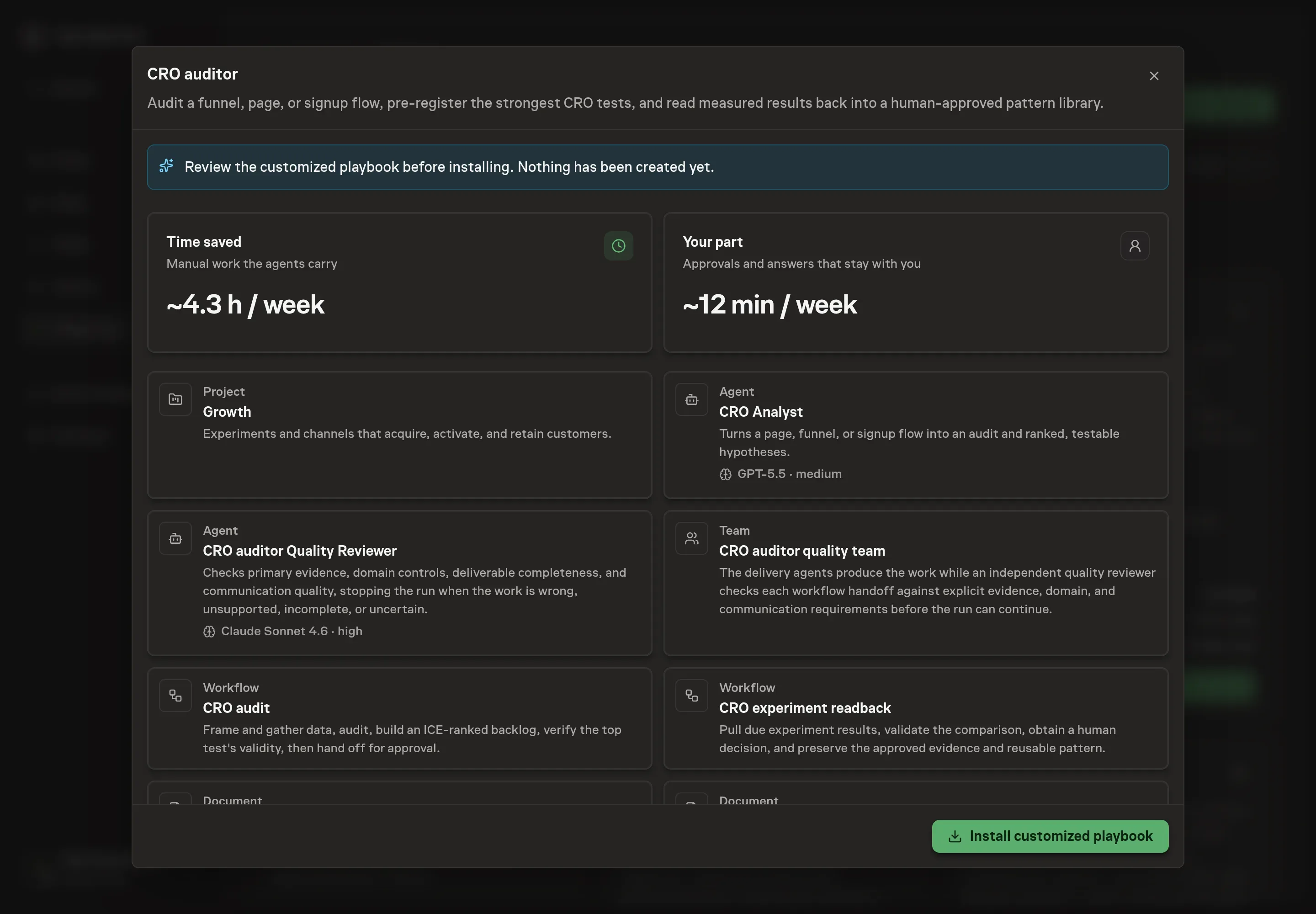
6. Approve and prepare the first work
Choose Approve on the proposal in Chat when the configuration matches your brief. Task Machine installs that reviewed configuration. The approved item retains its review details. If your autonomy settings allow direct installation, this approval may not be required. Check the resulting configuration in that case too.
Complete any remaining secure service setup from the installation details in Chat. Inbox keeps those setup items available if you return later. Prepare the source documents and inputs before starting the first Task or Workflow. Installation does not authorize sending, publishing or changing an external service beyond the boundaries you agreed. Confirm each schedule's cadence and timezone, and resolve any pending schedule setup before it starts. A readback must wait for its agreed observation window and source data. Check the reviewed tracker or results document before the first cycle so evidence and human decisions have a durable home.
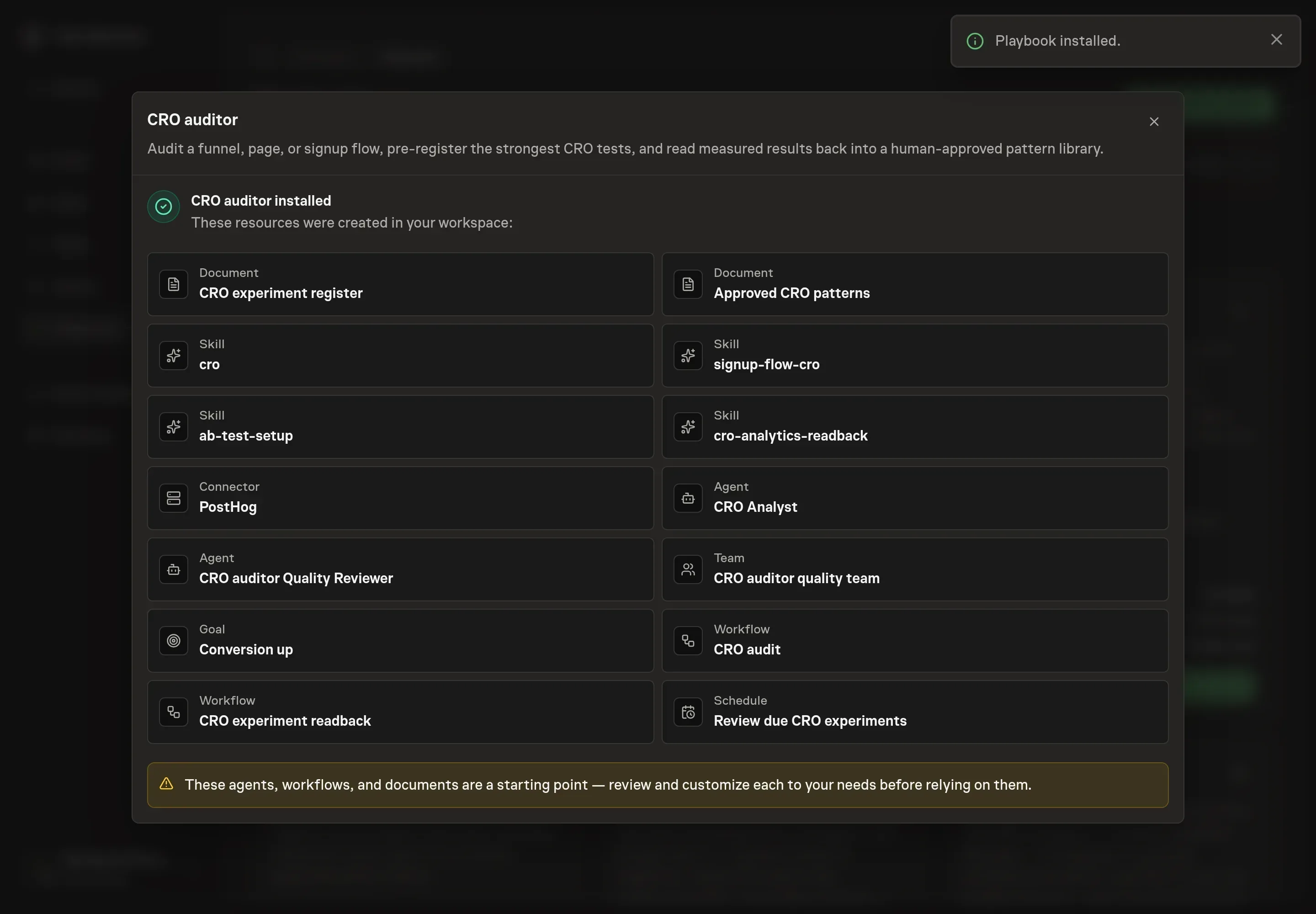
What good looks like
Classify the measures before launch so a test cannot optimize whatever happened to move:
- Primary outcome: completed conversion rate. Use the one business action named in the experiment, such as qualified inquiry submitted or trial activated. It decides the outcome.
- Downstream business signal: conversion quality. Qualified pipeline, paid activation, retention, or another later result checks whether more conversions became useful customers. It needs a longer window and does not replace the registered primary outcome.
- Secondary metrics: diagnostic steps. Form starts, field-level drop-off, CTA clicks, time to complete, and segment results explain the path. They do not overrule a flat primary metric.
- Downside guardrails: unacceptable harm. Watch form error rate, activation quality, refund or cancellation rate, page performance, and any other known failure mode. A primary lift with a damaged guardrail is not a winner.
The minimum honest observation window is the pre-registered sample and duration, not the first day a chart looks favorable. Choose a test cadence that the page's real traffic can support. Four to eight conclusive tests a month can be a planning starting point for a high-traffic program, but low-volume pages should run fewer defensible tests instead of chasing that number.
Two operating measures show whether the program itself is healthy:
- Decision quality. Every conclusion should point to the registered source, sample, duration, guardrails, and confounder review. Track unproven results separately from wins and losses.
- Backlog readiness. Keep enough scored hypotheses ready that one completed test does not leave the program idle, and re-score them as new evidence arrives.
How the loop learns
The CRO experiment register separates the plan from the result. Before launch, each approved row fixes the page and audience, hypothesis, single variable, baseline and candidate windows, primary metric, secondary metrics, guardrails, minimum sample and duration, source system, and readback date. That makes it harder to move the goalposts after a promising chart appears.
At readback, the agent adds the measured baseline and candidate values, absolute and relative deltas, actual sample and duration, guardrail results, segments checked, and every material caveat. It checks for seasonality, campaign changes, traffic-source shifts, audience mismatch, simultaneous releases, broken assignment, novelty, and tracking changes. A missing source value stays missing. A model-generated estimate never substitutes for evidence.
The recommendation vocabulary is deliberately small:
- Promote when the primary metric improves by a meaningful amount, guardrails hold, and the measurement is sound.
- Keep testing when the design remains valid but the pre-committed evidence has not arrived.
- Roll back when the candidate loses materially or breaches a guardrail.
- Unproven when low volume, dirty attribution, tracking failure, or confounders prevent a defensible decision.
After you approve the result, the full decision stays in the register. Only a supported, approved finding becomes a narrowly scoped entry in Approved CRO Patterns. Losing and inconclusive tests remain visible too, so the next audit does not recycle a disproven belief.
Common questions
Does the agent need analytics access before the first audit? No. Without a connected tool it audits from attached exports, screenshots, and the page itself. Connecting PostHog or Mixpanel grounds the same audit in real funnel drop-off, event, and experiment data instead of what you remember to attach.
Will the agent launch A/B tests or promote winners on its own? No. The audit waits for you to approve the pre-registered plan, and the later readback waits for you to approve the evidence decision and exact pattern patch. Neither approval authorizes a live page change. The agent never queues, promotes, or rolls back a variant on its own.
What if the page does not get enough traffic to test? The agent checks this before proposing anything. A page converting at 3% needs roughly 12,000 visitors per variant to detect a 20% lift, and if the traffic cannot reach that in a sensible window, the recommendation becomes a bolder change or a qualitative method rather than an underpowered test.
What is the peeking problem? Stopping a test early because the results look significant inflates false positives. The fix is pre-committing to a sample size and duration before the test starts and holding to it, with one exception: stop early if a guardrail metric goes significantly negative.
What happens when the evidence is inconclusive? The readback records keep testing when the design is still valid and more evidence can resolve it. It records unproven when low volume, broken tracking, or confounders make a defensible result impossible. Neither outcome updates Approved CRO Patterns.