How to Automate Demo and Changelog Generation
A practical guide to turning shipped work into demo scripts, launch posts, launch notes, and changelog entries.

Founder, Task Machine
Demo and changelog generation is the process of turning shipped product work into the public artifacts that help users understand what changed. The same release can become a 30-second demo clip script, an X post, a LinkedIn post, a launch note, and a changelog entry, as long as every artifact stays tied to what shipped.
Small teams often ship faster than they communicate. The code lands, the pull request closes, and the people who would benefit from the change never see a clear explanation. A repeatable shipped-to-content loop keeps product momentum visible without asking a founder, PM, or engineer to rebuild the same launch packet from memory every Friday.
Why shipped work disappears
Shipped work disappears when nobody owns the last mile between the repository and the customer. The merged work is visible to engineers, but users do not read commit history. Sales and support teams hear about new behavior late. Public channels stay quiet unless someone remembers to write.
The cost goes beyond reach. A rushed launch post can overstate a feature, a changelog can describe implementation rather than user value, and a demo clip can spend half its time on setup instead of the moment that matters. The work needs a producer and an editor.
What the manual process looks like
Done by hand, demo and changelog generation is a release ritual:
- Review merged PRs, commits, and releases since the last content pass.
- Drop pure refactors, chores, and internal changes that do not alter user behavior.
- Pick the user-facing changes worth explaining.
- For each change, write a 30-second demo clip script with a hook, on-screen action, captions, a money shot, and one CTA.
- Draft the X post, LinkedIn post, launch note, and changelog entry from the same facts.
- Check every claim against what shipped, tighten the voice, and approve what goes public.
The steps are familiar, but they are easy to skip because they sit after the engineering finish line. By the time the release is safe, the team is already thinking about the next build.
What an agent can automate
This job is a good fit for an agent because the structure is fixed and the judgment gates are clear:
- Pull shipped work. The agent reads merged PRs, commits, and releases from the connected repository. Until repository access is connected, it works from shipped-work notes or release attachments.
- Filter for user value. The agent drops lockfile bumps, internal refactors, tests, and chores. It keeps changes that affect what users can do, see, configure, or understand.
- Produce the content kit. For every user-facing change, the producer drafts a captioned 30-second clip script, an X post, a LinkedIn post, a launch note, and a changelog entry grouped under New, Improved, or Fixed.
- Keep the facts aligned. The same source facts drive every artifact, so the social posts, launch note, and changelog do not contradict each other.
- Edit before approval. A second agent checks accuracy and voice, then produces a go or no-go note before the human approval step.
The agent should not decide what goes live. It assembles and checks the kit so the human review starts from complete work instead of a blank page.
The guardrails that make it safe
Launch content can damage trust when it claims more than the product does. The safe shape is an agent workflow that treats public posting as an approval-gated act.
The producer drafts from repository evidence. The editor checks every claim against shipped work, looks for contradictions across surfaces, and sends weak artifacts back. The final approval sits with a human, and browser posting only happens after that approval. The run history records what was reviewed, which artifacts were approved, and what the editor flagged.
Set it up in Task Machine
The Product demo & changelog creation playbook provides a starting point for the method above. You need an active Task Machine workspace with Chat, workspace-management and Playbook-installation access (workspace owners have it). Repository access and browser access to X and LinkedIn can be authorized after install. Until then, the agent works from shipped-work attachments and produces drafts you publish yourself.
1. Find the playbook
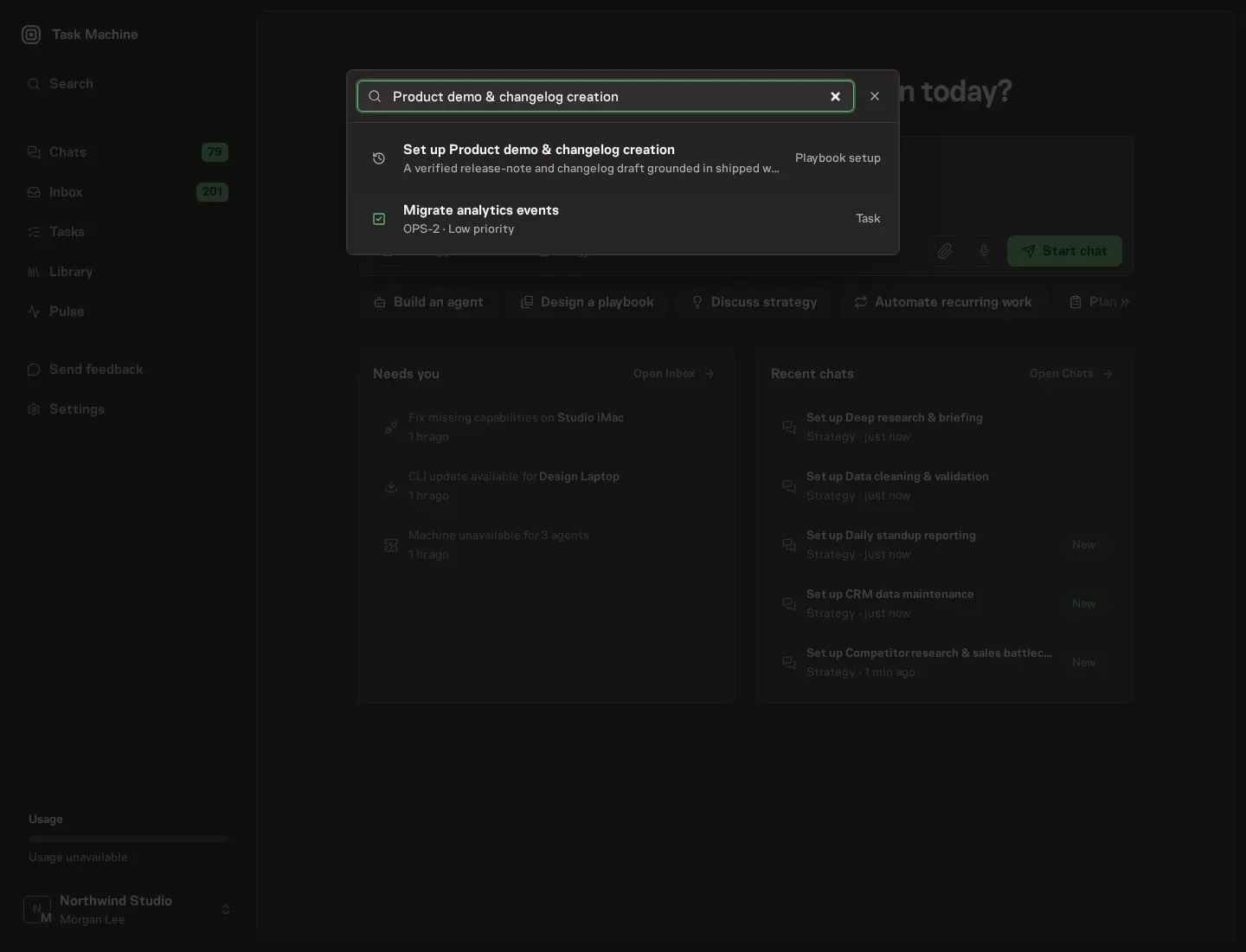
Open Search in your workspace and enter "Product demo & changelog creation". The command center lists Set up Product demo & changelog creation under Playbook setup.
2. Start the conversation
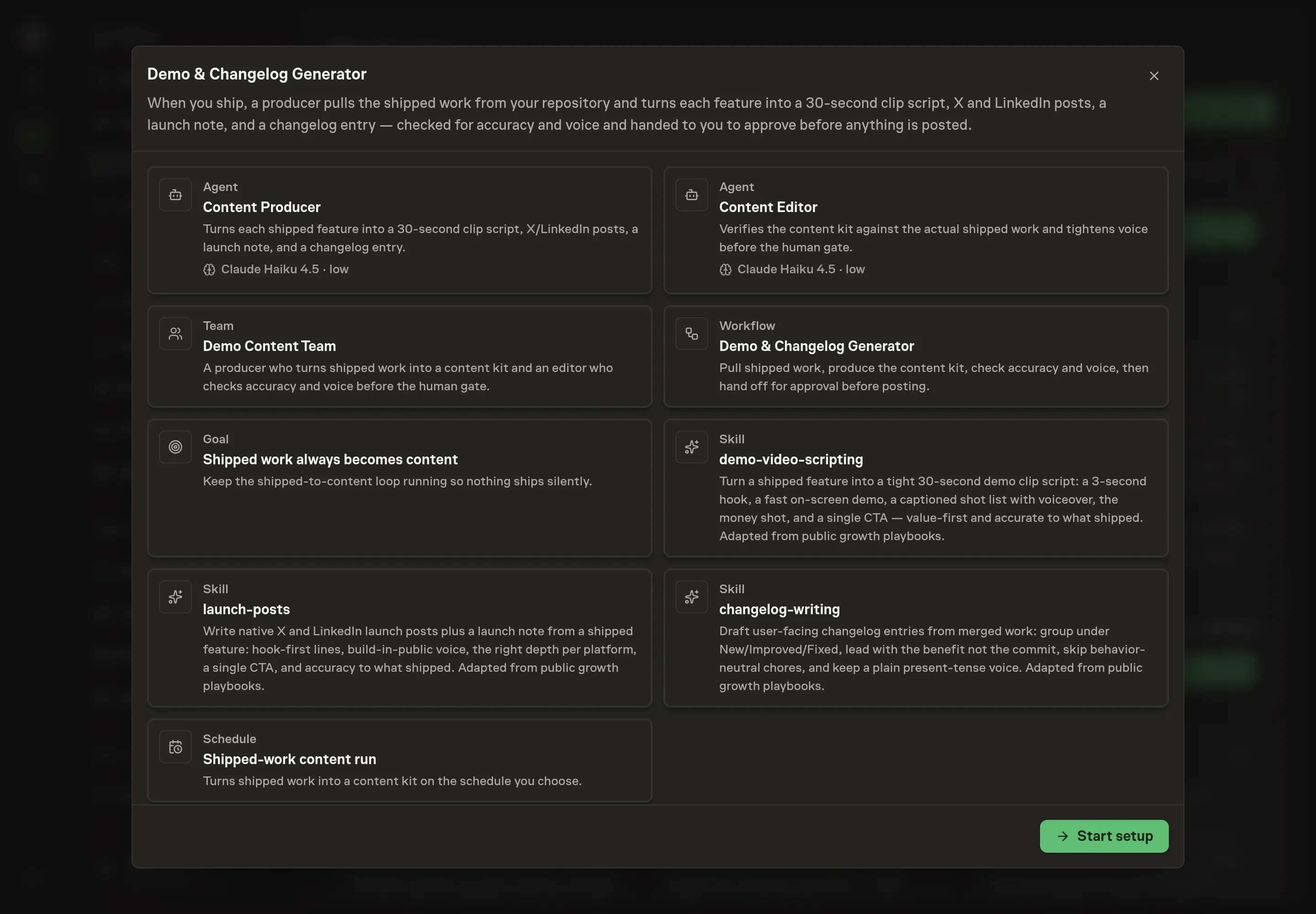
Choose Set up Product demo & changelog creation. Task Machine opens a dedicated Chat with the Playbook card and an editable, unsent request. Read the intended job and outcome. Add your situation and send it when ready. Opening the draft does not install anything or start work. This walkthrough uses settings that require approval of the proposed Playbook.
3. Agree the working brief
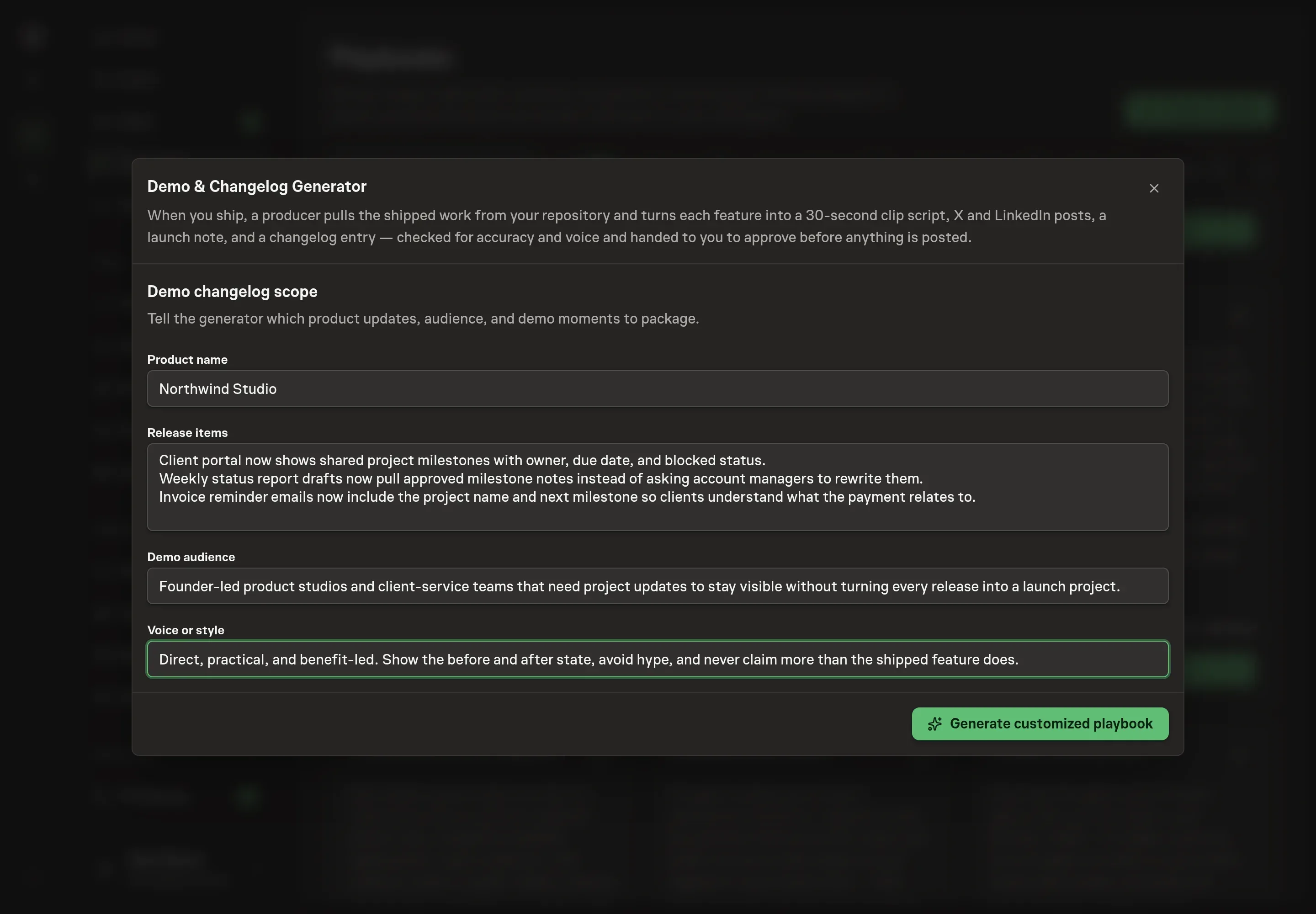
Use Chat to agree the inputs, expected output and limits before asking for a proposal. The Agent needs the product name, the release items, the demo audience, and the voice or style. Use short, concrete release items. The agent will filter them again, but the better the input, the tighter the kit.
4. Review the proposed Playbook
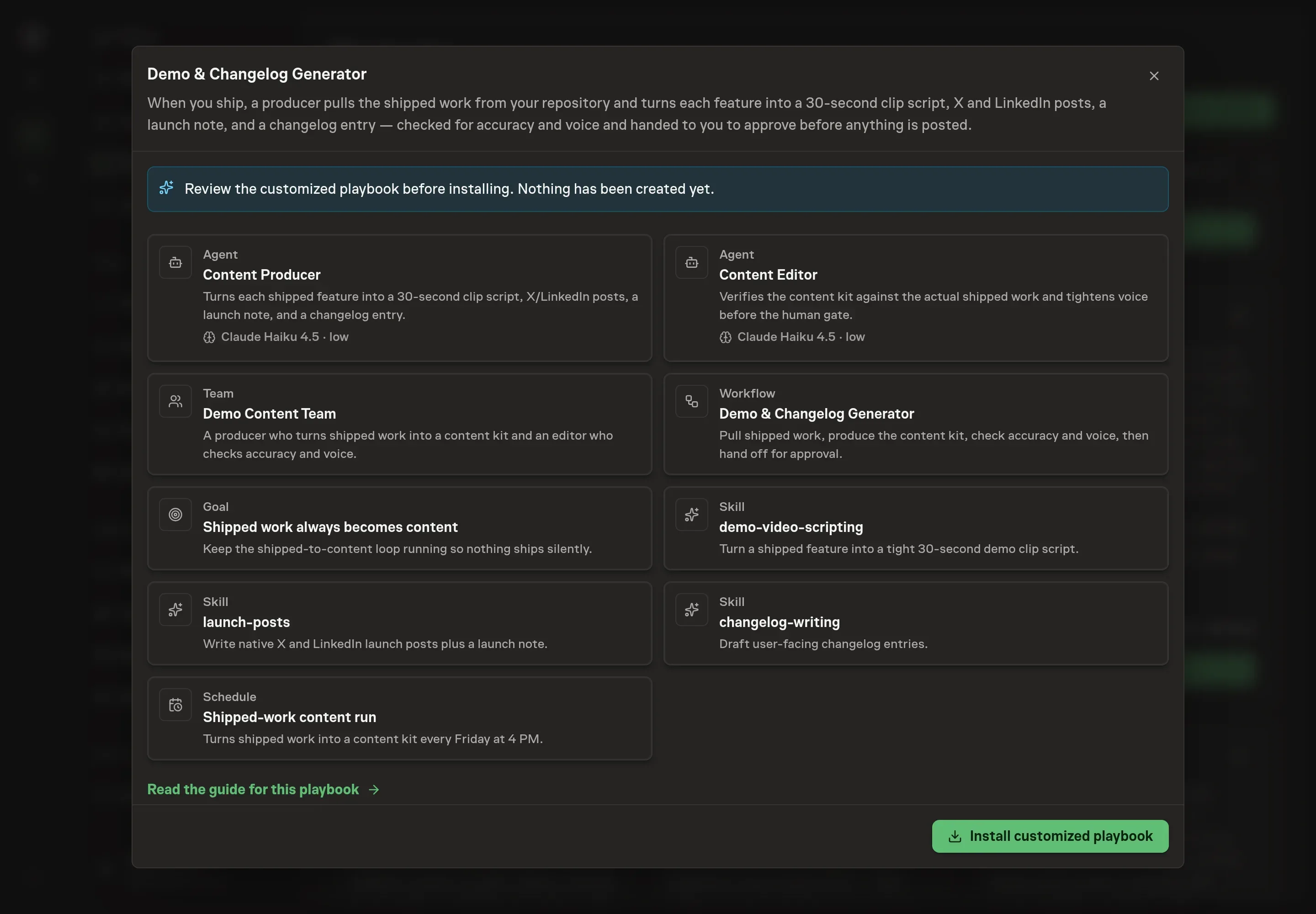
Ask the Agent to generate the Playbook from the agreed brief. Open its proposal in Chat and check the instructions and resources it will install, which carry more detail than the conversational summary. Review the customized playbook before it creates anything. Check that the workflow still ends in approval and that the voice notes do not invite claims beyond shipped behavior. Ask for a revised proposal if anything is missing or changes the job.
5. Approve and prepare the first work
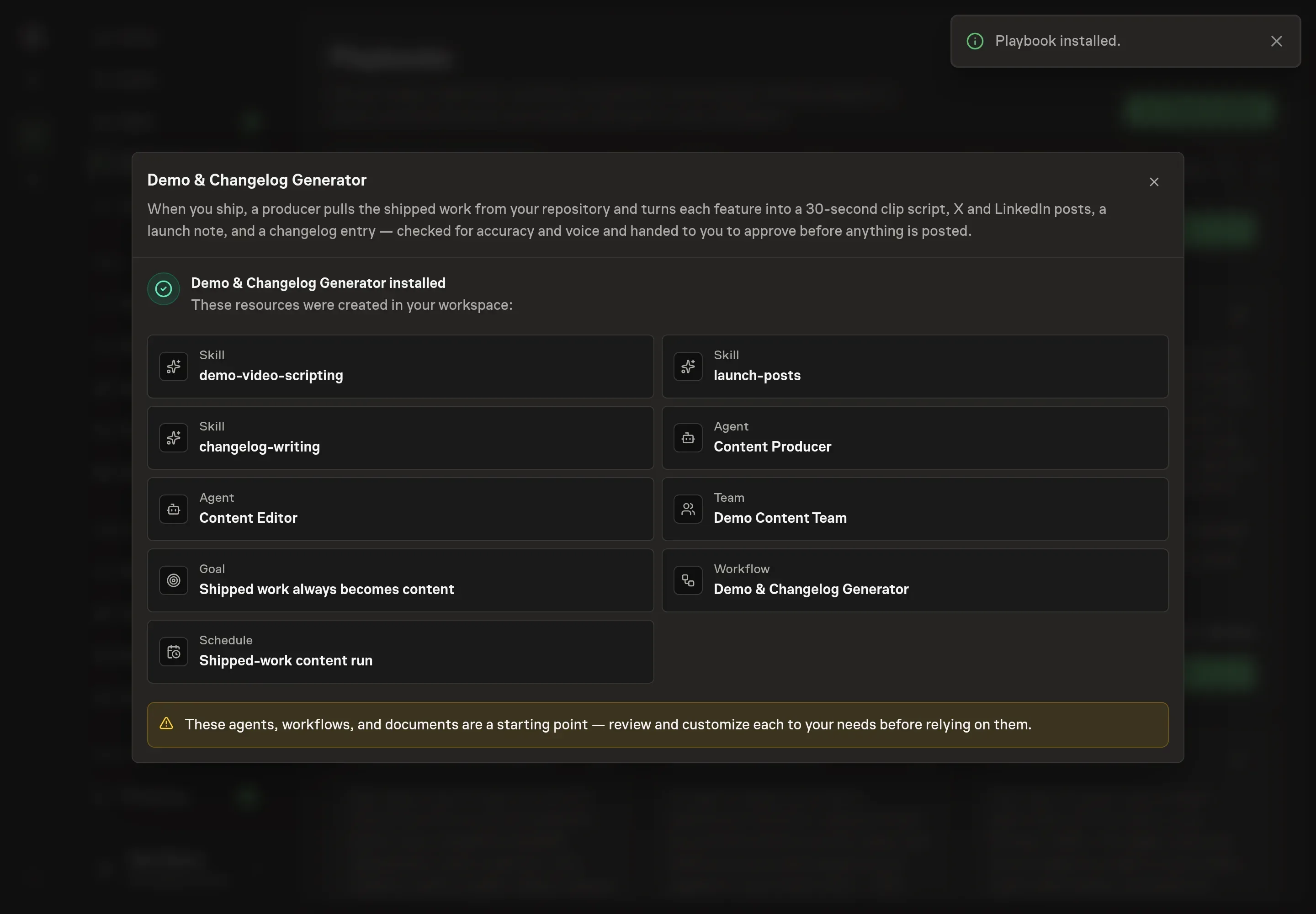
Choose Approve on the proposal in Chat when the configuration matches your brief. Task Machine installs that reviewed configuration. The approved item retains its review details. If your autonomy settings allow direct installation, this approval may not be required. Check the resulting configuration in that case too.
Complete any remaining secure service setup from the installation details in Chat. Inbox keeps those setup items available if you return later. Prepare the source documents and inputs before starting the first Task or Workflow. Installation does not authorize sending, publishing or changing an external service beyond the boundaries you agreed. Confirm each schedule's cadence and timezone, and resolve any pending schedule setup before it starts. A readback must wait for its agreed observation window and source data.
What good looks like
Three checks tell you whether the loop is working:
- Every user-facing shipped change has a decision. It either receives a content kit or is deliberately skipped because it is not useful to users.
- Every artifact agrees on the facts. The clip script, X post, LinkedIn post, launch note, and changelog entry describe the same shipped behavior.
- The changelog is benefit-led. It groups changes under New, Improved, and Fixed, drops internal noise, and explains what changed for the user rather than how the team built it.
Common questions
Can the generator post directly to X or LinkedIn? No. The playbook drafts native posts and can use browser access after approval, but the approval gate stays before any public posting.
What happens to internal refactors and chores? They are filtered out unless they change user behavior. The changelog-writing skill is explicit about skipping behavior-neutral work.
Can one shipped feature become several pieces of content? Yes. The playbook produces a kit from the same source facts: the clip script, X post, LinkedIn post, launch note, and changelog entry.
What if repository access is not connected yet? The workflow still runs from shipped-work notes or attachments. Connecting the repository removes that manual input and lets the agent read merged PRs, commits, and releases directly.