How to Automate Pull Request Reviews
A practical guide to reviewing pull requests with an agent: a correctness and security checklist, severity-classified comments, and approval before posting.

Founder, Task Machine
A pull request review is the check a code change goes through before it merges: a second reader works through the diff, looks for bugs, security problems, and broken contracts, and either approves the change or sends it back with specific comments. It is the last point where a mistake is cheap to fix, because after the merge the bug ships with everything built on top of it.
For a small team, review time is the scarcest resource in the pipeline. The people qualified to review are the same people writing the code, so reviews queue behind feature work, get rushed at the end of the day, or get skipped because the change looks simple. Every skipped review is a bet that nothing in the diff will bite later.
Unowned code review decays in a predictable order
When nobody owns review, the process decays in a predictable order. First the depth goes: reviewers skim the diff, comment on naming, and approve without tracing what the change touches. Then the coverage goes: small PRs merge unread because "it's simple", which is exactly the reasoning that lets a nil dereference or a leaked behaviour change through. Finally the habit goes, and review becomes something the team does when there happens to be time.
The costs surface later and land somewhere else. A broken API contract shows up as a support ticket. A missed N+1 query shows up as a slow page under load. A string-interpolated SQL statement shows up as a security incident. None of these trace back to the ten minutes of review that would have caught them, so the process never gets the blame.
What the manual process looks like
Done properly, a pull request review is a ritual with five steps:
- Read the diff and work out what the author intended and how far the change reaches.
- Walk the correctness checklist: exceptions and nil dereferences, off-by-one errors, unhandled error returns, expensive work on the request path, behaviour changes that leak into other components, and anything that breaks an API or serialized format without a migration path.
- Check the tests. Every behaviour change needs tests covering the edge and error cases, and they have to assert behaviour rather than implementation. A test that passes the instant it is written proves nothing.
- Run a security pass: trace every input the change touches back to its source and ask whether an attacker controls it, rather than flagging on pattern-match alone.
- Write it up as comments anchored to a file and line, phrase uncertainty as a question, and end with one verdict.
Each step rewards patience and consistency. Together they take real time per PR, which is why the checklist shrinks on busy days and disappears on the busiest ones.
What an agent can automate
Most of that ritual is systematic reading, which makes it a good fit for an agent running a fixed workflow:
- Read the diff in context. The agent reads the pull request diff, the changed files, and the surrounding code from your connected repository, then summarises the author's intent and the scope of the change before judging anything.
- Run the correctness and design pass. It works the full checklist: worker errors, performance problems like unbounded loops and N+1 queries, side effects that leak to other components, and backwards-compatibility breaks. It traces the callers of any contract that moved and confirms behaviour changes are covered by tests that assert behaviour, not implementation.
- Run a confidence-gated security pass. The agent traces attacker-controlled input to its sink before flagging anything, skips framework-mitigated and server-controlled patterns, and reports only high-confidence, exploitable findings. A clean pass is a real result, not a failure to find something.
- Self-check the findings. Before drafting, it drops low-confidence security flags, drops pure style nits, and confirms every surviving comment is anchored to a file and line and is actionable.
- Draft comments and a verdict. Each finding is classified Critical, Important, or Minor, states what is wrong and what to do instead, and the review ends with one verdict: Approve, Approve with changes, or Request changes.
Two things stay with people. The verdict is drafted, never posted, until you approve it. And risky territory is escalated rather than waved through: changes touching a database schema, an API contract, a new dependency, a performance-critical path, or security-sensitive code get flagged for a senior reviewer.
The guardrails that make it safe
An automated reviewer fails in two ways: it posts noise that trains the team to ignore it, or it posts confident nonsense that erodes trust in review itself. The guardrails target both.
Against noise, the workflow includes an explicit self-check step where the agent reviews its own findings and cuts everything low-confidence, framework-mitigated, or stylistic before a human ever sees the draft. The security pass treats a false positive as the cardinal sin and investigates before flagging.
Against unsupervised posting, the workflow ends at a human approval step. The agent never posts anything itself. The drafted comments and verdict wait in your inbox, you edit anything that reads wrong, and nothing reaches the pull request without your sign-off.
Set it up in Task Machine
The Pull request review playbook provides a starting point for the method above. You need an active Task Machine workspace with Chat, workspace-management and Playbook-installation access (workspace owners have it). Repository access is not required up front. Until you connect it, the agent reviews from the diff and files you attach to each run.
1. Find the playbook
Open Search in your workspace and enter "Pull request review". The command center lists Set up Pull request review under Playbook setup.
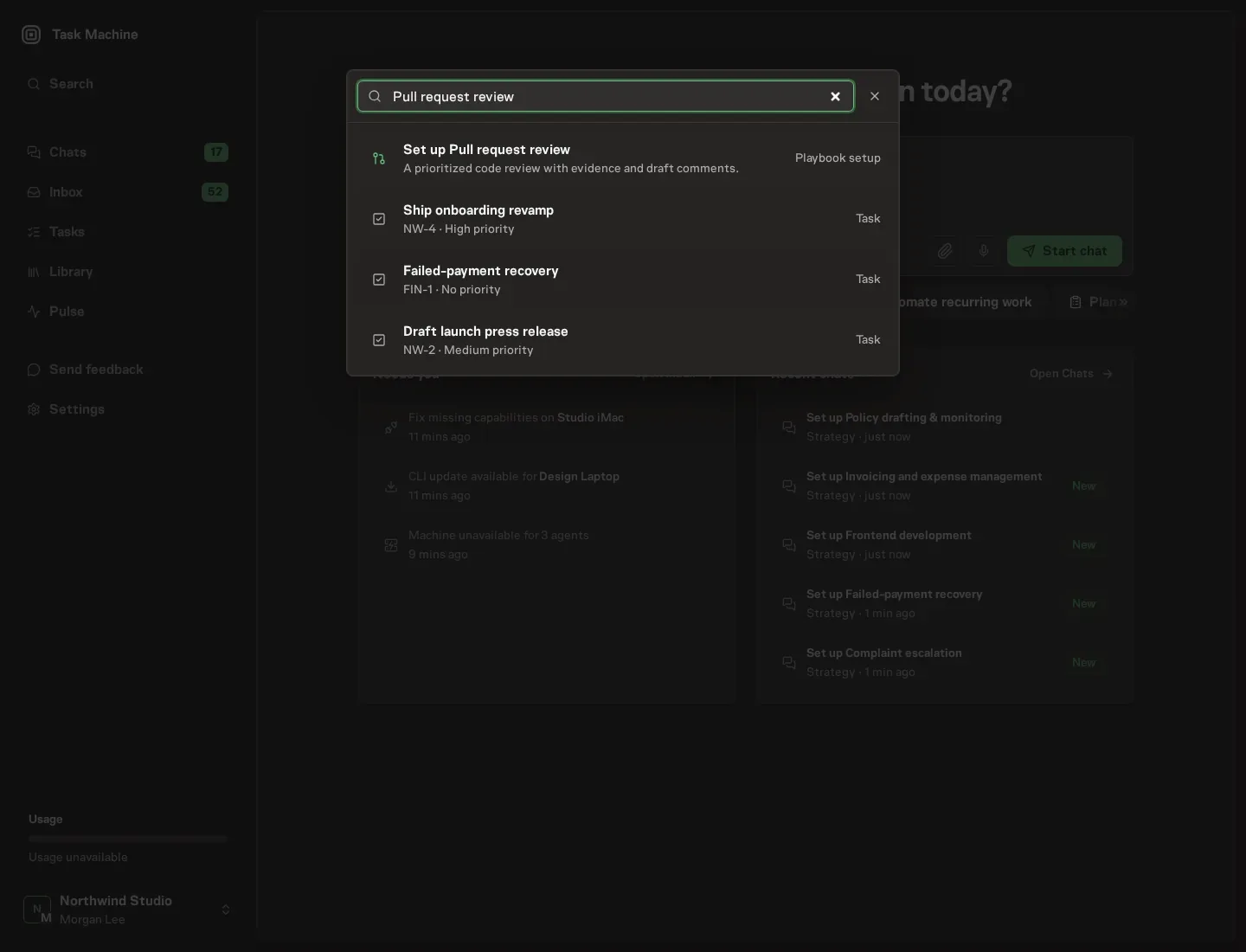
2. Start the conversation
Choose Set up Pull request review. Task Machine opens a dedicated Chat with the Playbook card and an editable, unsent request. Read the intended job and outcome. Add your situation and send it when ready. Opening the draft does not install anything or start work. This walkthrough uses settings that require approval of the proposed Playbook.
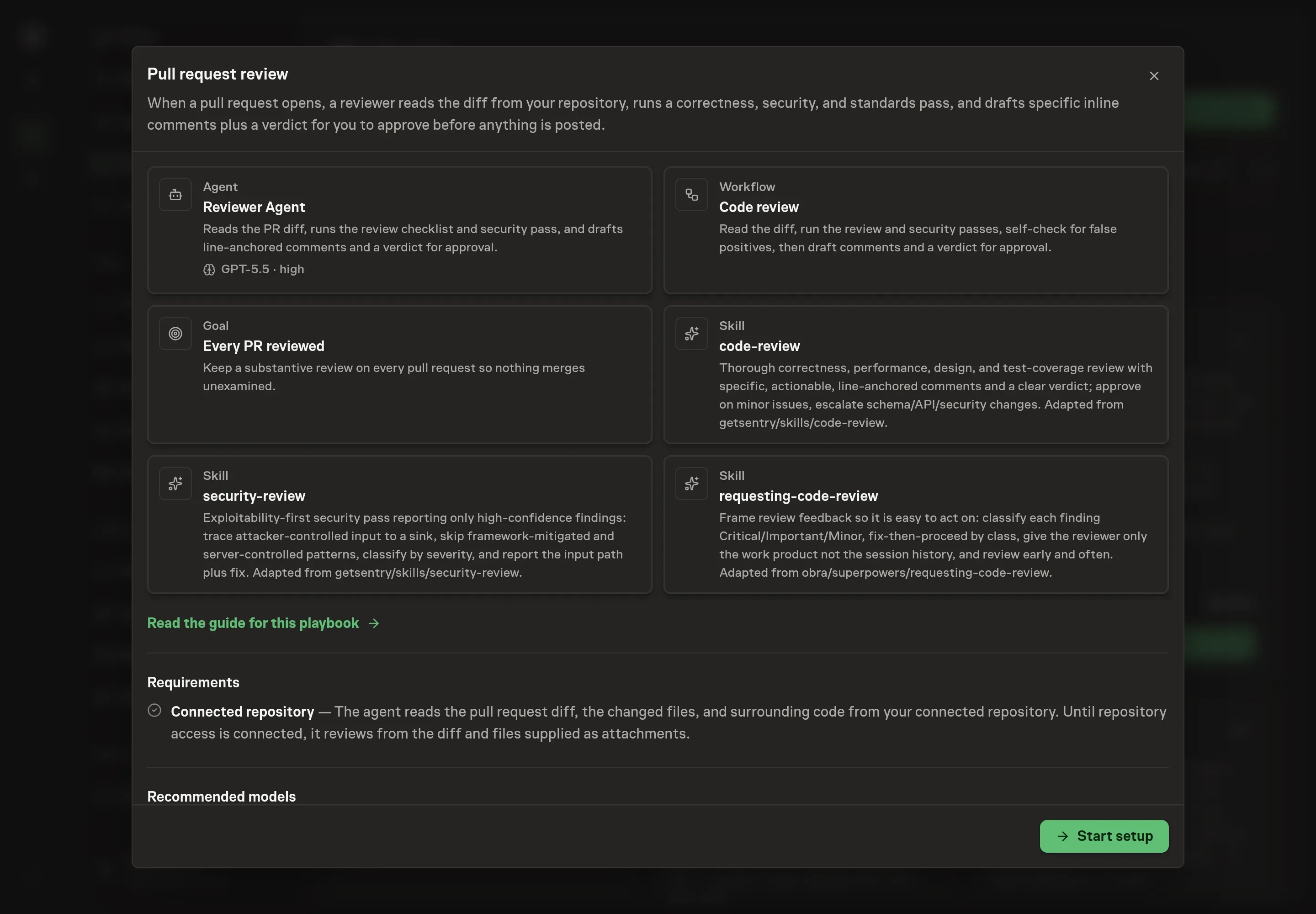
3. Agree the working brief
Use Chat to agree the inputs, expected output and limits before asking for a proposal. The Agent needs the details that shape every review. Repository identifies the repository the agent reviews. Review focus areas lists the areas you want weighted in every pass, such as accessibility or performance. Project standards or constraints describes the conventions every comment should respect, so the agent flags violations of your rules rather than generic style. Verification command names the check a change is expected to pass, so the agent can ask whether it was run.
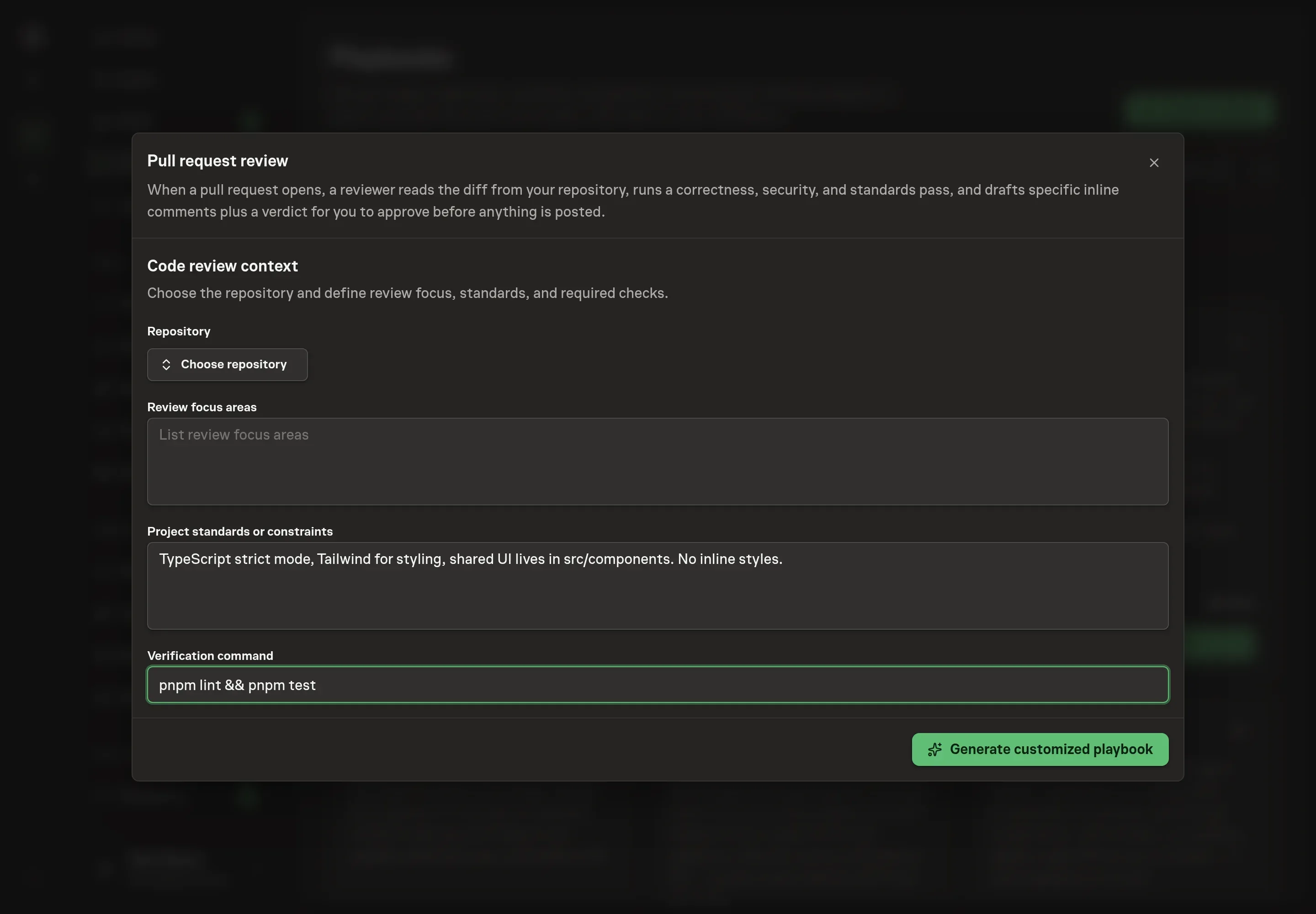
4. Review the proposed Playbook
Ask the Agent to generate the Playbook from the agreed brief. Open its proposal in Chat and check the instructions and resources it will install, which carry more detail than the conversational summary. Read through the agent and workflow cards and confirm the standards and focus areas you wrote appear where the agent will act on them. Ask for a revised proposal if anything is missing or changes the job.
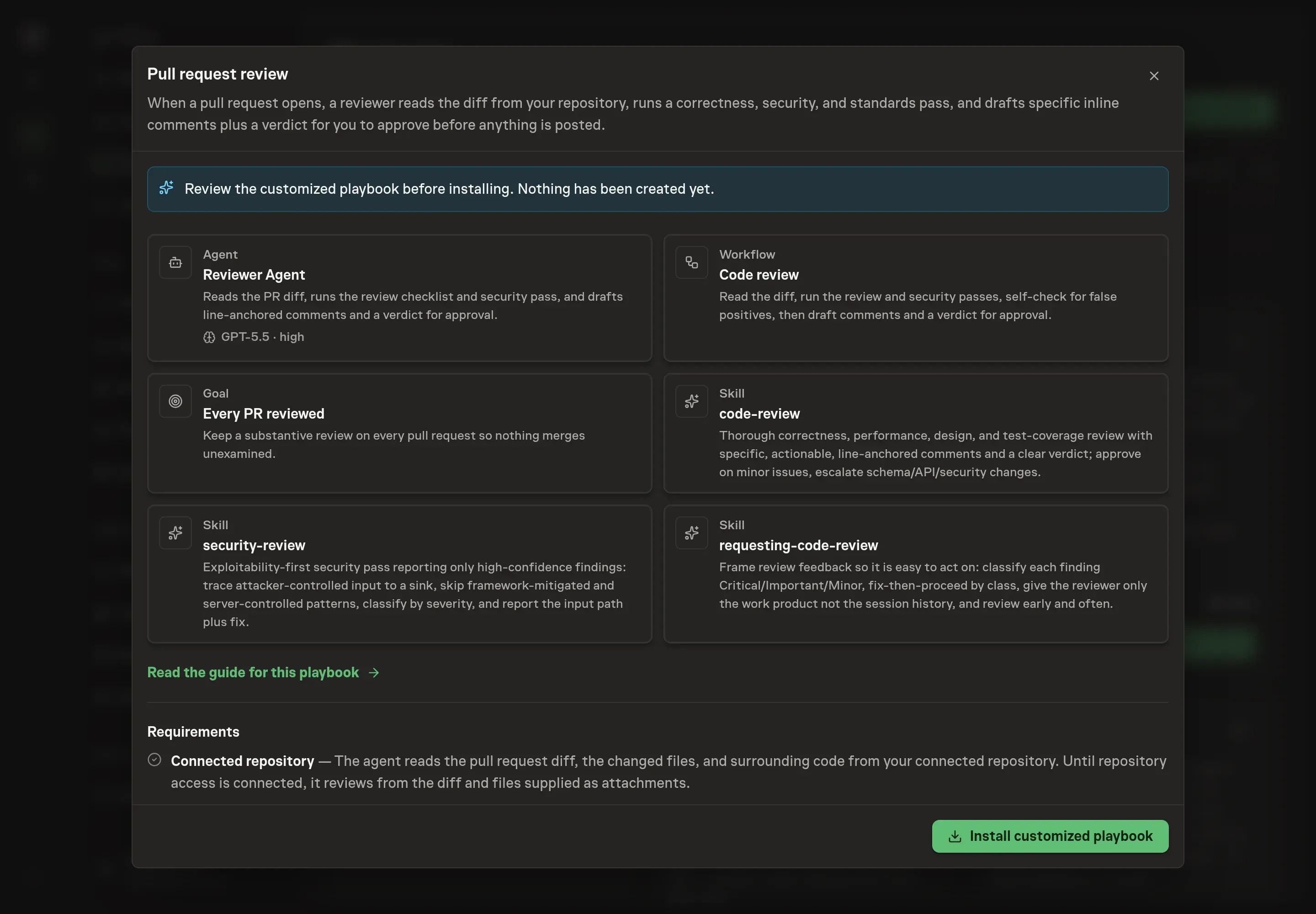
5. Approve and prepare the first work
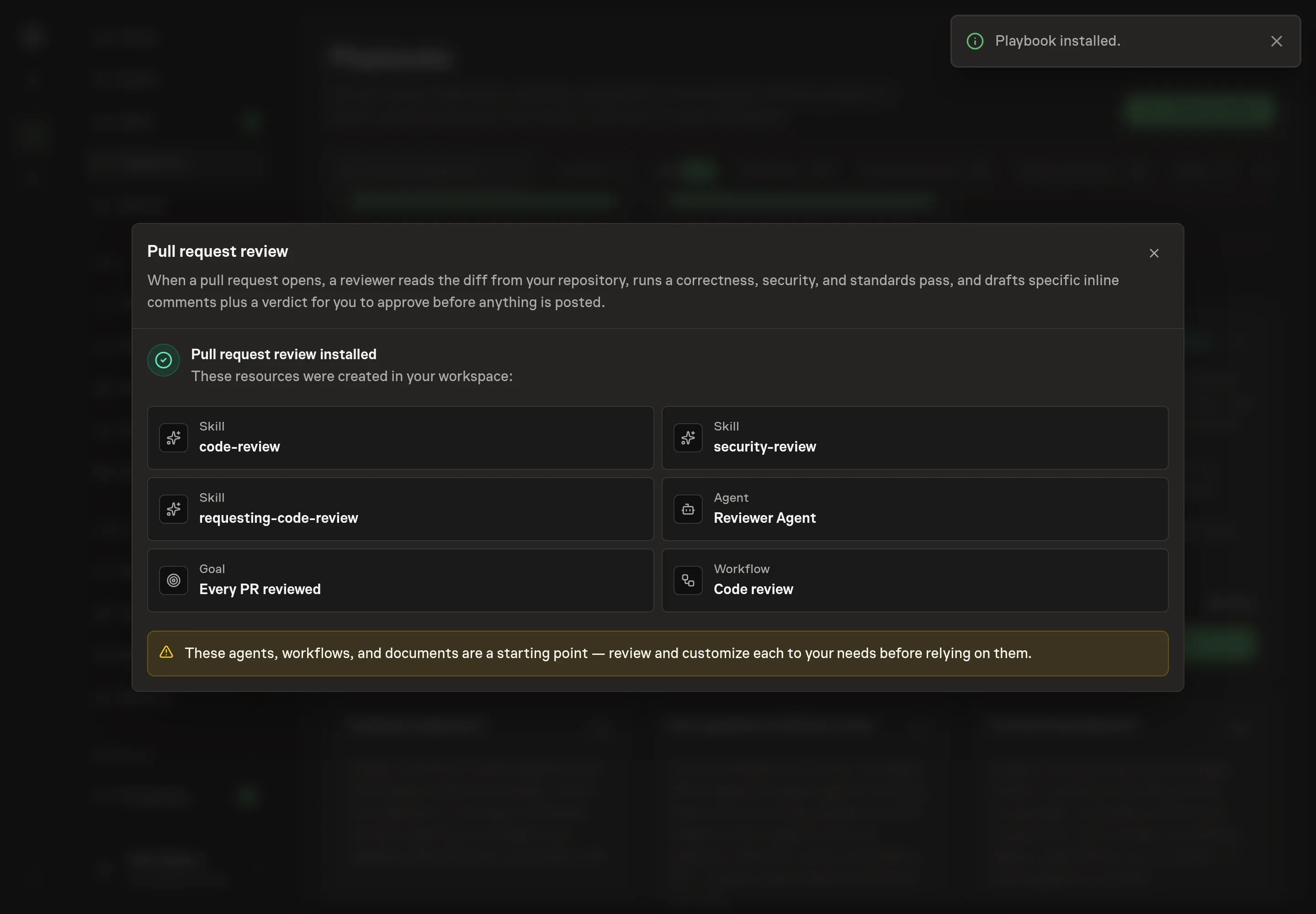
Choose Approve on the proposal in Chat when the configuration matches your brief. Task Machine installs that reviewed configuration. The approved item retains its review details. If your autonomy settings allow direct installation, this approval may not be required. Check the resulting configuration in that case too.
Complete any remaining secure service setup from the installation details in Chat. Inbox keeps those setup items available if you return later. Prepare the source documents and inputs before starting the first Task or Workflow. Installation does not authorize sending, publishing or changing an external service beyond the boundaries you agreed.
What good looks like
The bundle's own standard for a great review is the honest benchmark: a tight, line-anchored, severity-classified set of actionable comments with a clear verdict and no false-positive noise. Three signals tell you the process is working:
- Every PR carries an approved review before it merges. That is the standing goal the playbook installs, and the gap between PRs opened and PRs reviewed is the first number to watch.
- Comments survive contact with the author. If findings routinely get dismissed as noise, the self-check is not doing its job. Each comment should name a file, a line, what is wrong, and what to do instead.
- Escalations happen where they should. Schema changes, API-contract changes, new dependencies, performance-critical paths, and security-sensitive code should reach a senior reviewer with a flag instead of a silent approval.
Common questions
Will the agent post review comments on its own? No. The workflow ends at a human approval step. The drafted comments and verdict wait in your inbox, and nothing is posted to the pull request without your sign-off.
Does this work before the repository is connected? Yes. Until repository access is connected, the agent reviews from the diff and files you attach to each run. Connecting the repository lets it read the changed files and surrounding code itself.
Will an automated reviewer flood PRs with nitpicks? The method is built against that. The agent does not block on style, and a self-check step drops pure style nits and low-confidence flags before you see the draft. What survives is classified Critical, Important, or Minor, so the author knows what must be fixed and what is a note for later.
What happens with risky changes like a schema or API change? The agent stops and flags them. Changes touching a database schema, an API contract, a new dependency, a performance-critical path, or security-sensitive code are escalated for a senior reviewer instead of being waved through with a verdict.
Is a review with no security findings a bad review? No. The security pass reports only high-confidence findings where attacker-controlled input reaches a vulnerable pattern, because a false positive costs more trust than it saves. A clean pass after that investigation is a real result.