How to Automate Warm Social Outbound
Turn LinkedIn and X post engagement into qualified, personalized DM drafts with approval before anything is sent.

Founder, Task Machine
Warm social outbound is the process of turning people who already engaged with your posts into relevant, personalized conversations. The signal comes from likes, comments, reshares, and replies on LinkedIn or X, and the work is to find the few people whose role, company, and interaction make a real conversation appropriate.
That distinction matters because engagement is only the start of permission. A thoughtful comment on a post can be a strong buying signal. A passive like from a loose-fit account is not. Good warm outbound protects the relationship by referencing the specific interaction, giving before asking, and stopping before anything becomes generic.
Why warm engagement gets wasted
Most teams notice social engagement in the moment, then lose it. The post gets comments on Tuesday, someone replies during the day, and by Friday the list of possible conversations has disappeared into notifications.
The team loses more than the outreach. It also loses the context that made the outreach warm: which post they reacted to, what they said, and why the topic was relevant. Once that context is gone, the message becomes another cold pitch with a first-name field.
What the manual process looks like
Done by hand, warm social outbound is a weekly review ritual:
- Review recent LinkedIn and X posts and collect the people who liked, commented, reshared, or replied.
- Capture the source post, interaction type, and exact comment or reply text for every person.
- Qualify each engager against the ICP and separate strong fits from nurture-only contacts.
- Draft a message that references the exact interaction and makes at most one light ask.
- Read every draft before sending and skip anything that feels thin, opportunistic, or too salesy.
The work is repetitive, but the quality bar is high. The difference between a good DM and a bad one is usually one sentence that proves the sender read the actual interaction.
What an agent can automate
Warm outbound works well as an agent workflow because the research and drafting are structured, while the final judgment stays human:
- Gather interaction context. The agent reviews owned LinkedIn and X posts through browser access and records the person, handle, role, company, source post, interaction type, and exact comment or reply text.
- Qualify before drafting. The agent scores each person as Strong fit, Worth a touch, Nurture, or Skip by combining ICP fit with interaction strength. Existing customers and known contacts are skipped for outbound.
- Draft from the interaction. The agent writes one DM per qualified engager, references what they did or said, matches LinkedIn or X tone, and avoids a first-message product pitch.
- Self-critique the batch. The agent checks that no passive-like-only loose-fit person got a message and that every draft gives value or curiosity before any ask.
The agent handles the assembly work. The human decides which conversations deserve to start.
The guardrails that make it safe
Warm social outbound becomes risky when the system treats engagement as a license to send. This playbook has the opposite shape. The agent can gather, qualify, draft, and critique, but the batch ends at a human approval gate.
That approval packet should include the source post, the exact interaction, the fit reason, and the draft. If a message cannot explain why the person is worth contacting, it should not be sent. The workflow also stays inside owned engagement. It does not bulk scrape, evade login walls, or treat unrelated profiles as a lead list.
Set it up in Task Machine
The Social media outreach playbook provides a starting point for the method above. You need an active Task Machine workspace with Chat, workspace-management and Playbook-installation access (workspace owners have it). Browser access to LinkedIn and X is useful for live runs, but the workflow can start from attached engagement exports.
1. Find the playbook
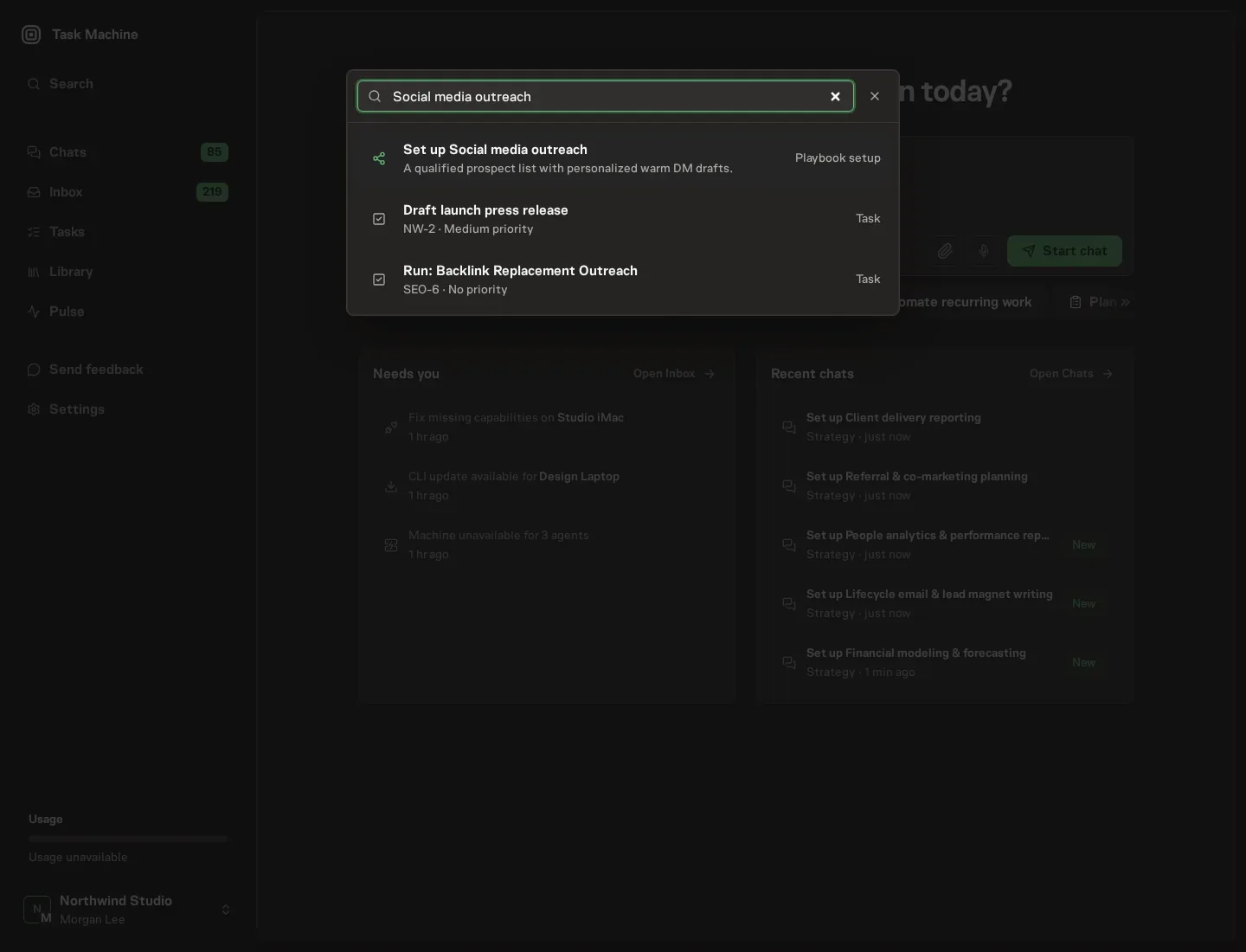
Open Search in your workspace and enter "Social media outreach". The command center lists Set up Social media outreach under Playbook setup.
2. Start the conversation
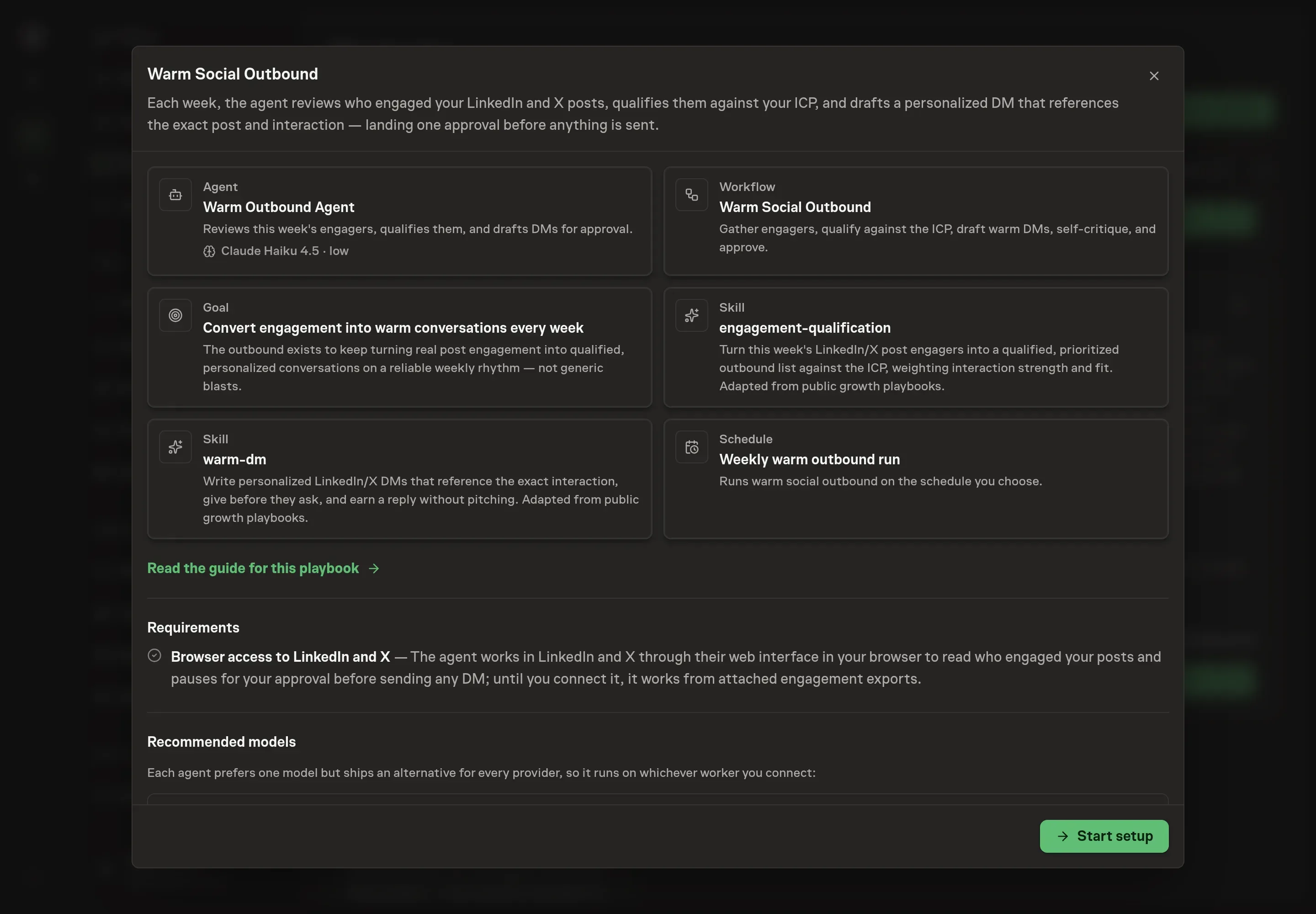
Choose Set up Social media outreach. Task Machine opens a dedicated Chat with the Playbook card and an editable, unsent request. Read the intended job and outcome. Add your situation and send it when ready. Opening the draft does not install anything or start work. This walkthrough uses settings that require approval of the proposed Playbook.
3. Agree the working brief
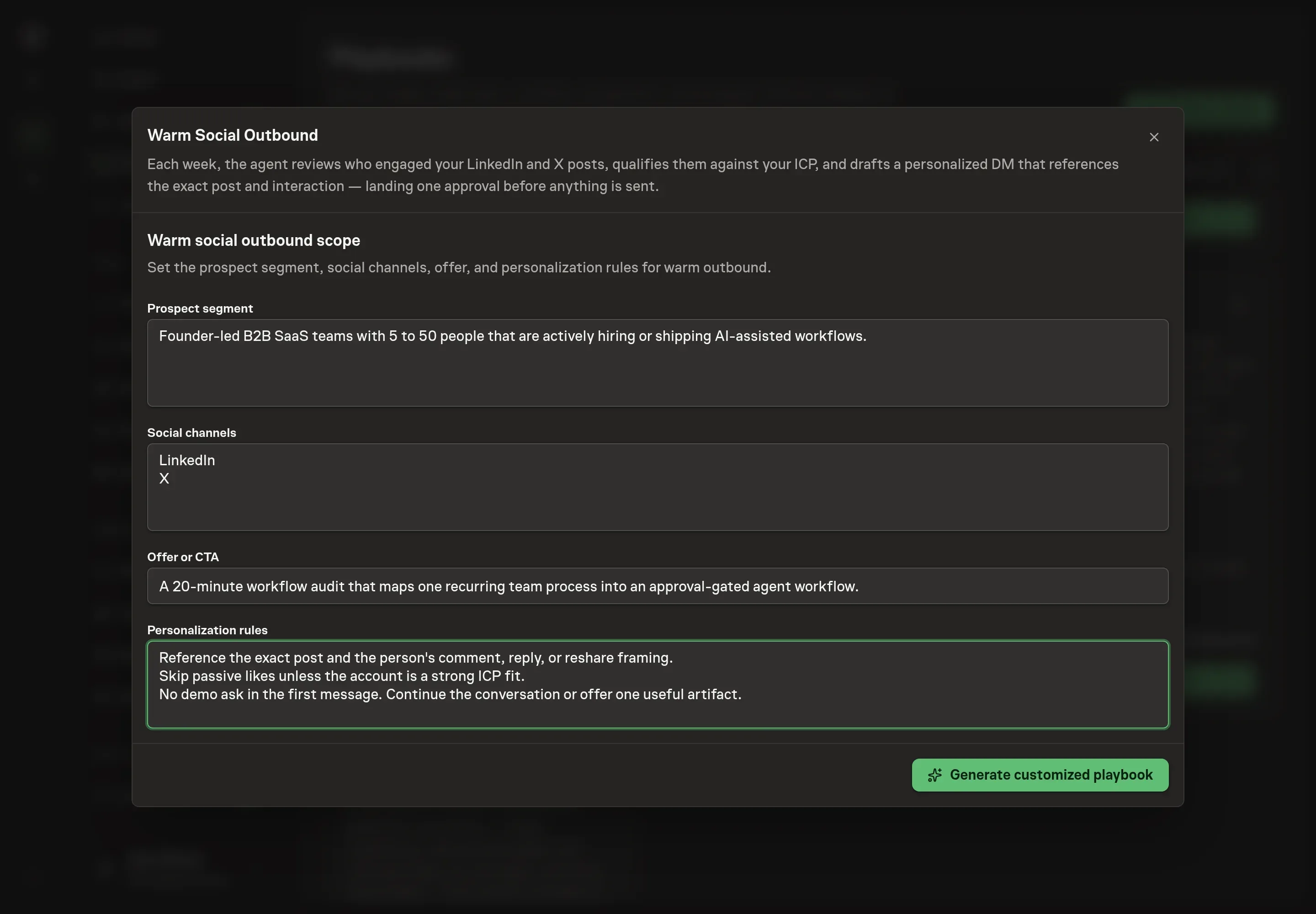
Use Chat to agree the inputs, expected output and limits before asking for a proposal. Discuss the prospect segment, social channels, offer or CTA, and personalization rules. These answers tell the agent who is worth a DM, which channels to review, what a light ask may point toward, and what must be true before a draft is acceptable.
4. Review the proposed Playbook
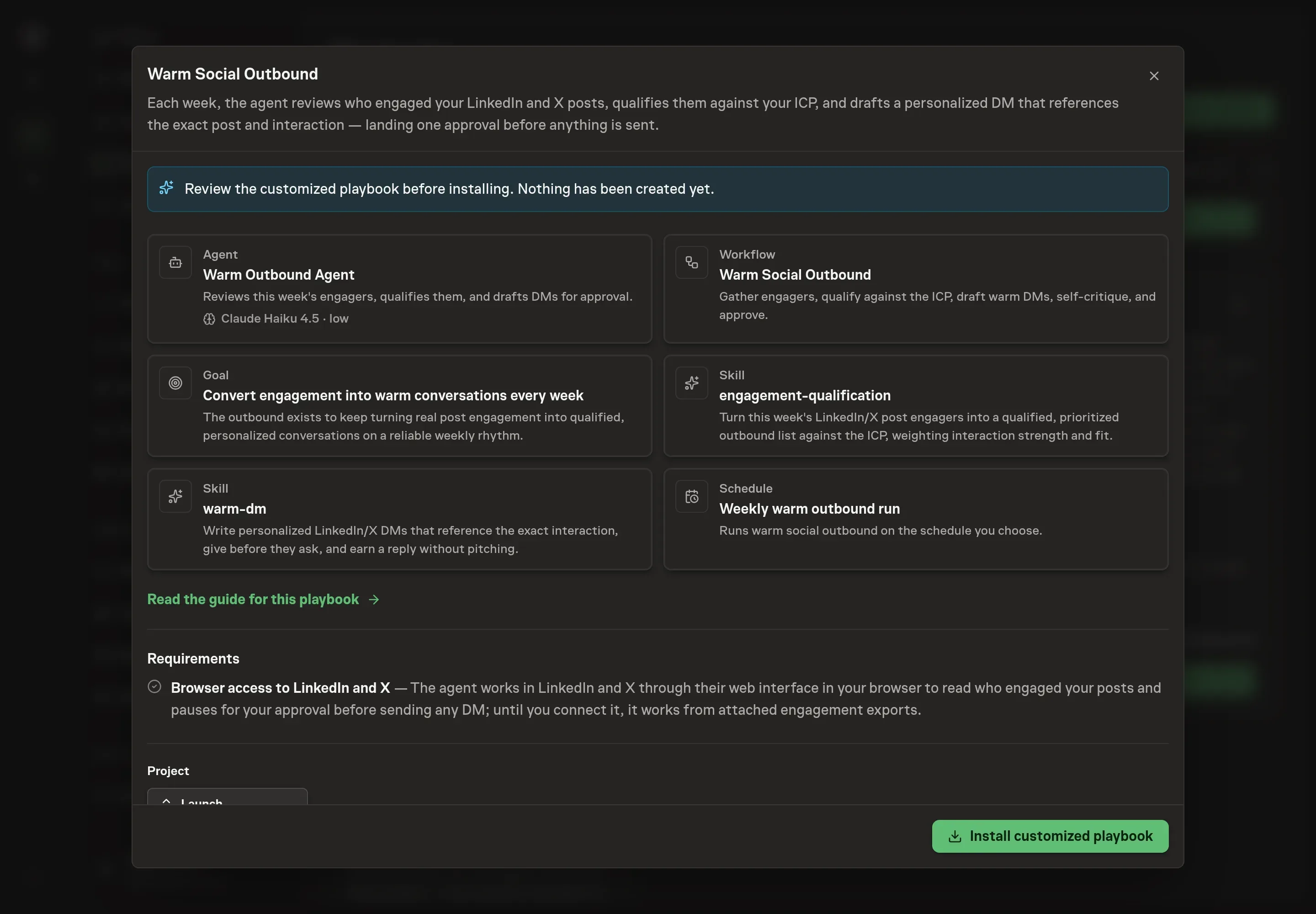
Ask the Agent to generate the Playbook from the agreed brief. Open its proposal in Chat and check the instructions and resources it will install, which carry more detail than the conversational summary. Review the generated records and confirm the qualification rules are narrow enough that the agent will skip weak engagement. Ask for a revised proposal if anything is missing or changes the job.
5. Approve and prepare the first work
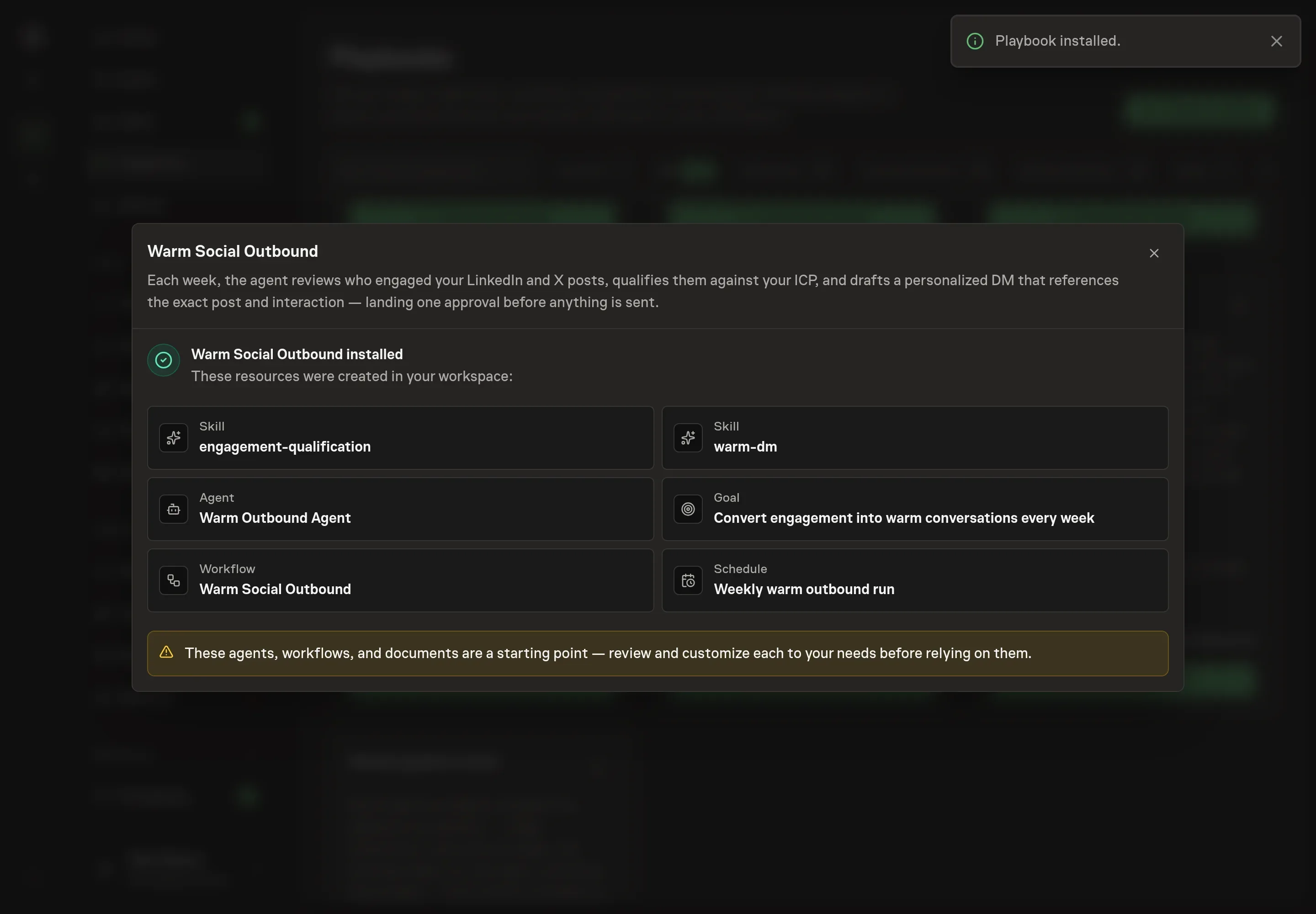
Choose Approve on the proposal in Chat when the configuration matches your brief. Task Machine installs that reviewed configuration. The approved item retains its review details. If your autonomy settings allow direct installation, this approval may not be required. Check the resulting configuration in that case too.
Complete any remaining secure service setup from the installation details in Chat. Inbox keeps those setup items available if you return later. Prepare the source documents and inputs before starting the first Task or Workflow. Installation does not authorize sending, publishing or changing an external service beyond the boundaries you agreed. Confirm each schedule's cadence and timezone, and resolve any pending schedule setup before it starts. A readback must wait for its agreed observation window and source data.
What good looks like
The process is working when the approved list is small, specific, and defensible. Every drafted DM should name the source interaction. Every skipped person should have a clear reason, such as weak fit, passive engagement, or existing relationship.
Watch three numbers: qualified DMs per run, reply rate by interaction type, and skipped weak-fit engagers. If the qualified list grows while replies fall, the qualification bar is probably slipping.
Common questions
Should every person who likes a post get a DM? No. A like without ICP fit or a meaningful interaction is usually a nurture signal, not a message trigger.
Can this send DMs automatically? No. The workflow drafts and self-critiques the batch, then waits for human approval before anything is sent.
What makes a warm DM different from cold outbound? The message references a specific post and interaction. It continues a conversation the person already joined instead of starting with a generic pitch.
Can it work from exports instead of browser access? Yes. Live browser access helps the agent review LinkedIn and X directly, but attached engagement exports can provide the same source post and interaction data.