How to Draft LinkedIn Posts in Your Voice
A practical guide to turning raw notes and shipped work into LinkedIn drafts with hooks, voice checks, and approval.

Founder, Task Machine
LinkedIn ghostwriting is the process of turning a founder's raw notes, shipped work, customer scenes, and measurable outcomes into posts that still sound like the founder. The job is to extract specific material, shape it into a post, and leave the posting decision with the person whose name is on it.
It is worth systematizing because the useful material usually sits in scattered places: customer calls, shipped features, internal notes, screenshots, and lessons learned after the work is done. Without a process, the founder either posts vague advice or stops posting when client work gets busy.
Generic LinkedIn posts start from weak inputs
Generic LinkedIn content usually comes from weak inputs. The writer starts from a topic instead of a specific scene, so the post has no number, mechanism, contradiction, or concrete takeaway.
Voice drifts for the same reason. A founder's voice is not a mood. It has attributes, preferred terms, banned phrases, mechanics, and story patterns. If those rules are not written down, every draft slowly turns into platform-neutral business copy.
What the manual process looks like
Done by hand, a good ghostwriting loop has six steps:
- Collect raw notes from shipped work, customer conversations, and founder observations.
- Run a strategic interview for audience, goal, CTA, before-and-after numbers, mechanism, counterintuitive insight, and credibility detail.
- Check the validation gate: at least one quantified metric, one counterintuitive insight, one mechanism, and one determined CTA.
- Engineer several hooks using distinct levers, then choose the one that creates the strongest reason to read the second sentence.
- Draft the body in the founder's voice with mobile-first formatting and a clear takeaway.
- Scrub filler, hype, over-hedging, and AI tells, then get human approval before posting.
The work is repeatable, but it is not disposable. A post carrying a founder's name needs claimable specifics and a voice check.
What an agent can automate
An agent can run the ghostwriting loop while keeping authorship and approval with the founder:
- Extract usable material. The agent turns notes and shipped work into the raw ingredients: audience, goal, numbers, mechanism, insight, credibility, and CTA.
- Enforce the validation gate. It stops when a claim is not public, a number cannot be verified, or the mechanism is missing.
- Engineer hooks. It proposes distinct hook options and picks the strongest based on the post type, not only on punchiness.
- Draft in the founder's voice. It uses the founder voice guide for attributes, lexicon, mechanics, and channel-specific rules.
- Self-critique before approval. It removes filler, predictable cadence, hollow transitions, and hype while preserving the hook that carries the post.
- Capture founder feedback. Approval preserves keep, change, avoid, and reason for the voice, hook, proof, CTA, and story.
- Read complete results. A separate workflow waits for the full seven-day window, then combines LinkedIn analytics, business signals, guardrails, confounders, and founder judgment.
The agent prepares drafts and measured recommendations. It does not post on its own.
The guardrails that make it safe
The first guardrail is claim verification. A LinkedIn post can reference results only when the number is public or approved to share. If the number cannot be verified, the agent should ask or remove it.
The second guardrail is two approvals. The founder first approves the draft, fixed seven-day measurement plan, and structured feedback before the post enters the results log. A later approval decides whether a voice, hook, format, or topic pattern is reusable. Neither approval posts or changes live content.
Set it up in Task Machine
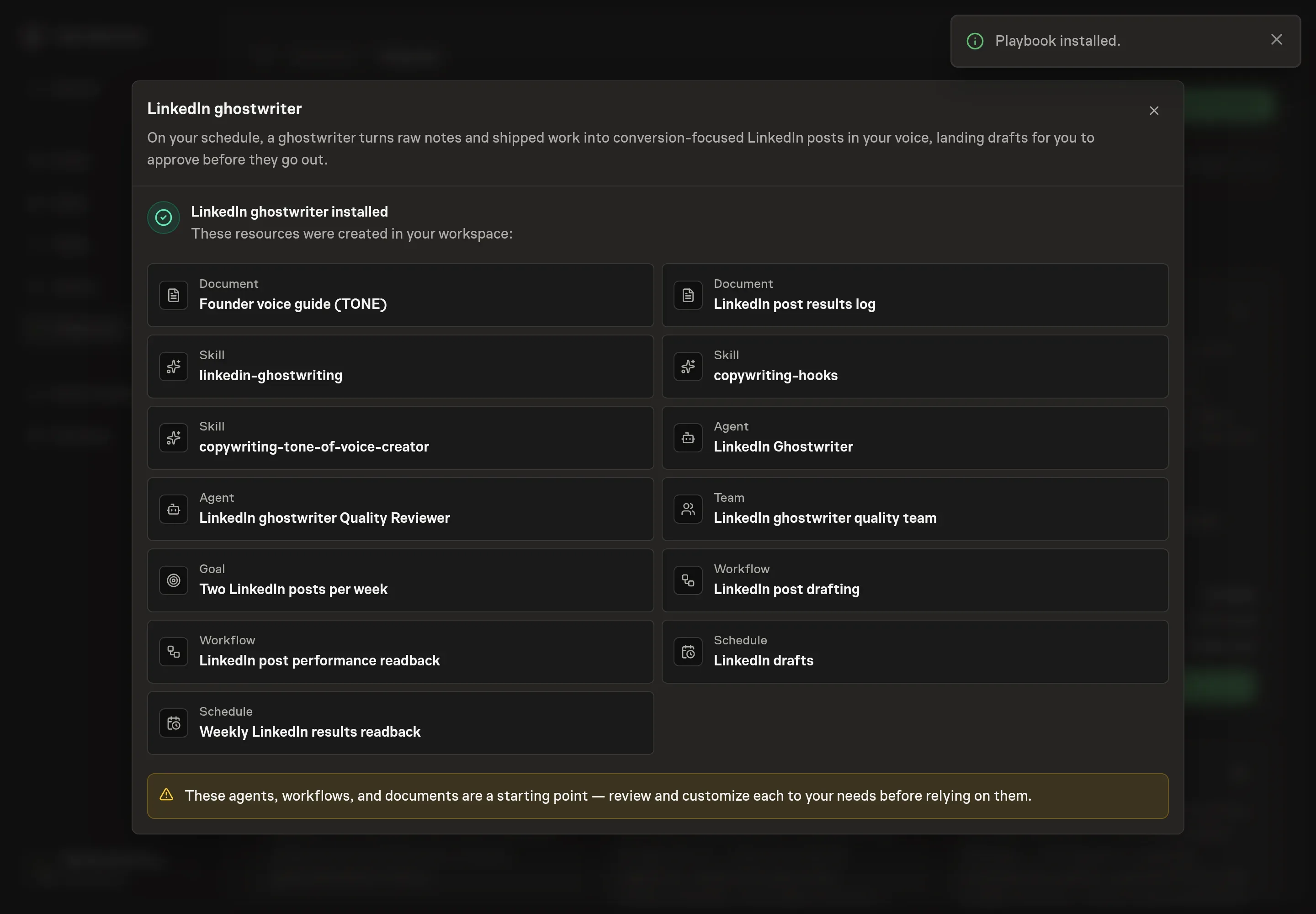
The LinkedIn content writing playbook provides a starting point for the method above. You need an active Task Machine workspace with Chat, workspace-management and Playbook-installation access (workspace owners have it). LinkedIn access is optional at setup. Until it is authorized, the agent drafts from your voice guide and attached notes.
1. Find the playbook
Open Search in your workspace and enter "LinkedIn content writing". The command center lists Set up LinkedIn content writing under Playbook setup.
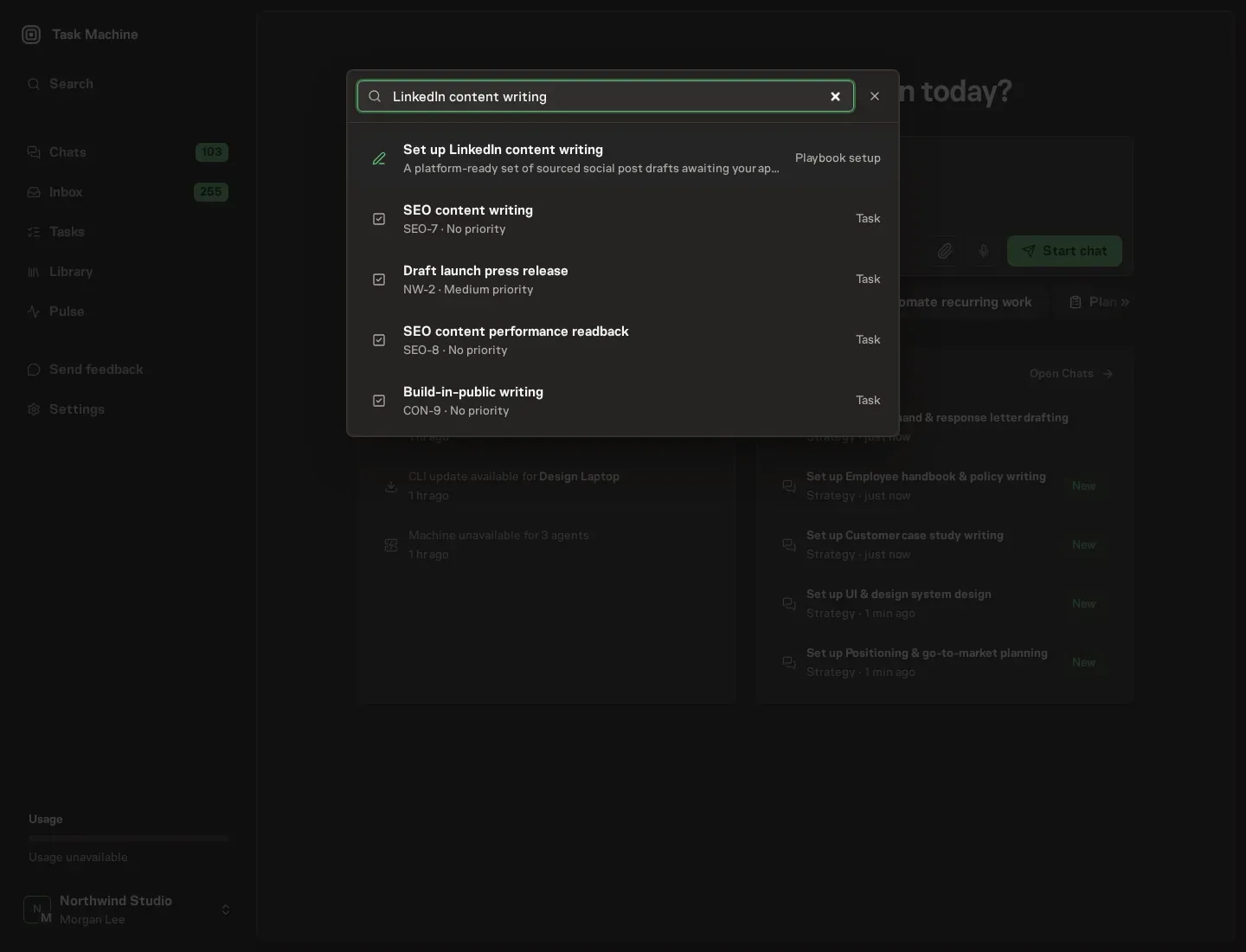
2. Start the conversation
Choose Set up LinkedIn content writing. Task Machine opens a dedicated Chat with the Playbook card and an editable, unsent request. Read the intended job and outcome. Add your situation and send it when ready. Opening the draft does not install anything or start work. This walkthrough uses settings that require approval of the proposed Playbook.
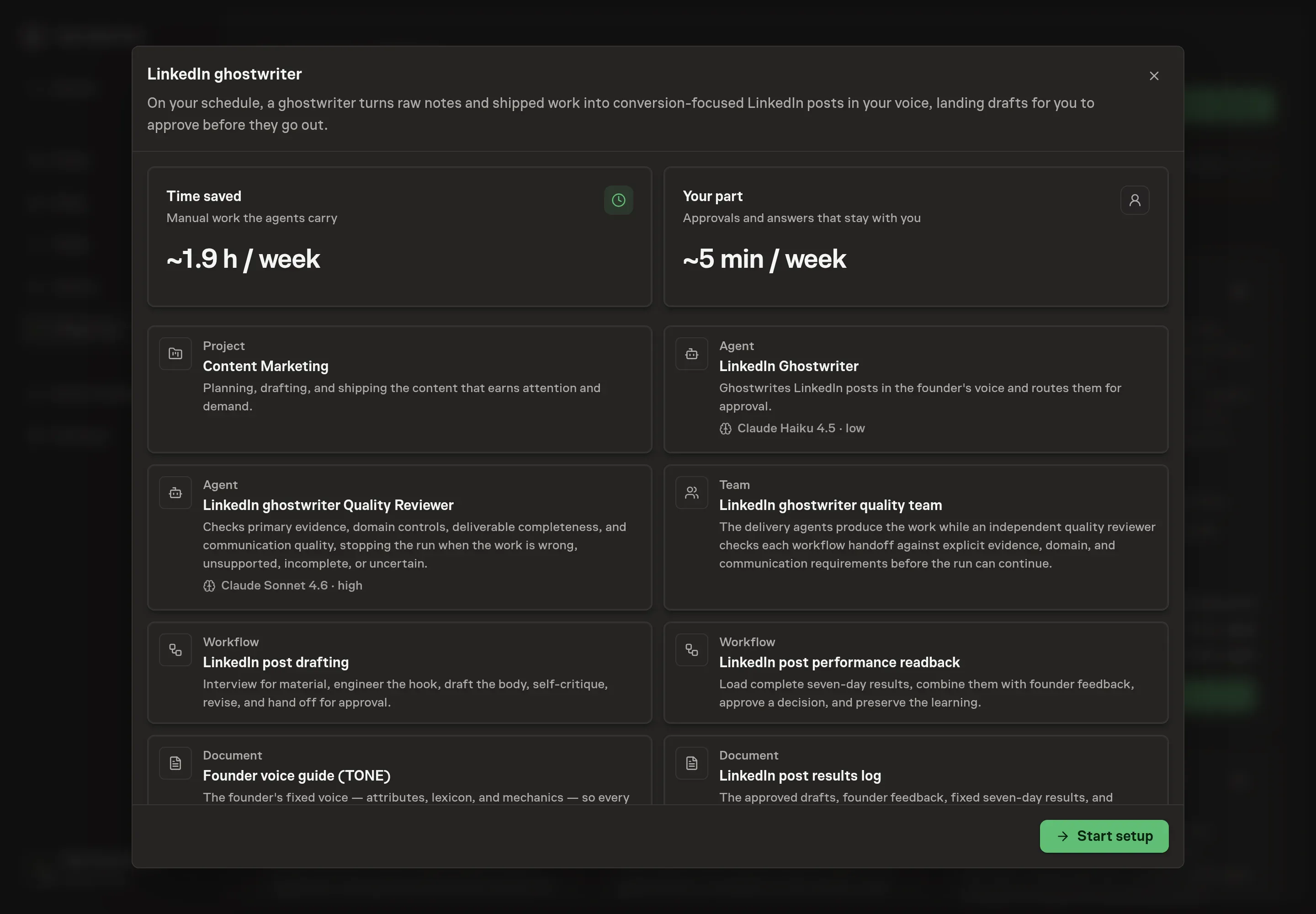
3. Agree the working brief
Use Chat to agree the inputs, expected output and limits before asking for a proposal. The Agent needs the author profile, target audience, content pillars, and voice notes. Use concrete inputs: who the founder is writing as, who should read the posts, which recurring subjects matter, and which phrases or mechanics make the writing sound like them.
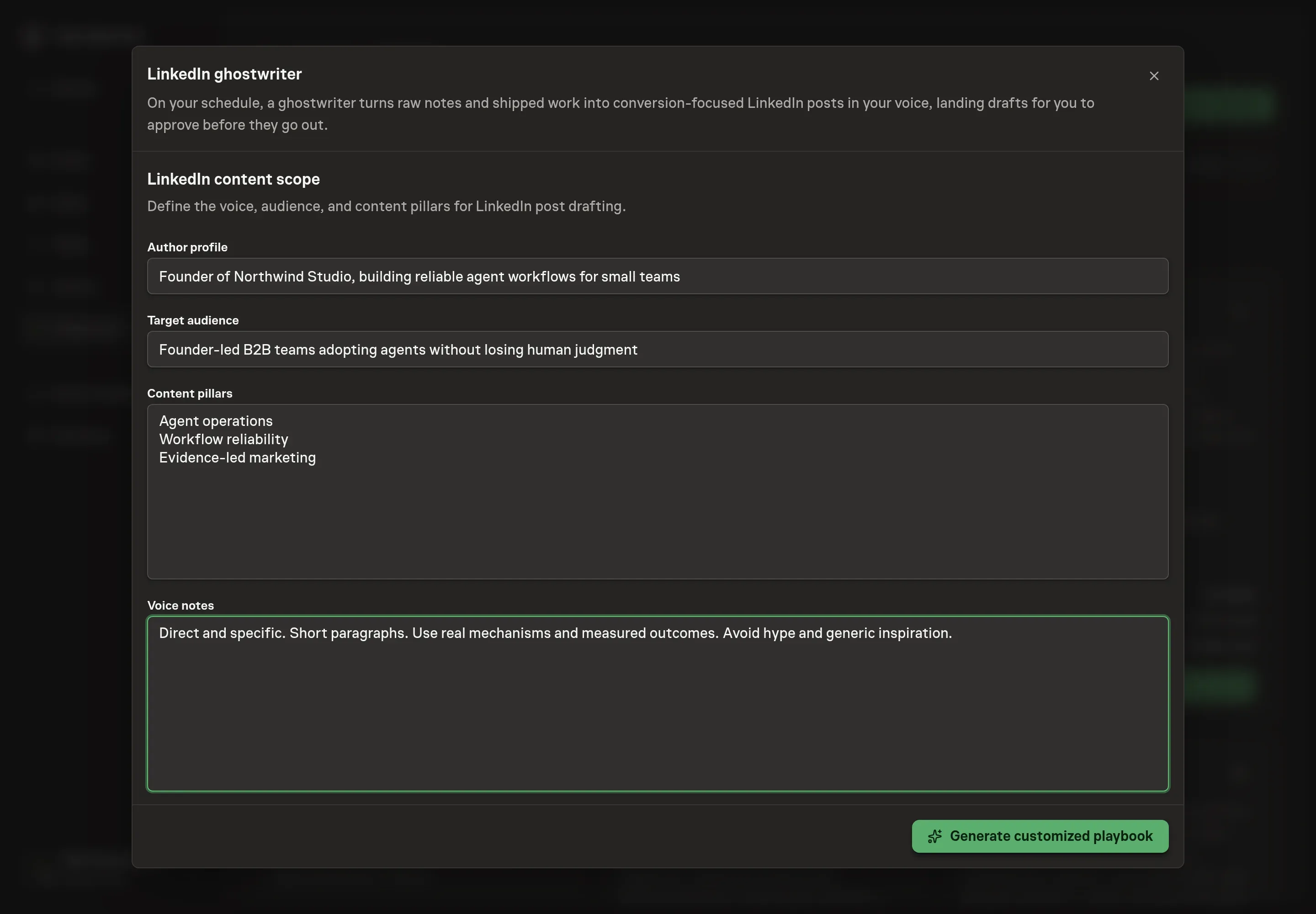
4. Review the proposed Playbook
Ask the Agent to generate the Playbook from the agreed brief. Open its proposal in Chat and check the instructions and resources it will install, which carry more detail than the conversational summary. Confirm production ends with Approve post and Record approved LinkedIn post, while readback has its own approval before learning is recorded. Ask for a revised proposal if anything is missing or changes the job.
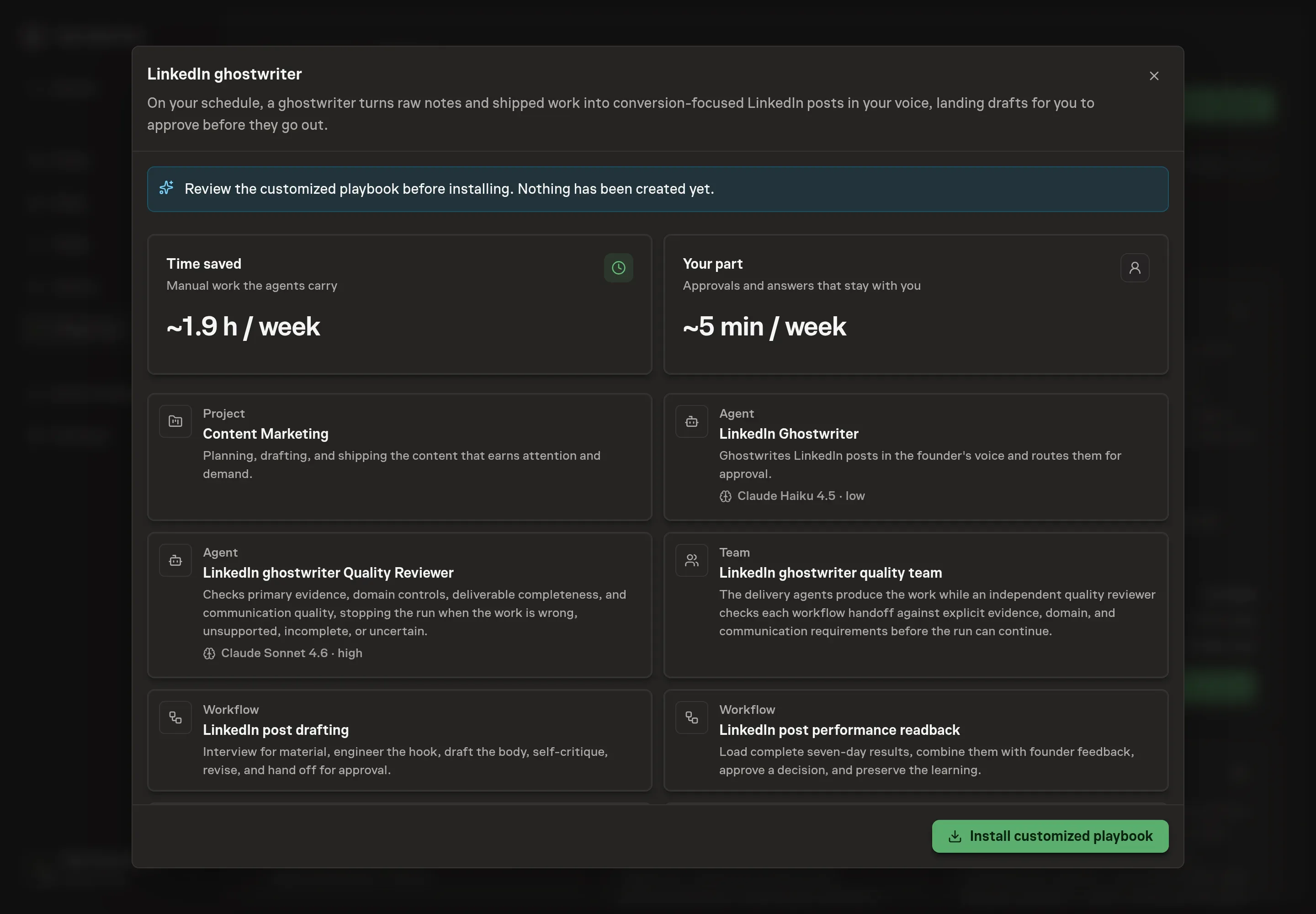
5. Approve and prepare the first work
Choose Approve on the proposal in Chat when the configuration matches your brief. Task Machine installs that reviewed configuration. The approved item retains its review details. If your autonomy settings allow direct installation, this approval may not be required. Check the resulting configuration in that case too.
Complete any remaining secure service setup from the installation details in Chat. Inbox keeps those setup items available if you return later. Prepare the source documents and inputs before starting the first Task or Workflow. Installation does not authorize sending, publishing or changing an external service beyond the boundaries you agreed. Confirm each schedule's cadence and timezone, and resolve any pending schedule setup before it starts. A readback must wait for its agreed observation window and source data. Check the reviewed tracker or results document before the first cycle so evidence and human decisions have a durable home.
What good looks like
Three signals tell you whether the ghostwriting loop is working:
- Claimable specificity. Each post should have a specific scene, number, mechanism, or customer fact that is approved to share.
- Voice consistency. Drafts should match the founder's mechanics, terms, and boundaries without sounding like a brand account.
- Approval quality. The founder should edit judgment and nuance, not rebuild the post from generic copy.
- Signals stay separate. Qualified comments, reposts, and saves are the platform outcome. Profile views, follows, inbound messages, conversations, and leads remain business signals. Hides, unfollows, corrections, audience mismatch, and voice violations remain guardrails.
How the loop learns
Before publication, the log records the owner, audience job, hook, format, CTA, approved copy, founder keep/change/avoid feedback and reason, fixed seven-day window, primary outcome, business signals, guardrails, and readback date.
At readback, the agent checks distribution changes, account growth, amplification, timing, tracking gaps, seasonality, and low volume. A human chooses reuse, keep testing, retire, or unproven and approves the exact narrow learning. Weak and inconclusive posts remain visible, and no decision changes or repeats a live post automatically.
Common questions
Can an agent write in a founder's voice? It can draft closer to the founder's voice when it has a real voice guide and examples. The founder still needs to approve, because the post carries their name.
What should go in the voice guide? Include voice attributes, preferred terms, banned phrases, mechanics, perspective, examples, and the kinds of claims the founder is comfortable making.
Does the agent need LinkedIn access? No. It can draft from notes and the voice guide without LinkedIn access. Browser access only helps prepare approved posts in LinkedIn.
What if the notes do not include a number? The agent should ask for one, use a qualitative scene if that is honest, or skip the claim. It should not invent performance numbers.