How to Fix Bugs With a Coding Agent
A practical guide to fixing bugs with a coding agent: feedback loops, root-cause investigation, regression tests, and approval before merge.

Founder, Task Machine
Bug investigation and fix is the process of taking a reported defect from symptom to merged correction: reproducing the failure on demand, tracing it back to its root cause, changing the smallest amount of code that resolves it, and locking the behavior in with a regression test so it cannot return unnoticed.
Done well, it is the difference between a codebase that gets more reliable with every report and one that accumulates patches. A fix at the symptom buys quiet for a week. A fix at the root cause, proven by a test that failed before the change and passes after, removes the bug from the system for good.
Guess-and-check fixes create new bugs
Most bugs get fixed under time pressure, and time pressure invites the shortcut: skim the code, spot something plausible, change it, and see if the symptom goes away. Random fixes waste time and create new bugs, and quick patches mask the underlying issue instead of resolving it.
The costs compound unnoticed. A symptom-level patch leaves the real cause in place, so the bug resurfaces in a different shape and gets investigated again from zero. A fix shipped without a regression test can be undone by any later change without anyone noticing. And a bug that survives several failed fixes in a row is usually a sign the surrounding design is wrong, a signal that guess-and-check never surfaces because each attempt looks like just one more try.
Nobody budgets for this work. It arrives as interruptions, gets handled between other tasks, and rewards whoever makes the symptom disappear fastest over whoever makes it never come back.
What the manual process looks like
Run with discipline, a bug fix is a ritual with six steps:
- Read the report carefully: the full error message, the stack trace, the exact steps that trigger it.
- Build a way to make the failure happen on demand, such as a failing test, a script that hits the endpoint, or a command-line run, and watch it fail.
- Shrink the reproduction until only the parts that matter remain.
- Form a theory about the cause, test it with the smallest possible change, and form a new theory if it does not hold.
- Write a test that captures the bug, apply the fix at the root cause, and watch the test go from failing to passing.
- Reread the whole diff for new problems, remove the debug logging, and open a pull request that explains what was wrong and why the fix is right.
Every step is teachable, and every step gets skipped when the queue is long. The reproduction gets skipped first, the regression test second, and the self-review rarely happens at all.
What an agent can automate
The whole ritual is mechanical enough to hand to a coding agent, as long as the agent runs the full discipline instead of the shortcut version:
- Build the feedback loop before any theory. The agent constructs a tight, deterministic pass/fail signal that goes red on this exact bug: a failing test, an HTTP script, a snapshot diff, or a throwaway harness. It refuses to read code and form theories until that command exists, because theorizing without a reproduction is the exact failure the method prevents.
- Reproduce and minimise. It runs the loop, confirms the failure is the reported symptom and not a nearby one, then cuts inputs, callers, and config one at a time until every remaining element is load-bearing.
- Rank falsifiable hypotheses. Before probing anything, it lists three to five ranked hypotheses for the root cause, each with a prediction of the form "if X is the cause, changing Y makes the failure disappear". When the bug looks domain-sensitive or risky, it shows you the ranked list first, because you can often re-rank it instantly with knowledge the code does not carry.
- Fix at the root with a proven test. It writes the regression test first, at a seam that exercises the real bug pattern, then implements the single smallest fix, watches the test go from red to green, and re-runs the original loop. No bundled refactoring, no "while I'm here" improvements.
- Self-review the diff. It reads its own change as if it were someone else's: the full diff, a map of every input, query, permission check, and external call the change touches, a security checklist from injection through race conditions, and a performance pass for query-per-item loops and unbounded reads. Every finding must be proven real before it is reported, and a clean result is an acceptable answer.
- Draft the pull request. The PR summarises the root cause, the fix, the regression test, the self-review outcome, and the hypothesis that proved correct, so the next person debugging nearby learns from it.
Two things stay with you: re-ranking hypotheses with domain knowledge the codebase cannot express, and deciding whether the finished fix merges.
The guardrails that make it safe
An agent that edits code needs harder boundaries than one that drafts documents, and the boundaries here are part of the method rather than bolted on.
Nothing merges without you. The workflow ends in an explicit approval step: the agent drafts the pull request, and the root-cause analysis, the fix, the regression test, and the self-review wait in your inbox until you approve. The agent is instructed to never merge on its own.
Failure has a hard stop. If three fixes fail, the agent does not attempt a fourth. It stops and raises the pattern as a design concern, because each failed fix revealing new coupling somewhere else is evidence the problem is bigger than the bug.
The reporting stays honest. Zero findings from the self-review is treated as a valid outcome, so the agent never manufactures issues to look thorough, and severity has to match real impact. Before the PR goes out, tagged debug instrumentation and throwaway harnesses are removed, so the diff you review is the fix and nothing else.
Set it up in Task Machine
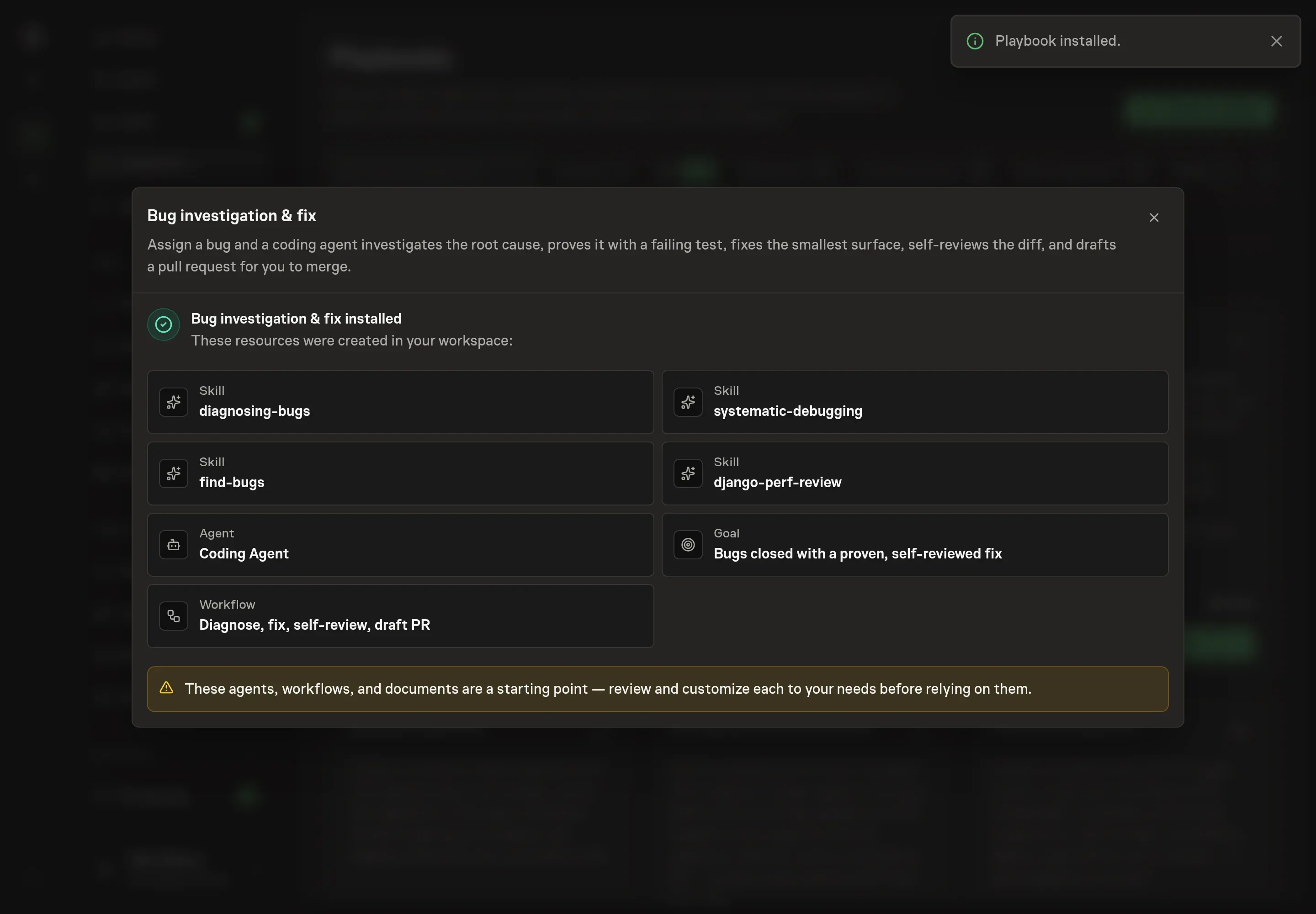
The Bug Investigation & Fixing playbook provides a starting point for the method above. You need an active Task Machine workspace with Chat, workspace-management and Playbook-installation access (workspace owners have it). GitHub access is not required up front. Until you connect it, the agent works from exports you attach to each run.
1. Find the playbook
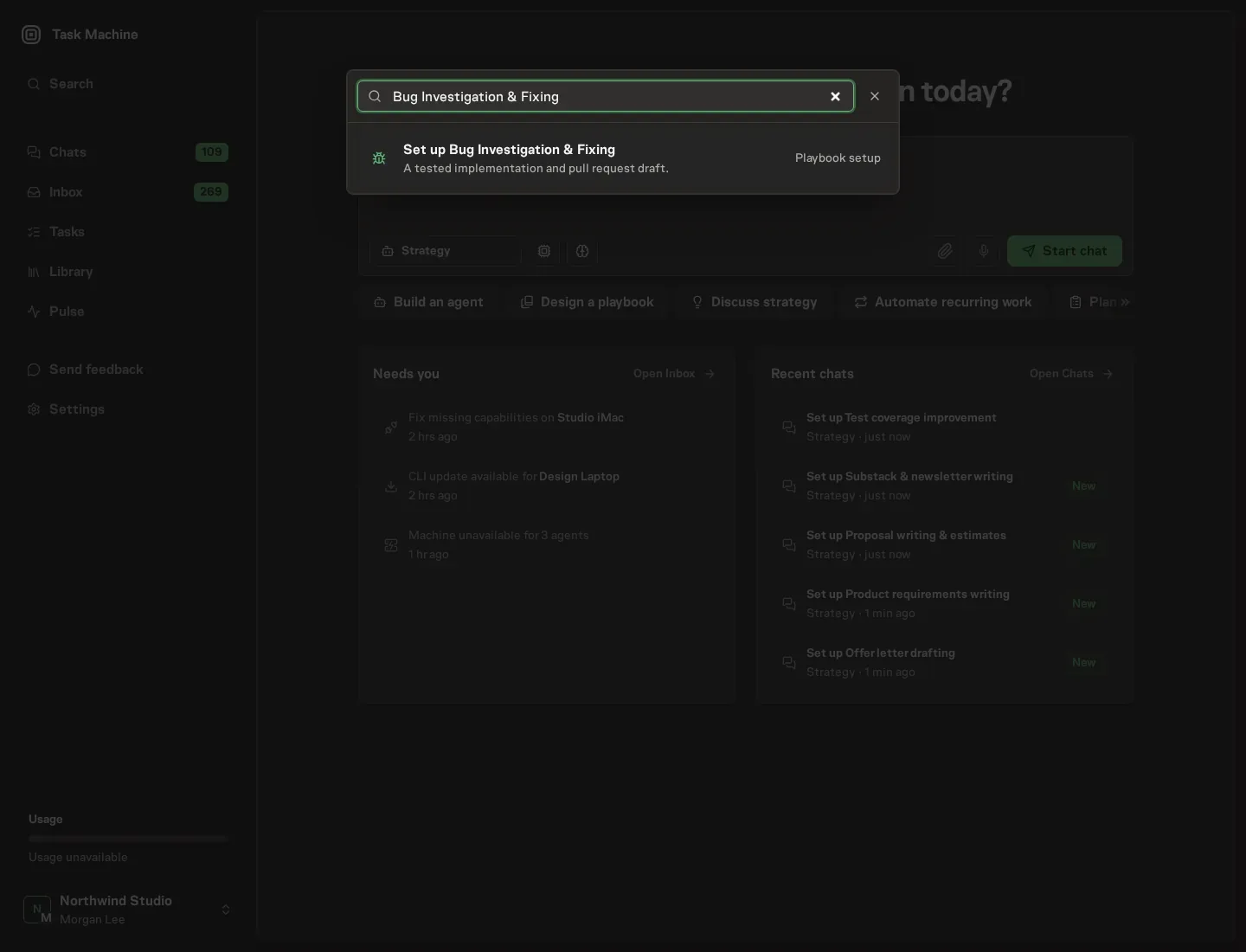
Open Search in your workspace and enter "Bug Investigation & Fixing". The command center lists Set up Bug Investigation & Fixing under Playbook setup.
2. Start the conversation
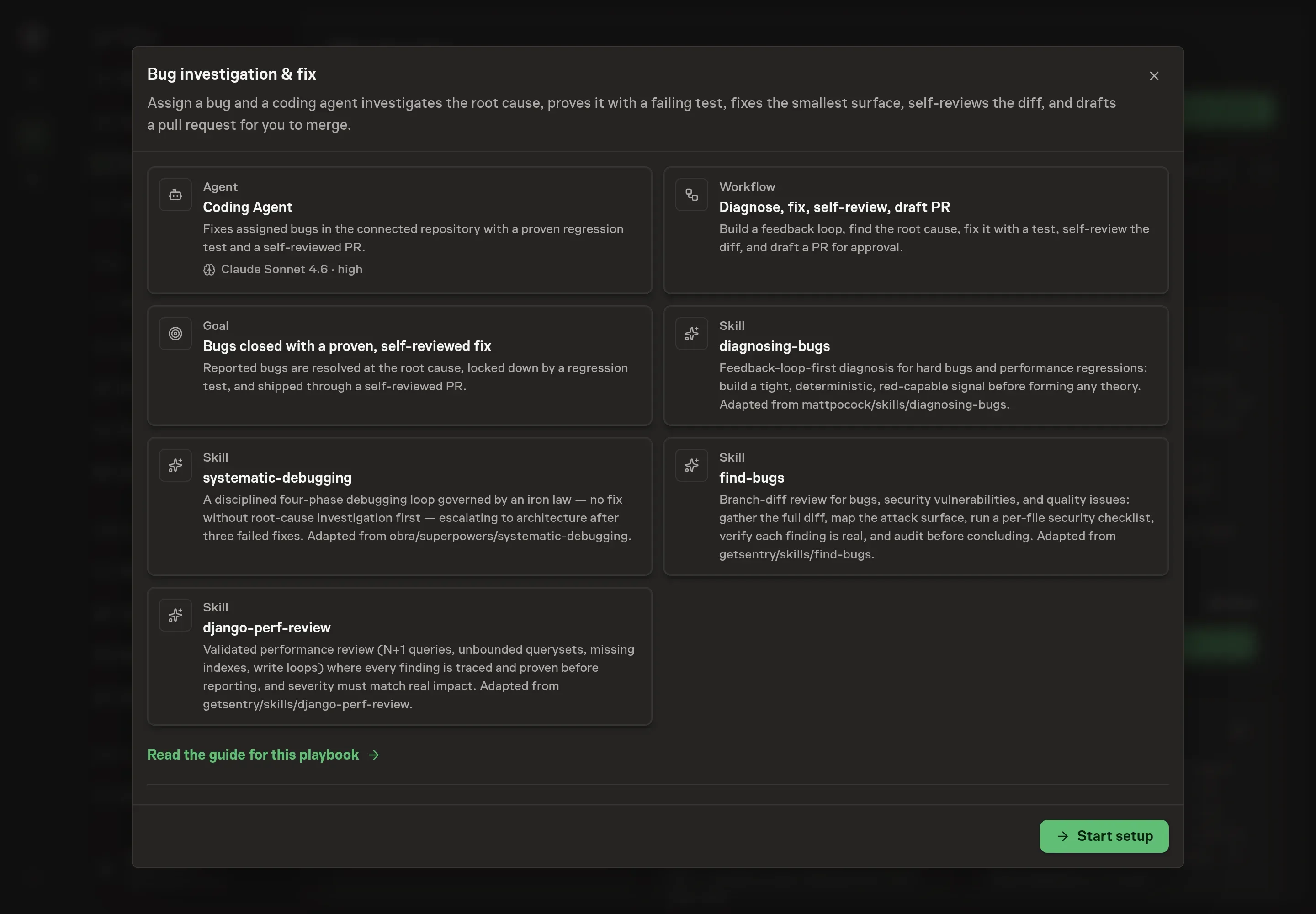
Choose Set up Bug Investigation & Fixing. Task Machine opens a dedicated Chat with the Playbook card and an editable, unsent request. Read the intended job and outcome, add your situation, and send it when ready. Opening the draft does not install anything or start work. This walkthrough uses settings that require approval of the proposed Playbook.
3. Agree the working brief
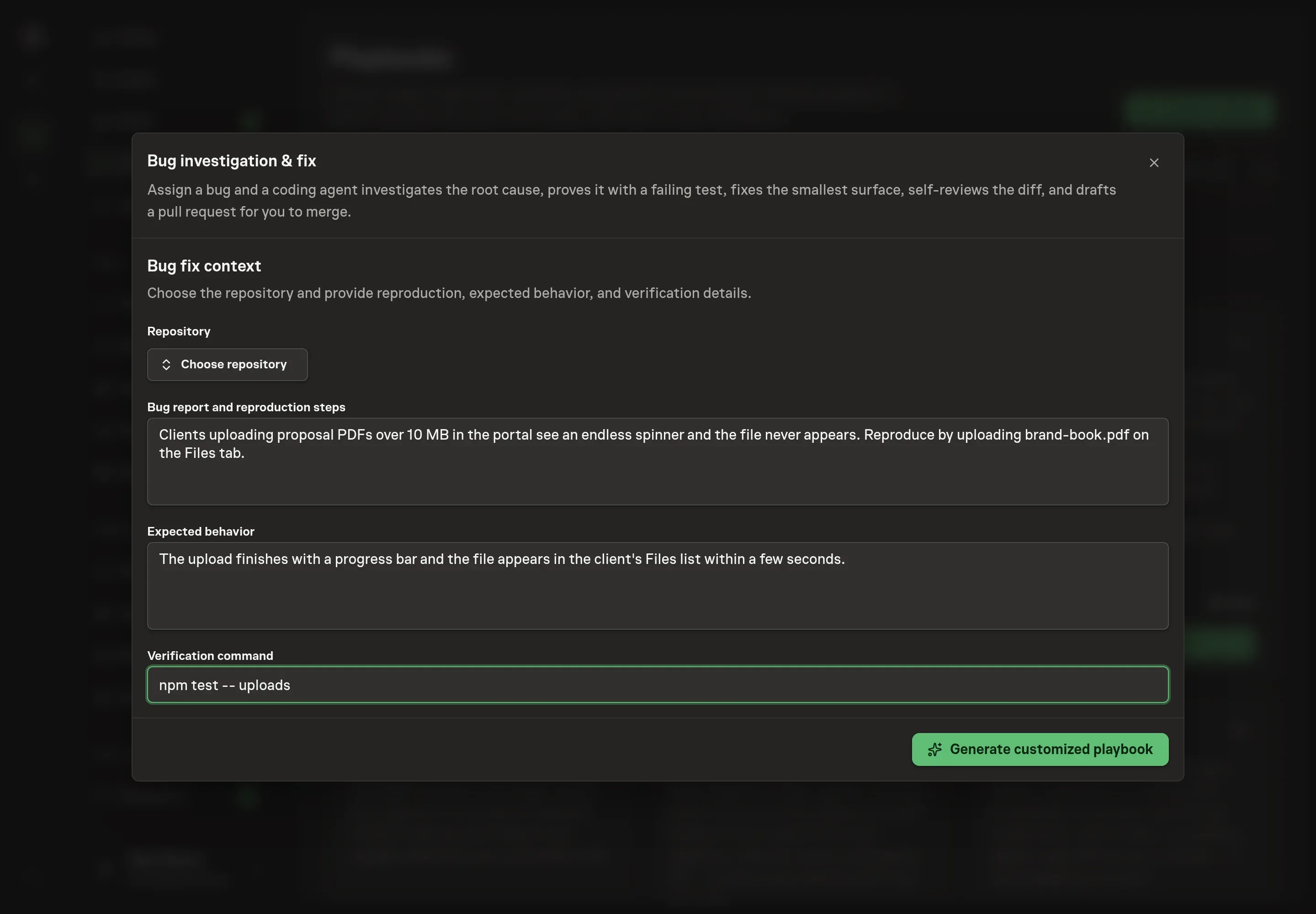
Use Chat to agree the inputs, expected output and limits before asking for a proposal. The Agent needs the details that shape the first run. Repository identifies the connected repository the agent works in. Bug report and reproduction steps describes the symptom and how to trigger it, which becomes the raw material for the feedback loop. Expected behavior states what correct looks like, which is what the regression test will assert. Verification command names the command that runs the affected code path unattended, such as your test runner, so the agent can prove the fix instead of assuming it.
4. Review the proposed Playbook
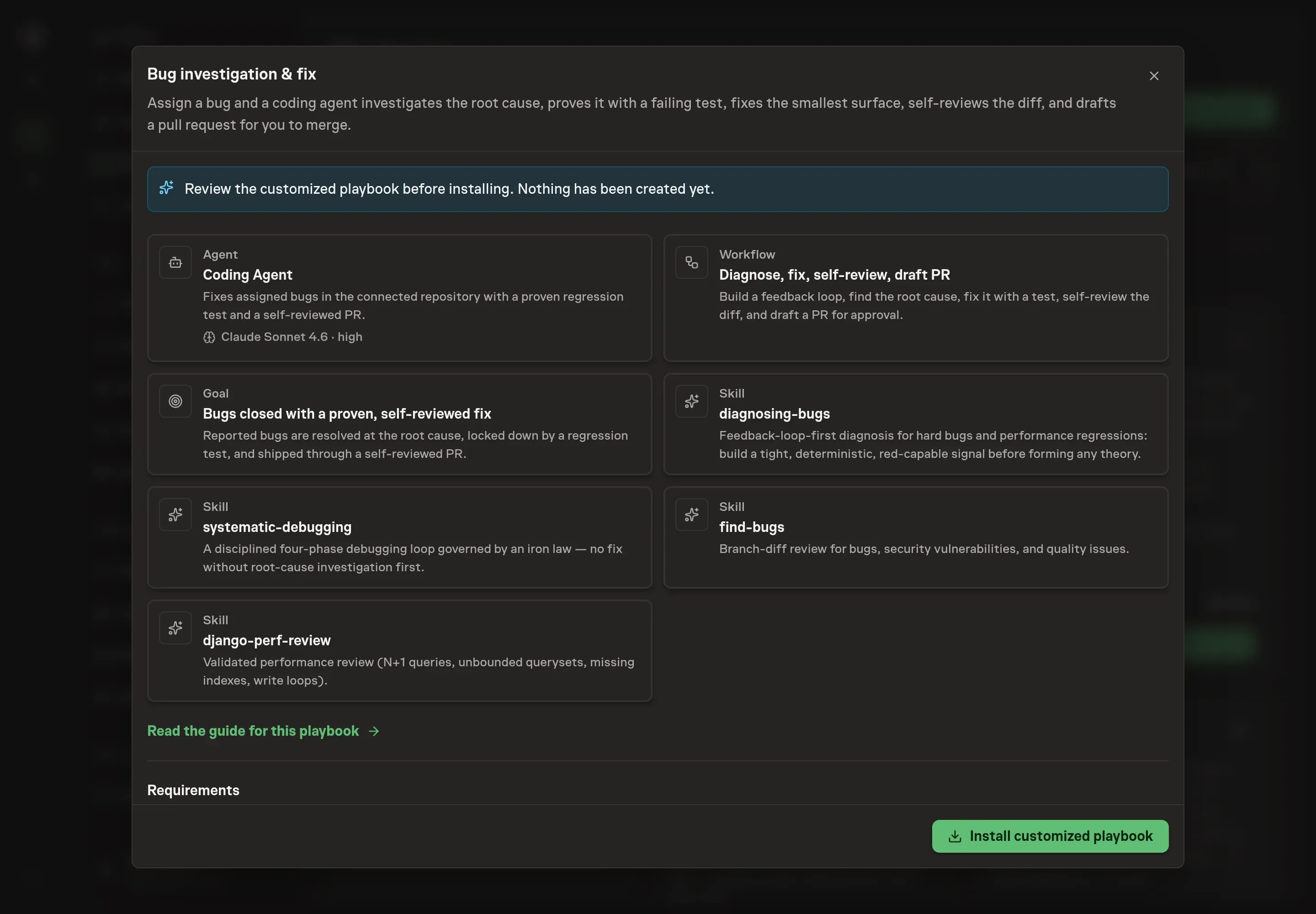
Ask the Agent to generate the Playbook from the agreed brief. Open its proposal in Chat and check the instructions and resources it will install, which carry more detail than the conversational summary. Read through the agent and workflow cards, confirm the repository and verification command are the ones you gave, and check that the workflow ends with the approval step. Ask for a revised proposal if anything is missing or changes the job.
5. Approve and prepare the first work
Choose Approve on the proposal in Chat when the configuration matches your brief. Task Machine installs that reviewed configuration. The approved item retains its review details. If your autonomy settings allow direct installation, this approval may not be required. Check the resulting configuration in that case too.
Complete any remaining secure service setup from the installation details in Chat. Inbox keeps those setup items available if you return later. Prepare the source documents and inputs before starting the first Task or Workflow. Installation does not authorize sending, publishing or changing an external service beyond the boundaries you agreed.
What good looks like
Three signals tell you whether the process works:
- Every regression test fails before the fix and passes after. A test that never went red proves nothing about the bug. Red before, green after is the evidence the fix addressed the actual cause.
- Self-reviews come back clean or with findings already addressed. The goal is a diff with no unaddressed security or performance finding, and a self-review that reports zero issues when zero exist rather than padding the report.
- No bug needs a fourth fix attempt. A healthy run lands the fix on the first or second hypothesis. Hitting the three-failed-fixes stop means the run correctly turned a thrash into a design conversation instead of another patch.
Common questions
Does the agent merge its own fixes? No. The workflow ends at a human approval step, and the agent's standing instructions tell it to always request approval and never merge on its own. You review the root cause, the fix, the test, and the self-review before anything reaches your default branch.
What if the bug cannot be reproduced? Then investigation continues instead of guessing. The method's first gate is a command that reliably makes the failure happen, and until one exists the agent gathers more data rather than forming theories. For flaky failures, it raises the reproduction rate first, by looping the scenario, adding stress, or pinning down sources of nondeterminism, until the bug is debuggable.
Why write the regression test before the fix? Because watching the test fail is the proof that it exercises the real bug. A test written after the fix can pass for the wrong reason and guard nothing. When no honest place for such a test exists, that gap is reported as a finding of its own instead of papering over it.
What happens when a fix does not work? The agent forms a new hypothesis instead of stacking more changes on the old one. After three failed fixes it stops entirely and raises a design concern, because repeated failures in different places usually mean the problem is structural, and that decision belongs to you.
Can this run without connecting the repository? Yes. Until GitHub is connected, the agent works from exports you attach to each run. Once connected, it works in GitHub through its web interface in your browser and pauses for your approval before making any changes.