How to Improve Architecture With a Refactor Agent
Use an agent to find shallow modules, plan tiny behavior-preserving commits, run tests, and draft a refactor PR.

Founder, Task Machine
Architecture improvement through refactoring is the work of reducing codebase friction without changing observable behavior. The target is often a shallow module: an interface that is almost as complex as its implementation, spreads knowledge across callers, and makes future changes harder than they need to be.
The valuable refactor is the small, behavior-preserving change that deepens one module, improves locality, keeps tests green, and ends as a reviewable pull request.
Architecture drift shows up as repeated hesitation
Technical debt rarely appears as one dramatic failure. It shows up as repeated hesitation. A developer has to read five files to understand one concept. A test has to reach past the public interface. A helper exists only because it was easier to test than the real behavior. A term in code means something different from the product glossary.
Those costs compound because the code still works. Without a disciplined refactor process, teams either avoid the area or attempt a large rewrite. Both paths are expensive. The safer pattern is to find the smallest deepening opportunity, pin current behavior, move in tiny commits, and stop when the interface is better.
What the manual process looks like
Done by hand, architecture improvement is a slow engineering review:
- Read the target area, surrounding modules, tests, glossary, and recorded decisions.
- Identify friction: shallow modules, leaked concepts, caller complexity, fuzzy domain terms, and hard-to-test behavior.
- Apply the deletion test. If deleting a module makes complexity vanish, it may be pass-through code. If the complexity reappears across callers, the module may be earning its place.
- Scope the refactor with the smell, target interface, out-of-scope boundaries, and behavior-preservation rule.
- Check test coverage before moving code. Add characterization tests first when coverage is thin.
- Refactor in the smallest working commits, running relevant tests after each step.
- Draft the pull request with problem, approach, decisions, testing, and explicit confirmation that behavior did not change.
The discipline is in what the refactor refuses to do. If the work changes behavior, expands scope, or contradicts an existing architecture decision without approval, it is no longer a safe refactor.
What an agent can automate
The refactor and architecture improver gives that disciplined loop to a coding agent:
- Find the deepening opportunity. The agent reads the target area and uses the deletion test to identify the shallowest useful module.
- Use the project's language. It names boundaries and seams in domain terms rather than generic technical labels.
- Plan tiny commits. The agent writes a step-by-step refactor plan where each commit leaves the program working.
- Pin behavior before movement. If coverage is thin, early commits add characterization tests before structural changes.
- Apply behind tests. The agent runs the relevant test command after each step and stops instead of proceeding on red.
- Draft the PR. The final artifact explains the problem, approach, commit plan, decisions, tests, out-of-scope items, and behavior-preservation claim.
The agent does not merge the work. It ends at a human approval gate.
The guardrails that make it safe
Refactoring needs stricter guardrails than feature work because the success condition is absence of behavior change. Make that explicit in the working brief: refactor goal, do-not-change boundaries, and verification command.
Task Machine also keeps the workflow staged. The agent first finds the opportunity, then plans tiny commits, then applies behind tests, then verifies behavior unchanged, then drafts the PR, then waits for approval. If a step gets bigger than planned, if tests go red, or if behavior has to move, the agent stops.
Set it up in Task Machine
The Refactoring and architecture improvement playbook provides a starting point for the method above. You need an active Task Machine workspace with Chat, workspace-management and Playbook-installation access (workspace owners have it). A connected repository is expected for full execution. Until repository access is connected, the agent works from attached code and drafts the PR for you to open.
1. Find the playbook
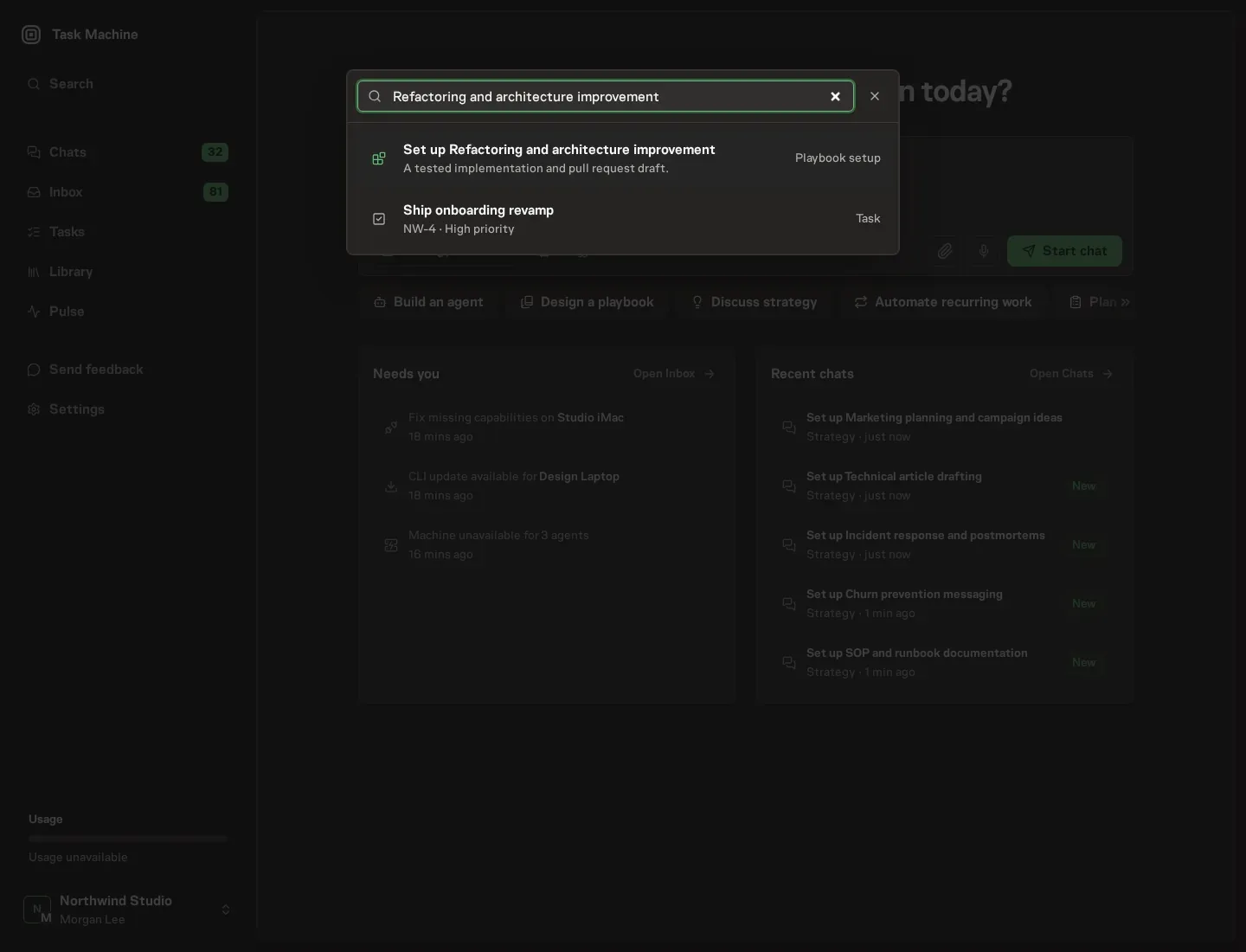
Open Search in your workspace and enter "Refactoring and architecture improvement". The command center lists Set up Refactoring and architecture improvement under Playbook setup.
2. Start the conversation
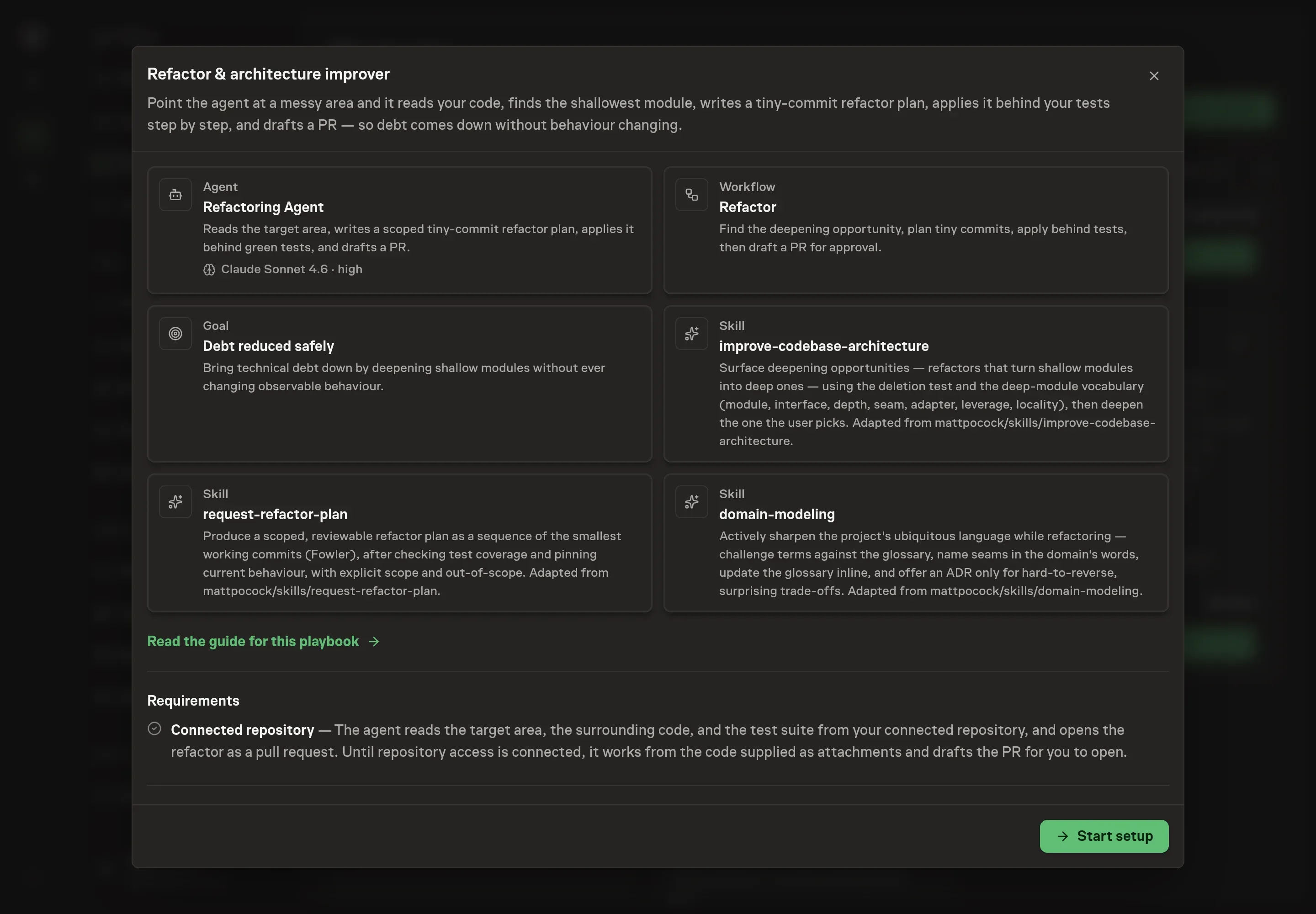
Choose Set up Refactoring and architecture improvement. Task Machine opens a dedicated Chat with the Playbook card and an editable, unsent request. Read the intended job and outcome. Add your situation and send it when ready. Opening the draft does not install anything or start work. This walkthrough uses settings that require approval of the proposed Playbook.
3. Agree the working brief
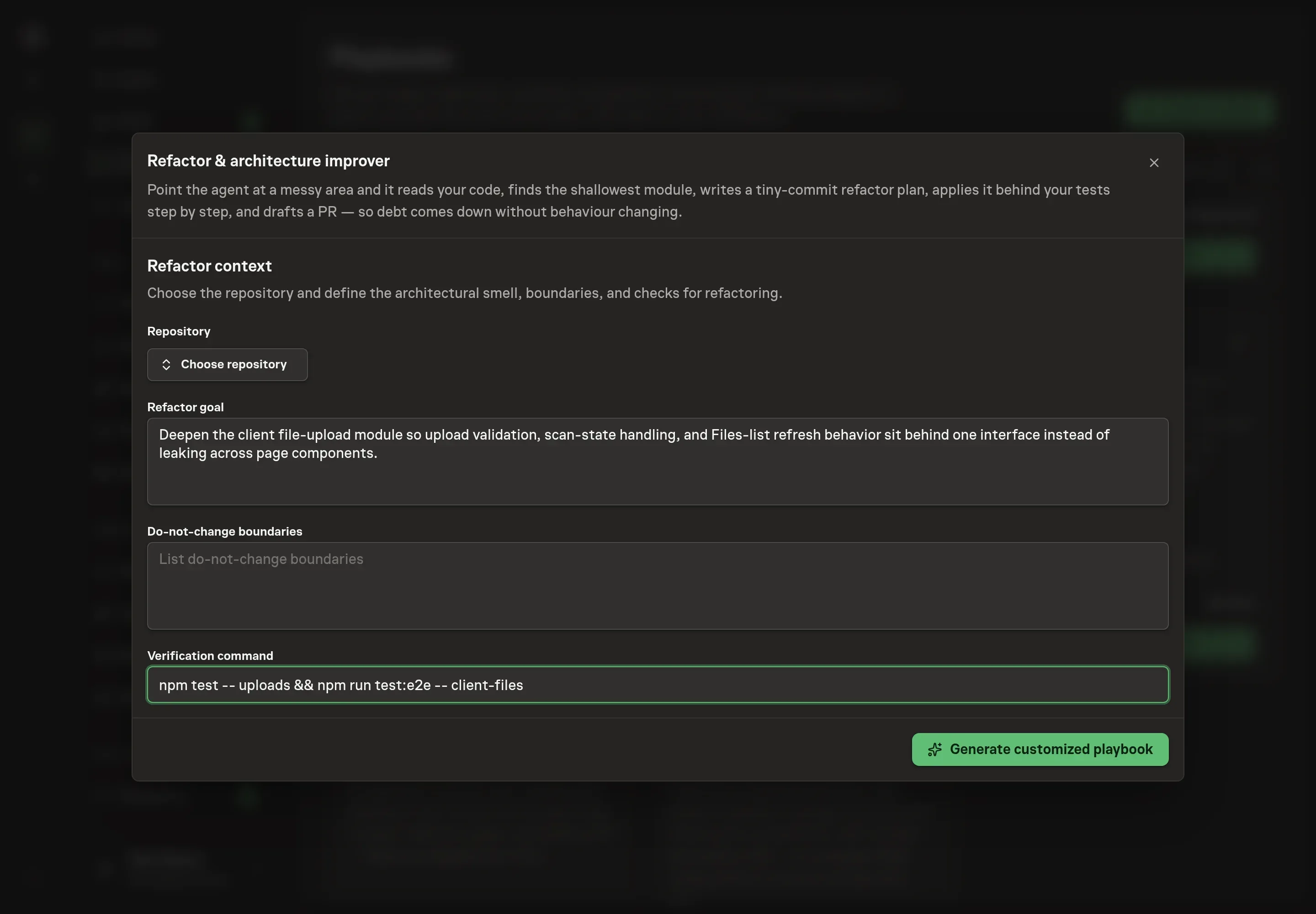
Use Chat to agree the inputs, expected output and limits before asking for a proposal. The Agent needs the repository, refactor goal, do-not-change boundaries, and verification command. The goal should name the messy area and the architectural smell. The boundaries should name behavior, files, APIs, or product surfaces that must not move.
4. Review the proposed Playbook
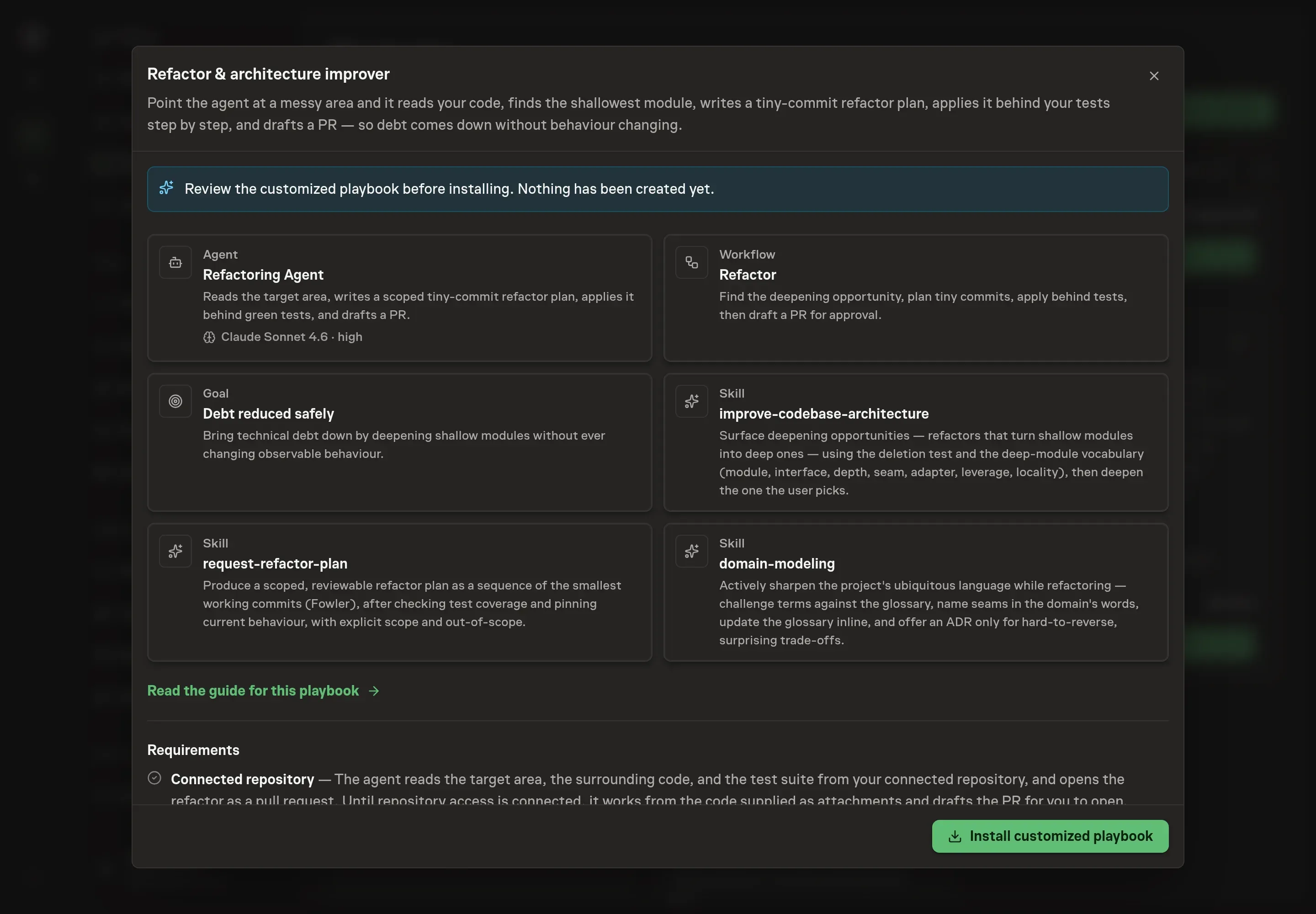
Ask the Agent to generate the Playbook from the agreed brief. Open its proposal in Chat and check the instructions and resources it will install, which carry more detail than the conversational summary. Review before creation. Confirm that the workflow requires tests after each step, that observable behavior stays unchanged, and that the approval gate comes after the PR draft. Ask for a revised proposal if anything is missing or changes the job.
5. Approve and prepare the first work
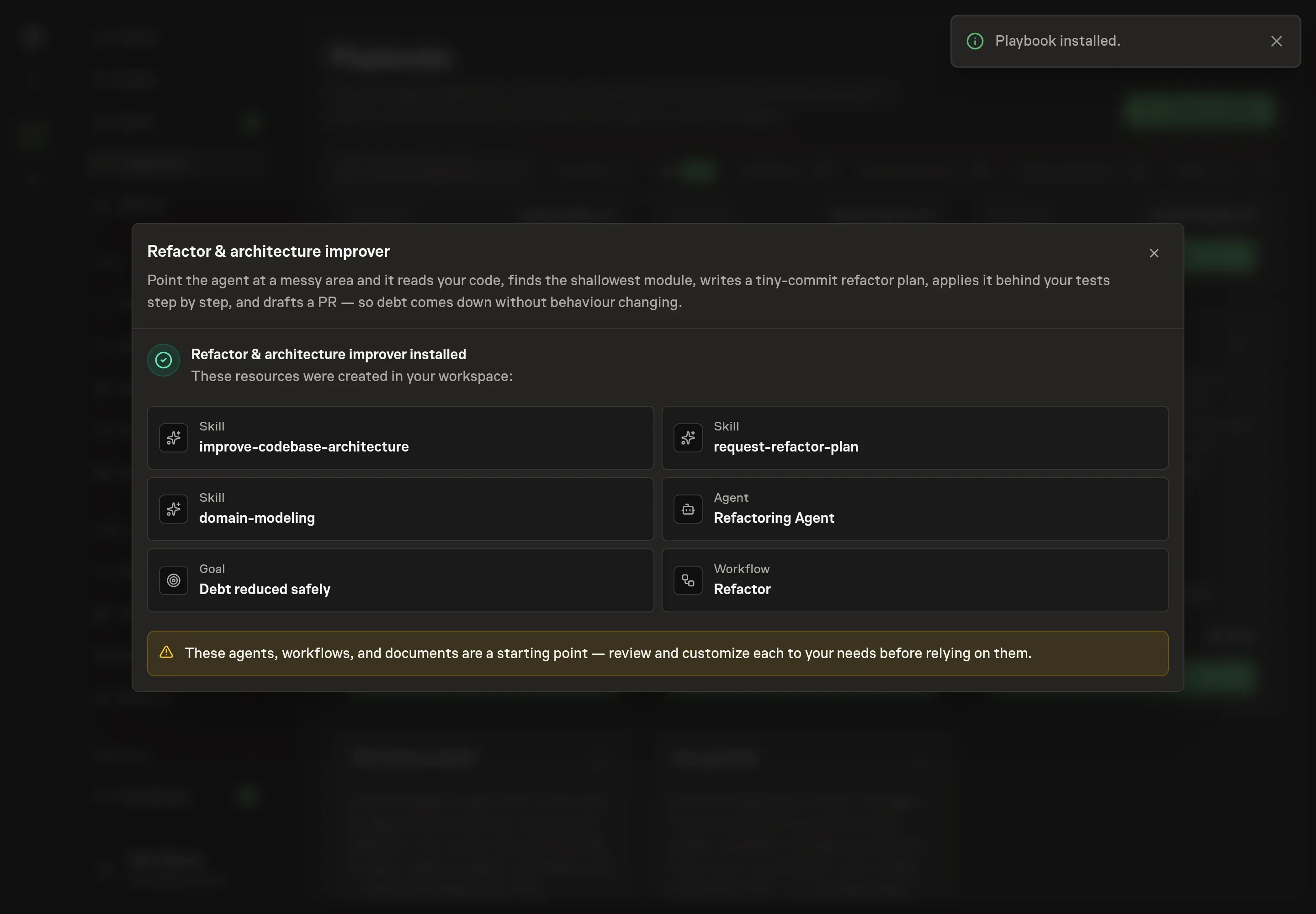
Choose Approve on the proposal in Chat when the configuration matches your brief. Task Machine installs that reviewed configuration. The approved item retains its review details. If your autonomy settings allow direct installation, this approval may not be required. Check the resulting configuration in that case too.
Complete any remaining secure service setup from the installation details in Chat. Inbox keeps those setup items available if you return later. Prepare the source documents and inputs before starting the first Task or Workflow. Installation does not authorize sending, publishing or changing an external service beyond the boundaries you agreed.
What good looks like
A refactor run is healthy when three things are true:
- The interface is deeper. Callers need to know less, while more behavior lives behind the module boundary.
- The commits are small and green. Each step leaves the program working and the relevant tests passing.
- Behavior is unchanged. The PR can explain what moved structurally and what did not change for users or callers.
Common questions
How is this different from asking an agent to clean up code? The playbook is scoped to one target area, one behavior-preserving goal, and one reviewed PR. It does not run a broad cleanup.
What if tests are missing? The agent should add characterization tests first to pin current behavior. Refactoring without a behavior check is outside the safe path.
Can the agent change product behavior during the refactor? No. If behavior needs to change, the agent should flag that the work is no longer a refactor and ask for human direction.
Does it need repository access? Repository access is expected for the full workflow because the agent needs code, tests, and PR context. Without it, the agent works from supplied attachments and drafts the PR for a human to open.