How to Launch Apple Search Ads Campaigns
A practical guide to launching Apple Search Ads with an agent: intent-separated campaigns, CPT bid math, negative keywords, and approval before spend.

Founder, Task Machine
Launching an Apple Search Ads campaign set is the work of turning App Store search demand into structured paid campaigns: researching the keywords people type, separating them into campaigns by intent, deriving bids from what an install is worth to you, excluding the queries you never want to pay for, routing high-intent terms to product pages that match them, and confirming the tracking can measure the result before any money moves.
It is worth doing carefully because the searcher has already stated what they want. Someone typing a category term into the App Store is looking for an app like yours right now, which makes this spend unusually accountable: every bid can trace back to a stated assumption about installs and conversion, and every result can be checked against it.
Why an unstructured campaign burns the budget
The default failure mode is one big campaign where everything lives together. Brand terms usually convert at high rates and deliver installs cheaply on their own, so when they share a campaign with broad discovery terms, the efficient brand clicks subsidize the expensive ones and the reporting cannot say which keyword earns its bid.
The other leaks are quieter. Bids set without a conversion-rate assumption are guesses, and guesses on an auction compound daily. A thin negative-keyword list means paying for irrelevant queries and for terms that rack up impressions without a tap. An unverified attribution setup means the campaign runs for weeks before anyone notices the success event was never measurable. And the job rewards weekly consistency, so the maintenance loop that promotes winners and prunes waste is exactly the work that slips when nobody owns it.
What the manual process looks like
Done by hand, launching and running an Apple Search Ads campaign set is a ritual with seven steps:
- Research keywords: expand seed terms through App Store autocomplete, competitor names, category phrases, problem phrases, and use cases, then classify each term by intent.
- Structure the campaign set: Brand for your app name, misspellings, and developer name, Competitor for exact competitor names, Category for generic and long-tail terms, and Discovery for Search Match and broad terms at low bids.
- Set bids: target cost per tap equals target cost per install times expected conversion rate, with the conversion assumption stated for every group.
- Add negative keywords: irrelevant queries, high-impression zero-tap terms, and the competitor terms you exclude on purpose.
- Map ad groups to Custom Product Pages where the default App Store page is too generic for the searched intent.
- Verify attribution: the AdServices framework or measurement-partner integration, the events that count as success, and consistent campaign and ad group naming.
- Launch, then run the weekly loop: promote converting discovery terms to exact match, add negatives, review tap-through rate, conversion rate, and cost per tap, and scale only after stable conversion evidence.
None of these steps is hard on its own. Together they demand research time up front and a weekly habit afterward, and the weekly habit is what most small teams drop first.
What an agent can automate
Most of that loop is method rather than judgment, which makes it a good fit for an agent working the campaign through the Apple Search Ads web interface:
- Keyword research and grouping. The agent expands your seed themes through autocomplete, competitor names, category terms, problem phrases, and use cases, classifies each term by intent, and groups them into ad groups with coherent intent. Volume and rank data that is unavailable gets labeled unknown, never invented.
- Campaign structure. Brand, Competitor, Category, and Discovery campaigns get built where each fits the brief, so budgets, bids, and decisions stay separated by intent from day one.
- Bid math. Every bid derives from target cost per install times expected conversion rate, with the conversion assumption written down. Bids rise for profitable impression-share gaps and fall for expensive low-conversion terms.
- Negative keyword hygiene. Irrelevant, wasteful, and deliberately excluded terms go on the negatives list before launch and keep getting added afterward.
- Custom Product Page routing. Ad groups map to product pages that match the searched intent, and each mapping carries a hypothesis, a routed ad group, a first-three-screenshot hook, and a success metric.
- Attribution checks. The agent verifies the AdServices or measurement-partner setup, the events that count, naming consistency, and the gap between Apple-reported installs and what your analytics show.
- The weekly loop. After launch, the agent monitors spend, tap-through rate, conversion rate, cost per tap, cost per install, return on ad spend, search terms, negatives, and product-page performance, and reports the results.
What stays judgment is the money: whether to launch, how much to spend, and when to scale.
The guardrails that make it safe
This process spends real money, so the drafting and the spending are kept apart. The build runs through two agents rather than one: an operator assembles the campaign set, and a separate reviewer independently checks campaign separation, keyword groups, negatives, the cost-per-tap math, product-page routing, attribution readiness, and worst-case spend against a named hard cap, then writes a go or no-go memo.
Nothing launches on that memo alone. The build and the memo wait in your inbox for explicit approval, and every approval request states the cost-per-tap assumptions, the worst-case spend, and the headroom left under the cap. After launch, bid changes, budget changes, and scale-ups each need their own separate approval, Custom Product Pages are never published without sign-off, and launch is blocked outright if the agreed success event cannot be measured. The budget itself lives as a named external-costs cap, so the answer to "what could this cost at worst" is always written down before you say yes.
Set it up in Task Machine
The Apple Search Ads campaign launch playbook provides a starting point for the method above. You need an active Task Machine workspace with Chat, workspace-management and Playbook-installation access (workspace owners have it). The agent works in Apple Search Ads through its web interface and pauses for your approval before launch or any spend change.
1. Find the playbook
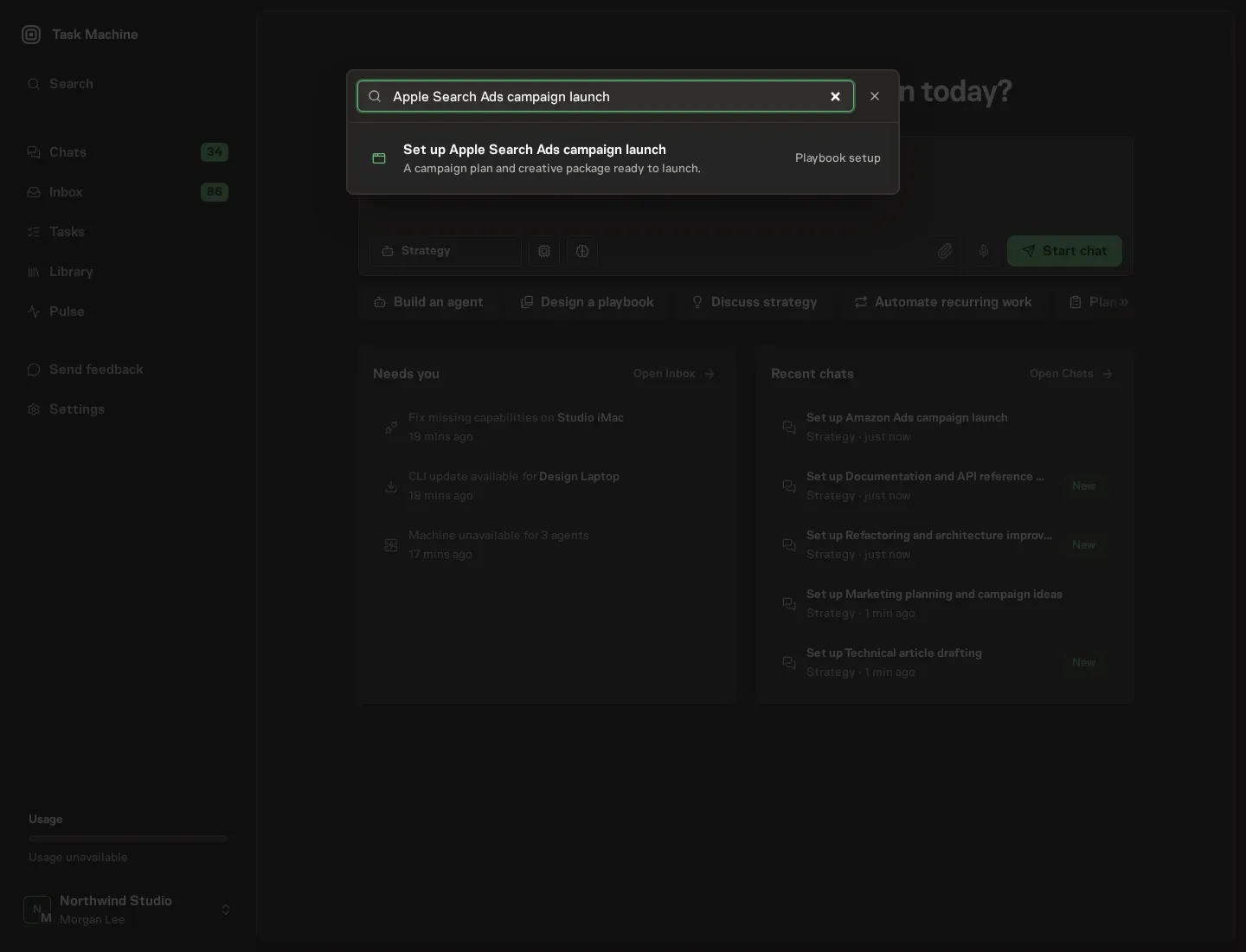
Open Search in your workspace and enter "Apple Search Ads campaign launch". The command center lists Set up Apple Search Ads campaign launch under Playbook setup.
2. Start the conversation
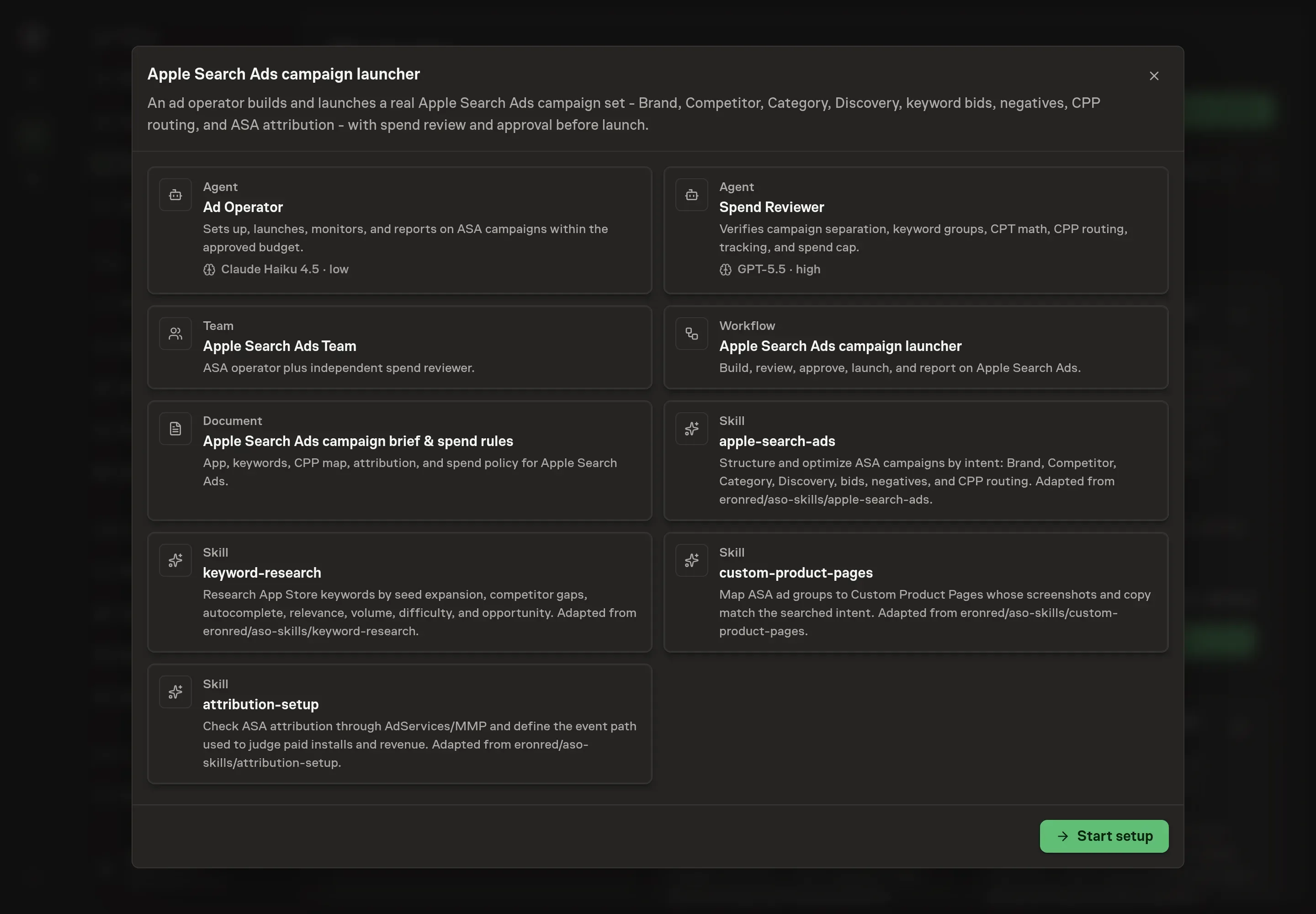
Choose Set up Apple Search Ads campaign launch. Task Machine opens a dedicated Chat with the Playbook card and an editable, unsent request. Read the intended job and outcome. Add your situation and send it when ready. Opening the draft does not install anything or start work. This walkthrough uses settings that require approval of the proposed Playbook.
3. Agree the working brief
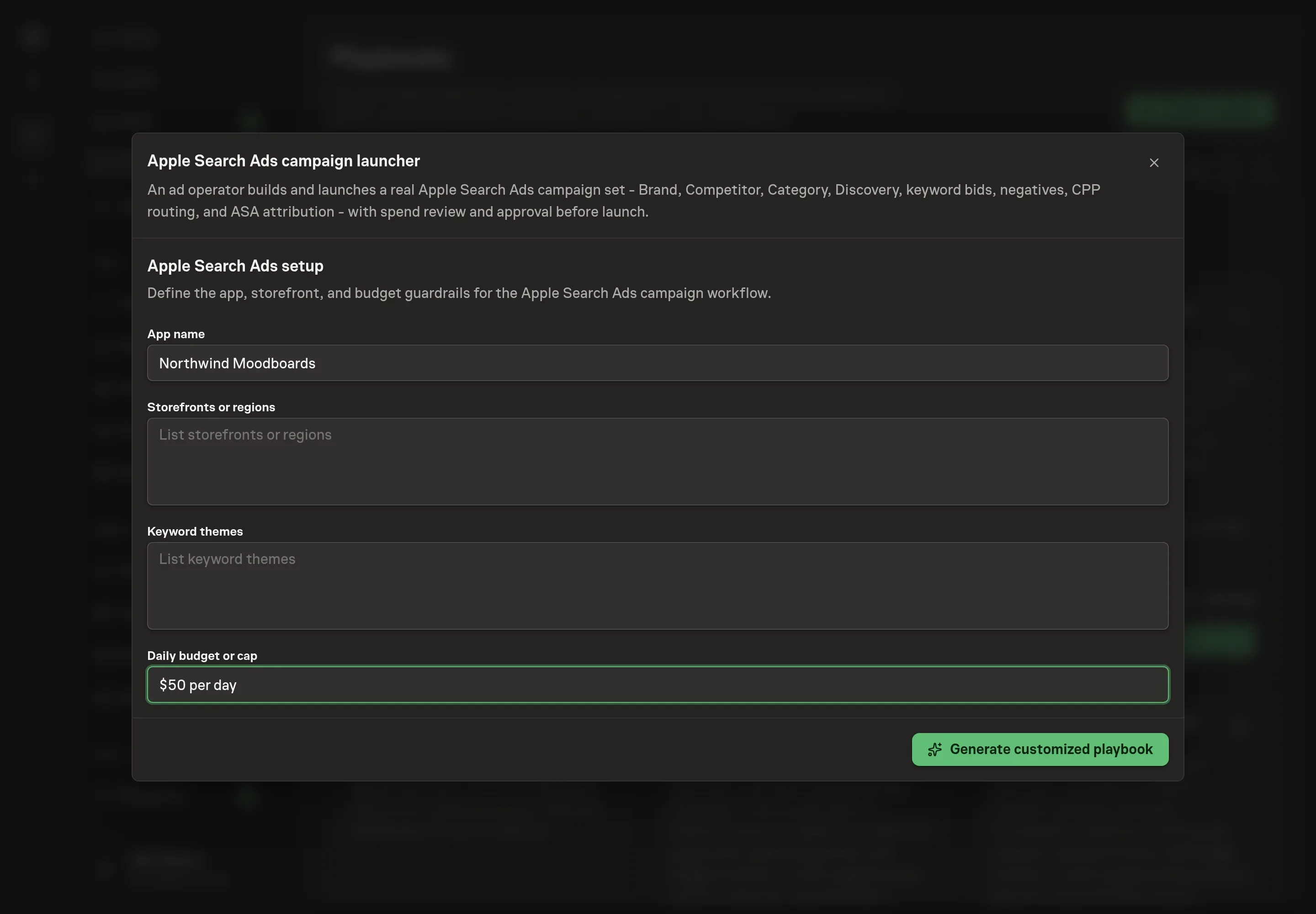
Use Chat to agree the inputs, expected output and limits before asking for a proposal. The Agent needs four answers that shape the whole build. App name names the app the campaigns promote and anchors the brand campaign. Storefronts or regions sets which App Store storefronts the campaigns target. Keyword themes seeds the keyword research the agent expands from. Daily budget or cap becomes the spend guardrail the reviewer checks worst-case spend against.
4. Review the proposed Playbook
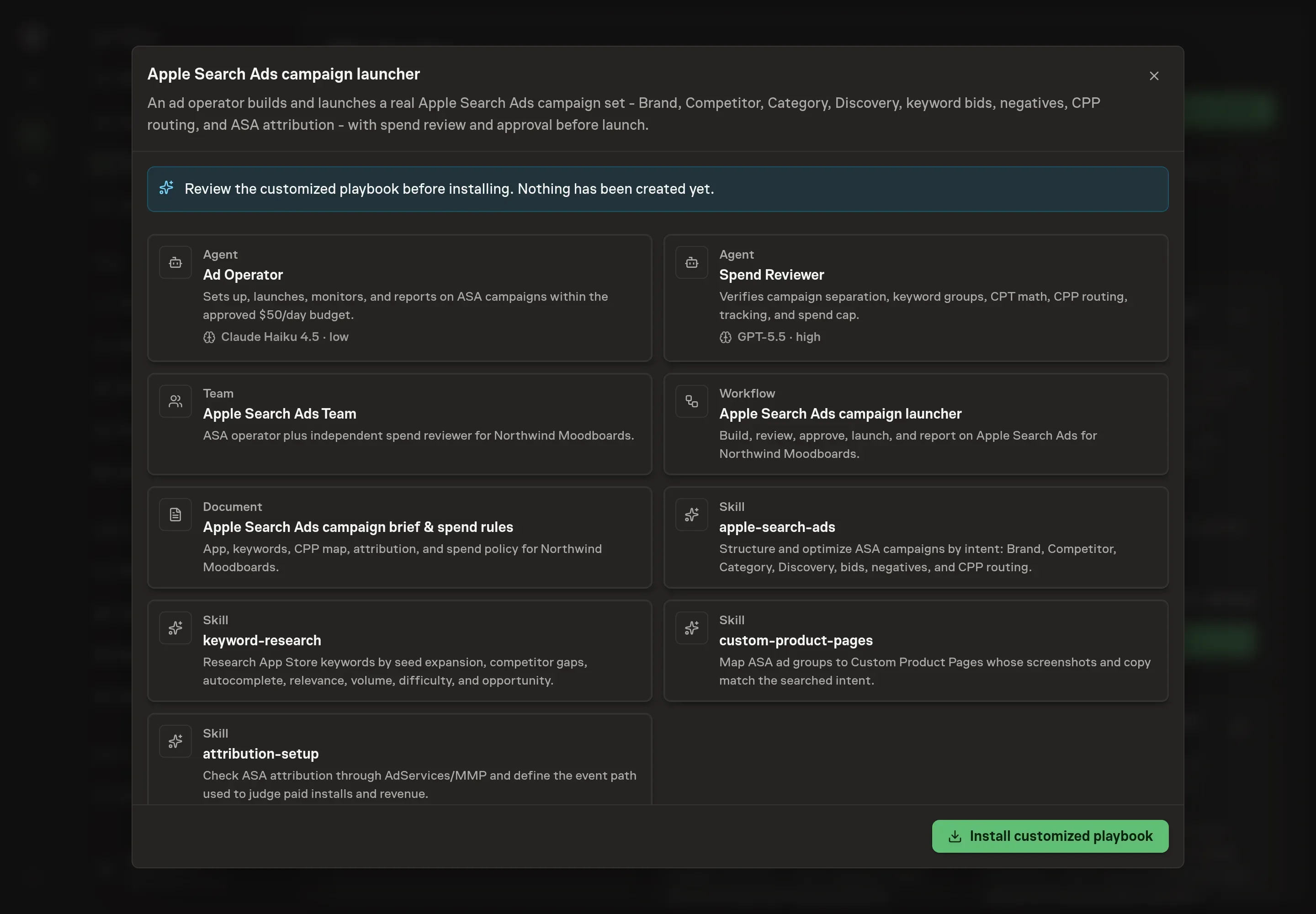
Ask the Agent to generate the Playbook from the agreed brief. Open its proposal in Chat and check the instructions and resources it will install, which carry more detail than the conversational summary. Read through the agent and workflow cards and confirm the app, storefronts, themes, and budget cap match what you agreed. Ask for a revised proposal if anything is missing or changes the job.
5. Approve and prepare the first work
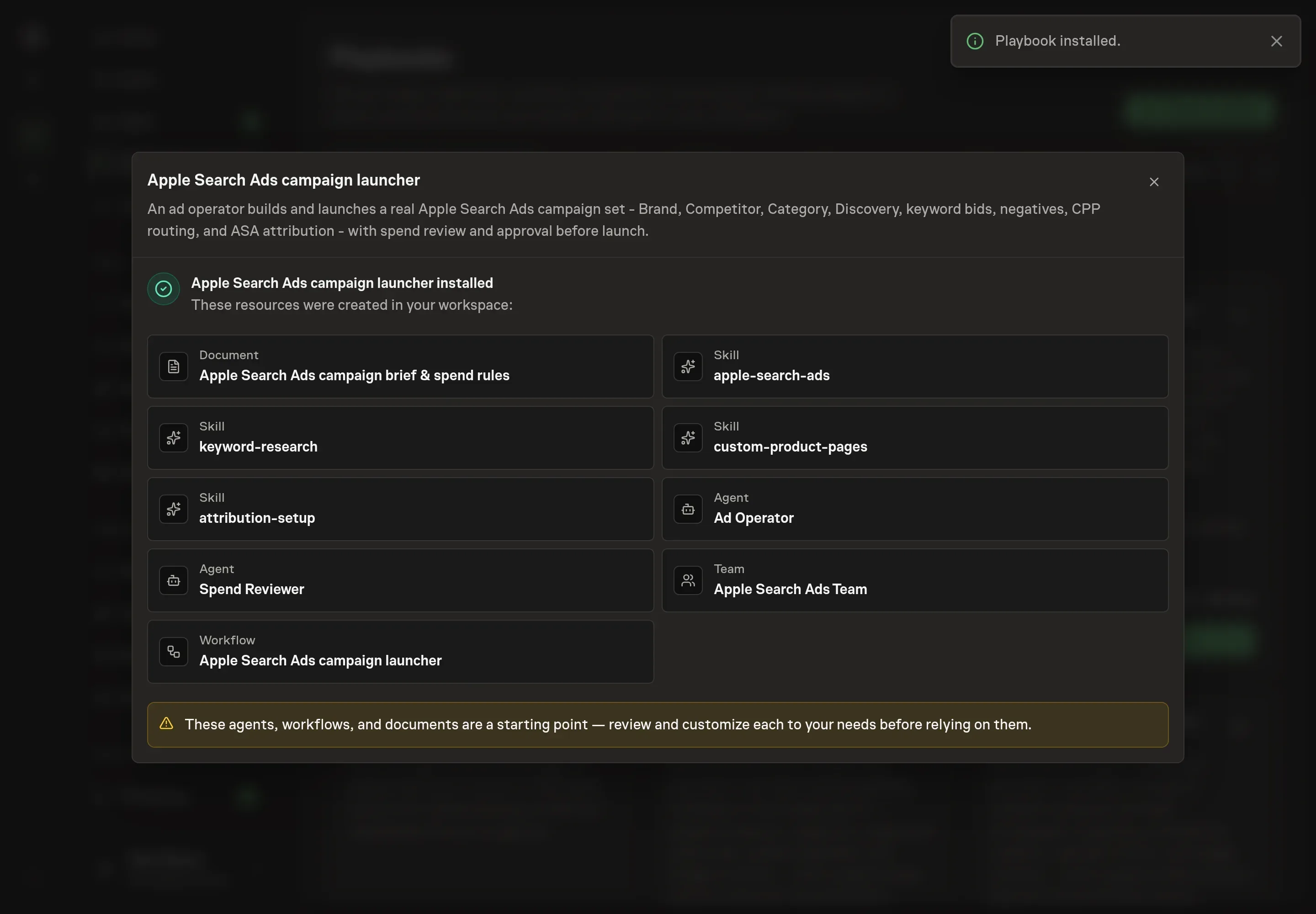
Choose Approve on the proposal in Chat when the configuration matches your brief. Task Machine installs that reviewed configuration. The approved item retains its review details. If your autonomy settings allow direct installation, this approval may not be required. Check the resulting configuration in that case too.
Complete any remaining secure service setup from the installation details in Chat. Inbox keeps those setup items available if you return later. Prepare the source documents and inputs before starting the first Task or Workflow. Installation does not authorize sending, publishing or changing an external service beyond the boundaries you agreed.
What good looks like
Three signals tell you whether the campaign set is working:
- Cost per tap tracks the stated assumption. Every bid was derived from target cost per install times expected conversion rate, so the reported cost per tap and cost per install should sit near the numbers written into the brief. A widening gap means the conversion assumption needs revisiting, not a bigger budget.
- Brand stands apart from everything else. Brand campaigns usually show high conversion rates and efficient install costs. If the separated reporting does not show that contrast, something is misfiled.
- Discovery keeps graduating. Converting discovery terms should move to exact match week after week, and the negatives list should keep growing. A static discovery campaign is one nobody is mining.
Scaling waits for stable conversion evidence, and each scale-up is its own approval.
Common questions
Can the agent spend money without approval? No. Launch sits behind an explicit approval step, and bid changes, budget changes, and scale-ups after launch each need their own separate approval. Every request states the cost-per-tap assumptions, the worst-case spend, and the headroom left under the named cap.
Should you bid on competitor names? Yes, in their own campaign: exact match, lower bids, and a close watch on conversion rate. Product pages routed to those terms should frame a comparison or a differentiator without trademark misuse, and terms that stop converting come out.
What if keyword volume data is not available? The research method labels unavailable volume and rank data as unknown instead of inventing it. Relevance and conversion likelihood outrank raw volume when prioritizing terms anyway.
Do you need a mobile measurement partner? Apple Search Ads has strong native attribution, but it still needs reconciliation. The pre-launch check covers the AdServices framework or measurement-partner integration, the events that count as success, naming consistency, and the gap between Apple-reported installs and your product analytics. Launch is blocked until the agreed success event can be measured.
When is it safe to scale a campaign? After stable conversion evidence, and not before. The weekly report surfaces tap-through rate, conversion rate, cost per tap, and return on ad spend, and a scale-up only happens through a separate approval with the worst-case spend stated.