How to Optimize Content for AI Search
A practical guide to getting your pages cited by AI answer engines: entity recognition, extractable answer blocks, sourced claims, and approvals.

Founder, Task Machine
Generative engine optimization (GEO) is the practice of reworking web content so AI answer engines cite it as a source. Where traditional SEO earns a page a ranking on a results page, GEO earns it a citation inside the answer itself, across Google AI Overviews, ChatGPT, Perplexity, Gemini, Claude, and Copilot. The work has three parts: making the content extractable, making its claims citable, and making the brand behind it recognizable as a distinct entity.
The reason to do it is that more of the questions your customers ask now end in a generated answer instead of a list of links. When an engine writes that answer, the cited sources get the attention and the trust, and everyone else gets summarized away. A well-structured page can be cited even when it ranks on page 2 or 3, which makes this one of the few content jobs where a small team can compete with much larger ones.
Missing AI citations never show up in analytics
The loss is silent. Your analytics show the visits you got, never the answers you were left out of, so a page can keep its ranking while a competitor collects the citations for the exact questions it was written to answer.
Two mechanics drive who gets cited. First, engines resolve a query to an entity before they answer, so a brand the engine cannot identify cannot be cited, no matter how good the page is. Second, the writing itself moves the needle in measurable ways: Princeton's GEO research found that citing sources lifts visibility in generated answers by around 40%, adding statistics by around 37%, and adding quotations by around 30%, while keyword stuffing costs about 10%. Presence matters too. Brands are cited far more through third parties (Wikipedia alone accounts for roughly 7.8% of ChatGPT citations, alongside Reddit, review sites, and industry roundups) than through their own domain.
Nobody owns this job by default. It sits between content, SEO, and brand, and in most small teams it belongs to whoever last read an article about it.
What the manual process looks like
Done by hand, GEO work on one page or cluster is a five-step ritual:
- Run your target questions through ChatGPT, Perplexity, and Google, and record which pages get cited, yours or a competitor's.
- Test whether the engines recognize your brand at all. Ask "What is X?" and "X vs competitor?" and note whether the description is accurate and free of mix-ups.
- Audit the page against those queries. Check whether each one has a clear, self-contained answer, whether the claims carry dated sources, and whether the headings match how people ask.
- Rework the page and the entity signals around it: answer-first passages, sourced statistics, structured data, consistent naming, About and author pages, third-party profiles.
- Wait a few weeks, re-run the queries, and log whether the citations moved.
Every step is doable and none of it is hard. The problem is volume and consistency: the queries fan out (Google generates 5 to 10 related queries under the hood for a single question), each engine behaves differently, and the re-check a month later is exactly the step that gets skipped.
What an agent can automate
Most of that loop is mechanical assessment and rewriting against a fixed method, which an agent can carry:
- Run the visibility check. The agent uses web search to see how the page surfaces today: it runs the target queries and the recognition tests across engines, records where you and your competitors are cited, and flags any robots.txt rule blocking AI crawlers. Where it cannot query an engine directly, it asks you to run a few test queries and report what you see.
- Audit the entity. Using an entity-resolution method, it scores six signal categories (structured data, knowledge-base presence, naming consistency, content signals, third-party mentions, and AI-specific signals) as pass, partial, or fail, with a specific fix per gap. If the entity is weak, those fixes lead the plan, because an unrecognized entity cannot be cited.
- Rework the page for extraction. It drafts a standalone 40-to-60-word answer block for each target query and its fan-out variants, adds sourced and dated statistics and quotes, rewrites headings in query form, adds tables and FAQ blocks that match the visible content, and lists third-party presence actions.
- Keep the numbers honest. Every metric in its output is labeled measured, user-provided, or estimated, and each run ends with a before-and-after read plus a coverage list of which target queries now have a standalone answer.
Two things stay with you: deciding which claims and changes ship, and any robots.txt change, which the agent flags but never makes.
The guardrails that make it safe
Content changes shape how engines describe your company for months, which is why the output of this process is a plan, never a silent edit. The safe shape is a workflow that ends in an explicit approval step: the agent assesses, plans the entity fixes, reworks the answers, and then the whole optimization plan waits in your inbox. Nothing ships until you approve it.
Before handoff the agent also runs a self-check against its own method: every target query has a self-contained quotable answer, every claim is sourced and dated, no separate AI-only variant was written, and anything speculative gets dropped rather than dressed up. The metric labels close the loop, so when the plan says a competitor is cited for a query, you know whether that was measured or estimated.
Set it up in Task Machine
The AI Search Optimization playbook provides a starting point for the method above. You need an active Task Machine workspace with Chat, workspace-management and Playbook-installation access (workspace owners have it). The agent works through web search and only reads public pages, and for engines it cannot query directly, it asks you to run the test queries and report the results.
1. Find the playbook
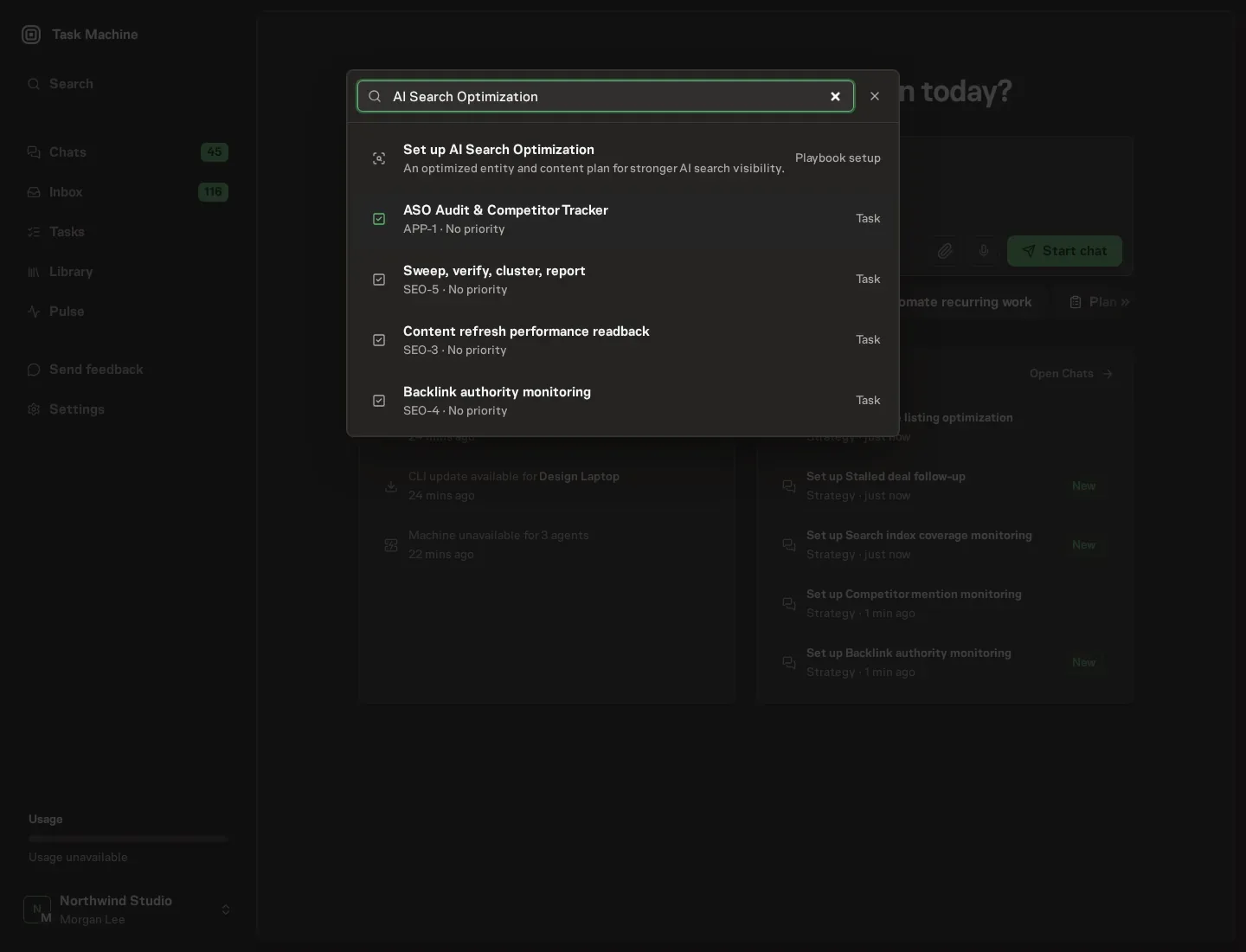
Open Search in your workspace and enter "AI Search Optimization". The command center lists Set up AI Search Optimization under Playbook setup.
2. Start the conversation
Choose Set up AI Search Optimization. Task Machine opens a dedicated Chat with the Playbook card and an editable, unsent request. Read the intended job and outcome. Add your situation and send it when ready. Opening the draft does not install anything or start work. This walkthrough uses settings that require approval of the proposed Playbook.
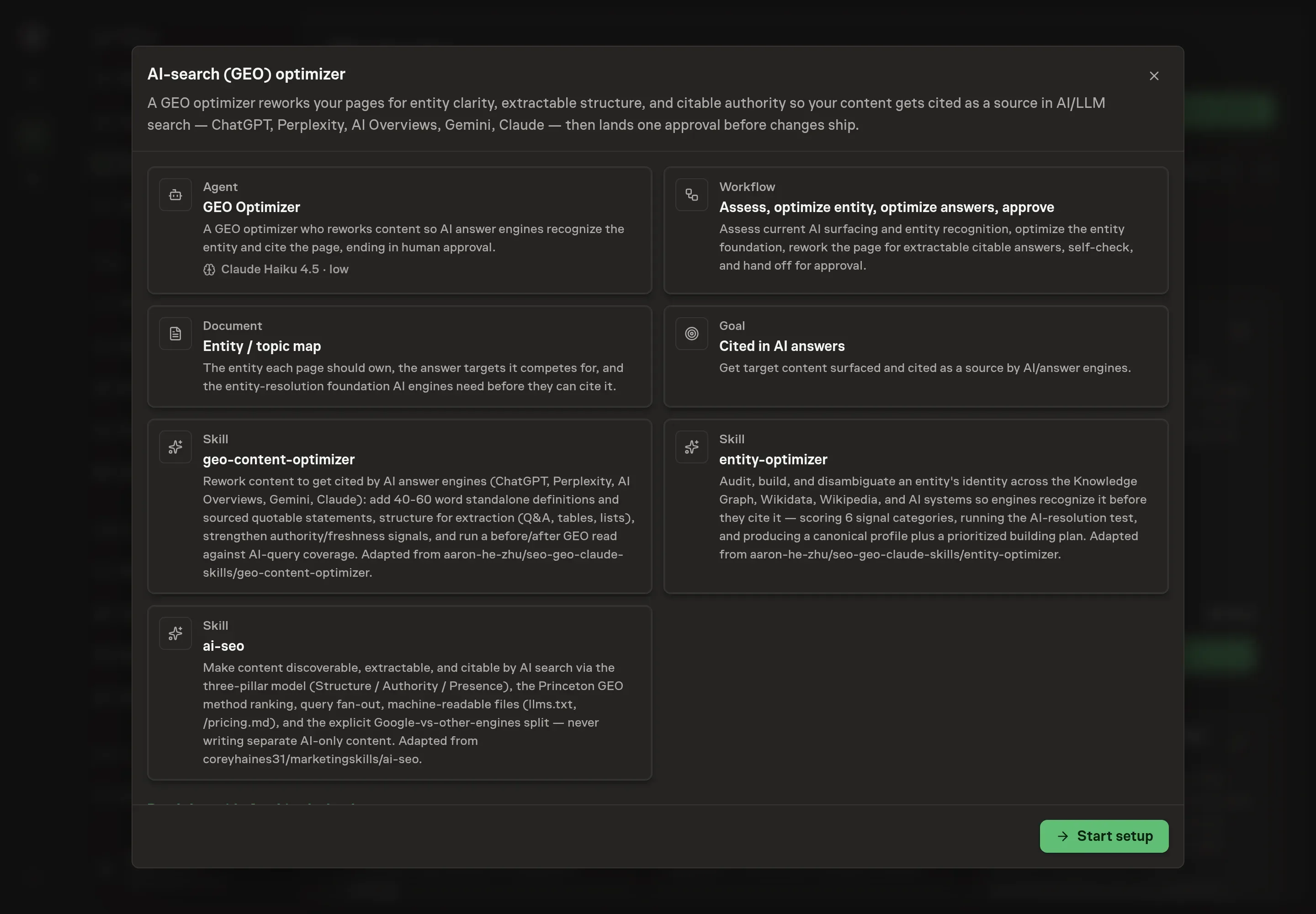
3. Agree the working brief
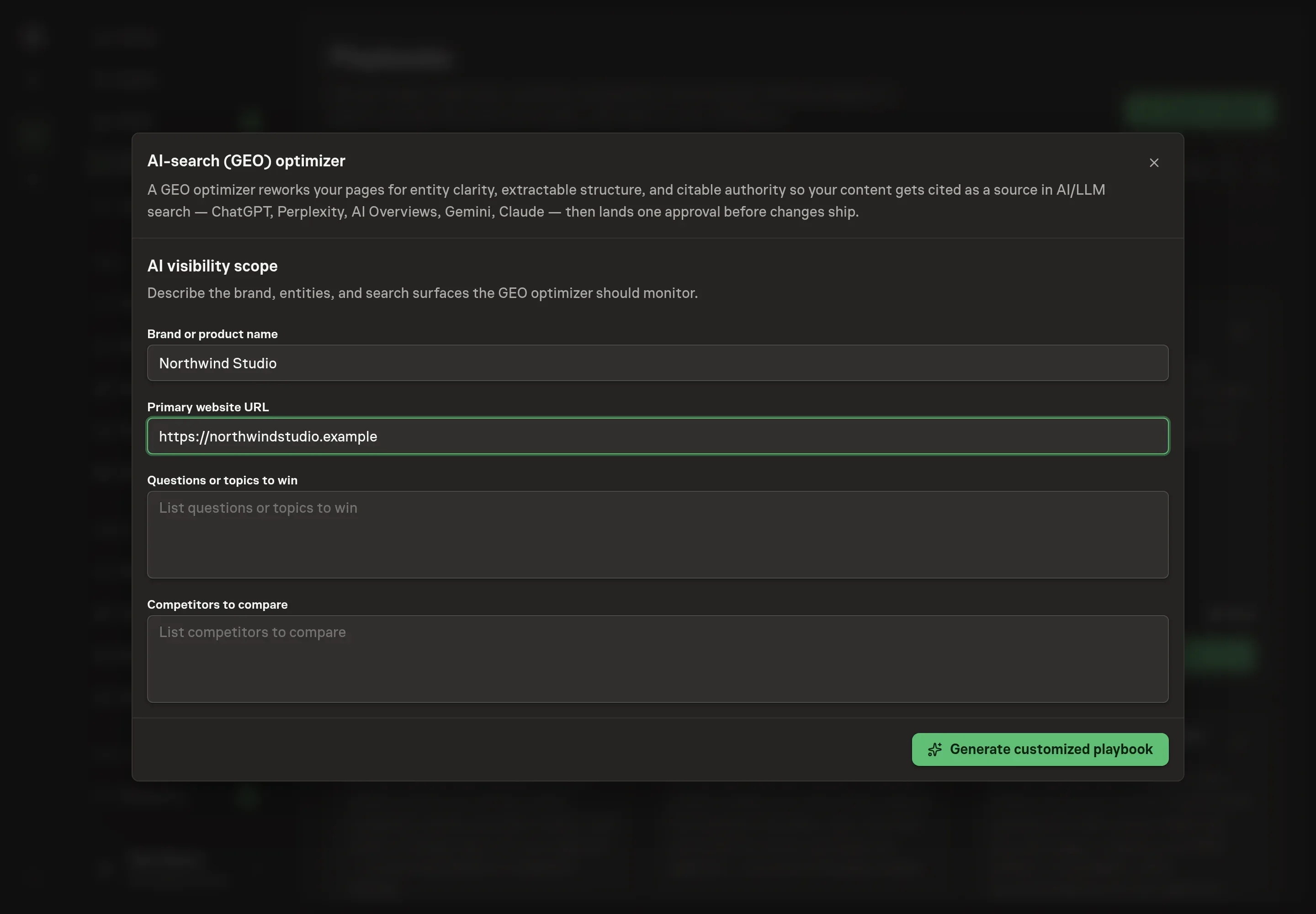
Use Chat to agree the inputs, expected output and limits before asking for a proposal. The Agent needs the scope the optimizer should work in. Brand or product name and Primary website URL anchor the entity the agent checks recognition for. Questions or topics to win takes the queries you want answered with a citation to your pages, and Competitors to compare names who the agent checks citations against in every assessment.
4. Review the proposed Playbook
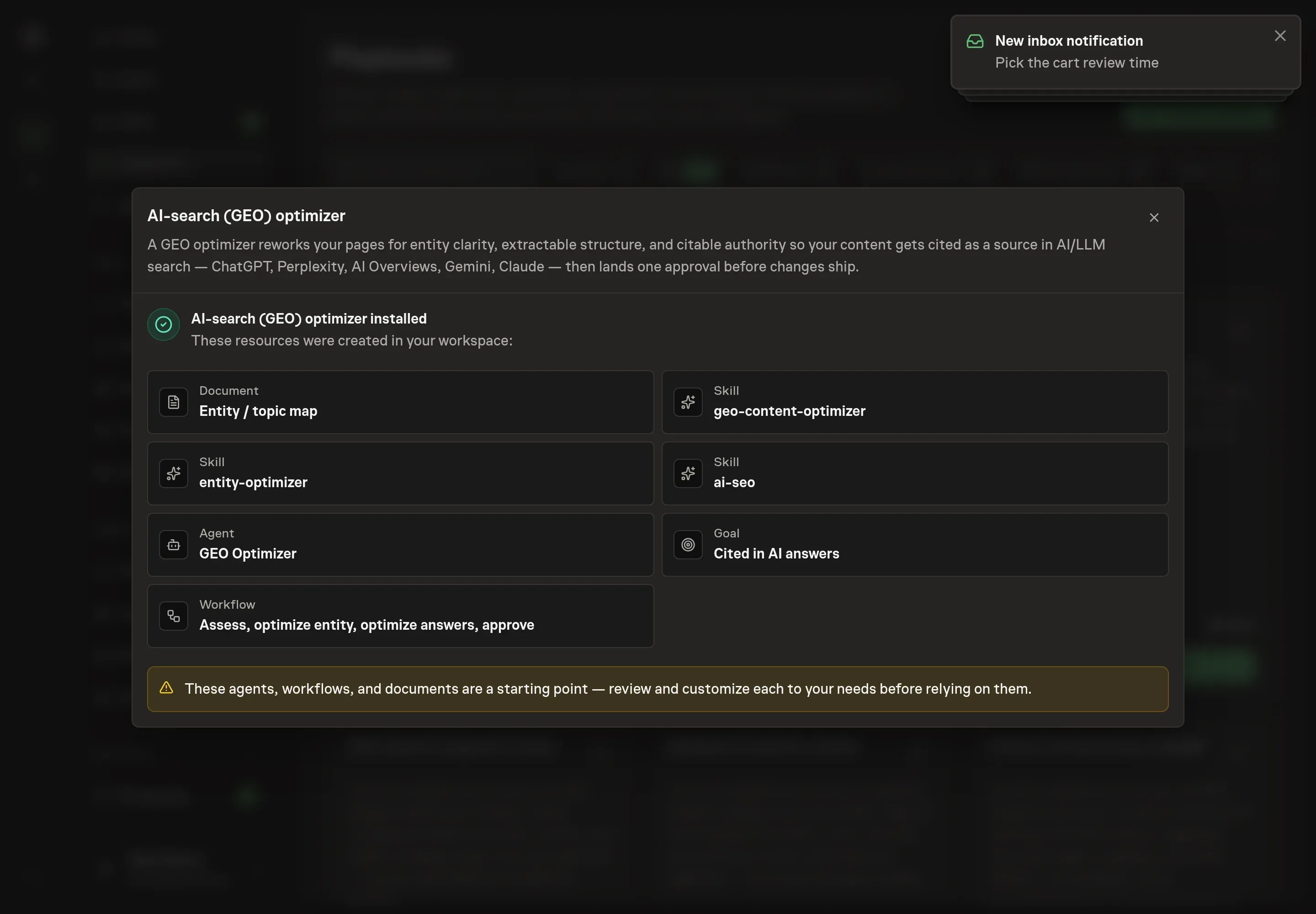
Ask the Agent to generate the Playbook from the agreed brief. Open its proposal in Chat and check the instructions and resources it will install, which carry more detail than the conversational summary. Read the agent and workflow cards, and confirm the questions and competitors you listed appear where the assessment steps reference them. Ask for a revised proposal if anything is missing or changes the job.
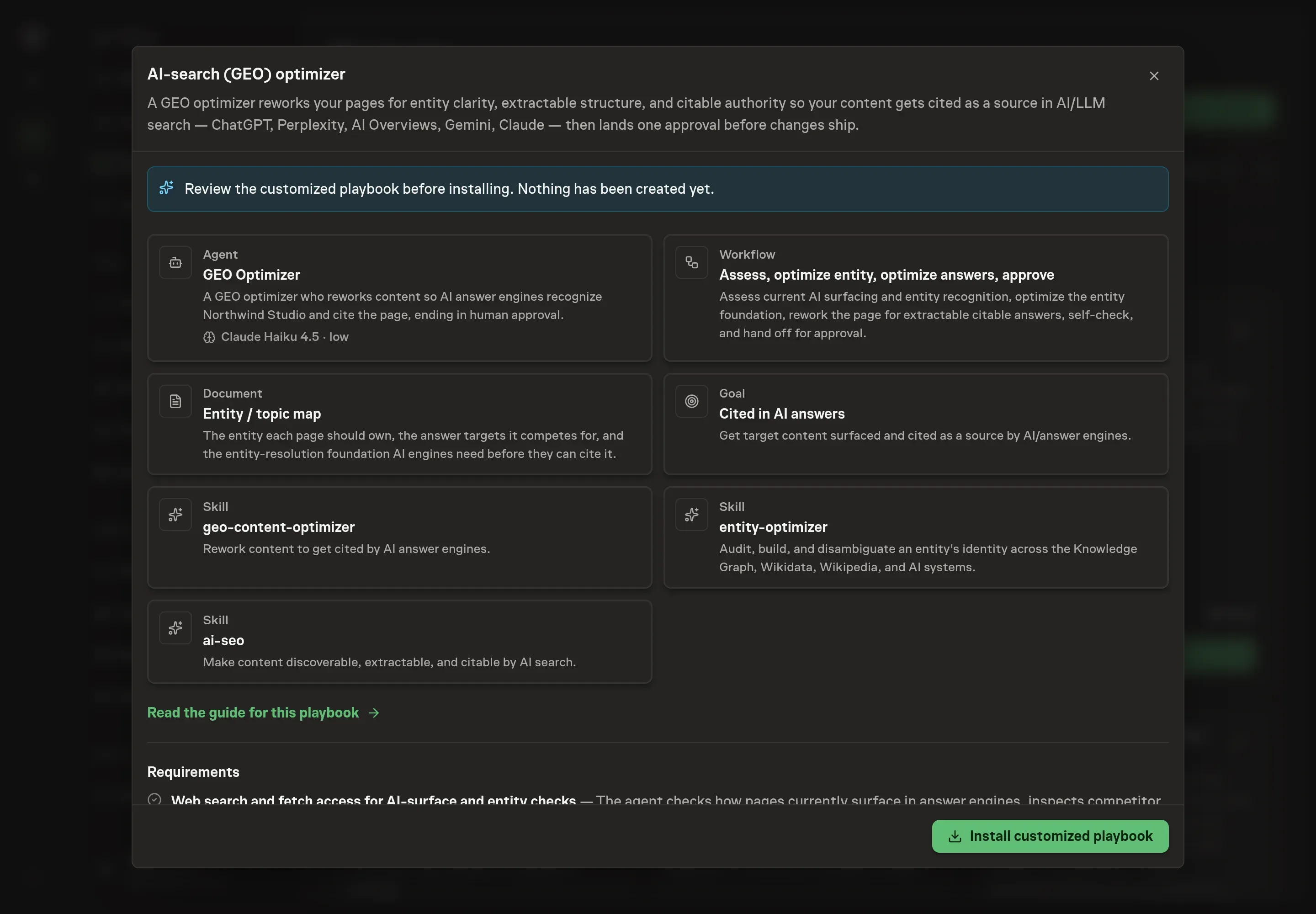
5. Approve and prepare the first work
Choose Approve on the proposal in Chat when the configuration matches your brief. Task Machine installs that reviewed configuration. The approved item retains its review details. If your autonomy settings allow direct installation, this approval may not be required. Check the resulting configuration in that case too.
Complete any remaining secure service setup from the installation details in Chat. Inbox keeps those setup items available if you return later. Prepare the source documents and inputs before starting the first Task or Workflow. Installation does not authorize sending, publishing or changing an external service beyond the boundaries you agreed.
What good looks like
Three signals tell you whether the process works:
- AI-query coverage. Every target query, and its fan-out variants, has a standalone 40-to-60-word answer on the page. The agent reports this coverage before and after each run, so gaps are visible per query rather than as a vague sense of "optimized".
- Entity recognition. Each engine answers "What is X?" about your brand accurately and without confusing it with something else. Until that holds, citation work is premature, and the plan should lead with entity fixes.
- Citation share. Across a monthly check of your top 20 queries in ChatGPT, Perplexity, and Google, your pages are cited, and the share holds or grows against the competitors you named. Entity signals compound over weeks, so the monthly log is the honest measure, not day-to-day watching.
Common questions
Does optimizing for AI search hurt normal Google rankings? Not when done the right way. Google's own guidance is to write for people and organize for clarity, with no special markup or files for AI Overviews. The structural habits that help other engines (answer-first passages, query-phrased headings, tables) do not hurt Google. What does hurt is writing a separate AI-only version of a page, which Google treats as scaled-content abuse, so the method never does that.
What if AI engines do not recognize the brand at all? Then entity work comes first. Engines resolve a query to an entity before they answer, so an unrecognized brand cannot be cited regardless of page quality. The fixes are unglamorous and effective: a Wikidata entry, consistent name and description everywhere, Organization schema with sameAs links, real About and author pages. These signals compound over weeks rather than days.
Should you block AI crawlers in robots.txt? Only if you accept the trade. An engine can only cite a page its crawler can read, so a Disallow on GPTBot, PerplexityBot, or ClaudeBot removes you from those answers. Blocking training-only crawlers like CCBot is a separate and legitimate choice that does not affect citation. The agent flags these rules but the change is always yours to make.
How do you measure whether any of this is working? Run your top 20 target queries through ChatGPT, Perplexity, and Google once a month, and log whether you and your competitors are cited and which page the citation points to. That log, kept alongside the entity map, turns AI search visibility into a trend you can read instead of an impression.