How to Organize Tax Prep for Your Accountant
A practical guide to preparing quarterly estimates, 1099 lists, missing W-9 actions, and CPA-ready tax packets.

Founder, Task Machine
Tax prep organization is the recurring work of keeping the source documents, payment records, estimates, assumptions, and open questions ready for the person who prepares the return. Filing, tax advice, and treatment decisions stay with that person. This work is the handoff discipline that keeps the accountant from discovering missing W-9s, unreconciled processor payments, or unclear prior-year assumptions at the deadline.
The work is worth doing before filing season because most tax stress is not caused by one hard calculation. It comes from scattered records, unclear assumptions, and late follow-up. A business that keeps a CPA-ready packet current can spend review time on judgment instead of reconstruction.
Disorganized prep turns your accountant into a project manager
Tax prep gets expensive when the accountant has to become the project manager. Missing W-9s need outreach before January 31. Contractor payments need aggregation across the ledger and payment processors. Estimated tax needs a YTD Profit & Loss, payments already made, prior-year safe-harbor context, and stated assumptions.
When nobody owns the routine, the same questions repeat every quarter: which profit number is current, which contractors crossed the threshold, which payments were already made, and which documents still need a human to chase. Beyond the accountant's time, a rushed packet risks hiding a bad assumption until the review window is gone.
What the manual process looks like
Done by hand, tax prep organization is a quarterly and year-end ritual:
- Pull the YTD Profit & Loss, contractor payment detail, processor records, prior-year return, and estimated payments already made.
- Decide whether the run is quarterly estimate prep, year-end 1099 prep, or both.
- For quarterly estimates, calculate self-employment tax, adjusted net, federal estimate, total liability, remaining quarterly payment, and safe-harbor status with every assumption visible.
- For 1099 prep, aggregate service payments by payee across the ledger, Stripe, and PayPal, apply the $600 threshold, flag $400 to $599 near-threshold payees, and check W-9 status.
- Build one gap list with owners and deadlines, then assemble a packet for accountant review.
The work is repeatable, but it is easy to defer because every source lives somewhere else. The safest manual habit is to treat the packet as prep material for a CPA, never as tax advice, and make assumptions visible instead of burying them in a spreadsheet.
What an agent can automate
The agent takes over the collection and assembly work while leaving tax judgment and filing outside the workflow:
- Determine the mode. The agent infers quarterly, year-end 1099, or combined prep from the date, then confirms with the owner when the mode is ambiguous.
- Prepare the estimate. It pulls or accepts the YTD Profit & Loss, asks for estimated payments already made, calculates the self-employment tax and federal estimate, and states the bracket, business type, excluded state taxes, and deductions not applied.
- Build the 1099 list. It aggregates service payments by payee, flags likely duplicates for review instead of merging them, applies the threshold logic, checks W-9 status, and calls out processor overlap for the accountant.
- Maintain the checklist. It reads the year-round tax document checklist, marks collected, missing, and unknown items, then turns the gaps into an owned action list.
- Assemble the packet. It formats the estimate, candidate table, missing-W-9 list, processor-overlap note, and accountant next steps into one reviewable handoff.
The agent does not file anything, auto-merge payees, auto-exclude corporations, or decide tax treatment. Those are accountant and owner decisions.
The guardrails that make it safe
The first guardrail is language. Every deliverable opens as material prepared for review by an accountant, not tax advice. That framing matters because the agent is organizing records and assumptions, not replacing professional judgment.
The second guardrail is the approval step. The workflow prepares materials, checks the checklist gaps, self-reviews the packet against the bundle's hard rules, then waits for a human to approve before it goes to the preparer. The review is where the owner checks payment sources, assumptions, duplicate payees, missing W-9 owners, and the deadline plan.
The third guardrail is restraint. The workflow produces a packet and follow-up actions. It does not file forms, submit payments, send documents to the CPA without approval, or change the accounting system on its own.
Set it up in Task Machine
The Tax preparation playbook provides a starting point for the method above. You need an active Task Machine workspace with Chat, workspace-management and Playbook-installation access (workspace owners have it). Accounting access is not required up front. Until you authorize it, the agent works from attached exports and the checklist.
1. Find the playbook
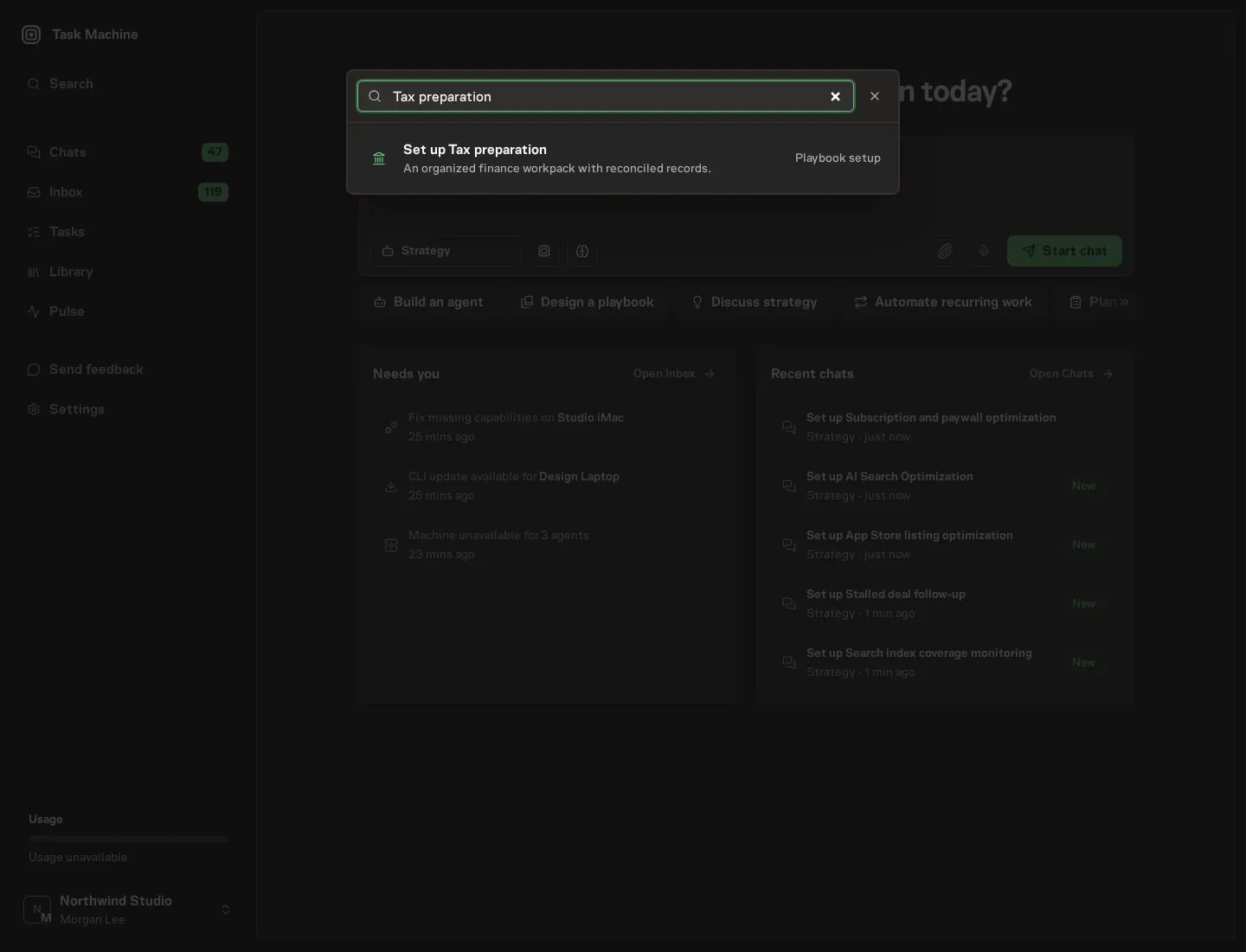
Open Search in your workspace and enter "Tax preparation". The command center lists Set up Tax preparation under Playbook setup.
2. Start the conversation
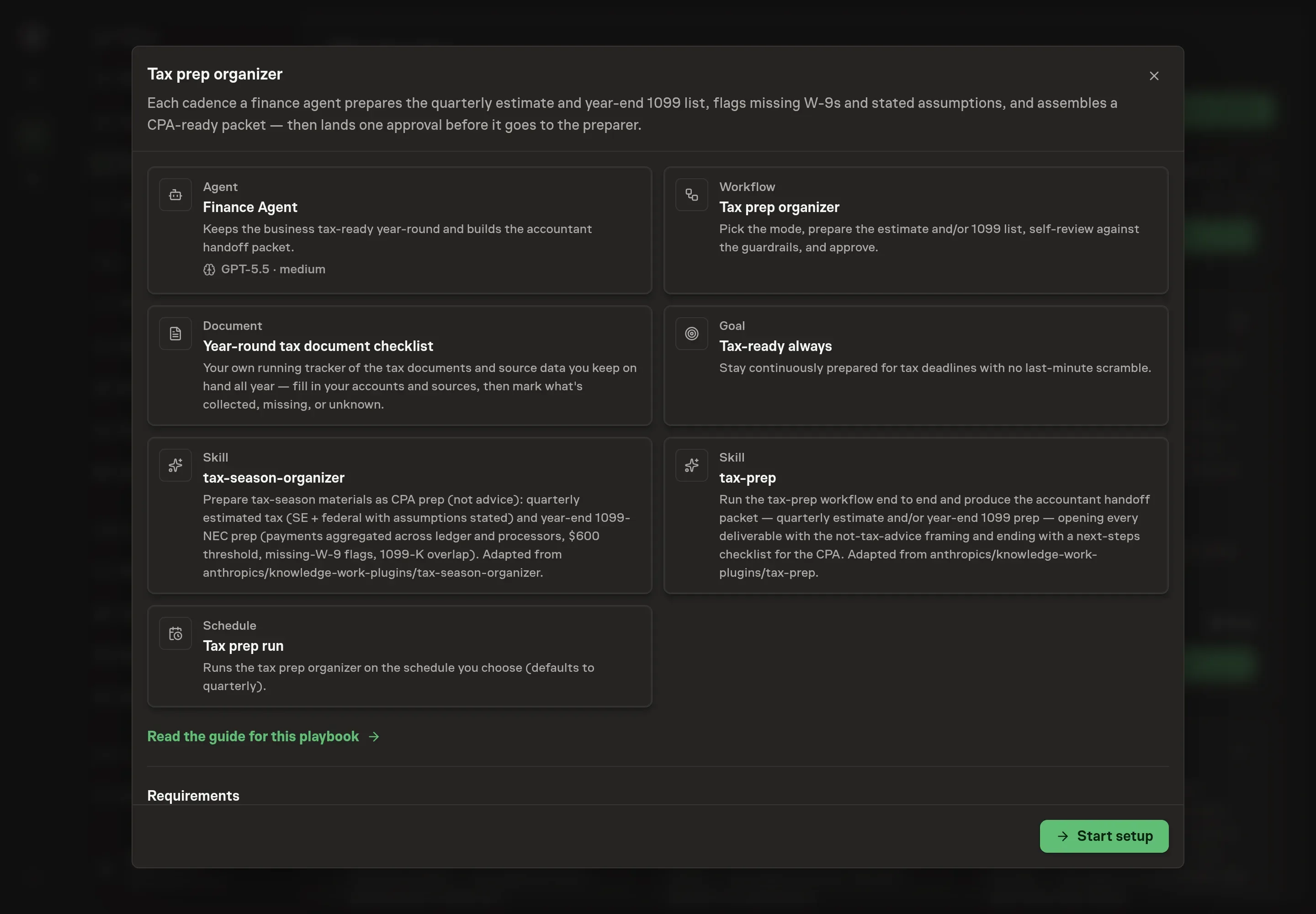
Choose Set up Tax preparation. Task Machine opens a dedicated Chat with the Playbook card and an editable, unsent request. Read the intended job and outcome. Add your situation and send it when ready. Opening the draft does not install anything or start work. This walkthrough uses settings that require approval of the proposed Playbook.
3. Agree the working brief
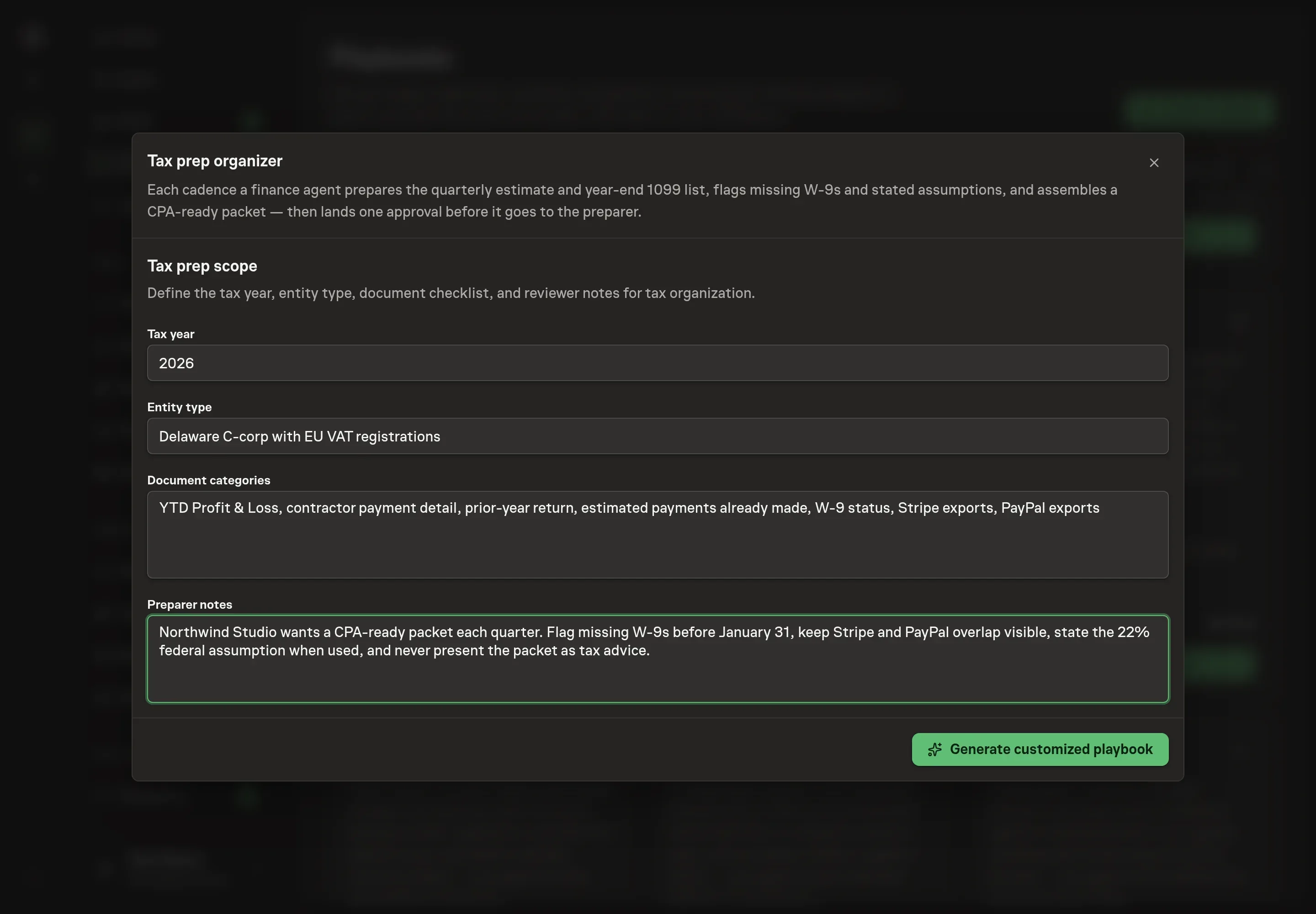
Use Chat to agree the inputs, expected output and limits before asking for a proposal. The Agent needs the tax year, entity type, document categories, and preparer notes. Use the document categories to name the records the accountant expects, such as Profit & Loss, contractor payment detail, prior-year return, estimated payments, W-9s, Stripe, and PayPal exports.
4. Review the proposed Playbook
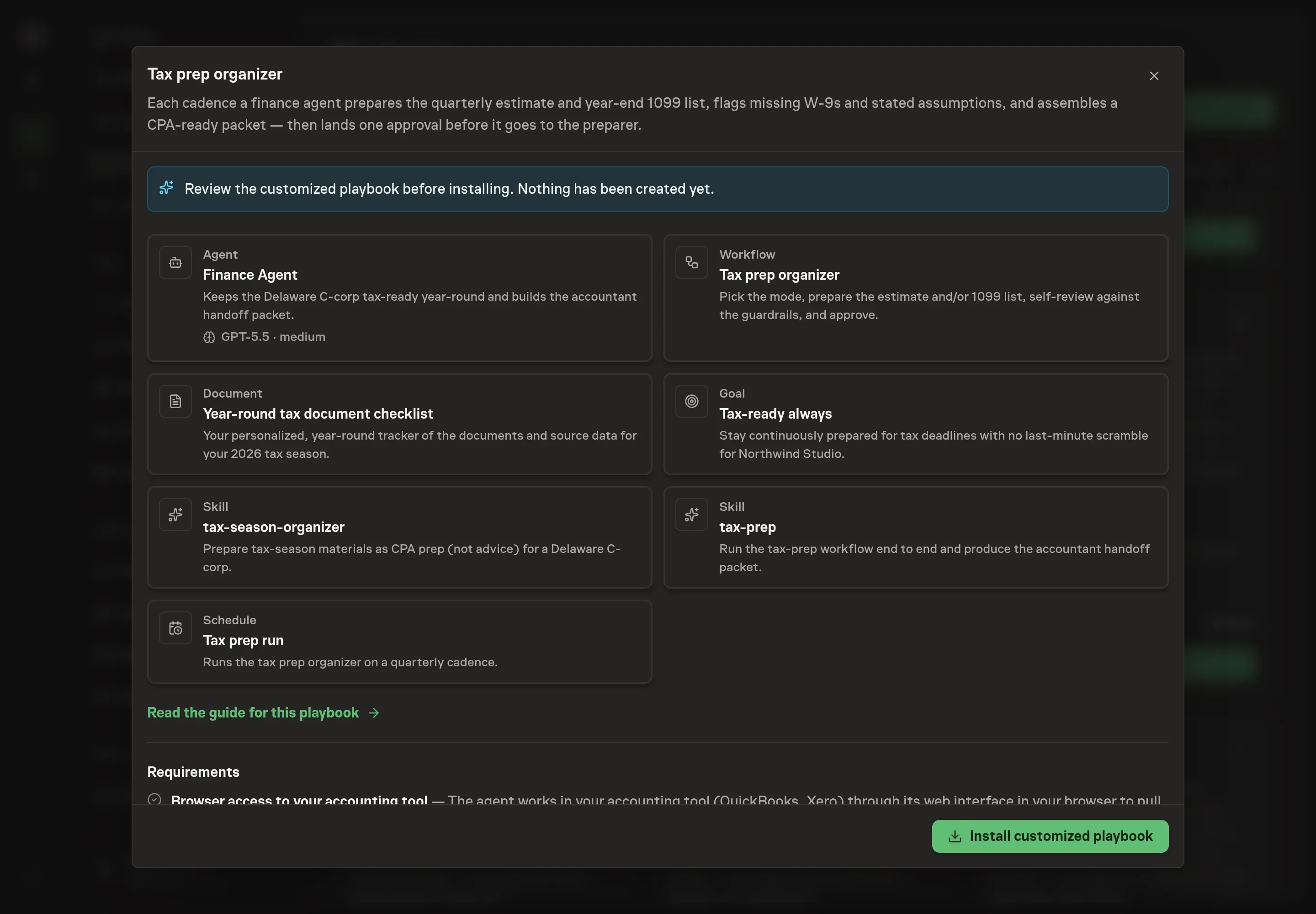
Ask the Agent to generate the Playbook from the agreed brief. Open its proposal in Chat and check the instructions and resources it will install, which carry more detail than the conversational summary. Review the generated packet carefully. The wording should keep every deliverable framed as accountant prep, name the same sources you agreed, and keep filing outside the workflow. Ask for a revised proposal if anything is missing or changes the job.
5. Approve and prepare the first work
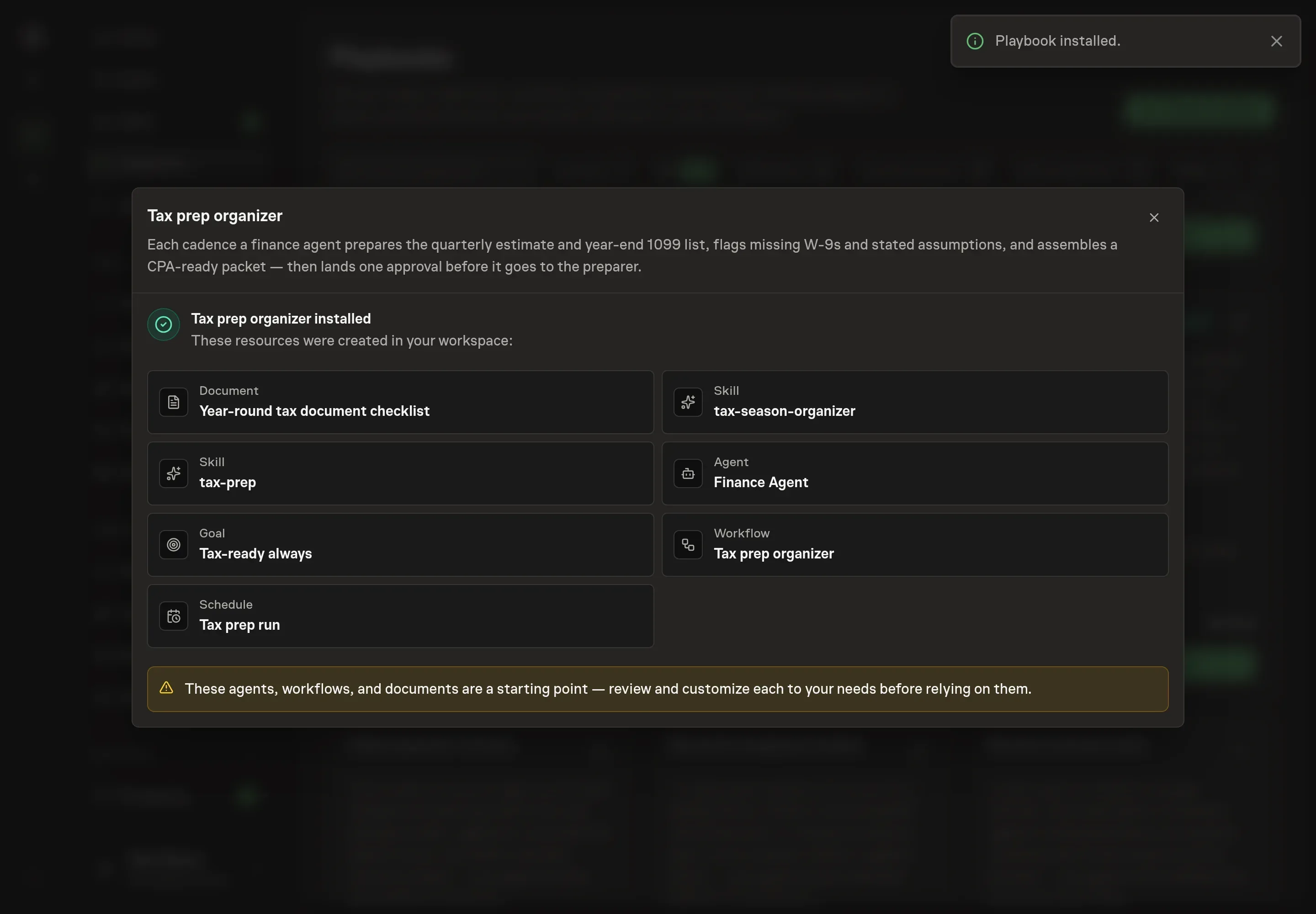
Choose Approve on the proposal in Chat when the configuration matches your brief. Task Machine installs that reviewed configuration. The approved item retains its review details. If your autonomy settings allow direct installation, this approval may not be required. Check the resulting configuration in that case too.
Complete any remaining secure service setup from the installation details in Chat. Inbox keeps those setup items available if you return later. Prepare the source documents and inputs before starting the first Task or Workflow. Installation does not authorize sending, publishing or changing an external service beyond the boundaries you agreed. Confirm each schedule's cadence and timezone, and resolve any pending schedule setup before it starts. A readback must wait for its agreed observation window and source data. Check the reviewed tracker or results document before the first cycle so evidence and human decisions have a durable home.
What good looks like
Three signals tell you the process is working:
- No uncategorized packet gaps. Missing items are on one action list with an owner and a deadline, not hidden in notes.
- Every number has an assumption trail. Bracket, business type, payments made, excluded state taxes, and deductions not applied are visible for the accountant.
- Year-end work starts before the deadline. Missing W-9s and near-threshold payees are surfaced early enough for follow-up before January 31.
Common questions
Can an agent calculate taxes for the business? The playbook prepares estimate material for accountant review. It states assumptions and shows calculations, but it does not give tax advice or file anything.
What happens if the accounting tool is not connected? The agent works from attached exports such as a Profit & Loss, Transaction List by Vendor, payment processor reports, and the checklist. Connecting browser access removes some manual export work.
Does the workflow file 1099s? No. It creates a 1099 candidate list, missing-W-9 action list, near-threshold table, and processor-overlap note for the accountant to review.
Why does it flag duplicates instead of merging payees? Duplicate payees can hide legal-name differences, processor overlap, or two real vendors with similar names. The agent flags likely duplicates and leaves the merge decision to a human.