How to Run a Weekly Content Pipeline
A practical weekly content workflow for validating demand, outlining, drafting, self-editing, and approving one publish-ready piece.

Founder, Task Machine
A weekly content pipeline is a recurring process for taking one topic from demand validation to an approved draft on a reliable schedule. It works as a production rhythm with a quality bar: choose one topic worth writing, research it properly, draft it, edit it, and get a human approval before publishing.
The pipeline matters because content fails when it is treated as a mood. Teams publish when someone has time, pick topics from intuition, and ship drafts that sound finished but do not answer a real reader anxiety. A weekly process turns content into operational work with evidence, ownership, and a review gate.
Why weekly content breaks down
The failure usually starts before the draft. A topic sounds useful internally, but nobody validates whether the audience searches for it, shares it, or asks about it in sales and support conversations. By the time the draft exists, the team is editing words around a weak premise.
The other failure is trying to ship too much. Five half-finished pieces create more scheduling work than audience value. One demand-validated article with a clear buyer stage, a specific reader pain, and a structured edit is usually the better weekly target.
What the manual process looks like
A strong weekly content process has five steps:
- Pick one topic by validating demand from search, forums, competitor blogs, sales calls, support questions, and audience language.
- Map the topic to a pillar and buyer stage so the piece has a role in the broader content system.
- Build an outline that starts at the point of relevance and gives each section one job.
- Draft with specific claims, customer language, and source flags where evidence is still missing.
- Run a structured edit before approval, not a vague "make this better" pass.
The process is simple to describe and hard to repeat. The hard part is keeping the same standard every week.
What an agent can automate
An agent can do the recurring research and draft assembly while keeping human expertise in the loop:
- Validate the topic. The agent checks whether the topic is searchable, shareable, or both, then names the pillar, buyer stage, demand evidence, and professional anxiety the piece should relieve.
- Mine audience language. The agent pulls questions, objections, and phrases from supplied calls, support notes, forums, and competitor posts, then turns them into an outline.
- Draft with evidence boundaries. The agent writes the piece from the outline, leads with the conclusion, uses benefits and specifics, and marks source-needing claims as
[needs source]. - Run the seven-sweep edit. The agent checks clarity, voice and tone, "so what", proof, specificity, heightened emotion, and zero risk before sending the draft to a human.
- Capture owner feedback. Approval records keep, change, avoid, and reason for the voice, argument, proof, format, and audience fit.
- Read back results. A scheduled workflow compares the fixed channel-specific window, business signal, and guardrails, then proposes reuse, keep testing, retire, or unproven.
The agent does not publish. It prepares one draft and one reproducible learning decision for human judgment.
The guardrails that make it safe
Content automation gets dangerous when the agent invents proof or fills uncertainty with confident prose. The guardrail here is evidence discipline. Every source-needing claim is cited or flagged. Unsupported statistics, testimonials, and superlatives are not allowed.
The second guardrail is two separate approvals. A content expert first decides whether the draft and measurement plan may enter the performance log. After publication, a second approval evaluates measured results and owner feedback. Neither approval publishes, edits, removes, or automatically repeats content.
Set it up in Task Machine
The Weekly content planning & writing playbook provides a starting point for the method above. You need an active Task Machine workspace with Chat, workspace-management and Playbook-installation access (workspace owners have it). Web search and fetch access help with live research, but the agent can also work from supplied notes and documents.
1. Find the playbook
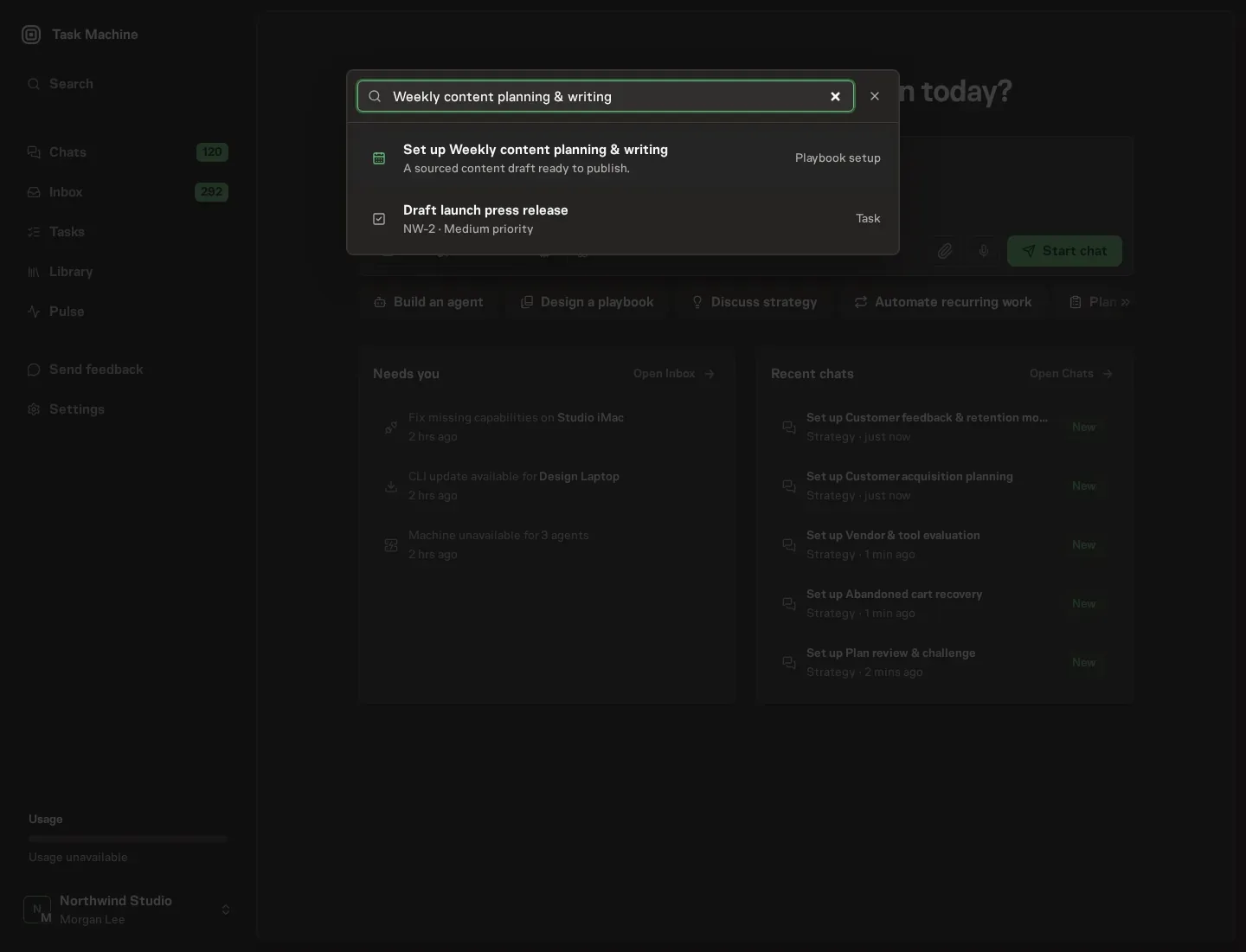
Open Search in your workspace and enter "Weekly content planning & writing". The command center lists Set up Weekly content planning & writing under Playbook setup.
2. Start the conversation
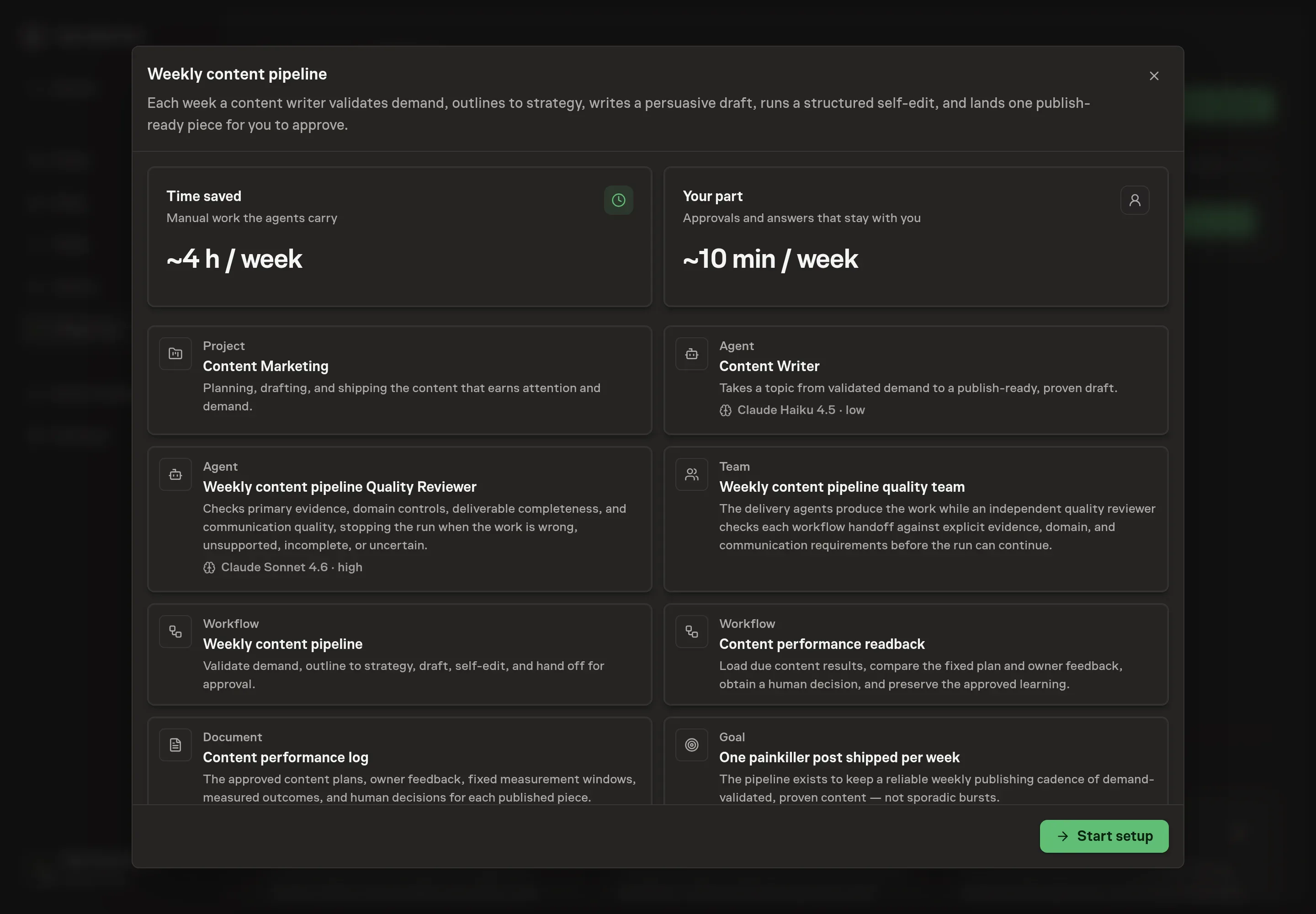
Choose Set up Weekly content planning & writing. Task Machine opens a dedicated Chat with the Playbook card and an editable, unsent request. Read the intended job and outcome. Add your situation and send it when ready. Opening the draft does not install anything or start work. This walkthrough uses settings that require approval of the proposed Playbook.
3. Agree the working brief
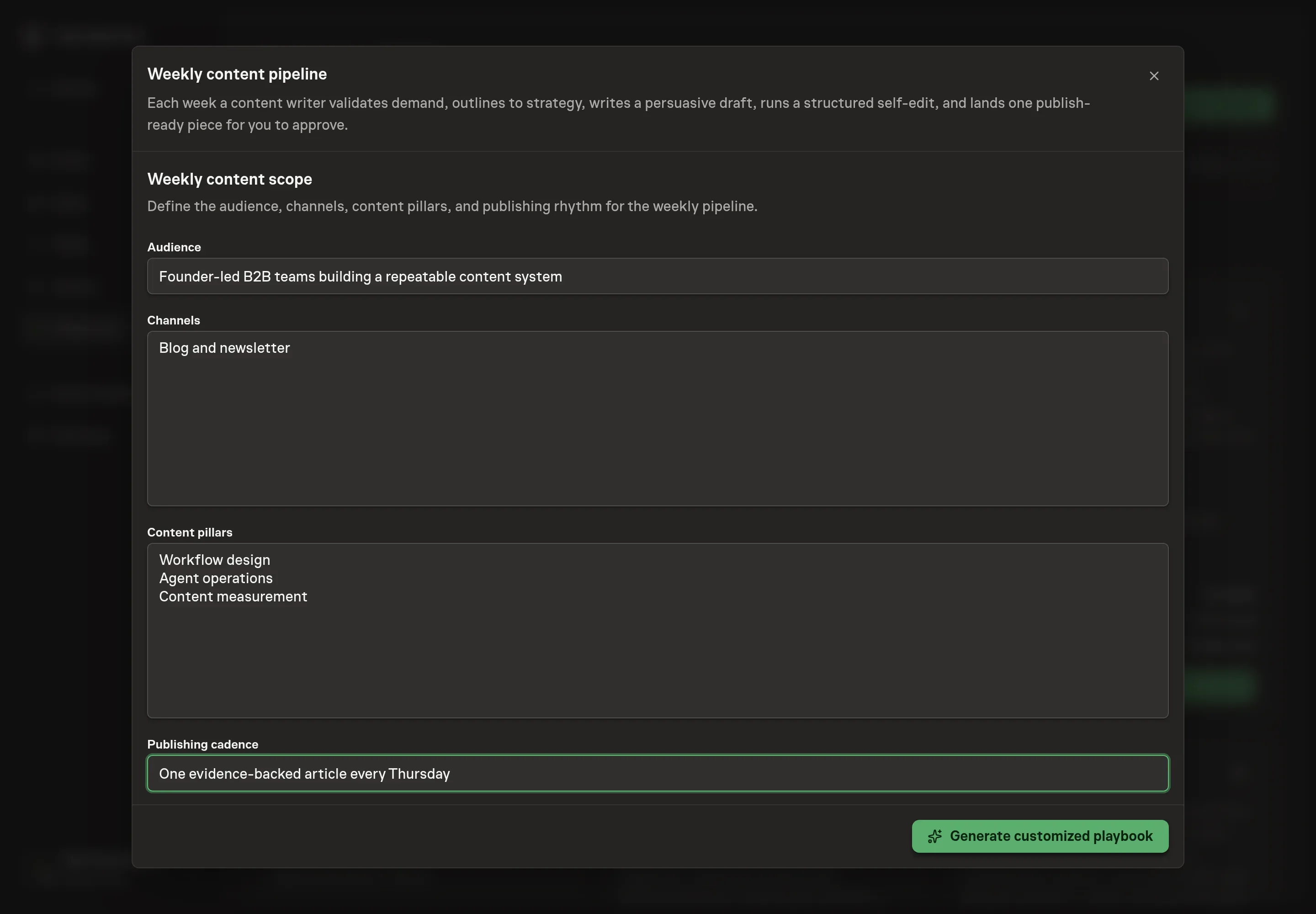
Use Chat to agree the inputs, expected output and limits before asking for a proposal. Discuss the audience, channels, content pillars, and publishing cadence. These answers shape topic selection and keep the agent from drafting generic content for a vague reader.
4. Review the proposed Playbook
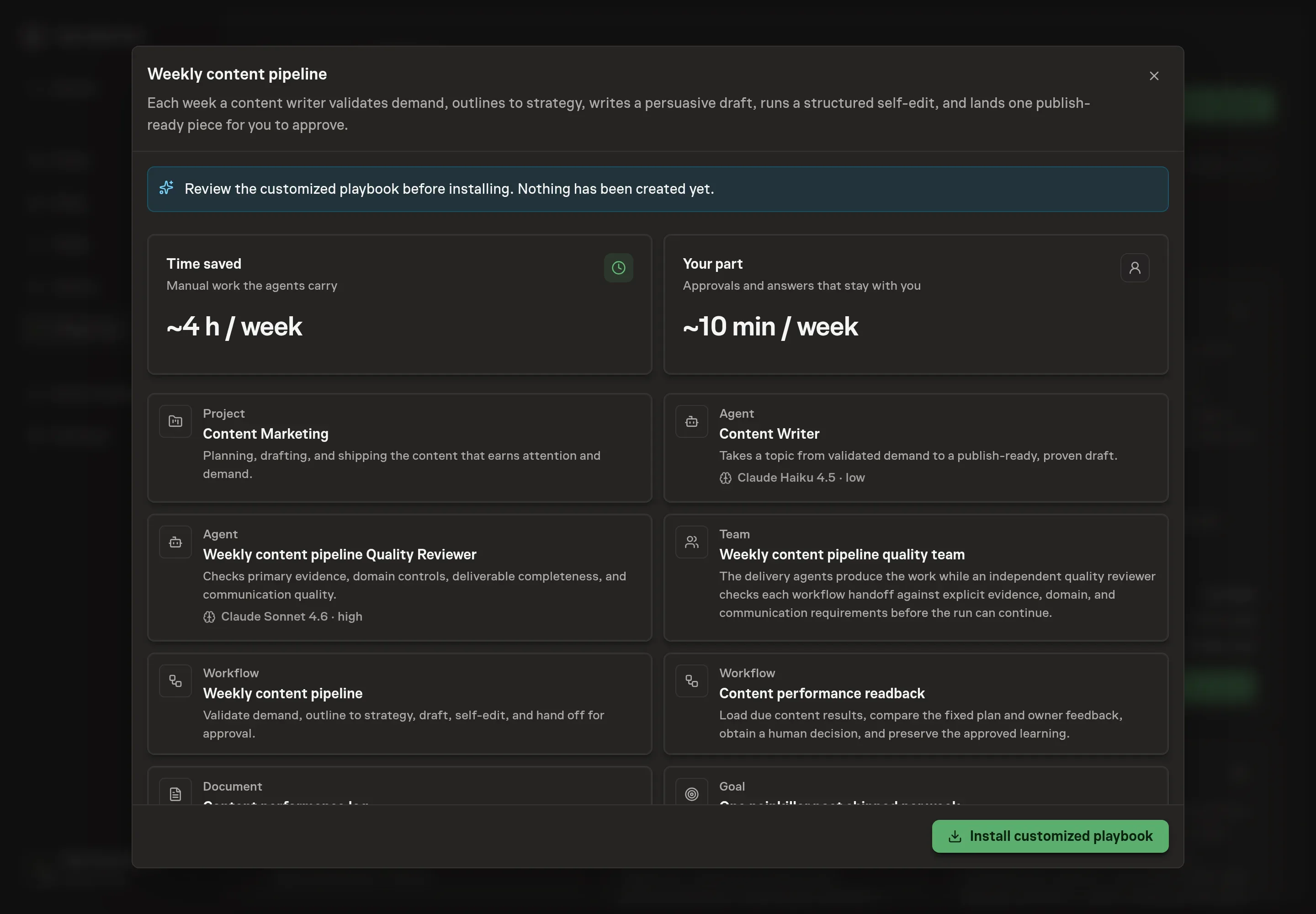
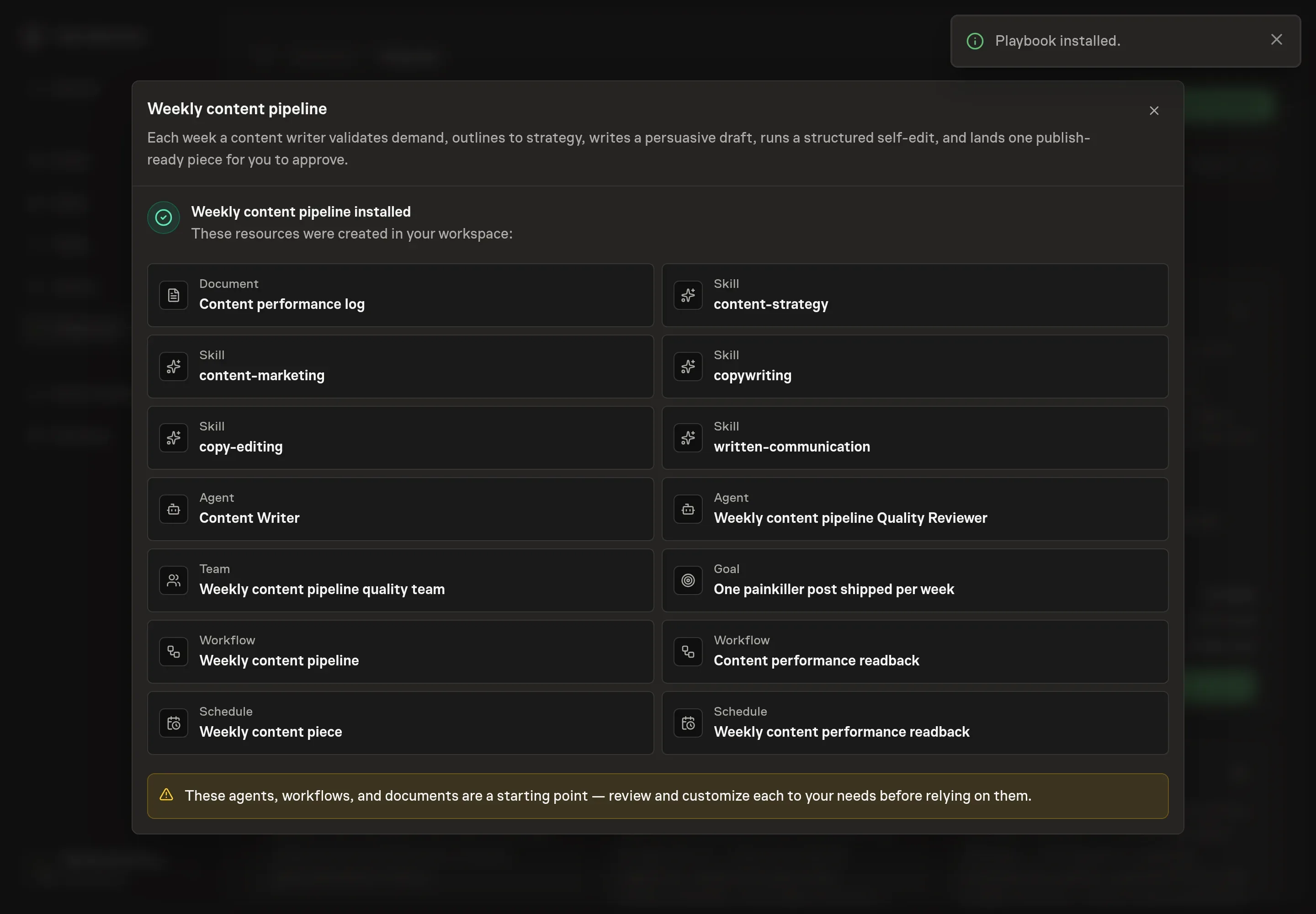
Ask the Agent to generate the Playbook from the agreed brief. Open its proposal in Chat and check the instructions and resources it will install, which carry more detail than the conversational summary. Review the agents, both workflows, performance log, skills, goal, and schedules. Confirm the audience and pillars, structured owner feedback, fixed-window readback, and two approval boundaries. Ask for a revised proposal if anything is missing or changes the job.
5. Approve and prepare the first work
Choose Approve on the proposal in Chat when the configuration matches your brief. Task Machine installs that reviewed configuration. The approved item retains its review details. If your autonomy settings allow direct installation, this approval may not be required. Check the resulting configuration in that case too.
Complete any remaining secure service setup from the installation details in Chat. Inbox keeps those setup items available if you return later. Prepare the source documents and inputs before starting the first Task or Workflow. Installation does not authorize sending, publishing or changing an external service beyond the boundaries you agreed. Confirm each schedule's cadence and timezone, and resolve any pending schedule setup before it starts. A readback must wait for its agreed observation window and source data. Check the reviewed tracker or results document before the first cycle so evidence and human decisions have a durable home.
What good looks like
The output should be one approved piece per week, not a pile of drafts. Track topic acceptance rate, source flags left unresolved, and publish-ready drafts approved without a full rewrite.
A healthy pipeline also produces sharper inputs over time. Track one primary channel outcome, a separate downstream business signal, and downside guardrails such as unsubscribes, negative feedback, corrections, or voice violations.
How the loop learns
Before publication, the performance log records the owner, channel, audience job, hook, format, structured owner feedback, fixed result window, one primary outcome, business signal, guardrails, sources, and readback date. The window must suit the channel and be fixed before results arrive.
At readback, the agent checks low volume, distribution changes, campaigns, seasonality, tracking changes, and simultaneous edits. A human chooses reuse, keep testing, retire, or unproven and approves the exact narrow learning. Losing and inconclusive pieces stay in the log, and no decision changes or repeats live content automatically.
Common questions
Does the agent choose topics on its own? It can propose a topic, but the workflow is designed to validate demand and route the draft for approval. You can also give it a topic to validate.
Can it publish directly to the blog or newsletter? No. The playbook ends at human approval. Publishing stays a human decision.
What happens when demand cannot be validated? The agent should say so and propose a topic that can be validated instead of drafting a weak piece.
How do we keep the writing from sounding generic? Give the agent a narrow audience, real content pillars, and source material with customer language. The seven-sweep edit then checks voice, proof, and specificity before approval.