How to Track Compliance Deadlines and Entity Filings
A practical guide to tracking entity filings, renewal windows, and compliance deadlines with an agent: one register, send-by alerts, and approvals.

Founder, Task Machine
Compliance and entity tracking is the practice of keeping every legal obligation a company carries in one register and surfacing each item before its window closes. The register covers entity filings such as annual reports, franchise taxes, and Statements of Information, contract renewals with their cancel-by deadlines, consents, and the evidence deadlines that come with audit frameworks like SOC 2 or GDPR.
For a small company the stakes are asymmetric. Each obligation is cheap to meet on time and expensive to miss: a lapsed filing can cost good standing exactly when a transaction needs a certificate on short notice, and a missed cancel-by window locks in another year of a contract nobody wanted to keep. The work itself is not hard. The hard part is remembering, in the right week, that it exists.
Why compliance obligations slip
Deadlines that live only in someone's head get dropped at handoff, forgotten in a busy week, and missed when a person leaves. Nobody reads a contract twice, so the renewal date extracted at review time has to live somewhere that shouts 45 days before the cancel-by deadline, not 45 days after.
The dates themselves are also sneakier than they look. A 60-day notice window with a certified-mail requirement is really about 55 days, because the notice has to be sent early enough to arrive. A cancel-by date that lands on a weekend rolls back to the prior business day, never forward, because forward means the notice arrives after the window closes.
Entity filings have their own trap: the calendar depends on entity type as well as jurisdiction. A Delaware corporation owes an annual report and franchise tax on March 1. A Delaware LLC files no annual report and owes a flat $300 tax on June 1. Treating "a Delaware entity" as one bucket writes the wrong deadline into the tracker, and the spurious overdue it produces masks the real exposure.
What the manual process looks like
Done by hand, keeping the register honest is a recurring ritual with five steps:
- Pull the current sources: the registered-agent compliance report (the authoritative record for entity filings), the renewal register, and the deadline ledger.
- Recheck each entity's filings against its type and jurisdiction, and mark anything unconfirmed as unknown rather than guessing.
- Recompute each renewal's real deadline: cancel-by minus the notice period, rolled back off weekends and holidays, minus mail transit time.
- Walk the deadline ledger for anything hitting a warning threshold, anything overdue, and anything completed since last time.
- Write up the status and chase owners: ping the business owner on each renewal, and confirm open filings with the registered agent.
Each pass rewards consistency over cleverness, and it is exactly the kind of work that gets skipped in a busy month, which is when a growing register produces the most deadlines.
What an agent can automate
Almost all of that loop is bookkeeping against fixed rules, which makes it a good fit for an agent running a scheduled workflow:
- Read the register. The agent works from registered-agent compliance reports, renewal exports, and deadline lists, inventories every filing, renewal, consent, and framework obligation, and says plainly when it only has stale exports instead of current agent data.
- Apply entity-type discipline. Filings are keyed to entity type and jurisdiction, so a Delaware corporation and a Delaware LLC get different calendars. When the type is unrecorded, the agent flags it as unknown and asks rather than computing either deadline.
- Alert off the send-by date. For each renewal the agent computes the effective cancel-by date with business-day roll-back, subtracts a transit buffer (none for electronic notice, around five days for domestic certified mail, around ten for international registered post), and raises the alert off that send-by date. Rolling renewals roll forward, so after year one the alert still fires against the current term.
- Keep the deadline ledger honest. A warning cadence (14, 7, 3, and 1 days by default) pulls approaching items into every report, a plausibility check flags dates that look grossly wrong without recomputing them, and overdue items stay in every report until someone explicitly resolves them.
- Check audit readiness. For framework obligations such as SOC 2, ISO 27001, GDPR, HIPAA, and PCI DSS, the agent tracks which controls need evidence and surfaces evidence older than the framework's window, because stale evidence is the silent audit failure.
- Write the status report. The recurring deliverable leads with a bottom line, groups overdue, due, and blocked items with an owner and a next step on every row, and calls out unknown-status items and entities not confirmed in good standing in the last 12 months.
Two things stay with a person by design. The agent never files anything, and it never computes a deadline from a triggering event against a legal rule. That math is done by a human and logged, and the agent's job is to make sure the result is impossible to forget.
The guardrails that make it safe
Every run of the workflow ends in a human approval step. The status report waits in your inbox, you confirm the reference dates against your registered agent or counsel, and nothing is treated as settled until you approve it. Every computed date in the register carries a provenance tag marking it as a model calculation to verify against the source clause.
Consequential actions get a second, stricter gate. Recording a filing as done, sending a non-renewal notice, or letting an auto-renewal fire are formal legal steps, so before any of them the agent asks whether the step has been reviewed with an attorney or a qualified registered agent. If not, it produces a short brief covering the entity, the filing or clause, the date, the open questions, and what could go wrong, then waits for an explicit yes.
The report itself is also checked before it reaches you. The agent re-checks every date that moved: any cancel-by on a weekend without a roll-back note, any Delaware entity carrying the wrong type's deadline, any overdue item that silently dropped out, any reference date not flagged for confirmation. Deadlines in the register are reference only, not legal advice.
Set it up in Task Machine
The Compliance & entity tracking playbook provides a starting point for the method above. You need an active Task Machine workspace with Chat, workspace-management and Playbook-installation access (workspace owners have it). Calendar access is not required up front. Until you connect it, the agent works from the exports you attach to each run: registered-agent compliance reports, the renewal register, and the deadline ledger.
1. Find the playbook
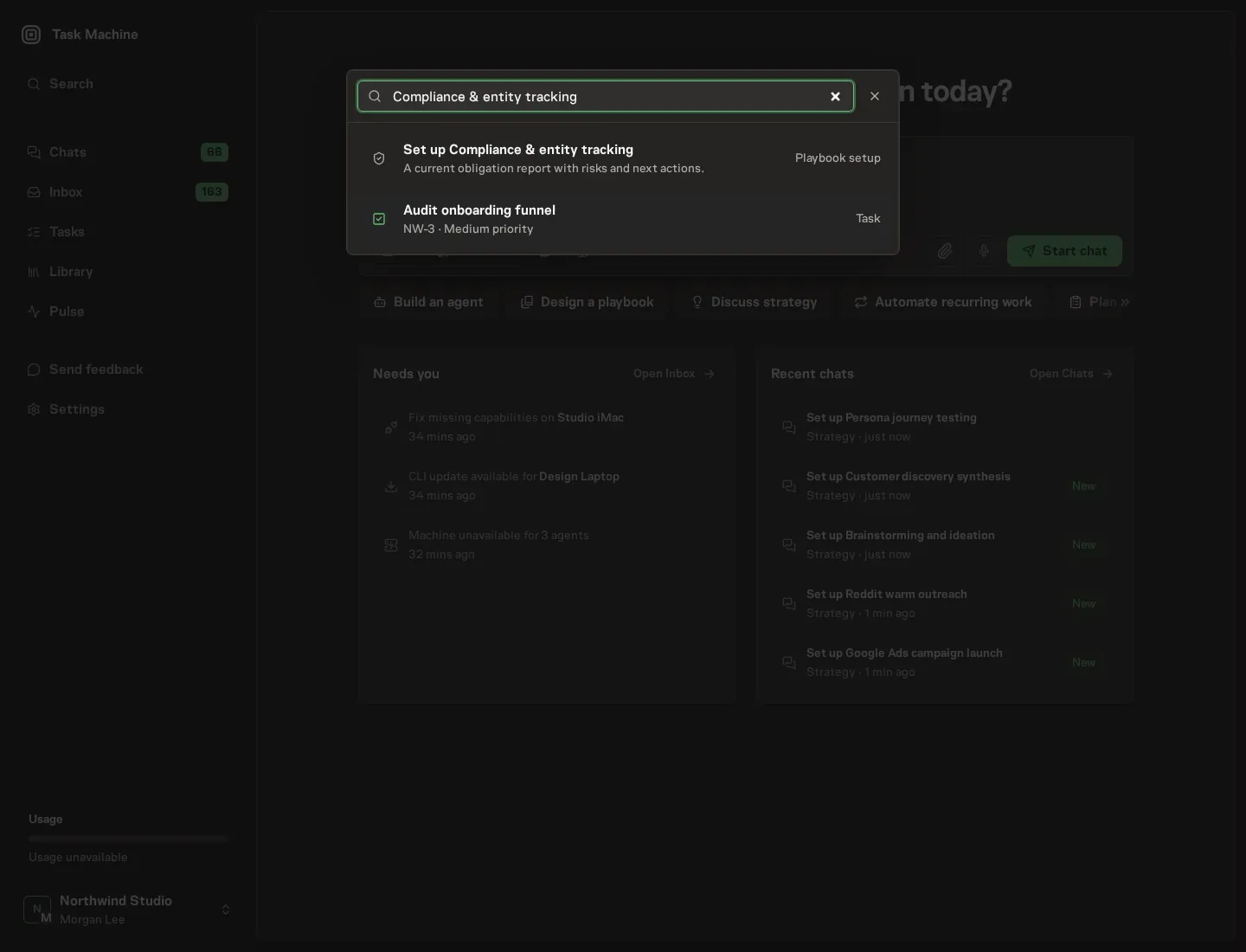
Open Search in your workspace and enter "Compliance & entity tracking". The command center lists Set up Compliance & entity tracking under Playbook setup.
2. Start the conversation
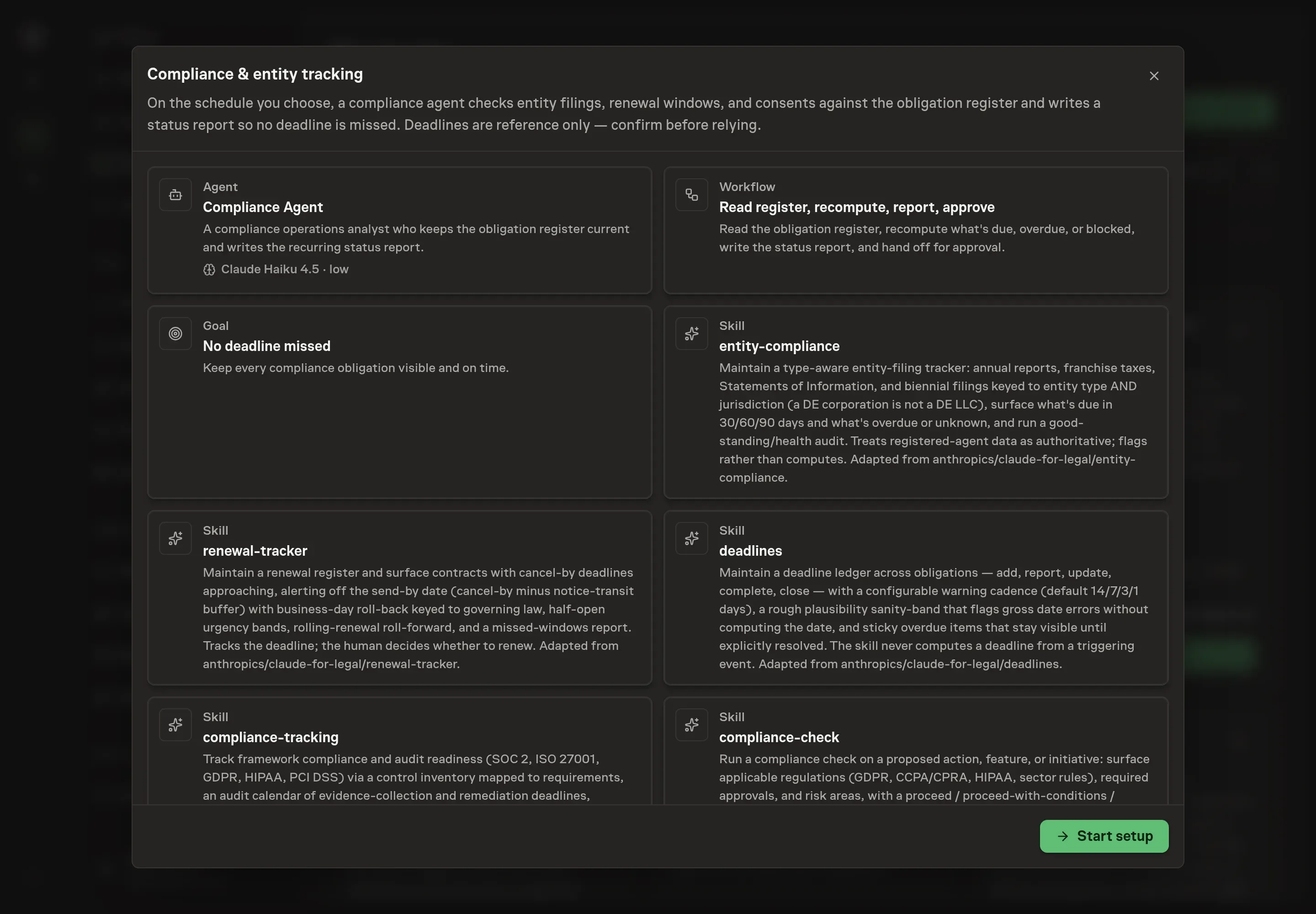
Choose Set up Compliance & entity tracking. Task Machine opens a dedicated Chat with the Playbook card and an editable, unsent request. Read the intended job and outcome. Add your situation and send it when ready. Opening the draft does not install anything or start work. This walkthrough uses settings that require approval of the proposed Playbook.
3. Agree the working brief
Use Chat to agree the inputs, expected output and limits before asking for a proposal. The Agent needs the scope of the register. Entities to track lists each legal entity by name, because every filing calendar hangs off an entity. Jurisdictions names the states or countries those entities file in. Obligations or filings lists the recurring items you already know about, such as annual reports, franchise taxes, or consent renewals. Renewal calendar notes describes how your contracts renew, so the send-by math starts from your real notice terms.
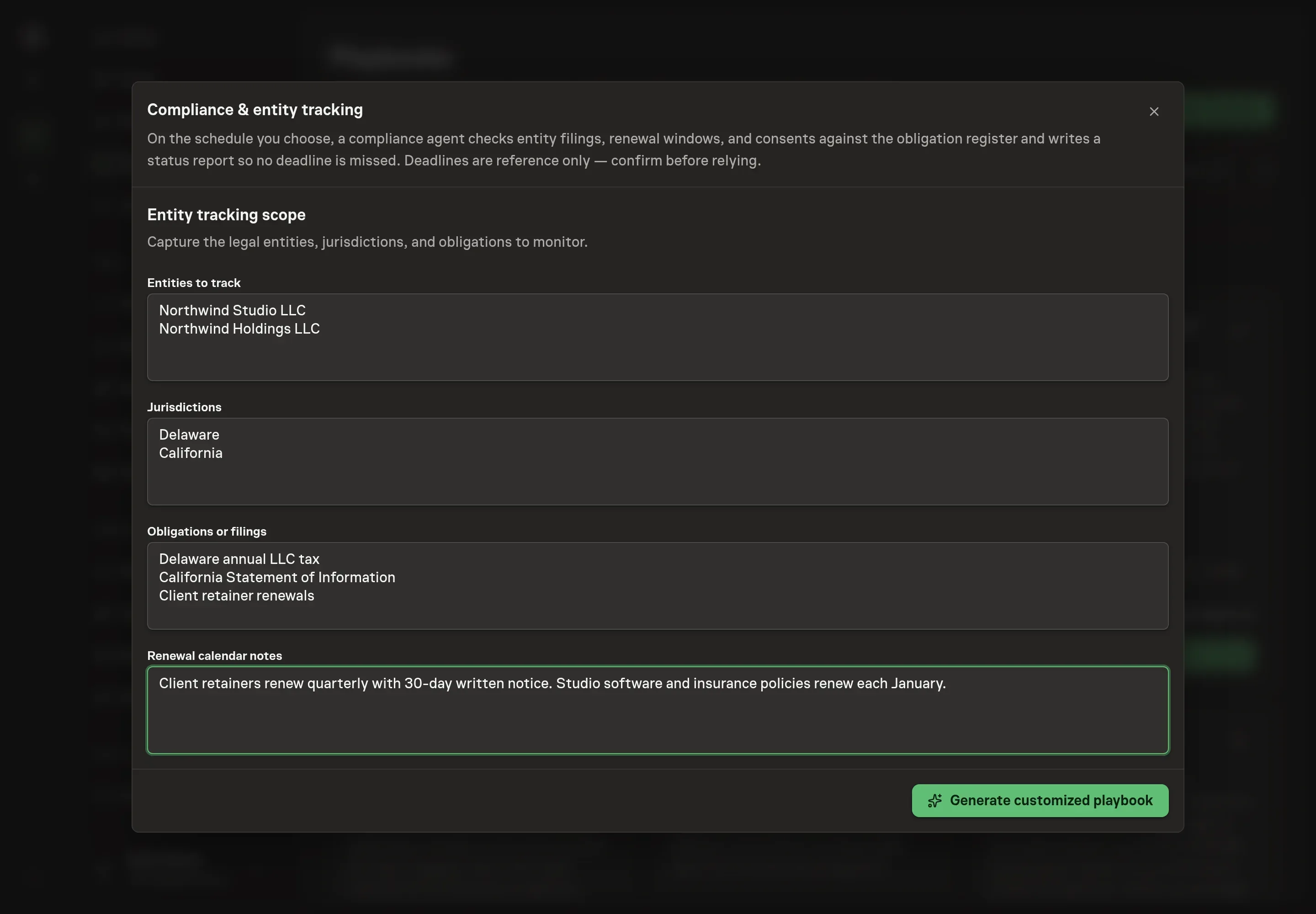
4. Review the proposed Playbook
Ask the Agent to generate the Playbook from the agreed brief. Open its proposal in Chat and check the instructions and resources it will install, which carry more detail than the conversational summary. Read through the agent and workflow cards and confirm your entities, jurisdictions, and renewal terms appear the way you agreed them. Ask for a revised proposal if anything is missing or changes the job.
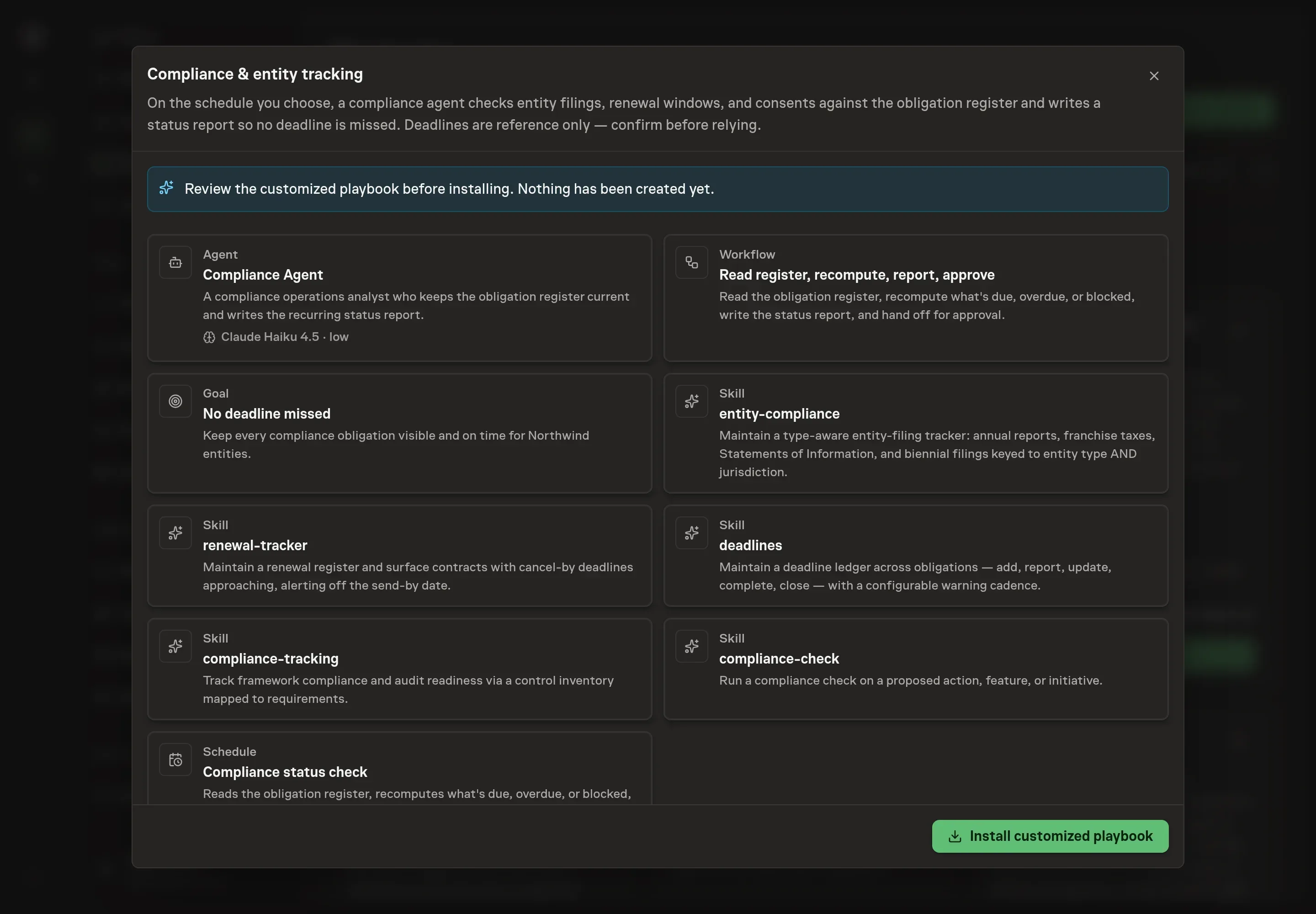
5. Approve and prepare the first work
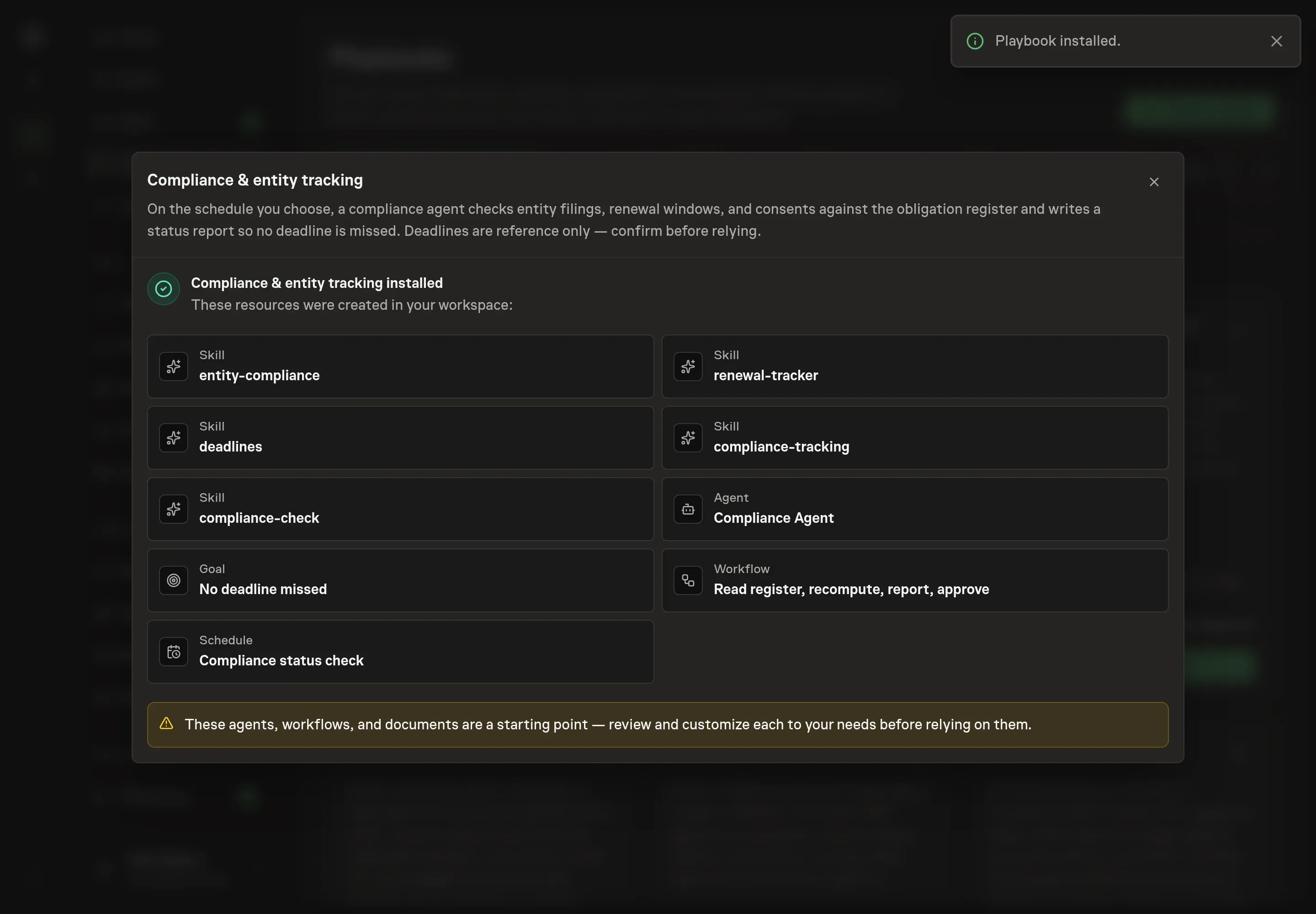
Choose Approve on the proposal in Chat when the configuration matches your brief. Task Machine installs that reviewed configuration. The approved item retains its review details. If your autonomy settings allow direct installation, this approval may not be required. Check the resulting configuration in that case too.
Complete any remaining secure service setup from the installation details in Chat. Inbox keeps those setup items available if you return later. Prepare the source documents and inputs before starting the first Task or Workflow. Installation does not authorize sending, publishing or changing an external service beyond the boundaries you agreed. Confirm each schedule's cadence and timezone, and resolve any pending schedule setup before it starts. A readback must wait for its agreed observation window and source data.
What good looks like
Three signals tell you whether the register is doing its job:
- Nothing reaches its date unsurfaced. Every obligation appears in an approved report inside its lead time. A renewal that first shows up in the 0-to-13-day band arrived too late to act on calmly.
- Overdue items leave loudly. The overdue section should trend toward empty, and every exit should be an explicit completion or a closure with a recorded rationale, never a silent disappearance.
- Unknowns get resolved. Filings marked unknown get confirmed with the registered agent instead of lingering, and no entity goes 12 months without a good-standing confirmation.
Common questions
Does the agent calculate legal deadlines by itself? No. Computing a deadline from a triggering event against a rule stays with a human, who logs the result. The agent applies a rough plausibility check to catch gross entry errors, tags every derived date as a model calculation to verify, and asks rather than guessing when an entity's type is unknown.
Will it file an annual report or cancel a contract for me? No. Filing and non-renewal are consequential legal steps behind an explicit gate. Before either, the agent produces a short brief with the entity or contract, the date, the open questions, and what could go wrong, then waits for an explicit yes from you.
Why does the report warn so far ahead of the actual deadline? Because the date that matters is the send-by date, not the cancel-by date. A 60-day notice window with a certified-mail requirement is really about 55 days, and a deadline on a weekend rolls back to the prior business day. Alerting off the send-by date is what keeps the warning useful.
Can this run without connecting my calendar? Yes. The workflow runs from the exports you attach to each run: registered-agent compliance reports, the renewal register, and the deadline ledger. Connecting your calendar later lets the agent work in it through your browser, and it still pauses for your approval before making any changes.
Are the dates in the report legal advice? No. Every date is reference only, flagged for confirmation, and the approval step exists so you verify them against your registered agent, the relevant authority, or counsel before relying on them.