How to Analyze Market Strategy
A practical guide to market strategy analysis with TAM/SAM/SOM, Porter, PESTLE, citations, verifier checks, and approval.

Founder, Task Machine
Market strategy analysis is the process of applying a chosen framework to a specific business question, then showing the data, assumptions, and reasoning behind the answer. It might size a market with TAM/SAM/SOM, assess industry attractiveness with Porter's Five Forces, or scan macro risk with PESTLE.
The useful output is a decision aid that says what market is being analyzed, which constraints matter, where the numbers came from, how confident the assumptions are, and what the result means for a real decision.
Unsourced market numbers pass as strategy
Market analysis often fails by looking more certain than it is. A TAM number appears without a source, SOM is treated like a percentage of ambition instead of go-to-market capacity, or a PESTLE scan lists obvious macro factors without ranking what matters.
The bundle's method treats unsupported numbers as defects. Market sizing uses top-down and bottom-up estimates, then reconciles them. Porter ratings name the drivers and strategic implication for each force. PESTLE factors are prioritized by impact and probability, then turned into responses or leading indicators.
What the manual process looks like
Done by hand, a credible market strategy analysis follows a strict path:
- Write the business context, market boundaries, customer segment, geography, competitors, and decision the analysis must inform.
- Choose one framework for the job: TAM/SAM/SOM, Porter's Five Forces, or PESTLE.
- Gather source material from industry reports, public data, competitor pages, customer research, and supplied internal context.
- Apply the framework rigorously, showing math, ratings, assumptions, confidence, and caveats.
- Verify the high-stakes numbers or ratings against their sources and reject unsupported claims.
- Summarize the strategic implications and route the analysis to the decision owner for approval.
The trap is mixing frameworks until the output becomes a survey of everything. One well-applied framework beats a broad report that never answers the decision.
What an agent can automate
An agent can handle the research, framework discipline, and verification loop:
- Read the brief first. The agent starts from the business context and the decision, not from a generic market template.
- Apply the chosen framework. For TAM/SAM/SOM it defines the market, builds top-down and bottom-up estimates, scopes SAM, grounds SOM in GTM capacity, and projects assumptions. For Porter it rates the five forces with drivers and implications. For PESTLE it scans six macro categories and prioritizes by impact and probability.
- Cite market data. Every market number carries a source URL or is explicitly labelled as an estimate.
- Show the working. The output includes population counts, formulas, confidence ratings, and assumptions rather than final numbers alone.
- Verify before approval. A verifier spot-checks headline numbers, math, source fit, SOM realism, and hidden assumptions before the analysis reaches the human.
The agent drafts the pack. The human still approves how the strategy changes.
The guardrails that make it safe
Strategy artifacts can influence fundraising, hiring, market entry, and product bets, so unsupported confidence is the failure mode to design against. The first guardrail is source discipline: no market number is allowed to look like data unless it has a traceable source.
The second guardrail is adversarial verification. The verifier checks whether the source says what the analysis claims, whether the math reconciles, whether SOM is grounded in capacity, and whether Porter or PESTLE ratings are justified by named drivers. Approval comes only after that check.
Set it up in Task Machine
The Market and strategy analysis playbook provides a starting point for the method above. You need an active Task Machine workspace with Chat, workspace-management and Playbook-installation access (workspace owners have it). Web search and fetch access help ground market data, but the agent can label estimates and gaps when live research is unavailable.
1. Find the playbook
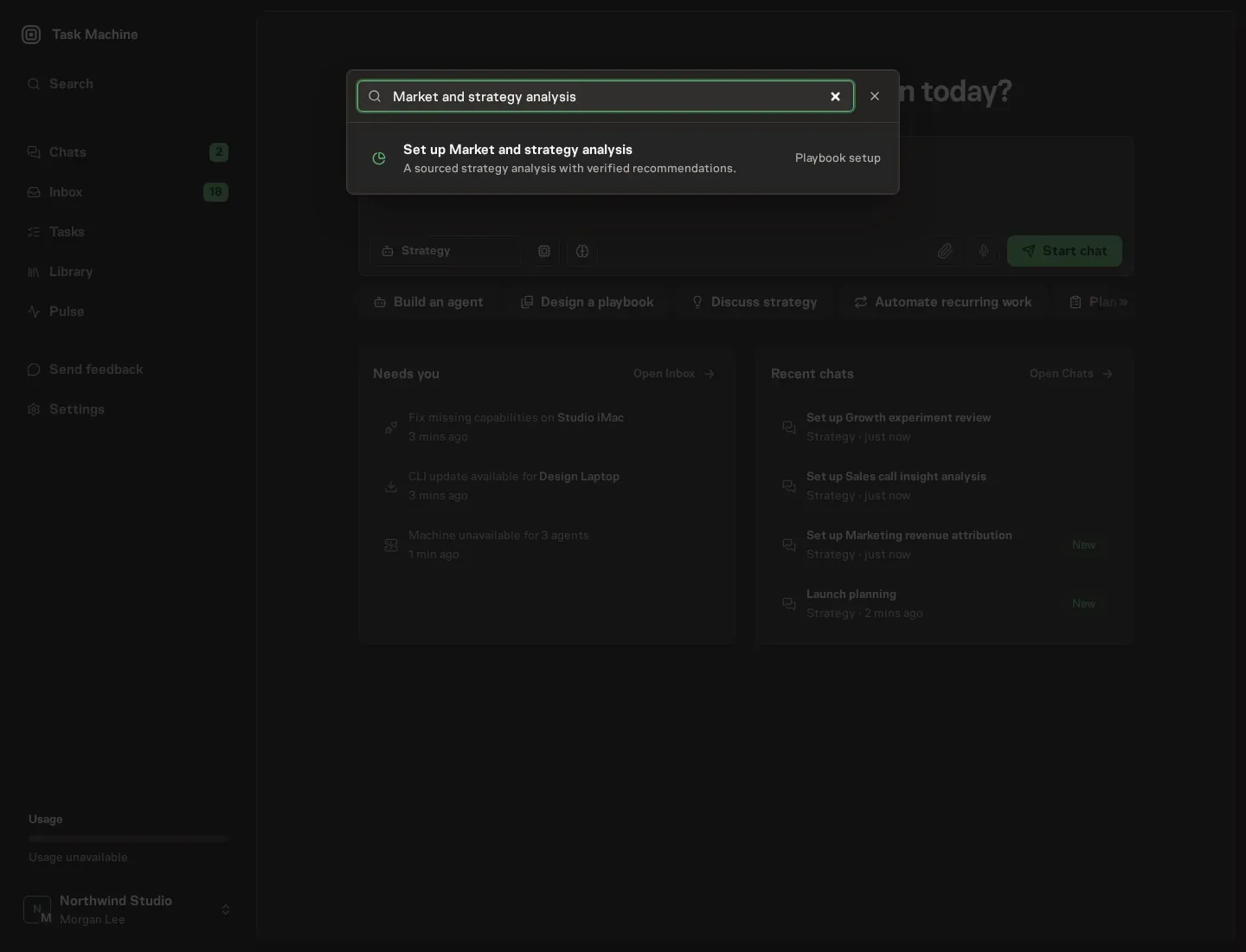
Open Search in your workspace and enter "Market and strategy analysis". The command center lists Set up Market and strategy analysis under Playbook setup.
2. Start the conversation
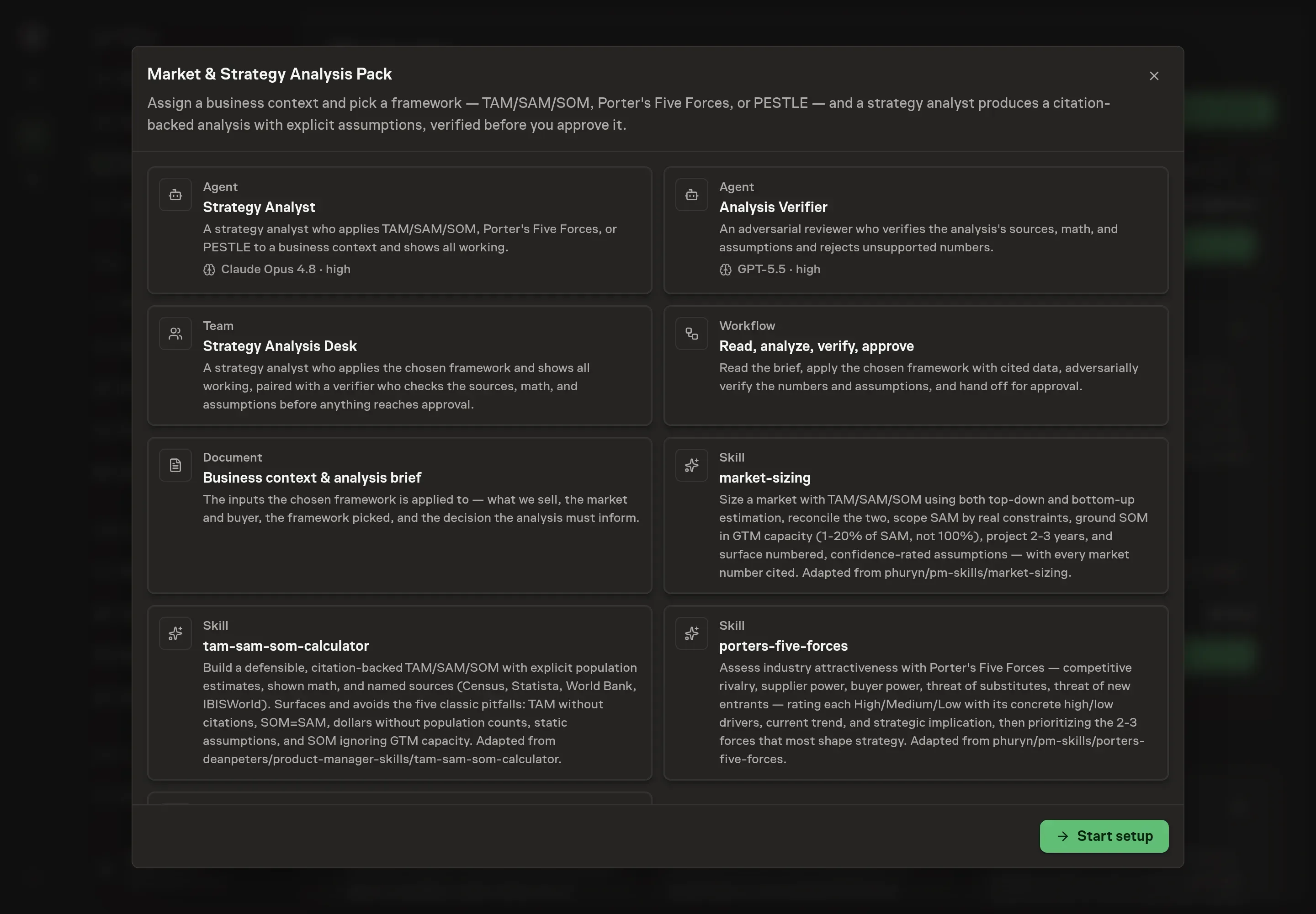
Choose Set up Market and strategy analysis. Task Machine opens a dedicated Chat with the Playbook card and an editable, unsent request. Read the intended job and outcome. Add your situation and send it when ready. Opening the draft does not install anything or start work. This walkthrough uses settings that require approval of the proposed Playbook.
3. Agree the working brief
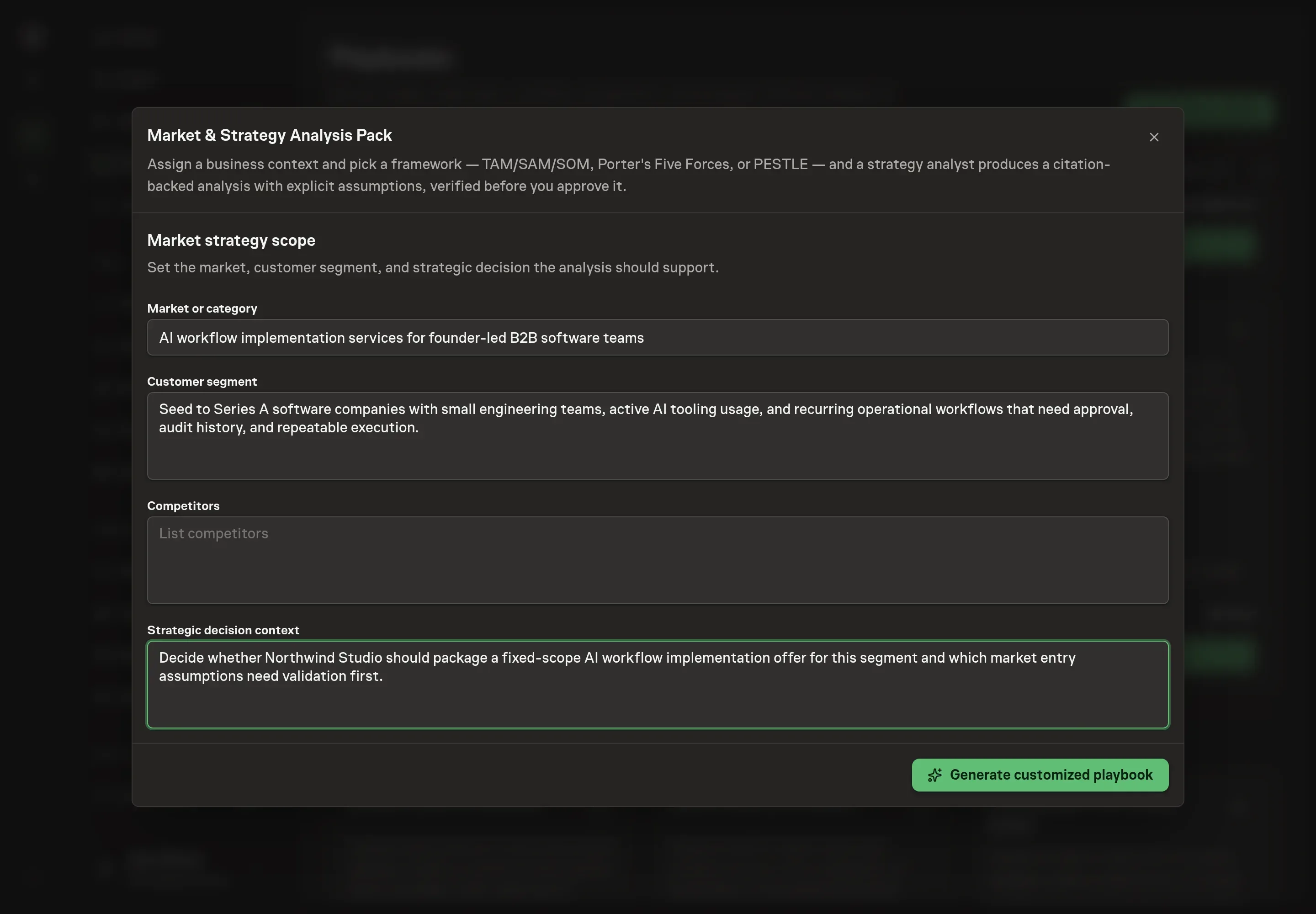
Use Chat to agree the inputs, expected output and limits before asking for a proposal. Discuss the market or category, customer segment, competitors, and strategic decision context. Also choose the analysis framework in Chat. Use one framework per assignment so the output answers the decision instead of becoming a general report.
4. Review the proposed Playbook
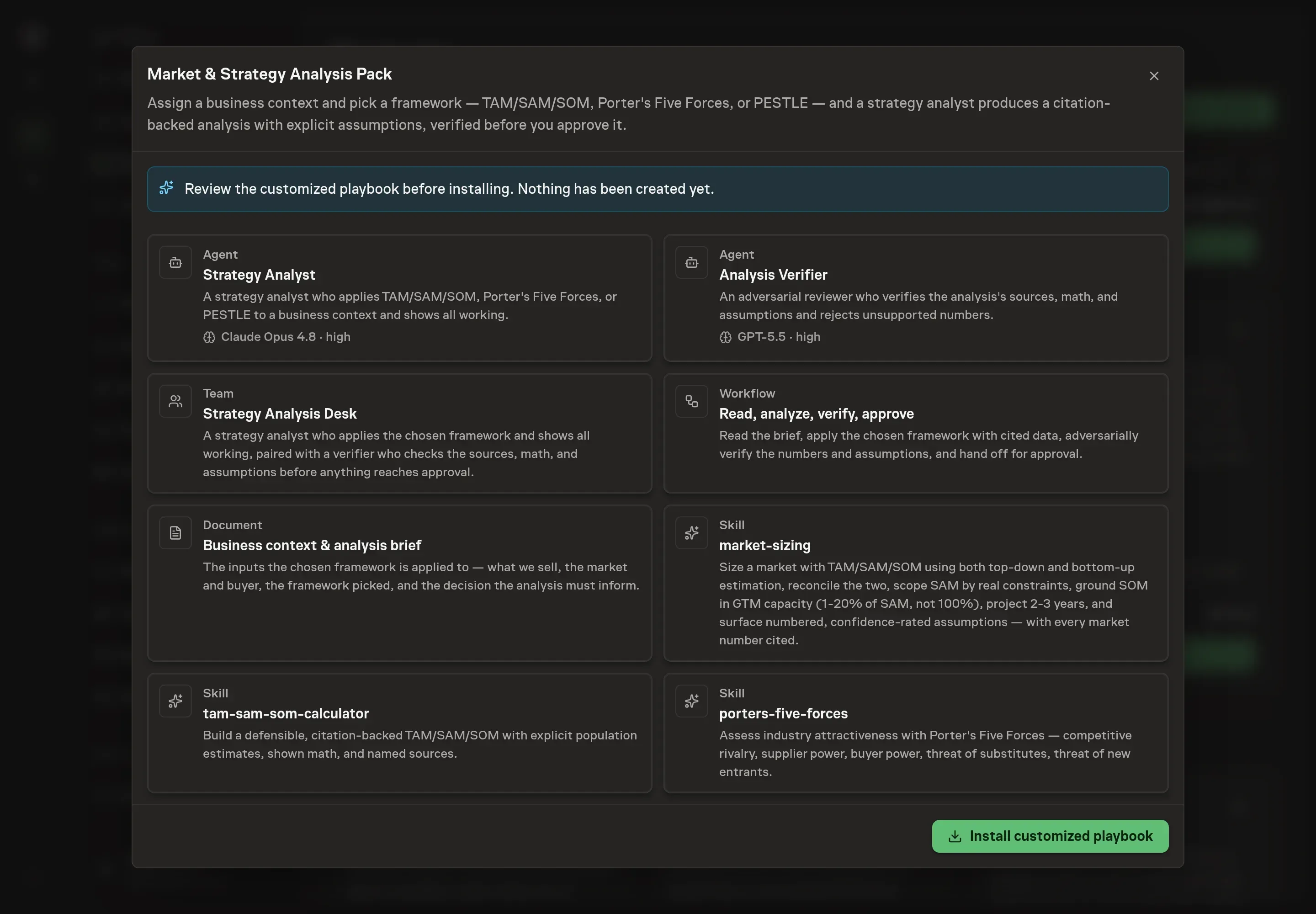
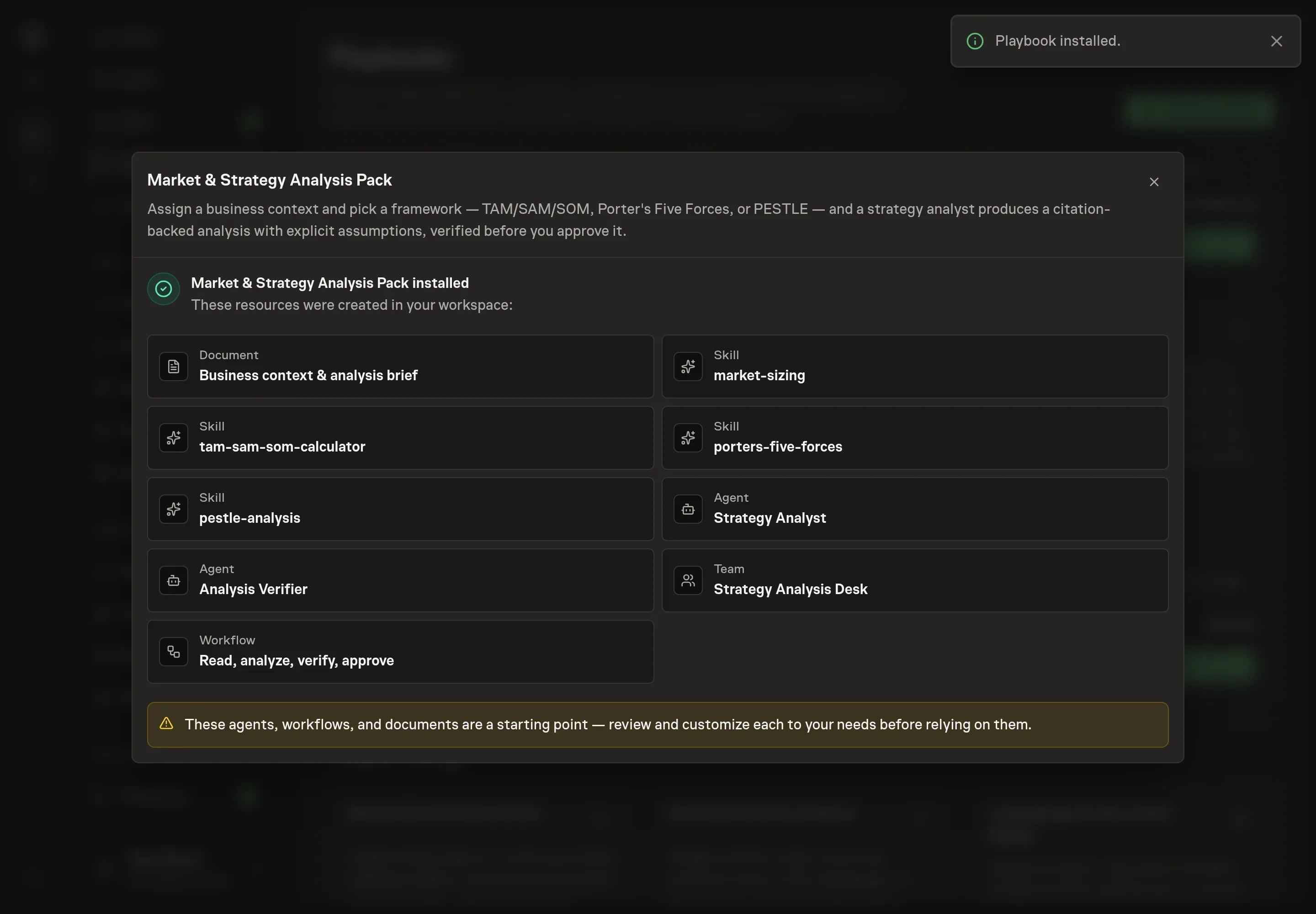
Ask the Agent to generate the Playbook from the agreed brief. Open its proposal in Chat and check the instructions and resources it will install, which carry more detail than the conversational summary. Confirm that the workflow reads the brief, runs the chosen framework, verifies numbers and assumptions, and waits for approval. Ask for a revised proposal if anything is missing or changes the job.
5. Approve and prepare the first work
Choose Approve on the proposal in Chat when the configuration matches your brief. Task Machine installs that reviewed configuration. The approved item retains its review details. If your autonomy settings allow direct installation, this approval may not be required. Check the resulting configuration in that case too.
Complete any remaining secure service setup from the installation details in Chat. Inbox keeps those setup items available if you return later. Prepare the source documents and inputs before starting the first Task or Workflow. Installation does not authorize sending, publishing or changing an external service beyond the boundaries you agreed.
What good looks like
A strategy analysis is ready when the decision owner can challenge it:
- The framework fits the question. TAM/SAM/SOM for market size, Porter for industry structure, PESTLE for macro context.
- Numbers are sourced or labelled. No headline figure appears without a source URL, shown math, or an estimate label.
- SOM is realistic. It reflects GTM capacity and competition, not a wishful share of the market.
- Assumptions are explicit. The analysis names confidence, caveats, and validation paths.
Common questions
Should one analysis include TAM/SAM/SOM, Porter, and PESTLE? Usually no. Pick the framework that answers the decision. Run a separate pack when another decision needs another framework.
Can this replace customer discovery? No. Market size and industry structure do not prove product-market fit. Pair the analysis with customer interviews when the decision depends on demand.
What happens when sources disagree? The agent should show both, explain the reconciliation, and label confidence rather than forcing a false single answer.
Can it use gated analyst reports? It can read public portions through browser access when available. It should not invent gated data it cannot access.