How to Automate Policy Drafting and Monitoring
A practical guide to monitoring regulatory change, diffing policy gaps, and drafting proposed redlines for attorney approval.

Founder, Task Machine
Policy drafting and monitoring is the recurring process of watching regulatory sources, deciding which changes matter, comparing those changes against the current policy library, and preparing proposed policy updates for review. The job is to make sure material changes are found, mapped, drafted, verified, and routed to the right attorney before they go stale. Only the attorney changes the policy.
For a small regulated business or agency serving regulated clients, the cost is rarely one dramatic missed rule. It is the slow drift between what policies say and what the current regulatory surface requires. That drift creates late reviews, vague ownership, and redlines built from memory instead of traceable sources.
Regulatory noise buries the updates that matter
Regulatory updates arrive through noisy channels: agency feeds, regulator pages, guidance notes, dockets, law-firm alerts, and internal client questions. Most of that stream is FYI. Some of it needs a comment deadline logged. A smaller set creates a policy gap that needs counsel.
When nobody owns the filter, every update becomes either noise or panic. Teams forward links, save PDFs, and ask "does this affect us?" without an indexed policy library or a materiality threshold. That turns review into archaeology. The policy owner has to reconstruct the rule, the policy version, the jurisdiction, and the source trail before they can even decide whether a redraft is needed.
What the manual process looks like
Done by hand, policy monitoring is a weekly or monthly control cycle:
- Pull updates from the named regulators, agency feeds, RSS URLs, and public pages the business cares about.
- Classify each item by materiality: always material, review-worthy, or FYI.
- Verify whether the rule is in force before treating it as a compliance requirement.
- Extract each discrete requirement, map it to the indexed policy library, and classify the gap as none, partial, or full.
- Draft the smallest proposed redline that closes the gap, carrying source tags and rationale into the markup.
- Send the proposal, diff memo, and before-applying checklist to an attorney for approval.
The hard part is preserving the chain of judgment: why this rule mattered, which policy it touched, what changed, what was verified, and what still needs counsel.
What an agent can automate
The Policy drafting & monitoring playbook is built for the repeatable parts of that cycle:
- Sweep the watchlist. The compliance agent reads the maintained policy library, pulls the configured feeds through web search and fetch access, and classifies updates by materiality. It treats secondary sources as pointers back to primary sources, not as final authority.
- Check rule currency. Before a diff proceeds, the agent looks for delays, stays, injunctions, rescissions, vacatur, or amendments. If status cannot be verified, it carries a RULE STATUS UNVERIFIED banner instead of pretending the rule is settled.
- Diff requirement by requirement. The agent extracts specific requirements, maps each one to the closest indexed policy, and records the gap, owner, effort, risk, and needed change.
- Draft proposals only. The redraft is a dated proposal file with struck and inserted text, inline rationale, and source tags. It never edits the live policy and never closes the gap tracker.
- Verify before counsel. A separate rule verifier checks rule currency, citation provenance, scope, and smallest-possible edit discipline before the attorney sees the redraft.
The work stays narrow by design. A rule that does not apply should stop at scope analysis. A partial rule text should create a question, not a guessed redraft. A second unrelated policy gap should be flagged as a follow-on, not silently folded into the proposal.
The guardrails that make it safe
Policy work needs a hard line between drafting help and legal approval. The playbook keeps that line visible. The compliance agent can sweep, classify, diff, and propose. The rule verifier can challenge the proposal. Neither can adopt policy, close the gap, or approve on behalf of counsel.
The human approval step is the control point. The attorney reviews rule status, source tags, the proposed redline, and the before-applying checklist. The policy owner applies the approved change through the normal policy-change process. Task Machine records the workflow run, the proposal, and the approval request so the team can reconstruct what happened later.
Set it up in Task Machine
The Policy drafting & monitoring playbook provides a starting point for the method above. You need an active Task Machine workspace with Chat, workspace-management and Playbook-installation access (workspace owners have it). Web search and fetch access make the sweep live. Until then, the agent can work from attached updates and policy materials.
1. Find the playbook
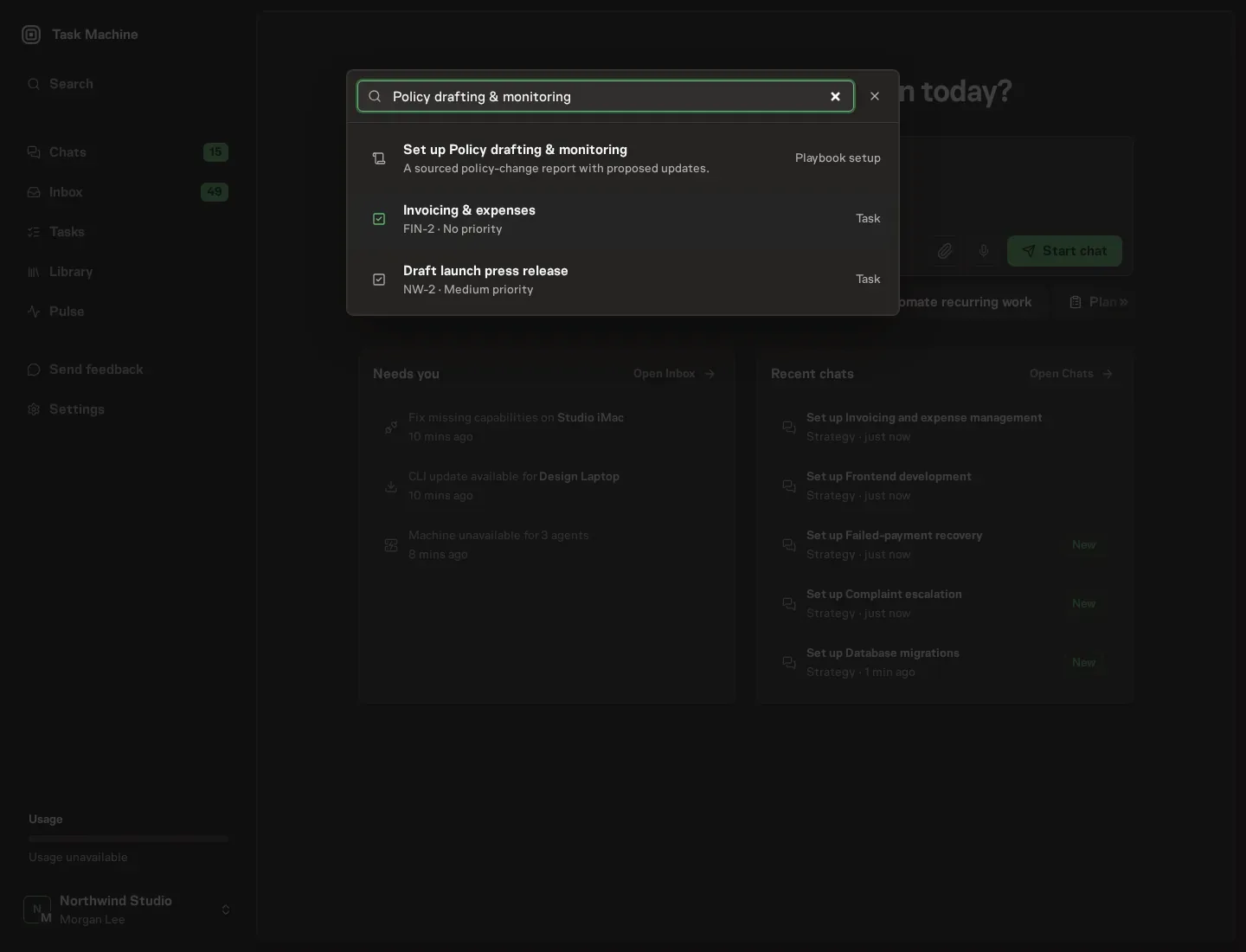
Open Search in your workspace and enter "Policy drafting & monitoring". The command center lists Set up Policy drafting & monitoring under Playbook setup.
2. Start the conversation
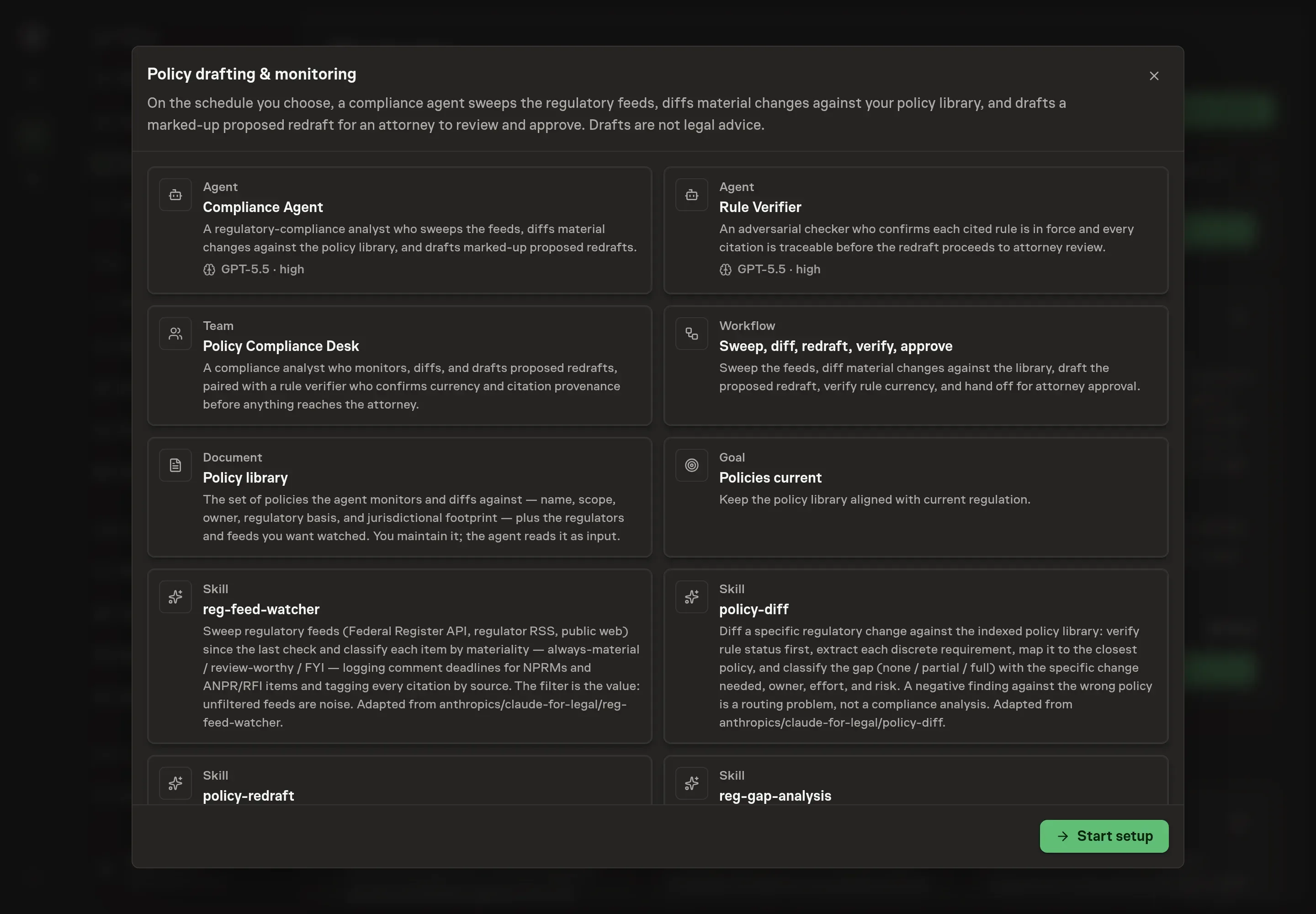
Choose Set up Policy drafting & monitoring. Task Machine opens a dedicated Chat with the Playbook card and an editable, unsent request. Read the intended job and outcome. Add your situation and send it when ready. Opening the draft does not install anything or start work. This walkthrough uses settings that require approval of the proposed Playbook.
3. Agree the working brief
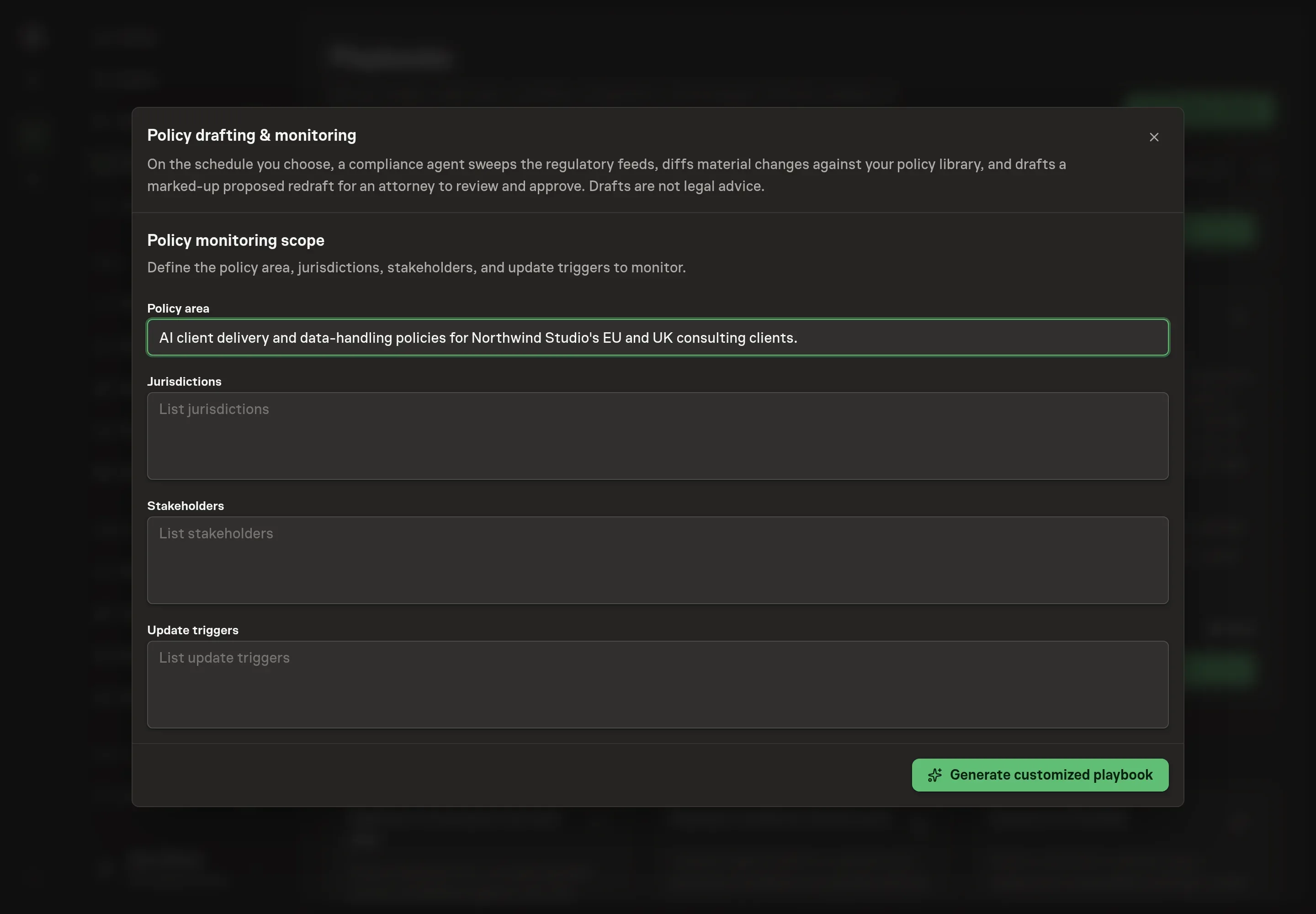
Use Chat to agree the inputs, expected output and limits before asking for a proposal. The Agent needs the policy area, jurisdictions, stakeholders, and update triggers. Use concrete entries: the regulated topics you monitor, the jurisdictions that matter, the owners who review drafts, and the events that should start a diff.
4. Review the proposed Playbook
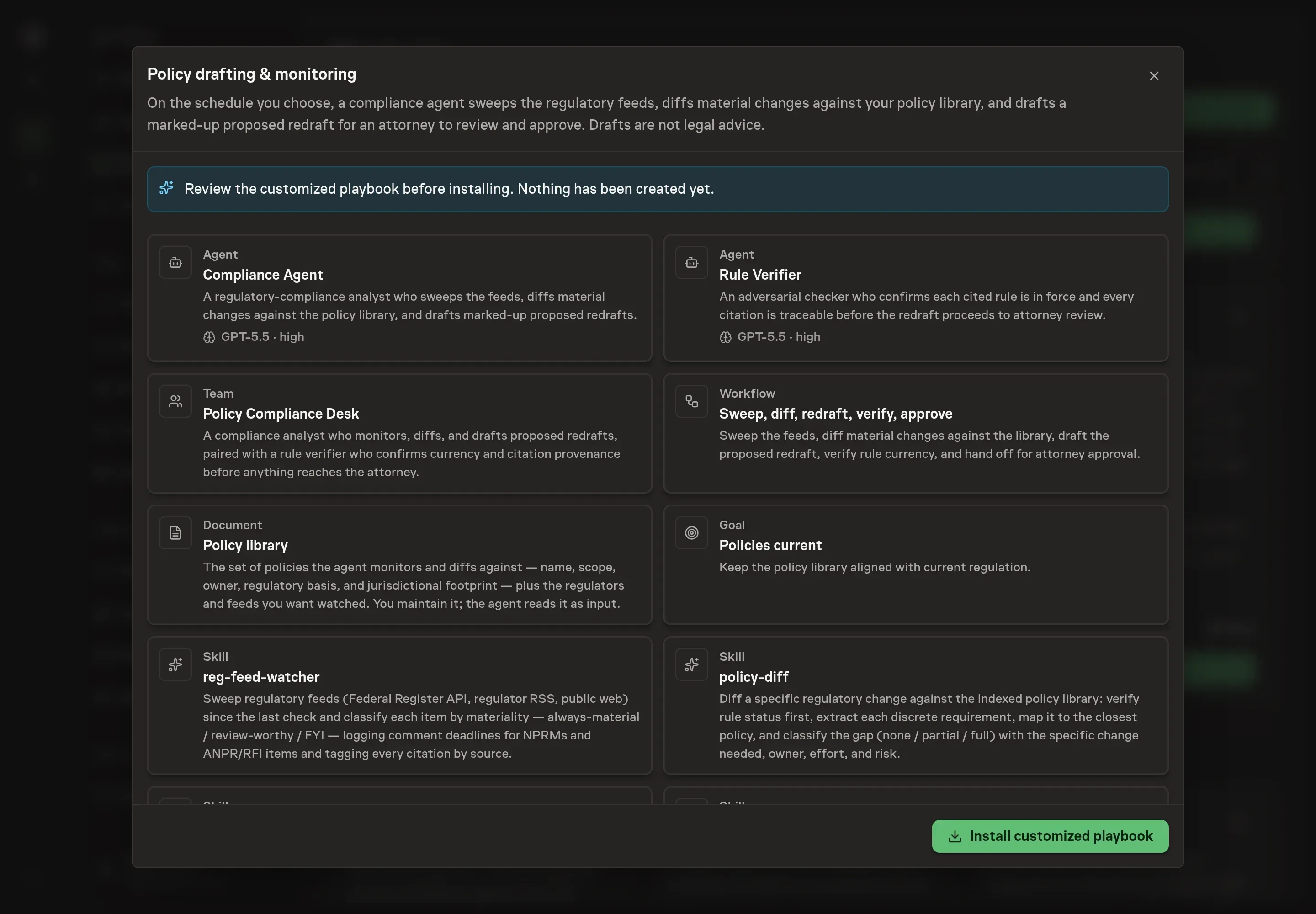
Ask the Agent to generate the Playbook from the agreed brief. Open its proposal in Chat and check the instructions and resources it will install, which carry more detail than the conversational summary. Read the proposal closely. Confirm the workflow still ends in Attorney approval, and confirm the agent is instructed to draft proposals rather than edit live policies. Ask for a revised proposal if anything is missing or changes the job.
5. Approve and prepare the first work
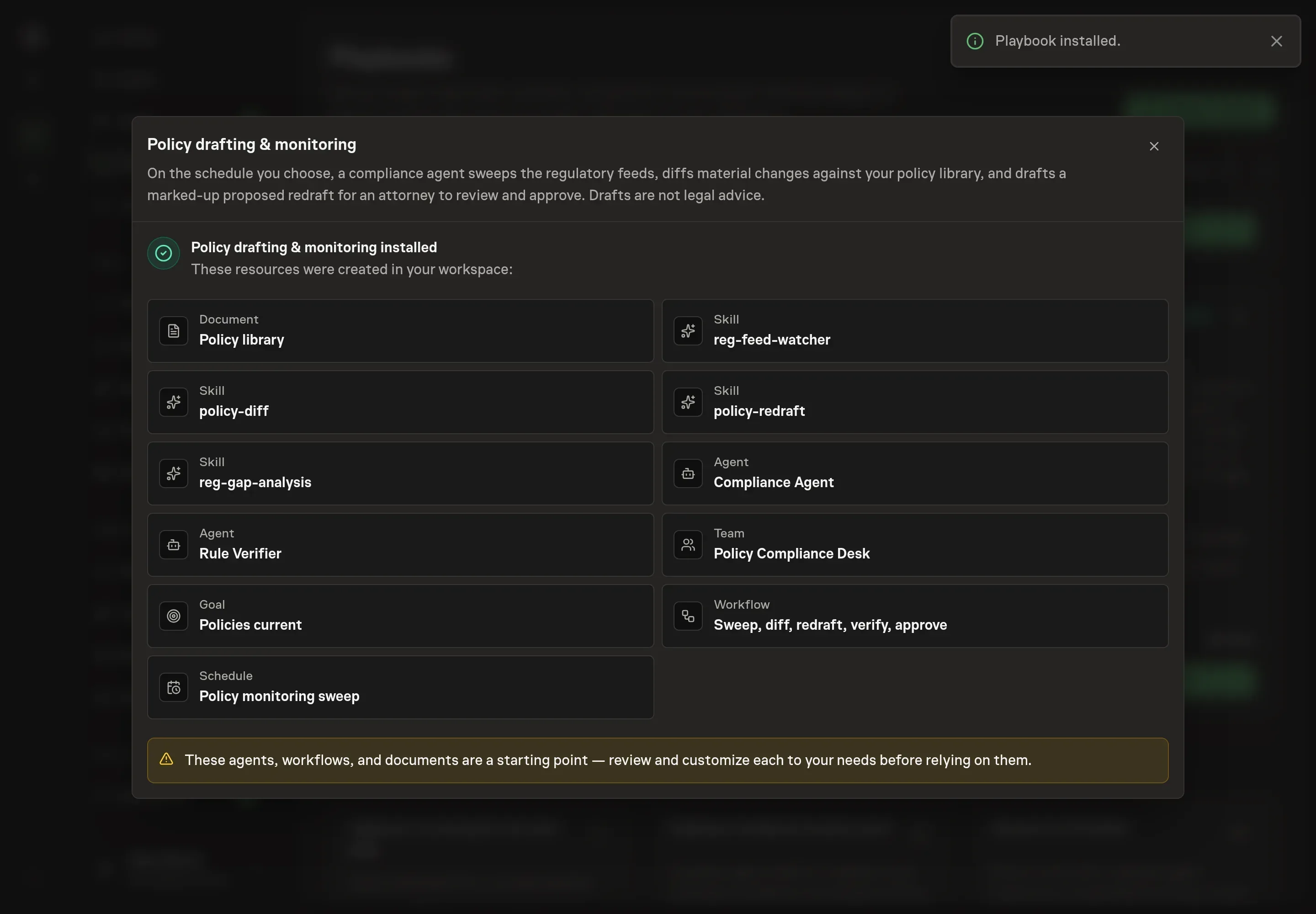
Choose Approve on the proposal in Chat when the configuration matches your brief. Task Machine installs that reviewed configuration. The approved item retains its review details. If your autonomy settings allow direct installation, this approval may not be required. Check the resulting configuration in that case too.
Complete any remaining secure service setup from the installation details in Chat. Inbox keeps those setup items available if you return later. Prepare the source documents and inputs before starting the first Task or Workflow. Installation does not authorize sending, publishing or changing an external service beyond the boundaries you agreed. Confirm each schedule's cadence and timezone, and resolve any pending schedule setup before it starts. A readback must wait for its agreed observation window and source data.
What good looks like
Three measures tell you whether the process is working:
- Material updates are filtered. The digest separates always-material items from review-worthy and FYI items, so counsel does not review a raw feed.
- Every proposed redraft is traceable. The memo names the requirement, affected policy, gap, owner, source, and rule-status confidence.
- No live policy changes without approval. Proposed redlines remain proposals until the attorney and policy owner accept them through the normal process.
Common questions
Can an agent give legal advice? No. The playbook drafts and verifies proposed work for attorney review. It does not adopt policy, close gaps, or decide what the law requires.
What happens if a rule status cannot be verified? The workflow carries the RULE STATUS UNVERIFIED banner and routes the issue for review. A draft built on an unverified rule must not be treated as ready to adopt.
Does this require paid regulatory feeds? No. The bundle is designed around public sources such as the Federal Register API, regulator RSS feeds, public web pages, and attached materials. Paid feeds can still be part of the policy library if your team uses them.
Can this monitor non-US rules? Yes, if you give the agent the relevant jurisdictions, regulator pages, RSS feeds, or source materials. The guide does not assume a complete global feed. Thin coverage should be reported as a coverage gap.