How to Run Google Ads Campaigns
A practical guide to launching Google Ads with keyword research, RSA copy, budget review, and approval before spend.

Founder, Task Machine
Running a Google Ads campaign means turning an offer, a landing page, and a conversion goal into a paid campaign that can spend real money without drifting away from the business case. Besides writing ads, the work includes keyword research, intent grouping, negative keywords, conversion tracking, budget math, pre-launch review, launch, and performance monitoring.
The expensive failure is a campaign that launches before the tracking works, spreads budget across weak intent, or spends more than the team meant to risk. A useful process makes the money boundary explicit before the campaign goes live.
Google Ads punishes loose campaign structure
Google Ads rewards structure. A campaign with loose ad groups, missing negatives, untested tracking, and vague budget limits can look busy while learning from the wrong clicks. The account spends, reports accumulate, and nobody can tell whether the problem is the offer, the landing page, the keyword set, or the measurement.
Small teams usually feel the waste after launch. The budget is already running, the search terms report shows irrelevant queries, the conversion column is empty or suspect, and every change feels like a guess. The safer pattern is to force the review before spend: prove the campaign structure, prove the tracking, and prove the worst-case spend sits inside the cap.
What the manual process looks like
Done by hand, a careful launch is a six-step operating ritual:
- Define the offer, landing page, conversion goal, target CPA or ROAS, audience, geography, and constraints.
- Research keywords, classify intent, group commercial and transactional terms into tight ad groups, and build a negative-keyword list.
- Read the live SERP for head terms so the campaign does not bid into an intent or competitive set it cannot win.
- Write responsive search ads that fit Google's limits: 15 headlines, 4 descriptions, paths, sitelinks, and callouts.
- Confirm conversion tracking, set bidding, calculate daily budget and run window, and check the worst-case spend against the cap.
- Review the build, approve spend, launch, then monitor CPA, search terms, actual spend, and changes that need another approval.
The work is repetitive, but the risk is real. A person must still decide whether the offer is worth funding and whether the proposed spend is acceptable.
What an agent can automate
The Google Ads campaign launcher is a good fit for a bounded agent workflow because most of the preparation follows a fixed checklist:
- Build the campaign plan. The agent reads the campaign brief, chooses the campaign type, clusters keywords by intent, prioritizes commercial and transactional searches, and records which metrics are measured, user-provided, or estimated.
- Shape the ad groups. It turns tight keyword clusters into ad groups, writes a negative-keyword list, and uses live SERP evidence to avoid terms where the intent or competition does not match the offer.
- Draft the ad assets. It writes responsive search ads within Google's hard limits, including 15 headlines, 4 descriptions, sitelinks, callouts, and paths where relevant. It checks character counts before review.
- Check the money. It recomputes worst-case spend from daily budget and run window, allowing for Google's possible daily overspend, then states the headroom against the named budget cap.
- Monitor after launch. Once approved and launched, it watches actual spend and target CPA, then asks before any adjustment, scale-up, or bid change.
The judgment remains with the operator: whether the campaign should spend, whether the reviewer's no-go is acceptable, and whether post-launch changes deserve more budget.
The guardrails that make it safe
The safe version of Google Ads automation treats spend as a gated action. The agent can plan, draft, calculate, and prepare. It cannot launch, increase budget, or change bids without a human approval step.
The workflow also separates builder and reviewer. The ad operator prepares the campaign in the Google Ads UI. A spend reviewer independently checks the build, the responsive search ad limits, the negative list, the conversion tracking status, and the worst-case spend. Only a build that passes review reaches the approval gate. If tracking is untested, negatives are missing, or the cap can be exceeded, the reviewer sends it back with specifics.
Set it up in Task Machine
The Google Ads campaign launch playbook provides a starting point for the method above. You need an active Task Machine workspace with Chat, workspace-management and Playbook-installation access (workspace owners have it). Google Ads access is not required up front. Until you authorize it, the workflow can prepare from the campaign brief, exports, and attached documents.
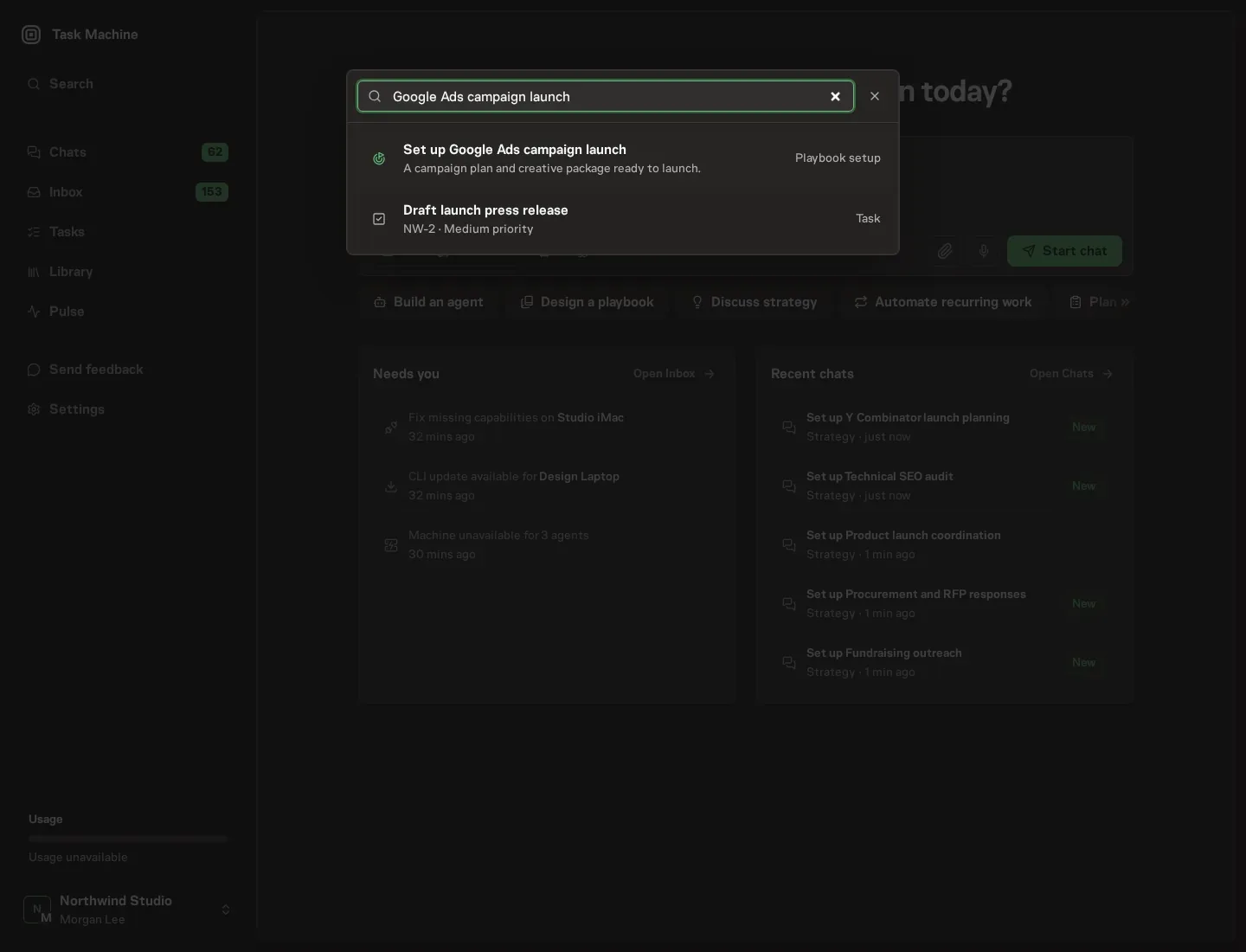
1. Find the playbook
Open Search in your workspace and enter "Google Ads campaign launch". The command center lists Set up Google Ads campaign launch under Playbook setup.
2. Start the conversation
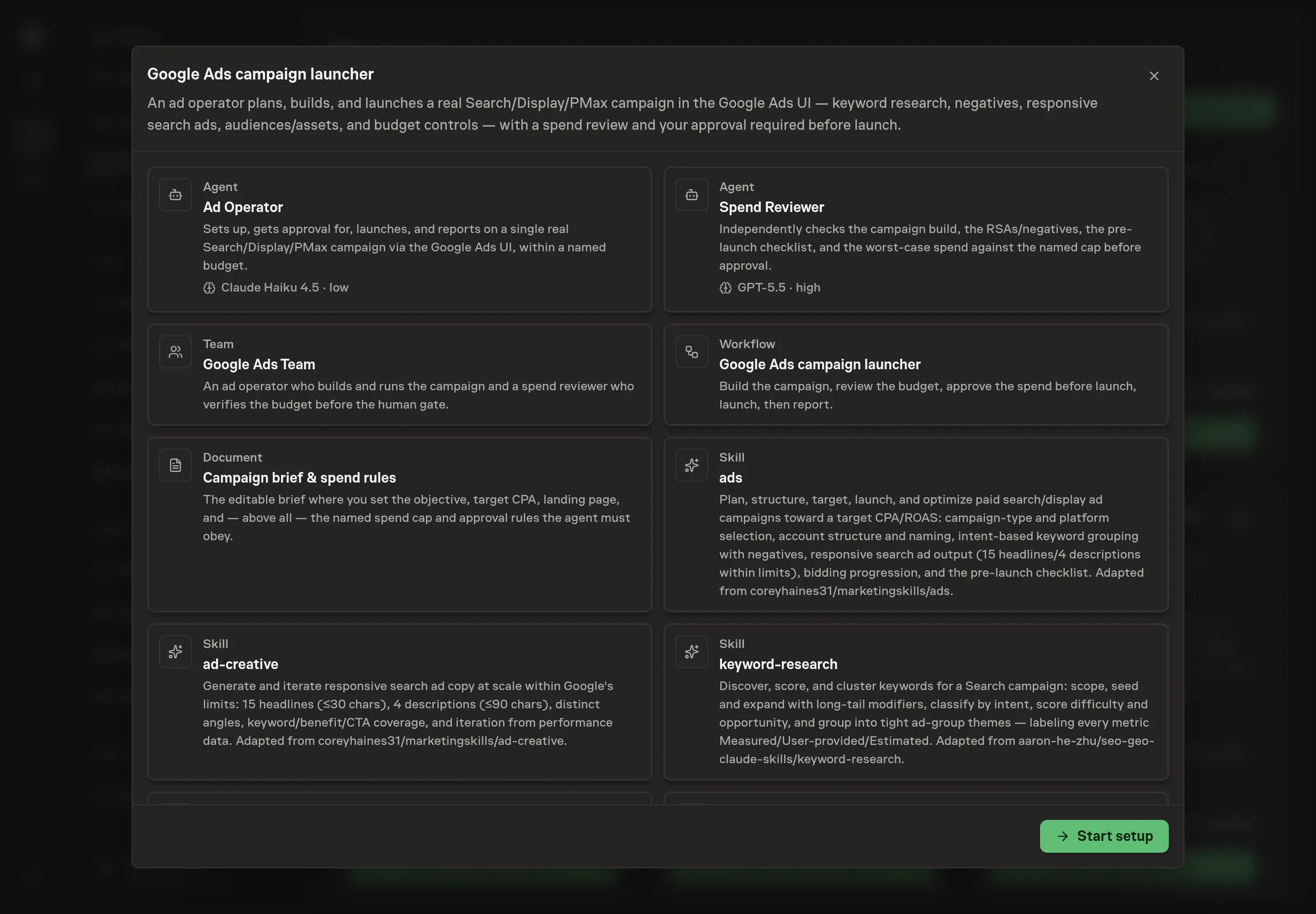
Choose Set up Google Ads campaign launch. Task Machine opens a dedicated Chat with the Playbook card and an editable, unsent request. Read the intended job and outcome. Add your situation and send it when ready. Opening the draft does not install anything or start work. This walkthrough uses settings that require approval of the proposed Playbook.
3. Agree the working brief
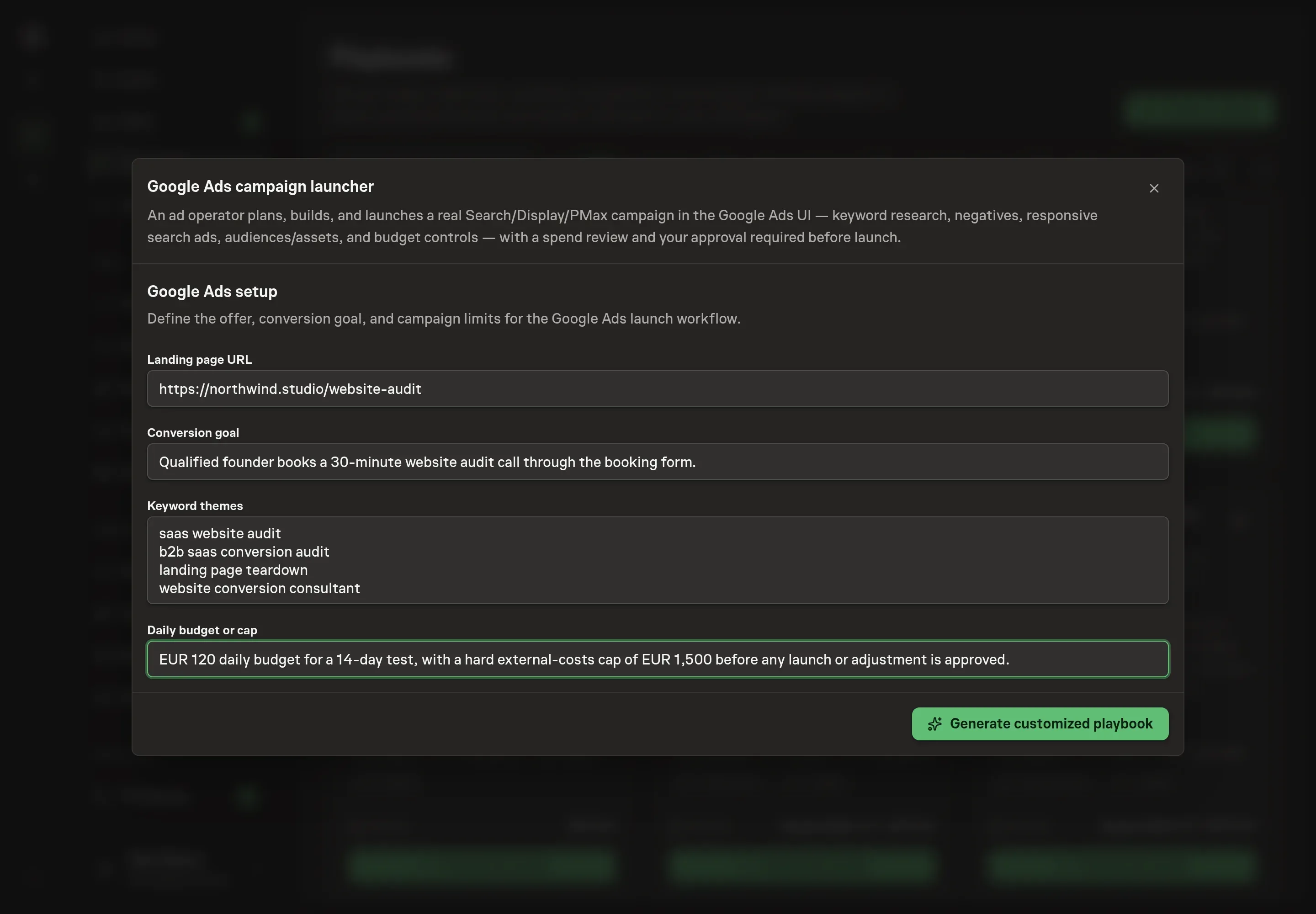
Use Chat to agree the inputs, expected output and limits before asking for a proposal. The Agent needs the landing page URL, conversion goal, keyword themes, and daily budget or cap. Use the budget answer to state the spend boundary the reviewer must check, not a loose aspiration.
4. Review the proposed Playbook
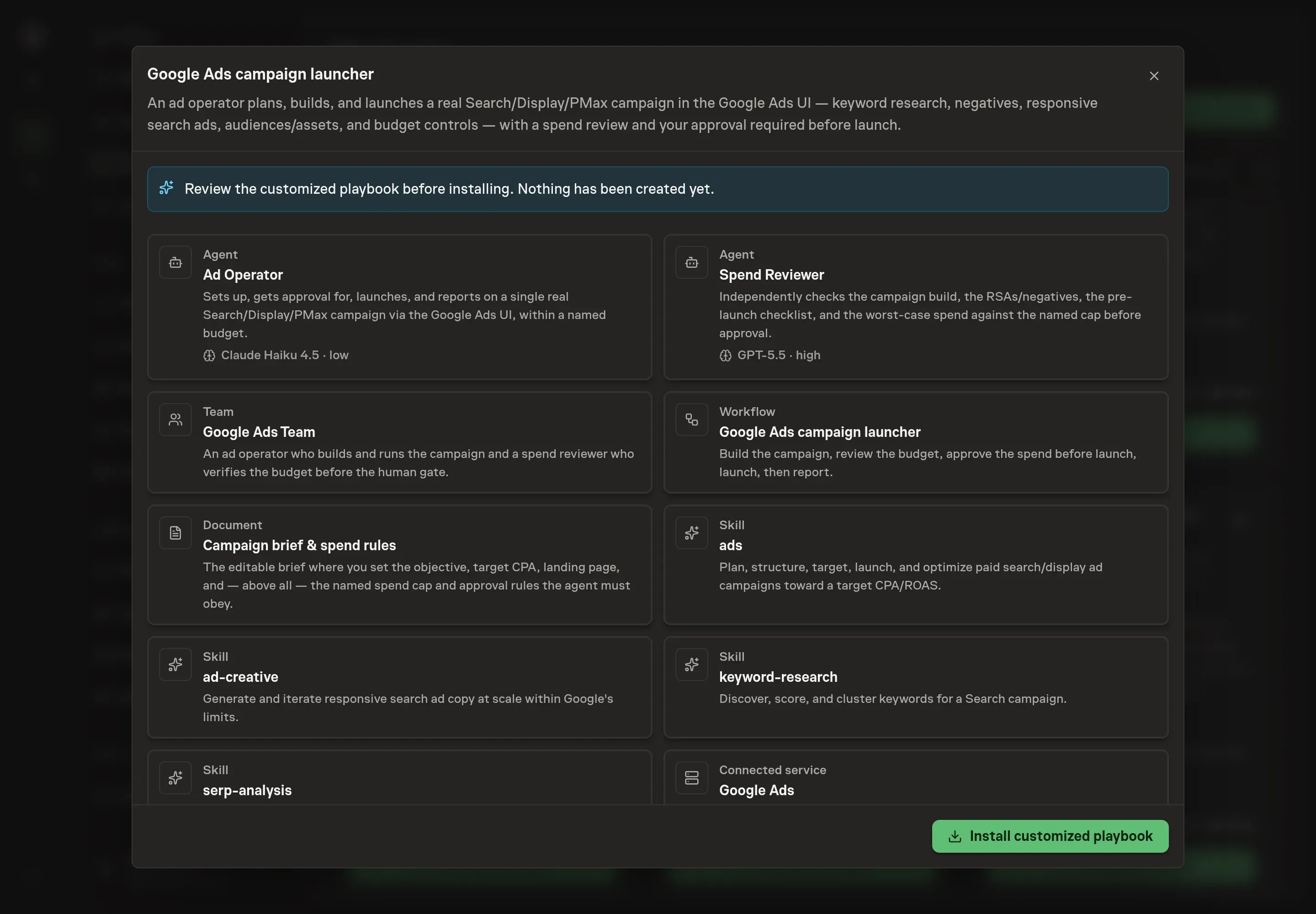
Ask the Agent to generate the Playbook from the agreed brief. Open its proposal in Chat and check the instructions and resources it will install, which carry more detail than the conversational summary. Review the generated records before installation. Confirm that the landing page, conversion goal, keyword themes, and budget language match the campaign you want to run. Ask for a revised proposal if anything is missing or changes the job.
5. Approve and prepare the first work
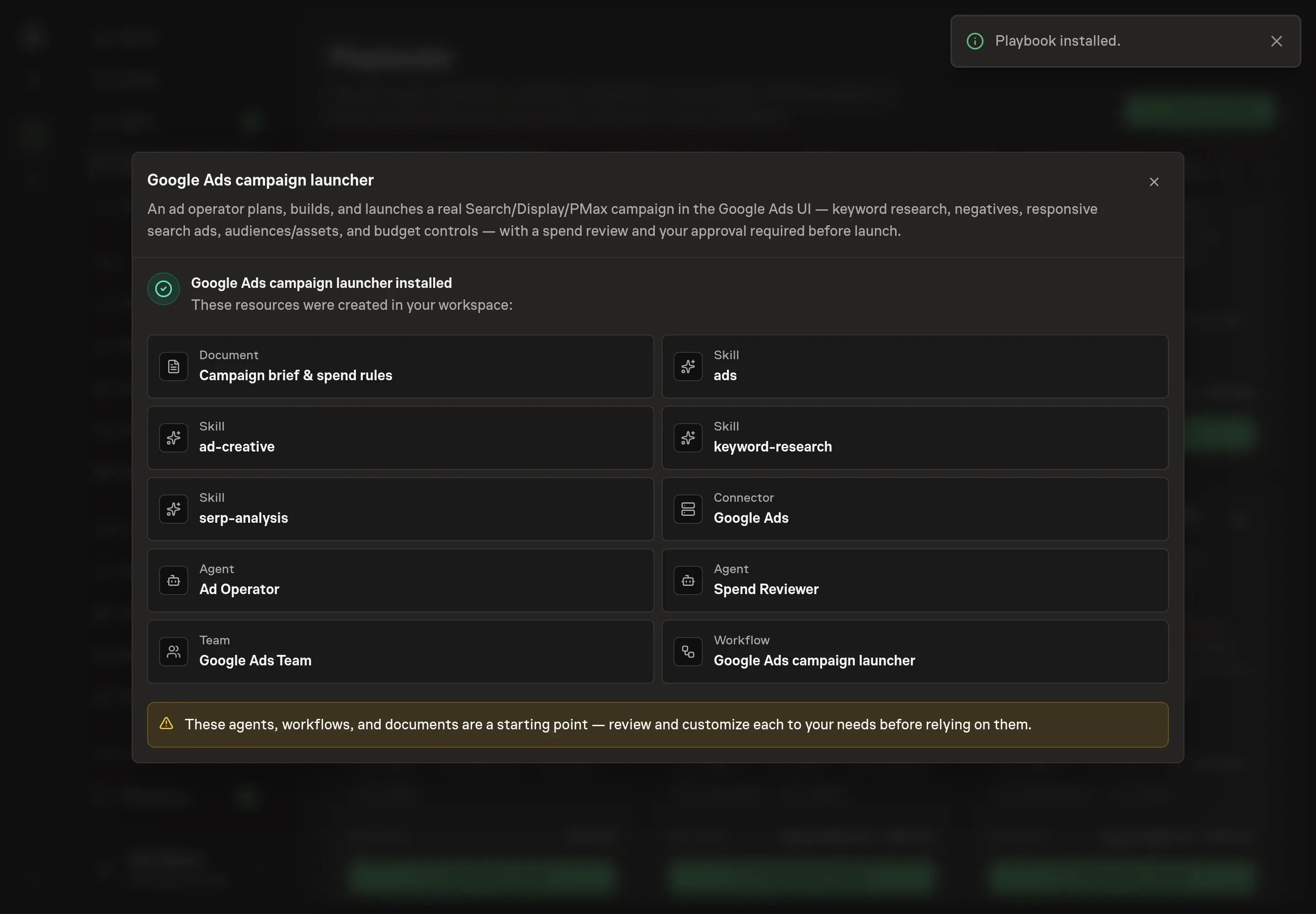
Choose Approve on the proposal in Chat when the configuration matches your brief. Task Machine installs that reviewed configuration. The approved item retains its review details. If your autonomy settings allow direct installation, this approval may not be required. Check the resulting configuration in that case too.
Complete any remaining secure service setup from the installation details in Chat. Inbox keeps those setup items available if you return later. Prepare the source documents and inputs before starting the first Task or Workflow. Installation does not authorize sending, publishing or changing an external service beyond the boundaries you agreed.
What good looks like
Three checks tell you whether the launch process is healthy:
- Tracking is proven before spend. The campaign does not go live until conversion tracking is tested and the conversion goal is named.
- Intent is tight. Ad groups map to commercial or transactional keyword clusters, and the negative list removes the obvious waste before launch.
- Spend is bounded. The approval request states daily budget, run window, worst-case spend, and headroom against the external-costs budget.
Common questions
Can an agent launch a Google Ads campaign without approval? No. The playbook puts human approval before launch. Budget increases, bid changes, and scale-up spend also require approval.
What campaign types does the process support? The bundle can prepare Search, Display, or Performance Max work. Search gets the deepest keyword, SERP, negative-keyword, and responsive-search-ad treatment.
What happens if conversion tracking is not ready? The reviewer should return a no-go. Launching without tested conversion tracking makes CPA and optimization work unreliable.
Does this replace a performance marketer? No. It removes the checklist work and creates a reviewable campaign build. A person still owns the offer, the budget, the approval, and the decision to keep spending.