How to Mine Rising Search Queries
A practical guide to finding Search Console queries gaining impressions and turning the right clusters into approved content briefs.

Founder, Task Machine
Rising-query mining is the process of finding search queries whose impressions are growing before your site has a dedicated page for them. It starts with Search Console performance, groups related queries by intent, checks whether an existing page already covers the demand, and turns the best gaps into content briefs.
The value is timing. By the time a keyword is obvious in a planning spreadsheet, competitors may already own the page type. Rising queries show where demand is forming now, while the site still has a chance to publish a focused page instead of stretching an old article to do a new job.
Why query opportunities disappear
Search Console is full of weak signals: a query with a few impressions, a landing page that almost fits, a topic that looks too small to prioritize. Individually, each one is easy to ignore. Together, they show where the market is starting to use new language.
The cost comes from treating those signals as a monthly cleanup. A small cluster grows, the homepage or a generic blog post keeps ranking by accident, and nobody writes the page until the query has become competitive. The team then spends more effort catching up than it would have spent approving a brief early.
What the manual process looks like
Done by hand, rising-query mining is a weekly SEO ritual:
- Pull Search Console query performance for the current comparison window and the prior one.
- Filter for queries with rising impressions where the site is visible but not winning.
- Cluster related queries by intent instead of by matching words alone.
- Check the current landing page and existing content library for cannibalization risk.
- Decide whether the cluster needs a new page, a stronger existing page, consolidation, a watch-list entry, or rejection.
- Draft a brief for the approved opportunities with target queries, intent, title, outline, internal links, and metric provenance.
The hard part is discipline. Without a rolling log, the same weak clusters get rediscovered, rejected, and rediscovered again.
What an agent can automate
An agent is useful because the process is structured, evidence-heavy, and easy to run on a schedule:
- Compare the query windows. The agent reads Search Console or attached exports, compares the current period to the prior period, and labels every metric by source.
- Cluster by intent. It groups rising queries into page-shaped clusters, then classifies the intent so a how-to query does not get mixed into a comparison page.
- Check existing pages. It searches and fetches current pages to avoid recommending a new page that would split an existing ranker.
- Draft the brief. For each winner, it writes the query set, working title, outline, internal-link candidates, and the reason the page should exist now.
- Maintain the log. It appends every cluster, verdict, and later outcome so rejected clusters and watch-list items do not loop forever.
What stays judgment: which briefs enter production, which clusters are too close to the brand strategy to publish, and any case where the evidence is thin.
The guardrails that make it safe
The safe shape is a read-only mining workflow. The agent reads performance data, checks public pages, writes briefs, and stops at approval. It does not publish, rewrite pages, or change the content calendar on its own.
The query-opportunity log is the second guardrail. Every metric keeps a provenance label, every rejected cluster records why it was rejected, and every approved brief waits for a person to decide whether the content team has capacity to produce it.
Set it up in Task Machine
The Emerging search query research playbook provides a starting point for the method above. You need an active Task Machine workspace with Chat, workspace-management and Playbook-installation access (workspace owners have it). Search Console access is useful but not required up front. Until you authorize it, the workflow can work from attached exports.
1. Find the playbook
Open Search in your workspace and enter "Emerging search query research". The command center lists Set up Emerging search query research under Playbook setup.
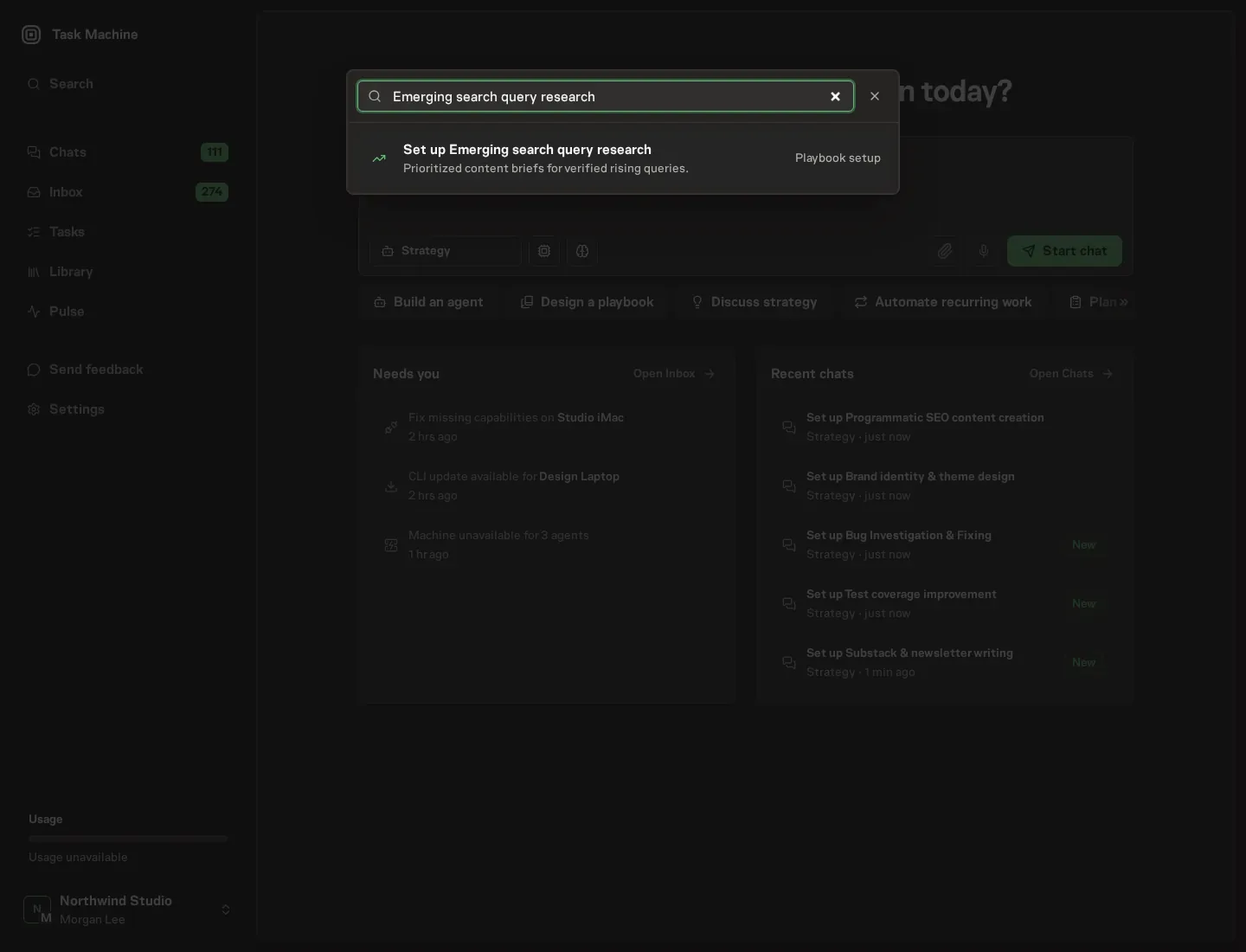
2. Start the conversation
Choose Set up Emerging search query research. Task Machine opens a dedicated Chat with the Playbook card and an editable, unsent request. Read the intended job and outcome. Add your situation and send it when ready. Opening the draft does not install anything or start work. This walkthrough uses settings that require approval of the proposed Playbook.
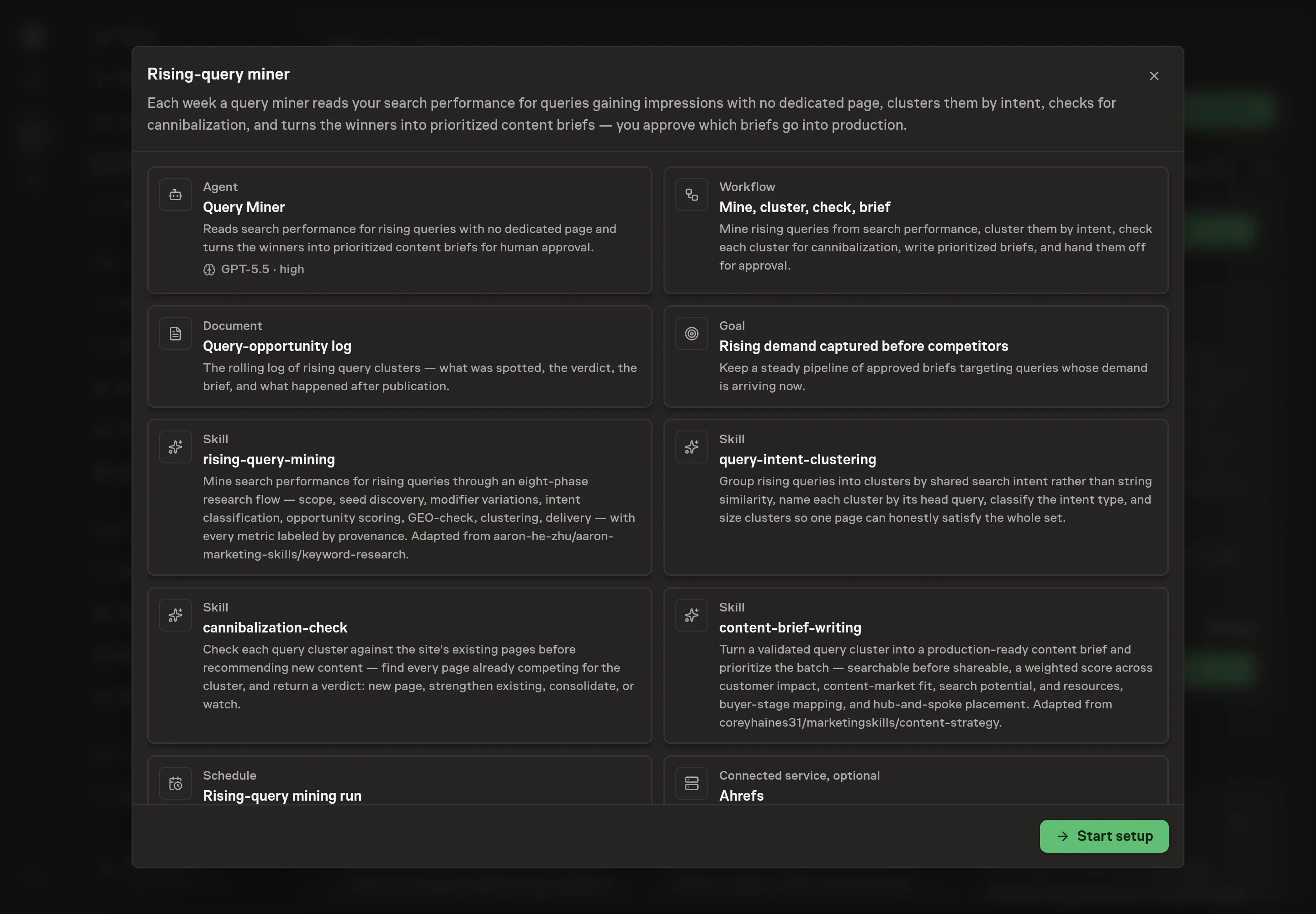
3. Agree the services
Tell the Agent which services you use. The catalog offers these starting choices:
- SEO data providers: Ahrefs, Semrush. Optional.
Discuss any missing access or export-based alternative before generation. Check the exact proposal includes only the services you agreed. Enter credentials only through secure setup, never in Chat.
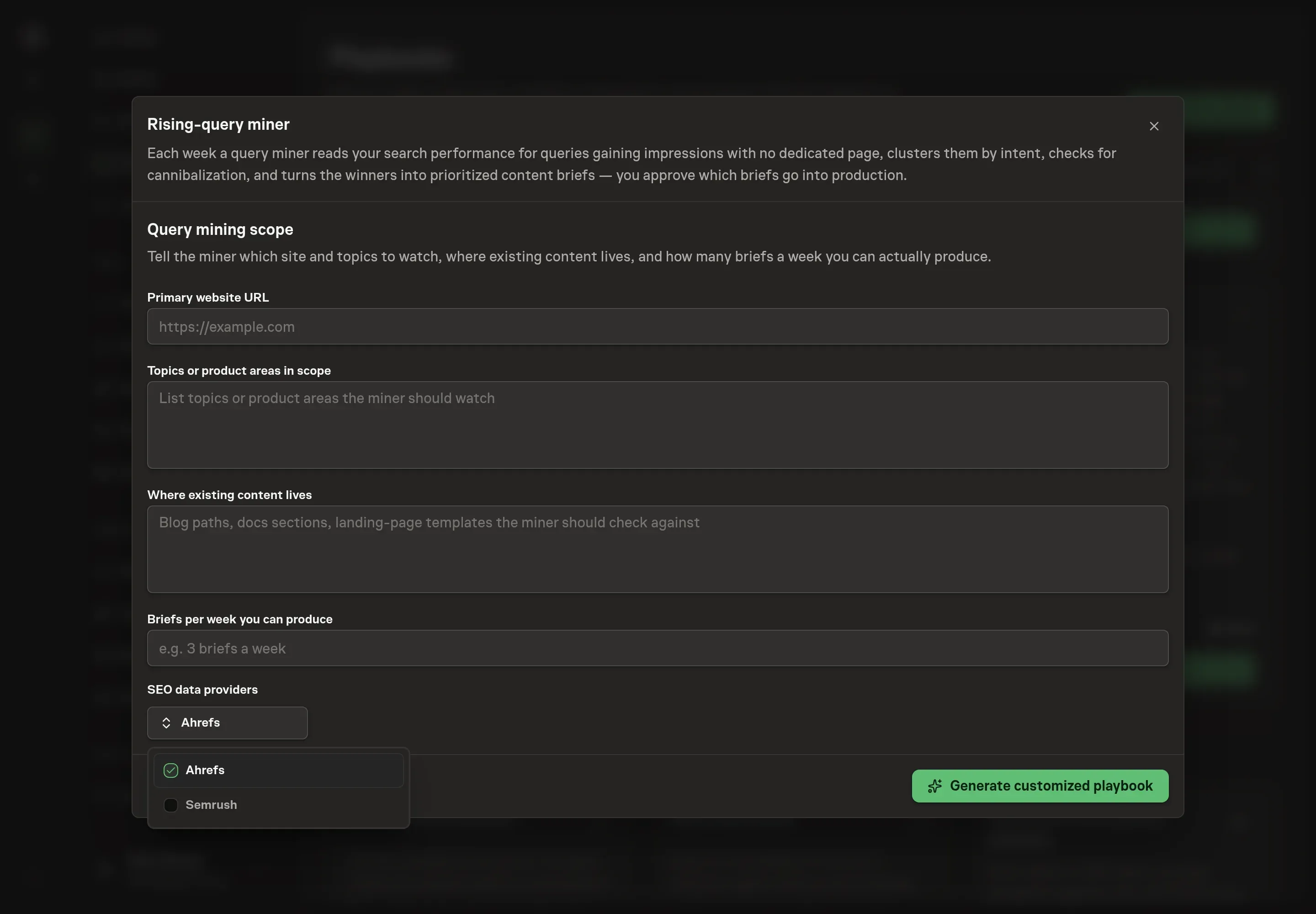
4. Agree the working brief
Use Chat to agree the inputs, expected output and limits before asking for a proposal. Discuss the site URL, topics in scope, where existing content lives, and how many briefs the team can produce each week. Concrete capacity keeps the miner from approving more opportunities than the team can use.
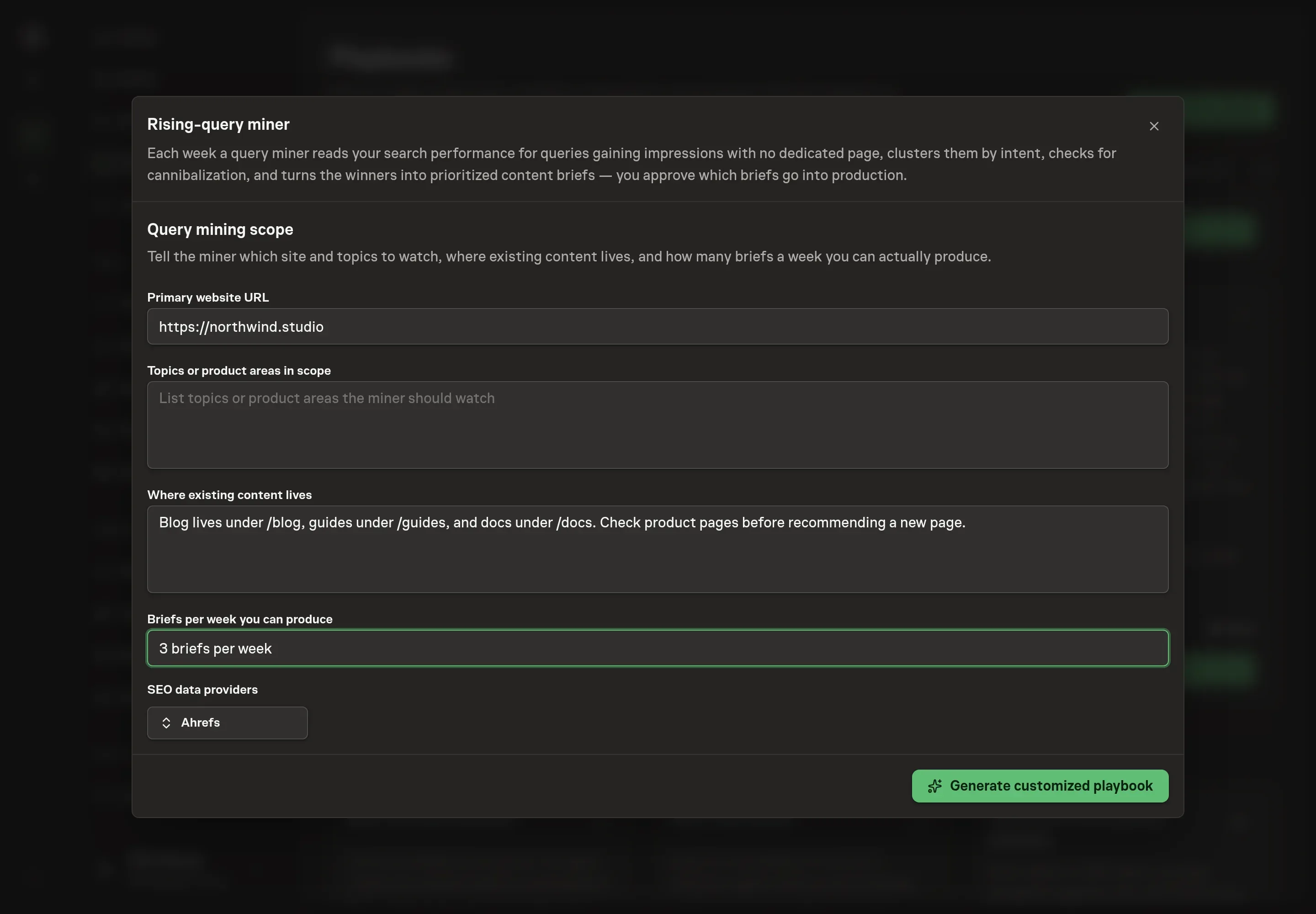
5. Review the proposed Playbook
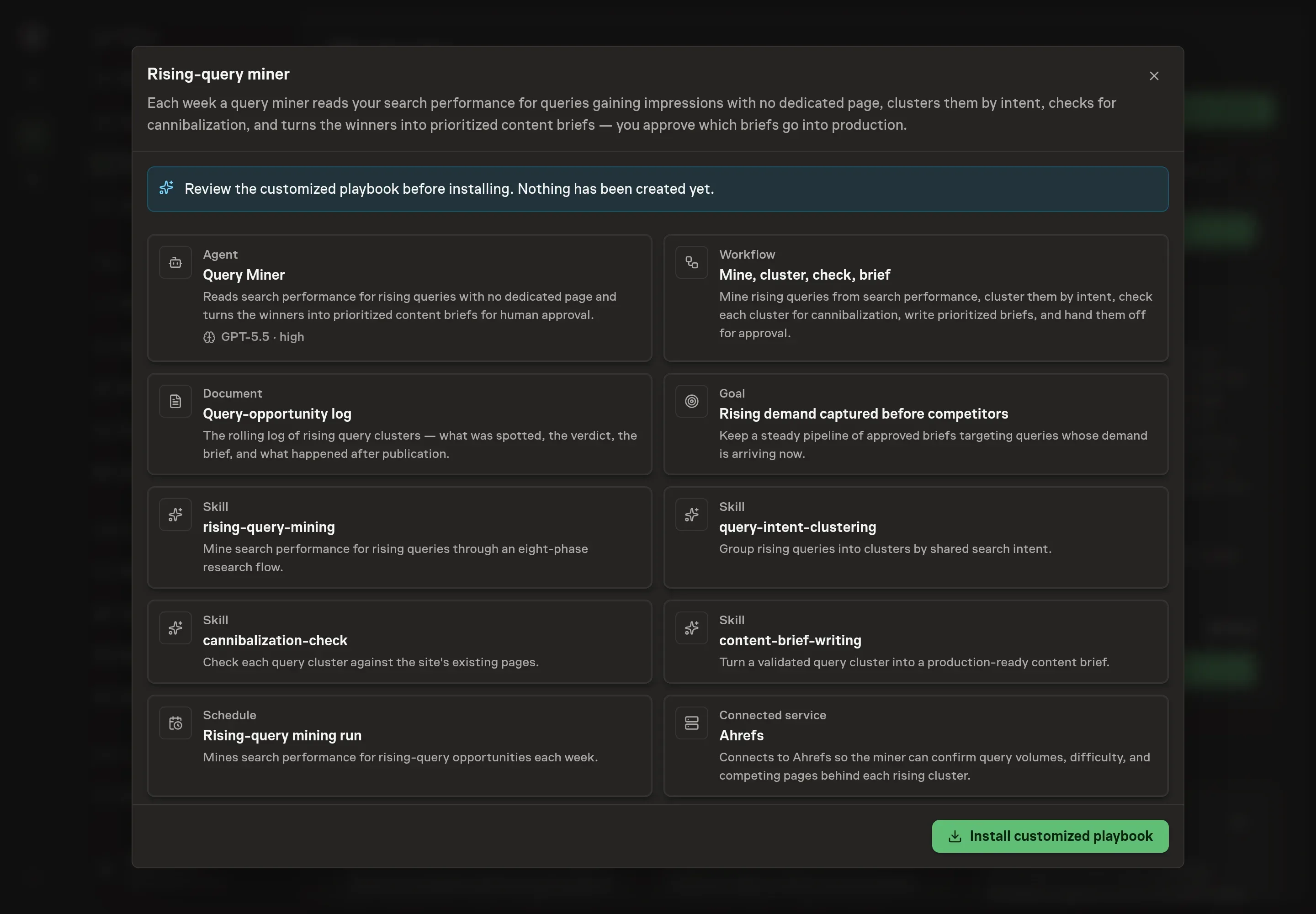
Ask the Agent to generate the Playbook from the agreed brief. Open its proposal in Chat and check the instructions and resources it will install, which carry more detail than the conversational summary. Review the generated records and confirm the chosen service is the only connected service listed. Ask for a revised proposal if anything is missing or changes the job.
6. Approve and prepare the first work
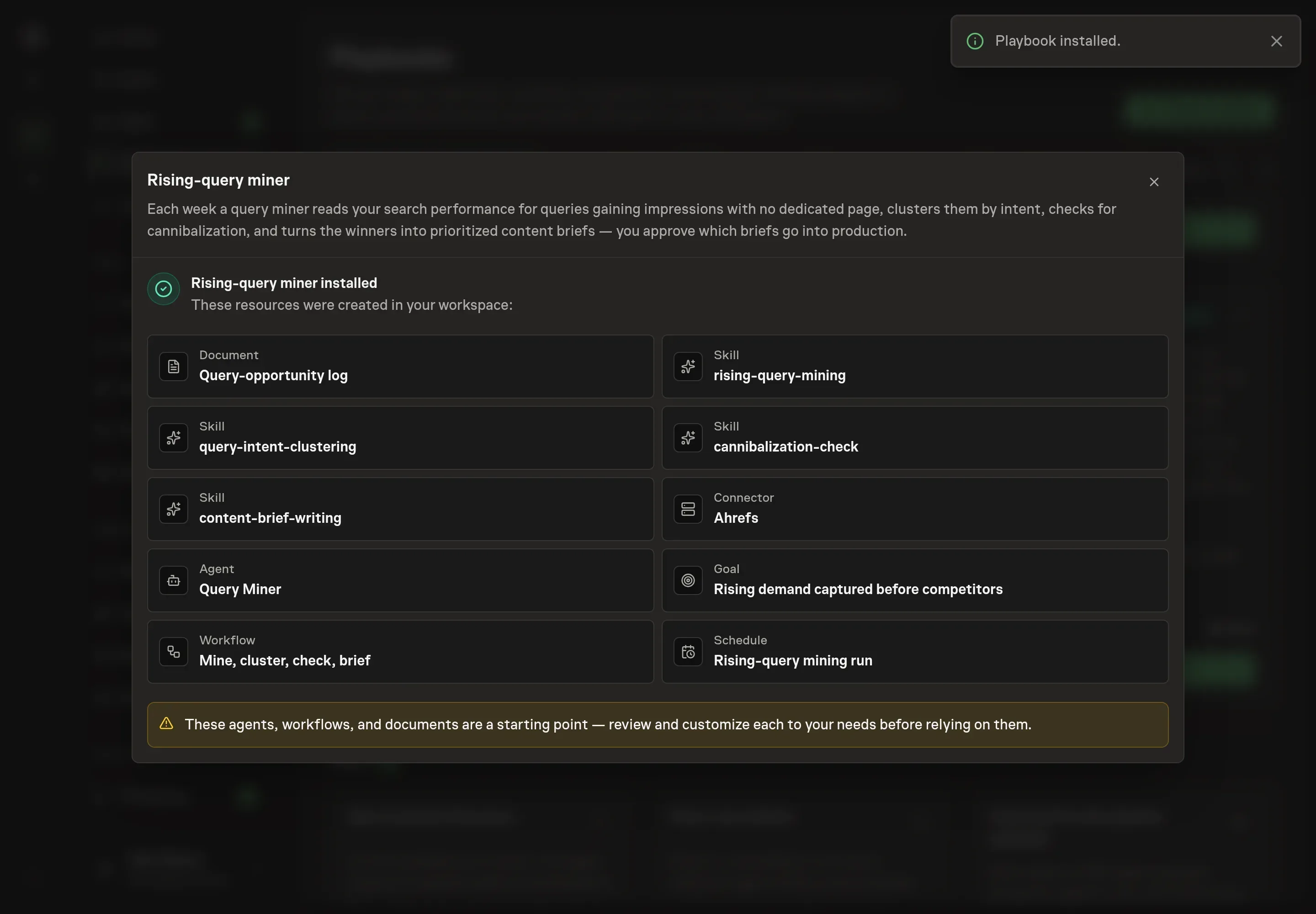
Choose Approve on the proposal in Chat when the configuration matches your brief. Task Machine installs that reviewed configuration. The approved item retains its review details. If your autonomy settings allow direct installation, this approval may not be required. Check the resulting configuration in that case too.
Complete any remaining secure service setup from the installation details in Chat. Inbox keeps those setup items available if you return later. Prepare the source documents and inputs before starting the first Task or Workflow. Installation does not authorize sending, publishing or changing an external service beyond the boundaries you agreed. Confirm each schedule's cadence and timezone, and resolve any pending schedule setup before it starts. A readback must wait for its agreed observation window and source data. Check the reviewed tracker or results document before the first cycle so evidence and human decisions have a durable home.
What good looks like
Three signals tell you whether the process works:
- Clusters are page-shaped. Each approved cluster has one intent, one likely page type, and a clear reason existing pages do not already cover it.
- Rejected ideas stay rejected. The log prevents the same weak cluster from returning every week without new evidence.
- Briefs match capacity. The miner recommends the number of briefs the team can produce, not every interesting query.
Common questions
Can this run without Ahrefs or Semrush? Yes. The miner can work from Search Console exports and the query-opportunity log. A connected SEO data service helps confirm volume, difficulty, and competing pages.
Will it publish pages automatically? No. It drafts briefs and waits for approval. Publishing remains a separate content decision.
How often should it run? Weekly is the default because query movement needs enough time to mean something. Daily mining creates noise for most sites.
What happens to cannibalized queries? They become strengthen-existing-page or consolidate recommendations, not new-page briefs.