Updates
Product updates and implementation notes for Task Machine.
-
New Feature
Workflows now support Loop and Classify steps
Task Machine Workflows can now repeat a set of steps for every item in a list. For example, classify a day’s customer requests by topic and urgency, then prepare one summary for review. We added them because many recurring jobs, like a daily batch of customer requests, run the same steps over a list.
Repeat steps for each item with Loop
Add Loop after a step that returns a list, then choose the steps to run for each item. Loop processes the items one at a time and collects their results in the original order for the next step.
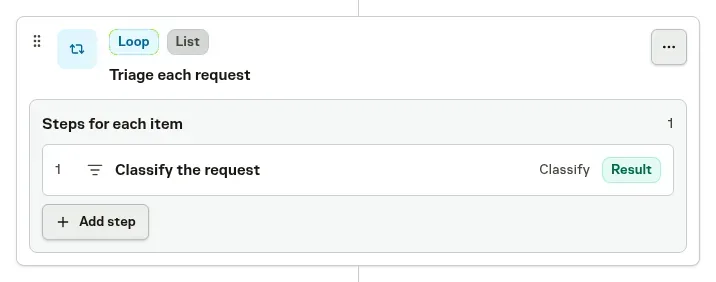
If an item fails, Loop continues with the remaining items and includes the error in that item’s result. The Run view shows which items failed and lets you inspect their steps, so unfinished work stays visible alongside completed results.
Answer questions and route work with Classify
Classify answers a set of questions about its input in one step. Questions can choose from named options, rate an item on an ordered scale, or answer yes or no. For a customer request, that might mean choosing its department, assessing urgency, and deciding whether it needs follow-up.
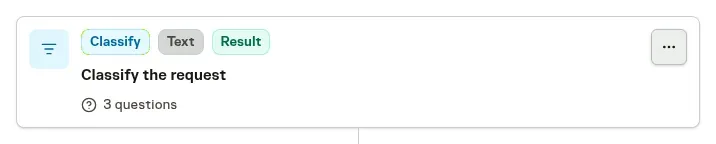
The answers are returned together as text for later agents to use. Classify can also choose a route from a choice or rating, such as sending an urgent request through an additional review step. You set the confidence threshold and what happens when the answer is uncertain.
Classify is currently unavailable in EU-only workspaces.
See Workflows for configuring Loop steps and Classify questions.
-
New Feature
Agents now finish tasks in fewer runs
Agent tasks now finish in fewer runs and reach done sooner. Every run ends with a short report that says where the work stands and what happens next, and Task Machine starts that next step at the right moment on its own. We built it because idle check-ins and repeated attempts were spending runs without moving the work forward.
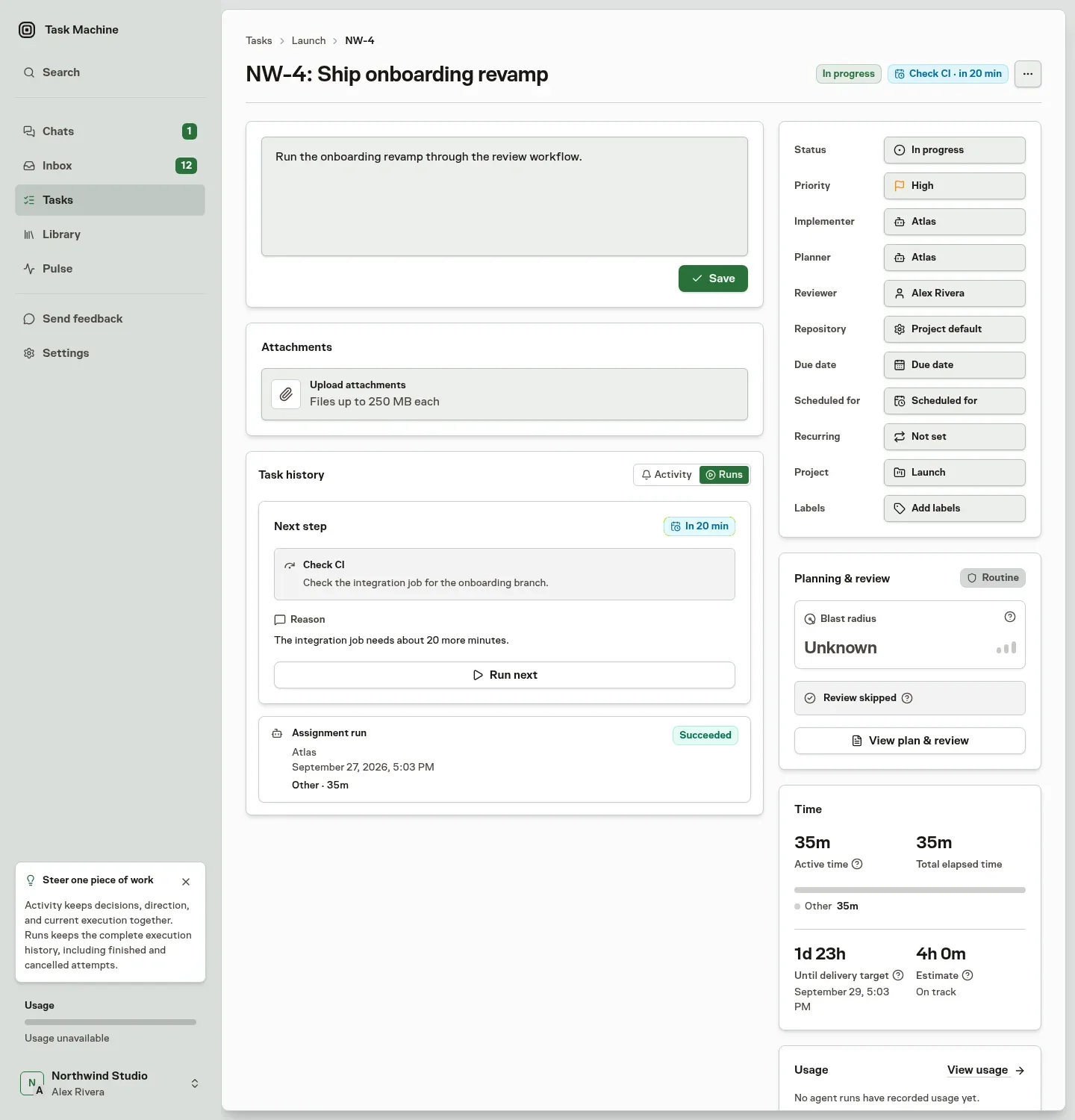
See the next step on every task
Each task shows what its agent does next and when. An agent waiting on CI checks back when the job should be done. An agent waiting on your answer resumes as soon as you reply in the Inbox, without checking in while it waits. Tasks that depend on other work start when that work lands.
Stop paying for runs that go nowhere
Task Machine notices when an agent repeats the same step without progress and says so in the run report, including what those runs cost. It holds the next attempt until something changes, such as a new commit, a decision, or your direction. When a task needs you, Give direction shows the affected runs so you can steer it in one place.
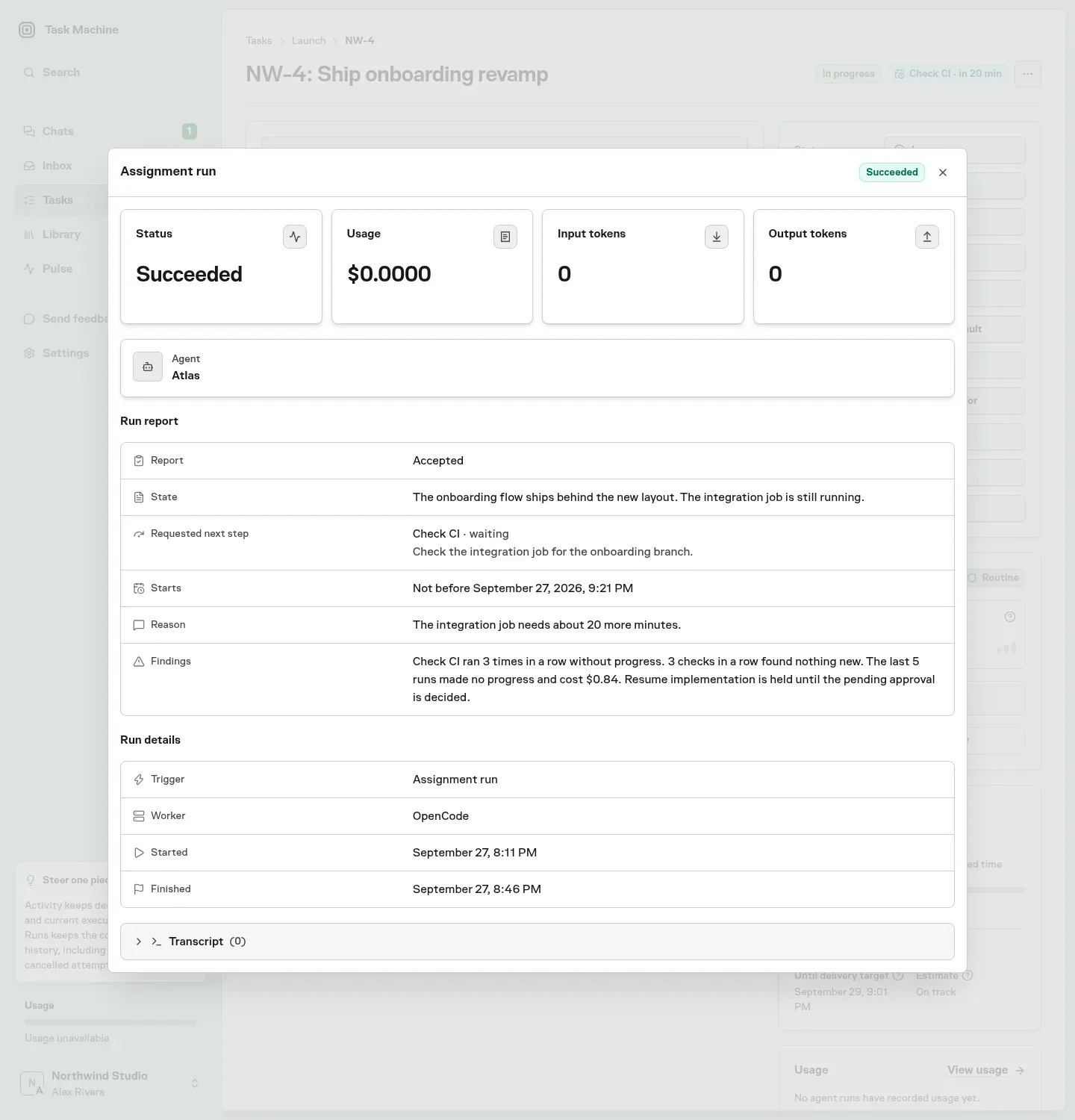
Know when work will land
Agents estimate the working time left and say whether the task is on track for its delivery target. When a task is at risk, you see it on the board and on the task before the deadline passes.
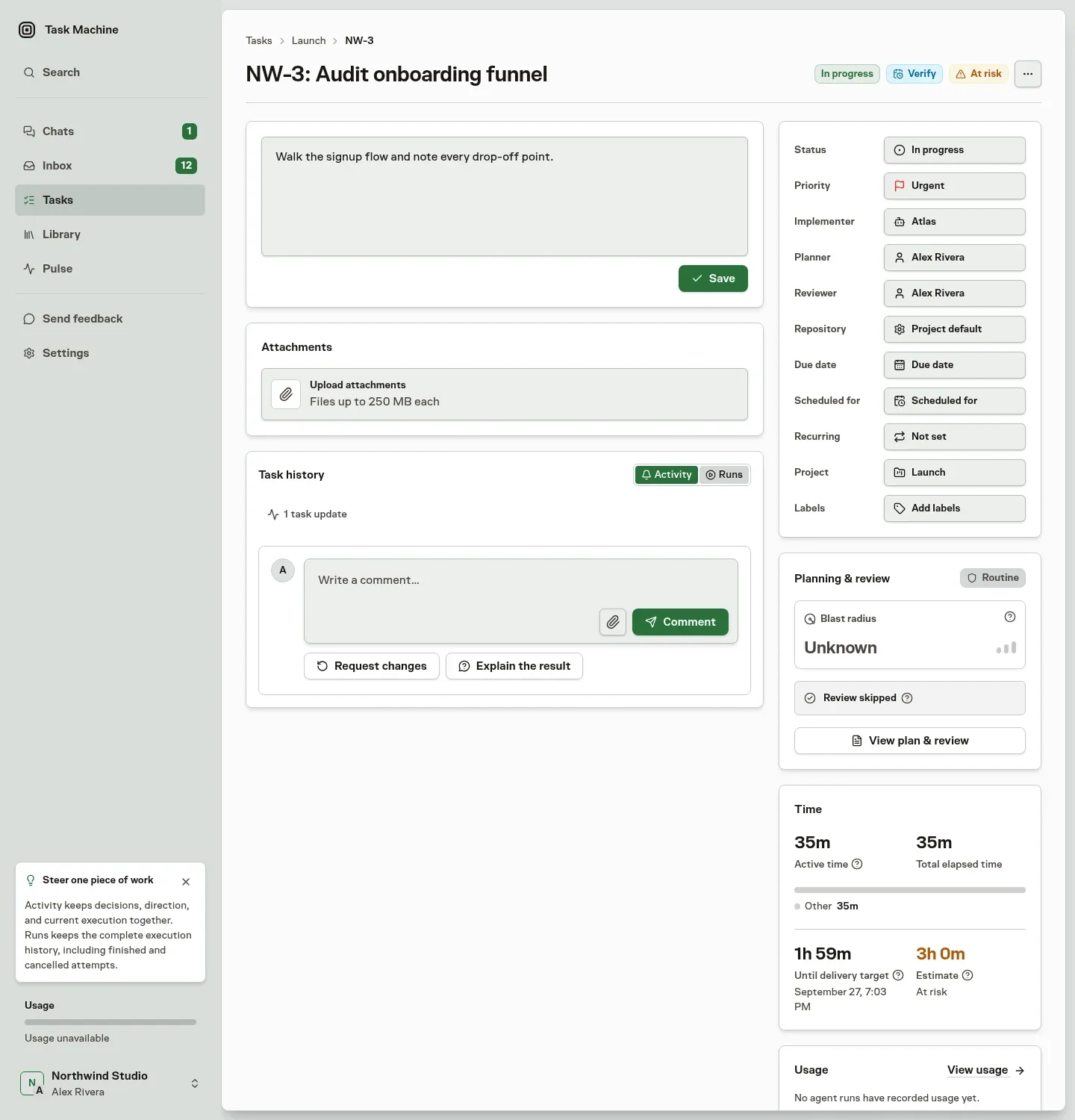
Read Run history and Blocked work for how next steps, findings, and estimates work.
-
New Feature
Use Task Machine in your favorite tools
Task Machine can now be used through its remote MCP server. Connect it to an AI assistant you already use, like ChatGPT, Claude, or Gemini, to create and assign tasks and ask how work is going without leaving your conversation. We built it because many people already plan their day in an AI assistant and should be able to hand off work from there.
Create a task or assign it to a person or agent, then check its status, read updates, and follow the discussion from your connected tool. The task and its history stay in Task Machine.
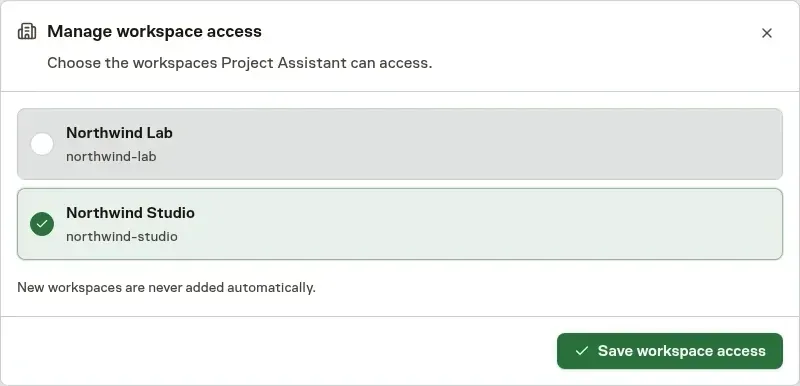
Choose what each tool can access
You select the workspaces a tool can use. Proposals that need your decision still come to Inbox. Connected tools cannot approve them or run agents directly.
-
New Feature
Control retention and processing region for managed AI
Workspaces can now require zero data retention, EU processing, or both for Task Machine-managed AI. Model choices and requests follow the Workspace policy, and Task Machine blocks incompatible requests rather than silently weakening either requirement. We added these controls because some teams can only use AI when their data is not retained or stays in the EU.
Workspace owners configure two independent requirements in the Managed AI section of Privacy & data settings:
- Require zero data retention routes managed AI only through qualifying zero-retention endpoints.
- Require EU processing for managed AI sends requests through OpenRouter's EU service and uses EU-eligible provider endpoints.
- Enabling both restricts requests to endpoints that satisfy both requirements.
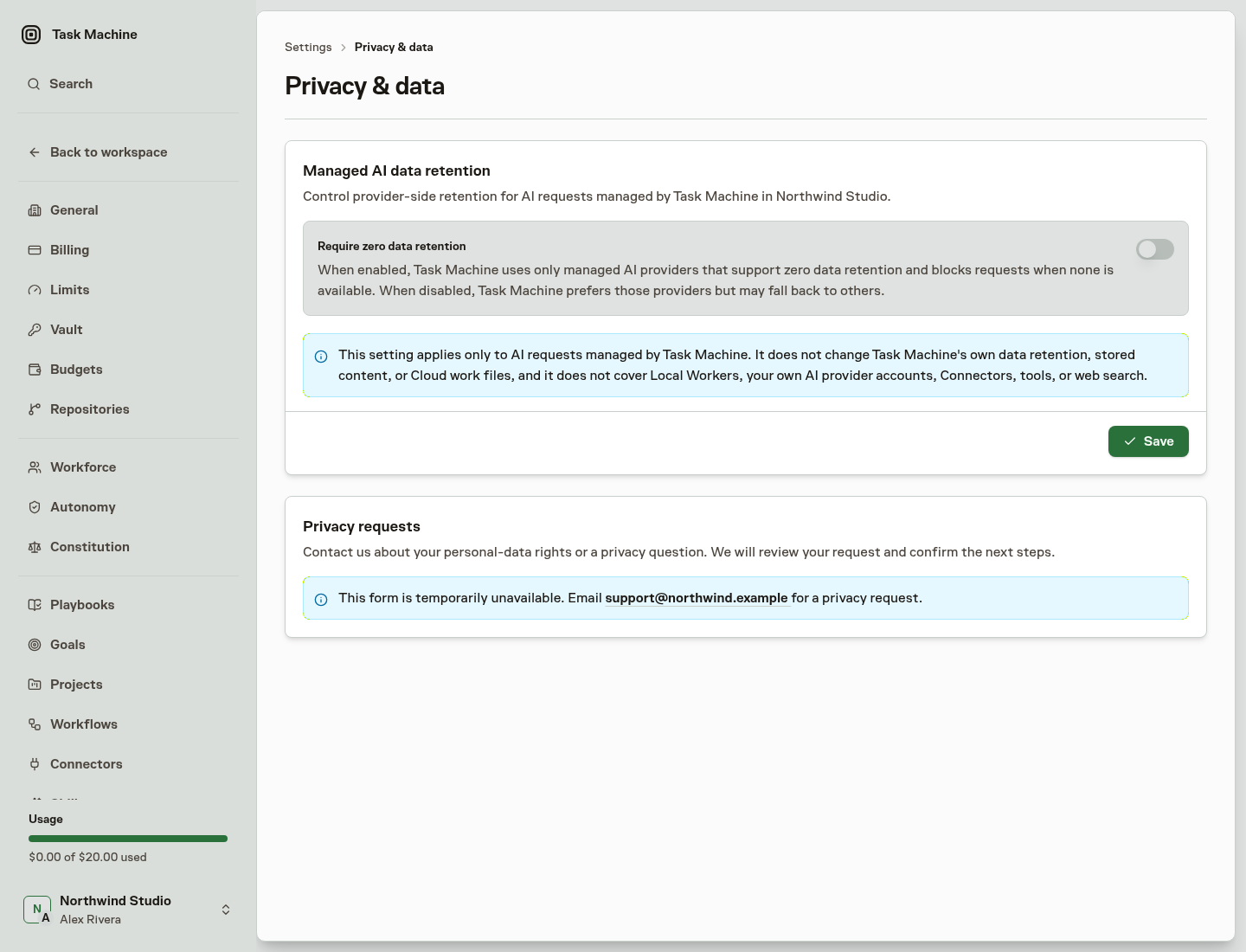
Changes apply to subsequent AI requests, including later requests within work already in progress. Requests already sent may finish under the previous policy.
Task Machine-supplied AI features follow the Workspace's regional requirement even when an Agent executes through a Local Worker. These product-side features require zero-retention routing for every request, independently of the Workspace switch.
-
New Feature
More precise learned autonomy
Learned autonomy now recommends precise approval-policy changes based on the work people actually reviewed. Strong task-creation results can support direct task creation without also relaxing review for workflow updates, Skill changes, or unrelated work. We changed it because one strong track record could relax review for unrelated kinds of work too.
The same applies to Team routing: routine routes can become automatic while defer, block, or cancellation decisions remain under review.
Set clear approval boundaries
Agent and Team Autonomy settings now show the policy for each kind of work. Built-in autonomy levels provide a starting point, while Custom lets you choose Review or Direct for Agent work and Review or Automatic for Team routing.
Permissions remain separate. An Agent still needs permission to perform the work. Learned autonomy only determines whether that authorized work takes effect directly or waits for review.
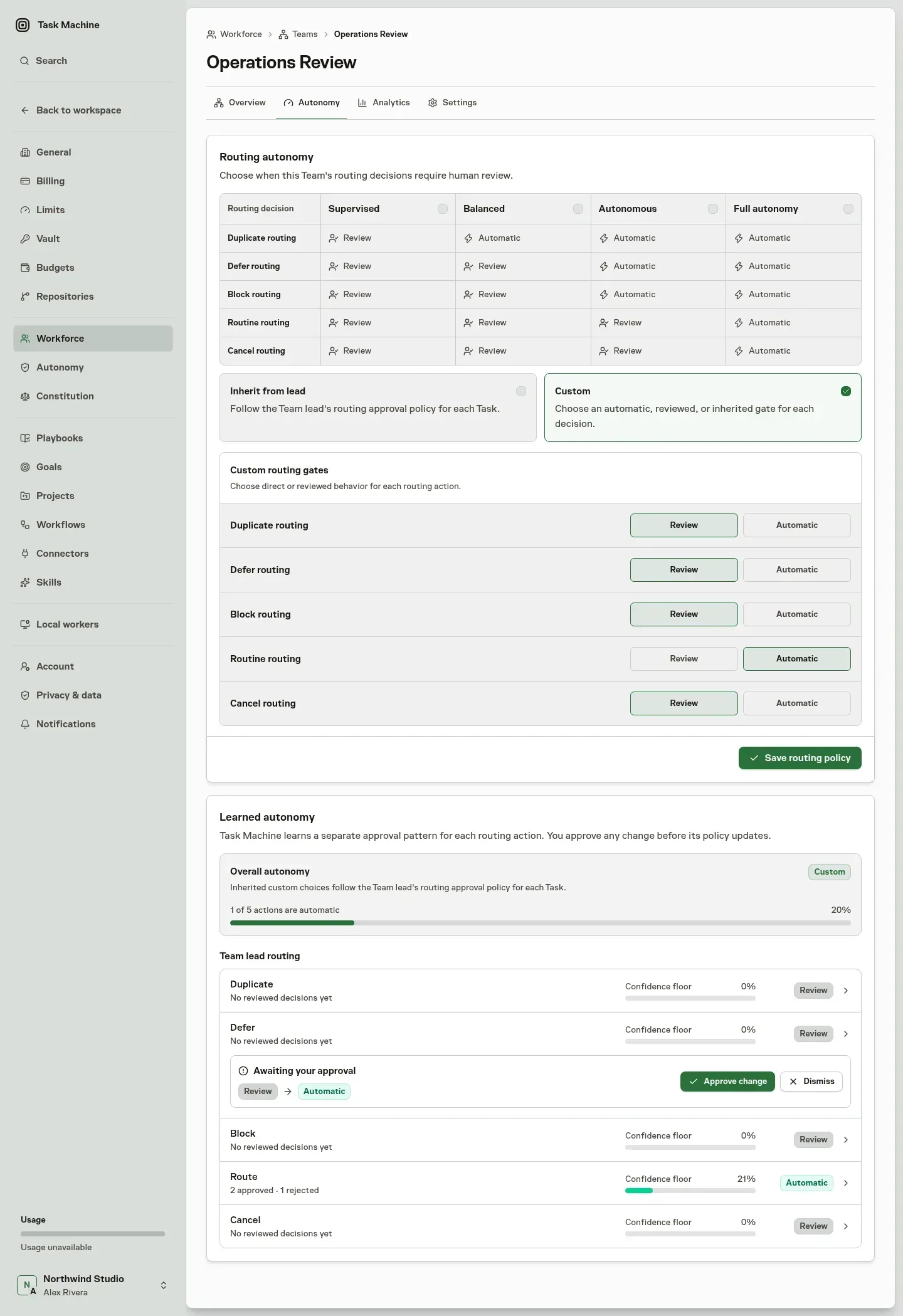
Approved and rejected decisions contribute only to the matching kind of work. A task proposal cannot increase autonomy for workflow updates, and one Team routing decision cannot change the policy for another routing decision.
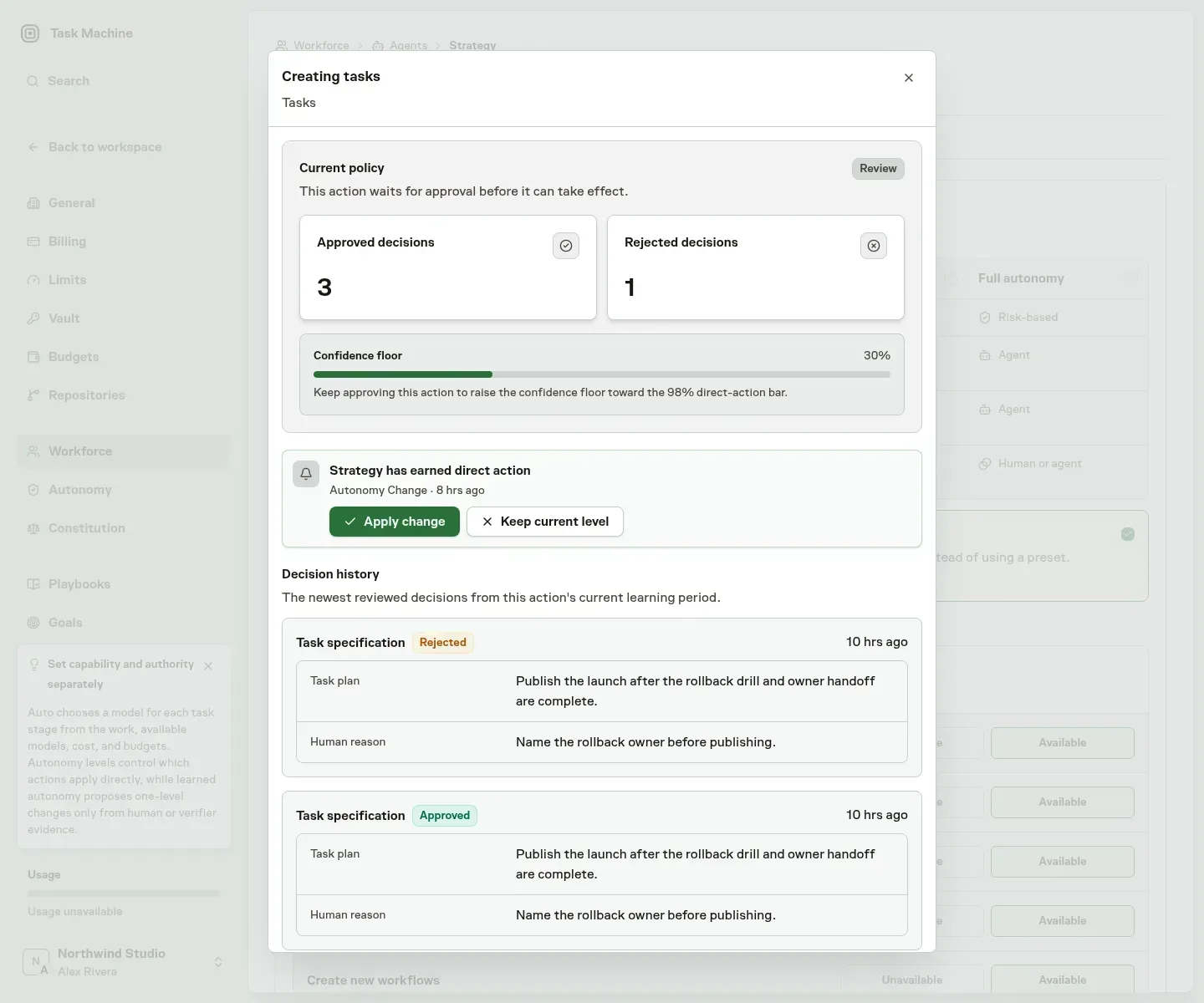
The Learned autonomy section shows the current policy, approval history, and confidence for each activity. Direct and automatic work is periodically returned to the normal review flow before taking effect, keeping the evidence current.
Keep every policy change human-approved
When the results support a change, Task Machine recommends moving that policy from Review to Direct, or back to Review, without changing other approval boundaries.
The recommendation arrives in the Inbox with the relevant decision history and human reasons. You can apply the change or keep the current policy. Learned autonomy never changes a policy without your approval.
-
New Feature
Teams can earn routing autonomy
Teams can now apply selected routing decisions automatically while keeping higher-risk choices under review. Task Machine learns from reviewed outcomes, proposes changes to each Team’s autonomy in the Inbox, and shows whether that trust is working over time. We built it because routine routing decisions kept waiting for review even after a Team had handled them well many times.
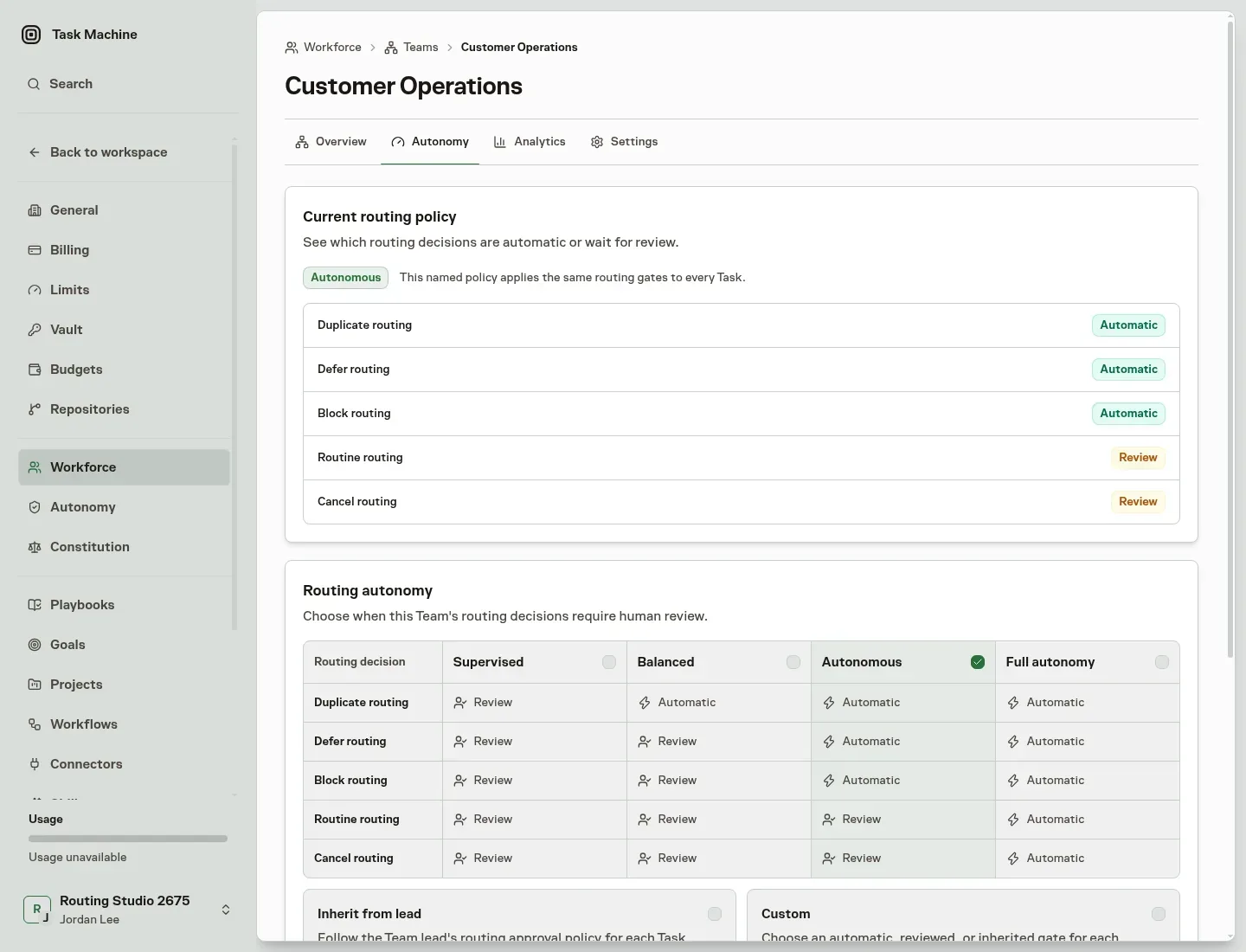
Choose how closely each Team’s routing should be supervised. Built-in levels progressively allow duplicate, defer, block, routine, and cancellation decisions to be handled automatically, while Custom lets you decide each one separately.
The policy belongs to the Team rather than its current lead, so replacing a lead does not reset the trust you have established. Routing decisions retain the policy that governed them, preserving a clear record of what happened.
Adjust trust from reviewed outcomes
Every approved or corrected routing decision contributes evidence for that Team and decision type. When the evidence supports a change, Task Machine proposes moving the Team one autonomy level up or down.
The proposal arrives in the Inbox with the relevant evidence and remains a human decision. Applying it publishes a new Team policy. Dismissing it leaves the current policy unchanged. Task Machine never changes a Team’s autonomy silently.
See whether autonomy is working
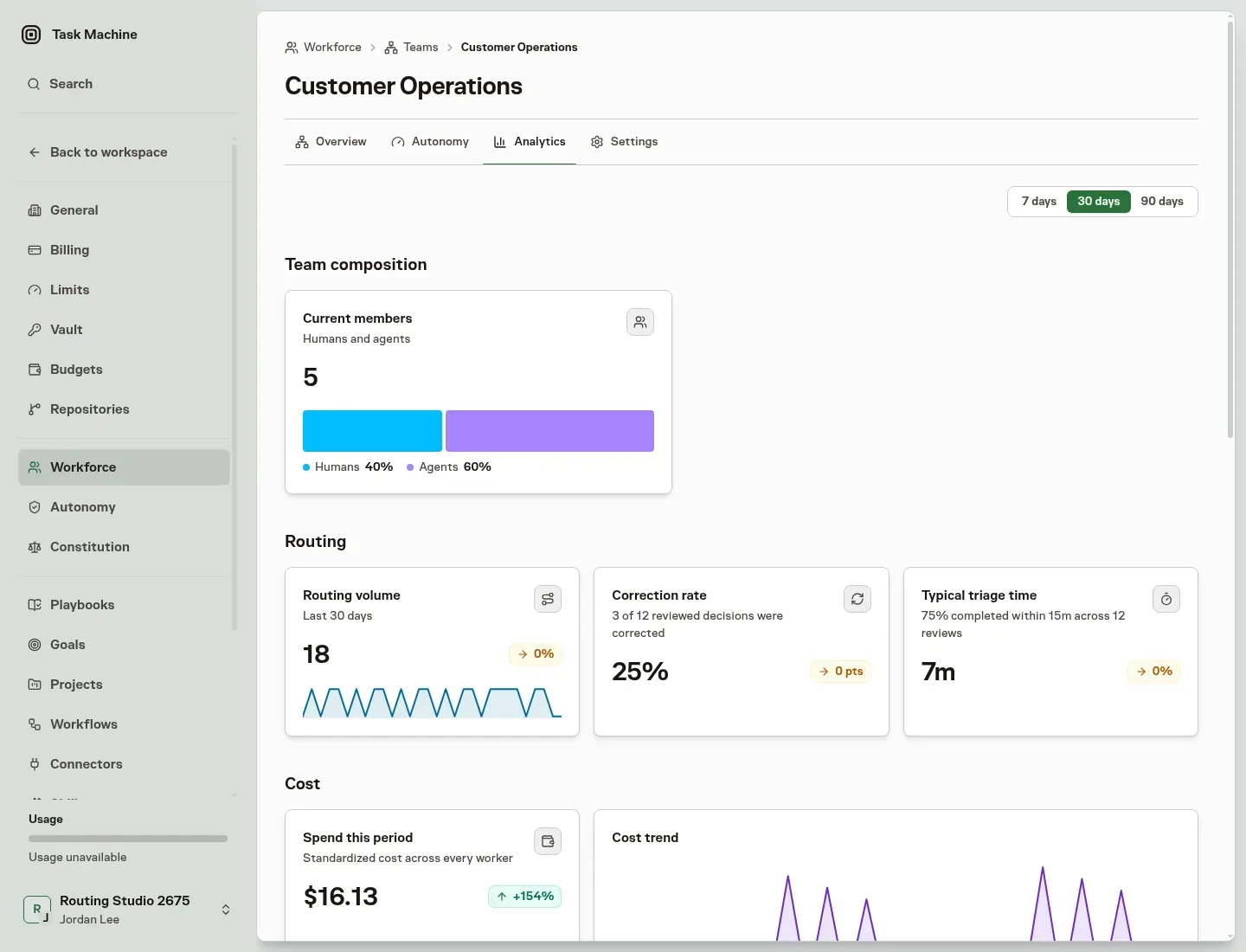
The Team Analytics page separates current composition from routing performance and execution usage. Compare routing volume, corrections, and triage time across trailing 7, 30, or 90-day periods.
People with budget access can also review cost, tokens, and active time for work routed through the Team, with breakdowns across the Agents, Projects, Goals, Tasks, Workers, Stages, and Models involved. This makes it possible to increase autonomy while keeping review quality, spend, and execution time visible.
-
New Feature
Agents learn Skills from repeated work
Task Machine can now review work an Agent has completed repeatedly and propose a reusable Skill when the pattern is clear. Future tasks can start with approved instructions instead of rebuilding the same approach from scratch. We built it because agents kept rebuilding the same approach from scratch on similar tasks.
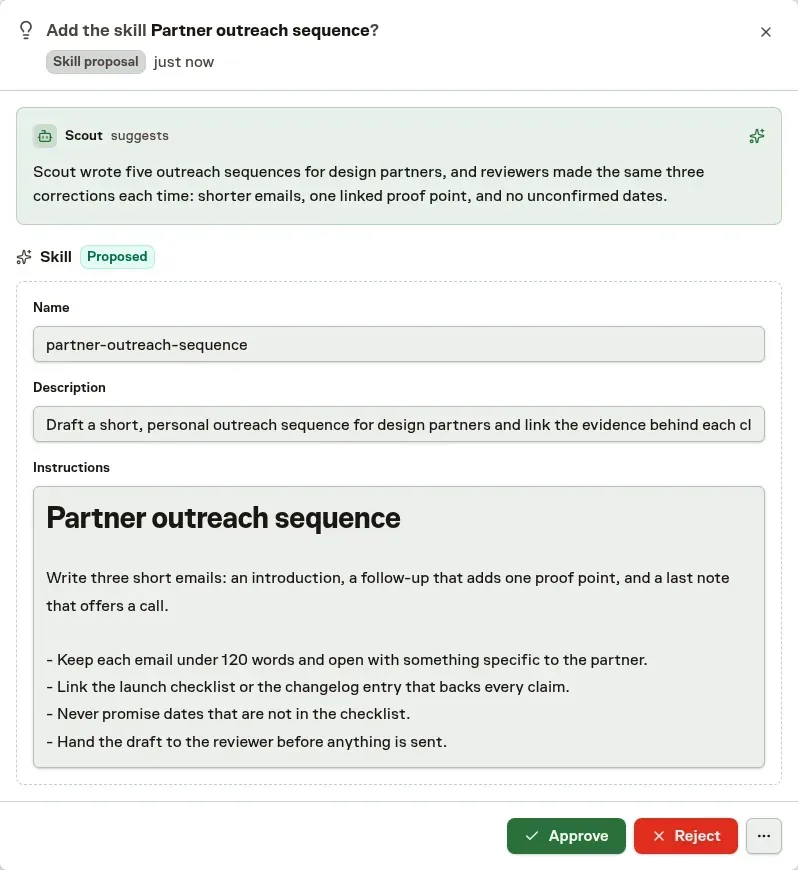
Task Machine periodically reviews completed work for each Agent and recommends the smallest useful change supported by the evidence: assign an existing Skill to more Agents, improve a workspace-authored Skill, or create a new one.
When the evidence is not strong enough, nothing is proposed and no Inbox attention is required. Marketplace Skills can be assigned to additional Agents, but their content is never rewritten.
Set a separate policy for each kind of change
Every consequential Agent action now has its own review or direct policy. Task Machine learns from decisions for that exact action instead of pooling unrelated work, samples every tenth direct action for review, and proposes action-specific policy changes through the Inbox. Agent and Team Autonomy settings group these actions and provide bounded evidence details for each one.
When a learned-Skill action requires review or is sampled, its proposal arrives in the Inbox with the completed tasks that support it, a plain-language explanation, and any relevant limitations. New Skills show their complete instructions, while proposed updates show the existing and revised Markdown as a structured before-and-after diff. Eligible direct actions apply without creating Inbox attention.
For reviewed proposals, you can add or remove Agent recipients before approving. Approval publishes the Skill changes and Agent assignments together. Rejection leaves the current setup unchanged. The completed Inbox item keeps the reviewed evidence, content, and final recipients as a durable record of the decision.
-
New Feature
Team leads now triage the full backlog
Team leads now revisit every eligible Task in the Team backlog, including older, deferred, and changed work. They prioritize the queue, check for duplicates, and give each Task an explicit next step. We built it because new Tasks kept pushing older and deferred work out of the lead's view.
Team leads work through the backlog in prioritized batches and resume where their previous review stopped. Older work stays in consideration even when new Tasks keep arriving.
Before deciding, the lead checks accessible Tasks for duplicates, related work, and regressions. It can then route a Task forward, defer it until a specific time, mark it blocked, or cancel it. A deferred Task keeps the lead’s explanation and returns for reconsideration at the chosen time.
When work moves forward, the lead recommends the Task status, priority, implementer, planner, reviewer, and other Task details together. Applying the recommendation records the final routing and Task details as one decision, so work cannot be left partially routed.
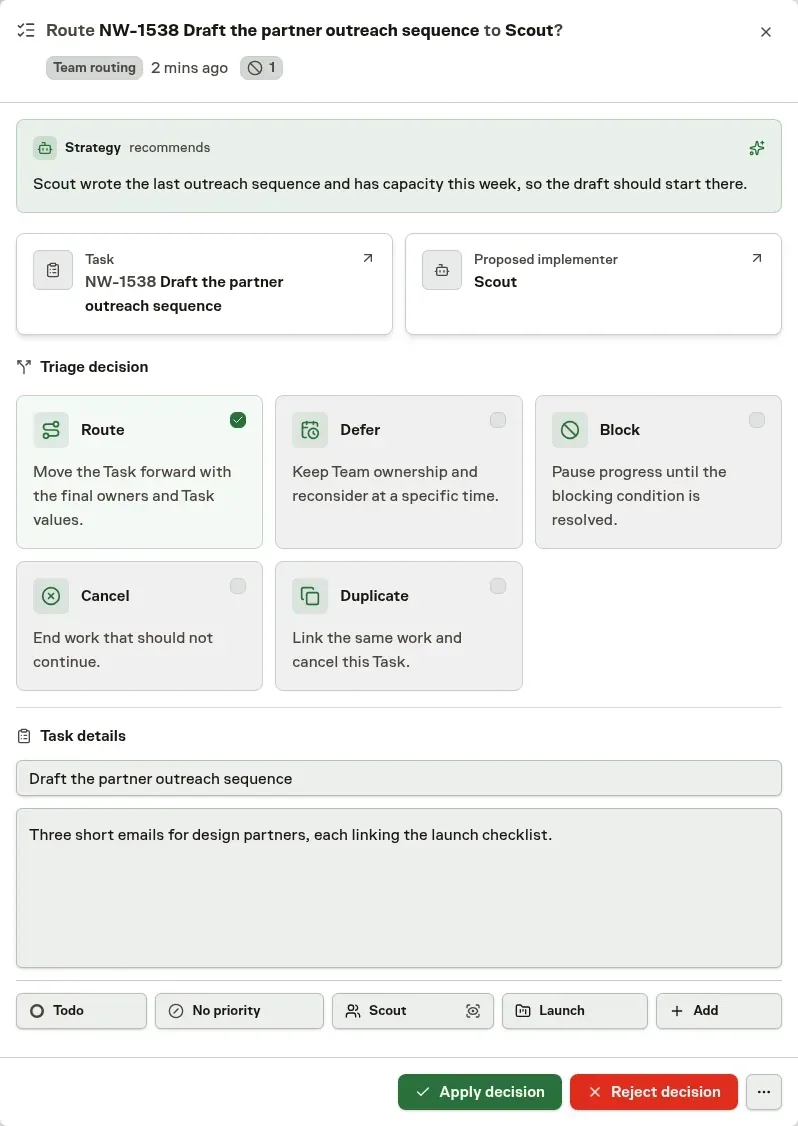
Approve the lead's routing without redoing the triage
When routing requires approval, the Inbox presents the lead’s explanation as read-only context, followed by the recommended triage decision and editable Task details. You can choose a different next step or change any supported Task field before applying it. The reconsideration time appears only when you choose to defer the Task.
Rejecting a recommendation returns the unchanged Task to the Team lead with your feedback. Teams allowed to route without approval apply the same complete decision directly.
-
New Feature
Agents now carry lessons from one task to the next
Agents can now turn outcomes, corrections, and failed approaches from their task work into durable memory automatically. The next task starts with lessons from earlier work instead of relying on someone to copy them into the agent's notes. We built it because a correction you gave on one task was lost by the next unless someone copied it into the agent's notes.
Every substantive successful agent run refreshes the task's rolling summary. It preserves decisions, evidence, reviewer corrections, reusable lessons, unresolved work, and blockers while removing details that are resolved or superseded.
Task Machine periodically compiles the latest summaries into the agent's bounded memory. It reads each affected task's current summary once, not full transcripts or earlier summary revisions, so memory is based on the latest handoff rather than an ever-growing log. If the work produced no reusable lesson, the memory can stay unchanged.
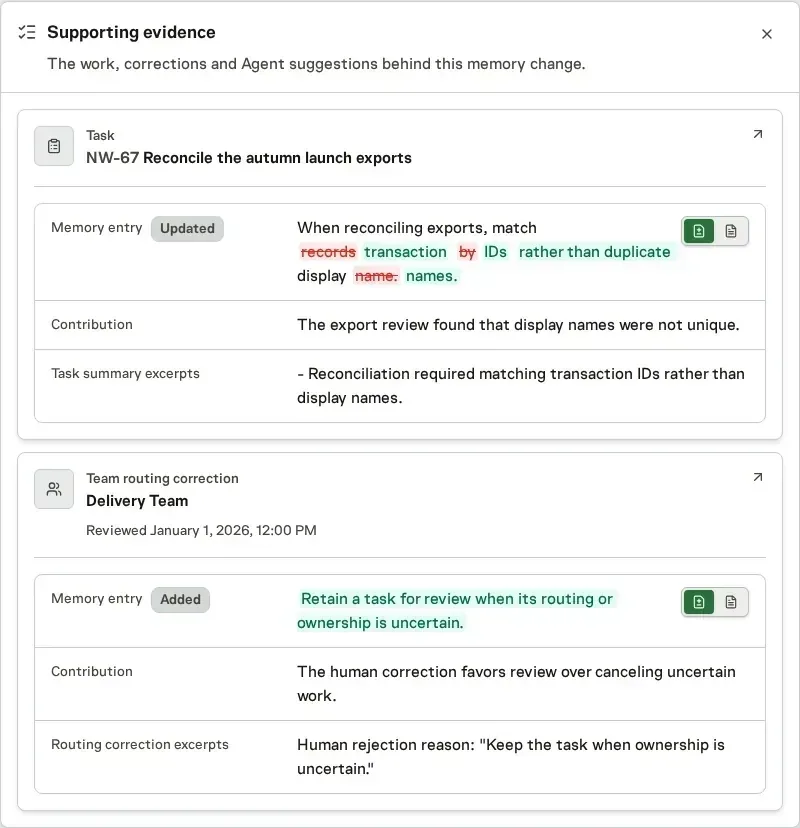
Improve memory without another approval step
Automatic updates publish as immutable memory versions. Earlier versions remain available in history, so each change is inspectable and reversible. A manual Tidy memory remains separate: it proposes a consolidated version and waits for you to accept or discard it before anything changes.
Read Memories for how agents carry durable notes into future work.
-
New Feature
Review agent browser work without watching it live
Tasks and Chats now keep a Browser use history whenever an agent works in the browser. You can review how the work happened after it finishes instead of watching the run live or reconstructing it from the final result. We built it because a final screenshot rarely shows how an agent got there or where it went wrong.
Open a browser journey to see the pages the agent worked through, what it clicked or inspected, and how the browser changed along the way.
A chronological action log, localized timestamps, and thumbnail filmstrip let you move from the first action to the final screen. This makes it easier to verify the result, understand where the agent stopped, or continue the work yourself.
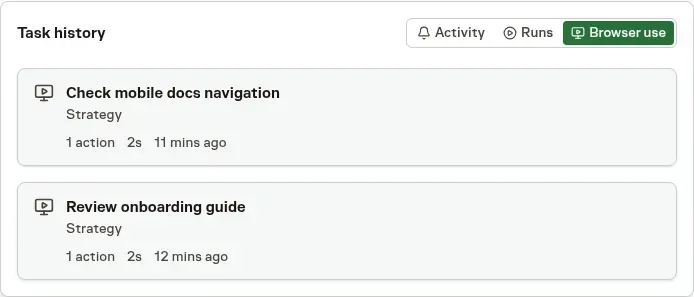
A Task reveals its Browser use tab after browser history exists. Chat shows the same history in a compact sidebar card without interrupting the conversation.
Selecting an entry opens that browser journey directly, keeping the evidence beside the Task or conversation that produced it.
Decide how much visual history to keep
Action history remains available even when automatic screenshots are disabled. Workspace owners and admins can stop future screenshots while agents continue using the browser normally.
Existing screenshots can be retained or deleted when recording is disabled. Recognized password, payment, one-time-code, and Vault-filled fields are masked before an image is kept, and Browser use remains protected by the access controls of its Task or Chat.
Read Tasks and Chat with agents for the complete review workflow.
-
Announcement
Task Machine is open for public signup
Task Machine is now open for public signup. If you have more business than hands, you can put agents to work on product development, marketing, outreach, support, research, and operations while you focus on what matters most. We removed the invite step so anyone with recurring work can start right away.
Start with one recurring job, such as shipping a product change, preparing a weekly client report, researching prospects, or refreshing content. Task Machine gives that work a repeatable process and brings the questions, approvals, and finished results back to one Inbox.
Your agents can keep work moving without asking you to watch every step. Open Tasks when you want the full discussion and history, or use Chat to change direction and turn the next idea into work.
Start from a playbook for the job you want handled
Choose a playbook for the job you want handled. You can review the agents, company knowledge, workflow, and schedule it will add before anything starts, then adjust where you want approval and where the work can continue on its own.
There is no invite or waitlist. Choose Start free trial on taskmachine.io to create your account and put the first recurring job in motion.
-
Improvement
Chat answers can now suggest your next reply
Agents can now offer short suggested replies with an ordinary Chat answer, so you can keep a planning or strategy conversation moving without turning it into a fixed questionnaire. We added them because many replies in a planning conversation are short choices you would otherwise type out.
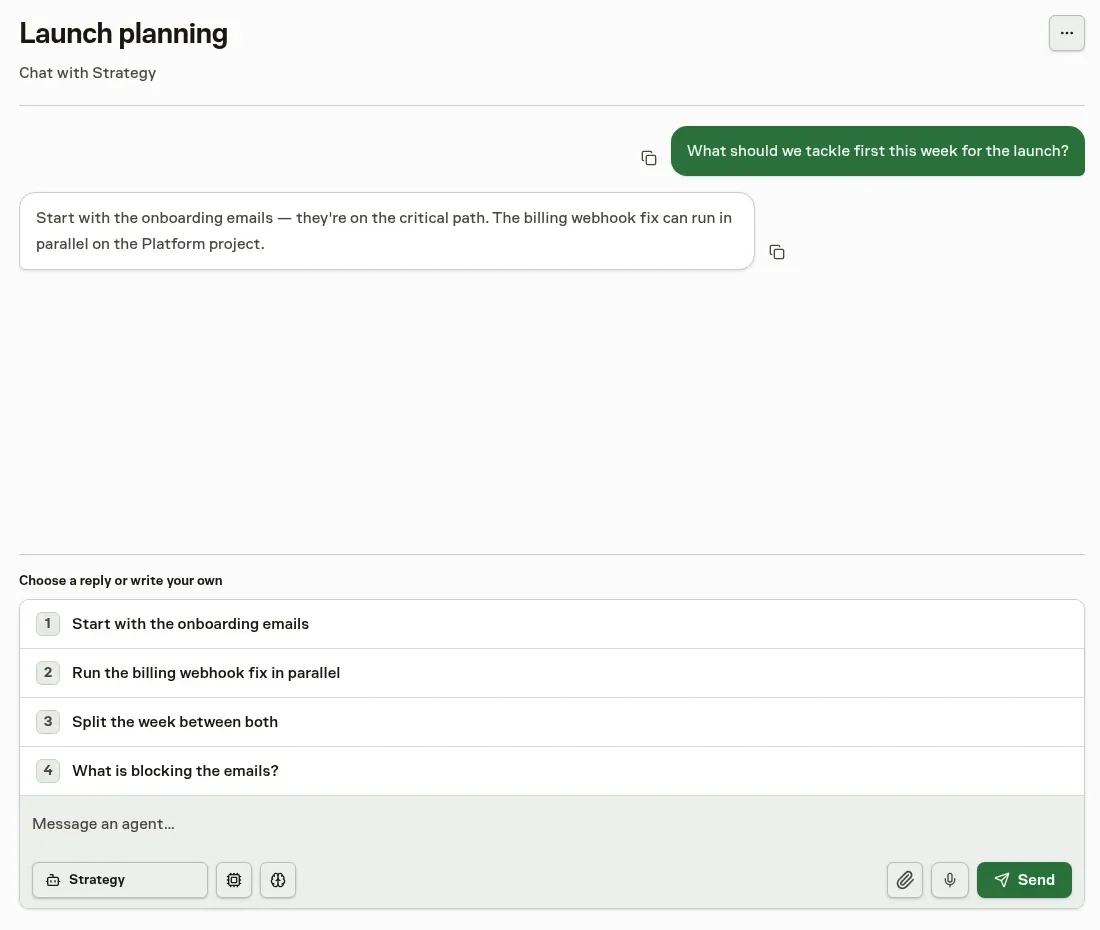
Up to five suggestions appear below the latest agent answer. Select one to fill the existing composer, edit it if needed, or write something different. Task Machine sends nothing until you submit the reply.
Suggestions belong only to the current answer. A newer message or agent turn removes the older choices, so the available options stay aligned with the conversation in view.
Read Chat for how conversations turn direction into work.