Put Agents to Work
Runtime machines
Agents run on computers you control, through a small daemon that reports the coding tools it finds.
An agent's work runs on a computer you control, not in someone else's cloud, and a machine is how Task Machine knows about one of those computers. When an agent picks up a task, the actual execution happens where your files, credentials, and software already live — on a machine you connected. This is the core of what local-first means in practice, and it is why an agent can edit your repository or call your tools without moving that work to a shared runner. This chapter covers what a machine is, the daemon that connects it, and what makes a machine ready to run an agent's work.
A machine runs the daemon and reports its tools
A machine is a registered computer running the tama daemon, the small program you install to connect that computer to your workspace. Once connected, the daemon does two jobs on a steady cadence: it tells Task Machine the machine is alive, and it reports which coding tools it found installed there. Each machine carries a name, the CLI version it runs, and a heartbeat — the timestamp of its last check-in — so the workspace can tell a live machine from one that went quiet.
Hanging off each machine are its runtimes: one record per coding tool the daemon detected, such as Claude Code or Codex. A runtime record holds the tool's name and provider, the path to its executable, its version, and what the tool reports it can do — the models and reasoning levels available through it, which is what an agent profile chooses from. The daemon refreshes this list every time it checks in, so when you install a new tool it appears, and when you remove one its runtime drops off the machine. What you see in the workspace is the current state of that computer's toolset, not a snapshot from when you first connected it.
The machine also reports where on disk it runs agent work: its execution root, the directory under which the daemon creates one folder per workspace and task or chat so each run has an isolated place to read and write files. It defaults to a folder under the home directory of the account running the daemon and can be pointed elsewhere through the CLI's config file, which the CLI chapter covers. Reporting it lets you see from the workspace exactly where a machine will run an agent's work before you trust it with any.
A machine is online only when it is actually checking in
A machine counts as online only when it reports an online status and its last heartbeat is recent. The status alone is not enough, and the reason is simple: a daemon that has stopped — the laptop closed, the process killed — cannot reach back to mark itself offline. So Task Machine treats a machine as available only while its heartbeats keep arriving inside a short freshness window, and a machine whose check-ins go stale is treated as offline no matter what its last status said. Runtimes follow the same rule, because a tool is only runnable while the daemon that reports it is live.
This freshness model is what makes the online indicators trustworthy. When an agent's chosen runtime goes stale — the machine it lives on went to sleep — the agents that depend on it can no longer run, and Task Machine raises that to the inbox of the people who manage agents rather than letting work silently pile up against a dead machine. Keeping a machine online is therefore mostly about keeping the daemon running, which the CLI chapter covers.
Task Machine enforces CLI compatibility
Each heartbeat includes the tama version the daemon is running. Task Machine advertises the latest published CLI version and can set a minimum supported version. When a machine falls behind, the Machines page shows an update status and workspace managers receive an Inbox nudge with an Update now action. If the minimum version rises, outdated daemons can still check in and report update progress, but they cannot start new agent work until they update.
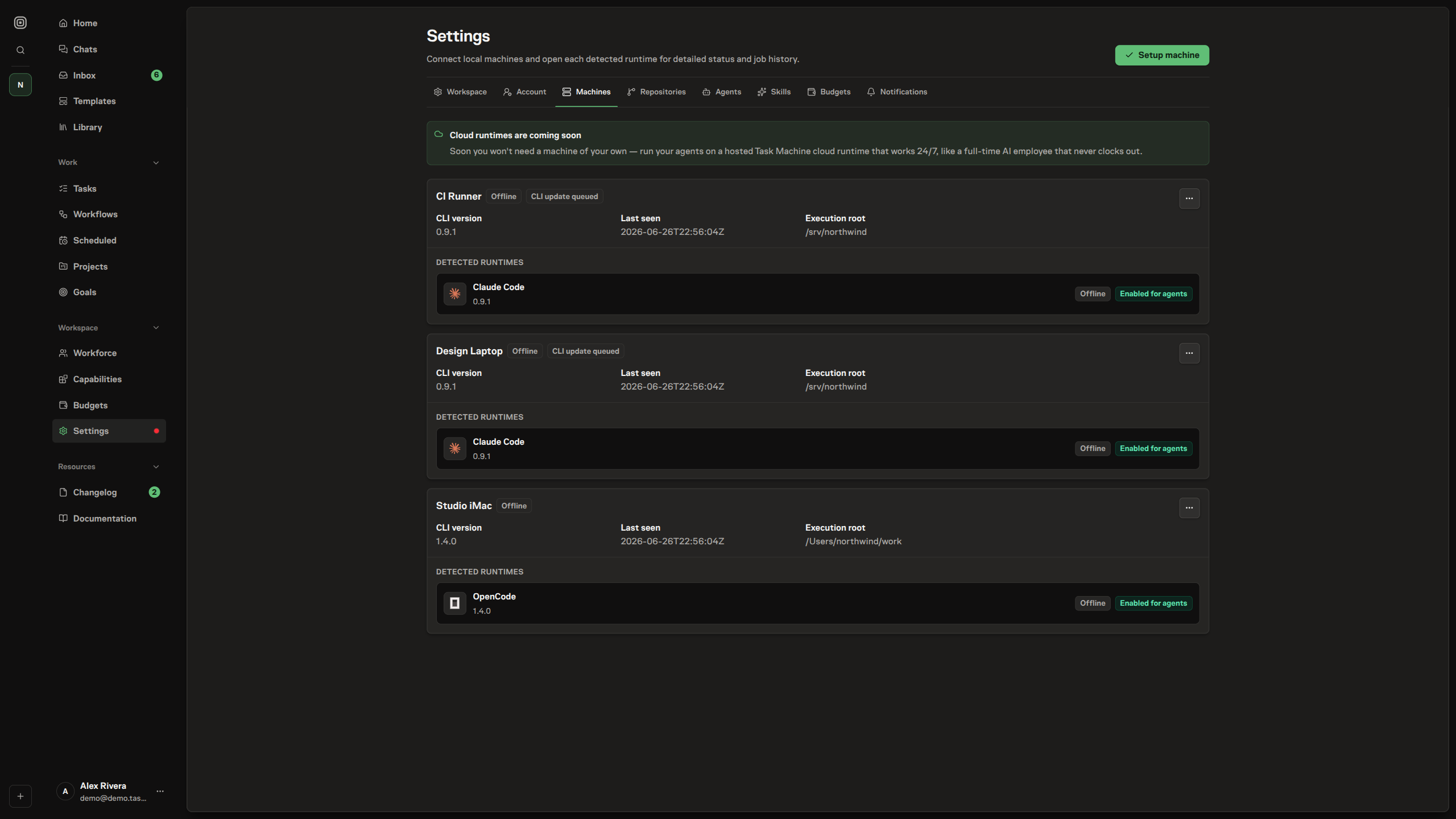
The update action in machine settings does not connect your browser directly to the local daemon. It queues an update request for that machine; the daemon receives the request on its next outbound heartbeat, downloads the trusted release, verifies it, installs the new tama binary, and exits so its startup setup can start it again with the new version. If you ran the daemon in the foreground, start it again after the update completes.
Owners decide which tools agents may use
Detecting a tool is not the same as approving it for agents, and the two are kept separate on purpose. A workspace owner can disable an individual runtime for agent use, and a disabled runtime stays visible — the daemon keeps reporting it and you can still see it was found — but no new agent work is sent to it. This lets you confirm what a machine actually offers before letting agents loose on it, and lets you take a tool out of rotation without uninstalling it. An owner can also remove a machine entirely, which clears it and its runtimes from the workspace.
So a runtime is genuinely ready for an agent only when three things hold at once: its machine is online, the runtime itself is freshly reported, and an owner has left it enabled for agents. Any one of those failing takes the runtime out of consideration for new work, which is exactly the behavior you want — an agent runs only where you have a live machine, a working tool, and your permission.
From here, the next chapter walks through installing the tama CLI and connecting your first machine.